-
BreastShowgirl Morph G8F/8.1F
A big boob morph for G8F/G8.1F. Intended to look like a very large, obvious breast implant (the vanilla implant morph doesn't really look like an implant to me). I could never really get a shape like this out of the vanilla morphs so I made this. It mixes well with other morphs and with my Better Nipple replacement. Unpack in your D|S content directory and the morphs should be available on any G8/8.1 Female you load.
Download: ShareCG
Download: Google Drive
 Genesis 8 Male Fig neck problems (geometry)
Hello i have a problem realy weird here. and i don't know how to solve. But i just realize that when i rotate the head of the genesis 8 male fig to the X -30.00 this weird geometry go crazy. and this is just the basic figure i don't even aply any morph. some one can help me here a realy appreciate it.
Weird geometry bug:
https://drive.google.com/file/d/1iwJRdwHsnrFKWs9hyhQNJ4u8Fnmf9azN/view?usp=sharing
With out rotate the head:
https://drive.google.com/file/d/1AuWgBEcpPIk6Oxwnr3_ZE2ztMys-zVhq/view?usp=sharing
Simple Carrara Hard Bodied physics for demonstrating cam and gear linkages etcDartanbeck said:
Alberto makes physics plugins for Daz Studio, but Carrara just totally ROCKS for these kinds of things doesn't it?
I love how easily we can manipulate the "hotpoint" in Carrara and do So Many things with that alone. Quick to set up and make it work. The biggest challenge, then, is thinking it though.
yeah feel bad I haven't bought any of Alberto's D|S plugins
but everything is easier to do in Carrara including things with his Carrara plugins
I use morph eraser the most
I love both Carrara physics engines and play with them a lot
not always to render, just to play
How to create a 3D character from scratchluan.yang said:
lilweep disse:
luan.yang disse:
no YouTube, mas o que encontrei foi algumas pessoas ensinando como customizar um personagem pronto
Seria o mesmo processo.
Carregue uma figura base, por exemplo, 'Genesis 9' e depois aplique ou disque morfos e materiais que você comprou.
Alguns pacotes de morph para o daz studio permitirão que você tenha um controle bastante granular. Por exemplo, eles permitirão ajustar o Philtrum ou algum pequeno detalhe anatômico. Outras formas serão mais amplas, como tornar um personagem magro ou musculoso
Você será limitado pelas formas às quais tem acesso.
I understood. I had this doubt because I watched a tutorial where a guy used a ready-made model and just changed the hair color and added new clothes and applied a pose but he hadn't explained about these sliders and morphs. Sorry for my ignorance, but would these morphs and sliders be something equivalent to what you do in Metahuman? It's because before venturing into Daz3D, I used and still use Metahuman Creator because it's a little easier to create ultra-realistic 3D characters.
I am not really familiar with metahuman process.
Im sure there are videos that show Daz Studio customisation process... Briefly, Daz Studio has vendors on multiple different marketplaces and these vendors make, among many other options for customisation, morphs that change the shape of the Daz Studio base figures. The morphs would be either character morphs that are full head and body morphs, body part morphs i.e., feet and hands, body composition morphs, individual muscle or anatomy morphs, granular detail morphs like wrinkles or chin dimples etc.
These morphs will generally be dials that range from 0% to 100% so you have control on how much of each morph to bring in at a time and combinations of morphs. The library of morphs users have access to depends on what they have downloaded. There are not very many useful morphs that come with the defualt Genesis 9 figure, for example. So the expectation is that to be able to fully customise figures using a large morph library, you will have had to download additional morph packages.
Like morphs, other custom options like skin textures and hair would also need to be downloaded to get a broad library of presets.
"duplicate formulas found in file" questionAre you sure that error is caused by duplicate names? It is called duplicate formula error not duplicate name error . If you go to your Daz Studio error log it will identify which properties of the offending .dsf files are causing the problem.
I thought that error is usually caused when you have a Controller and Subcomponent relationship saved in two different files.
E.g., if you have a Character dial set up as the Controller with Head and Body morphs as its Subcomponents, so that when Character is dialled, Head and Body are both dialled in at the same time, and you save that ERC relationship in the Character.dsf file. That would be fine, but if you also somehow ended up saving that ERC link between Controller and Subcomponent in the Head.dsf morph too, then you have a duplicate formula relating those two properties, in two different .dsf files, one in the Character.dsf and one in the Head.dsf. Daz cannot use two formulas for the same Controller/Subcomponent at the same time as that is a conflict.
(Sometimes those errors are scene.duf file specific, and if you load fresh scene the error goes away.)
"duplicate formulas found in file" questionI have a question regarding the "duplicate formulas found in file" error. I understand that this error is caused by conflicting content resulting from the use of identical names. I also understand that one way to resolve the error is by deleting one of the problematic morphs. However, in this particular case, I would like to keep both morphs. I've attempted to rename the morph id and the label inside one of the two DSF files, but the error persists. Does anyone know which ID needs to have a unique name in order to prevent this type of error from occurring?
Thank you in advance.
project transferring help.Recently I transferred a project to my other computer and re-downloaded everything but when I tried to load a character it asked me to locate some file which I do but the other files for the character it says they could not be found, and it shows my old computer file location for the files. Is there a proper way to transfer files or a way to fix this without having to remake everything?
How to apply one cloth morph to other clothes?crosswind said:
xlpasstest said:
crosswind said:
If the styles of 'other clothing' (geometry) are similar to Everyday 2 (t-shirt & pants), you may also use Transfer Utility to transfer Morph Targets from E2 to the target clothing.
I have also tried Transfer Utility, but I don't understand how to use it, do you have detailed steps?
The simplest setting is as below. You may also add the needed morphs of E2 to Favorites, and choose the option - Favorites from the dropdown list 'From Source'.
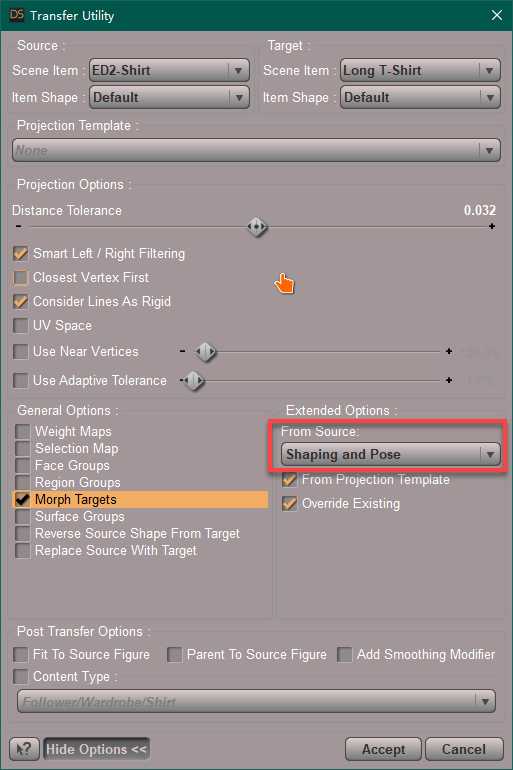
Sorry for the late reply, thanks so much for the tutorial, I'll give it a try.
Errors on loading contentIf I buy a character, can I use that character in Daz and morph it to my liking? I ask because every time I try and load something that I downloaded from Render3D, I always get some error message. I tried YouTube but still got nothing. Can someone give me step by step instructions on loading content that was downloaded from Render into Daz?
AIUTO...CHI CONOSCE L’ITALIANO? PARTE QUATTORDICITiziano said:
E sul sito di DAZ? E' possibile fare una ricerca con questi parametri?
Non proprio... Fai prima a cercare prodotti per la base, non ha molto senso cercare qualcosa di "compatibile con un morph" in quanto funziona comunque.
Se applichi dei vestiti a G8, quelli gli staranno addosso con qualsiasi morph, non è che smette se gli applichi Bugga Boo... (⊙ˍ⊙)
Se poi il morph crea dei poke-thru, si correggono in un attimo senza dover cercare "compatibilità".
AIUTO...CHI CONOSCE L’ITALIANO? PARTE QUATTORDICICarica la base nella scena, tipo Genesis8, selezionalo e poi vai sullo Smart Content.
Se i prodotti non sono filtrati, in basso c'è l'opzione "Filter by context", mostrerà tutti i prodotti compatibili.
In ogni caso, funziona solo con i prodotti che sono stati "preparati" prima con una compatibilità. Le basi come la famiglia Genesis ce l'hanno già ma sotto-prodotti come "growing up" (che è un set di morph aggiuntivi) e Bugga Boo (che è un full body morph) NON hanno una compatibilità propria in quanto si basano su una figura.
Se poi tu hai un bisogno specifico di filtrare i capelli per Bugga Boo (superfluo in quanto funzionano tutti comunque), devi creare tu una compatibilità nel Conted DB Editor. E' abbastanza intuitivo, unica scocciatura è selezionare tutti i prodotti uno per uno.
Does anyone have a solution for tis annoying problem?PerttiA said:
This has a morph for "Eyelashes Length"
yes I thought there was one but assumed cobusp didn't have it
Does anyone have a solution for tis annoying problem?PerttiA said:
This has a morph for "Eyelashes Length"
I thought I had that control, but I haven't used Genesis 2 for my main characters that would get me using something like that. Thanks!
XTransfer Module 1- Genesis 3 to Genesis 8 Morph Converter (Commercial)Zev0,
I am running into the same issue as others when trying to Xtransfer Daz G7 Gwennili Head and its gets to the 71% mark then crashes out first giving the error and when submitting that error I then reopen Daz and go to the log file and I am attaching it to this message. I have updated my nvidia drivers to the newest driver that came out this month. I can saw that it is only with the head that crashes the xtrasnfer out. the body transfers fine.
not sure why it just crashes out only on the head morph
How do I remove edge sharpness in DS?I made a model in Blender that, when I transfer it to DS, DS makes some edges sharp - against my wishes.
See the picture: https://www.deviantart.com/luqu/art/Stubborn-Sharp-Edges-982259186
I've done all I could to remidy the problem in Blender with no success.
See the post on BlenderArts: https://blenderartists.org/t/stubborn-sharp-edge-cant-be-un-sharpenned-in-2-79/1482555
So now I seek a way to fix the problem in DS. DS obviously has a way of tagging edges as sharp. I need to get at those tags and change them.
Does anyone have a solution for tis annoying problem?This has a morph for "Eyelashes Length"
There's Always Another Sale Thread -- Discussions Only Pt 2Catherine3678ab said:
miladyderyni_173d399f47 said:
Catherine3678ab said:
Well the hands and feet product are for all the Genesis clans :-)
I bought the mermaid bundle because the price was just too good :-) I also bought the cave for them to swim in. Now for the few dollars the cave cost I am not complaining however, a light set for it would have been nice so one could see the mermaids in there lol ... and also some removable cave walls to let some light in. So I made some removable sections for the cave using Hexagon and saved that as a scene subset. And the mermaids are going to get some lanterns or something ;-)
The gazelles were an instant purchase! Very happy with those.
The time traveler morph set plays nicely with other character morphs.
Got the HD Shark for under 2 USD, so the mermaids have to behave themselves ;-)
I don't mind that there's nothing super terrific atm as I'm waiting for a new CC to arrive and the store credit has run out :-(
I saw the hands & feet were multi-figure but right now All Good Things must be wishlisted, since it's T Minus 3 Days until payday. (Maybe I will get lucky & they will forget to change the Golden Tickets on time.) Meanwhile, I will check out this cave of which you speak. In the last few months, I've picked up Sickleyield's G8 Merfolk & also Anemone, an adorable G2 water fae or elemental (DO) and they all need homes.
This is the cave: https://www.daz3d.com/xi-underwater-cave However the price has gone up from where it was when I bought it.
Thanks, that is gorgeous, and looks accurate
Make Human and Daz Studioyuyu.atem said:
Hi, I have a question about the Genesis 8 Female Head Morphs | Daz 3D; I would lile a triagle shape head, but I don't see any morph for this shape in the list of the morphs. I see "Face Heart, Face Round and Face Square", so I wonder how to create a "face tringle" by combining these morphs.
Could you give me an advice, please?
Thank you in advance!
I think the face heart would work since the chin is pointed... then adjust the cheeks in a bit separately??? If you fiddle with the facial features I'm sure you could get close. Half the fun of morphs is fiddling :) lol. Good luck.
There's Always Another Sale Thread -- Discussions Only Pt 2miladyderyni_173d399f47 said:
Catherine3678ab said:
Well the hands and feet product are for all the Genesis clans :-)
I bought the mermaid bundle because the price was just too good :-) I also bought the cave for them to swim in. Now for the few dollars the cave cost I am not complaining however, a light set for it would have been nice so one could see the mermaids in there lol ... and also some removable cave walls to let some light in. So I made some removable sections for the cave using Hexagon and saved that as a scene subset. And the mermaids are going to get some lanterns or something ;-)
The gazelles were an instant purchase! Very happy with those.
The time traveler morph set plays nicely with other character morphs.
Got the HD Shark for under 2 USD, so the mermaids have to behave themselves ;-)
I don't mind that there's nothing super terrific atm as I'm waiting for a new CC to arrive and the store credit has run out :-(
I saw the hands & feet were multi-figure but right now All Good Things must be wishlisted, since it's T Minus 3 Days until payday. (Maybe I will get lucky & they will forget to change the Golden Tickets on time.) Meanwhile, I will check out this cave of which you speak. In the last few months, I've picked up Sickleyield's G8 Merfolk & also Anemone, an adorable G2 water fae or elemental (DO) and they all need homes.
This is the cave: https://www.daz3d.com/xi-underwater-cave However the price has gone up from where it was when I bought it.
Make Human and Daz StudioFirstBastion said:
yuyu.atem said:
Thank you very much for your answers! In fact, I discovered MakeHuman long before Daz, that's why my characters are in MakeHuman. I am a beginner in Daz but for now, I don't understand how I can entirely recreate my MakeHuman character in Daz. I mean, for the face, MakeHuman offers several different shapes (rond, oval, rectangle, triangle, etc...). I didn't see anything like that in Daz. So, I thought I had first to find a figure having the shape I wanted for the face, that seems not very easy... Is there a way to control the shape of the face like it is controlled in MakeHuman?
This is the perfect time to let go of make human and try daz3d characters. There is a sale right now, many products are over 80% off.
Download the genesis 8 essentials pack which is free with dazstudio.
Then buy the head morph and body morph packages.
The head morph has all those head and faces shapes you listed. The body morphs pack has all the body types. You may have to buy a skin texture later, and maybe some hair and clothes later.
Genesis 8 Female Body Morphs | Daz 3D
Hi, I have a question about the Genesis 8 Female Head Morphs | Daz 3D; I would lile a triagle shape head, but I don't see any morph for this shape in the list of the morphs. I see "Face Heart, Face Round and Face Square", so I wonder how to create a "face tringle" by combining these morphs.
Could you give me an advice, please?
Thank you in advance!
Daz 3D is part of

Connect
DAZ Productions, Inc.
7533 S Center View Ct #4664
West Jordan, UT 84084Licensing Agreement | Terms of Service | Privacy Policy | EULA
© 2026 Daz Productions Inc. All Rights Reserved.