-
Setting up my runtime.....again
There is a very good chance that anything old enough for Victoria 4 does not have the metadata necessary to automatically categorize it, and in fact I've seen the CMS miss them entirely. You will have to manually assign categories.
Yes, I know how daunting a task that is for someone with a lot of older content, or with a lot of content from other sources like Rendo or freebies. I'm in the same boat. It bothers me a little that I'm probably forgetting about content I already have because of this. So I'm slowly working through my content to ensure it's organized according to categories that make the most sense to me. :)
An Attempt of a "Limited Time Freebie" Message Only Email Alert ThreadNew biweekly freebies are up: https://www.daz3d.com/free-3d-models. Now includes Stephanie 6 Starter Bundle and Frangipani Bundle for Victoria 4.
Thank you very much DAZ!
Edit: All items showed the -100% Free discount label when I posted this Aelin...
Freebie: How to create a V4 clone (and transfer other figures) for G8F (now with video!)Great stuff. I got my G8 fitting v4 clothing nicely along with hair. Its when I I go to the hidden clone dial and crank V4 to 1.0 that's when I get distorted fingers when applying poses. DId I do something wrong or should I leave that dial along, and try to just dial the Victoria 8 body shapes instead. Also Daz studio seems to have become more crash prone after this tweak. I saved my clone geometries to a different location (runtime) than the base geometries by the way.
So I guess this is good for :
1. V4 clothing fits to G8
2. V4 hair fits t G8
Not good for :
1. Poses from G8 with clone setting at 1.0
2. Textures for G8 body form V4 body textures
3. Applying v4 character morphs to G8
4. Not good for v4 footwear
Newbie question: what are the advantages of buying victoria 8?I know this may seem a stupid question to many of you, but I'm a newbie, and I've not really understood what are the functions of Victoria 8.
If I buy her, do I get the autoretrocompatibility for all G8F characters? I mean, applying from "Smart Content" a pose/expression/piece of clothing for let's say G1/G2F/G3F/V4 etc. will give me no problems anymore?
The backward compatibility comes from GF8 rather than Victoria 8. Clothing for the Genesis characters mostly translates well, as do G3F expressions and poses (if you're willing to fiddle with the arms and legs). Poses and expressions earlier than G3, though, take a few extra products to convert your way through. Vicky 8 doesn't really improve or hinder that. The big advantage of V8 is having a different body shape from the base G8F that almost all clothing for Genesis 8 will conform to without trouble, as nearly every content creator will include a body shape morph for Vicky. Some purchased characters use her as a portion of their body shape as well, and though that can be said of all core characters, Victoria seems to be used more than others.
Scott's World of Junk -- Real Junk at Incredibly Low Prices!Hi Scott.
Nice Martini Girl looks good so far.
Beside of posing if I look close on the reference image there is also some subtile expression on her face like how you call it grim look?
Maybe some inner brows down, raise outer brows, brow compression but very low values there. And her mouth needs some more expression like bottom lip down, mouth corners back, also it looks like she raises her right upper lip a bit while the right corner is pulled back more. And finaly the squinted eyes especaly the bottom eyelids are raised at the inside.
You don't have to use expression presets or the default expression sliders, depending on the figure you are using Genesis 3 or 8 you have more or less options in the Power Pose pane for to manipulate individual face rig bones.
In case you don't know see this thread here How to get the new powerpose view for Victoria 8?
With Genesis 3 you can do similar things by switching to the joint editor tool to select the individual bones and manualy transform the face rig bones with the sliders in the Parameters pane.
[Quote] Not seeing the need for all those dots
As I understand it the face rig includes all these litttle bones with a smale infuence radius defined by the weightmap, so that they can get driven in a specific combination and in relation to eachother by the expression pose controler properties. I haven't palyed much with the genesis 8 facerig yet but I have currently inspected its capabilities. And I think its nice to have the control over every face bone individualy without the need to select them in the joint editor first like with genesis 3. With this you could create a completly new expression or finetune some existing expression, maybe if there is something that dosn't look quiet right with a character morph applied to the head.
I've attached a screenshot of what I did to genesis 8 female after playing with the PowerPose tool for about 5 minutes. You see she is super exited about the face template in PowerPose LOL. Seriously expressions can still get quiet scary if you want to, but all bones have their translation and rotation limits. For example I've also raised Eyelid Lower Inner. Also recently I found that some of the Daz original Face Morphs actualy drive some face bones to shape the head.
BTW I tweked a face bone on one side then I hit Shift+Y to get the pose Symmetry and Alt+Click resets the bone as usual with properties.
Thanks, Syrus!
I've been using facial morphs instead of pose presets, bouncing between actor and morphs and then Head mouth, eyes, lips, etc. It's all manual. I'll check out power pose--I've been kind of wary about using it, but I figure this is an experiment so I might as well do things in a non-destructive way.
One thing that bothers me is the left side hair. There are no morphs to make the hair tighter on that side. Also, there are no morphs to make it much shorter. I have to make do, I guess. It's a G8 Character: Aurorae to start. Lots of morphing to get it like this. The key for using this character were the eyebrows. I've adjusted the face to make it less angular, as well. The characters nose has pretty much been completely redone.
Scott
Black Friday sale is BORING... Thank You DAZThe "door buster deals" are good if you want victoria 4 items. If you are a pc+ member and get 5 or more
Its over 90% off most of the items.
Help identifying a couple of promo characters? (OOT and Blue Rabbit)It's Charlene, maybe with a little tweak in the face morph: https://www.daz3d.com/ry-charlene-hd-for-victoria-8
Newbie question: what are the advantages of buying victoria 8?Victoria 8 is a shape and materials for Genesis 8 Female, so yes everything remains compatible (though, as with any change to the shape, some poses may need adjustment and if a fitted item doesn't have its own Victoria 8 shape the auto-followed shape may not be ideal).
Daz Install Manager (DIM) 1.2.0.6, Now Available!Also, do have User Account Control turned off entirely?
You asked me that already. I told you UAC is off.
And have you tried switching it On then?
Yes! I already told you that as well. lol.
Numerous people have posted, with various questions, to this thread - giving a summary of what has already been covered, rather than simply restating the original topic, would make it easier to avoid recovering previous ground. At the risk of revisting another previous question, have you checked that you can access the DIM folders without needing elevated privileges (try with UAC on so you get an alert if not)?
As far as I am aware nothing absolutely requires DIM - plug-ins and applications haev stand-alone isntallers, content can be installed manually or, in most cases, through Connect.
Also, do have User Account Control turned off entirely?
You asked me that already. I told you UAC is off.
And have you tried switching it On then?
Yes! I already told you that as well. lol.
Numerous people have posted, with various questions, to this thread - giving a summary of what has already been covered, rather than simply restating the original topic, would make it easier to avoid recovering previous ground. At the risk of revisting another previous question, have you checked that you can access the DIM folders without needing elevated privileges (try with UAC on so you get an alert if not)?
As far as I am aware nothing absolutely requires DIM - plug-ins and applications haev stand-alone isntallers, content can be installed manually or, in most cases, through Connect.
I do have access to all of the folders. If i can do everything through Connect then i'll do it that way. Thanks for that info.
Not everything - plug-ins, and anything else that isntalls "as software" can't be Connect installed and, as I noted above, some plug-ins don't have a stand-alone installer (though I'm not sure which). The fourth-generation Daz Figures (Victoria 4 etc.) need their bases and ExP morph expansions in the same folder, not in separate folders per product as Connect does behind the scenes, though a manual install will work for that.
Newbie question: what are the advantages of buying victoria 8?I know this may seem a stupid question to many of you, but I'm a newbie, and I've not really understood what are the functions of Victoria 8.
If I buy her, do I get the autoretrocompatibility for all G8F characters? I mean, applying from "Smart Content" a pose/expression/piece of clothing for let's say G1/G2F/G3F/V4 etc. will give me no problems anymore?
Thank you, and sorry for the silly question! :D
Scott's World of Junk -- Real Junk at Incredibly Low Prices!Hi Scott.
Nice Martini Girl looks good so far.
Beside of posing if I look close on the reference image there is also some subtile expression on her face like how you call it grim look?
Maybe some inner brows down, raise outer brows, brow compression but very low values there. And her mouth needs some more expression like bottom lip down, mouth corners back, also it looks like she raises her right upper lip a bit while the right corner is pulled back more. And finaly the squinted eyes especaly the bottom eyelids are raised at the inside.
You don't have to use expression presets or the default expression sliders, depending on the figure you are using Genesis 3 or 8 you have more or less options in the Power Pose pane for to manipulate individual face rig bones.
In case you don't know see this thread here How to get the new powerpose view for Victoria 8?
With Genesis 3 you can do similar things by switching to the joint editor tool to select the individual bones and manualy transform the face rig bones with the sliders in the Parameters pane.
[Quote] Not seeing the need for all those dots
As I understand it the face rig includes all these litttle bones with a smale infuence radius defined by the weightmap, so that they can get driven in a specific combination and in relation to eachother by the expression pose controler properties. I haven't palyed much with the genesis 8 facerig yet but I have currently inspected its capabilities. And I think its nice to have the control over every face bone individualy without the need to select them in the joint editor first like with genesis 3. With this you could create a completly new expression or finetune some existing expression, maybe if there is something that dosn't look quiet right with a character morph applied to the head.
I've attached a screenshot of what I did to genesis 8 female after playing with the PowerPose tool for about 5 minutes. You see she is super exited about the face template in PowerPose LOL. Seriously expressions can still get quiet scary if you want to, but all bones have their translation and rotation limits. For example I've also raised Eyelid Lower Inner. Also recently I found that some of the Daz original Face Morphs actualy drive some face bones to shape the head.
BTW I tweked a face bone on one side then I hit Shift+Y to get the pose Symmetry and Alt+Click resets the bone as usual with properties.
converting helpWhich clothing converter? The RSSY Clothing Converters go between specific figures, and Kids 4 isn't supported 9in fact none of the pre-Genesis figures are supported). The older Clothes Converter don't, however, go past Victoria 4, and certainly can't convert to any version of Genesis, so I'm not sure that there's anything that will greatly help with your specific goal.
oo dam so i spent time and money on items never be able to use as genisise 8 is main form of figeres i whant to use , so no point in buying any converters then
converting helpWhich clothing converter? The RSSY Clothing Converters go between specific figures, and Kids 4 isn't supported 9in fact none of the pre-Genesis figures are supported). The older Clothes Converter don't, however, go past Victoria 4, and certainly can't convert to any version of Genesis, so I'm not sure that there's anything that will greatly help with your specific goal.
Creating Morphs for Daz Genesis 8 Specific Characters...Hi there! Can anyone point me towards a tutorial for making custom morphs for Gen8 characters (like Victoria 8 for example).
I've been trying to mess around with creating morphs like I do from scratch for the base character, but it always goes wrong somehow. I'm sure there is information about this somewhere but I can't find it :)
thanks in advance for any helpSleeve Trouble with dForce Mahaut Fantasy Outfit for Genesis 8 Female(s)I'm having trouble with the sleeves on dForce Mahaut Fantasy Outfit for Genesis 8 Female(s). I've tried several G8F/V8F poses (this one is from Bedazzling Poses), but after running a dforce simulation (default settings with Better or Best for Collision Mode) the right sleeve on her upper right arm renders like this. I've also tried an animation timeline, but it's not any better. This happens with the base G8F as well as this new character, Neiva HD for Victoria 8.
In addition to the sleeve problem, the crease/opening on the front of the dress extends higher on the red part of the bra.
The read me states: "Items may seem bent or broken when applying certain shapes and or poses but will disappear after simulation" so I must be doing something wrong.
Is there any other simulation setting that will fix this issue? I'm more concerned about the sleeve issue than the bra right now. I've watched the dForce video by Daz and used other dForce products, and so far this is the only dress I'm having trouble with.
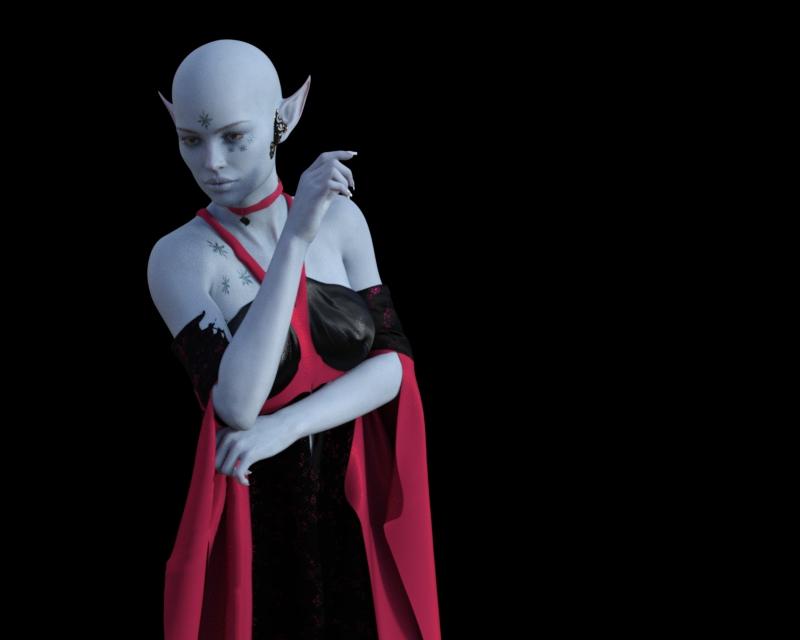
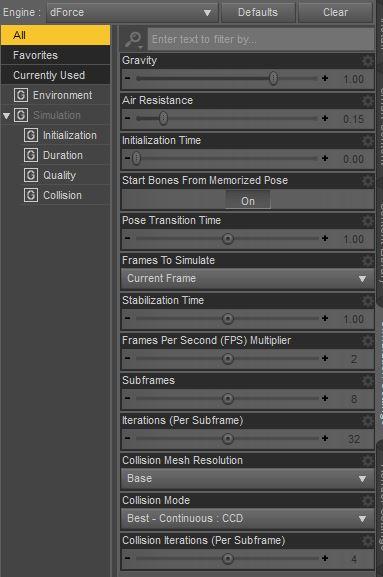
Can anyone help?
Fixing the kids 4Actually... I found the hair floating twice as high as the kid but in the heirarchy window its a children of the Kids 4 figure...
So you'd recommend poser 4 over daz3d? I have bought dazToMaya but the figures lose their posing, their realitisticness (of textures), and more...
I am trying to do simple renders, with a macbook pro 2012 and daz is just giving me headache.
It depends how realistic you want it. There is no IRay in Poser and to get anything close to realism, you would need a newer (and expensive) version of Poser. I started with Poser, loved it, used it for years, but when IRay was released in DS, forced myself to learn it (still learning) and hope I haven’t forgotten how to use Poser altogether! If you plan to do artistic work with a lot of postwork, Poser, even early versions, can be fine, but if you want anything close to realism, you really need IRay...
If you're willing to wait for a sale, you can get Poser at a decent price. Last winter I got whatever the new version was for about $36 with their Christmas sale + a birthday gift card.
As far as realism, Superfly(Poser's renderer) should be on par with Iray, the difference is the lack of hd morphs, plus the models are mostly Victoria 4 era quality.
One issue with Superfly is that hardly any products come bundled with Superfly shaders, nor are there many products containing Superfly shader packs. When Iray was released the Daz Studio PAs very quickly embraced it and added Iray shaders, but for some reason that never happened with PA's making Poser products, many of whom still make products compatible with Poser 6 or 7.
Looking for a few plug-in thingsThis will enable you to use V4 textures on G8F: https://www.daz3d.com/legacy-uvs-for-genesis-8-victoria-4
The G3F version is at Rendo.
You will need to convert the pz2 to DS material presets.
For morphs, GenX2 with both G2 and G3 add-ons will enable to convert them from V4 to G3F. Unfortunately the creator passed away so there’s no G8 add-on.
For clothes, you will need a V4 clone for your target figure to use autofit.
This includes one for G3F: https://www.daz3d.com/wear-them-all-autofitting-clones-and-clothing-smoothers-for-genesis-3-female-s
This has one for G8: https://www.daz3d.com/sy-victoria-4-and-michael-4-clones-for-genesis-8
Issues with transferring character from G3F to G8FI've been trying to use SickleYield's guide to transfer morphs in order to move some of my more used characters over from G3F to G8F, but I'm experiencing issues where after I've used the Transfer Utility, some vertices are moving too far or even entirely in the wrong direction in the new G8F morph - here, parts of the fingers are moving completely in the wrong direction, completely wrecking the hands, and vertices around the elbow are moving too far, creating a ridge


I think I've followed the instructions correctly (zeroing the scale of the initial model, using the suggested approach of posing G3F to match G8F, ticking check boxes as instructed), and I've got the G3F merged morph working beautifully (even got the rigging fixed) - but even after several attempts of trying to toggle various settings, this still keeps happening. (Posing G8F to G3F before transferring causes a less obnoxious problem, but still a problem, so I don't think it's just I've managed to interpret those instructions badly).
The body shape I'm using is mostly Victoria 7, albeit with some additional morphs layered on top, and I'm experiencing pretty much exactly the same problem if I try to transfer just the basic V7 shape.
Where have I managed to mess up here? I know people use this method just fine for transferring characters nearly seamlessly between these two very similar generations, but I can't work out what I'm personally doing wrong.
can you use victoria 4 morphs on genesis 3?hello all, i'm looking for fignernail morphs for genesis 3 but the only ones i can find are these ones for m4 and v4 https://www.daz3d.com/m4-and-v4-nail-bundle
Is there a way to transfer these morphs onto my g3 female model?
Getting iRay Shaders onto DAZ Figures with Poser ShadersThe NGS you linked is the first one. NGS2 is more versatile as it can be applied to basically every figure, including non standard figures. This is one of NGS2's biggest advantages over most other products like it. (Sorry, I did not mean to confuse by just saying NGS.) NGS2 also has an additional perk of being able to apply specific shaders to specific surface areas, like only using the cornea shader. Sometimes I use ISC first, and then use the NGS2 cornea shader. So there are times when I use both at once.
https://www.daz3d.com/n-g-s-anagenessis-2-revolution
NGS3 has been "coming soon" for like a year or more. Only Dimension Z knows when it might be releasing, and I am not sure he even knows. I was initially excited, but now it feels like waiting for Half Life 3. He has DeviantArt account, but he has not been updating as much lately. I think he has been having some health issues or something.
Iray Smart Converter has a different product for each generation. The one I use is for Genesis 2, but I also own the Generation 4 version.
https://www.daz3d.com/iray-smart-converter-and-advanced-skin-managers-for-genesis-2
Like I said before, I can use this one on V4 skins because I have products that allow G2 to wear V4 skins. That is this product: https://www.daz3d.com/victoria-4-for-genesis-2-female ; If you are sticking to V4/M4, then you have no reason to get this, you can get the Generation 4 version. If you are only interested in using V4, this is the one,
https://www.daz3d.com/iray-converter-for-generation-4
I just point out how I do it because you have options. If you convert V4 to another generation, then you only need ISC for that generation. Or you can use ISC for Generation 4 first, save as a preset, and THEN convert that to Genesis xyz. You can do it however you wish.
Each of these have topics dedicated to them created by the PA themselves. There are also a lot of user renders in them.
https://www.daz3d.com/forums/discussion/110976/n-g-s-anagenessis-ii-revolution-commercial/p1
I think both products have their merits, and one does something better than the other. But over all I do prefer the look of ISC more. But is just me. A lot of people on the forums seem to like NGS2 more. Honestly I would buy both if on sale, because I do like both, and as I said, I have even used both at the same time. But if I had to pick just one, it would be one of the ISC's for the generation I prefer. I've learned a few things about how surfaces work thanks to these products, and I am very thankful for that.
Daz 3D is part of

Connect
DAZ Productions, Inc.
7533 S Center View Ct #4664
West Jordan, UT 84084Licensing Agreement | Terms of Service | Privacy Policy | EULA
© 2026 Daz Productions Inc. All Rights Reserved.