-
New Genesis, New Sales Thread: Report Issues Here "Reporting Only"
Catherine3678ab said:
Fauvist said:
I added Edward 8 Pro Bundle to my cart as one of the $10 bundles you can get with buying a debut new release, and after I paid for my cart, the Pro Bundle had magically changed into just Edward 8 with NO PRO BUNDLE. What do I have to do to get Edward 8 changed into the Edward 8 PRO BUNDLE now?
I hope you took a screen grab of Edward 8 Pro 'cause it doesn't appear to be in the qualifying batch atm.
What you can do, the usual, open a support ticket and ask them nicely to fix it for you. Alternatively, return the order.
To all: if they are switching out what is or isn't available periodically then I'd highly recommend refreshing the cart before making the purchase.
eta: I had show hidden toggled on but did not see Edward 8 Pro, however I do own that one. So put it in the cart along with a qualifier and yes it still shows as $10 so "in case" you need it Fauvist, here's the screengrab. {maybe, eventually, forum issues with loading images still}
Thanks for the screen shot! I may need it. What's weird is that they gave me Edward 8 along with Edward 8 HD - which are two different products - for 10$. I submitted a ticket.
Ron's Vintage Backgrounds and Overlaysmlolya said:
I understand that the product provides 40 jpg images, what I didn't realise is that these images cannot be used in Daz. I have purchesed other 'backgrounds' here that are simply loaded in Daz as a backgroud in a Daz creation and I assumed these were the same kind of thing. It would have been nice if there was some sort of indication that altough these were being sold on Daz they couldn't be used in Daz. I wouldn't have wasted $18.95 if there was a little more explaination.
I don't own that product, but you should be able to load any JPG image as a background in Daz Studio, including those. You do so in the Environment pane (Not the Render Settings Environment section). If you don't have the Environment pane in your layout, go to menu Window/Panes (Tabs)/Environment to load it. In the Environment pane, change the Type from None to Backdrop. Then in the Background section, click the little square and select Browse. Navigate to the place where the JPG images are stored and select one. It should now appear in your viewport as a background. If your viewport aspect ratio is not the same as the JGP image, your background may appear squished in the viewport. You can change the viewport aspect ratio to match the background image if the squishing is not acceptable. Use the Environment pane's context menu ("hamburger" menu) to do that.
I made some screenshots for you, but the forum will not let me upload them now. The forum has been broken like that, off and on, for days. I'll try later. Edit: Screenshots are uploading again. I attached them.
You can submit a help request and ask for a refund within 30 days of purchase, if you don't want to keep the product.
New Genesis, New Sales Thread: Report Issues Here "Reporting Only"Catherine3678ab said:
marcus.ames said:
Edward 8 Pro Bundle shows up on mine, is it perhaps something you already own and therefore was filtered out? I randomly added a new item in the cart and that bundle just to be sure, and it's ten bucks. I'd upload a screenshot, but forum bugs...
Thanks for the offer, I used good ol' Google Drive :-)
It would seem that toggling what's owned or not, is also not working 100%.
I don't doubt it. Sometimes I have to switch back and forth between browsers because they work differently. The shop updates faster for Chrome, on Firefox the new daily stuff on the main store page flashes, than fails to load. Toggles work likewise. But I hate Chrome with a passion, so I use it sparingly.
New Genesis, New Sales Thread: Report Issues Here "Reporting Only"marcus.ames said:
Edward 8 Pro Bundle shows up on mine, is it perhaps something you already own and therefore was filtered out? I randomly added a new item in the cart and that bundle just to be sure, and it's ten bucks. I'd upload a screenshot, but forum bugs...
Thanks for the offer, I used good ol' Google Drive :-)
It would seem that toggling what's owned or not, is also not working 100%.
New Genesis, New Sales Thread: Report Issues Here "Reporting Only"Edward 8 Pro Bundle shows up on mine, is it perhaps something you already own and therefore was filtered out? I randomly added a new item in the cart and that bundle just to be sure, and it's ten bucks. I'd upload a screenshot, but forum bugs...
New Genesis, New Sales Thread: Report Issues Here "Reporting Only"Fauvist said:
I added Edward 8 Pro Bundle to my cart as one of the $10 bundles you can get with buying a debut new release, and after I paid for my cart, the Pro Bundle had magically changed into just Edward 8 with NO PRO BUNDLE. What do I have to do to get Edward 8 changed into the Edward 8 PRO BUNDLE now?
I hope you took a screen grab of Edward 8 Pro 'cause it doesn't appear to be in the qualifying batch atm.
What you can do, the usual, open a support ticket and ask them nicely to fix it for you. Alternatively, return the order.
To all: if they are switching out what is or isn't available periodically then I'd highly recommend refreshing the cart before making the purchase.
eta: I had show hidden toggled on but did not see Edward 8 Pro, however I do own that one. So put it in the cart along with a qualifier and yes it still shows as $10 so "in case" you need it Fauvist, here's the screengrab. {maybe, eventually, forum issues with loading images still}
Metadata problems - (Reason found)If you click "Export content metadata" while selecting every smart product, it saves all of their dsx files wherever you specify, and they have GUIDs.
I tried your advice and used notepad++ to search my Manifest folder and it only pulled up the GUIDs from the product files of the ones that are broken. So nothing else has a conflicting GUID that I can find. I searched my custom content folder as well and found nothing. I'm not sure where else I can search. I've had the CC Angelic product for a long time and it has literally never worked right. It's so frustrating.
I really appreciate all your help!
Metadata problems - (Reason found)Personally, I use notepad++ for all things text. In this case you can use Find In Files to search for a specific string in a set of files in any folder hierarchy. The Manifest Archive is a folder (I use DIM, configured in the settings) with a record of every product you have installed, and each .dsx file has all sorts of information about the product, including GlobalID and MetadataID.
Exporting all the metadata from Content DB Maintenance only saves the UserData, and that does not have any GUIDs. To search the vendor data, just go to the Runtime/Support folder and search the metadata .dsx files. That or the manifest archive has all the info you need to find the GUID. Together they have the info that gets entered into the database to begin with, and maybe some other behind-the-scenes data, when installing a product.
Using File/Symmetry Shortcut IssueThere is not much to make a tutorial about. You go to this window (F3), find an action on the left.
Right Click > Change Keyboard Shortcut.
What makes it unusable is the time it takes to find an action because of the lack of a search function.
-----------------
What you could do is go to that same window :
Window > Workspace > Customize (F3)
And click on the most bottom left Icon : Defaults...
This should fix whatever's causing your issue with Shift+Y ?
Using File/Symmetry Shortcut IssueHi Hansolocambo,
Thanks, but are there any tutorials out there, that you are aware of that show how to change a shortcut in DAZ?
I went to Window/Workspace/Customize and although I have been using Daz Studio for years, I cannot
figure out what to do there. I have even search YouTube, but to no avail.DazStudio feature wish: "limit search to this section"Oh, a simply checkbox "search in current path only" would help already.
And multiple Content Lib Tabs, but that's another issue.
Metadata problems - (Reason found)NorthOf45 said:
I searched my Manifest Archive, each GUID appears twice (GlobalID and MetadataGlobalID) in the (single) corresponding manifest, as expected.
How do you search your Manifest Archive?
Using File/Symmetry Shortcut IssueYou'll see your current Shortcut for that action there : Edit > Figure > Symmetry
You can change the hotkey from : Window > Workspace > Customize (F3)
P.S : I guess the shortcut can be changed from Customize. But in Daz, you can't search actions by name, or by current key binding (like in Blender). So searching for any action to change its shortcut in Daz is like looking for a needle in a haystack. A real pain this UI...
Searching for so-called Baby Face Adult Male Face CharacterDiomede said:
Greetings. I am looking for a rounder adult face character, male, preferably for G8M or G9M. The ideal would have face morph and matching skin maps - very slight stubble or 5 o'clock shadow would be a jackpot. Very slight. Would prefer not to achieve with a weight morph or a child morph, but will likely go that route if search is unsuccessful. Softer jaw line, less high cheek bones,... Ethnicity not particularly important. Think of someone who does not have the traditional 'leading man' looks, although may have been a leading man none-the-less. The opposite of John Hamm and Henry Cavill. Someone typically expected to be hired to play the Jimmy Olson sidekick photographer character, not the Clark Kent Superman investigative journalist character.
EDIT: speaking of stubble, is there a 5 o'clock shadow or stubble skin overlay or geoshell for G8M or G9M? Would be better to separate the search.
Both the Genesis 9 Base morphs to 100% Male / 0% Female, the Genesis 8 Male Base, and the Genesis 3 Male Base all qualify I think. Not as much as Lou Costello or Bob Costos, but reasonably in that general area.
Food MixerThanks. But I see you have it marked for commercial use. Be careful with that. Do a Google search for Kitchenaid. The name and design may be copyrighted.
Old Town Paristsroemi said:
Stonemason said:
Masterstroke said:
lou_harper said:
Got this one too, already

Here is, what I'd like to see more:
Streets of Paris – Google Suche
Streets of Paris – Google Suche
(Looks like a Job for Super-Stonemason )Streets of old Paris is very much on my list of things to do
Oh wow, WOW! Can't wait!!!
... and here it is. Looks so cool.
Thank you, Stonemason.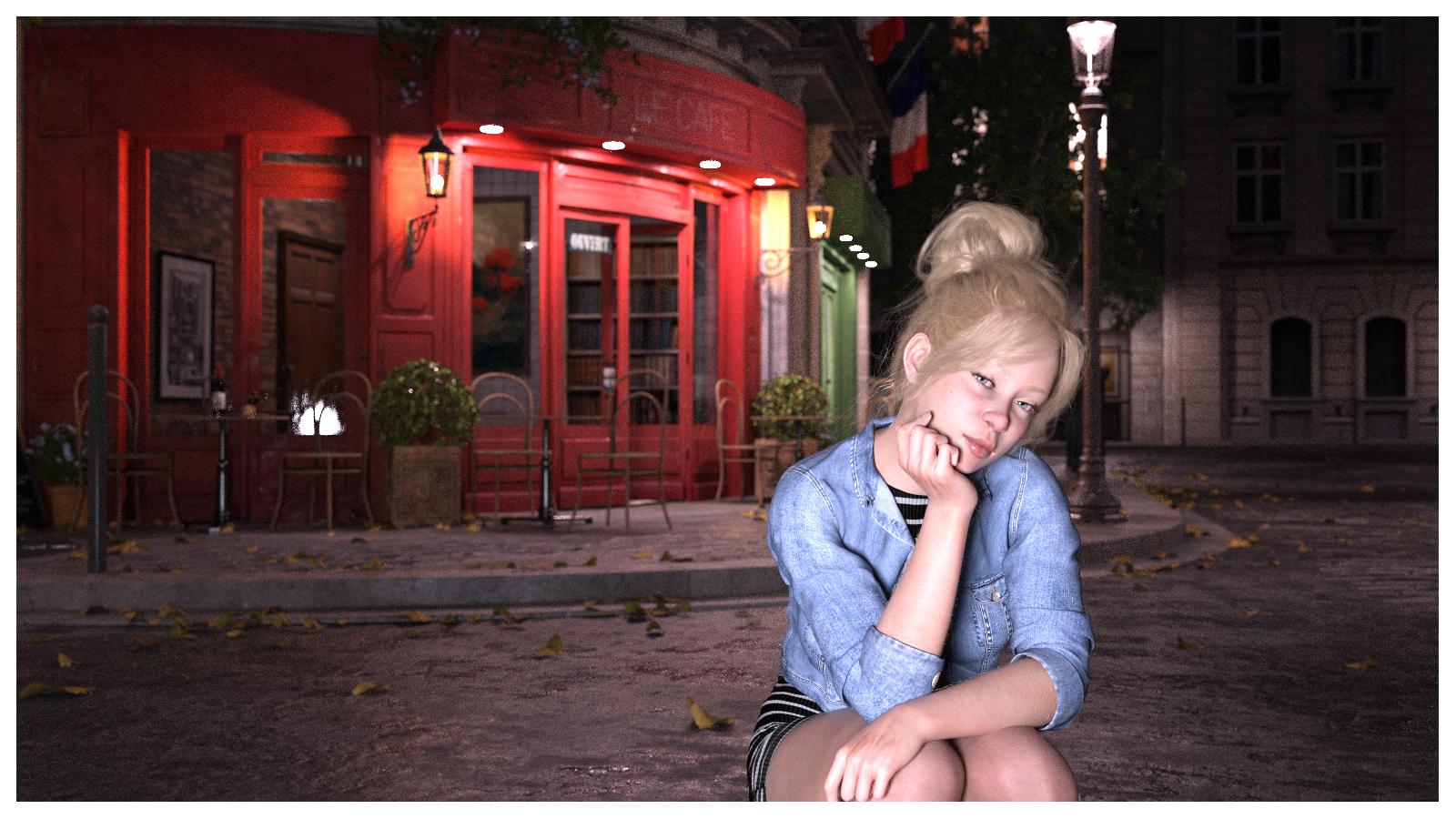 Searching for so-called Baby Face Adult Male Face Character
Greetings. I am looking for a rounder adult face character, male, preferably for G8M or G9M. The ideal would have face morph and matching skin maps - very slight stubble or 5 o'clock shadow would be a jackpot. Very slight. Would prefer not to achieve with a weight morph or a child morph, but will likely go that route if search is unsuccessful. Softer jaw line, less high cheek bones,... Ethnicity not particularly important. Think of someone who does not have the traditional 'leading man' looks, although may have been a leading man none-the-less. The opposite of John Hamm and Henry Cavill. Someone typically expected to be hired to play the Jimmy Olson sidekick photographer character, not the Clark Kent Superman investigative journalist character.
EDIT: speaking of stubble, is there a 5 o'clock shadow or stubble skin overlay or geoshell for G8M or G9M? Would be better to separate the search.
Eyelashes and brows not rendering properlyhansolocambo said:
"it" won't let me upload the image
There has never been an image upolading option on this forum.
That is patently false. You can attach images to your posts. There's a size restriction, it's a bit mercurial and apparently isn't functioning correctly right now, but it's there.
Eyelashes and brows not rendering properly"it" won't let me upload the image
Upload your image to an images hoster (ImgBB, etc.). Then paste the URL to that image here. There has never been an image upolading option on this forum.
eyelash mat not applying properly
As stated on the product page Gaius HD for Genesis 8 Male
Compatible Figures: Genesis 8 Male
Eyelashes geometry and UVs are very different from 8 to 8.1. 2D pixels from a G8 eyelashes' textures can't be projected on a G9 (except using tools such as the excellent and unique Unify UVs in 3D-Coat)
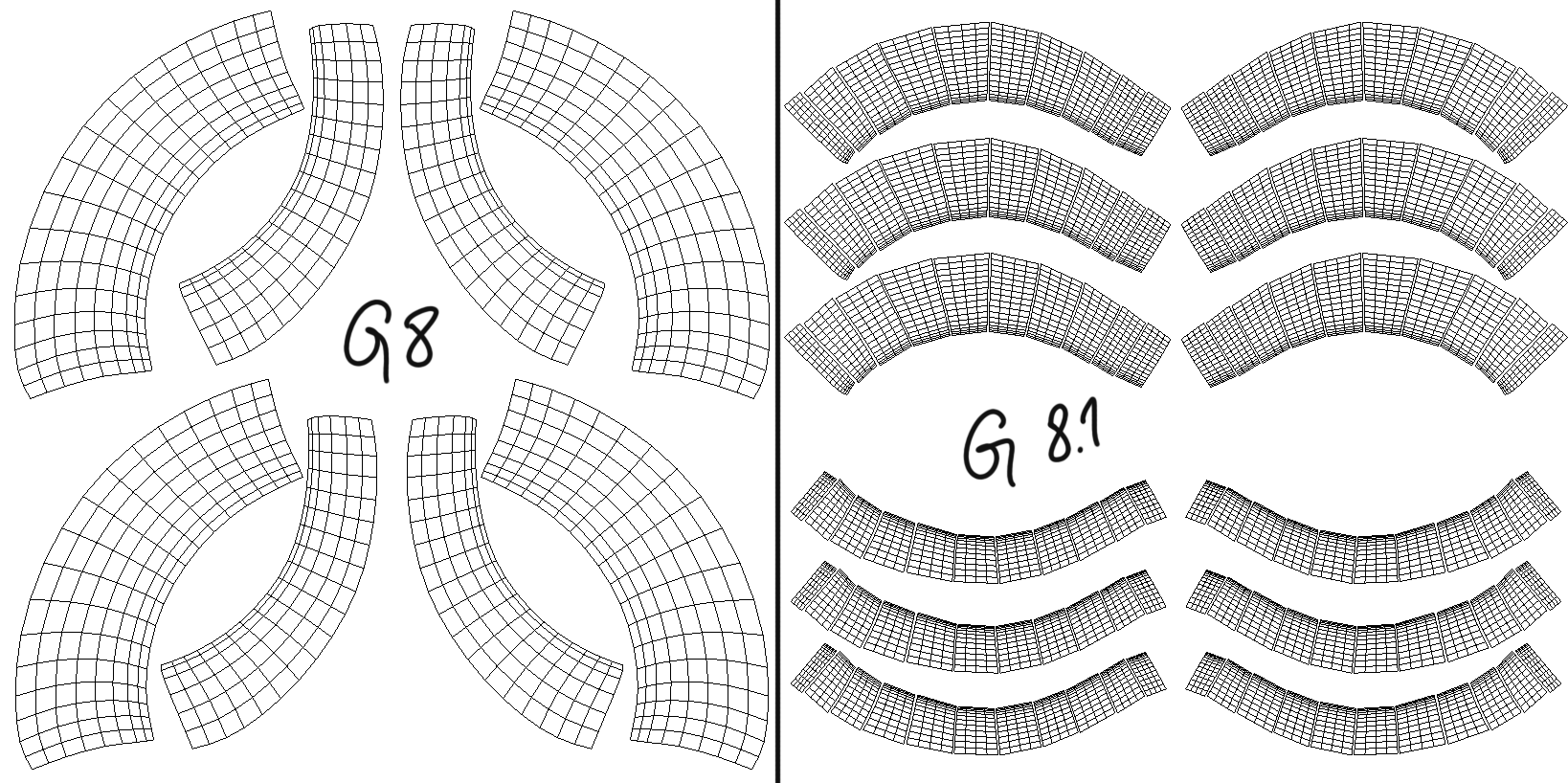
Solution : Apply any other eyelashes from an 8.1 character.
New! Novica & Forum Members Tips & Product Reviews Pt 14The forum has been very glitchy lately with not posting pictures. Mine will also stop typing and I have to wait a few seconds for it to catch up. Its very annoying

Daz 3D is part of

Connect
DAZ Productions, Inc.
7533 S Center View Ct #4664
West Jordan, UT 84084Licensing Agreement | Terms of Service | Privacy Policy | EULA
© 2026 Daz Productions Inc. All Rights Reserved.