-
[solved] Rigging Copyright - Clarification Please
FSMCDesigns said:
Rakete said:
What is actually "rigging" in this case? I assume the bone structure and the weight maps? Is the bone structure itself somehow protected? I assume not because otherwise how could all these other sites that sell daz content exist.
LOL, If a model is not a genesis model and a standalone figure, the rigging needs to be done by hand, not transferred. Unfortunately, many do it any way and hope they don't get caught. The rigging is considered a "derivitive" work
As far as I can tell "rigging" is the the binding of the mesh to the armature. I guess what you're saying is that the transfer tool would create a work that violates daz copyright if distributed without their consent. I was asking about the armature itself though, I assume that if I did my own rigging, "by hand" as you say (for a mesh I created, so that it works with the genesis armature), I can distribute that because that would be a derivative work. And so because the armature is at least implicitly part of anything that I rig, I assume daz at least tolerates that people distribute it on e.g. renderosity.
pJCM - Keyed TCB problemtry alt clicking the morph if this happens to reset to expected value.
if you have manually dialled the morph, then that will override the keyed values in some way. So need to reset them by alt-clicking, or just restart daz studio i guess, as you have done.
[solved] Rigging Copyright - Clarification PleaseIn this case, according to the latest EULA, a user's practice could be:
As for Characters that one makes for distributing or selling:
- with a Genese Base figure, you sculpt the figure in ZBrush / Blender, etc, or use Merchant Resources like 200 Plus / Shape Shift to shape the figure. Then you just provide the head / body morphs with 'derived rigging' rather than the geometry dsf file that includes the rigging.
- you sell the character with shaping presets on Rendo, RH, DA or somewhere, and mark 'Genesis XX' is required.
- if you also provide material preset, etc, you must create the texture maps by yourself or use Merchant Resources.As for Clothing / Accessories / Wearables..:
- almost the same: you just derive / transfer the rigging from the base figure to the items that you make with external software...
- similarly, you provide the files of geometry, morphs, texture maps, all necessary presets of the content that you made, for distribution or sales.
- mark 'Genesis XX' is required.Created morphs for daz studio not working. - Resolved!Yes, using 1 unit = 1 cm. But I will double check.
I still have weird things happening. Hex crashes about every 3-4 times used. Frequently have to restart Studio as Hex fails to load or transfer objects.
Again, Hex bridge is working again (except for crashes), so I can continue on with projects.
Thanks again.
Cant find various V4 materials and Exp PackRichard Haseltine said:
The base Victoria 4, the morph expansions, and any characters descibing themselves as using the ExP system all have to be installed to the same content directory (which means DIM, Daz central, or manual). I would recommend installing the powerLoader add-ons for the morph sets as that allows you to use them without having to fiddle around with the updata, and to load the morphs at the outset rather than having to inject them.
The power loaded add on is installed and loads the morph sets fine. It's the hi res and standard res materials that won't work. They are installed and are actually showing in the content manager and they are all installed to the same loctation, they just won't load and I get a message saying the file can't be found.
Cant find various V4 materials and Exp PackRichard Haseltine said:
The base Victoria 4, the morph expansions, and any characters descibing themselves as using the ExP system all have to be installed to the same content directory (which means DIM, Daz central, or manual). I would recommend installing the powerLoader add-ons for the morph sets as that allows you to use them without having to fiddle around with the updata, and to load the morphs at the outset rather than having to inject them.
The power loaded add on is installed and loads the morph sets fine. It's the hi res and standard res materials that won't work. They are installed and are actually showing in the content manager, they just won't load and I get a message saying the file can't be found.
Make Human and Daz StudioHi! Before triying to entierely recreate my character from zero, I tried to use the face transfer plugin from the image of my MH character, so as to use it later an help, and this is what I obtain:
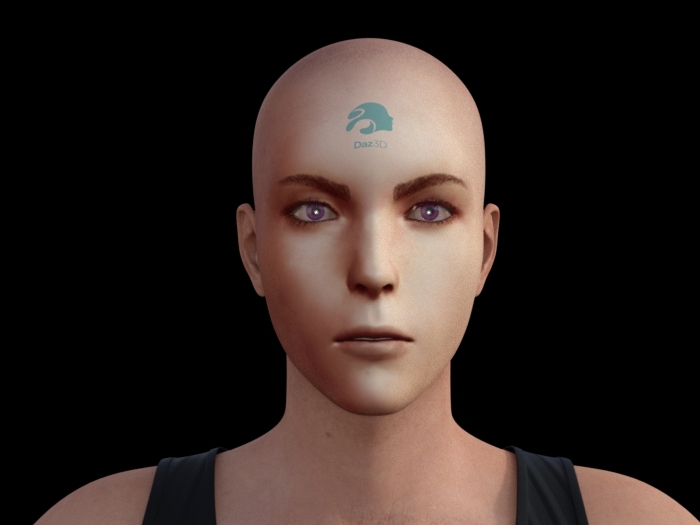
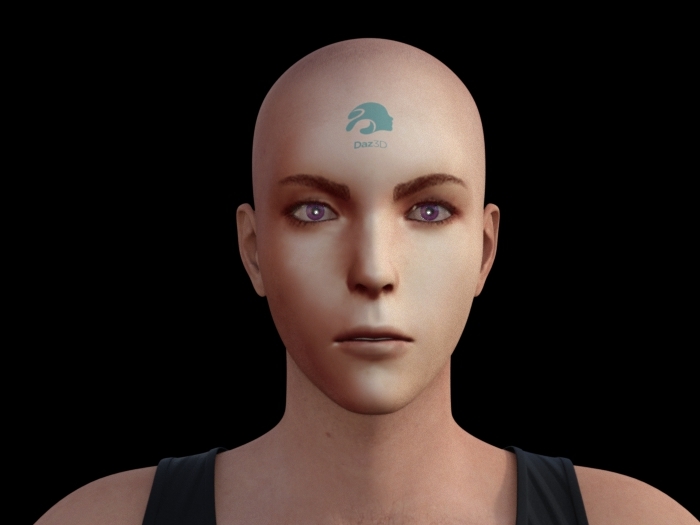
It's pretty close to the MH version, but it seems a bit too square, so I fit the face quare morpsh to the minimal value; I obtained that:
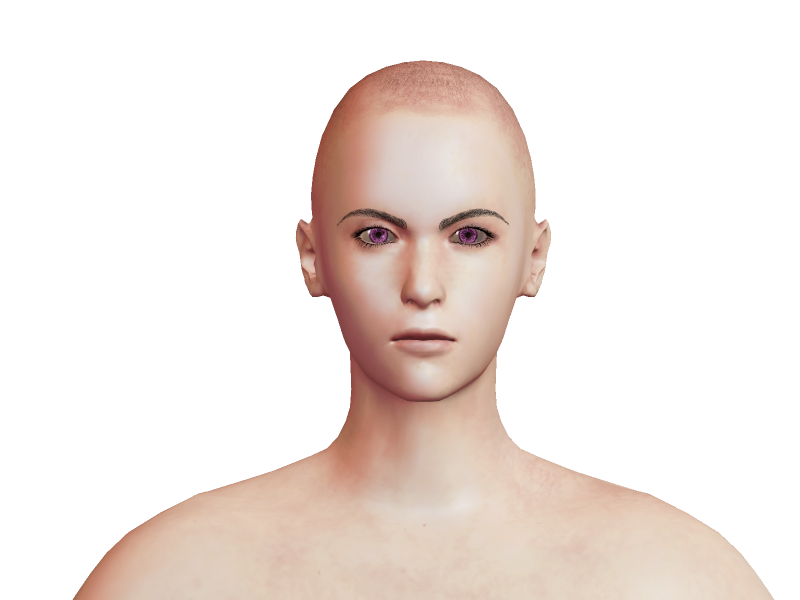
To compare with the MH version (but it's probably not the same scale):
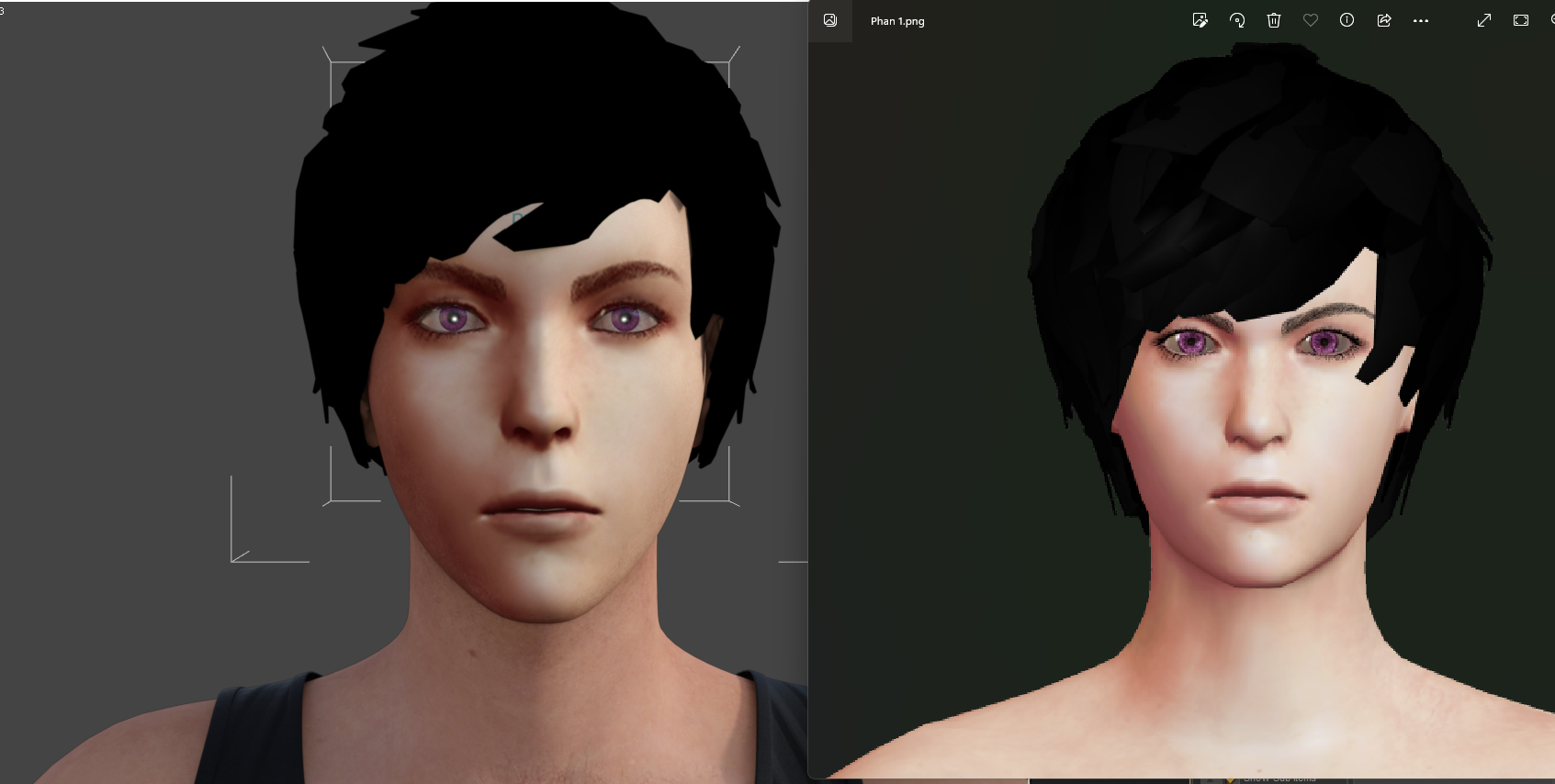
I also tried to compare the two versions with the MH hair imported into Daz:
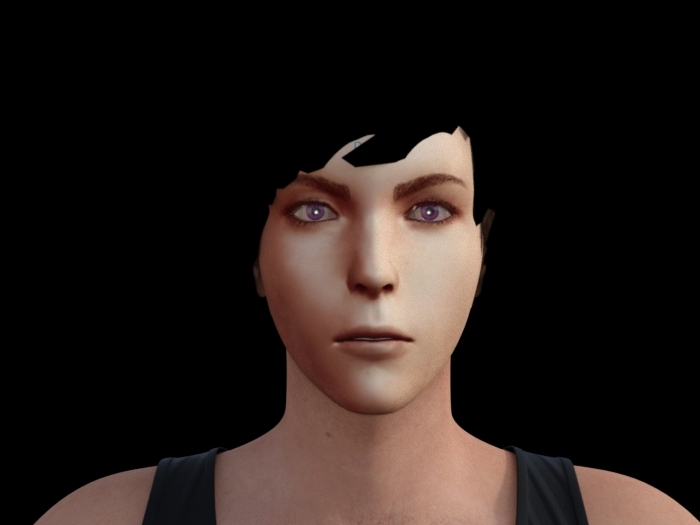
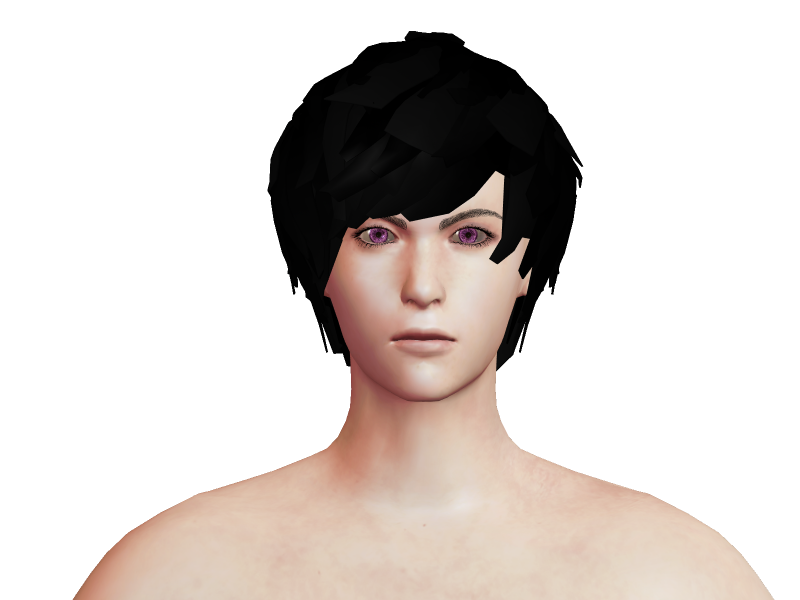
I anlso try to modify the Jaw Corner Width but I am not sure if it improves the character or not...
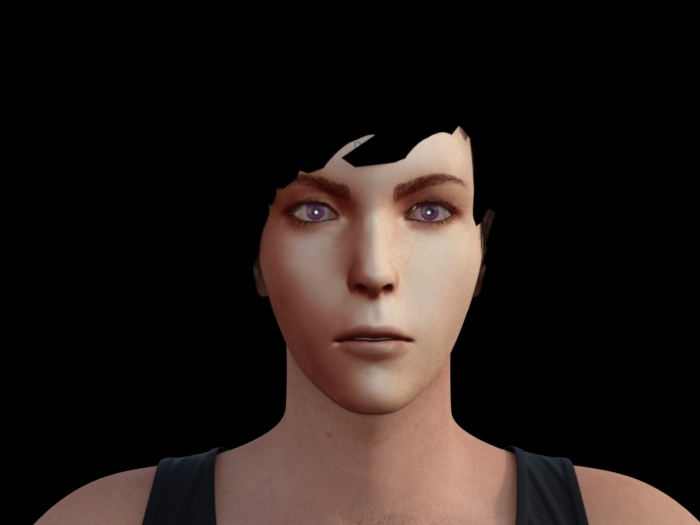
For now, here are the morphs I used:
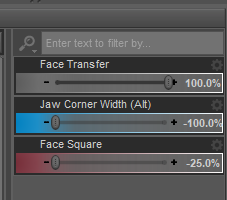
Before to use the face transfered character as an help to create my final character, I would like to obtain something as close as possible to the MH character, so I still have manythings to modify, but I would need an advice. Indeed, the MH character seems sweeter and kinder than the face transfered Daz character, I don't know how to recreate the effect in Daz... Do you think it comes from the face shape itself, or because I didn't modify the "details" like the brows and the noze? From your experience, what do you suggest to recreate this sweetness and kindness on the facte transfered character?
Thank you in advance for your advices!
[solved] Rigging Copyright - Clarification PleaseHi...don't know if this question is already answered somewhere but I couldn't find it...bit confused on the copyright on the rigging of Daz figures (or any other figure I guess even for like poser etc. too)
So I get this part: like if you make your own character you cannot transfer the rigging from a Daz character to that figure and then give it away or sell it because obviously that's Daz's rigging.What's confusing me is clothing and wearables. All the tutorials I see at some point transfer the rigging of the character you are making the clothing for to the clothing so it fits properly which makes sense but then if you give this clothing away either by selling or for free wouldn't that also be distributing rigging you don't have copyright to and thus violating some rule somewhere? But I can't see how you can make workable clothing without doing this either.
Not sure if this is a silly question but if anyone could clarify this for me that would be a big help. =)Cant find various V4 materials and Exp PackThe base Victoria 4, the morph expansions, and any characters descibing themselves as using the ExP system all have to be installed to the same content directory (which means DIM, Daz central, or manual). I would recommend installing the powerLoader add-ons for the morph sets as that allows you to use them without having to fiddle around with the updata, and to load the morphs at the outset rather than having to inject them.
is it possible to insert an image and use it as an help?crosswind said:
To a certain extent... 1st there's no HD morph from Face Transfer, 2nd the quality of generated texuture maps is not great...Ah, ok, thank you very much!

Edit:
I used the face transfer plugin and save the .duf file, just the fil without to use the save face feature of the face transfer. When I open again the file, I obtain an error message and my face transfered character hasn't any material:
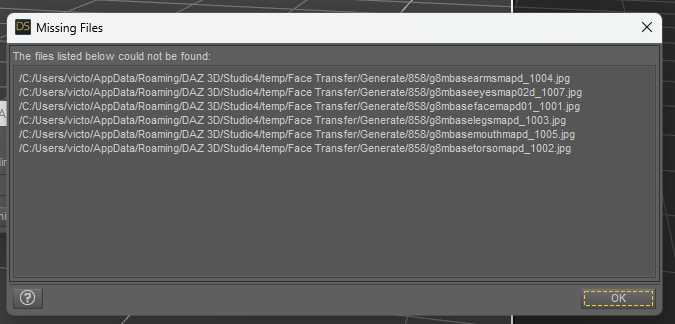
Could you tell me if it's normal and if it's possible to fix it?
Thank you in advance!
is it possible to insert an image and use it as an help?So, if I understand well, the difference is just the number of faces I can save without the watermark, not the quality or the resolution of the character?That's right.
By the way, is there a difference of quality between a character created by the face transfer and a character created by morphing Genesis 8?
To a certain extent... 1st there's no HD morph from Face Transfer, 2nd the quality of generated texuture maps is not great...
Thank you in advance for your answer!
is it possible to insert an image and use it as an help?crosswind said:
Pls check 'What's Included and Features' on the 'unlimited' product page - https://www.daz3d.com/face-transfer-unlimited
So, if I understand well, the difference is just the number of faces I can save without the watermark, not the quality or the resolution of the character?
By the way, is there a difference of quality between a character created by the face transfer and a character created by morphing Genesis 8?Thank you in advance for your answer!
Created morphs for daz studio not working. - Resolved!Are you also using the 1 unit = 1cm preset in Morph Loader Pro? OBJ doesn't have a scale, just "units," so it is necessary to tell the code what those units mean.
Problem with rig !Hello guys ! im new here. I have created a g9 morph. I load it to daz 3d and everthing was ok . But when i tryied to fix the rigging with adjust rigging to shape i have this problem and i dont know how can i fix it... Does anyone know what to do ? or any tutorial video ? i dont know how to google it .
Created morphs for daz studio not working. - Resolved!Thanks to everyone trying to help out.
After uninstalling and reinstalling - studio and Hex (3X), the Hex bridge finally started working again.
I did try and impoort the model as .obj, and there was a difference in scale. In sending a model to Hex via the bridge, exporting as /obj and importing into Studio - I had to use a 1000% scale to match the same size.
Using unit = 1 cm on export and import. Not sure exactly what that means, but obj/morphs imported via morph loader pro still do not work.
(I may still be doing something wrong on that one)But I have always used to bridge in the past so with that working I can continue my projects.
Thanks again.
Appreciate the help.pJCM - Keyed TCB problemAssuming you use Bend dial on Left Thigh Bend:
- Drag Bend dial to this pjcm morph in Property Hierarchy
- Set Keyed TCB, but just need to set the range as:
Key -115:1
Key -60:0
(It's a normal way... no need to set 59:0, 0:0.)pJCM - Keyed TCB problemGF8
I'm making a pJCM morph to fix the shape of a butt.
When the L thigh rotate the buttmorph kicks in.
I used Keyed TCB.
The value is as follow-100:1
-60:0.1
-59:0
0:0But the value of the butt morph just stay at 100% no matter the L thigh rotation value.
The value of L thigh rotation is the 1st stage controller of the butt morph.
Note: I'm not replacing any existing pJCM. I make my own.
is it possible to insert an image and use it as an help?yuyu.atem said:
crosswind said:
If it's only for being used as a reference image, free version is just enough.
Thank you very much! Just by curiosity, what would be the difference with the paid version?
Pls check 'What's Included and Features' on the 'unlimited' product page - https://www.daz3d.com/face-transfer-unlimited
Translucency Weight and ColorHello! I'm dabbling in DAZ Studio and have experience working with Blender and Substance 3D Painter.
Recently, I generated some totally new textures for one of my models and protagonists of the 3D graphic novel I'm writing.
The model was designed in DAZ Studio on a G8.1 Male, exported to Blender to make adjustments as an OBJ and re-imported to DAZ Studio as a morph to be applied directly on a standard G8.1 Male.
I have also generated all the textures with Substance 3D Painter and I got a not very pleasant surprise in the Translucency channels.
What seemed obvious was that Translucency Weight would interpret the Scattering maps generated in Substance Painter as the mask they are and that Translucency Color would interpret the Scattering Color maps as the translucency color it should project. However, this was not the case and, although I have solved it, I do not fully understand where my error of interpretation is.
Let me show you the channel settings on the Face surface:
This is the Base Color or Difusse:
I've incorporated Substance Painter's Ambient Occlusion map to acquire shadow details in the texture:
And this is the Translucency settings:
As you can see, Translucency is working. However, it didn't until I removed the Scattering Color map and replaced it with a solid color. The interesting thing about that map was that it provided exactly the color information of each specific part.
I have not understood something correctly in how DAZ Studio works with Scattering and I would love to know it to be able to avoid problems like these, since I have seen that practically all DAZ Studio models use a Translucency Color map (Scattering Color) and not one of Translucency Weight (Scattering Mask).
Cant find various V4 materials and Exp PackLeana said:
Catherine3678ab said:
I do recall from the days long ago [D/S3] that for some products we had to be careful that they were installed to the same folder structure as the one holding the main figure. [Some would have multiple Runtimes; but only one has the actual V4 geometry, etc.] {I don't think this factors in here though}You recall correctly, V4 base and all her morph packs which use Exp technology need to be installed in the same content library (that's the main reason you can't install V4 and her morphs with Connect which installs each product to a separate directory structure), and the base V4 should be installed in only one content library. Otherwise you might end up which morphs not detected or not working properly.
I installed v4 base etc manually into the same content library. I can load v4 and power load all her morphs and the standard res materials load. Just the hi res and another set of materials don't and they where installed manually too.
Daz 3D is part of

Connect
DAZ Productions, Inc.
7533 S Center View Ct #4664
West Jordan, UT 84084Licensing Agreement | Terms of Service | Privacy Policy | EULA
© 2026 Daz Productions Inc. All Rights Reserved.