-
The I Miss the Old Days Complaint Thread
I was wondering about doing something and instead of actually doing it or starting a thread asking if it made sense to bother with or if it's a waste of server space (I always keep poor little Burt in mind as he has enough of a burden) I decided to ask an opinion here... since both Richard and Frank seem to mod this thread I figured their input is kinda important too in regards to this...
I was thinking of starting a reference image thread in the Art Studio forum... I take tons of reference photos for stuff I make or as ideas for scenes and I was thinking of going through them and selecting some of the more useful ones that people might be able to use for a project or as a reference image.
Its probably stupid because it would be kind of random based on stuff I've thought was interesting or useful and I know that th Internet is full of images on anything you can imagine, but in my experience it's never what I want or includes the kind of helpful details... I see lots of people make models too that seem to be good model makers, but they omit certain simple and glaringly obvious details and I've wondered if they just aren't finding good reference material.
The most likely starting point would be architectural reference images and machinery details... stuff that would be good for modeling those type of things or modeling... Like last week me and my daughter were photographing some ruins on the grounds of an abandoned psychiatric facility and a lot of the images are good references for horror or apocalypse/dystopian scenes or modeling.
I feel like it would evolve over time, probably based only comments/input, but I dunno it seems like it could be an interesting thing and might even draw people in to discover DAZ if they find the thread using a Google search... so sort of an asset for DAZ in a way.
If this is a totally idiotic idea and a waste of server space or something forbidden (I don't get what's forbidden sometimes, it seems kinda hard to predict/interpret) please let me know.
If it's okay and interesting I'll start going through my collections and figure out how to do this in the most sensible arrangement/presentation and manner.
This is an example of a dilapidated machinery kind of picture...
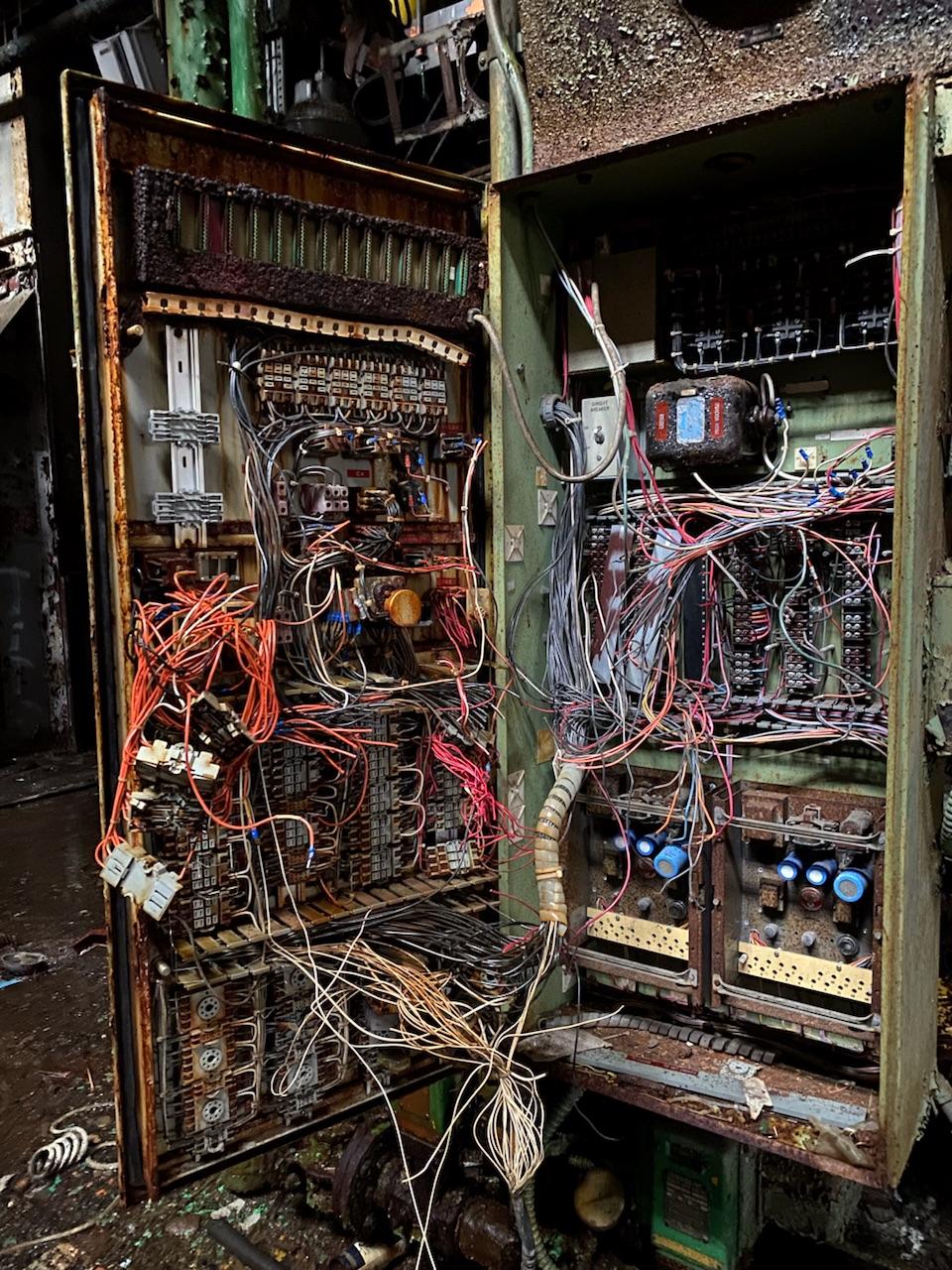
I know, I know it's portrait format, not landscape... but it made sense for this item.BTW- It seems the subject is some sort of hot water exchange unit that controls hot water delivery pumps... based on surviving labels on a different unit nearby.
Genesis 8 is driving me battyHi, folks. I've lost about 90% of my <PUDDINGS> trying to get Genesis working. I beseech thee.
I installed the essential thingy, but it didn't appear in my normal library folders. - Typically newly installed content for me appears in Poser Formats > My Daz Studio > Figures. Because my Daz library is about 20 years old, it's very fragmented and here there and everywhere, so I know that might be causing problems, but for arguements sake; "Poser Formats > My Daz Studio > ..." is where all newly installed content ALWAYS appears... ...until now!
I found Genesis 8 in the daftest folder on the planet, the "Products" folder. (Genesis 9 appeared in the "Catagories" folder, but one pain in the butt at a time...!)
In Products > G > Genesis 8 Starter Essentials I am presented with a large vomit of content, which I'm sure is all good stuff, but there's so much that the nagivation bar is sensitive as heck! --- And when I FINALLY found Genesis 8. Or Genesis 8.1. What the hell is 8.1? What's Dev Load? - Never mind. I finally LOAD the--- what I THINK --- I Genesis 8 - and she can't move, she can't talk - I gotta say, she's pretty rude!
I search DAZ official site for morphs, and it's ONLY got body morphs. There is zero way I can see to make her face move at all. What on earth am I doing wrong, and what happened to plug and play?? :'(
Thanks in advance, anyone who can help me out of this pit. All I want to do is shape the model and make her emote! But you try searching the store for Genesis 8 stuff, it just won't come up!
- Giles.
PT True Sky HDRI has zero documentationI'm not finding a support forum for [PT True Sky HDRI] this yet. Nor any documentation. There are a bunch of scripts as "documents" in the documents folder, none of which appear to do anything, or pop up any helpful windows, nor have any documentation to go with them.
I've clicked every single script and none of them do anything. How do you use this?
And Environment Maps are only available through Browse. Maybe there is no way around that, but since they are all named hdri_010, 011, 012, etc, that is about the most pain in the butt way to find what I am looking for there is.
I'm feeling a lot of buyers remorse at the moment.
How do I make custom angled surfaces?This might be in the wrong forum (and maybe the wrong website) but I figured I'd start here.
Let's say I've rendered the attached image and I want to change the newspaper, like add my own headlines or images or whatever.
How would I do it?
I'm assuming I'd do it in Gimp. While Googling I came across another thread on this forum in which someone was asking something similar, and the response was that because Daz doesn't have a text editor, one would need to do it in an image editor.
Here's where I hit a dead end, because if you search "how to make a newspaper in Gimp" on Google, you'll get tutorials on how to make newspaper-style text and how to make your image look faded and newspapery, but not how to impose that image onto a prop that a character is holding at an angle like in the attached image.
I'm assuming that there IS some way to do it, and that there's some weird specific esoteric word for the tool (like "Angular Image Modifier" or something) but I don't know what that term would be and therefore what to search.
TL;DR: you want to impose a custom image onto the newspaper in the attached image. You open up Gimp to do so. What do you call the tools you'd use to make it happen?
[Released] Turbo Loader for Genesis 8 and 8.1 [Commercial]P302 said:
Hi,
I have a problem with Turbo Loader Manager. At first glance everything works fine. TL finds the morphs, I can disable and enable them. I save a Morph list with everything enabled and also one with disabled morphs. I execute the list. Files get renamed. I save the settings and a configuration. Close the scipt. Re open TL Manager. The list shows the settings as I left it last time as expected.
But everytime I close and reopen DAZ Studio TL Manager tells me that this is the first execution. Also the update hint gets displayed in no regard of the "dont show again" checkbox. If I select OK TL Manager rebuilds the list but this takes quite a while - not something I want to do all the time. If I cancel TL Manager shows no morph list of course. I can load the previously saved morph list where everything is on and update the list with "Refresh Status" the list seem to represent state of the filesystem correctly - but I have to do this every single time I start DS.
However Turbo Loader Open File still works. I can load my scenes the morphs get enabled and if I then load TL Manager, load the complete morph list and refresh the status the additional morphs needed for my scene are enabled as expected.
I'm working with the Public Build. I start DAZ Studio using instancing ("C:\Program Files\DAZ 3D\DAZStudio4 Public Build\DAZStudio.exe" -instanceName #) Is this an Issue for Turbo Loader? Where does TL store the Information on close of the Manager script? Does this get overwritten? What if I open multiple Instances of DAZ Studio?
All of my scripts write their information to the registry. If you are comfortable using RegEdit, you can load it, search for Turbo Loader and see what it is saving. I don't know why your registry would not be working though. Do you have issues with other of my scripts?
As a stop gap until you figure this out, the Save and Load buttons at the top will save your morph list to a file.
Why Daz content creators don't make more of other ethnicity character?
And that's exactly the fun part - kitbash and create what you can't find in store. Though I agree the more choices in store the better.kyoto kid said:CHWT said:
ekajuan_9f765a669b said:
@all
First, my question derives from a user point of view and not a content creator. I was wondering.
With the ability/skill of some creators, even up to creating (almost) a resemblance of some movie actors/actresses, I think they can do it, if they want to, why didn't they create more of different ethnicities?I just want to hear this forum opinions or perhaps some experiences.
Second, for anyone who offended by the term race and prefer the term etnicity, no problem. Etnicity it is.
Third, why I don't make my own with morphs. I'm not good at it. I tried. I tried sculpting too. I ended up spend many weeks, trying to. Although I ended with somehting, but I didn't get the result I desired.
Thus, instead of making what I want to make, I ended up tweaking those.Facegen, I've tried it. The result wasn't at the level I wanted it.
With all said, in general don't need to get too serious guys.
I know it's frustrating for you... but if you really want to achieve what you exactly want it takes time. To achieve a level of realism/quality acceptable to myself, it took me TWO YEARS to fine tune one of my characters. Because I know I will NEVER get what I want in the marketplace...after over 15 years at this (beginning with trying to create a viable young teen out of 5' 10 " tall Vicky 4), I feel I finally have one of my central characters looking like I imagined her. G8 helped a lot as there are a few more "petite" base characters that aren't stylised like 3DU's younger ones and after struggling for a couple weeks, I finally was able to apply a nice G8.1 skin to a G8 character.
The character herself is a blend of several different ones. The skin is from Moryen 8.1 and is perfect for a ginger haired individual. Took a bit of adjusting first having to create a separate head surface with the Geometry Editor and then compensate for lack of the SSS channels 8.1 has that G8 doesn't, but finally got it to work.
Would post a pic but doesn't fit the main topic.
Why Daz content creators don't make more of other ethnicity character?CHWT said:
ekajuan_9f765a669b said:
@all
First, my question derives from a user point of view and not a content creator. I was wondering.
With the ability/skill of some creators, even up to creating (almost) a resemblance of some movie actors/actresses, I think they can do it, if they want to, why didn't they create more of different ethnicities?I just want to hear this forum opinions or perhaps some experiences.
Second, for anyone who offended by the term race and prefer the term etnicity, no problem. Etnicity it is.
Third, why I don't make my own with morphs. I'm not good at it. I tried. I tried sculpting too. I ended up spend many weeks, trying to. Although I ended with somehting, but I didn't get the result I desired.
Thus, instead of making what I want to make, I ended up tweaking those.Facegen, I've tried it. The result wasn't at the level I wanted it.
With all said, in general don't need to get too serious guys.
I know it's frustrating for you... but if you really want to achieve what you exactly want it takes time. To achieve a level of realism/quality acceptable to myself, it took me TWO YEARS to fine tune one of my characters. Because I know I will NEVER get what I want in the marketplace...after over 15 years at this (beginning with trying to create a viable young teen out of 5' 10 " tall Vicky 4), I feel I finally have one of my central characters looking like I imagined her. G8 helped a lot as there are a few more "petite" base characters that aren't stylised like 3DU's younger ones and after struggling for a couple weeks, I finally was able to apply a nice G8.1 skin to a G8 character.
The character herself is a blend of several different ones. The skin is from Moryen 8.1 and is perfect for a ginger haired individual. Took a bit of adjusting first having to create a separate head surface with the Geometry Editor and then compensate for lack of the SSS channels 8.1 has that G8 doesn't, but finally got it to work.
Would post a pic but doesn't fit the main topic.
Hidden objectsParameter Display Visible in simulation off
you can select multiple objects, enter in simutaion in search bar and disable everything is not needed in simulation in 1 click
Why Daz content creators don't make more of other ethnicity character?
I know it's frustrating for you... but if you really want to achieve what you exactly want it takes time. To achieve a level of realism/quality acceptable to myself, it took me TWO YEARS to fine tune one of my characters. Because I know I will NEVER get what I want in the marketplaceekajuan_9f765a669b said:@all
First, my question derives from a user point of view and not a content creator. I was wondering.
With the ability/skill of some creators, even up to creating (almost) a resemblance of some movie actors/actresses, I think they can do it, if they want to, why didn't they create more of different ethnicities?I just want to hear this forum opinions or perhaps some experiences.
Second, for anyone who offended by the term race and prefer the term etnicity, no problem. Etnicity it is.
Third, why I don't make my own with morphs. I'm not good at it. I tried. I tried sculpting too. I ended up spend many weeks, trying to. Although I ended with somehting, but I didn't get the result I desired.
Thus, instead of making what I want to make, I ended up tweaking those.Facegen, I've tried it. The result wasn't at the level I wanted it.
With all said, in general don't need to get too serious guys.
Why Daz content creators don't make more of other ethnicity character?ekajuan_9f765a669b said:
@all
First, my question derives from a user point of view and not a content creator. I was wondering.
With the ability/skill of some creators, even up to creating (almost) a resemblance of some movie actors/actresses, I think they can do it, if they want to, why didn't they create more of different ethnicities?I just want to hear this forum opinions or perhaps some experiences.
Second, for anyone who offended by the term race and prefer the term etnicity, no problem. Etnicity it is.
Third, why I don't make my own with morphs. I'm not good at it. I tried. I tried sculpting too. I ended up spend many weeks, trying to. Although I ended with somehting, but I didn't get the result I desired.
Thus, instead of making what I want to make, I ended up tweaking those.Facegen, I've tried it. The result wasn't at the level I wanted it.
With all said, in general don't need to get too serious guys.
As someone who's not a 3D content creator either, I'm far from it and the most I do is dial spin until I find what I like, this thread is interesting to read. For people who depend on PA's for creating a good base to use it can be super frustrating when what you're looking for still isn't out there but sometimes mixing and matching various morphs from different vendors gets me better results than waiting for the perfect product that'll probably never be released. At least with g8/8.1 there's so many enthnic morphs and morph packs with facial morphs that can get you what you want eventually. But as others have said, they know that 20'ish white female characters sell really well and that's what's generating the money so that's what the majority of the marketed products are going to be. G8 saw some amazing asian female characters from bluejaunte, Mousso, hid3d, daz released ML8, Alawa and Kayo. There's also an artist DaYin from that other... other store who's faces are really amazing.
G9 isn't out long enough to really have a built up volume of ethnic morphs library like g8 but hid3d's Nao was my starting point for a character I initially worked on trying to duplicate a custom character I made on G8. I actually like the results I got with the g9 attempt way more than I did with my custom g8 character, so much so that I was thinking of redoing a lot of renders and replacing them with the g9 one.
Why Daz content creators don't make more of other ethnicity character?@all
First, my question derives from a user point of view and not a content creator. I was wondering.
With the ability/skill of some creators, even up to creating (almost) a resemblance of some movie actors/actresses, I think they can do it, if they want to, why didn't they create more of different ethnicities?I just want to hear this forum opinions or perhaps some experiences.
Second, for anyone who offended by the term race and prefer the term etnicity, no problem. Etnicity it is.
Third, why I don't make my own with morphs. I'm not good at it. I tried. I tried sculpting too. I ended up spend many weeks, trying to. Although I ended with somehting, but I didn't get the result I desired.
Thus, instead of making what I want to make, I ended up tweaking those.Facegen, I've tried it. The result wasn't at the level I wanted it.
With all said, in general don't need to get too serious guys.
Blur Crazy Driving me CrazyI don't have that product but looking at the promo shots it looks like it's trying to be a one-click 'do it all in Daz Studio' solution. I don't think that's the best way to do it (many of the the promos look unconvincing to me) and if you want good results then you'll have to break out Photoshop or your preferred equivalent for some post work.
I don't do this kind of render often but I always refer back to this video for how to do it and, because you can render the car separately using canvasses in Studio, the 'cleaning up' section of the video can basically be skipped:
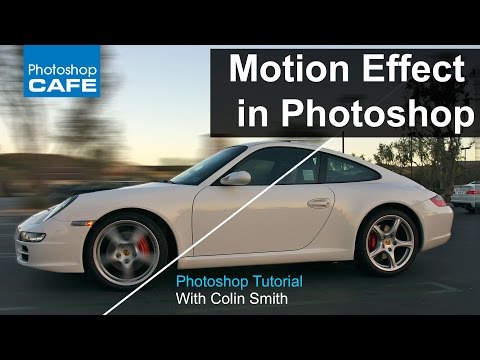
Loads of results using the search:
https://www.youtube.com/results?search_query=photoshop+car+motion+blur
This technique also works for trains, helis, aircraft - any vehicle you can think of. Works great for sports renders of athletes too - no vehicles needed!
Hope this helps.
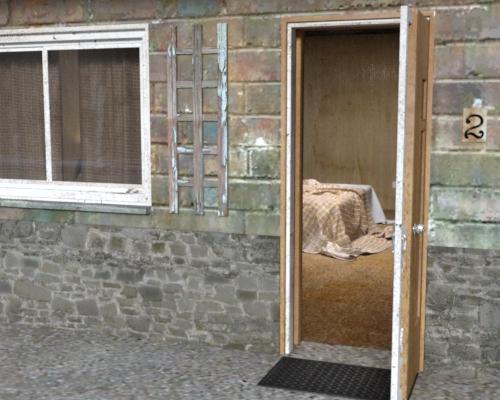
Where Are the Motel Room Walls and Floor?The motel-room product does not contain walls and floor - it is only the furnature.
As you have seen, it requires the motel product which contains the outer shell - that is where the floor and walls come from. If you use the preset in the motel-room product it will furnish Room 2 - providing you did not move the motel from it's initial spawn location.
EDIT: @NorthOf45, sorry, the forum didn't show your reply when I posted mine - didn't mean to repeat what you'd already said :/
Image name not savingI don't believe that the image name or library/path setting in the render pane is saved with the scene - the library/path, and which to use, seem to be global settings. You could edit the first post heer to change the forum to Daz studio Discussion to get more feedback, but if you confirm there isn't a way to store the name per-scene settle on a request it needs to be made via a Tech Support ticket.
Show Us Your Bryce Renders Part 12Jnobes - welcome to the Forum, fantastic render, hoping to see more of your renders.
Adbc - two beautiful abstracts.
Show Us Your Bryce Renders Part 12jnobes - welcome to this forum. Very nice and well done scene.
hubert - thank you.
adbc - thank you. Beautiful abstract.
Celebrity Look-a-Likes for 3D figures part 3Haruchai said:
FSMCDesigns said:
WandW said:
Haruchai said:
Stephen said:
Haruchai said:
leeleess at RenderHub has released their Letita Wright Genesis 8.1 Female
Editorial Use Only Restriction

From the license - 'because certain intellectual property depicted in this model may not be affiliated with or endorsed by the original rights holder'
Understandable in the circumstances.
If that is the case, how can they legally sell it?
They can't which is why that store shouldn't be mentioned or linked to IMO
In that case neither can anyone else who is covered in this thread and DAZ store, among all the others, should never be mentioned again :)
I am of the opinion that my more crude and sophomoric posts to this forum, at least deserve a dishonorable MENTION
 SOLVED JW Pro Pose Reset for Genesis 9 Questions
I've read on this forum about zeroing Genesis 9 also removing the JCM/CBS settings, and that this may be causing some of the unsightly bends in promos. I'm wondering if JW Pro Pose Reset is designed to eliminate this issue and serve as an alternative to the zero function. If you know anything, please share.
Daz To Blender BridgeUse Diffeomorphic instead of Daz to Blender Bridge. You'll find info for that in the Blender forum or google diffeomorphic blender and download it there.
Worldmaker 'Game': Any scenes?I'm always on a search for programs that will enable nice scenery to be created, and recently came across a relatively new scenery creation program on 'Steam' called WorldMaker.
It's a somewhat like FlowScape, being based on one of the big game engines (in this case it's Unreal Engine 5 as opposed to Unity for FlowScape) and allows snapshots of a minimally animated scene, with just the rendering produced by the engine.
I've tried it and found it to be less easy to use than FlowScape as you can't paint scener in quite the same way, but it does have limited quality characters built in, which is an advance, and they can be posed to a limited degree or have one of a large number of ani-blocks applied.


The similar sunlight & weather options exist as with FlowScape.
All in-all not bad for background scenes - especially as the default render is rather better than with FlowScape.
Price, not huge, £7.19, say $9.50-ish. It's supposed to come with 1200 bits of content in various categories, from skyscrapers to trees, grasses and Saxon houses. I suspect it's all freebie UE5 content available for most purposes.
There is supposed to be FBX import (no export except 2D screen shots) but on my PC, just pressing the button crashes the program. It may be developed a bit, who knows.
Might be worth trying out.
Regards,
Richard.
Daz 3D is part of

Connect
DAZ Productions, Inc.
7533 S Center View Ct #4664
West Jordan, UT 84084Licensing Agreement | Terms of Service | Privacy Policy | EULA
© 2026 Daz Productions Inc. All Rights Reserved.