-
Xivon Environment Assets - Wow but Ouch
Xellosz said:
WendyLuvsCatz said:
I need to use an earlier version of Twinmotion to import the diffuse textures original file paths
probably not available to people "buying" it for free now
so that and chasing up all the other maps, consolidation of materials is likely the most off putting thing
a lot can be solved by simply exporting maps to a bespoke folder for your project, I jst prefer to avoid bloating all my drives needlessly
Xivon textures are extra nested in many subfolders making using original paths extra excruciating
Fugazi does this too
otherwise, it's easy to use and had lots of other awesome features
terrain sculpting and painting, brushing animated foliage, full weather system with volumetric clouds and rain, snow, fog, particles to name a few
I am just wary now about discussing or suggesting TM to others because of a lot of pushback and moderation in the past
there is absolutely NOTHING in it for me
if anything I suspect they want people to stay in DAZ studio and buy extra products such as Ultrascenery to do what TM does for free
Thx for the info.
I think with the bridges (DAZ to Unity, Unreal, Blender, Maya, Cinema 4D), etc... crossing between programs is even more accepted than before, and there is now the "common enemy" the AI.
How is AI the enemy? I use AI on every project i have with DS.
As for the original topic, there are way to many assets, environments, clothing, etc that are not optimized for DS use on mid level PCs. I have a long list of PAs I will not buy from because their work is either way to detailed to use, or just bloated and unable to use once you add anything else into the scene.
Xivon Environment Assets - Wow but OuchWendyLuvsCatz said:
I need to use an earlier version of Twinmotion to import the diffuse textures original file paths
probably not available to people "buying" it for free now
so that and chasing up all the other maps, consolidation of materials is likely the most off putting thing
a lot can be solved by simply exporting maps to a bespoke folder for your project, I jst prefer to avoid bloating all my drives needlessly
Xivon textures are extra nested in many subfolders making using original paths extra excruciating
Fugazi does this too
otherwise, it's easy to use and had lots of other awesome features
terrain sculpting and painting, brushing animated foliage, full weather system with volumetric clouds and rain, snow, fog, particles to name a few
I am just wary now about discussing or suggesting TM to others because of a lot of pushback and moderation in the past
there is absolutely NOTHING in it for me
if anything I suspect they want people to stay in DAZ studio and buy extra products such as Ultrascenery to do what TM does for free
Thx for the info.
I think with the bridges (DAZ to Unity, Unreal, Blender, Maya, Cinema 4D), etc... crossing between programs is even more accepted than before, and there is now the "common enemy" the AI.
HDRI, billboards, viewport screens, etc... were the basic fast imports and exports. If I buy something, I want to get it to work, fit into my GPU. If it doesn't fit into my GPU or it's reported to be too hard (commercial-center) I don't buy it. So any idea to get it working is a good idea.
Xivon Environment Assets - Wow but OuchI need to use an earlier version of Twinmotion to import the diffuse textures original file paths
probably not available to people "buying" it for free now
so that and chasing up all the other maps, consolidation of materials is likely the most off putting thing
a lot can be solved by simply exporting maps to a bespoke folder for your project, I jst prefer to avoid bloating all my drives needlessly
Xivon textures are extra nested in many subfolders making using original paths extra excruciating
Fugazi does this too
otherwise, it's easy to use and had lots of other awesome features
terrain sculpting and painting, brushing animated foliage, full weather system with volumetric clouds and rain, snow, fog, particles to name a few
I am just wary now about discussing or suggesting TM to others because of a lot of pushback and moderation in the past
there is absolutely NOTHING in it for me
if anything I suspect they want people to stay in DAZ studio and buy extra products such as Ultrascenery to do what TM does for free
The New Mac FAQbrookwell.brian said:
I recently upgrade to the Sequoia 15.7.2 operating system. Most of my purchased assets are now missing or unusable. They appear in the Lost and Found and are inaccessible. I tried a reinstall of the assets to no effect. Anyone have any suggestions to help?
If they are in Lost and Found they aren't missing, but their metadata is not being found. You can check theya re accessible either by loading them or by looking in the Content Library under Daz Studio Formats (or Poser formats, depending on the type of content). If the files are present but not correctly categorised (Lost and Found is a catch-all category) then it may be related to one of the postgreSQL issues discussed previously in this thread.
fbx export animation not working not workingThere are two sides of this, you have the export and then you have the import into some other application, both can cause problems so you really need to give a little more ifnormation of what it is that is not working.
FBX is a very complex specification so it is difficult to make a generic export (or import) that work everywhere, so if you have a specific issue it may help tweaking one or more of the parameters in the export dialog.
Using Daz to open a dsi. file.................Hi,
How could I open/import a dsi. file in DAZ?
Thank you!
Tried to fix PostqreSQL error by reinstalling Daz studio twice and restarting, now can't login.I use Notron 360 for gamers when it comes to security software. And yes, I did try the part where I made Daz Studio show up on their allowed applications for both windows firewall and that.
no dice. and again, DIM allows my login just fine, but now Daz studio is refusing to let me login.
as for it working.... it just recently stopped working. it only started glitching out when I tried to update metadata and stuff because images were showing as broken in the smart content menu.... and then the postqreSQL thing stopped working. so that's when I tried to reinstall things to get things working again.
[DAZ Studio 4.24] Smart Content Thumbnails Not Showing After Reinstall (New PC)Word of warning. I'm sure you already know this but some products lose their Smart Content entries if you update/re-import their metadata.
[DAZ Studio 4.24] Smart Content Thumbnails Not Showing After Reinstall (New PC)Huge thank you to memcnell70 and felis!
Thanks to your guidance, I have successfully resolved the issue where thumbnails were not displaying in the Smart Content "Products" tab.
I want to note that I installed DAZ Studio using the default directory settings without any customization when I set up my new PC. Despite this, the problem still occurred.memcnell70's suggestion regarding the "Cloud lines" was exactly the key. The root cause was that Windows 11 was automatically synchronizing my user folders with OneDrive, which created unstable paths in the content library that prevented the Smart Content database from functioning correctly.
Just in case, for any other users who might encounter this common issue, here are the specific steps I took to fix it:
[Solution: Removing OneDrive Paths and Rebuilding Metadata]
1. Remove the OneDrive Paths from DAZ Studio
-Open DAZ Studio Preferences: Go to the menu, Edit>Preferences...
-Select the Content tab from the list, and then click the Content Directory Manager button.
-Delete Cloud Paths: In the Content Directory Manager window, navigate through the "Content Sets" tree and check the lists for both Daz Studio Formats and Poser Formats.
-Select ALL paths that include "OneDrive" (e.g., C:/Users/USER NAME/OneDrive/...) and click the Remove button.
-Click Accept to save the settings and close the window.
2. Rebuild the Metadata
-Open Content DB Maintenance: Click the menu (usually a hamburger icon) on the top right of the Smart Content tab, and select Content DB Maintenance...
-Re-Import Metadata: Check the box next to "Re-Import Metadata..." and click Accept to run the process.
-Restart DAZ Studio.
Following these steps resulted in all thumbnails being displayed normally in the Smart Content "Products" tab.
This information may be helpful for other new PC users who have OneDrive enabled.Thank you once again for your expertise and help!
Any substitute hairs I can use for Blender?I’m trying to learn Blender, but I’ve heard it’s difficult to import DAZ hair. Does anyone know a good solution or another marketplace where I can get hair for characters? I also need the hair to work with the physics system
thanks
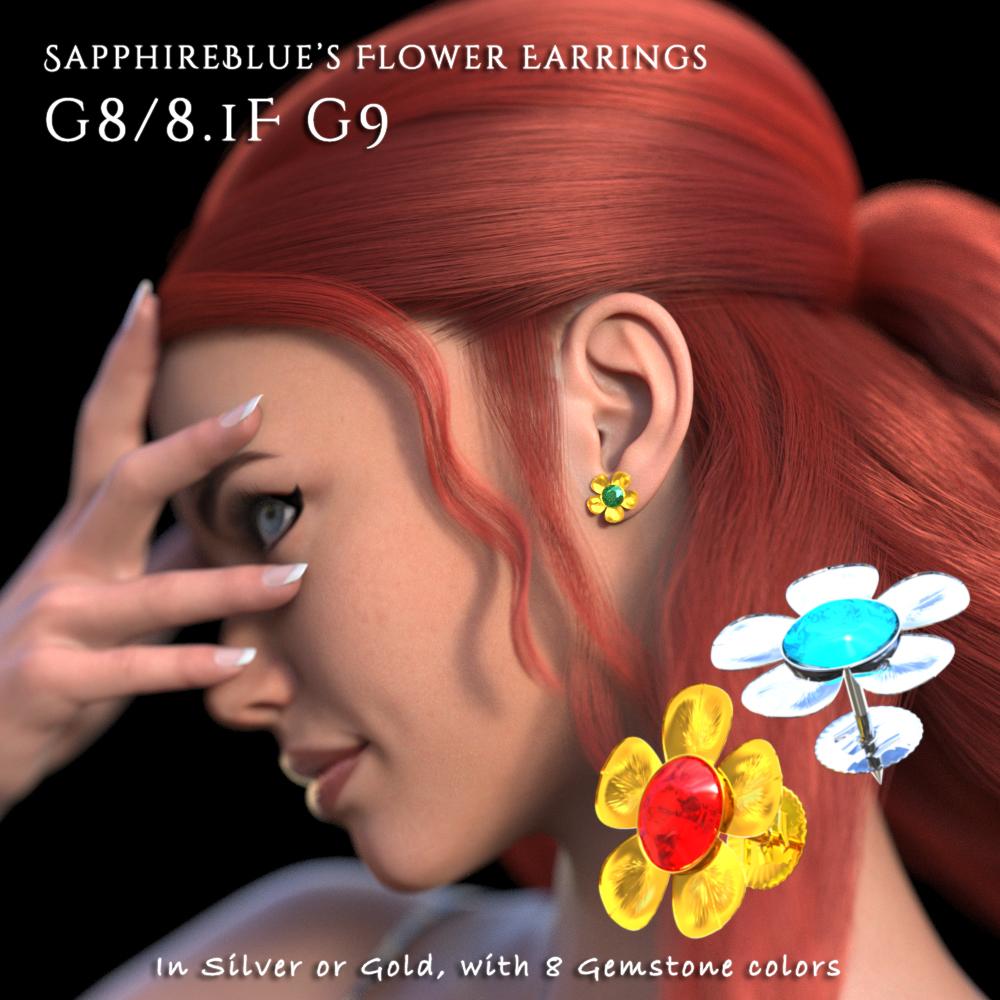
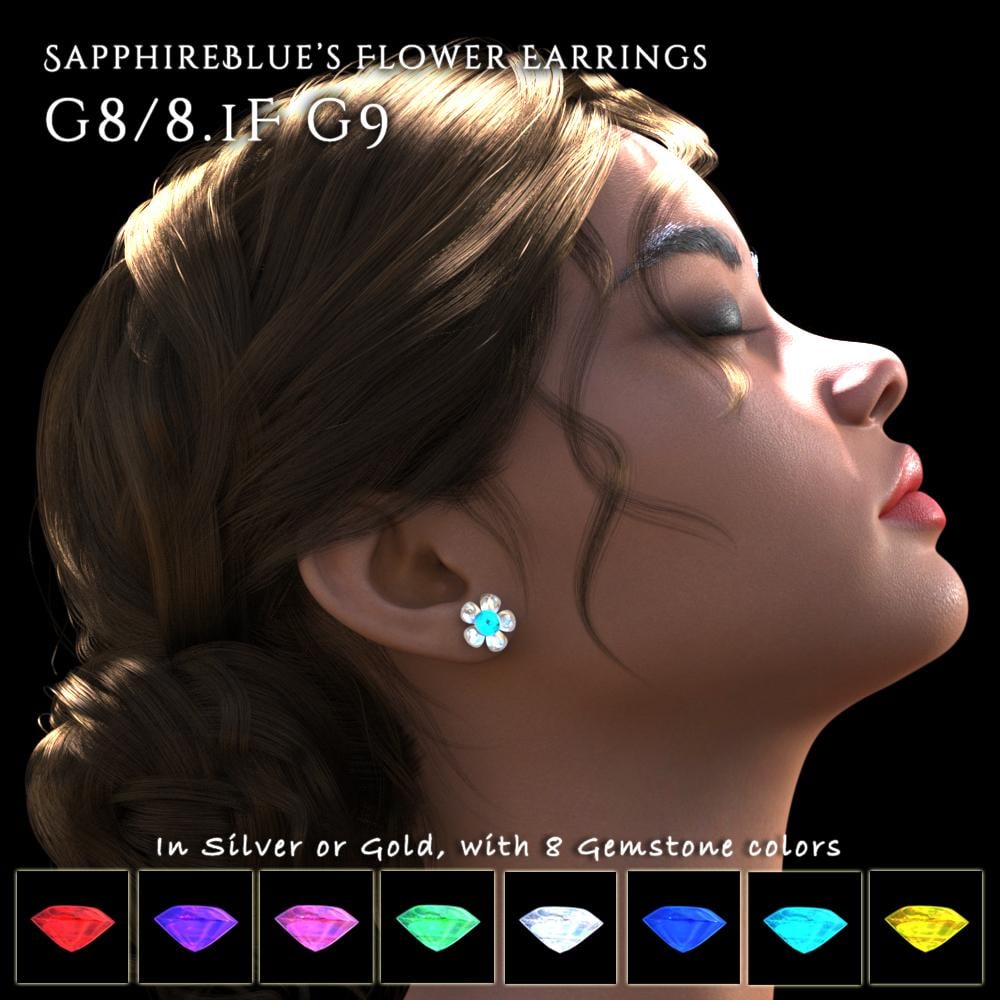
SapphireBlue's freebies: Flower Earrings for G8/8.1F and G9Finally decided to venture into Blender and here's my first project: a pair of flower earrings for G8/8.1F and G9. The earrings come with 2 material presets for the setting (silver and gold), and 8 for the gemstone colors. You can further change these colors by changing the base color value for the earring setting, and the glossy color value for the earring gemstone in DAZ Studio's Surfaces tab. The included readme file also has these details.
The accessories and material presets will be in:
People > Genesis 8 Female > Accessories > SapphireBlue > Flower Earrings
And People > Genesis 9 > Accessories > SapphireBlue > Flower EarringsDownload at Renderhub, or use the attached files here. I've included a zip file and an installer file here. The dsa installer file should add Smart Content metadata too if you choose to use it. (I should try it out one of these days by test installing it on another device maybe). Let me know if there are any issues or any suggestions. (First promo is with G8.1, second with G9.)
 Diffeomorphic export issueHi, When I export a gen9 character model to Blender it exports the morphs, but not 3D nipples, it only shows the regular texture. So in Daz3D when I render I can see the niplle sticking out, but not with the import into Blender.I must be doing something wrong, any suggestions?Genesis in Poser
Silizium said:
Hello I'm new in Poser. Please can someone explain me how I get Genesis charaters into Poser?
I have Poser 11 and Poser 14 installed alongside of Daz Studio on a Windows PC. Poser 11 is able to import Genesis 1 and Genesis 2. Later Genesis figures ( 3, 8, 8.1 and 9 ) can be imported as FBX figures exported from Daz Studio. When the Genesis 1 and 2 figures are imported I find they have all of their installed morphs. When later Genesis figures are imported I find that they don't have all of their morphs but it is possible that that may be because I simply haven't figured out how to get those morphs. I'm still trying to learn more about the import and export process and the formats. Trying to import a Genesis 3 figure usually goes a bit weird as a CR2 but is perfectly fine as an FBX.
Poser PlayI see that the new specifications for Poser 14 include the ability to import and export GLTF/GLB formats.
[Resolved] Is there a way to speed up Uninstall in DIM?crosswind said:
Ryuu@AMcCF said:
crosswind said:
Ryuu@AMcCF said:
Well, I guess I can rule out Navicat. Their sign-up requires me to fill in a country/region of origin (apparently beneath the Last Name)--but there's NO entry spot to fill in!

I really think there's something wrong with your Norton... because when I googled issues of Norton yesterday, I saw some guys reported that Norton prevents webpages from being fully loaded... for some reason.
Unfortunately, I'm unable to get any help from Norton on this. And with the trial period for Navicat counting down, I'm running out of options for pursuing this route. I did look around and saw there were other DB manipulators out there with trial periods, like DbGate, pgAdmin, DBeaver, as well as Navicat.
But I'm wondering if it's really worth the effort to chase down whatever such obscure problem that's slowing DIM down, or shouldn't it just be easier to rip all of the cms and downloaded files in DS out by the roots and try starting over and reload from scratch?
You don't have to go for this route though it should've been pretty straigh-forward and faster. Since this way doens't work for you, another option is that you can Reset cms database by using Content DB Maintenance and re-import the metadata of installed products.
However, the cons are: 1) that'll take much more time; 2) if the products with wrong Description data are re-imported, you'll still have to face the issue of slow uninstallation in DIM ~~
Well, if I were you, I would firstly uninstall Norton applicaiton, retry using Navicat.... see if it'll work. Then re-install Norton application after fixing the issue or failing to fix... In this way, at least I can know if Norton is the culprit or not ~~
Still same error & unable to connect.
[Resolved] Is there a way to speed up Uninstall in DIM?Ryuu@AMcCF said:
crosswind said:
Ryuu@AMcCF said:
Well, I guess I can rule out Navicat. Their sign-up requires me to fill in a country/region of origin (apparently beneath the Last Name)--but there's NO entry spot to fill in!
I really think there's something wrong with your Norton... because when I googled issues of Norton yesterday, I saw some guys reported that Norton prevents webpages from being fully loaded... for some reason.
Unfortunately, I'm unable to get any help from Norton on this. And with the trial period for Navicat counting down, I'm running out of options for pursuing this route. I did look around and saw there were other DB manipulators out there with trial periods, like DbGate, pgAdmin, DBeaver, as well as Navicat.
But I'm wondering if it's really worth the effort to chase down whatever such obscure problem that's slowing DIM down, or shouldn't it just be easier to rip all of the cms and downloaded files in DS out by the roots and try starting over and reload from scratch?
You don't have to go for this route though it should've been pretty straigh-forward and faster. Since this way doens't work for you, another option is that you can Reset cms database by using Content DB Maintenance and re-import the metadata of installed products.
However, the cons are: 1) that'll take much more time; 2) if the products with wrong Description data are re-imported, you'll still have to face the issue of slow uninstallation in DIM ~~
Well, if I were you, I would firstly uninstall Norton applicaiton, retry using Navicat.... see if it'll work. Then re-install Norton application after fixing the issue or failing to fix... In this way, at least I can know if Norton is the culprit or not ~~
A weird one with keyboard and DS 4.21.0.5Try Window>Workspace>Customise and use the button at the bottom to Import then select Actions and one of the default layouts.
Problems with hair in blender with diffeomorphic.For SBH and dForce hair the material conversion is approximated so in general you won't get the same as daz studio. For transmapped hair the conversion is quite good and you should get results similar to iray. To convert SBH and dForce you don't need to tessellate as tubes, polylines are preferable for the blender shaders wich work on curves anyway so tubes will not apply.
If the product is using custom shaders, as OOT or others, these will not convert and you get a warning on import.
My personal opinion on hair is to avoid importing daz products, as they are often very heavy for animation and rarely fit blender. Rather do hairs in blender with the blender tools and libraries, this will result in better quality and much faster hairs.
https://bartoszstyperek.gumroad.com/l/hairtool
 Problems with hair in blender with diffeomorphic.
So, I want to import my DAZ models into blende and I'm having problems with the hair. I attached a image of how the image looks when I first import into blender. Also, the hair, I'm prettty sure, is a SBH so I turned on tesselation and PR preview before exporting it to blender. Then I convert the hair with the 'Make Hair' option with tube selected in the Create section, and Particles selected in the Output section. The second attachment shows what happens to the character when I do this. The hair turns white in the material preview mode, and also I just can't select the hair anymore.
And I guess I'm just asking how do I make it look like it did in Nvidia Iray in DAZ. I'm very new to all this so any help would be very much appreciated. Thank you!
Getting shaders to work on imported .obj [SOLVED]I have tried to make a step-by-step instruction for those coming here with the same question:
Steps to undertake for Daz 4.23:
- Import
- Import the wanted .obj-file through File / Import
- Add Iray Decal Node
- Select the imported object in the Scene tab.
- In the Create menu find and click Add New Iray Decal Node.
- Select the Iray decal node in the Scene tab.
- Go to the Parameters tab and select Decal in the list of properties on the left.
- By default, Clip Mode is set to Position. Change this to None. This will ensure that the shader will cover the whole model without worrying about positioning it.
- Go to your Surfaces tab and select the Front surface, then apply your desired shader.
- Et voila!
- If the shader does not cover the object completely, try this:
- Again, select the Iray decal node in the Scene tab.
- Go to Parameters / Decal / General / Face Mode and change it to Front and back.
- The bounding box for the iray decal node seems off
- The bounding box for the Iray decal node might seem off-set in relation to the object it belongs to.
- This has no impact on how it works, so this off-set can be ignored.
- If it bothers too much try to adjust the transform settings of the decal. Setting them to zero should help.
Again, thank you to Silas3D for helping out.
Daz 3D is part of

Connect
DAZ Productions, Inc.
7533 S Center View Ct #4664
West Jordan, UT 84084Licensing Agreement | Terms of Service | Privacy Policy | EULA
© 2026 Daz Productions Inc. All Rights Reserved.