-
Anime Toons and Filatoon Shader Q&A
TheNathanParable said:
necroscension said:
TheNathanParable said:
necroscension said:
TheNathanParable said:
I haven't tried this myself yet, but I wonder if it might be better to use one of those skydome products rather than a HDRI background, such as Iray Worlds or Worldbase by Magix 101.
https://www.daz3d.com/iray-worlds-skydome
https://www.daz3d.com/the-all-new-worldbase-xt-lushlands
At least then you won't have to worry about the background being pixellated.
I have the first product, I'll give it a try.
I had attempted using a plane and a sphere to create a background but those pixelated as well. The main reason the pixelation became a problem for me is that the hdr I was trying to use had a painted look that got ruined by the resampling.
Vick 9 | Daz 3D -> I had to render the background using Iray in order to retain the painted look.
(edit) Unfortunately Filament doesn't like the product, I guess because it uses the sky image in both the Emission and Luminance properties in Surfaces (view attachment).
Have you tried applying the Filatoon shader to the backdrop? The default iray shaders may not translate well to filament.I applied the general shader and moved the image in the Emission slot to the base slot. Unfortunately the images are being resampled (see attached).Ok, I think I figured out why the mesh skydone is pixellated for you.
These are two renders of Mikey. On the left, I set the "texture resources" option in the Daz Studio preferences to "performance", which makes Mikey's textures pixellated. On the right, I set the option to "quality", which makes them sharper. It's most noticeable around the eyes.
I'm using a iray HDRI background in both of these. It seems these are completely unaffected by this option, but a mesh skydone like the one used in iray worlds or worldbase xt should look better with this option set to "quality". I'll try it out for myself once I get them installed and working.
The Iray Worlds product uses odd shaped images, so plugging in a new hdri doesn't really work. But I can confirm that if I create a dome from a sphere and plug in an hdri in the Base parameter in Surfaces there's no resampling. I tested with a Cake and Bob 16K hdri and confirm that I can actually see "film grain" instead of pixelation (view attachment). Too bad that setting doesn't apply to the hdri used in Environment Options.
AIUTO...CHI CONOSCE L’ITALIANO? PARTE QUATTORDICIMuscleman said:
Crios said:
Muscleman said:
Crios said:
No, ho caricato il vestito, e fatto partire il render. Ma il risultato è lo stesso se applico il materiale.
quando hai settato il viewpoint, controla se nei materiali appare, selezionando una parte del vestito ( scena, figura) l dicitura FILATOON, allora si che rendrizzera in filatoon se escono IRAY o Altro, vai in shader preset e applica lo shader del FILATOON di base, così da "convertirlo"
Ho provato anche in questo modo, ma non va. I colori sono bianchi e l'outline, se attivo, fa tutto nero.ma sei in filatoon come viewport?
No, i Filament come Viewport, mica esiste il viewport FIlatoon?!?
4.23.0.1 crashes on startup: QtCore4.dllOh, the curse of intel. I feel your pain, as a 13900ks cpu and z790 board user myself. Your solution relies in the bios.
If filament CTD's, daz studio crashes while loading something, plug-in throws unhandled exceptions, it is highly probably not the cpu, but how it is being handled by the bios itself. That is the trouble.
So far, within my over-35-years of oem machine building experience, I've never ever seen any intel base system, which struggles to work even within its own advertised specifications. I found my way out, so there is a chance that it will throw you out of your unfortunate loop. I find it highly inappropriate for intel to leave proper settings to be found by the end-user like this. I know I'm not the only one feeling like this, so here it goes:
1- You would probably want to get the latest bios first
2- Load intel's failsafe defaults (I use extreme setting on my asus z790)
3- It is *very very* important to leave svid as "Intel's Fail Safe" and rest at defaults for starting point.
4- Find your avx2 settings, lower avx2 binning by 4. Be careful, when you do this, some of the *other* customizations you might have done will be reverted by a safeguard, but let it be.
5- Disable IA Cep and SV cep if your cpu allow for it and if you want additional performance. Do this ONLY IF you have a cooler which has over 180 points (mine is 208). Make sure to do this step after step 4, because CEP settings will be one of those which will be reverted. Just keep points in order.
6- Find your CORE temperature throttling, enable it, set it to 100 degrees for a core.
7- Find your PACKAGE temperature throttling, enable it and set it to 90 degrees for the whole cpu package.
(Edit) 7.5 - I forgot to add also disable "Overclocking TVB". Just disable it. This setting also might get reset after step 4, so do it last.
8- Save & Exit bios.
If you're not comfortable with playing around bios, leave this to someone who does. If you are unable, RMA whole thing and ask your money back, then maybe try to fetch an amd x3d type of cpu.
I really wish this helps. Took almost a year to stabilize the z790 system, and I can deeply understand your frustration. Just for the record, I managed to stabilize it 2 days ago relative to creation of my response to you.
Anime Toons and Filatoon Shader Q&ACensored said:
TheNathanParable said:
necroscension said:
TheNathanParable said:
necroscension said:
TheNathanParable said:
I haven't tried this myself yet, but I wonder if it might be better to use one of those skydome products rather than a HDRI background, such as Iray Worlds or Worldbase by Magix 101.
https://www.daz3d.com/iray-worlds-skydome
https://www.daz3d.com/the-all-new-worldbase-xt-lushlands
At least then you won't have to worry about the background being pixellated.
I have the first product, I'll give it a try.
I had attempted using a plane and a sphere to create a background but those pixelated as well. The main reason the pixelation became a problem for me is that the hdr I was trying to use had a painted look that got ruined by the resampling.
Vick 9 | Daz 3D -> I had to render the background using Iray in order to retain the painted look.
(edit) Unfortunately Filament doesn't like the product, I guess because it uses the sky image in both the Emission and Luminance properties in Surfaces (view attachment).
Have you tried applying the Filatoon shader to the backdrop? The default iray shaders may not translate well to filament.I applied the general shader and moved the image in the Emission slot to the base slot. Unfortunately the images are being resampled (see attached).Ok, I think I figured out why the mesh skydone is pixellated for you.
These are two renders of Mikey. On the left, I set the "texture resources" option in the Daz Studio preferences to "performance", which makes Mikey's textures pixellated. On the right, I set the option to "quality", which makes them sharper. It's most noticeable around the eyes.
I'm using a iray HDRI background in both of these. It seems these are completely unaffected by this option, but a mesh skydone like the one used in iray worlds or worldbase xt should look better with this option set to "quality". I'll try it out for myself once I get them installed and working.
Sorry to barge in, but I just wanted to thank you... aparently I've been working this long and neither I nor my promo artist new about this setting... unfourtunatly we've now gone all the way throuch two toon products wodering why the crisp lines look so pixelated...
You can increase the Anti Aliasing value in Filament Draw Options.
Figures look differentThe first one is using Filament and the second is using Texture Shaded I think.
Anime Toons and Filatoon Shader Q&ATheNathanParable said:
necroscension said:
TheNathanParable said:
necroscension said:
TheNathanParable said:
I haven't tried this myself yet, but I wonder if it might be better to use one of those skydome products rather than a HDRI background, such as Iray Worlds or Worldbase by Magix 101.
https://www.daz3d.com/iray-worlds-skydome
https://www.daz3d.com/the-all-new-worldbase-xt-lushlands
At least then you won't have to worry about the background being pixellated.
I have the first product, I'll give it a try.
I had attempted using a plane and a sphere to create a background but those pixelated as well. The main reason the pixelation became a problem for me is that the hdr I was trying to use had a painted look that got ruined by the resampling.
Vick 9 | Daz 3D -> I had to render the background using Iray in order to retain the painted look.
(edit) Unfortunately Filament doesn't like the product, I guess because it uses the sky image in both the Emission and Luminance properties in Surfaces (view attachment).
Have you tried applying the Filatoon shader to the backdrop? The default iray shaders may not translate well to filament.I applied the general shader and moved the image in the Emission slot to the base slot. Unfortunately the images are being resampled (see attached).Ok, I think I figured out why the mesh skydone is pixellated for you.
These are two renders of Mikey. On the left, I set the "texture resources" option in the Daz Studio preferences to "performance", which makes Mikey's textures pixellated. On the right, I set the option to "quality", which makes them sharper. It's most noticeable around the eyes.
I'm using a iray HDRI background in both of these. It seems these are completely unaffected by this option, but a mesh skydone like the one used in iray worlds or worldbase xt should look better with this option set to "quality". I'll try it out for myself once I get them installed and working.
Sorry to barge in, but I just wanted to thank you... aparently I've been working this long and neither I nor my promo artist new about this setting... unfourtunatly we've now gone all the way throuch two toon products wodering why the crisp lines look so pixelated...
There's Always Another Sale Thread -- Discussions Only Pt 3daveso said:
Tomhip said:
daveso said:
Torquinox said:
I don't know where to put this comment. I'm really gag-reflex repulsed by the so-called anime and toon offerings I've seen since filatoon came out. Just ew! No to Vicky and Mikey et al. I will never buy any of that!
that toon stuff makes shopping easy here now... just whoosh right by them. Ueah, I'm not into toons much either, especially that style.
Its not on my buy list but I definitely think its a good business idea, most applications thatr deal with this style tend to be... for naughty purposes. So if they can tap into a new market and get new reveniue then everybody wins.
To be honest it is so distinct from the normal Daz stuff that it really could use a separate store page...
agree on the separate store page.
There is no separate store page for any other category. Some people don't want creepy Halloween stuff, some people don't want skimpwear, some people don't want G9, some people don't want (or only want) Iray, or 3Delight, or Filament/FilaToon. I don't think toon stuff requires a separate "page", anymore than any other category of assets. Where do you draw the line?
Anime Toons and Filatoon Shader Q&Anecroscension said:
TheNathanParable said:
necroscension said:
TheNathanParable said:
I haven't tried this myself yet, but I wonder if it might be better to use one of those skydome products rather than a HDRI background, such as Iray Worlds or Worldbase by Magix 101.
https://www.daz3d.com/iray-worlds-skydome
https://www.daz3d.com/the-all-new-worldbase-xt-lushlands
At least then you won't have to worry about the background being pixellated.
I have the first product, I'll give it a try.
I had attempted using a plane and a sphere to create a background but those pixelated as well. The main reason the pixelation became a problem for me is that the hdr I was trying to use had a painted look that got ruined by the resampling.
Vick 9 | Daz 3D -> I had to render the background using Iray in order to retain the painted look.
(edit) Unfortunately Filament doesn't like the product, I guess because it uses the sky image in both the Emission and Luminance properties in Surfaces (view attachment).
Have you tried applying the Filatoon shader to the backdrop? The default iray shaders may not translate well to filament.I applied the general shader and moved the image in the Emission slot to the base slot. Unfortunately the images are being resampled (see attached).Ok, I think I figured out why the mesh skydone is pixellated for you.
These are two renders of Mikey. On the left, I set the "texture resources" option in the Daz Studio preferences to "performance", which makes Mikey's textures pixellated. On the right, I set the option to "quality", which makes them sharper. It's most noticeable around the eyes.
I'm using a iray HDRI background in both of these. It seems these are completely unaffected by this option, but a mesh skydone like the one used in iray worlds or worldbase xt should look better with this option set to "quality". I'll try it out for myself once I get them installed and working.
3D Comic Book Tips And Picturesmmitchell_houston said:
This looks very nice, and very promising. What, exactly, is Filatoon? Is it a render setting built into Daz Studio or is it a separate product? I saw a bunch of Toon products recently listed, but non of them list a prerequisite for another product. Also, does it allow for pure b&w output?
Filatoon is a shader (well, a combination of a shader and a geoshell for the outline) that you use with the Filament render engine. The shader is available in the latest version of DS default resources, and you need DS 4.23 to use it.
3D Comic Book Tips And Pictures3Diva said:
I'm so excited about Filatoon! I'm planning on using it for my comic work. Here's the result of an experiment I'm doing with the Filatoon settings and the Filament Draw Options. This is a Filament render with zero post-work:
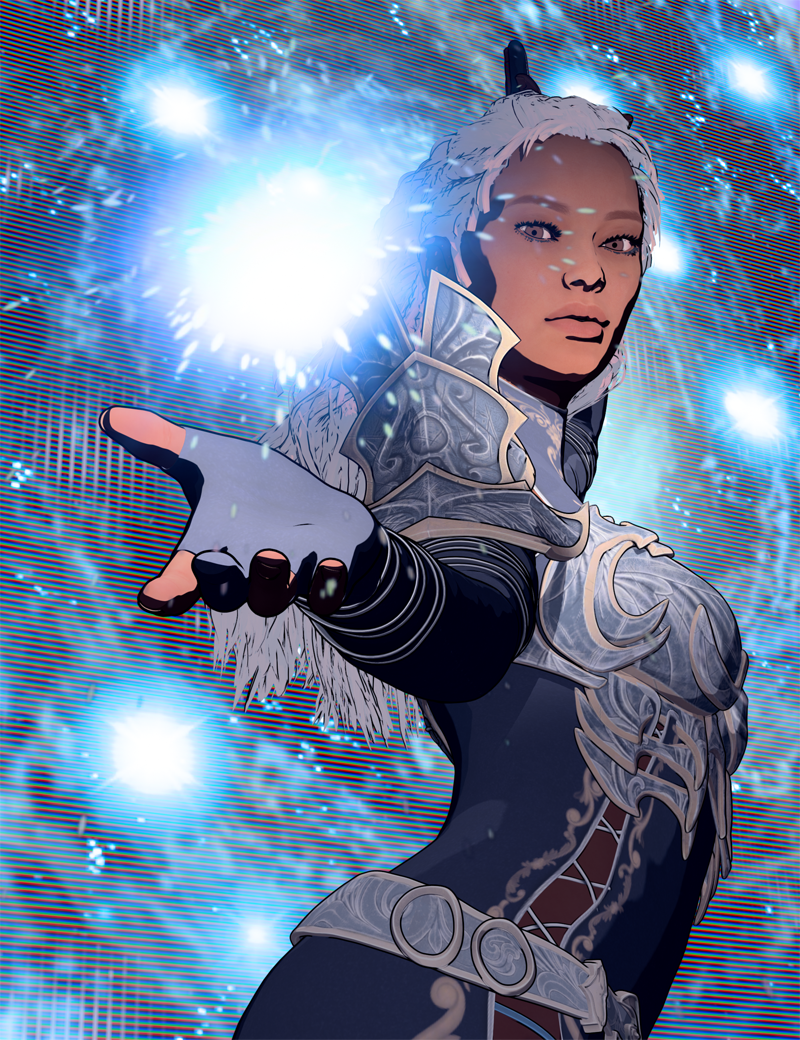
Is anyone else exploring Filatoon? One of my favorite parts is that it renders just about instantly - in about 1 second, even on my older machine! And what you see in the viewport is what you get! So cool!
This looks very nice, and very promising. What, exactly, is Filatoon? Is it a render setting built into Daz Studio or is it a separate product? I saw a bunch of Toon products recently listed, but non of them list a prerequisite for another product. Also, does it allow for pure b&w output?
3D Comic Book Tips And Pictures3Diva said:
I'm so excited about Filatoon! I'm planning on using it for my comic work. Here's the result of an experiment I'm doing with the Filatoon settings and the Filament Draw Options. This is a Filament render with zero post-work:
Is anyone else exploring Filatoon? One of my favorite parts is that it renders just about instantly - in about 1 second, even on my older machine! And what you see in the viewport is what you get! So cool!
This looks very nice, and very promising. What, exactly, is Filatoon? Is it a render setting built into Daz Studio or is it a separate product? I saw a bunch of Toon products recently listed, but non of them list a prerequisite for another product. Also, does it allow for pure b&w output?
Anime Toons and Filatoon Shader Q&ATheNathanParable said:
necroscension said:
TheNathanParable said:
I haven't tried this myself yet, but I wonder if it might be better to use one of those skydome products rather than a HDRI background, such as Iray Worlds or Worldbase by Magix 101.
https://www.daz3d.com/iray-worlds-skydome
https://www.daz3d.com/the-all-new-worldbase-xt-lushlands
At least then you won't have to worry about the background being pixellated.
I have the first product, I'll give it a try.
I had attempted using a plane and a sphere to create a background but those pixelated as well. The main reason the pixelation became a problem for me is that the hdr I was trying to use had a painted look that got ruined by the resampling.
Vick 9 | Daz 3D -> I had to render the background using Iray in order to retain the painted look.
(edit) Unfortunately Filament doesn't like the product, I guess because it uses the sky image in both the Emission and Luminance properties in Surfaces (view attachment).
Have you tried applying the Filatoon shader to the backdrop? The default iray shaders may not translate well to filament.I applied the general shader and moved the image in the Emission slot to the base slot. Unfortunately the images are being resampled (see attached).Anime Toons and Filatoon Shader Q&A
Have you tried applying the Filatoon shader to the backdrop? The default iray shaders may not translate well to filament.necroscension said:TheNathanParable said:
I haven't tried this myself yet, but I wonder if it might be better to use one of those skydome products rather than a HDRI background, such as Iray Worlds or Worldbase by Magix 101.
https://www.daz3d.com/iray-worlds-skydome
https://www.daz3d.com/the-all-new-worldbase-xt-lushlands
At least then you won't have to worry about the background being pixellated.
I have the first product, I'll give it a try.
I had attempted using a plane and a sphere to create a background but those pixelated as well. The main reason the pixelation became a problem for me is that the hdr I was trying to use had a painted look that got ruined by the resampling.
Vick 9 | Daz 3D -> I had to render the background using Iray in order to retain the painted look.
(edit) Unfortunately Filament doesn't like the product, I guess because it uses the sky image in both the Emission and Luminance properties in Surfaces (view attachment).
Anime Toons and Filatoon Shader Q&ATheNathanParable said:
I haven't tried this myself yet, but I wonder if it might be better to use one of those skydome products rather than a HDRI background, such as Iray Worlds or Worldbase by Magix 101.
https://www.daz3d.com/iray-worlds-skydome
https://www.daz3d.com/the-all-new-worldbase-xt-lushlands
At least then you won't have to worry about the background being pixellated.
I have the first product, I'll give it a try.
I had attempted using a plane and a sphere to create a background but those pixelated as well. The main reason the pixelation became a problem for me is that the hdr I was trying to use had a painted look that got ruined by the resampling.
Vick 9 | Daz 3D -> I had to render the background using Iray in order to retain the painted look.
(edit) Unfortunately Filament doesn't like the product, I guess because it uses the sky image in both the Emission and Luminance properties in Surfaces (view attachment).
FilaToon / Cell shaded rendering with FilamentVenger1979 said:
Progressed a little on the toons. How should i work with environments? Adding dodgy cartoon background like this isnt like the real thing.
I personally recommend two things:
1) Invest in some simple environments. Maybe even go for the older pre-iray environments, as they tend to have simpler geometry that might work better with Filament.
2) Invest in some of the Filament specific products available here, such as https://www.daz3d.com/atmosphere-for-filament or https://www.daz3d.com/sy-atmospheric-blur-filament to add a bit more colour detail to the backgrounds.
With those aformention products, you'll need to apply the filatoon shader to them (I recommend the "constant" preset) and then making sure to turn off "cast shadows" in the shader settings.
How do I keep my dots from going awayCybersox said:
Dotify is an iray shader combined with iray decals, so it has to be rendered using the Iray engine, whereas the new toon shader system is a Filament shader (with a geoshell ad-on for the toon outline) and is run in the completely different Filament rendering system. So, in-render, they're completely incompatible. That said, you could try rendering the characters twice, once in Iray with Dotify, and once in FIlament using FIllatoon, and then try combining them in post with Photoshop.
Thank you for your reply. I tried doing what you said. I'm not sure if it is an improvement or not
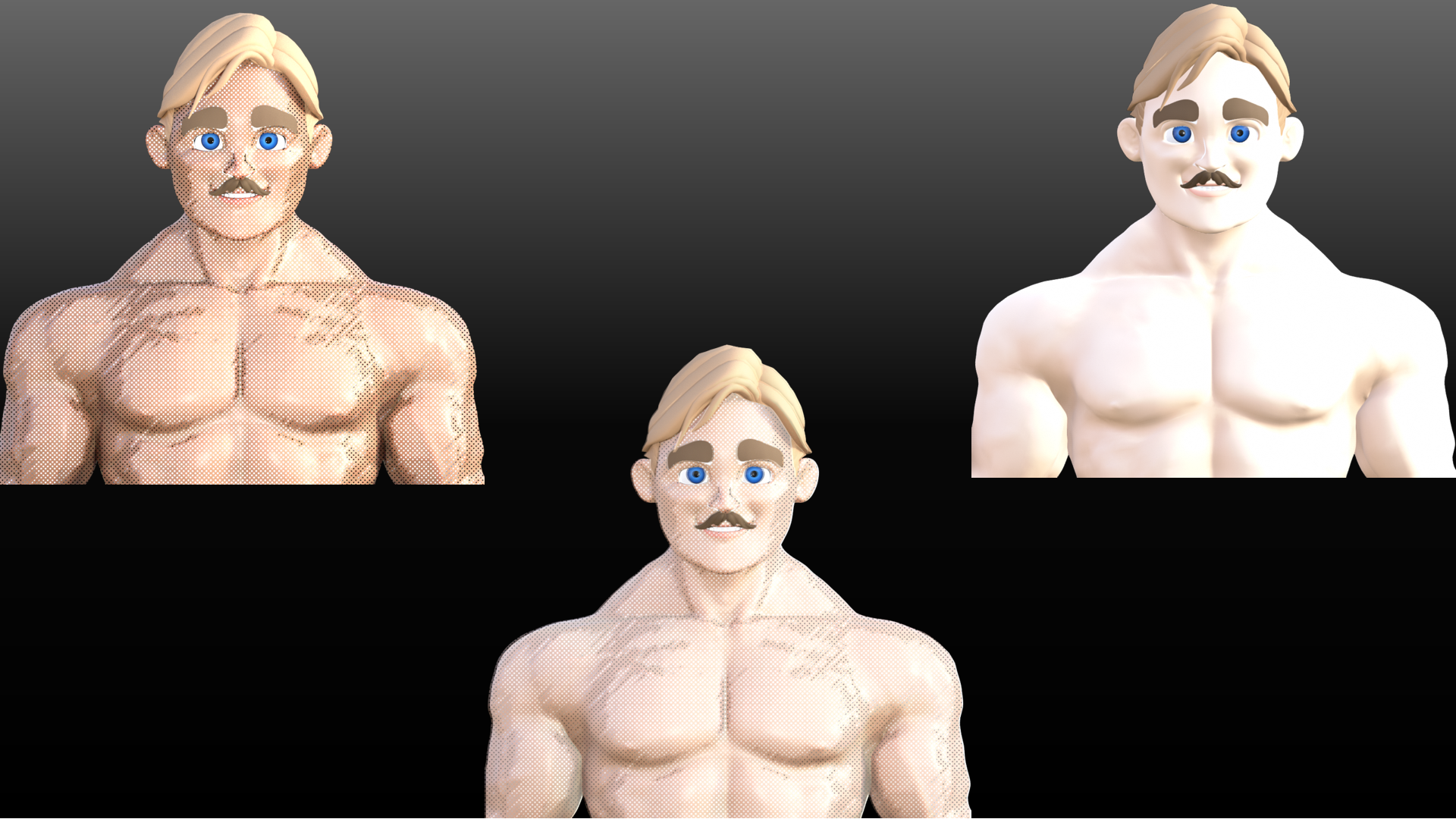 How do I keep my dots from going away
Dotify is an iray shader combined with iray decals, so it has to be rendered using the Iray engine, whereas the new toon shader system is a Filament shader (with a geoshell ad-on for the toon outline) and is run in the completely different Filament rendering system. So, in-render, they're completely incompatible. That said, you could try rendering the characters twice, once in Iray with Dotify, and once in FIlament using FIllatoon, and then try combining them in post with Photoshop.
I have a question about daz and hardware??(solved)You do seem to need an upgrade, specially for Daz with iray or any other nvidia base rendering.
Upgrading CPU (+mother/+ram) will help, but not much. GPU is the priority if you want iray rendering.
Alternatives? Staying in daz, filament instead of iray.
Alt2: Load assets in Daz, then export to other programs that works better with an AMD GPU.
AIUTO...CHI CONOSCE L’ITALIANO? PARTE QUATTORDICI
No, ma essendo uno shader, è non essendo stato modificato il motore di rendering, dovrebbe funzionare.Tiziano said:Crios said:
Comunque ho scarica G9, e DAZ mi ha fatto fare un download di altri aggiornamenti, ma non va. Quando renderizzo in Filament, tipo la maglia del ragazzo, mi parte il render in 3Delight,e non in filament. Quando provo a renderizzare G9F anime, mi parte il render in Iray. NB: uso l'ambient nel pacco della ime, e selezione sia la visuale in Filament che il render in View content, non seleziono né 3Delight né Iray.
Usi l'ultima versione di DS?
Anime Toons and Filatoon Shader Q&AArtini said:
Does anybody has succeded with the conversion of Iray HDRI Skydomes to FilaToon?
If so, how to proceed.
Same here. My attempts resulted in resampled background images, making the smooth images blocky/pixelated. There doesn't appear to be a max image size setting for Filament like there is for Iray (unless I'm overlooking it), so I'm under the impression Filament uses a default setting. I had to resort to rendering the background in Iray and the figure without the background in Filament and then merge the two in Photoshop/Gimp.
(edit) So Filament allows hdr's to be used, but it looks like not all hdr's are usable (though they may work in Iray). It takes a moment for the Draw Settings to update with the new hdr, with nothing updating if hdr is unusable (a bug maybe?) And like I mentioned, the hdr's are resampled to give that lovely re-sized blurred yet pixelated look. IBL Skies - Scattered Clouds | Daz 3D for example works, but the clouds get pixelated.
(edit 2) Hdr's that act unusable can be "corrected" by re-saving them in Photoshop and then reloaded into DazStudio.
Daz 3D is part of

Connect
DAZ Productions, Inc.
7533 S Center View Ct #4664
West Jordan, UT 84084Licensing Agreement | Terms of Service | Privacy Policy | EULA
© 2026 Daz Productions Inc. All Rights Reserved.