-
Changes to Infinite Skills Carrara Training
Thanks Phil for such a quick reply!!
I scoured through the disks but to no avail and as you said the morphs for Victoria 4 are no longer present at DAZ3d.
I"ll try to make the best of what I have.
Thank you having taken the time to create these tutorials and I hope your new ventures go in the direction you want them to.
Cheers
Anthony
Changes to Infinite Skills Carrara TrainingI think you may find it on the disks that you have - I included a bunch of working files which should be included with the distribution disks.
However the Injection Morphs sound like those for Victoria 4 which are a Daz product. At the time V4 was the most up to date figure and most people would already have the head and body morphs packages. Of course times have moved on and more recent figures are available - albeit that Carrara only supports up to Genesis 2 figures natively.
GoZ wierdnessI have an odd problem in Zbrush--I can use theGoZ plugin for everything in a scene except one figure, a Victoria 7 HD. I have literally tried all the other files in the scene but this one always comes up with an error message "Unable to connect with Pixologic Zbrush. Check the. installation". I can't figure out why this one figure is not working. I was able to create a character from the figure that wouldn't transfer and paste the figure to the new character and aligned the two. The new figure transfers easily to Zbrush so my problem is resolved but I'm curious to know if anyone else has had this issue. I'd like to prevent this from happening in the future as the workaround takes a bit of time.
Poser format wrong geometryAs jestmart indicated, Sarah, poses are usually designed to work with a specific figure, i.e. Victoria 4, Genesis, Genesis 3 Female, Genesis 8 Female, etc., etc.. Attempting to use a pose designed for one figure on another will sometimes work, sort of, but invariably there are issues of some sort related to the differences between the figures. The issues are not only related to the differences in the geometries of the different figures, but also the differences in how they are rigged and how the joint movements work.
There are some conversions possible if you really must use poses designed for one figure on another, but they tend to address specific figure to figure conversions. The number of possibilities is very large, so you would need to be more specific in providing the figures the poses are designed for, and the figure that you are attempting to apply them to.
Gigi Hair Genesis 8 Female helpCould someone tell me why I'm getting this weird color along the cap. Its Gigi Hair Genesis 8 Female on Victoria 8. Is that a shadow? I' using an environment and 3 pt light rig, but the strange color is there evn without the three point rig. Is it the surface maps perhaps? Appears even using all default render settings iray. This of course is the preview window not a render.
Tired of Sassy, need AwkwardThis one, right?
https://www.daz3d.com/shy-girl-poses-for-teen-josie-8-and-victoria-8
That is a great set. Wishlisted right away. :)
Thanks! :)
Issues with Fantasy Skins for G8 - Unable to apply materialsWorked fine for me.
@May Dawney "I don't install in the default directory, which is most likely why Victoria, Michael, and She Freak are broken for me"
None of my Content paths are default. You just need to have the Install Manager and Content Directory Manager paths be identical. All your content paths must be mapped within Studio.
It is entirely possible I broke something there. @TrraceSL, I do use my D drive as my C drive is a tiny POS that does no one any good ;-)
I have attached screenshots.Issues with Fantasy Skins for G8 - Unable to apply materialsWorked fine for me.
@May Dawney "I don't install in the default directory, which is most likely why Victoria, Michael, and She Freak are broken for me"
None of my Content paths are default. You just need to have the Install Manager and Content Directory Manager paths be identical. All your content paths must be mapped within Studio.
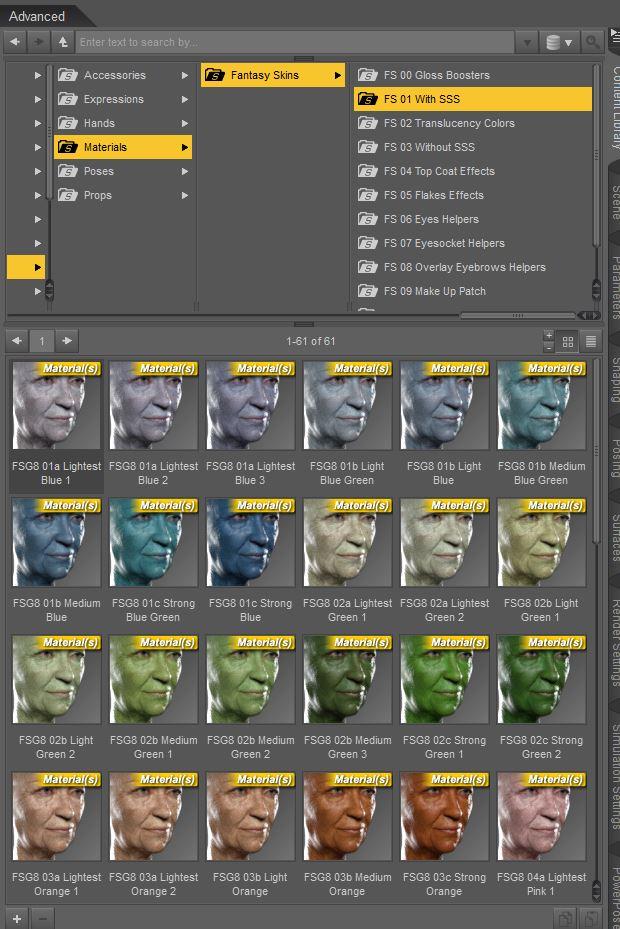 Issues with Fantasy Skins for G8 - Unable to apply materials
So, bought the package, install was nominal, but the materials aren't accessible (see screenshot). It does say the package is installed when I right click on the package.
I don't install in the default directory, which is most likely why Victoria, Michael, and She Freak are broken for me, but material and light packages never give me issues after installing them through the manager and then manually installing them in DAZ as well. Does this package need default installation to work? Any other fixes?
Thank you!
MayWhat kind of clothing are you sorely missing?I've only been doing 3D art for a couple of years now, but it seems like the V4 era had a lot of really big elaborate outfits and armour that I'd love to see brought to the newer gen. I've tried transferring some of those types of outfits to the newer gens but due to their "largeness", things get warped, even with really good transfer scripts like RiversoftArt and Sickleyield's.
We get awesome elaborate outfits like that every once in a while but they're very few and far between:


There are already some amazing V4 era pieces that would be great to be able to use on the new generations.


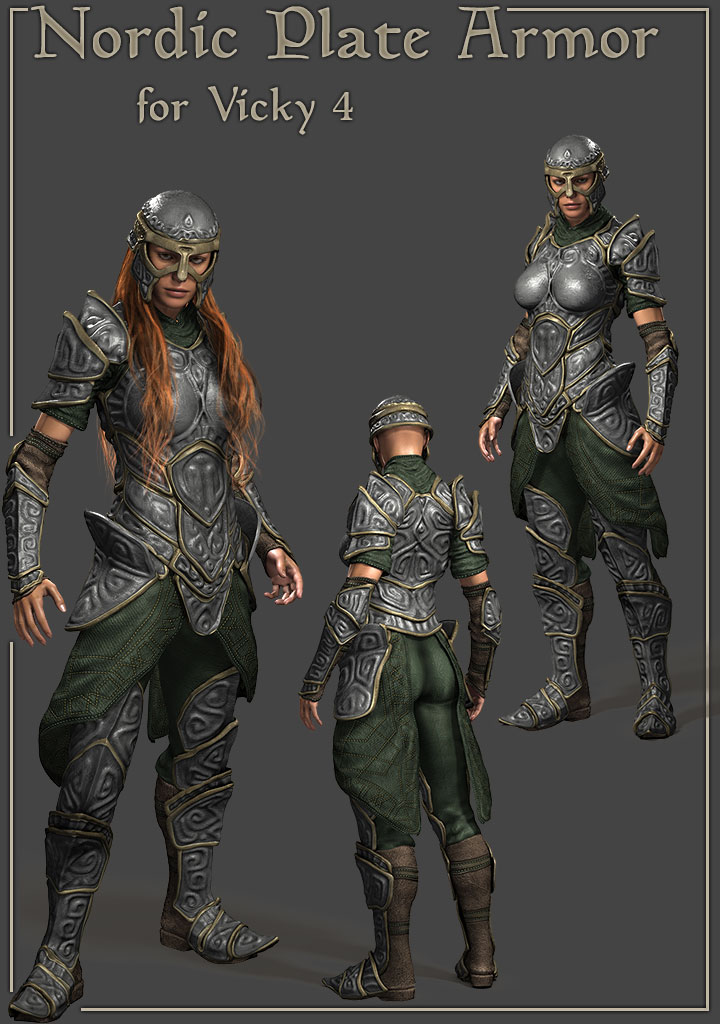
There are SO MANY great Victoria 4 era pieces and it's such a shame that they don't transfer well via clones or scripts. I think if some took the time to bring those already sculpted gorgeous outfits and updated them for the newer gen, it would be amazingly good! I think a lot of people would love to be able to use those highly detailed and elaborate outfits on the newer generations without the warps and misfits that often come with trying to transfer them ourselves via cones and such. Most automated transfer methods just don't do well with the larger, more elaborate, outfits. Not to mention fiddling with the mats and settings to get them Iray compatible.
If some of the gorgeous, elaborate V4 outfits could be updated and brought to the newer gen, I think that would be AWESOME! :)
Agreed. Arki updated The Sylph Outfit for Genesis 8 Female and I would love her to update her other ones as well
There's also the trick of using V4, hiding the head/hands, and using another generation and hiding the body. It helps if you have every morph kit available for V4.
female dragonoo wow she looks elegent and fallowed the were picture is put it in fav,...... so did you do the reform in daz ?or use somthing different .like what did you use for Faraleth file download was easy to do as i do basic stuffAll the editing was done in either Blender or Photoshop. Unfortunately, it's not a simple process - she's never actually been in Daz, as she'd be a collosal pain to import - Daz can't correctly import skeletons (from any file format I've yet tried - apparently taking FBX files via Poser can work, but I don't have Poser), and I really don't want to have to go through the rigging process from step 1 again.
As such, she's always been rendered in other programs.
the drakon is very nice but as female form its not elgent as female gose and like the hips and breast , me be i could play around ,.or could would think i could do like confert into a female form me beAgentUnawares has done some "transgender" morphs (which basically add a G8F shape to G8M, vice versa, and also for G3)
https://www.deviantart.com/agentunawares/art/Transgender-Genesis-8-723851486
https://www.deviantart.com/agentunawares/art/Transgender-Genesis-3-724928721They have their limits and I'm not sure exactly how well they'll work on an extreme shape like Dragkon, but in combination with auto-fit, they're still pretty useful tools. For example, a hypothetical "Michelle 7" (a.k.a. Michael 7 with the transgender morph, and Victoria 7's materials to get rid of the stubble and chest hair) has clearly been spending time at the gym, but it's still a plausible result.

You can also with models that don't rely on geographs or too heavily on HD morphs (however, unfortunately, Dragkon isn't such a model) use Daz's transfer utility and some of the UV swap products out there to permanently convert a non-HD version of the morph to the other gender - I've actually done that with one of RawArt's other models, Boaris (although the fang shape needed a little clean-up in Blender). The results, plus quite a lot of extra dial spinning, can be seen here:

intresting thanks for info , well i did convert the female dragon in blender but yes the riging is not happing , am not great in blender i had watch video on youtube to just do the converting then save as obj and save textures it looks nice but thats about it i was thinking i could use hex highlight movmen needed and then resend in to daz ,............... but i did download the lizards it has both sexses and i done the addons textures so can play around with that i could use the tail and wings from drakon to the lisards , see how works ............. i did play around with drakon male mrphed the chest bit to pop out a bit ,i could then move into hex and bring chest out bid more but is still kinda beafed up at moment i play around see wat i can do
any way thanks for info
What kind of clothing are you sorely missing?I've only been doing 3D art for a couple of years now, but it seems like the V4 era had a lot of really big elaborate outfits and armour that I'd love to see brought to the newer gen. I've tried transferring some of those types of outfits to the newer gens but due to their "largeness", things get warped, even with really good transfer scripts like RiversoftArt and Sickleyield's.
We get awesome elaborate outfits like that every once in a while but they're very few and far between:
There are already some amazing V4 era pieces that would be great to be able to use on the new generations.
There are SO MANY great Victoria 4 era pieces and it's such a shame that they don't transfer well via clones or scripts. I think if some took the time to bring those already sculpted gorgeous outfits and updated them for the newer gen, it would be amazingly good! I think a lot of people would love to be able to use those highly detailed and elaborate outfits on the newer generations without the warps and misfits that often come with trying to transfer them ourselves via cones and such. Most automated transfer methods just don't do well with the larger, more elaborate, outfits. Not to mention fiddling with the mats and settings to get them Iray compatible.
If some of the gorgeous, elaborate V4 outfits could be updated and brought to the newer gen, I think that would be AWESOME! :)
Agreed. Arki updated The Sylph Outfit for Genesis 8 Female and I would love her to update her other ones as well
[Released] RSSY Hair Converter from Genesis 2 Female to Genesis 8 Female [Commercial]Hi! What is "Multi-pair hair"? And what are "Wearables" in general?
And, is there any hope that "Eloiny Hair PLUS for Victoria 4 and Genesis 2 Female(s)" would convert? Maybe at least without the hat?
I'm guessing Birthday Girl Hair would be fine, but not Scarf Braid Hair because of the scarf? Nor would Vidal Braids Hair because of the wooden things at the end of the braids?
I never used those products and many others beyond hair, out of frustration over a GPU that could barely handle 3DL. I've finally upgraded a bit to where even iray works(!), sorta, so I'm back in the game. I really appreciate products like yours which help to keep older items available to us.
What I mean about multi-part hair is hair that loads as multiple objects. If a hair loads as one object with subobjects, that is fine. I have converted both Scarf Braid Hair and Vidal Hair and they work.
 What kind of clothing are you sorely missing?
I've only been doing 3D art for a couple of years now, but it seems like the V4 era had a lot of really big elaborate outfits and armour that I'd love to see brought to the newer gen. I've tried transferring some of those types of outfits to the newer gens but due to their "largeness", things get warped, even with really good transfer scripts like RiversoftArt and Sickleyield's.
We get awesome elaborate outfits like that every once in a while but they're very few and far between:
There are already some amazing V4 era pieces that would be great to be able to use on the new generations.
There are SO MANY great Victoria 4 era pieces and it's such a shame that they don't transfer well via clones or scripts. I think if some took the time to bring those already sculpted gorgeous outfits and updated them for the newer gen, it would be amazingly good! I think a lot of people would love to be able to use those highly detailed and elaborate outfits on the newer generations without the warps and misfits that often come with trying to transfer them ourselves via cones and such. Most automated transfer methods just don't do well with the larger, more elaborate, outfits. Not to mention fiddling with the mats and settings to get them Iray compatible.
If some of the gorgeous, elaborate V4 outfits could be updated and brought to the newer gen, I think that would be AWESOME! :)
female dragonoo wow she looks elegent and fallowed the were picture is put it in fav,...... so did you do the reform in daz ?or use somthing different .like what did you use for Faraleth file download was easy to do as i do basic stuffAll the editing was done in either Blender or Photoshop. Unfortunately, it's not a simple process - she's never actually been in Daz, as she'd be a collosal pain to import - Daz can't correctly import skeletons (from any file format I've yet tried - apparently taking FBX files via Poser can work, but I don't have Poser), and I really don't want to have to go through the rigging process from step 1 again.
As such, she's always been rendered in other programs.
the drakon is very nice but as female form its not elgent as female gose and like the hips and breast , me be i could play around ,.or could would think i could do like confert into a female form me beAgentUnawares has done some "transgender" morphs (which basically add a G8F shape to G8M, vice versa, and also for G3)
https://www.deviantart.com/agentunawares/art/Transgender-Genesis-8-723851486
https://www.deviantart.com/agentunawares/art/Transgender-Genesis-3-724928721They have their limits and I'm not sure exactly how well they'll work on an extreme shape like Dragkon, but in combination with auto-fit, they're still pretty useful tools. For example, a hypothetical "Michelle 7" (a.k.a. Michael 7 with the transgender morph, and Victoria 7's materials to get rid of the stubble and chest hair) has clearly been spending time at the gym, but it's still a plausible result.
You can also with models that don't rely on geographs or too heavily on HD morphs (however, unfortunately, Dragkon isn't such a model) use Daz's transfer utility and some of the UV swap products out there to permanently convert a non-HD version of the morph to the other gender - I've actually done that with one of RawArt's other models, Boaris (although the fang shape needed a little clean-up in Blender). The results, plus quite a lot of extra dial spinning, can be seen here:
[Released] RSSY Hair Converter from Genesis 2 Female to Genesis 8 Female [Commercial]Hi! What is "Multi-pair hair"? And what are "Wearables" in general?
And, is there any hope that "Eloiny Hair PLUS for Victoria 4 and Genesis 2 Female(s)" would convert? Maybe at least without the hat?
I'm guessing Birthday Girl Hair would be fine, but not Scarf Braid Hair because of the scarf? Nor would Vidal Braids Hair because of the wooden things at the end of the braids?
I never used those products and many others beyond hair, out of frustration over a GPU that could barely handle 3DL. I've finally upgraded a bit to where even iray works(!), sorta, so I'm back in the game. I really appreciate products like yours which help to keep older items available to us.
Trying not to scream. (The only good bug is a dead bug!)Today I reinstalled to a new hard drive. I didn't bother trying to move everything, I just went in, uninstalled, and reinstalled it. I didn't go hunting for every last folder/ini/registry setting. (I should have known better) and was hoping to escape a few bugs I was having.
For one, I cannot run clothing converters. Genesis 2 to 8, genesis 3 to 8. Genesis to Genesis 8 never did work properly, even when the interface loaded. (I'd point it to the Daz Connect folder, and after waiting FOREVER, it would then tell me that there was nothing to convert.)
Some items, though installed, show an odd icon on their thumbnail, with a "U" on it. I can't uninstal it. I can't install it.
I load a Genesis 8 female, load a Genesis 8 Male dForce wardrobe item, hit fit to, and it crashes to desktop. It fits regular gen8 clothing items. I can load the Gen8 Male dforce item to the scene just fine. But when I click "fit to" it crashes. I tested Gen8 female dForce items, and they work just fine.
I keep getting the "update" icon for products that are installed. I click update, it takes a while to process, and then nothing happens. Stil says there's an update.
I've posted about bugs before. This is getting old, fast. I've spent a lot of money for these products, and I can't use them. Understand my frustrations. I've reloaded the database. I've reloaded metadata. I've reset defaults. This shouldn't be so damn hard. If I uninstall a program, it should be eradicated from a system, and a fresh install should be free of any glitches caused by a previous install. Instead, I keep getting the same ones back, and then some new ones. If I reload database, for instance, it loses a bunch of stuff that I then have to reinstall.
It's very frustrating.
Now I've gone and bought an nVidia video card to speed up renders. Only I'm trying not to feel as if I've just been wasting money because crap don't work. I can understand maybe old genesis stuff failing, or victoria 4 crap, but no. The three different dForce items are less than a year old. The converters are all new. I've had good luck witht he gen3-gen8 converter on my laptop. I just got the gen2-gen8. The genesis-gen8 doesn't work no matter where I try it.
On top of that, certain utilities don't show up. LineRender9000, for instance.
Do I have to reinstall Windows to sort this problem out? What the heck is causing it? And please, some simple answers would be just great. My previous post on bugs after the last hard drive move got a bit cluttered up with "advice" that wasn't helpful. "Reset the CMS?" WHERE?!? Shouldn't it reset when I reinstall the damn program?
I've lost days trying to sort this crap out. I just want to sit at my computer and make some art. I've got a new book cover to do, a webcomic I'm trying to get done...
Attaching the log file. Also going to submit a report. I just want to get some work done.
2019-03-01 23:47:10.709 Loaded file: genesis 8 basic female.duf
2019-03-01 23:47:11.032 WARNING: cloud\dzcloudstorewgt.cpp(1054): https://www.daz3d.com/skin/frontend/enterprise/daznew/groups/embeddable_scripts-918eab20546d8226ed168dc037883c8c.js(33): primaryNodeSelectionChanged
2019-03-01 23:47:11.032 WARNING: cloud\dzcloudstorewgt.cpp(1054): https://www.daz3d.com/skin/frontend/enterprise/daznew/groups/embeddable_scripts-918eab20546d8226ed168dc037883c8c.js(33): lastSearchChanged
2019-03-01 23:47:11.032 WARNING: cloud\dzcloudstorewgt.cpp(1054): https://www.daz3d.com/skin/frontend/enterprise/daznew/groups/embeddable_scripts-918eab20546d8226ed168dc037883c8c.js(32): new filters are
2019-03-01 23:47:11.048 WARNING: cloud\dzcloudstorewgt.cpp(1054): https://www.daz3d.com/skin/frontend/enterprise/daznew/groups/embeddable_scripts-918eab20546d8226ed168dc037883c8c.js(32): filter-picker len
2019-03-01 23:47:11.048 WARNING: cloud\dzcloudstorewgt.cpp(1054): https://www.daz3d.com/skin/frontend/enterprise/daznew/groups/embeddable_scripts-918eab20546d8226ed168dc037883c8c.js(32): triggering query
2019-03-01 23:47:11.282 Loaded image g8fbaselegsmapd_1003.jpg
2019-03-01 23:47:11.360 Loaded image g8fbaseeyes01_1007.jpg
2019-03-01 23:47:11.548 Loaded image g8fbasearmsmapd_1004.jpg
2019-03-01 23:47:11.642 Loaded image g8fbasemouthmapd_1005.jpg
2019-03-01 23:47:11.845 Loaded image g8fbasefacemapd_1001.jpg
2019-03-01 23:47:12.063 Loaded image g8fbasetorsomapd_1002.jpg
2019-03-01 23:47:12.126 Loaded image g8fbaseeyelashes_1006.jpg
2019-03-01 23:47:20.067 WARNING: libpng warning: iCCP: known incorrect sRGB profile
2019-03-01 23:47:20.067 WARNING: libpng warning: iCCP: known incorrect sRGB profile
2019-03-01 23:47:23.645 Loading script: G:/My Daz 3D Library/data/cloud/1_55959/scripts/riversoft art/clothing converter/rssy clothing converter g2f to g8f.dse
2019-03-01 23:47:23.660 DEBUG: Found: G:/My Daz 3D Library/data/cloud/1_53295/data/riversoft art/common/rsconstants.dsa
2019-03-01 23:47:23.692 DEBUG: Found: G:/My Daz 3D Library/data/cloud/1_54451/data/riversoft art/common/rsccconstants.dsa
2019-03-01 23:47:23.707 WARNING: Script Error: Line 1
2019-03-01 23:47:23.707 WARNING: SyntaxError: Parse error
2019-03-01 23:47:23.707 WARNING: Stack Trace:
<anonymous>()@G:/My Daz 3D Library/data/cloud/1_54451/data/riversoft art/common/rsccconstants.dsa:1
2019-03-01 23:47:23.707 Error in script execution: G:/My Daz 3D Library/data/cloud/1_55959/scripts/riversoft art/clothing converter/rssy clothing converter g2f to g8f.dse
2019-03-01 23:47:46.937 WARNING: cloud\dzcloudtasknotifier.cpp(178): peer performed orderly shutdown errno=0
2019-03-01 23:49:03.140 WARNING: cloud\dzcloudtasknotifier.cpp(178): peer performed orderly shutdown errno=0
2019-03-01 23:50:28.373 WARNING: cloud\dzcloudtasknotifier.cpp(178): recv failed errno=10054
2019-03-02 00:18:30.233 WARNING: libpng warning: iCCP: known incorrect sRGB profile
2019-03-02 00:18:30.233 WARNING: libpng warning: iCCP: known incorrect sRGB profile
2019-03-02 00:18:31.796 Loading script: G:/My Daz 3D Library/data/cloud/1_55959/scripts/riversoft art/clothing converter/rssy clothing converter g2f to g8f.dse
2019-03-02 00:18:31.796 DEBUG: Found: G:/My Daz 3D Library/data/cloud/1_53295/data/riversoft art/common/rsconstants.dsa
2019-03-02 00:18:31.796 DEBUG: Found: G:/My Daz 3D Library/data/cloud/1_54451/data/riversoft art/common/rsccconstants.dsa
2019-03-02 00:18:31.796 WARNING: Script Error: Line 1
2019-03-02 00:18:31.796 WARNING: SyntaxError: Parse error
2019-03-02 00:18:31.796 WARNING: Stack Trace:
<anonymous>()@G:/My Daz 3D Library/data/cloud/1_54451/data/riversoft art/common/rsccconstants.dsa:1
2019-03-02 00:18:31.796 Error in script execution: G:/My Daz 3D Library/data/cloud/1_55959/scripts/riversoft art/clothing converter/rssy clothing converter g2f to g8f.dseAltern8 Lee 8hahah It's called Altern8 because it's based on my skin shader product Altern8 Skin Shader System for Genesis 8 (though Altern8 Lee 8 is a stand-alone product and the Altern8 Skin Shader System product isn't required to use it). :)
I wanted to note, since it's been asked on the other thread, that it DOES include shaders that can be used on other Genesis 8 Male, Genesis 8 Female, Genesis 3 Male, and Genesis 3 Female characters.
Here are a couple of variations of Victoria 7 using the Altern8 Lee 8 Shaders.
This one is- Maps Load Setting, Skin Shader 03, and Shine Strength Shader 08:
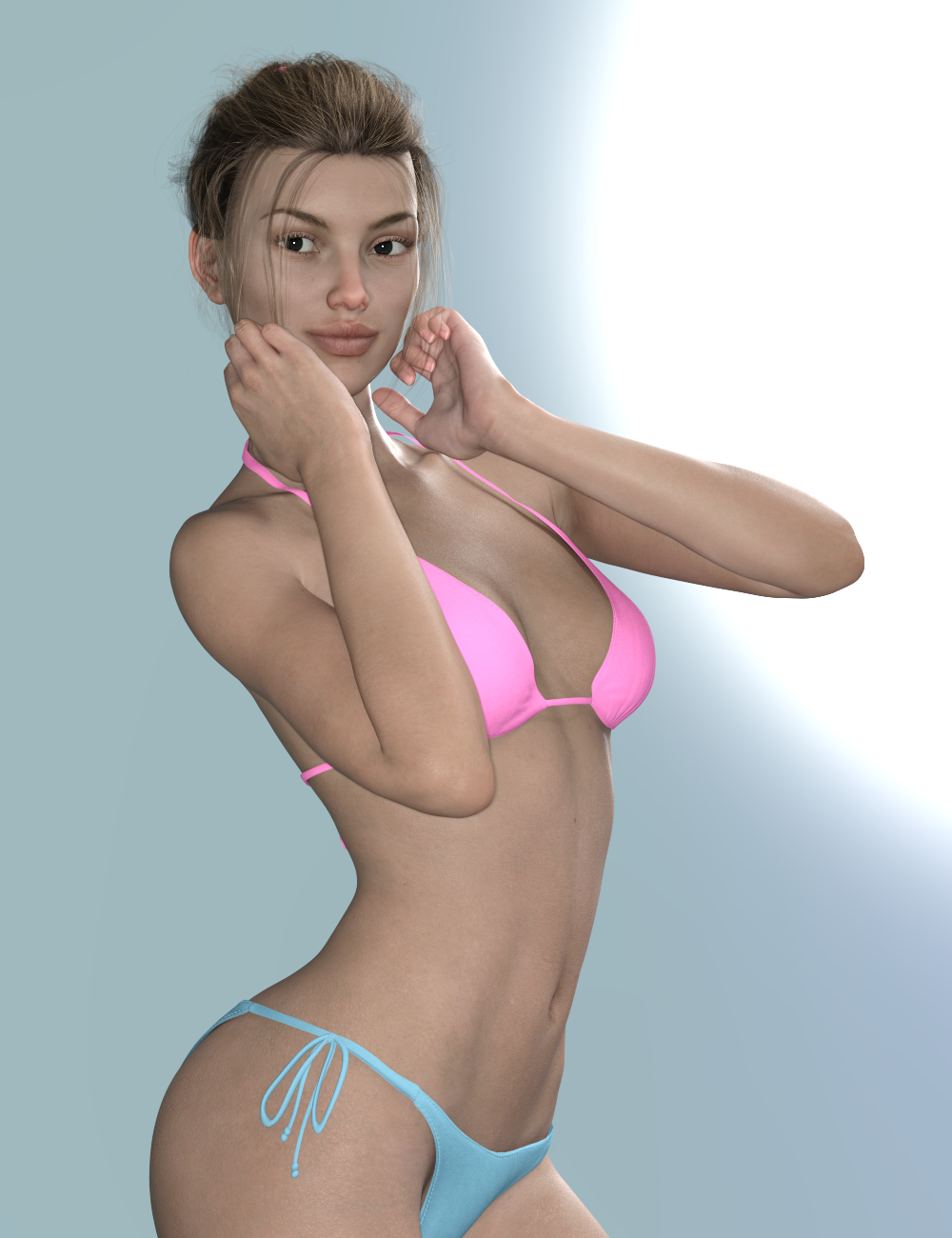
This one is- Maps Load Setting, Skin Shader 04, Shine Strength Shader 09, and SSS Tint Shader 10:
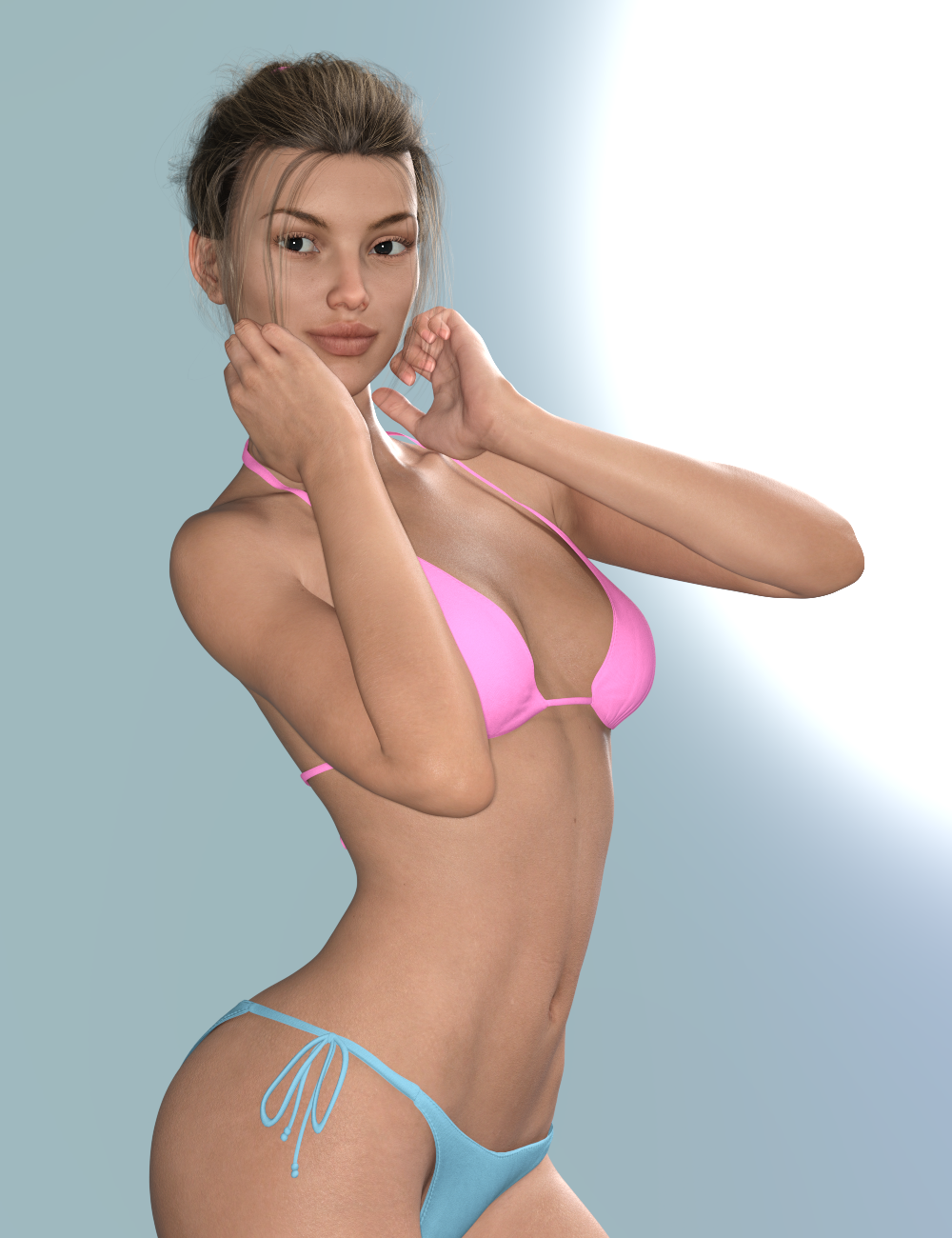
There are a total of 7 base skin setting shaders, 15 shine strength shaders, and 12 SSS tint shaders - that can be used on other Genesis 8 and Genesis 3 characters.
[Released] Altern8 Lee 8 (Commercial)Here are a couple of variations of Victoria 7 using the Altern8 Lee 8 Shaders.
This one is - Maps Load Setting, Skin Shader 03, and Shine Strength Shader 08:
This one is - Maps Load Setting, Skin Shader 04, Shine Strength Shader 09, and SSS Tint Shader 10:
[Solved] M4 Critical Error while trying to load himits to do with the order of your Poser runtimes
he needs to be in the first one added to DAZ studio if you have several
and you cannot have a duplicate of him or V4 in another one
Thank you Wendy. I will work on removing all of them then reinstall starting with Michael. Do I need to do that with just the basic Michael files, or do I need to then install Freak & Hiro before installing Victoria and her morphs?
I use both DAZ & Poser so my Gen 4 chars are all installed in a Poser runtime which is then pointed to within DAZ. I will make sure that I do not accidentally have him installed into both Studio & Poser libraries.
Daz 3D is part of

Connect
DAZ Productions, Inc.
7533 S Center View Ct #4664
West Jordan, UT 84084Licensing Agreement | Terms of Service | Privacy Policy | EULA
© 2026 Daz Productions Inc. All Rights Reserved.