-
One Skin Texture That’ll Fit Every Generation of Genesis & Michael 4 ?
mding said:
If i got it right, you can use any genesis 1/2/3/8/8.1/9 skin texture on every genesis generation and even between male and female using tools like
While I am deeply appreciative of Cayman's work, it should be noted that it does have some drawbacks; HD morphs won't work on the geografted portions, most geoshells for the base figure will no longer work properly, other geografts won't have the new UVs they need to work...
... so there are definitely reasons to want to bake over the textures permanently.
Havos said:
Map transfer only re-maps skins for UVs that are on the same figure. For example on G3F you can map transfer from G3F base to V7. You can not however use it to go from V4 to G3F, as no figure has both of those UVs.
Well, on the above note, I have managed to abuse Cayman's UV geografts to resolve said issue.
With some modification, I was able to come up with a mesh that had full support for both G8 and G9 UVs, and from there permanently bake textures over to the G9 UVs.

(Admittedly, she was originally a G2 character who I'd already transferred to G8, but this was still a permanent G8 to G9 transfer).
Genesis 9 UVs for Genesis 8 and 8.1 [Commercial]alienarea said:
I'll try anyway. Once I have a skin transfered to G8F I can save it as a material preset.
Unfortunately, I can confirm this won't work.
The core is that this product does not, as you put it, "transfer a skin to G8F". Rather than making the textures compatible with G8F, it makes G8F compatible with the the textures.
You can't then jump from there to G8M, because G8M doesn't have the same compatibility. This applies even if you have the G8 UV Swap, as that simply makes G8M compatible with G8F textures, but the textures are still G9 textures (even if, with this asset, G8F can now use G9 textures).
In theory you could use another application like Blender for the purpose of permanently rebaking the textures to the G8F UV (or directly to the G8M UV), but while this product is a useful aid in that process, such a transfer is not an inherent function of this product.
One Skin Texture That’ll Fit Every Generation of Genesis & Michael 4 ?nemesis10 said:
Gordig said:
nemesis10 said:
How they work is pretty simple. Each UV is a map on a sheet as it were. It is possible to remap any figure (go google globe projections to get an idea of the possibilities). If you remap figures to a comfortable number of UV maps, you can thus place your own textures to fit your map. Deepsea's solutions only work with Deepsea's textures and UVs so it isn't a generalized solution to get a Genesis texture on a Genesis 8 figure since it specifically has to be the Deepsea texture and UV.
How would it work if you Map Transferred, say, a G8M texture onto the Adam UVs?
I'm not sure if it is possible; map transfer works well enough between the official figures but I'm not sure how it would work on Adam or a cube for that matter. I suspect that it isn't infinite in its flexibility; you might have better luck in Blender. The next problem is that the resolution of textures isn't equal across generations. All of this going to be a lot of work so there won't be any simple solution.
Map transfer only re-maps skins for UVs that are on the same figure. For example on G3F you can map transfer from G3F base to V7. You can not however use it to go from V4 to G3F, as no figure has both of those UVs.
ultimate-pose-converter-bundle-for-genesis-9Hello Icescrib , I want to retarget aniblocks with morph from genesis 8 to genesis 9 d'you think it will work ?
and animations with aniblocks do not slide on the floor ?
it's animations made with facemotion 3D for GEN 8 .. it makes morph because there is no bones on the the face
there is MOJO for Gen 9 but it's not using french speaking.. although Facemotion use reel face capture .
thank you very much
sorry for the english , i am french
iInstalling my Daz Assets on New Computer [SOLVED]PerttiA said:
MrRogerSmith said:
Thank you for this, but what is the problem with logging in? I've always been logged in on my first PC. Although since I copy/pasted my directory onto this second computer intead of installing using Daz Central I don't have smart content for any of it, so I guess there is no reason to be logged in on the second computer anyway.
You don't need to be logged in to use 'smart' content, the metadata is there, you just need to refresh the database.
The only reason to log in to Daz Studio, is when one has made a consious decision to use Daz Connect (inside Daz Studio) as their primary method of installing content.
The installation location DAZ Connect uses is non-traditional, which does not work with scripts and older content, and whatever gets installed by DAZ Connect, overrides the installations made by the other installation methods (DIM/DAZ Central/Manual installation), even when the DAZ Connect installations fail to work due to for example decryption failures. If content is installed by DIM, DAZ Central or manually and again with DAZ Connect inside DAZ Studio, the content is installed twice, taking twice the space on ones drive.Some scripts, and some older content (mainly ExP morph expansions).
Is there a morph keyframe on the timeline?Is there morph keyframe on the timeline?
I can't seem to find one.Sometimes the morph value changes, although no keyframe ahead. Confuse.
Let's appreciate/discuss today's new releases - ongoing thread
No worries:)Phatmartino said:Ah, my apologies... the system of hiding and then revealing the projections fooled me, for sure. Even so, their addition is well worth it in my opinion, and at least it doesn't add to the clutter of the rest one's G9 morph lists, etc.Let's appreciate/discuss today's new releases - ongoing threadAh, my apologies... the system of hiding and then revealing the projections fooled me, for sure. Even so, their addition is well worth it in my opinion, and at least it doesn't add to the clutter of the rest one's G9 morph lists, etc.[Released] dForce2Morph [Commercial]RiverSoftArt said:
sagoru said:
I've tried adding an image both as an attachment and integrating the image into the text, but to no avail. I try to share the image from Google Drive: https://drive.google.com/file/d/1Yy-DZpf_0xOAXqpB7XRtGfRD_2Uhsr_-/view?usp=sharing
Ok, this is how morphs work. You have the dress fitted to the figure. When the figure is posed, DS automatically makes the dress follow the figure and its pose. Then the morph ADDs to that and moves it. Unfit the dress to the figure and apply the morph. dForce2Morph is more about adding wind morphs and things like that.
I'm currently facing the same issue. Could you implement a checkbox feature that automatically adjusts the clothing before conversion and then reverts it back to its original state after the morph has been created? It's quite frustrating having to manually un-fit the clothing, generate the morph, and then re-fit the cloth again.
The older generation: Victoria 2/3, Michael 2/3 and their children rendersOK, I did a fairly rough & ready autofit clone for G8F from V3 within DS, just lengthening/shortening narrowing/ generally tweaking limbs on V3 so it roughly matched G8F base. Then saved V3 as an obj. Imported the obj as a morph into my Triax Glamorous Vickie 3 and changed the morph to a clone, and..
Discovered that Arryn/Onnel's G8F Nora Cocktail dress and Goldtassel's G8F Cafe curls fitted perfectly. So the image below is Cherubit's G8F Milan next to a Triax Glamorous Vickie with G8F Autofit Clone, and the same G8F clothing & hair with a G8F pose transferred over with my G8F to GV3 pose convertor (did need tweaks as the Left Buttock Pose was wildly wrong)
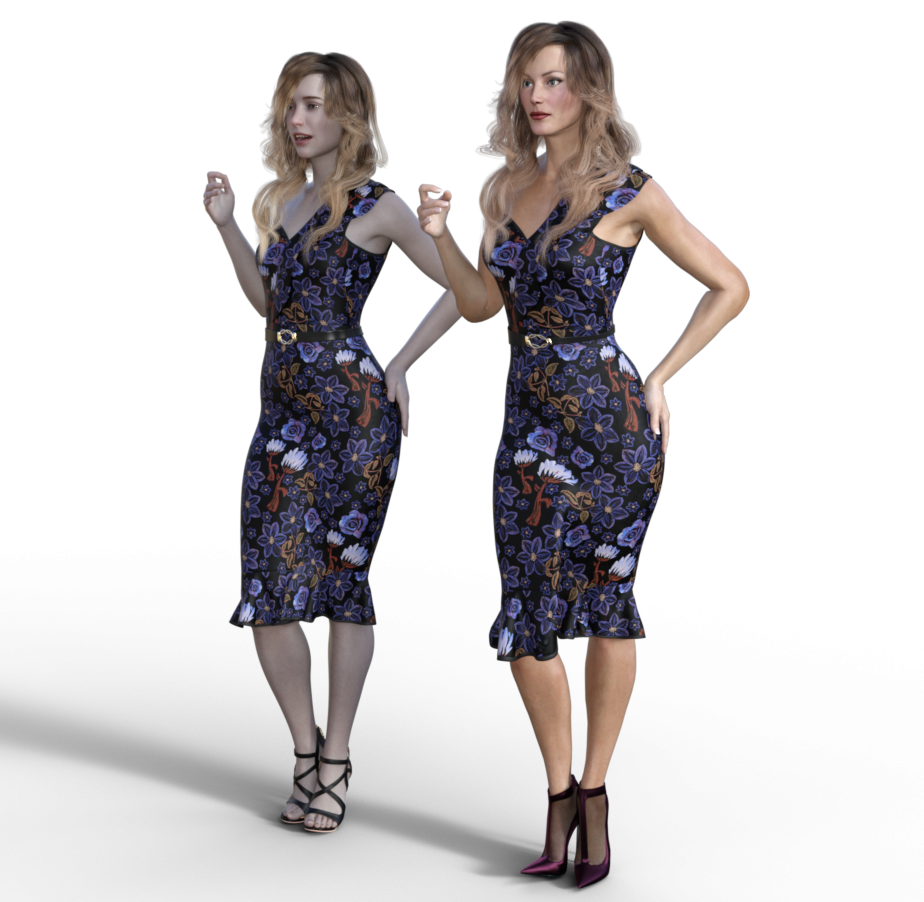
I think this shows Triaxing V3 works. I'm surprised it's never been done before by people who know a lot more than I do.
Regards,
Richard
One Skin Texture That’ll Fit Every Generation of Genesis & Michael 4 ?Gordig said:
nemesis10 said:
How they work is pretty simple. Each UV is a map on a sheet as it were. It is possible to remap any figure (go google globe projections to get an idea of the possibilities). If you remap figures to a comfortable number of UV maps, you can thus place your own textures to fit your map. Deepsea's solutions only work with Deepsea's textures and UVs so it isn't a generalized solution to get a Genesis texture on a Genesis 8 figure since it specifically has to be the Deepsea texture and UV.
How would it work if you Map Transferred, say, a G8M texture onto the Adam UVs?
I'm not sure if it is possible; map transfer works well enough between the official figures but I'm not sure how it would work on Adam or a cube for that matter. I suspect that it isn't infinite in its flexibility; you might have better luck in Blender. The next problem is that the resolution of textures isn't equal across generations. All of this going to be a lot of work so there won't be any simple solution.
Is there any need for classic Hollywood G9 head morphs?wondergirl0706 said:
AOBB said:
@ Eustace Scrubb - Yes, I see now that my Burt Lancaster sculpt needs more TLC. BTW, thank you for appreciating my work!
 As for "Desert Fury" Lancaster was known for his explosive temper, so it kind of fits but it wouldn't work as a head morph name. Nevertheless thanks for the suggestion.
Here's another actor (WIP) - try guessing who that is! I hope it won't be too difficult...


Edit: Changed the image for updated one.
It's Clark Gable.
Well someone was on the tip of my tongue as I thought I recognized your sculpt but it's been one of those days, I can't recall nouns. And it's always nouns I can't recall on these sorts of days. I guess it's a true test if folk get who it is when a bit younger with not quite the hairdo he was most commonly seen with. So much of recognising these famous people have a lot more to do with their typical expressions than I would of thought too.
Thanks you two for correcting me on the cause is dimples. I think you are close but his face needs to be somewhat more angular and thinner, although I suppose with young photos he'd have more baby fat.
One Skin Texture That’ll Fit Every Generation of Genesis & Michael 4 ?There has been a product available in the past to transfer maps from V4/M4 to G1/G3 with Blacksmith3D's Texture Transformer. This worked quite well.
As far as I understood G8 is almost using the same UVs than G3.The best way today would probably be via Blender. Thus you could probably include G9 as well.
Suddenly Getting ErrorsFaeryl Womyn said:
Wasn't using transfer utility, only fitting poser stuff to Genesis and yes my card is old and no longer supported,
There are still newer drivers for it.
https://www.nvidia.com/Download/index.aspx
Go to "Beta and older drivers"Suddenly Getting ErrorsFaeryl Womyn said:
Wasn't using transfer utility, only fitting poser stuff to Genesis and yes my card is old and no longer supported, working on getting a new one, but kinda hard with Christmas coming and a new grand child on the way.
Where do I find "Window's Mini dump file with WinDbg." and ' fatal error dialogue box'.
Congrats first!
How did your DS crash... the application session suddenly disappeared or a dialogue box popped up to show you the crash message ? If it was the latter, you may see the detailed fatal error information there.
For mini dump, you may first check the folder C:\Windows\Minidump, see if there's any latest dump file. If there's nothing in the folder or not dated recently, this way won't help.
Suddenly Getting ErrorsWasn't using transfer utility, only fitting poser stuff to Genesis and yes my card is old and no longer supported, working on getting a new one, but kinda hard with Christmas coming and a new grand child on the way.
Where do I find "Window's Mini dump file with WinDbg." and ' fatal error dialogue box'.
One Skin Texture That’ll Fit Every Generation of Genesis & Michael 4 ?Fauvist said:
Nobody, in all these years, has come up with some solution or hack?
It's a square peg into a round hole sitation. And before some smart alec goes "Ah! They did that in Apollo 13!"... the technical approximation of that here would be Cayman Studios' UV geografts. It took a contraption that did the job of making it "fit", and that's what the geografts are here.
A vendor providing the same skin to all the different generation's UVs is *possible* (as is a technically competent end user doing it - permanent transfer between UV layouts be done through Blender or the like), but it's not generally worth their time. The number of users more than a generation behind is relatively small, and the potential sales increase negligible.
What I am aware of is Deepsea's Adam and Eve that do supposedly have G1 through G8 skins (although I can't confirm that, as I don't own them - mostly because, like I say, most people don't need to). As far as M4 skins... I've a feeling that it's possible that the UV layout was kept between M4 and Genesis, but I honestly don't remember for certain.
https://www.daz3d.com/deepsea-adam-hd-for-genesis-through-genesis-8
https://www.daz3d.com/deepsea-eve-hd-for-genesis-through-genesis-8Suddenly Getting ErrorsIf the last action you were trying to do was using the Transfer Utility, there is/was [depends upon edition and if it was fixed] a glitch which acts differently on different systems.
Before running the transfer utility: EITHER select the clothing OR select "nothing" in the scene tab, then run the utility. One way or the other should work.
The older generation: Victoria 2/3, Michael 2/3 and their children rendersYep, that's what I thought too. But DS4.21 (not tried with earlier) converts the parametric characters to Triax Weight Mapping using menu option 'Edit| Figure| Rigging| Convert to Weight Mapping' and then select Triax Weight Mapping in the mini window that opens up.
The resulting figure operates without any extra distortion that I can see. It isn't any better, though! Also, the character can be saved in the same way as any rigged character as a Figure Asset through 'File| Save As|' as you do for creating a library item. Until I converted to a Triax Weight Mapped figure, DS wouldn't allow me to use the option to save the character.
Having done this you load clothing and fit to the character, and get the normal Compatibility window, which fits the clothing to the newly rigged character.
The GV3 and IV high heel feet don't autofit shoes well from flat footed characters, same as G8F feet don't autofit G3F shoes well. Apart from that, the only thing that doesn't seem to work well is for the clothes to follow character morphs (like GV3's 'Slender Hips' morph), but they do fit the base figure. I'm wondering if these morphs need to be re-created for the clothing to follow them with some other unexplained behind the scenes work done by DS.
If you want to try it yourself, I can write some step by step instructions, and then you can try it to verify for your self that it really does work.
I really can't see why V4 clothes couldn't be used on V3, as I have got A3 hair to work on GV3 as easily as G3F hair works on G8F. A V4/G8F/G9 autofit clone would take some work, though, and creating an A3 autofit clone for V3 takes just a few minutes because they basically use different morphs of the same unimesh. This also means the one clone obj file can be used for all the different Triax Weight Mapped V3 characters. Probably the most useful Triax V3 autofit clone would be G8F. Might try that.
One area that doesn't work at all is 'Prop' clothing. I've V3/GND2 clothing that only extends over one bone, and isn't rigged, just simple props. Bracers, some briefs, some bra's (mostly GND2 stuff) that I have tried are like this. Once I have Triax versions of V3 & GND2 I will use transfer utility to transfer the rigging to the prop clothing and then see how well it moves onto the other characters.
Regards,
Richard.
Is there any need for classic Hollywood G9 head morphs?AOBB said:
@ Eustace Scrubb - Yes, I see now that my Burt Lancaster sculpt needs more TLC. BTW, thank you for appreciating my work!
As for "Desert Fury" Lancaster was known for his explosive temper, so it kind of fits but it wouldn't work as a head morph name. Nevertheless thanks for the suggestion. Here's another actor (WIP) - try guessing who that is! I hope it won't be too difficult...
Edit: Changed the image for updated one.
It's Clark Gable.
Daz 3D is part of

Connect
DAZ Productions, Inc.
7533 S Center View Ct #4664
West Jordan, UT 84084Licensing Agreement | Terms of Service | Privacy Policy | EULA
© 2026 Daz Productions Inc. All Rights Reserved.