-
Carrara Non Photo Realistic Works 2
G9 - Timmy morph
 Let's appreciate/discuss today's new releases - ongoing thread
https://www.daz3d.com/breast-utilities-for-genesis-9 If anyone gets this, if you'd be willing to post what the flat chested morph looks like on the undressed masculine shape I'd appreciate it.
Help me get to Heaven!Then the conclusion is that nothing is actually wrong from a geometry perspective and you got the character as released. I have to say I'm struggling to see the differences as well but I don't own Heaven and I don't have the character right in front of me as you do.
You undoubtedly have some morph packs at this point so I think it's going to be a case of tweaking that model yourself so it matches the promos as you see them. Do bear in mind that PAs are allowed to render some of their promos with different software and to use post-processing work if they wish; I obviously don't know if that was done here (and it seems unlikely looking at your images) but there are often very minor and subtle differences between what the PA illustrates in their promos and what you actually buy. Someone ranted about a chin dimple some time ago on what was actually a very nicely made model (which I bought and which had a dimple!) but they believed the promos misrepresented their purchase (they didn't). Lighting, poses, Photoshop - all of it comes into play.
You've got the skills... you can rebuild her!
Is there any need for classic Hollywood G9 head morphs?Okay, so I've managed to make him despite some negative feelings that were coming up for me while doing this sculpt. I'll probably tweak him a bit but he's mostly ready - the Burt Lancaster likeness. I thought I'd attach a picture of the real actor for comparison. Enjoy!
 Still haven't come up with a name for this head morph.
 Carrara Non Photo Realistic Works 2
G9 - V4 Randomizer morph
 hexagon morphs
I ran into this same problem with a clothing morph for V4
Here's what I had to do to solve it.Edit
Figure
Rigging
Convert figure to weight mapping
Convert to Triax
Accept
Save As
Support Assets
Figure Property Assets
[Customise the popup]
"Accept"
Save As
Support Assets
Morph Asset
[Select the morphed item from the popup list]
Accept
Now you can shut down Daz Studio, reboot it and then load your figure, locate the saved morphed item you just created and load that then "fit" the item to your character.
The morph loads with the morphed item and carries over to any character you "fit" to.To adjust the morph further, open it seperately in Daz, then "Send to Hexagon", adjust it in Hex and "Send to Daz Studio". In the popup, "Overwrite the existing morph" and then repeat the above process to save the new morph to the library.
Help me get to Heaven!The only possibility I can think of is that some unwanted morph or jcm from another character is being dialled in automatically. This can occur when another character in your library hasn't been set up properly but the reason I doubt this is the case is because it usually manifests in a very, very obvious and bizarre way rather than in subtle differences.
Still, it's worth a check: Right click your parameters tab and turn on Preferences -> Show Hidden Properties. Select Currently Used from the pane and have a look through the various controls being applied to your character. Zero out anything that looks out of place or clearly doesn't belong.
If this turns up nothing it would be worth resetting your G8 base just to make sure. Repeat the whole process for G8.1:
Load G8 base and with that model selected right click the parameters tab and click Zero -> Zero Figure. This may take some time to complete depending on how many G8 morphs you have installed.
Right click the parameters tab again and select 'Memorize -> Memorize Figure.
Now from the File menu select Save As -> Support Asset -> Save Modified Assets...
If anything is being overwritten you'll get an Accept/Cancel notification (click accept, obviously!) and you will be shown any currently used morphs that were zeroed out.
I really doubt this is the cause but it's simple enough to do and eliminates unwanted morphs as a cause leaving only the possibility that the author changed their product between creating the promos and releasing it. It has happened in the past but it's very rare.
How to Use dForce: Creating a Blanket, Draping Clothes on Furniture, and Much More [Commercial]Xero7489 said:
hey everyone, i was curious if there was a way to convert genesis 9 clothing to fit genesis 8 models? i know there's a script out there for the opposite, but i was wondering if anyone knew of one to go from gen9 to gen8? or if there was an alternate way to do it if not?
You can easily create a G9 Clone for G8 then use auto-fit for conversions, or use Bone Mapping + Transfer Rigging for conversions.
Is it possible to convert a morph for G8 female into a morph for G8 male?Hello,
I made more tests, and in fact, when I remove some vertices from the "head" group (those close to the eyes, where there is the artifact), this artifact completly disapears. So, I wonder if it could be a problem later to have removed this vertices from the "head" group.
When I will convert the modified G8 into an obj format so as to create an new DS morph, will DS consider that only the vertex positions have been modified, or will it "memorize" that the "head" group composition has been modified too?
For example, if, after creating this new morph, I use the DazToBlender Bridge again to import into Blender the G8 with the new morph I created, do the vertices I remove from the "head" group will be "come back" as vertices of the "head" group, or will they still be removed from this group?And if they are still removed from this group, could it create some issue later when I would want to modify my character or apply poses, animation, etc... ?
Thank you in advance for your answer!
Genesis 8.1 raises model's arms 90 degrees, causing the model to become misalignedskeyqiu said:
crosswind said:
skeyqiu said:
crosswind said:
There's a 'wrong weight' on Left Shoulder Bend - YRotate... As the sweater you made has a loose armhole and a sort of should pad around the collar, you may see, with Left Shoulder Bend - Front-Back -110 degrees, the weight around the armpit is not enough while the weight on the left collar is a bit much. The root reason is that the default weight transferred by TU won't work well on this garment, or did you use some specific projection template when using TU?
You either tweak the weight or directly fix pJCMs. I'm also a MD user. In most of the similar cases, I fix them in Blender or via GoZ because that is fast and with good result. You may also export the 'pose' as a Morph Target to MD and re-simulate the garment, then import back to DS to fix the pJCM.
I ever made a similar top with armhole drop, more or less the same case like the one you have. I fixed 'pJCMShldrFwd_110_L' in Blender as below:
I used pJCM to solve the problem, but is there a way to automatically apply the prepared pJCM according to different poses? I don’t want to import the corresponding pJCM every time I switch poses.
You have to pose the figure manually first, fix the corrective morph by external application and import back the obj as the delta morph to overwrite the existing pJCMs. That's the very typical SOP. Almost all PAs go for this way of fixing. But some products like this will speed up the process to a certain extent . https://www.daz3d.com/pjcm-poses--for-clothing-creators-for-genesis-8
As a trick, we usually fix one side and update pJCMs on both side by using Morph Mirroring or fix symmetrically and update pJCMs by using Attenuate. It'll be a piece of cake for most of the cases.
I tried several sets of long-sleeved clothing assets purchased in the store, and I didn't seem to see any configuration items related to pJCM, but there were files starting with "pJCM" in the asset's file list. I changed several special poses and they were all correct. Is there any other way to automatically load them?
The mechanics is almost the same: by Auto Follow, pJCMs on G8 or cbs on G9 are automatically triggered by the relevant pose of the figure first, then the corrective morphs on the fitted wearable will Auto Follow (triggerred as well). Then you fix it, and save as morph asset files ( pJCMxxxx.dsf )
There's a single dial control on G8 and G9 - Base Corrective..., if it's On or 100%, the corrective mechanics will be effective.
Genesis 8.1 raises model's arms 90 degrees, causing the model to become misalignedcrosswind said:
skeyqiu said:
crosswind said:
There's a 'wrong weight' on Left Shoulder Bend - YRotate... As the sweater you made has a loose armhole and a sort of should pad around the collar, you may see, with Left Shoulder Bend - Front-Back -110 degrees, the weight around the armpit is not enough while the weight on the left collar is a bit much. The root reason is that the default weight transferred by TU won't work well on this garment, or did you use some specific projection template when using TU?
You either tweak the weight or directly fix pJCMs. I'm also a MD user. In most of the similar cases, I fix them in Blender or via GoZ because that is fast and with good result. You may also export the 'pose' as a Morph Target to MD and re-simulate the garment, then import back to DS to fix the pJCM.
I ever made a similar top with armhole drop, more or less the same case like the one you have. I fixed 'pJCMShldrFwd_110_L' in Blender as below:
I used pJCM to solve the problem, but is there a way to automatically apply the prepared pJCM according to different poses? I don’t want to import the corresponding pJCM every time I switch poses.
You have to pose the figure manually first, fix the corrective morph by external application and import back the obj as the delta morph to overwrite the existing pJCMs. That's the very typical SOP. Almost all PAs go for this way of fixing. But some products like this will speed up the process to a certain extent . https://www.daz3d.com/pjcm-poses--for-clothing-creators-for-genesis-8
As a trick, we usually fix one side and update pJCMs on both side by using Morph Mirroring or fix symmetrically and update pJCMs by using Attenuate. It'll be a piece of cake for most of the cases.
I tried several sets of long-sleeved clothing assets purchased in the store, and I didn't seem to see any configuration items related to pJCM, but there were files starting with "pJCM" in the asset's file list. I changed several special poses and they were all correct. Is there any other way to automatically load them?
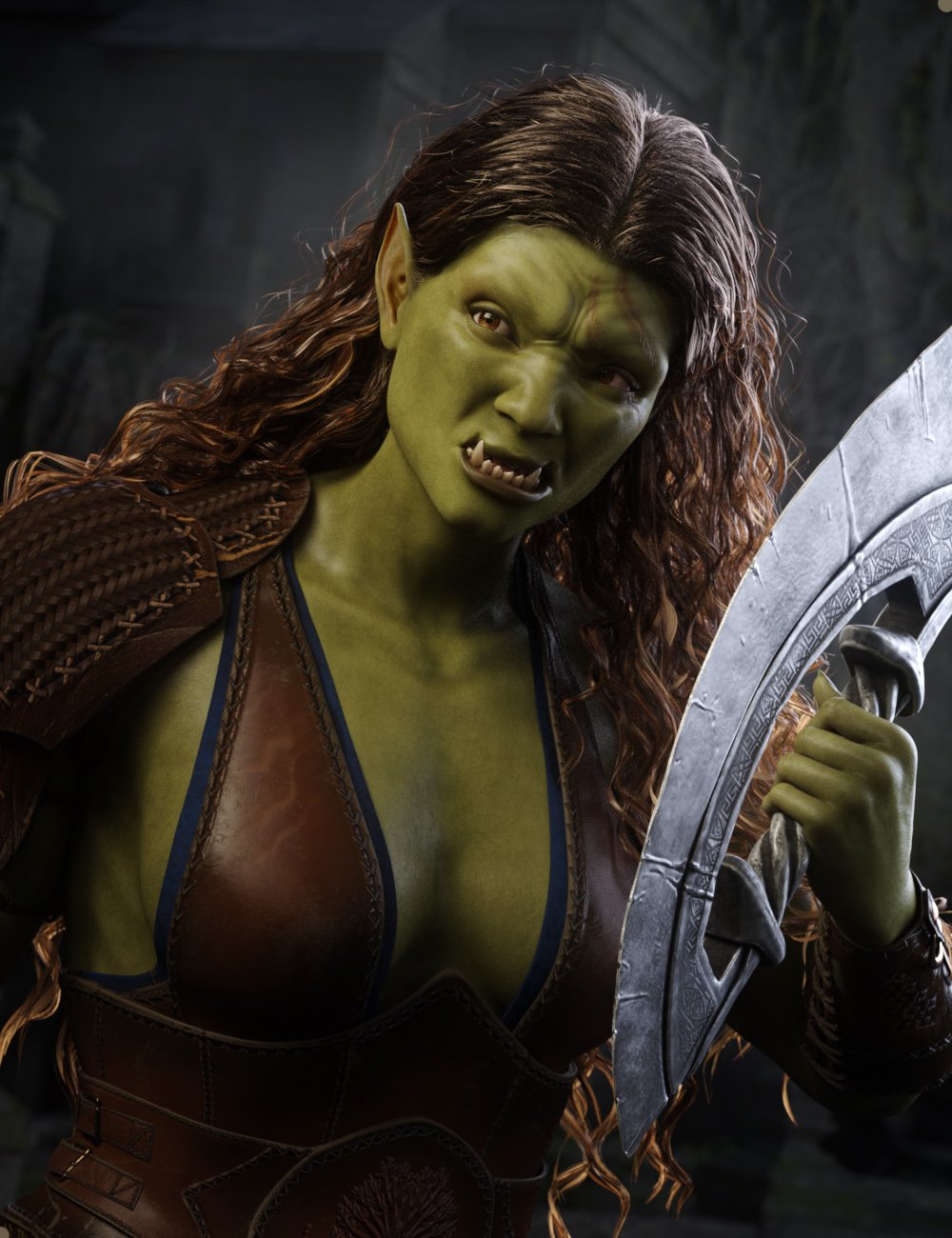
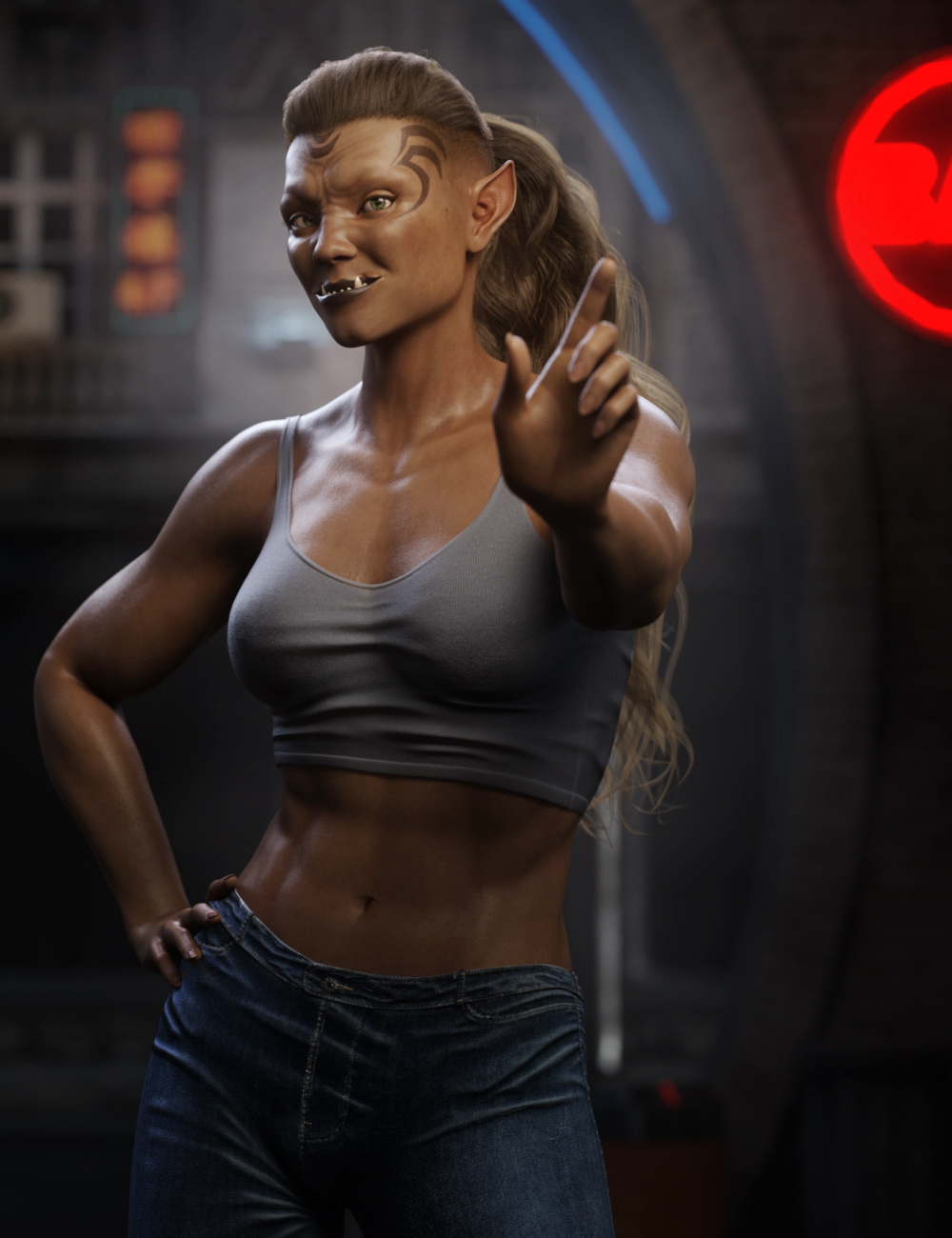
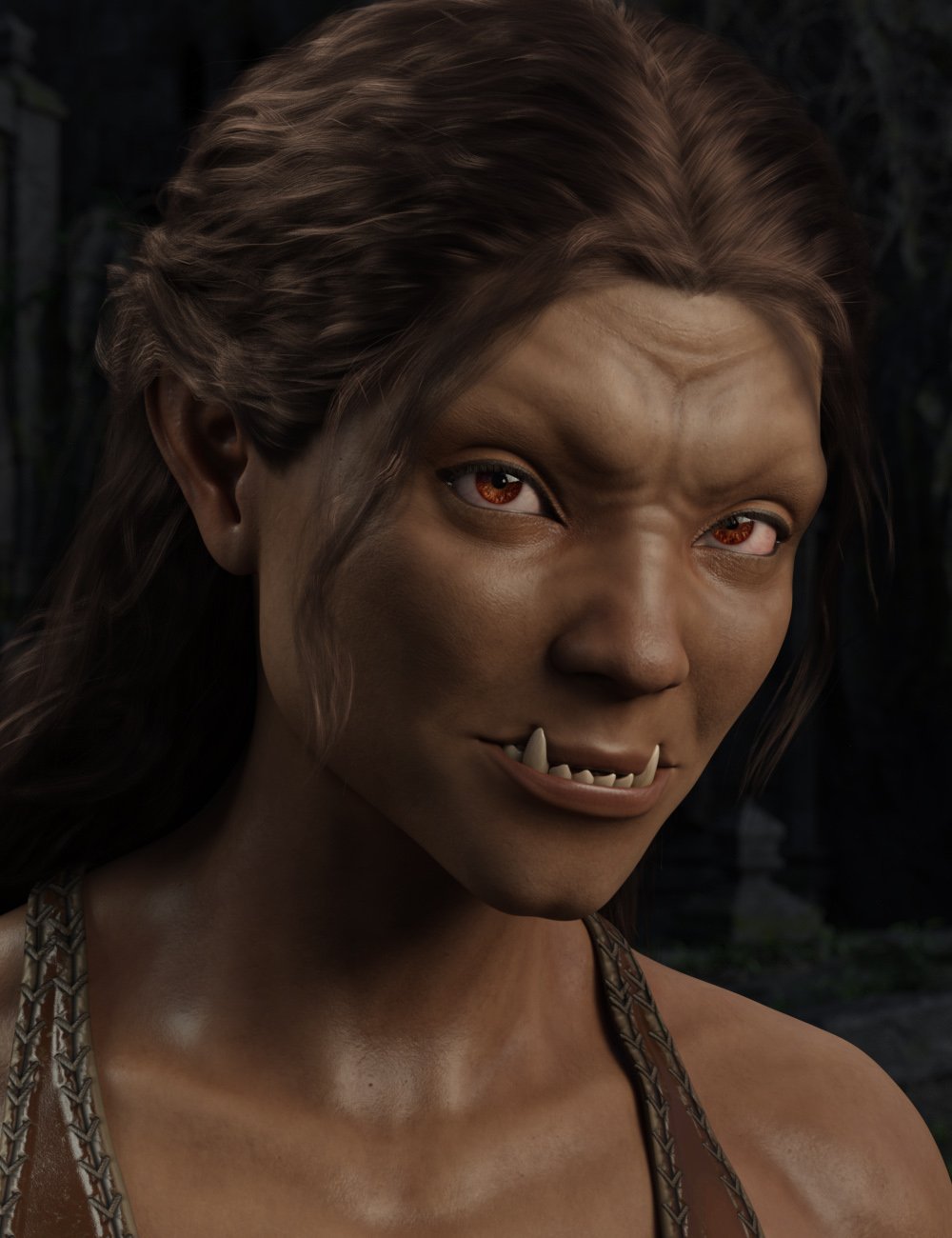
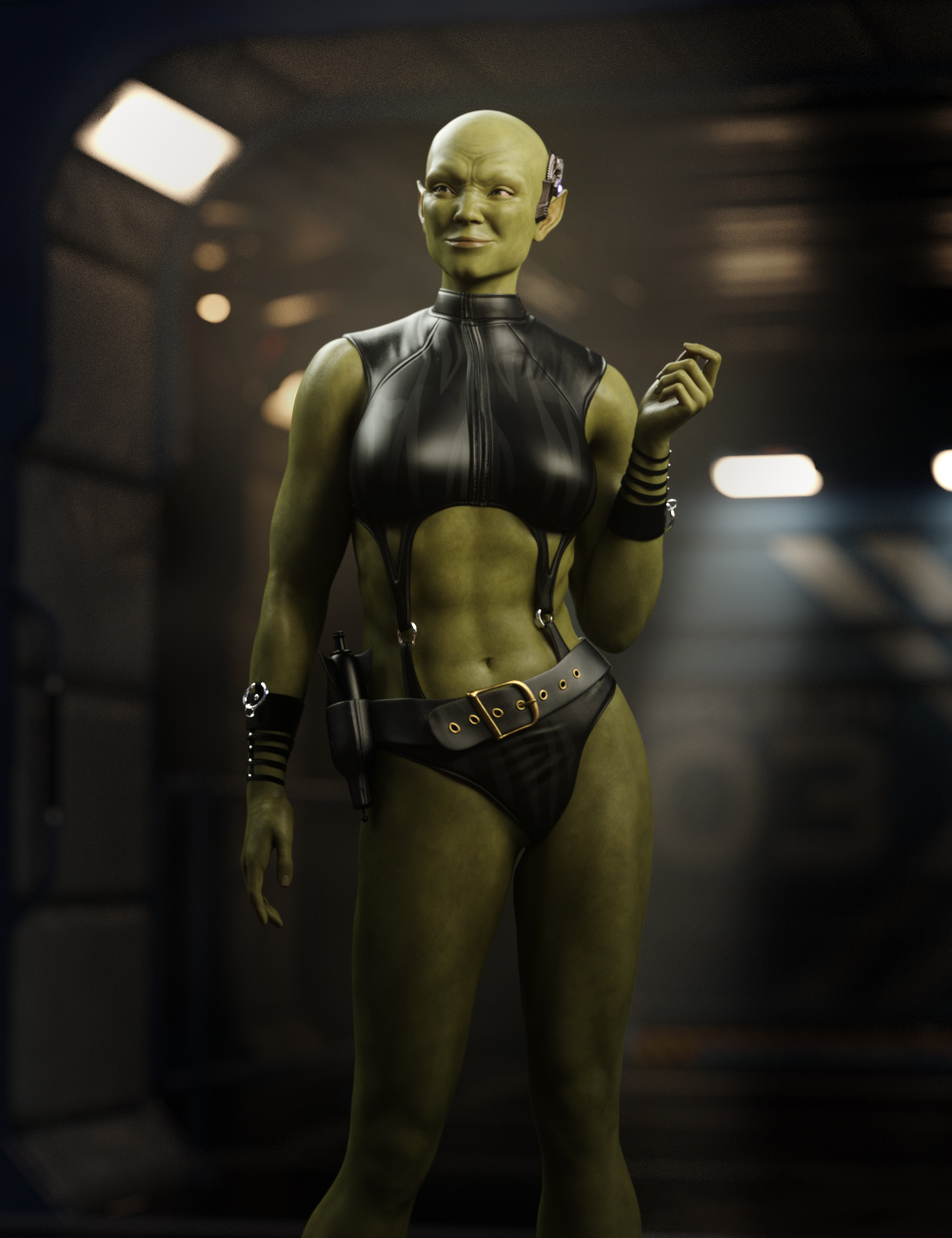
She Orc for G9 [commercial]She Orc is in the store
https://www.daz3d.com/she-orc-for-genesis-9
Beauty is not a trait often associated with Orcs, but this beautiful female Orc will raise the heat in any fantasy battle. With three skin colours and multiple facial texture variations, there is a lot of variety to this set, Medieval fantasy, contemporary fantasy even sci-fi aliens are all possible with this Gal.
Orc tusks can be dialed in or out depending on how human you want the character to look.
This set was designed with ultra-realistic PBR skin skin techniques. The High Definition morphs and High Quality textures to really bring this character to life for your renders.
What's Included and Features
- She Orc for Genesis 9: (.DUF)
- She Orc Character Preset
- She Orc Shaping Preset
- Raw SheOrc-Mouth Morph
- Raw SheOrc-HD Morph
- Materials
- 03 Full Skin Mats Including Female Anatomical Elements
- Raw She Orc 02 Green Face Bold
- Raw She Orc 02 Green Face Clean
- Raw She Orc 02 Green Face Drip
- Raw She Orc 02 Green Face Scar
- Raw She Orc 02 Green Face Tattoo
- Raw She Orc 03 Grey Face Bold
- Raw She Orc 03 Grey Face Clean
- Raw She Orc 03 Grey Face Drip
- Raw She Orc 03 Grey Face Scar
- Raw She Orc 03 Grey Face Tattoo
- Raw She Orc 04 Tan Face Bold
- Raw She Orc 04 Tan Face Clean
- Raw She Orc 04 Tan Face Drip
- Raw She Orc 04 Tan Face Scar
- Raw She Orc 04 Tan Face Tattoo
- Raw She Orc 05 Eye Blue
- Raw She Orc 05 Eye Brown
- Raw She Orc 05 Eye Green
- Raw She Orc 05 Eye Red
- Raw She Orc 05 Eye Yellow
 Genesis 8.1 raises model's arms 90 degrees, causing the model to become misaligned
skeyqiu said:
crosswind said:
There's a 'wrong weight' on Left Shoulder Bend - YRotate... As the sweater you made has a loose armhole and a sort of should pad around the collar, you may see, with Left Shoulder Bend - Front-Back -110 degrees, the weight around the armpit is not enough while the weight on the left collar is a bit much. The root reason is that the default weight transferred by TU won't work well on this garment, or did you use some specific projection template when using TU?
You either tweak the weight or directly fix pJCMs. I'm also a MD user. In most of the similar cases, I fix them in Blender or via GoZ because that is fast and with good result. You may also export the 'pose' as a Morph Target to MD and re-simulate the garment, then import back to DS to fix the pJCM.
I ever made a similar top with armhole drop, more or less the same case like the one you have. I fixed 'pJCMShldrFwd_110_L' in Blender as below:
I used pJCM to solve the problem, but is there a way to automatically apply the prepared pJCM according to different poses? I don’t want to import the corresponding pJCM every time I switch poses.
You have to pose the figure manually first, fix the corrective morph by external application and import back the obj as the delta morph to overwrite the existing pJCMs. That's the very typical SOP. Almost all PAs go for this way of fixing. But some products like this will speed up the process to a certain extent . https://www.daz3d.com/pjcm-poses--for-clothing-creators-for-genesis-8
As a trick, we usually fix one side and update pJCMs on both side by using Morph Mirroring or fix symmetrically and update pJCMs by using Attenuate. It'll be a piece of cake for most of the cases.
Genesis 8.1 raises model's arms 90 degrees, causing the model to become misalignedcrosswind said:
There's a 'wrong weight' on Left Shoulder Bend - YRotate... As the sweater you made has a loose armhole and a sort of should pad around the collar, you may see, with Left Shoulder Bend - Front-Back -110 degrees, the weight around the armpit is not enough while the weight on the left collar is a bit much. The root reason is that the default weight transferred by TU won't work well on this garment, or did you use some specific projection template when using TU?
You either tweak the weight or directly fix pJCMs. I'm also a MD user. In most of the similar cases, I fix them in Blender or via GoZ because that is fast and with good result. You may also export the 'pose' as a Morph Target to MD and re-simulate the garment, then import back to DS to fix the pJCM.
I ever made a similar top with armhole drop, more or less the same case like the one you have. I fixed 'pJCMShldrFwd_110_L' in Blender as below:
I used pJCM to solve the problem, but is there a way to automatically apply the prepared pJCM according to different poses? I don’t want to import the corresponding pJCM every time I switch poses.
[Released] RSSY Character And Material Conversion Bundle Genesis 8 to Genesis 9 [Commercial]RiverSoftArt said:
ArtofGohan said:
Has there been any update on if there is a fix or work around for NSFW artists to convert their gen 8 characters to gen 9 now?
For your issue (that the much smaller height and somewhat different shape) make the needed conversion process not suitable for small change morphs, this cannot be fixed. You could combine all your morphs for a character into one morph on G8 and then that could be converted.
Ok Ill give that a shot.[Released] RSSY Character And Material Conversion Bundle Genesis 8 to Genesis 9 [Commercial]ArtofGohan said:
Has there been any update on if there is a fix or work around for NSFW artists to convert their gen 8 characters to gen 9 now?
For your issue (that the much smaller height and somewhat different shape) make the needed conversion process not suitable for small change morphs, this cannot be fixed. You could combine all your morphs for a character into one morph on G8 and then that could be converted.
Add bones to non-Genesis figure and use Genesis clothes on non-Genesis figuresgiorgiogentile_8181b49452 said:
Thanks a lot @crosswind, I will definitely try!!! How can you import the Genesis 9 figure in Wrap please? Do you need to import both the .obj and the Genesis figure in Wrap, fix the face, and then export the Genesis model again? Could you tell me a bit more please, or tell me if there are any tutorials on the process?
Yes, import 3rd-party obj as fixed geometry and Genesis x Base figure as floating geometry. Set up the nodes and wrap. Export the result to DS as a full morph (or split into Head and Body) on Genesis figure. I recommend Kelvin Jin's channel on youtube - https://www.youtube.com/@Shinteo5/videos You may check his tutorial on how to wrap full body and head only.
2 examples for your reference. One is using G9 as floating geometry, another is using G8. You may try the latter first as it's much easier in terms of post-fixing... You may convert texture maps as well but the settings may be complex depending on the case you have...
G8.1->G9 Conversion, Eye Blink SliderThey'll need correctives to blink correctly. Fortunately this is fairly simple but tedious to set up.
Convert two additional versions of the shape you're converting; one with the left eye closed and one with the right eye closed. Then follow the steps in Creating Morph Controlled Morphs to turn them into correctives.
Add bones to non-Genesis figure and use Genesis clothes on non-Genesis figuresgiorgiogentile_8181b49452 said:
@crosswind how can you wrap them please? I found this old advice from ReDave:
Load the OBJ of your Poser/ZBrush/whatever figure, load a Genesis if it isn't already in the scene, scale Genesis so that bones roughly match and that Genesis is *all* contained just inside your new figure (actually may work best the other way around); with Genesis selected Edit->Figure->Geometry->Apply Smoothing modifier. Go in Parameters tab and select the Mesh Smoothing option and give it a fiddle. With a little luck Genesis will take the shape of the other figure. Export as OBJ and reimport through Morph Loader Pro.
Works best if the other figure doesn't have any innards like teeth.But it doesn't seem to work. Can you explain the different steps to wrap a 3rd party model with Genesis 8? I am fairly new to Daz3d. Thanks!
The way I mentioned is to use Faceform Wrap (used to be R3DS Wrap) . That's my workflow. - https://faceform.com/
Is AI killing the 3D star?RobotHeadArt said:
kyoto kid said:
...sounds easier (and more rewarding) to just develop a charater form scratch and save it as a character preset.
It depends. If you are trying to replicate a real person and you have a good set of source images, it is way easier than trying to create the skin textures, create the morphs, and then realize you can't get a good likeness because HD morph creation is PA only. Given the popularity of image to Daz character tools (Face Transfer, Headshop, Facegen, etc.) there is a high demand for this workflow. Also, for skin tones where there is little Daz representation, you are limited by what PAs have made available and how well you can edit them to match the right look.
It's not just people concepts you can do training on. For people who don't have great modeling skills it can be a great way to create clothing, props, hair, etc. I was able to take screenshots of an outfit from a cartoon, train a LORA, and then apply the LORA to a photorealistic model with about 45 minutes of prep work and 30 minutes of GPU training time. Stable Diffusion was able to take the cartoon outfit and transform it into a real, photoreal outfit. Creating the same outfit in Marvelous Designer, rigging it in Daz, UVing, texturing, etc. would have taken dozens of hours.
...for skin tones I've been working with Zev0's skin Builder since G2. Yes there was a learning curve at first, very new programme or process has one, but now it's pretty much my go to for skins that aren't commonly available (like very fair or albino both oaf which I have been very successful with). Many characters with HD morphs also have a separate "HD slider" I can ignore so they work better for combining with others, even older generations. Is I've mentioned elsewhere I rarely if ever use a character right out of the box, save for A3 and Gen4 (even then the V4/A4/S4/G4 "Unimesh" concept that preceded Genesis allowed for a bit more, albeit limited, custom work and clothing fits).
I tend to purchase more Merchant resource and utility content (such as morphing, shaping, and shaders) than characters. as I like developing my own My modelling skills are nothing to write home about and I am unable to use a tablet (which is pretty much essential for sculpting) due to severe arthritis, so I've taken to working totally with morph, shape, and expression controls to make up for that (even a small fraction of a slider input morph can make a difference).
Crikey I was creating teen and even child characters off V4 and later S4.(check out my "Leela" sub-gallery on DA) so I'm no stranger to putting in the time to learn how to push the Daz programme to and past its limits. I'm retired now, I have all the time I need on my hands to work with and perfect techniques using the tools I have and know.
Besides I find it rewarding and relaxing.
Again I feel AI could be useful to improve certain processes like rendering, noise reduction, animation, cloth simulation, and such, but that is as far as I would ever consider employing it.
Daz 3D is part of

Connect
DAZ Productions, Inc.
7533 S Center View Ct #4664
West Jordan, UT 84084Licensing Agreement | Terms of Service | Privacy Policy | EULA
© 2026 Daz Productions Inc. All Rights Reserved.