-
How to use V5 morph for G3F / G8F base?
Hi everyone!
I have a question or request, if any solution exists:
When I begun to play with Daz, I have created some characters with the Victoria 5 base.
When G2F (V6) was released, I found a converter, allowing me to "update" some of these characters, from V5 to V6 with V5 morph.
I would like to know if there is any converter, any product allowing me to do a new update: using V5 morphs on a G3F or G8F basis/body (I'm not yet into G9F). I have already found a solution for the textures, thanks to a product I found here, now I'm just needing the morph pack, if any exists!
Thanks in advance!
Glute Control for G9 please ZevoI'm finding the default glute poses very limited for G9s right now. Can we get a Glute Control for those guys? All I can see in store is morph products - not the same thing.
[Released] RSSY Character And Material Conversion Bundle Genesis 8 to Genesis 9 [Commercial]I have not been able to successfully convert any G8 or G8.1 characters to G9, despite multiple attempts. I keep receiving a pop-up message stating:
"Failed to save Morph Asset(s). See the log for more details."
When checking the log, I see:
[WARNING] :: /src/sdksource/fileoutput/dzassetoutfile.cpp(650): Failed to create file path.
[WARNING] :: /src/pluginsource/DzAssetIOFilters/dzmorphsupportassetfilter.cpp(936): Failed to write Morph Asset(s).I am using a Mac laptop with MacOS Ventura 13.4.1. I've attempted to set my output path to both a folder on my network drive as well as one on my local desktop, with the same results.
Happy to provide any additional information or run some more test conversions.
Thanks for any help!
Missing Parameters Controls?The Pose Controls are generally in the morph packs, not the free Starter Essentials, though I think the first Genesis may have been an exception.
16GB RTX 4060ti Releasing in Julykevinso2001 said:
If you're coming from a 3060, you'll only buy the 4060 ti 16gb if you can't afford a rtx 4080. But don't forget the RTX 4080 is just as fast as the RTX 3090 (non ti)
But the 4060 ti has a smaller memory bus than the 3060. Sure you can render bigger scenes but there's a small chance that your render will be slower. Why would you spend money on a brand new GPU that could be a DOWNGRADE on some parts to the RTX 3060?
So if you really want an upgrade in 2023, the best choice at the moment is really to find a used RTX 3090 (currently selling for $826 used compared to $2307 just 2 years ago). Barring that, it's better to keep your existing RTX 3060
Memory bus has nothing to do with rendering speed in iray, maybe it might take a few seconds more to transfer all the info over to the card but once that's done it's all taken care of on the video card itself. There's no back and forth transfer of data once the render has started, which is why this card may be really good for us once the prices eventually drop.
How to add new elements to Daz mesh with zBrush!Hi everyone!
I have been using zbrush to sculpt and create new morphs for my daz genesis figures. But now I want to use a custom non human foot shape I have created i another mesh, I am able to merge it with the genesis 9 figure in zbrush, but it GoZ doest not want to import the second I add other meshes to the shape. How can I do this, add parts, remesh and still import as a morph?Tutorial: Do not convert shoes but rebuild themIt probably is old news but I haven’t found it being mentioned: the whole struggle with failed shoe conversions might quite easily be avoided.
I hope someone can confirm that this method works, so far I haven’t found any major flaws.
The big plus: It should work for all Genesis generations.
First load a stock source model, in my case G3 Female (white) and a stock target model, in my case G8.1 Female (silver)
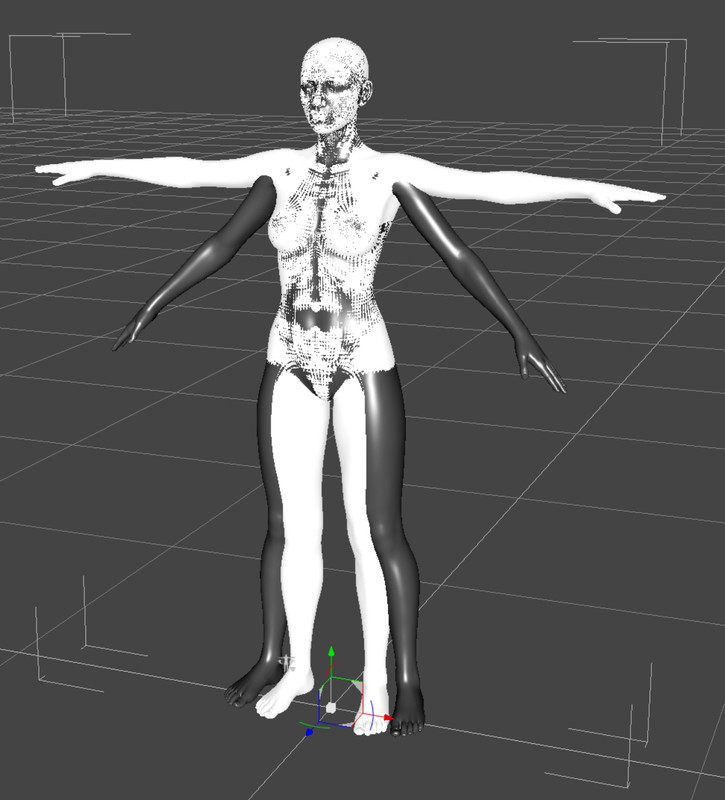
Then move the legs from the target model in the position of the source model.
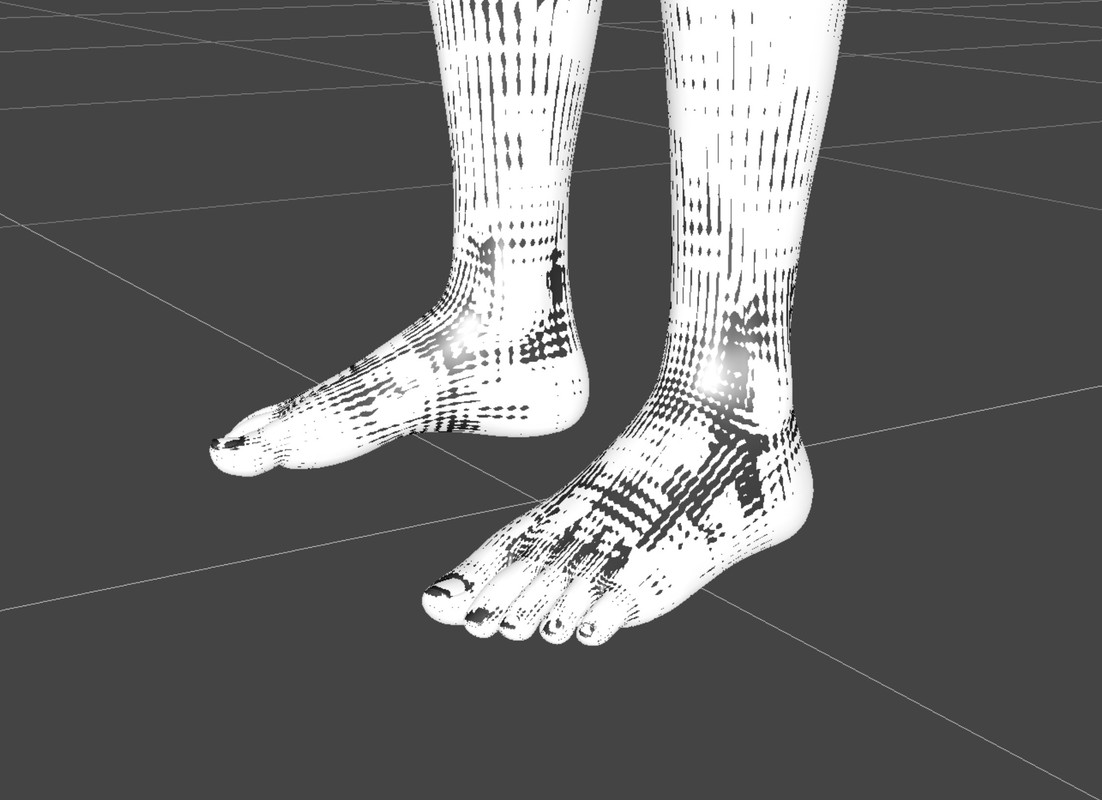
Load the shoes you want to convert to the source model with the appropriate foot pose. This one is from Rendo, tho.
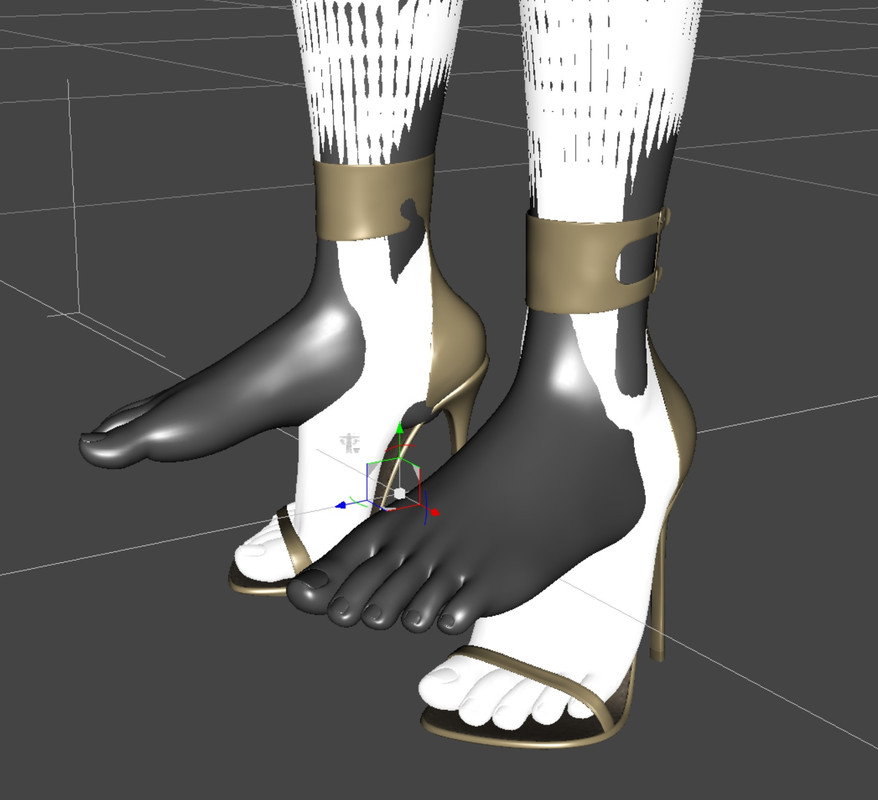
Make the shoes invisible and pose the target’s feet as close as possible to the same position. Save this foot pose as a pose preset for future use.
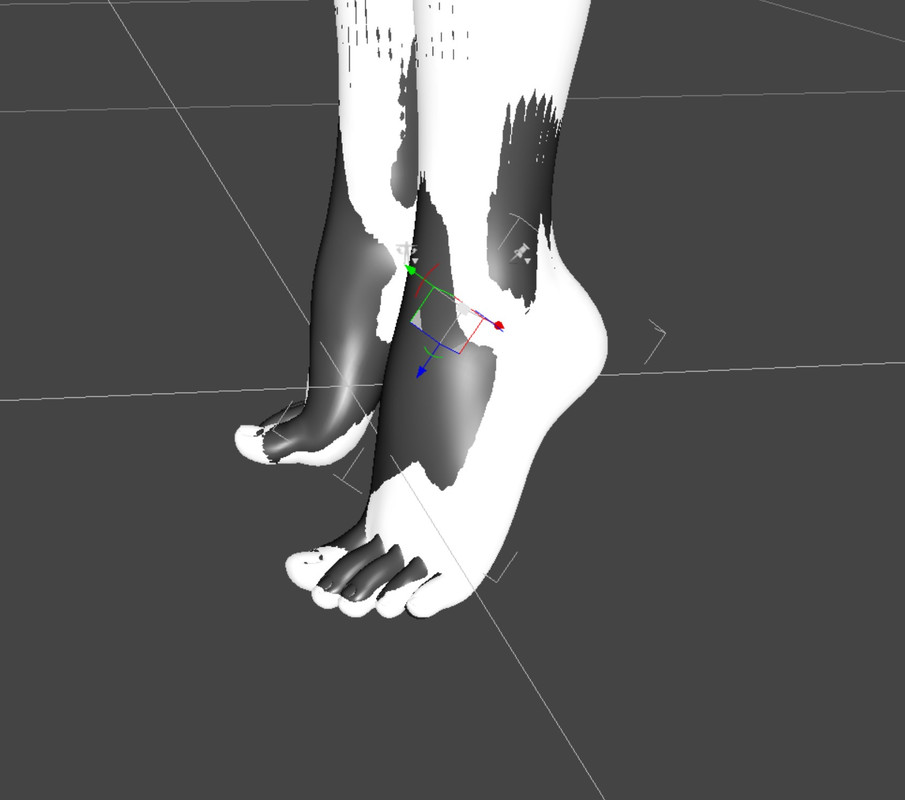
Then load the shoes you want to convert also to the target model with the autofit dialogue as follows:
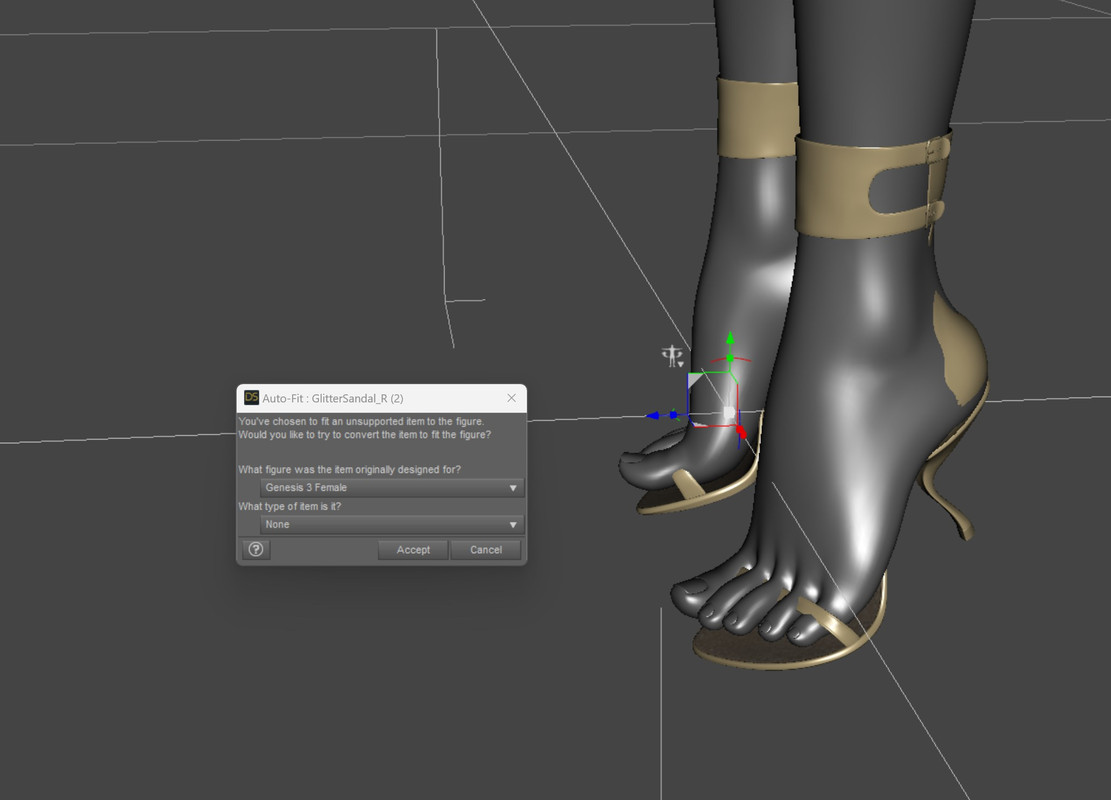
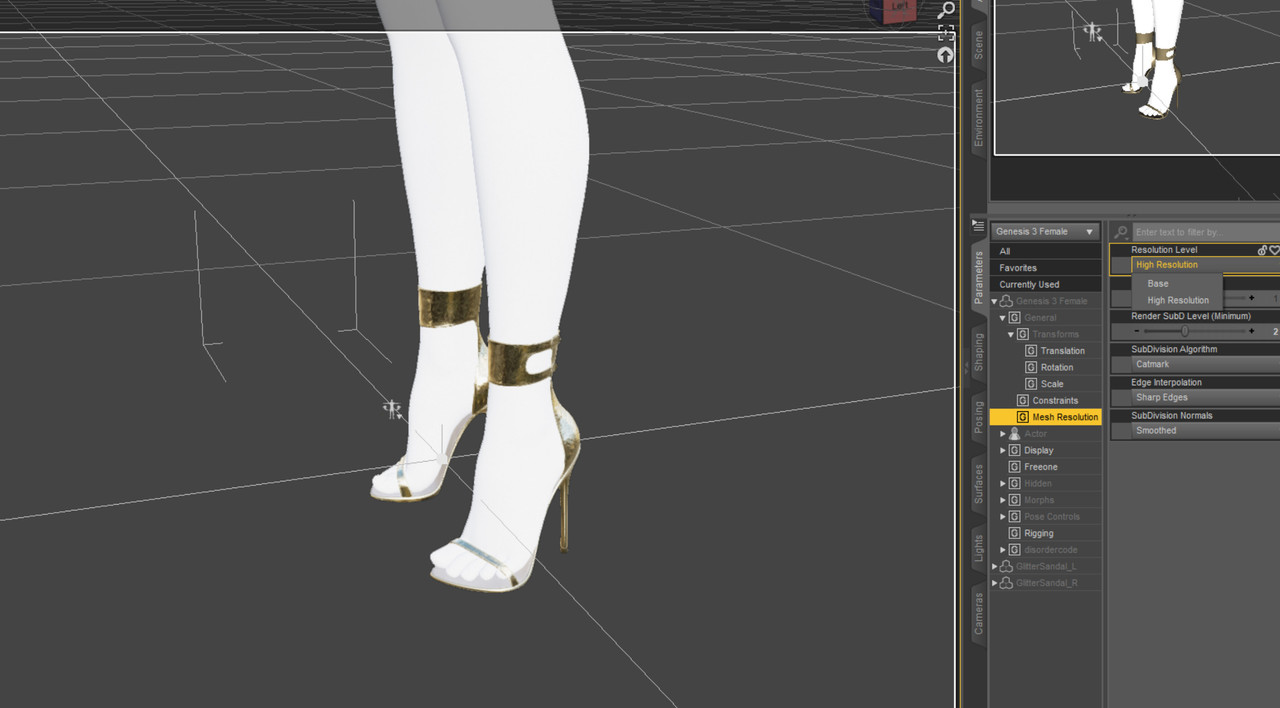
Next change the resolution of the shoes on the source model as much as on the target model to base resolution. (Here I had to change my Workspace Layout to make the palettes visible, so the screenshots start to look a bit different)
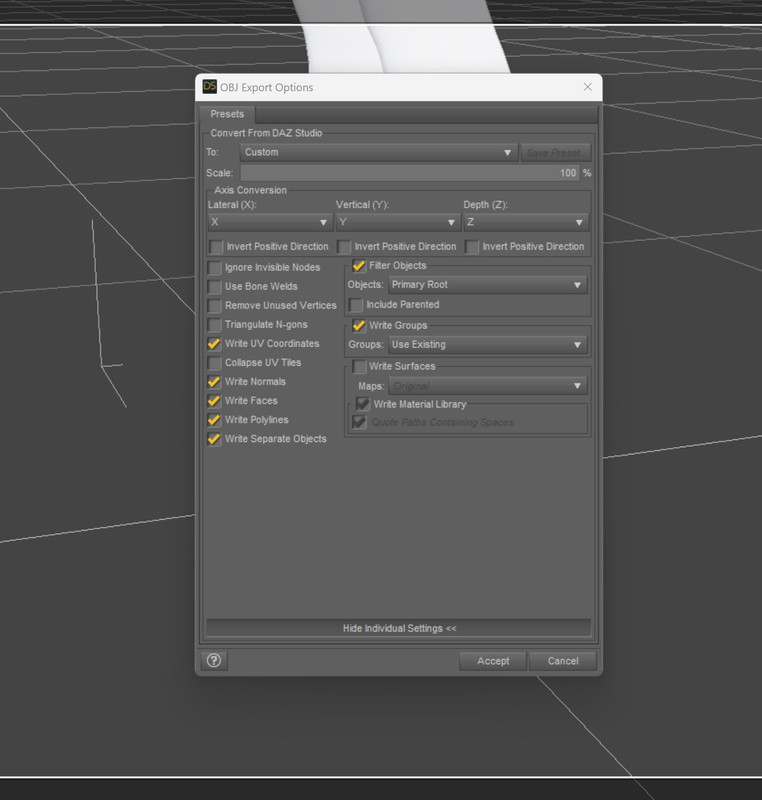
Export the shoes from the source model to obj with the following options checked:
Now open Morph Loader Pro (Edit -> Object -> Morph Loader Pro) with the following objections checked:
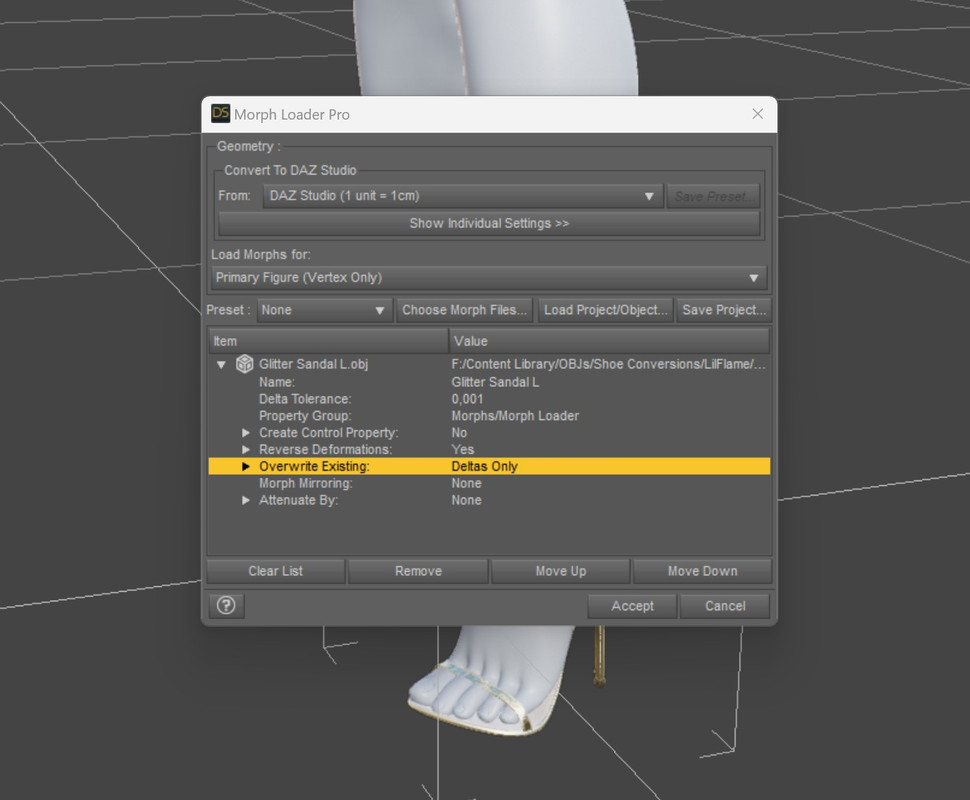
Important: Reverse Deformations should be put to “Yes” and Overwrite Existing to “Deltas Only”!
Afterwards you can dial in the new morph. I found that it often works better with something below 100%, in this case around 80%. Possibly you need to add a Smoothing Modifyer as well.
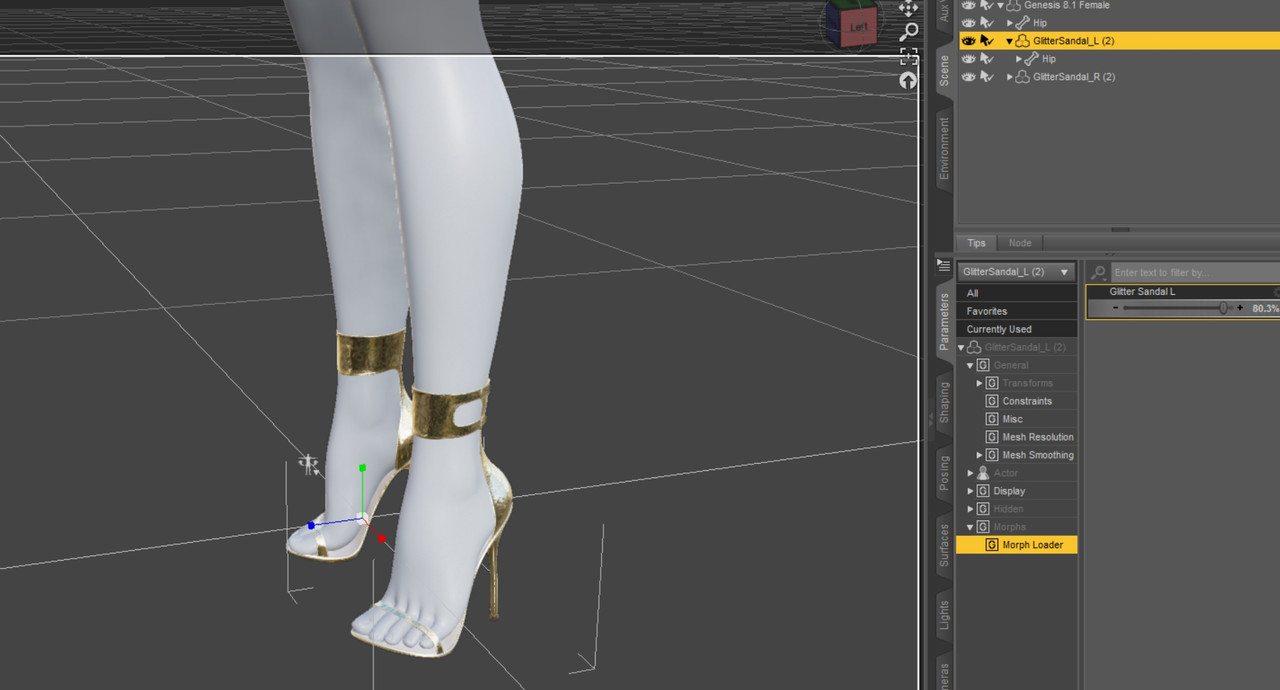
Change the resolution back to High and save these shoes as a new Prop asset to a directory of your choice. Preferentially the one you used for the foot pose already.
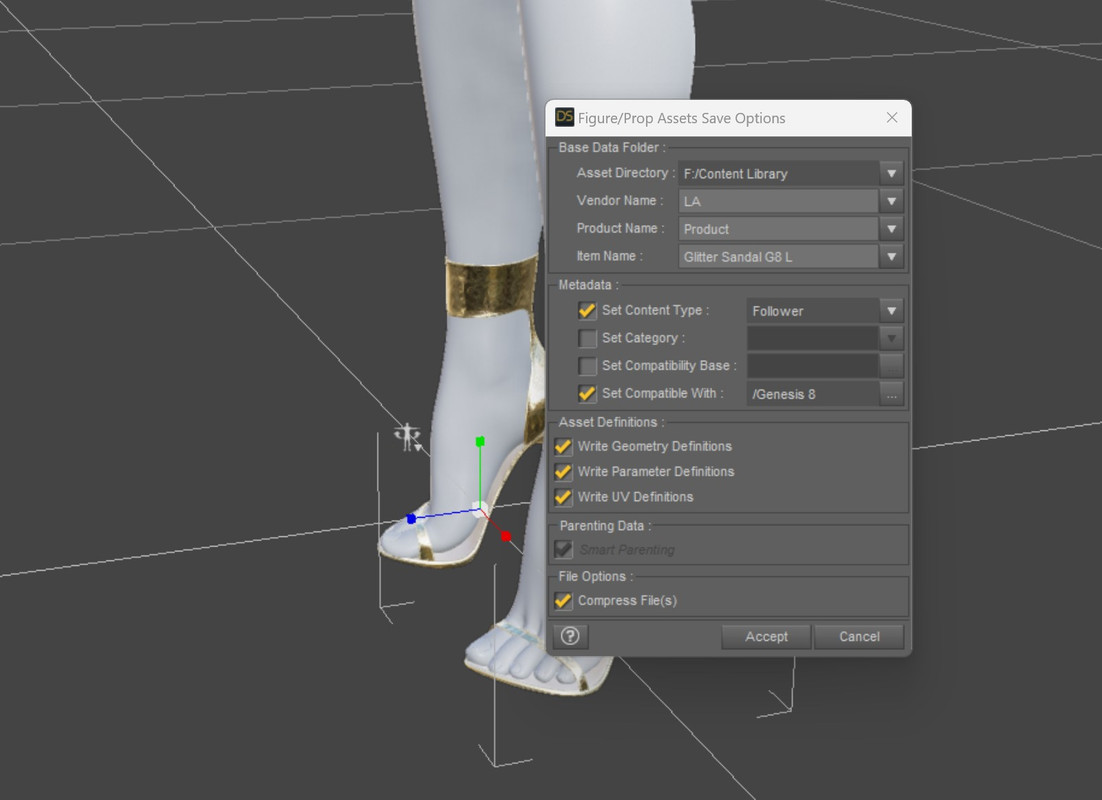
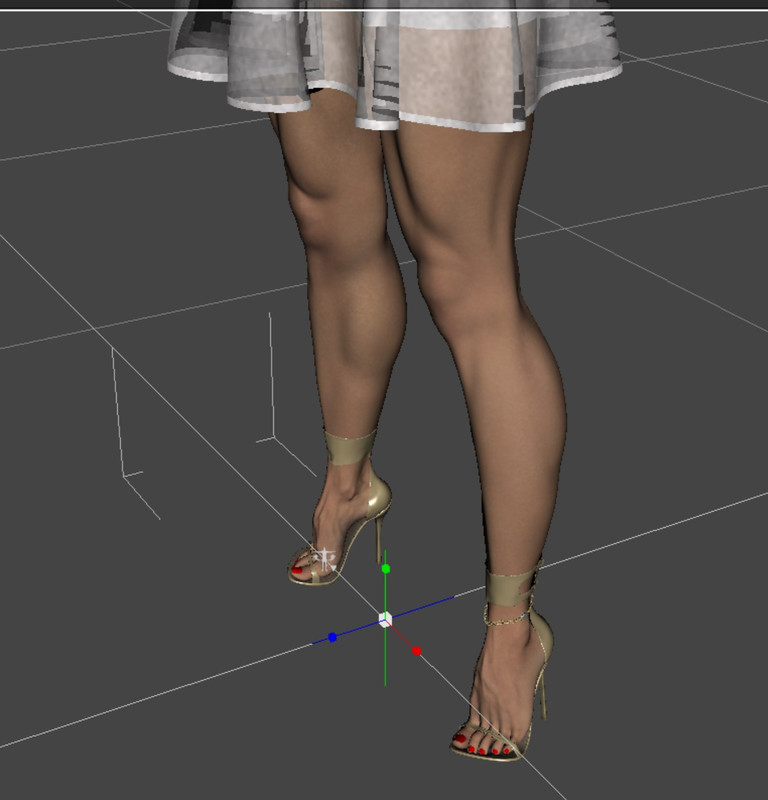
And done. You should be able to use the shoes on every other model of the generation you converted it to.
 Job: Transfer existing Daz asset to Genesis 8
Hi,
I got the CATOON package from the Daz store (its a cartoon cat), but unfortunately it's not using the Genesis 8 base. I want to animate it but also use some Genesis 8 Male morphs. I know its possible and would gladly pay someone to get the work done and 'transfer' it to use the Genesis 8 base. I tried the whole day to do it myself but failed miserably.
Anyone interested?
Missing Parameters Controls?Generally those come in the base morph packs dfor the figure, it does also depend on what you have selected.
Face Transfer for Genesis 9Hi, this is a message in the bottle. Can anyone release a software similar to Face Transfer for Genesis 9? I have lost any hope to see the original Face Transfer for Genesis 9, and the fact there is no similar utilities is forcing me to stick with Genesis 8 at the moment. Which is kind of sad. Thanks! Gio
Help! G9 morphs not loading correctly...FSMCDesigns said:
I don't have that character. Start a new scene and then load a fresh G9 and see if it loads the default correctly. If not, then you have a morph that is active all the time
Thanks for your input. I'll have to see what's going on. Maybe there's a hidden parameter I'm missing.
[Released] ManFriday’s Figure Converter for Genesis 9 [Commercial]FSMCDesigns said:
Any ideas on why this happens? this is the 3rd GF3 body morph (head came out great though) that did this almost exact issue with the hands and arms. I tried adjust rigging to shape, but that didn't help at all
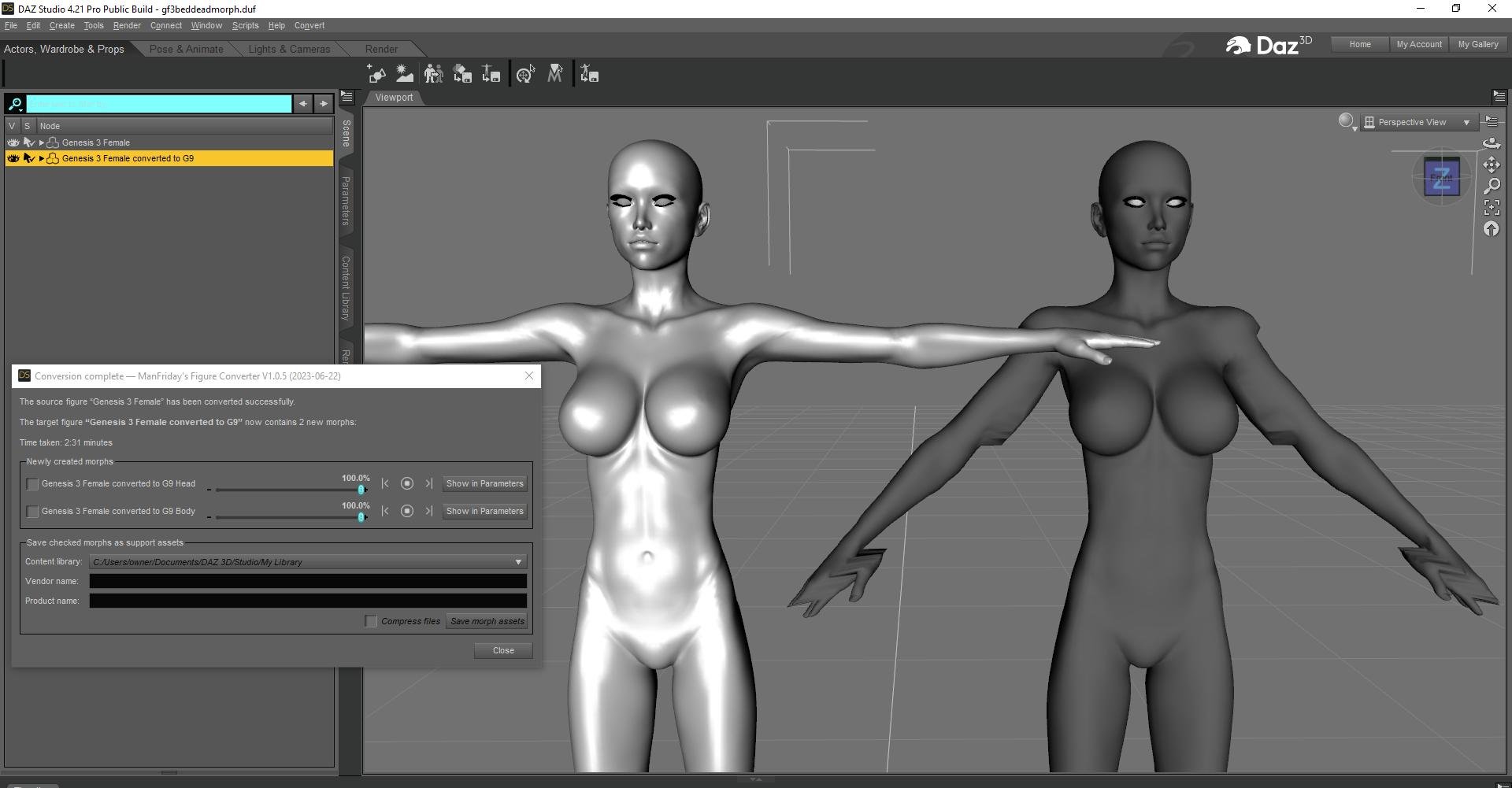
OK, since this is the second report about Genesis 3 deformations, it looks like there is a problem with Genesis 3 body morphs on the arms. Like I said I am currently traveling with my family and don't have my code with me so I can't debug the problem right now. Maybe it is best with Genesis 3 conversions to limit the conversion to creating a head morph for the moment. I will look at it as soon as I get back home. Genesis 8 seems to work OK though.
[Released] ManFriday’s Figure Converter for Genesis 9 [Commercial]ManFriday said:
vwrangler said:
Let me try an example to hopefully make my question a bit more clear.
Let's say I have a character that I call "Bert". Bert's head has a combination of the following character's heads:
FHM Darius 8
FHM Floyd 8
FHM AronThe product creates a single slider for the character called "Bert", and I can use the interface to split it into head and body shapes for Bert -- that I do understand. What I'm not clear about is, are the individual head morphs for Darius, Floyd and Aron *also* transferred to G9 so that the product can make the combination that way, or does the product read the shape in the scene, combine them all into one file for the shape beforehand, and then transfer only *one* morph file for the character shape, and the Darius/Floyd/Aron individual head morphs stay with G8M and don't get sent to G9 as separate morph files at all.
I'm asking in this way because, with the G9 unimesh, I'm very concerned about morph bloat -- having so many that loading just gets bogged down. G9 has only been out for a year, and may be around for some time longer, and there are already well over 50 characters available as native G9, so I don't want to make it impossible to use by transferring characters and all their component morphs.
It is the latter. The Figure Converter looks only at the final shape of the source figure, whatever morphs that may come from - one head morph, one body morph, or your "Bert" -, and creates a single morph in the target figure from it. Depending on the options that are selected, that single full morph will be preserved in the target, or sent through the head/body morph splitter to create separate head and/or body morphs. Where the "source" morphs came from -- head or body or something you cooked up yourself -- does not matter. I hope this makes it clearer!
That's exactly what I wanted to know. Thank you so much!
[Released] ManFriday’s Figure Converter for Genesis 9 [Commercial]Any ideas on why this happens? this is the 3rd GF3 body morph (head came out great though) that did this almost exact issue with the hands and arms. I tried adjust rigging to shape, but that didn't help at all
Help! G9 morphs not loading correctly...I don't have that character. Start a new scene and then load a fresh G9 and see if it loads the default correctly. If not, then you have a morph that is active all the time
Llola Lane’s RENDER A MONTH Challenge 2023 (ALL are welcome to join)Llola Lane said:
AgitatedRiot said:
I'm still in the middle of the Atlantic Ocean.
Lucky you Agi... :) Enjoy your vacation. We'll be here when ya git back! Hugzzzzzzzzzz
So the captain says we will make Nova Scotia a day or two, then cross the Minganie-Le Golfe-du-Saint-Laurent..and transfer to a river boat up the river to travel down to the City of Montreal.
Van Helsing 9sid said:
jd641 said:
sid said:
I go the pro bundle with the banner, because I wanted the alt shapes. Probably a smart move on Daz's part to make them Pro bundle exclusive, but only they can see the sales figures.
I dunno if it's smart or not but it was a good way to piss me off. hahah
I bought the main Olivia 9 morph and the alternate shapes cause I was worried they'd remove them like the Olympia ones that were up for sale but quickly removed. The amount of additional mixing that can be done with the young and old morphs really add a lot of options for creating of lot of different age groups now so not everyone is the same age, which is why I was really hoping the alts would be something anyone could buy but I was wrong. :(
I wonder though, since I have the alts for Olivia can I get an appoximation of the alts for VH9's young and old morphs (not counting the face texture's). Does anyone who has both alt products feel like trying this out, I'm very curious if it could work.
There seems to be genuine difference between the sculpts of the young versions of the two characters. (That's not to say you couldn't create something quiet comparble with just the base VH, just would take a bit more fiddling than I've done here.)
Samples only about 30% rendered to fit in on my lunch break.
Here’s young VH next to young Oliva, but I’ve applied adult VH’s skin mat’s over the top of young Oliva on the right:

Here’s young VH next to adult VH with VH adult mats on the right, but adult VH has had the young Oliva dials in, plus the same overall proportion dial adjusted to replicated how young-VH loads.

Dials for comparison, default young-VH dials on the first imageand the dials I used to to create a younger version with only the default-adult VH HD base and young-Oliva pictured second (in the recreated version I did apply the Olivia proportion dial and overall proportion dial to -23%, but left the other proportion dials for neck, feet, hands all unchanged, as the Olivia proprotion dial seemed to replicate them and she looked over-corrected if I applied as young-VH has dialled - basically, I ignored almost all of the orange dials)


Typing this up makes me feel very tongue tied!
Whoa that's a lot of work, thank you!
Looks like getting approximations are possible with a lot of work but if I wanted an old or a young VH proper I would have to buy the pro bundle which kinda sucks. Oh well... I can't afford that hahah, I can just hope that future alt's are not exclusives and anyone can buy them.
[Released] ManFriday’s Figure Converter for Genesis 9 [Commercial]ManFriday said:
Thank you Barbult. To be clear, yes, the source morphs get lumped together always. Whatever morphs are active get converted.
I actually love this feature. I have many G3 and G8 custom characters I have created over time and it's great to be able to create a single head and body morph from them for G9.
[Released] ManFriday’s Figure Converter for Genesis 9 [Commercial]barbult said:
vwrangler said:
Does this combine all of the head morphs for a character into one morph to transfer, for example, or does it transfer each individual morph in the head and then make a controller slider?
This question has not been answered. The question is not about head vs. body morphs. It is about whether individual head morphs used by the original character get lumped into a single morph in the G9 character, or whether each individual head morph used by the original character gets converted to an individual G9 morph, and then an ERC controller is created to combine their result to create the G9 head. I'm guessing it is the former: all lumped into one head morph. A definitive answer, when time allows, will be appreciated.
Thank you Barbult. To be clear, yes, the source morphs get lumped together always. Whatever morphs are active get converted.
[Released] ManFriday’s Figure Converter for Genesis 9 [Commercial]vwrangler said:
Let me try an example to hopefully make my question a bit more clear.
Let's say I have a character that I call "Bert". Bert's head has a combination of the following character's heads:
FHM Darius 8
FHM Floyd 8
FHM AronThe product creates a single slider for the character called "Bert", and I can use the interface to split it into head and body shapes for Bert -- that I do understand. What I'm not clear about is, are the individual head morphs for Darius, Floyd and Aron *also* transferred to G9 so that the product can make the combination that way, or does the product read the shape in the scene, combine them all into one file for the shape beforehand, and then transfer only *one* morph file for the character shape, and the Darius/Floyd/Aron individual head morphs stay with G8M and don't get sent to G9 as separate morph files at all.
I'm asking in this way because, with the G9 unimesh, I'm very concerned about morph bloat -- having so many that loading just gets bogged down. G9 has only been out for a year, and may be around for some time longer, and there are already well over 50 characters available as native G9, so I don't want to make it impossible to use by transferring characters and all their component morphs.
It is the latter. The Figure Converter looks only at the final shape of the source figure, whatever morphs that may come from - one head morph, one body morph, or your "Bert" -, and creates a single morph in the target figure from it. Depending on the options that are selected, that single full morph will be preserved in the target, or sent through the head/body morph splitter to create separate head and/or body morphs. Where the "source" morphs came from -- head or body or something you cooked up yourself -- does not matter. I hope this makes it clearer!
Daz 3D is part of

Connect
DAZ Productions, Inc.
7533 S Center View Ct #4664
West Jordan, UT 84084Licensing Agreement | Terms of Service | Privacy Policy | EULA
© 2026 Daz Productions Inc. All Rights Reserved.