-
Is there a way to transfer cc3 figures to Daz Genesis 8, at least for the mesh/morph?
PerttiA said:
I hear people are using Wrap3D/4D to convert figures from miscellaneous sources to genesis figures.
Thanks! I guess you meant R3DS Wrap? I found a one-hour long tutorial Let's Turn a 3D Body Scan into a Daz Character! (R3DS Wrap Tutorial) - YouTube
So it seems to me it would be sooner for me to morph directly in Daz 3D...
Blender HD morphs for DAZ StudioYou could in theory export a hi-res Base figure from DS into Blender and then re-import the .obj and transfer the rigging from the original figure, essentially giving you a higher res version of your DS figure that you could try to import the morph target within DS
Or you could try to export the High Res figure into Blender, add subdivision or anything else you might need then sculpt your morphs and export the whole thing as a Collada file or an FBX file along with the created shapekeys (morphs) which means if you re-import the DAE or FBX into Daz Studio you will get a figure shaped prop with morphs included which you could then try to rig using the Transfer Utility (at least as a starting point)
Another option (the non free approach) is exporting to Blender, adding subdivisions and sculpting, then exporting the end result and use a software like Wrap3DS (not free) and project your HD morph to the Genesis (or any figure you're working with) from the High Resolution mesh so you can use Morph Loader normally
Who is the character used in HS Stella Twintails HairSue Yee's Xiao Meng and Shiina also come to mind when I look at the image but they don't have the freckles across the nose. Possibly a different skin over a character morph?
Elli
Non DForce Hair items Conversion from Genesis 9 to Genesis 8Catherine3678ab said:
felipe.a.v.lopes said:
Catherine3678ab said:
Might sound like a jolly silly question, but why not just tell the hair that it's for G9 in the auto-fit options that appear when trying to fit it to G8? The clones for G9 for all the generations back one can either make oneself or purchase in the Daz3D store.
Because if you Auto-fit the Hair, The Transfer Utility will replace the Hair's original rigging with the one from the Autofitting Templates, basically giving it a duplicate of Genesis 8's rigging and destroying the Hair's "special" Posing bones
I see. That's if it had posing bones to start with. Can't say as I've had any major issues using the autofit methods.
If it's a longer hair or a Pontytail style hair the chances of it having posing bones are greater. If you autofit a hair like OOT Long Unisex Hair for Genesis 9 to Genesis 8, you might think everything on the Hair is working until you go into the movement morphs section in the Shaping Tab and try to use those dials. The advantage of converting is the functionality remains intact
[Released] RSSY Character And Material Conversion Bundle Genesis 8 to Genesis 9 [Commercial]starboysf said:
RiverSoftArt said:
starboysf said:
RiverSoftArt said:
starboysf said:
I have not been able to successfully convert any G8 or G8.1 characters to G9, despite multiple attempts. I keep receiving a pop-up message stating:
"Failed to save Morph Asset(s). See the log for more details."
When checking the log, I see:
[WARNING] :: /src/sdksource/fileoutput/dzassetoutfile.cpp(650): Failed to create file path.
[WARNING] :: /src/pluginsource/DzAssetIOFilters/dzmorphsupportassetfilter.cpp(936): Failed to write Morph Asset(s).I am using a Mac laptop with MacOS Ventura 13.4.1. I've attempted to set my output path to both a folder on my network drive as well as one on my local desktop, with the same results.
Happy to provide any additional information or run some more test conversions.
Thanks for any help!
Strange. Are you using the latest version?
I'm on Daz Studio 4.21.0.5. I don't see a version number listed for the character converter when the setup screen pops up, but I installed it using DIM and am current on all available product updates through DIM.
What are the Content directory manager settings for you? Here are mine:
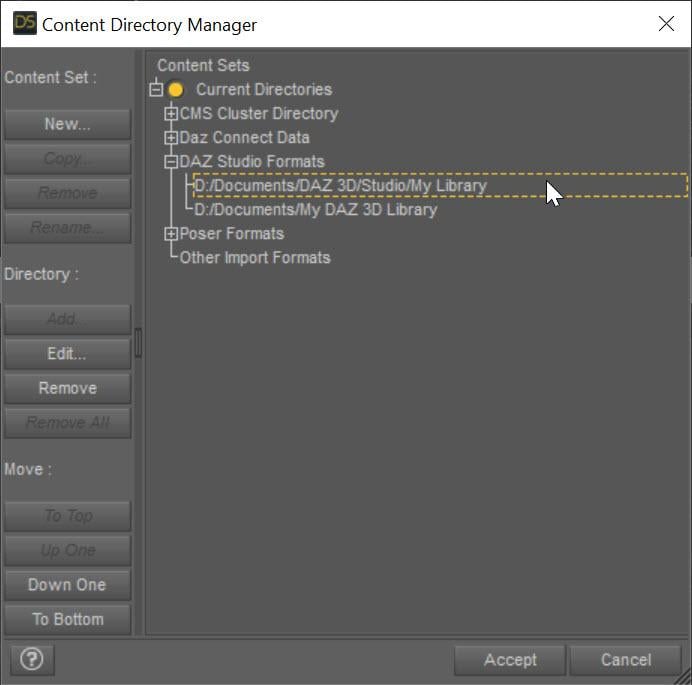
This specifies the directory the character morphs will go in. Also, can I see more of the log when running the conversion? There must be other messages.
Problem solved! I double-checked my settings in the Content Directory Manager and realized that I had an old directory path still showing at the top of the 'DAZ Studio Formats' section. I thought I cleaned that all up after migrating everything to a new drive, but apparently not! Once removed, I was able to convert a default 8/8.1 character as well as one that had been customized a bit.
Thanks for the help!
Awesome! I am glad you got it working.
HS dForce Hip and Breast V2korb said:
However, I am having the same experience that another of the posters on this thread noted - that he is ending up with 4 breasts. In response to that, you said this:
2.BTW,if you are using Weight map brush tool or Geomertry editing tools, you will also see 4 boobs
I am using Breastacular from Meipe. I assume based on your comment that this is not compatible with your module?
The geometry/weight map editor is a slightly different issue to trying to use this with Breastacular.
While in both cases the problem is two sets of geometry in the same place, the geometry editor (while active) is unhiding the portions of the base G8F geometry that Hamster's breast geograft is replacing. In your case, the problem is that two geografts are trying to hide and replace the same geometry.
While the two products do similar things, they are not directly compatible as they both rely on hiding and replacing the default geometry in that area. However, I find they are somewhat complementary, as they do different things better than each other. Hamster's product can handle more complicated collisions (involving several objects or odd objects, and can be quite useful under clothes), Meipe's handles detailed collisions better.
(In theory, one *can* make them work together by baking in the dForce transformation to a morph and then using the Transfer Utility to move across that morph, but this is probably somewhat excessive in many cases).Rigging and Weight Map TroubleshootingHello All,
I've managed to kind of figure out how to get the bones to 'stick' to an object, so a little progress has been made. But now I have run into a new problem (for me), in that when I bend a bone in the middle of the item, it does what the (hopefully) attached image shows. I want it to bend like a tail should, not see-saw for some currently unknown (to me) reason. I just don't know how to ask the right questions either. I did the following things iirc:
- Basically, I used figure setup tool to add extra ghost bones so that the tail will (to my thinking) follow G9 scales, shapes and whatnot, including l-thightwist1 and such.
- I created the figure without G9 in the scene initially, and the hip was initially located in the centre of the object.
- I set weight maps to fill at 100% on selected polygons following SickleYield's message in https://www.daz3d.com/forums/discussion/53538/way-for-smoothing-weight-map-about-many-bones-snake-at-once-solved .
- I memorised figure rigging.
- After some tests I thought maybe the hip location was the issue, so I used Transfer Rigging Figure Space (initially backwards), then memorised again.
- Then this happened
So, I want to know: Why is this happening like it has? What is going on? What could have caused this? What did I do wrong? How do I fix this?
And if it's weightmapping issues: what is the general standard for a 'tube' shape, regarding 'Smoothing' and 'Iterations' in weight mapping? If Gradient Fill is the best way, how could you sort out the 'Gradient Fill' spheres to make nice bends instead of having, say on the X Rotation, what is displayed in extreme in my image?
I will most likely run into more hiccups along the way, so hopefully I can puzzle this out over time. So, hold please for more questions!
Non DForce Hair items Conversion from Genesis 9 to Genesis 8felipe.a.v.lopes said:
Catherine3678ab said:
Might sound like a jolly silly question, but why not just tell the hair that it's for G9 in the auto-fit options that appear when trying to fit it to G8? The clones for G9 for all the generations back one can either make oneself or purchase in the Daz3D store.
Because if you Auto-fit the Hair, The Transfer Utility will replace the Hair's original rigging with the one from the Autofitting Templates, basically giving it a duplicate of Genesis 8's rigging and destroying the Hair's "special" Posing bones
I see. That's if it had posing bones to start with. Can't say as I've had any major issues using the autofit methods.
[Released] ManFriday’s Figure Converter for Genesis 9 [Commercial]FSMCDesigns said:
necroscension said:
FSMCDesigns said:
necroscension said:
DoctorJellybean said:
MelonArts3D said:
Hello,
I allways get this error when I try to use the product.
What am I doing wwrong or is something with my G9 not wright?
That error is a bit confusing. Please make sure that you have both Genesis 3 and Genesis 8 installed.
Also hold off on converting Genesis 3 items. The dev needs to address a problem with the arms after conversion (please check older posts). Just trying to keep another person from posting the same issue again.
I actually installed the latest version and redid the G3 body morph I had issues with earlier and it converted fine this time, so maybe it was updated
Nope, not fixed. Made sure my files were updated and just tried Elijah 7. It's almost like the more different the proportions are from the base G3, the more the arms distort. I believe my previous showed that. Maybe your morphs don't change the skeletal proportions?
I can wait.
I guess you are correct. I just tried Elijah 7 myself and it was a mess. makes me wonder why my custim G3 body didn't work the first time, but did the second time, odd.
I'm thinking the more the proportions vary from the base G3, the more we see this distortion. I've only tried four figures, all Daz #s - Michael 7, Lucian 7, Elijah 7, and Guy 7. Lucian 7 has the least amount of distortion, Elijah 7 has the most.
Non DForce Hair items Conversion from Genesis 9 to Genesis 8Catherine3678ab said:
Might sound like a jolly silly question, but why not just tell the hair that it's for G9 in the auto-fit options that appear when trying to fit it to G8? The clones for G9 for all the generations back one can either make oneself or purchase in the Daz3D store.
Because if you Auto-fit the Hair, The Transfer Utility will replace the Hair's original rigging with the one from the Autofitting Templates, basically giving it a duplicate of Genesis 8's rigging and destroying the Hair's "special" Posing bones
Non DForce Hair items Conversion from Genesis 9 to Genesis 8felipe.a.v.lopes said:
Hello, everyone,
I know that others like myself have asked whether it's possible to use Genesis 9 Hair products on Genesis 8 and usually the answer is Yes, but you would either not Fit the Hair and instead parent it to Genesis 8 head bone or you would use Autofit and while some hair products like OOT's would retain their 1-click presets that rely on morphs, anything dependent on Posing Bones would cease to work (even if by using the Transfer Utility you could either keep the Posing Bones or transfer them back from the original Hair figure)
I set out to do my usual tinkering and found out it's possible to convert the hair and keep all it's functionality, by taking a page out of the method to convert Genesis 3 Hairs to Genesis 8 and expanding a bit on it...
The summarized version is By projecting your desired Genesis 8 Clone shape to The intended Genesis 9 Hair, Editing the Preferred Base on the Scene Identification, Renaming the Hair Bones (and face groups) so they match Genesis 8 rig and doing a Transfer Rigging (Figure Space) from Genesis 8 to the Genesis 9 Hair (almost certainly also requiring to Update the Base Geometry in DS at least once) is possible to convert it to Genesis 8
I've posted a longer more detailed description of the process on Renderhub (you can find it by doing a search about converting Genesis 9 hair to Genesis 8 or by going here https://www.renderhub.com/forum/4558/genesis-9-to-genesis-8-hair-conversion )
Cheers :)
Might sound like a jolly silly question, but why not just tell the hair that it's for G9 in the auto-fit options that appear when trying to fit it to G8? The clones for G9 for all the generations back one can either make oneself or purchase in the Daz3D store.
Non DForce Hair items Conversion from Genesis 9 to Genesis 8Hello, everyone,
I know that others like myself have asked whether it's possible to use Genesis 9 Hair products on Genesis 8 and usually the answer is Yes, but you would either not Fit the Hair and instead parent it to Genesis 8 head bone or you would use Autofit and while some hair products like OOT's would retain their 1-click presets that rely on morphs, anything dependent on Posing Bones would cease to work (even if by using the Transfer Utility you could either keep the Posing Bones or transfer them back from the original Hair figure)
I set out to do my usual tinkering and found out it's possible to convert the hair and keep all it's functionality, by taking a page out of the method to convert Genesis 3 Hairs to Genesis 8 and expanding a bit on it...
The summarized version is By projecting your desired Genesis 8 Clone shape to The intended Genesis 9 Hair, Editing the Preferred Base on the Scene Identification, Renaming the Hair Bones (and face groups) so they match Genesis 8 rig and doing a Transfer Rigging (Figure Space) from Genesis 8 to the Genesis 9 Hair (almost certainly also requiring to Update the Base Geometry in DS at least once) is possible to convert it to Genesis 8
I've posted a longer more detailed description of the process on Renderhub (you can find it by doing a search about converting Genesis 9 hair to Genesis 8 or by going here https://www.renderhub.com/forum/4558/genesis-9-to-genesis-8-hair-conversion )
Cheers :)
[Released] RSSY Character And Material Conversion Bundle Genesis 8 to Genesis 9 [Commercial]RiverSoftArt said:
starboysf said:
RiverSoftArt said:
starboysf said:
I have not been able to successfully convert any G8 or G8.1 characters to G9, despite multiple attempts. I keep receiving a pop-up message stating:
"Failed to save Morph Asset(s). See the log for more details."
When checking the log, I see:
[WARNING] :: /src/sdksource/fileoutput/dzassetoutfile.cpp(650): Failed to create file path.
[WARNING] :: /src/pluginsource/DzAssetIOFilters/dzmorphsupportassetfilter.cpp(936): Failed to write Morph Asset(s).I am using a Mac laptop with MacOS Ventura 13.4.1. I've attempted to set my output path to both a folder on my network drive as well as one on my local desktop, with the same results.
Happy to provide any additional information or run some more test conversions.
Thanks for any help!
Strange. Are you using the latest version?
I'm on Daz Studio 4.21.0.5. I don't see a version number listed for the character converter when the setup screen pops up, but I installed it using DIM and am current on all available product updates through DIM.
What are the Content directory manager settings for you? Here are mine:
This specifies the directory the character morphs will go in. Also, can I see more of the log when running the conversion? There must be other messages.
Problem solved! I double-checked my settings in the Content Directory Manager and realized that I had an old directory path still showing at the top of the 'DAZ Studio Formats' section. I thought I cleaned that all up after migrating everything to a new drive, but apparently not! Once removed, I was able to convert a default 8/8.1 character as well as one that had been customized a bit.
Thanks for the help!
Riversoft Turbo Loader not finding product morphsFirst, I have no idea where the help area is in this new web page interface. Now to my actual issue.
I bought a third-party product called Cluster Bomb for a specific render. It has a bunch of morphs that I will likely never use again, but one day may so I didn't want to uninstall them completely. I started Turbo Loader for G8F, but it cannot find the morph suite. The morphs DO affect the graph rather than G8F, but are actually in G8F's morphs. I looked in the original data folder, and the product was installed under G8F's morphs, and also shows up there in the Daz interface.
Interestingly, the creator, Meipex, also made Breastacular which is a simliar breast graph, and those morphs show up just fine. In fact, both products are in the same format and in the same place in the data directory structure. Does anyone have an idea of how to make Turbo Loader find the Cluster Bomb morphs? I have attached a screenshot of some of the morphs I am talking about (they start with CL) and the Turbo Loader interface that does not have them. Or does anyone know how to contact Rviersoft Art directly?
Thanks all!
Hexdrake
g8 male (g8.1 too) eyes and mouth interior not following morphsHi I recently purchased this morph product https://www.daz3d.com/genesis-8-male-head-morph-resource-kit-2
I like the product, but the problem is that the eyes and the mouth interior don't follow the morphing (So if I create a morph with eye distance to give an example, the eye balls stay in place while the face stretches the distance of the eye sockets and therefore leaves empty spaces. The same is true for the mouth interior.). Basically the morphs on the outisde work, but the insides are not affected, they don't follow. It's the very first time I get this problem with a morph package. Anyone knows what could be the cause of this?
Thanks!
Is there a way to transfer cc3 figures to Daz Genesis 8, at least for the mesh/morph?Despite that I love Daz a lot, I found the Headshot plugin in Reallusion cc3/cc4 very powerful. I am thinking of transfering some cc3 figures I created to Daz Genesis 8. I saw there are some online tutorials on transfering Genesis 8 to cc3/cc4. So can I transfer cc3 to Genesis 8 in Daz as well?
[Released] RSSY Character And Material Conversion Bundle Genesis 8 to Genesis 9 [Commercial]MelissaGT said:
Not sure if it has been asked in this thread...can anybody tell me where the custom character script outputs? I'd like to locate what it output so I can delete it...tried to convert an 8.1 custom character that turned into quite the monstrosity.
See previous post. Wherever that is, plus data/Daz 3D/morphs/Genesis 9/Base/... (I think. this is from memory as I am not at the Daz computer). But the morph .dsf are there. You can also use the setting properties on the morphs to find their location when they are loaded in the scene.
Blender HD morphs for DAZ StudioWendyLuvsCatz said:
4andyz said:
snip
You are running behind e.g. Metahuman and all new AI driven human modeling apps to come soon. DAZ started long ego pioneering this technoilogy but those days are gone...
well to be fair you can use the 3D obj exported head of a HD DAZ figure to shape a Metahuman head (for your own use and 2D renders that is)
DAZ are only limiting what you can do in DAZ studio, one can sculpt stuff in HD for most other apps
the trick I actualy use sometimes is to use a much higher density figure llike V4 and M4 I can sculpt and have the later figure wear them like clothing
one could do the same easily with Genesis 9 as it has seperate eyes, mouth etc, subdivide the mesh and export an obj and fit that to the original using the transfer utilty
you can then sculpt that skinsuit
Interesting ideas for work around, but I find it too tidious and not satisfying. I do OBJ sculpting in Blender with multiresolution modifier, which is a very cool modifier, not even present in Zbrush. But i would like to see the unbiased results in studio. Not with extra layers, not with normal and bump maps.
I suppose DAZ is running prehistoric busines model. There must be a clever modern way to monetise HD sculpting for all customersnot only PAs. Shoul there be a resonable price and licence I would happly buy. I was thinkink about becoming PA, not for money but for artistic pleasure, but as I am not able to see my results in studio environment in advance I do not know what am I doing and what the result will be. I could perhaps qualify to become PA and get the acces, but that is not the point eithr. The point is that DAZ limits my creative freedom by keeping HD sculpting for the studio for themselvs. I do not understand this logic.
[SOLVED]: Saving pose preset with pose controlsIs there any chance to save pose preset not only for bones but for pose controls as well? I didn't find any settings in DzPoseAssetFilter that would include lets say "arms up-down" parameter into the preset.
Solution:
You just want to find a function called "setCommonNodePropertyOptions" in the "Save Pose Preset" sample and, in addition to existing parameters related to rotation, add sliders what you need. You can find their names in Edit mode at the Parameters tab, like you would do that during the morph export.Unsupported autofit question - dog coat to horse coat?Exactly how DS handles unsurported, seems to me to be guesswork. If there is significant difference on source and target I think it will fail, i.e. end up looking very wrong.
In order to use autofit you need a clone. I don't think that has been made.
You could take the clothing into a modeller and the fit to your new target and then import and use transfer utility.
Daz 3D is part of

Connect
DAZ Productions, Inc.
7533 S Center View Ct #4664
West Jordan, UT 84084Licensing Agreement | Terms of Service | Privacy Policy | EULA
© 2026 Daz Productions Inc. All Rights Reserved.










