-
I used powerpose-
Can you give more information?
What figure are you using? Are you working with the face rig? Can you show screenshots of what you have done?
I can't pose her face I don't have any option to do it, they disappeared.
No facial expression work, facial poses I have don't work, dail expression I have also don't work and all the options to change expressions are gone, no open mouth, smile, open smile, close smile nothing of that.
Edit: Any of the figures I have don't work, but I mostly uses Victoria 8/7 and Michael 7/8
Mrs. Chow 8I admit I’m curious why Mrs Chow is named differently than the other characters. Instead of using a first name. Like presumably Victoria, Bethany, Ollie etc.
Traditional culture demands that adults are always addressed respectfully in public and that means formal address. It's only since the 60 - 70s and later that that has largely been done away with in the US. In Switzerland and the bits of Europe I visited while living there, fomal address is still holding on much better than in the US, especially in countries were formal address is a cornerstone of how their native tongue even works grammatically. English is missing that integrated formality in it's grammatical structure which make it easier to speak familiarly or even disrepectfully if one chooses as the language has no grammatical means to even force formality upon anyone.
Question about ChOni for Genesis 8 Female and Mrs Chow 8A PA character that requires a Daz Original character (e.g. Victoria 8, Bridget 8) will work without the DO character (in almost all cases) but will not look like the promos of the PA character. In the case of "radical" DO characters like Edie, Ollie, Mabel, Mrs. Chow, Genesis 8 alone will be very different than the PA's character. In the case of ChOni, Mrs. Chow's body is pretty obvious and is drastically different than Genesis 8's body.
Mrs. Chow 8I admit I’m curious why Mrs Chow is named differently than the other characters. Instead of using a first name. Like presumably Victoria, Bethany, Ollie etc.
She deserves respect in her old age. None of that first-names nonsense!
Mrs. Chow 8I admit I’m curious why Mrs Chow is named differently than the other characters. Instead of using a first name. Like presumably Victoria, Bethany, Ollie etc.
Mrs. Chow 8Good heavens, but Zhirong looks stunningly realistic.

I'm really impressed with Daz's official array of characters for Genesis 8. We're still getting the odd Victoria/Michael clone, here and there, but there's so much more useful diversity in what we're now getting. Characters with actual character!
Show us your 3Delight rendersYeah exactly my thoughts:) I've managed to export as .obj and make a working werable for G1 but more extreme shapes will mess them up. So I mostly rely on the Genesis eybrows which come with 10 female and 10 male presets, using the good old opacity maps:D Applying the right amount of displacement will make them look ok.
I've never tried it, but adding a conforming eyebrow part (ala old Victoria 4.2) and adding Garibaldi hair (since it is free now) is probably the best solution. The eyebrow patch can be hidden since you don't need it for renders. You just need a base to paint where the eyebrows are supposed to be.
Should render really fast too and not be heavily distorted by extreme morphs. For dark/black fur or hair, you can get away with turning off diffuse completely and use a single spec/reflection on the actual hair/fur/eyebrow. You do need to recalculate the hair if the mesh is changed. But even so, it should be faster/easier than fixing distortion with fibermesh. Plus you can still reshape the eyebrows or even do a new groom if need to.

OK. Just made this to see if that works. Modelled a planar patch closely matching the eyebrow parts, turned that info a conforming figure. Uses the G2F base UV and the UV mapping isn't perfect (misaligned), but it's good enough to serve as a paint guide. Seems to work fine and I don't even have to recalculate the generated hair.
Tks wowie, have to try this

Should play around with Garibaldi some day. And find time to try my hand at the Aweshader, too.
As it is, I had some old fashioned 3DL fun :)
Cool! I'm not sure I can do that anymore
 , find it hard to go back to Reyes after aweSurface hit the market
The website www.garibaldiexpress.com says that it is no longer available for Daz, so that doesn't seem like a viable workaround? :-(
Garibaldi Express for DAZ Studio is no longer available. No more paid or free licenses will be issued.
This website remains for archive purposes only.Yea, sorry to hear you didn't get it in time, and thank you again @mustakettu85 for providing the link and banging the drums
Active Buyer couponWorks for me - with new items VYK Rachel, Kelsie a $2.99 hair, VYK Paislee, even the Elegant Attitude Poses (bonus buyer item)!
Show us your 3Delight rendersYeah exactly my thoughts:) I've managed to export as .obj and make a working werable for G1 but more extreme shapes will mess them up. So I mostly rely on the Genesis eybrows which come with 10 female and 10 male presets, using the good old opacity maps:D Applying the right amount of displacement will make them look ok.
I've never tried it, but adding a conforming eyebrow part (ala old Victoria 4.2) and adding Garibaldi hair (since it is free now) is probably the best solution. The eyebrow patch can be hidden since you don't need it for renders. You just need a base to paint where the eyebrows are supposed to be.
Should render really fast too and not be heavily distorted by extreme morphs. For dark/black fur or hair, you can get away with turning off diffuse completely and use a single spec/reflection on the actual hair/fur/eyebrow. You do need to recalculate the hair if the mesh is changed. But even so, it should be faster/easier than fixing distortion with fibermesh. Plus you can still reshape the eyebrows or even do a new groom if need to.
OK. Just made this to see if that works. Modelled a planar patch closely matching the eyebrow parts, turned that info a conforming figure. Uses the G2F base UV and the UV mapping isn't perfect (misaligned), but it's good enough to serve as a paint guide. Seems to work fine and I don't even have to recalculate the generated hair.
Hair Shaders - Confused, which do I need?Ah, thank you very much, Michael.
I am slowly learning my way around all this new stuff. My brain is still in the days of Victoria 3 :)
NP, it can be a bit overwhelming with all the options at times. many new users think they need this and that, but lots of what's in the store is just commercial ways of doing things in DS that the user can do themselves, but they either don't want to or don't know how to.
Things were much more simple in the V3 days, LOL.
Hair Shaders - Confused, which do I need?Ah, thank you very much, Michael.
I am slowly learning my way around all this new stuff. My brain is still in the days of Victoria 3 :)
ZDG random Daz Studio discoveries and questions.A short status of things. As Sandi (Vanessa's ears) ponders just how many glowy bits the D7 had and trying to remember where she last had the XF-66 Light Gray model paint to fix it, lol.
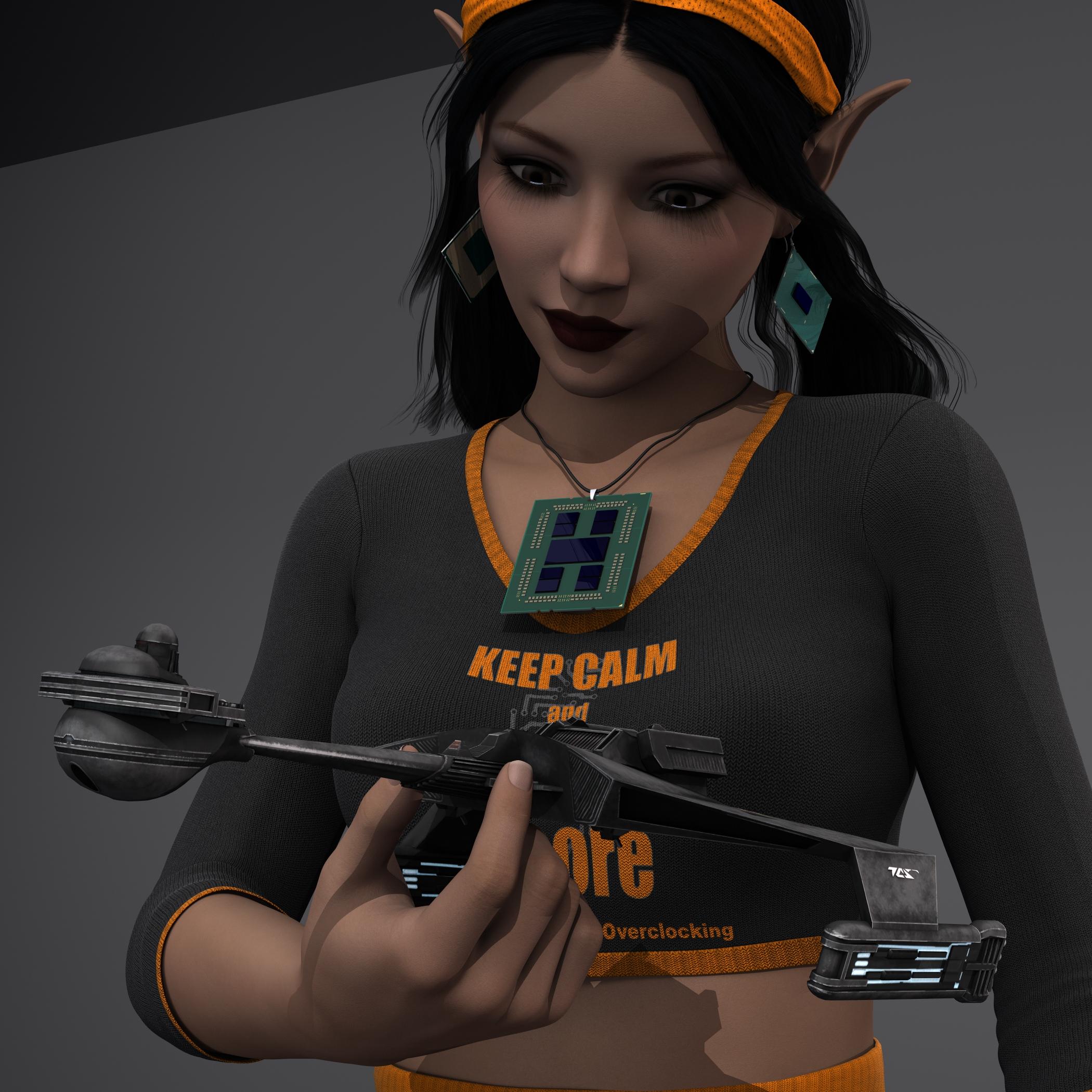
In all honesty, that is a nice FBX file to play with, to quote 'The Leather Jacket' (Jensen Huang), "It Just Works". On that thought, it sounds like Trekyards is working with someone on a fan film, and I actually look forward to seeing a derivative of a D7 made by someone that actually likes trek. On that note of making 3D models, I have been borderline criminally negligent in doing anything with the stuff on my list. There is them Twi'lek Lekku, that I honestly dread doing what I originally wanted to do, just by how dials for one item cannot be simply copied over to another item for a different gender/generation, resulting in a grueling tedious process of making the same dial multiple times from almost scratch (for G2F, G2M, G3F, G3M, etc etc etc). Ugh, way more than I've had energy for, considering the most I managed to do the past few months is load up a genesis figure, toss on some mats, fuss with surface settings, fail to make it look good, give up, watch Isaac Arthur vids for the rest of the day, and repeat the process the next day (G2F Aiyana, G2F Wachiwi, and G8F Uki came out ok, the rest needs work, a lot of work). The CPUs are also in limbo as well.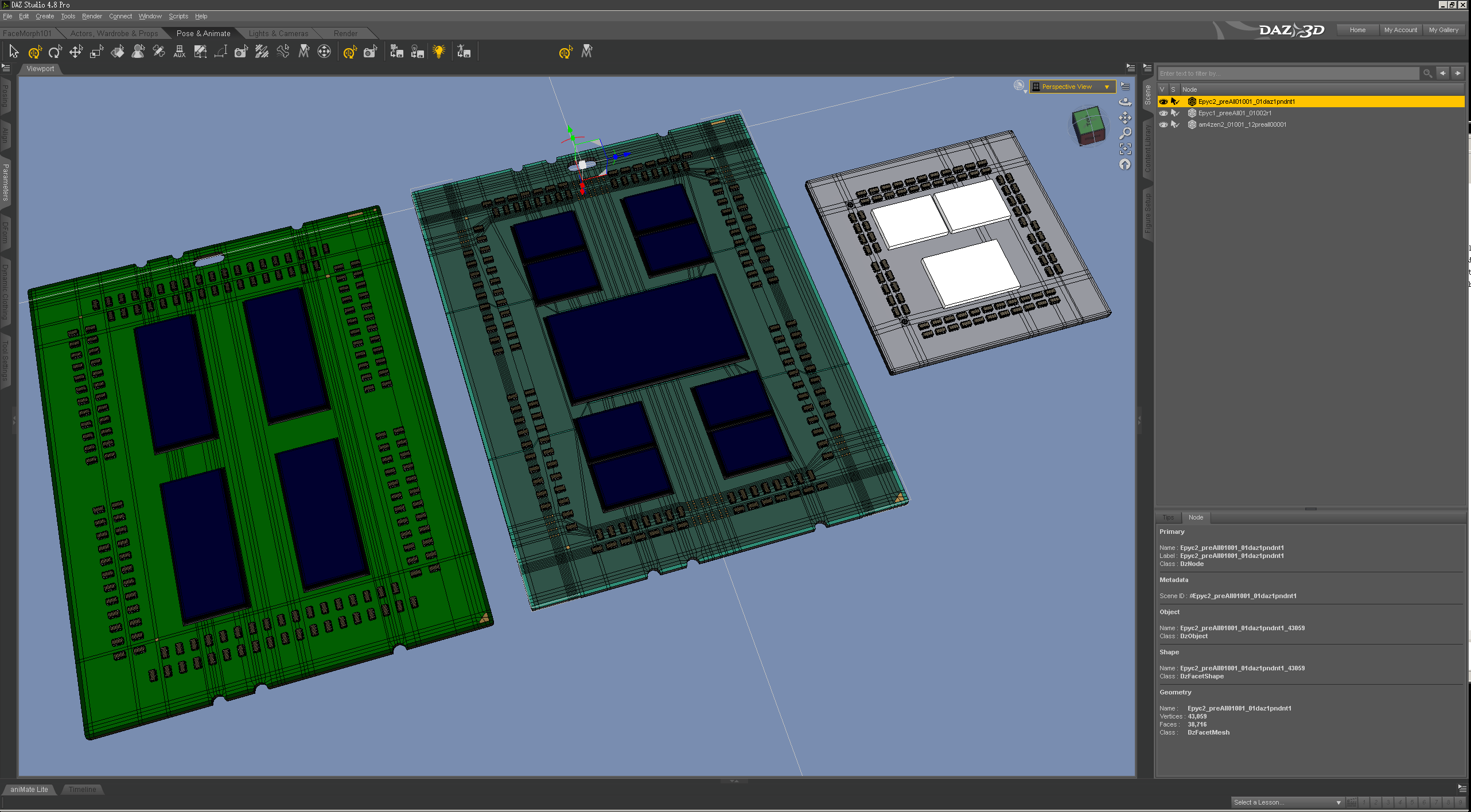
The geometry for the Epyc2 is mostly done (seen in the first render of this post), it's just not UV mapped, and I would need to replace all them caps any way with UV mapped ones. The EPYC1 hasn't been touched, so it's dimensions are still wrong. And there is the AM4 Zen2 that is in uncertainty limbo. I made the mistake of UV mapping the caps on the AM2Zen2, and it worked so well that I realized I would need to go back and UV map the other hundred caps on both EPYC models, a tedious task I do not look forward to, lol.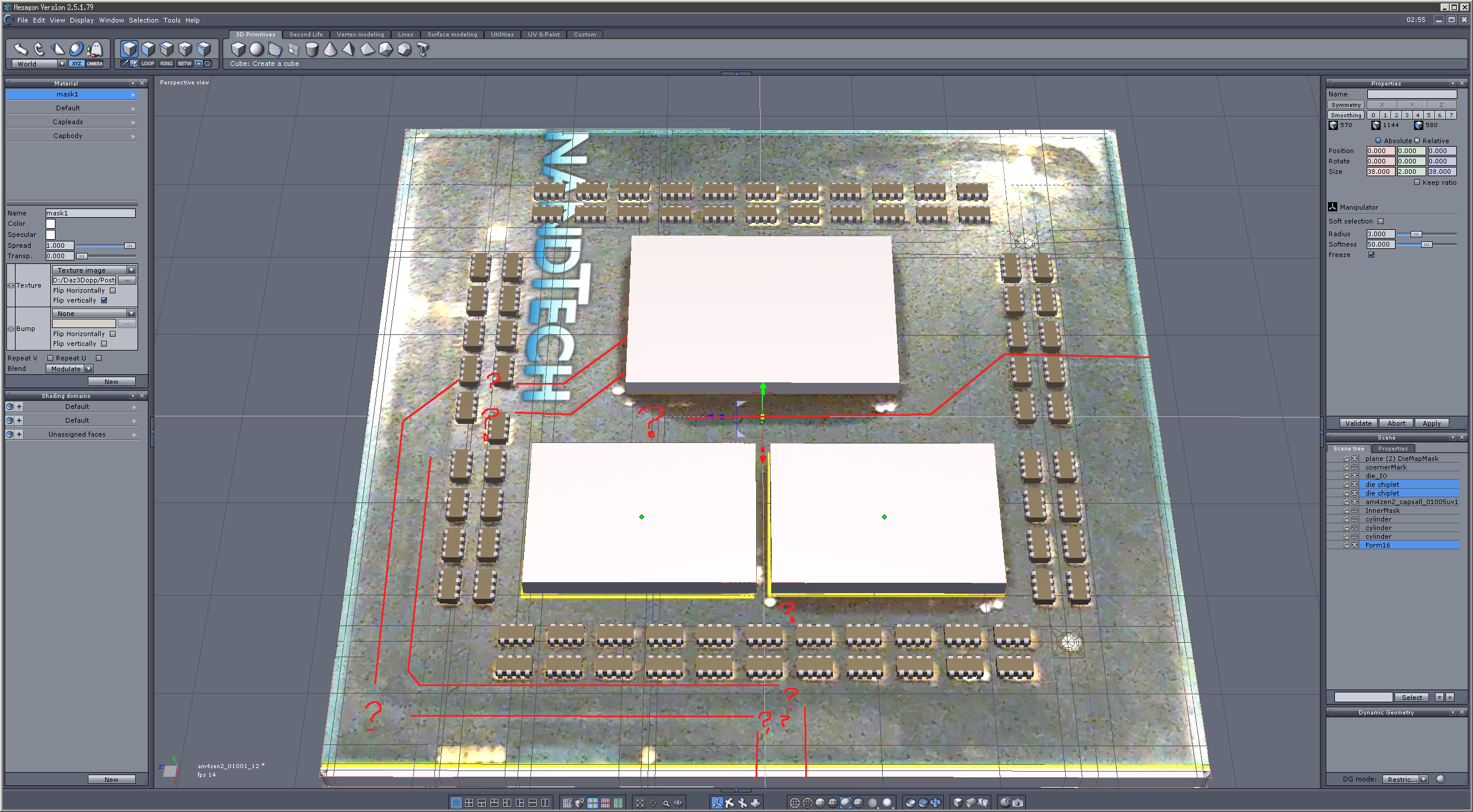
Also, on the AM4zen2, there are some clear breaks in the top ground/power plane, that I can't quite make out where they go in some spots. I can kind of see in the shading splotches what is going on in the few photos I found, just not well enough to place mesh there to make the boundaries for surface zones (like I did for the EPYC2). I decided to put that on the back burner and wait for more photos to surface, and so far nothing, so it's in limbo for now.Oh, in other news, Buildzoid managed to resurrect a card, with far better SMD soldering than I ever managed with a wand soldering iron, And Steve and crew have been making rounds of various factories. So things have been going on, I've just been in a 'mah' level of ambition of late. And Grammarly is up to its normal flaky stuff, lol. Oh, speaking of AI acting up, Jay ran into some flaky AI thing reported a vid
 , just because it was some give away with a link to where to enter for that giveaway,
  , This AI thing is getting out of hand Kind of like Generation Tech joking about Roomba's taking over. Hash-tag LetJ2CgiveAwayStuff or something like that.
I do get the impression that the corporate overloads think AI is just some kind of Deferred Equity Bonds that magically make them money off of others debt, and tell them to go off and do things like wash the dishes without realizing that AI is not some obscure Dishwasher you turn on and forget about. You need to watch over them like a child or you will find your cupboards and sink empty with the trash full of all of your dishes broken into small pieces, because the AI decided to rid you of ever putting up with dirty dishes ever again, lol.
Rockin' out with Phil Wilkes!Would you characterise those differences more in the rendring approach or would you say there were other main factors between yourself and Phil ?
I watching "Learning Carrara" and "Advanced Carrara Techniques", I noticed that nearly everything we do in Carrara, we do in a somewhat different fashion, which is delightfully awesome! I'll be able to give some better examples of that once I get a new computer. Right now I can barely run Carrara, which is sending me to a very dark place lately. It's a nightmare!
Purely as an observer, your artwork evokes to me the Edgar Rice Burroughs paperback covers from the 70s, or the classic Boris Vallejo Conan covers. I really like your images.
Wow, Thanks! I've been a big fan of Boris Vallejo, Frazetta, and others in that realm nearly all my life, which is likely why I tend toward that style - even if by accident, even though sometimes it's been fairly intentional! LOL
I understand your main two characters are based on yourself and partner. Was it a difficult workflow to nail the likenesses ? The tutorials I see rely on reference material which are more like official passport photos front and side view with a neutral facial expression. However, if trying to nail the likeness of, say an actor or rock star, the reference is not so conveniently available and if there are twenty different photos, the lens distortion factor could be different for each one, so I think there must still be some hand/eye coordination needed.
Generation 4 was Morph heaven for me - so getting Genesis Generation X2 has been a real treat for me! Now I can have those morphs on characters that relied on them before, and even better, I get my cool expression morphs collections I've bought for V4, and can use them on male figures as well!
Anyway, back to your question:
The morphs that came with Morphs++ were extensive and very well named. I used those to tweak and tweak my Rosie character for quite some time. I used to run up to her and gaze at her face while she was reading, watching TV, or whatever. Eventually she got used to it! LOL Even after I had a pretty good start, like the version of Rosie we see in my Just a Bit of Fun video, I still have made tweaks here and there. Michael 4 was actually almost already shaped like my face - kind of - so I didn't really do a whole lot with that one. Then I exaggerated the strength and beefiness to turn Dartanbeck into much more of a strong man than I am! LOL I mean, he's an imaginary Super Hero... he's supposed to be beefier than me, right?
I mentioned my Expressions morphs collection. Real difficulty came to me when I started trying to make Rosie 4 talk and smile. I just couldn't quite get the right moth shapes while it was moving or during a smile. This bothered me immensely, so I'd just move on to working on other things I needed to learn, like optimizing texture sizes to use less RAM, lighting like a cinematographer, learning the differences between shine and reflection, etc., When Facial Expressions for V4 came out, and I noticed that, unlike a lot of other "expression" products, this one actually added morph dials, I had to have it! With that, I then decided to add in the Girl 4 expressions too, and I could dial a little here, a little there, and back and forth, to get results that I was overjoyed with. Some of those results are in Just a Bit of Fun.
Textures were a different story altogether. Well, not for Dartanbeck. Those are just plain ol' M4 High Rez. For Rosie, I bought these and those... then I bought some more and more, and just kept buying. Okay now here's the funny part. You know what I'm using for Rosie's textures? V4 High Rez! LOL However, they're not just that. I've spent a lot of time in Howler painting them to be how I need them to be, and then repeating each process for the highlight and bump maps as needed.
Getting Arki's EYEdeas 3+ product, along with the Natural Textures add-on, was a real game changer. When I was completely satisfied with the eyes previously, it was only because I didn't know any better. But once I got my hands on Digital Lighting and Rendering, by Jeremy Birn, and read the part about rendering and lighting eyes, I needed to do something different. Well, the timing couldn't have been better - and it was funny for me. I made a custom morph to concave V4's irises, so that I could get the "Eye Sheen" phenomenon that is so important to cinematographers. It worked... kinda. It was just an experiment, so I worked quickly on it, and it was successful enough to urge me on to try and make them better.
It was just then, when Runtime DNA merged with DAZ 3D, and Arki's wonderful product hit the store shelves, and t caught my eye right away - it comes with iris morphs for just such a thing - along with a whole lot more. But also, Jeremy Birn talked about "Light Linking" - setting lights to only affect the eyes, and not the rest of the figure. Well, we cannot do that with Daz Figures in Carrara since the eyes are technically part of the same mesh. Arki's EYEs conform to Gen 4 figures and work beautifully. And that makes light lnking very easy. But even when using individual EYEdeas 3+ eye models on Genesis or Genesis 2 (or 3 or 8, for that matter) and parenting them to the eyes on the main figure, it turns out that we can still Light Link to them - so it truly is a win Win!
Yeah... with figure technology working much faster than my hobbiest learning curve, I'm still tweaking my two main characters! :)
I love Phil's Photo-Real approach as well - and he's always introducing something that I haven't tried yet, so I love to pay attention whenever he has something to say!
Can switching from CPU to GPU speed up renders with Graphics (not Video) Card?What path would I have to take in order to use GPU as the primary workhorse?
Use Iray.
Just to inform, I don't use iRay rendering at this time. iI presently use 3delight, with pwToon shaders.
I'd like to ask, are renders slower because of the size of images? I did download a free script that reduces the images to a smaller size, but the extra small images make props look blurry. is Scene Optimizer a better tool to use in order to reduce image sizes and retain better quality? Worst case scenario, maybe i should use GIMP to manually reduce the file size and retain the same high quality.
I realize also that using Genesis figures of any version may contribute to slower renders. I do have Victoria 4, but the trouble is, whenever Victoria 4 figures wear skirts, the skirt doesn't move with the legs. Is there any way to make a skirt move with the legs of a Victoria 4 or The Kids 4 figure?
I also think using props with a lot of images, particularly those by Stonemason and Dreamland Models, tend to take longer to load the images. I wonder if there are any low poly houses and neighborhoods I could purchase (but not the Toon style) anywhere?
ANYTHING can slow down a render. ANYTHING.
Can switching from CPU to GPU speed up renders with Graphics (not Video) Card?Just to inform, I don't use iRay rendering at this time. iI presently use 3delight, with pwToon shaders.
I'd like to ask, are renders slower because of the size of images? I did download a free script that reduces the images to a smaller size, but the extra small images make props look blurry. is Scene Optimizer a better tool to use in order to reduce image sizes and retain better quality? Worst case scenario, maybe i should use GIMP to manually reduce the file size and retain the same high quality.
I realize also that using Genesis figures of any version may contribute to slower renders. I do have Victoria 4, but the trouble is, whenever Victoria 4 figures wear skirts, the skirt doesn't move with the legs. Is there any way to make a skirt move with the legs of a Victoria 4 or The Kids 4 figure?
I also think using props with a lot of images, particularly those by Stonemason and Dreamland Models, tend to take longer to load the images. I wonder if there are any low poly houses and neighborhoods I could purchase (but not the Toon style) anywhere?
Native Daz file import for Blender - How does Daz feel about that?TriAx was the weight-mapped rigging system devised by Daz for Ds4/Genesis, Poser didn't add weight-mapping with a similar system until later. The older figures, including Victoria 4 and Michael 4, use parametric rigging which does have separate settings for each axis but isn't what is meant by TriAx.
Thanks for pointing that out. I always thought that TriAx is referring to the separate maps for XYZ, which is not supported by most modern CG programs as far as I know. I like that quaternion weighting is identical with Cinema 4D's spherical weighting.
Having some troubles with Victoria 8 and Tara 2I have the same problem, and I still don't find her.
I have victoria8 but I don't have victoria7 so is it because of that? I wonder...
I just don't find any tara2hd in my smart content.
The base compatibility would be with the Geensis # Female, not Victoria #, I would expect. How did you install, and in which pane(s) are you looking?
I install it through DIM (Daz Install Manager) and after that I noticed that the product was in grey color in Daz son I install it in Daz.
Now the product is colored but when I go to smart content>figures or in the products and double click on Tara2 Hd, well I just have the basic message "Where are my files"...
How to dial away the hollow back of female G8?I was looking at Leonie https://www.daz3d.com/leony-hd-for-victoria-8 ,
Interesting muscles, interesting skin, but the characters promos show a very distinct hollow back. Looks even a bit distorted to me, not a natural way of standing. So, is ist possible to have this character corrected to a more natural behaving back? Or ist this feature something she just shows because the promos gave her very high heels?
i could swear i have seen a freebie dealing with that issue.. on sharecg. just found it:
https://www.sharecg.com/v/82308/browse/21/DAZ-Studio/Unbreak-Spine-Posture-Corrector-for-Genesis-3
no idea tho how you can transpose that on G8 - i can't use the tools for morph transfer... maybe someone else can help for that
Having some troubles with Victoria 8 and Tara 2I have the same problem, and I still don't find her.
I have victoria8 but I don't have victoria7 so is it because of that? I wonder...
I just don't find any tara2hd in my smart content.
The base compatibility would be with the Geensis # Female, not Victoria #, I would expect. How did you install, and in which pane(s) are you looking?
How to dial away the hollow back of female G8?I was looking at Leonie https://www.daz3d.com/leony-hd-for-victoria-8 ,
Interesting muscles, interesting skin, but the characters promos show a very distinct hollow back. Looks even a bit distorted to me, not a natural way of standing. So, is ist possible to have this character corrected to a more natural behaving back? Or ist this feature something she just shows because the promos gave her very high heels?
Daz 3D is part of

Connect
DAZ Productions, Inc.
7533 S Center View Ct #4664
West Jordan, UT 84084Licensing Agreement | Terms of Service | Privacy Policy | EULA
© 2026 Daz Productions Inc. All Rights Reserved.