-
More Non-photorealisitic Renders (NPR II)
Blew the dust off of PWToon, because I haven't used it since I got the new computer, and decided to make a little something. One of my online friends uses the "Zombies, Run!" app. Its kind of an excercise buddy, that augments your daily run/jog with an interactive zombie apocalypse story. So this is kinda based off the stuff she's posted to me about it.

Could be straight out of hi tech big screen animation
Thanks. PWToon plays well with G3 apparently!
More Non-photorealisitic Renders (NPR II)Blew the dust off of PWToon, because I haven't used it since I got the new computer, and decided to make a little something. One of my online friends uses the "Zombies, Run!" app. Its kind of an excercise buddy, that augments your daily run/jog with an interactive zombie apocalypse story. So this is kinda based off the stuff she's posted to me about it.
Could be straight out of hi tech big screen animation
More Non-photorealisitic Renders (NPR II)Blew the dust off of PWToon, because I haven't used it since I got the new computer, and decided to make a little something. One of my online friends uses the "Zombies, Run!" app. Its kind of an excercise buddy, that augments your daily run/jog with an interactive zombie apocalypse story. So this is kinda based off the stuff she's posted to me about it.
Toony Cam Pro Issue in newest version of StudioHi. Sorry for commenting in such an old thread, but I am just now starting to experiment with all the various shaders I have at my disposal in hope of working on my first graphic novel. I just tried using ToonCamPro and it doesn't seem to work at all. When I first try to load the line script, I get the same error others have referenced. If I try to render the scene the whole image is just black. I am on current 4.10 DAZ build.
Sadly I apparently have just about every shader plugin possible installed for DAZ. Sketchy, pwToon, ToonyCamPro, Visual Style Shaders and LineRender900. Complete overkill. LOL. The issue is that any of the iRay based ones are way too slow for me to use. I really need a 3DL solution that works here.
Thanks.
DAZ Studio crashes while rendering with G3F figure wearing G8F dressI tried to render with just hte dress into an empty scene. I had the 3Delight render engine on, and I get the same error message. It seems as if the problem may be more with rendering in 3Delight than anything else.
Thing is, I wanted to do a pwToon render of the figure wearing that dress, but pwToon requires the 3Delight render engine.
DAZ filters for cartoony look a la Jaime HernandezThe Lichtenstein style is really just dithering color to a halftone which creates that comicbook dot pattern. It's how real photos are printed to paper magazines, how newspaper photos are printed, and so on.
You should be able to do a tutorial and learn to do that in Gimp, Photoshop, and many other 3rd party image filter programs.
https://en.wikipedia.org/wiki/Halftone
http://gimpchat.com/viewtopic.php?f=23&t=8195
For the other, you need to, and it won't look hand drawn completely but still look pretty good.
1) Buy pwToon in the DAZ 3D Store (https://www.daz3d.com/pwtoon) - these are 3DL shaders so you need to select the 3DL renderer when rendering.
2) Supplement the pwToon shaders by downloading, installing the freebie at shareCG that is a set of 3DL toon shaders that augment the pwToon shaders. You want to choose the toon presets that have thicker black outlines so you want an color inked effect. http://www.sharecg.com/v/69733/gallery/21/DAZ-Studio/Crescents-pwToon-Cel-Shaders
comic filter for Daz renders?If you are willing to put a bit of work into it, my Oso Toon for Iray provides tools for creating comic style images using Iray renders.
It's not a one step process (unless you just want lineart), but it can give you a lot of control over elements that are frustrating otherwise.
I've used PWToon and Linerender9000 to great effect; they are both very useful for doing this sort of art. PWToon uses Normal-based outlining, which has a few flaws. LR9K is a bit more sophisticated with lines, though can take some work.
I've tried MANY MANY methods of filtering to produce an illustrated effect, and found all of them wanting. The big problem is that there is no algorithm that will understand that THIS black pixel is part of a figure and THAT black pixel is part of the background. Ultimately, you need some sort of pass or logic that writes out what different blocks of the image belong to. Oso Toon and LR9K both can do this.
comic filter for Daz renders?You can use 3Delight and PWToon shaders, they come out pretty good. We also have a comic thread: https://www.daz3d.com/forums/discussion/228061/3d-comic-book-tips-and-pictures#latest
There's also a pretty cool thread that has tons of great ideas and suggestions: https://www.daz3d.com/forums/discussion/54697/non-photorealistic-renders-npr/p1
and the follow-up thread https://www.daz3d.com/forums/discussion/227541/more-non-photorealisitic-renders-npr-ii
3D Art Freebie Challenge-May 2018-"Winners Announced Month Of The Dragons" -Entries Thread OnlyDragon Temple
Not counting: Genesis 3 Female, Charm Hair, Millenium SubDragon, Alchemy Chasm
# = requires free registration
1) Sword of Power #
2) Amethyst (sixth item from the top, embedded to the sword)
3) Dragon Skull Trophy #
4) Free Hell Fire Prop (sixth item from the top)
5) FX Daz Studio (flames used) #
6) Pet Dragon #
7) Black Dragon #
8) A calm water terrain (base for the lava) #
9) Pony made with 3D Pony Creator (I can provide with settings file for this particular pony, if needed)
10) Crescent's pwToon Cel Shaders #
11) New pwToon Cel Shader Presets (download link in the opening post)
12) A Skeleton #Paid:
1) Tears of the Gods Outfit for Genesis 3 Female(s) #
2) Gladiator Goddess for Genesis 3 Female(s) #
3) DAZ Dragon 3 Pro Bundle #
4) Fantasy and Sci-Fi Effects #
5) pwToon #Lava texture from https://brennanwright.deviantart.com/art/Lava-Texture-416036870
Bone texture for dragon skull's teeth http://www.supinemusic.net/jim/tex/BonesNew.jpg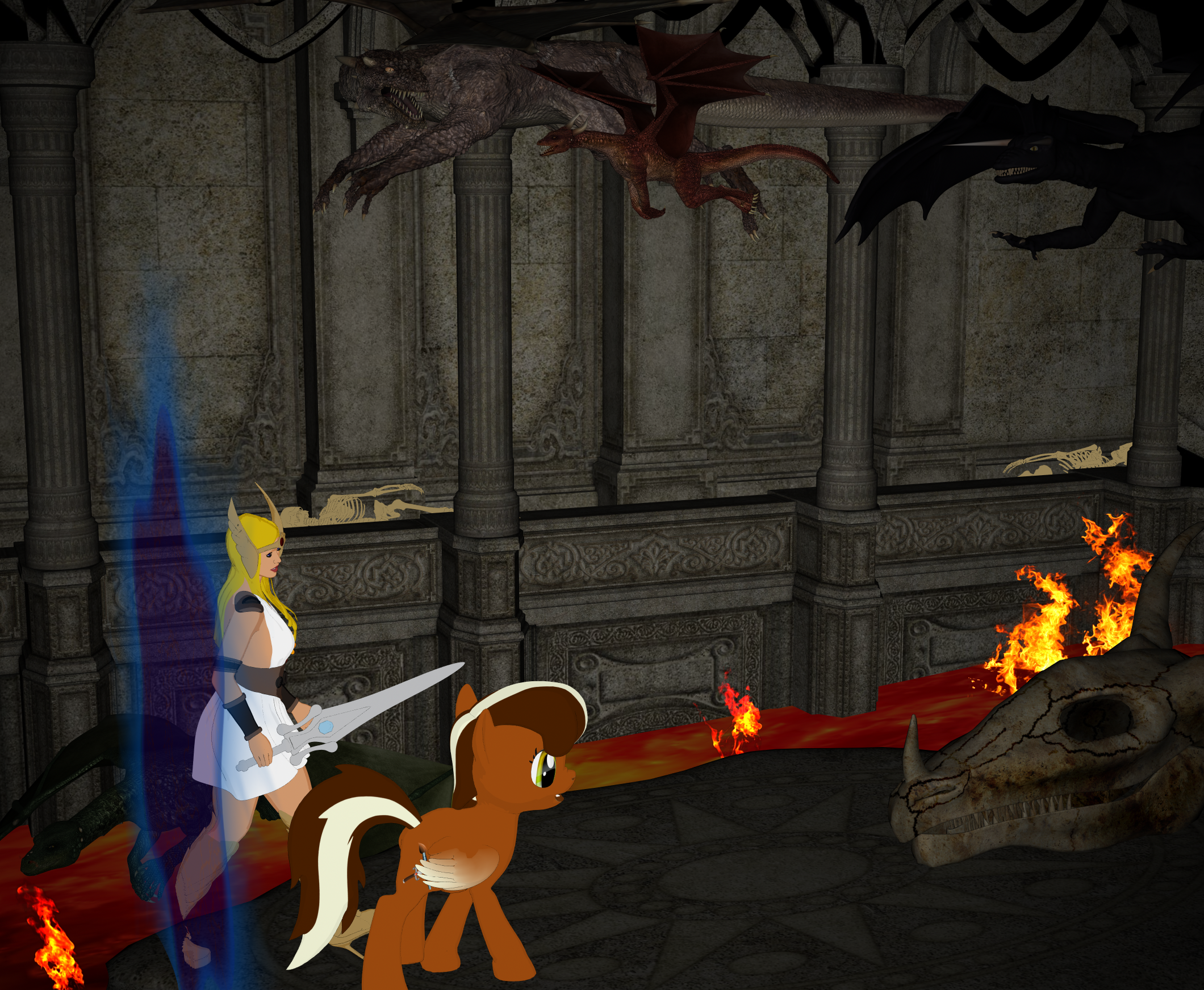 3D Art Freebie Challenge-May 2018-"Month Of The Dragons" -Main Thread Only
Dragon Temple
Not counting: Genesis 3 Female, Charm Hair, Millenium SubDragon, Alchemy Chasm
# = requires free registration
1) Sword of Power #
2) Amethyst (sixth item from the top, embedded to the sword)
3) Dragon Skull Trophy #
4) Free Hell Fire Prop (sixth item from the top)
5) FX Daz Studio (flames used) #
6) Pet Dragon #
7) Black Dragon #
8) A calm water terrain (base for the lava) #
9) Pony made with 3D Pony Creator (I can provide with settings file for this particular pony, if needed)
10) Crescent's pwToon Cel Shaders #
11) New pwToon Cel Shader Presets (download link in the opening post)
12) A Skeleton #Paid:
1) Tears of the Gods Outfit for Genesis 3 Female(s) #
2) Gladiator Goddess for Genesis 3 Female(s) #
3) DAZ Dragon 3 Pro Bundle #
4) Fantasy and Sci-Fi Effects #
5) pwToon #Lava texture from https://brennanwright.deviantart.com/art/Lava-Texture-416036870
Bone texture for dragon skull's teeth http://www.supinemusic.net/jim/tex/BonesNew.jpg
All Links Check Out Plz Move To The Entries Thread
3D Art Freebie Challenge-May 2018-"Month Of The Dragons" -Main Thread OnlyDragon Temple
Not counting: Genesis 3 Female, Charm Hair, Millenium SubDragon, Alchemy Chasm
# = requires free registration
1) Sword of Power #
2) Amethyst (sixth item from the top, embedded to the sword)
3) Dragon Skull Trophy #
4) Free Hell Fire Prop (sixth item from the top)
5) FX Daz Studio (flames used) #
6) Pet Dragon #
7) Black Dragon #
8) A calm water terrain (base for the lava) #
9) Pony made with 3D Pony Creator (I can provide with settings file for this particular pony, if needed)
10) Crescent's pwToon Cel Shaders #
11) New pwToon Cel Shader Presets (download link in the opening post)
12) A Skeleton #Paid:
1) Tears of the Gods Outfit for Genesis 3 Female(s) #
2) Gladiator Goddess for Genesis 3 Female(s) #
3) DAZ Dragon 3 Pro Bundle #
4) Fantasy and Sci-Fi Effects #
5) pwToon #Lava texture from https://brennanwright.deviantart.com/art/Lava-Texture-416036870
Bone texture for dragon skull's teeth http://www.supinemusic.net/jim/tex/BonesNew.jpg2D version of Daz?But look at toon rendering if you want more cartoon-liike images with your 3D figures.
https://www.daz3d.com/sketchy-toon-edge-and-art-style-shaders-for-iray -- modern
https://www.daz3d.com/pwtoon -- classic
Aiko and Hiro has lost their animeYes you are all right, I had forgotten that the newer anime has evolved into a more realistic face and a stylized body.
I also forgot that there was a simple Aiko without numbers. I wonder what she looked like back then. I dont think I could find her in the shop. Redfern, could you share a couple front and back images of Akio 1 I can see what the original one looks like?
Honestly, I don't know the real difference between Stephanie and Victoria I was going through my G3 morphs and found very little overall difference. G8 has very few morphs but that it most likely because I havent gotten any for them yet. G3 as a lot of morphs but I had a hard time figuring out how to get her lighter in pwtoon. it took 2 lights, set to each type of light before she would render right. But she still doesnt look right, especially beside g8. Personally, due to the compatiblity of clothes Id rather stick with G1 for now until I figure out how to get the clothes from my extensive 3/4 library up to g8, along with all the morphs I love with the textures I need for my future webcomic. Right now I'm just exploring options and deciding what I want. For now I'm settling with the classic and very versatile Genesis. She can be evertyingI need thanks to the morph packs I bought a long time ago.
Aiko and Hiro has lost their animeI was examining the Aiko and Hiro models after 4 and I noticed that they have slowly lost their anime inspired roots. Observe the three Aiko shapes below. The 2 on the left is genesis with a3 and a4 morphs applied and the right one is akio 6 ( dont have 5) Please note I do not know why akio 6 refused to be a lighter shade in the pwtoon shader I like to use. Everything but the eyelashes are white but she still came out a mile too dark.
Take note of their faces, aiko 6's eyes are a lot smaller and the nose less pointy than her previous versions. The body is still anime inspired but the rest of her has become a little too realistic. I noticed Hiro is the same way in the images I've looked at. (Speaking of Hiro where is Hiro 6?) Anyhow, has anyone else noticed it or am I the only one who really noticed it?
Edit: Had some issues with mod editing but I fixed it. Here is the image I promised. See a lower post for a true compairisonof the aikos
 My ToonGen morphs for a more human look !
What is the shader you are using? I have pwToon and pwGhost.
So where should I invest CPU or Graphics card?michaelxm_a1dddd836b,
Thanks for explaining washout. Luckily, I haven't had that problem with the Nvidia card that I have.
nonesuch00,
I'm not rendering anything UHD. Lately I've been staying in the 1024x1280 size range and exploring what I can do with IRAY and photorealistic portraits. So far renders are taking between half an hour and two hours. Not too bad, but the scenes are pretty simple.
I have pwToon, pwSketch, pwGhost, Visual Style Shaders, Subsurface Toon Shaders. Given the limitations I have with my graphics card I have been thinking about giving them a try again.
Converting my V/M4 textures to Genesis 8Thank you! There's a very good reason I need the v4/m4 textures

My webcomic has custom and basic textures for PWToon This is Alex, I'm not 100% happy with her clothes they are rather rumpled and the braid got a little messed up when I change the morphs.. I'm going to try and smooth it manually over in hexagon or Blender with morph loader pro. I need to adjust the M4 uvs just a bit in the nose area the nostrils aren't quite correct. The ears are parented, due to earlier issues with the joints and easy pose.
So where should I invest CPU or Graphics card?dakini; the washout seems to be with everyday applications, such as text. Seems the white bg overpowers the text making it hard to read. It's one reason I had to switch the layout in Daz Studio to a dark background, because it was hard to read in the default mode. I never seem to have that with the amd cards...so I don't know..maybe nVidia is just too vibrant when it comes to whites.
nonesuch00; I doubt I'll be getting that much of a high end gpu anytime soon. I was not aware of those other add ons. Do you use those 2 addons together to achieve those really fast renders? I do believe you are saying though that the shader is something you would use after the quick renders to enhance them.. right?
Edit: nonesuch00; ok now I see that pwtoon is included in the shader package :o)
The shader is what the render model uses to determine how the simulated light will react to a surface when it is rendered. It is not a post processing technique. Given that I have only a CPU and integrated intel GPU I render for animation tests using pwToon and the pwShaders (I don't have them all).
So where should I invest CPU or Graphics card?dakini; the washout seems to be with everyday applications, such as text. Seems the white bg overpowers the text making it hard to read. It's one reason I had to switch the layout in Daz Studio to a dark background, because it was hard to read in the default mode. I never seem to have that with the amd cards...so I don't know..maybe nVidia is just too vibrant when it comes to whites.
nonesuch00; I doubt I'll be getting that much of a high end gpu anytime soon. I was not aware of those other add ons. Do you use those 2 addons together to achieve those really fast renders? I do believe you are saying though that the shader is something you would use after the quick renders to enhance them.. right?
Edit: nonesuch00; ok now I see that pwtoon is included in the shader package :o)
So where should I invest CPU or Graphics card?Also, I forgot something. Rendering a image or frame a UHD will use more RAM than rendering smaller frames like just HD (1280x720).
Probably you can render both stills and animations at FHD which is 1920x1080 if you buy the newest nvidia video cards with what is it 11GB or 12GB RAM?.Anything less than than for animation you probably want to render at SD until you can save or the more capable cards become cheaper.
I don't think I'd try to render animations at UHD even with the best and newest nVidia cards unless you have a computer that you can leave alone for a week or more, depending on how long the animation is doing nothing else but the animation render.
For animations you can do quickly consider buying the pwToon or the pwShader Bundle for the DAZ 3DL renderer. You have to manually reassign the surfaces materials though to use the pwToon & other shaders. Then rendering a UHD frame in your animation will take all of 5 seconds or so. It's more important to be satisfied with your animation at first the the shaders assigned because the shaders & renderer are always easier to change later then redoing a portion of an animation.
Daz 3D is part of

Connect
DAZ Productions, Inc.
7533 S Center View Ct #4664
West Jordan, UT 84084Licensing Agreement | Terms of Service | Privacy Policy | EULA
© 2026 Daz Productions Inc. All Rights Reserved.