-
Anime Toons and Filatoon Shader Q&A
Genesis and Genesis2 content work really well with Filatoon as well
The more I play around and figure things out with Flatoon and Filament in general the more I like it.AIUTO...CHI CONOSCE L’ITALIANO? PARTE QUATTORDICICrios said:
Appunto, io seleziono Filament nel viewport, e poi il render dal viewport.
Faccio come ha detto Imago, ma non va, se lascio l'outline esce tutto nero, se lo levo, tutto con un colore molto chiaro.
Beh, è assurdo... Puoi fare uno screen della tua interfaccia e mostrarcela?
Is the atmosphere ruined?(closed)johnjohn808 said:
I tend to only come here for peer to peer support which is exceptional.
Of course, peer to peer support here kind of has to be exceptional, given how much nuts and bolts real support there is from DAZ itself. I remember a time, not that long ago, when DAZ customer service was amazingly good, but now the response to everything seems to be to file a ticket, with a large percentage of CS requests are now taking months and even years to get addressed. I'd say that there's not a much more telling way for a company to show how much interest it has in supporting it's core business and customers... except for the fact that this is also the company that hasn't bothered to update their basic software manuals in the ten years since the days of Genesis 2, so the "basic" and "User" manuals don't even mention the current primary render engine, Iray, or what is now the secondary render engine, Filament, D-force cloth or hair, volumetrics, anything to do with the use of geometry shells, Face Transfer 1 or 2, anything about of the last four base figure systems including the new methods of creating expressions, and DAZ Connect, let alone Fillatoon or any of this latest new batches of features that are supposed to be the selling benefits of DAZ premier... As a result, for DAZ Studio to survive as a viable system, it's pretty much fallen on the more experienced users to step up and fill that void.
New Free Digital Art Live seriesI definitely covered a Lot of helpful tips about Filament and FilaToon - but the content presentations were even more fun!
New Free Digital Art Live seriesStarting in 15 minutes!
We'll be exploring the new Filament Draw Options quite a bit - both for FilaToon and without.
Free Tickets Still Available!!!
Anime Toons and Filatoon Shader Q&AHylas said:
Ok you guys. This probably has already been explained before but this thread is soooooo long, please help me out here.
I'm currently not premier and I haven't bought Vicky or Mikey, or any G9 content that costs money.
I have upgraded to the most recent DAZ Studio version and have downloaded all the G9 content that's free.
I vaguely remembe that I'm supposed to have access to a basic male and female G9 toon character, one G9 toon hair, a filament toon lighting set up, and filament toon shaders.
Or did I misread/misremember that?I have found the shaders but I can't find any of the other stuff. What am I not getting?
Have you successfully installed Genesis 9 Starter Essentials (3 of 3) ?
Anime Toons and Filatoon Shader Q&AOk you guys. This probably has already been explained before but this thread is soooooo long, please help me out here.
I'm currently not premier and I haven't bought Vicky or Mikey, or any G9 content that costs money.
I have upgraded to the most recent DAZ Studio version and have downloaded all the G9 content that's free.
I vaguely remembe that I'm supposed to have access to a basic male and female G9 toon character, one G9 toon hair, a filament toon lighting set up, and filament toon shaders.
Or did I misread/misremember that?I have found the shaders but I can't find any of the other stuff. What am I not getting?
3D Comic Book Tips And Pictures
Thank you so much for the links. I'm not thrilled about needing to use a geoshell, but I am going to tinker with this and see what I can do. Thanks again!Space Jingoroh said:
mmitchell_houston said:
Leana said:
mmitchell_houston said:
This looks very nice, and very promising. What, exactly, is Filatoon? Is it a render setting built into Daz Studio or is it a separate product? I saw a bunch of Toon products recently listed, but non of them list a prerequisite for another product. Also, does it allow for pure b&w output?
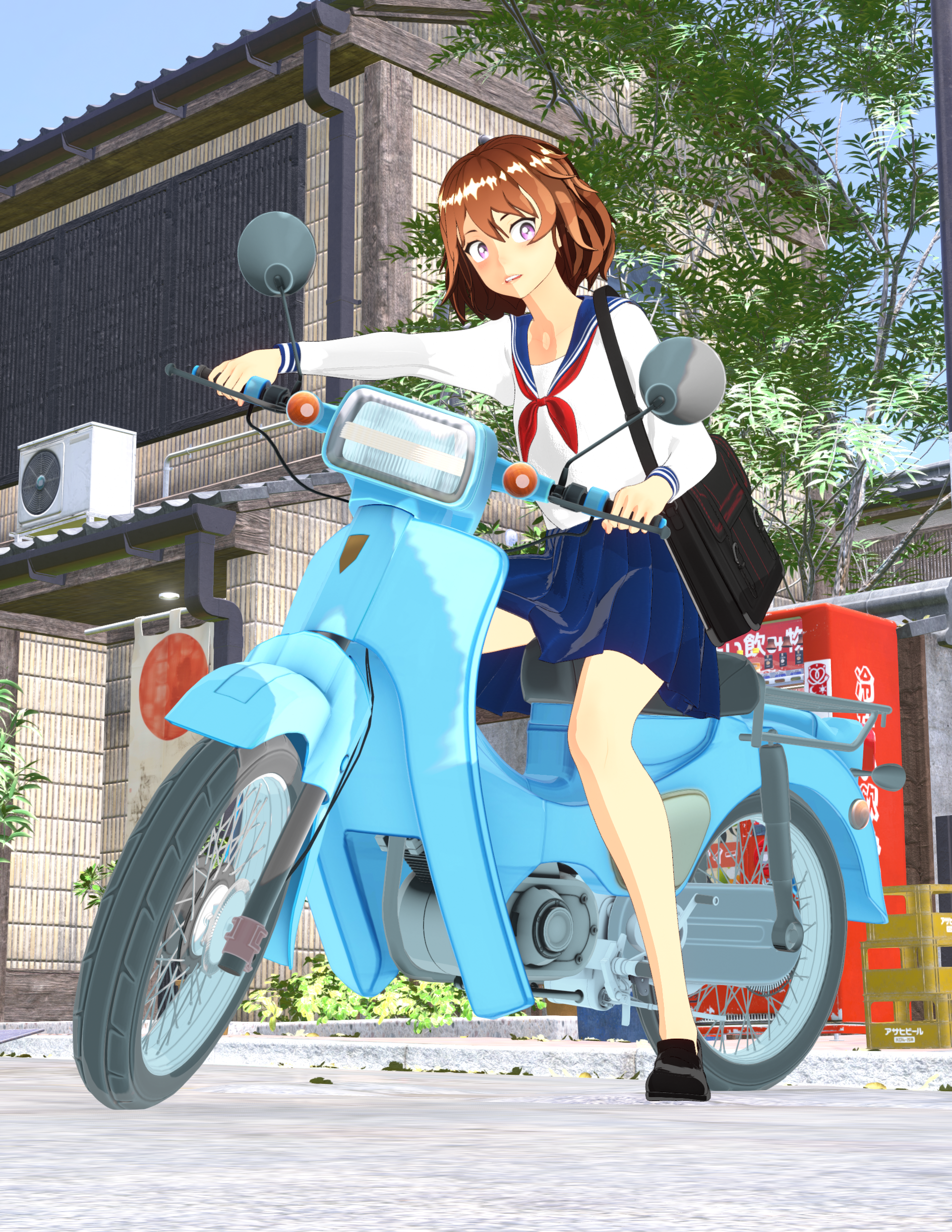
Filatoon is a shader (well, a combination of a shader and a geoshell for the outline) that you use with the Filament render engine. The shader is available in the latest version of DS default resources, and you need DS 4.23 to use it.
Very interesting. Is there a tutorial on how to use this?Anime Toons and Filatoon Shader Q&A
FilaToon / Cell shaded rendering with Filament
 Anime Toons and Filatoon Shader Q&A
AlienRenders said:
I can do multivariable calculus but I can't figure this out. I set it to filament renderer. I applied the shader to a character. I added a distant light. I set shadows to raytraced. Character is completely black no matter what I try.
edit: Ok, if I increase MatCap Weight to 1, I get color. What is MatCap? And why does it need to be at 1?
edit2: Oh, environment weight also gives color and more definition. All right, this is starting to look good. I really like the outline shell. Wish that worked in iRay even without the toon shading.
edit3: For anyone wanting outlines in iRay, I have a method that isn't too bad.
Outlines with iRay
1. Create a geoshell for your character
2. Set offset distance to 0.2 (0.2 to 0.3)
3. In the geoshell material, set all the weight dials to zero (Diffuse overlay weight, translucency weight, glossy layered weight, etc.)
4. Set Refraction Index and Refraction Weight both to 1 (100%). This will make the shell transparent.
5. Set Top Coat Weight to 1. Set Top Coat Color to black. Scatter only. Roughness to 1. Color Effect to Reflectivity. Reflectivity to 0. Curve 0 to 0. Curve 90 to 2 (need to turn off "use limits" in the gear icon, parameter settings). Curve exponent to 10. Everything else in top coat settings to 0. IOR can remain at 1.5.
6. Cutout opacity to 1
If you want darker lines, especially in front of a white background, there are two possible solutions. You can bump up Curve 90 to 3 or higher. It will create a bit more shading though. AND/OR you can duplicate the shell, set an offset about 0.05 larger than the other shell and copy the material. You can add more shells if you want.
You can also lower refraction weight, but it'll make your character darker. I'm mentioning it because it can be a cool effect.
Intersting tips on toons in iRay.
For FilaToon the shadows on the light needs to be set to Deep Shadow Map.
For quickly set up the scene use Basic FilaToon Environment included in People | Genesis 9 Toon
For me FilaToon is better because of its instant rendering time even with many characters in the scene.
Figures look differentThe one was Filament, I changed them so they are both the same and look the same now.
Thanks to both of you for your help!
AIUTO...CHI CONOSCE L’ITALIANO? PARTE QUATTORDICIAppunto, io seleziono Filament nel viewport, e poi il render dal viewport.
Faccio come ha detto Imago, ma non va, se lascio l'outline esce tutto nero, se lo levo, tutto con un colore molto chiaro.
AIUTO...CHI CONOSCE L’ITALIANO? PARTE QUATTORDICIFilament, Filatoon è lo shader e si vede solo se attivi Filament. Ci stiamo incasinando coi termini.

In ogni caso, conviene ricominciare daccapo.
Per prima cosa bisogna avviare una sessione fresca di DAZ Studio. Poi si attiva Filament. Dopodichè si cercano nelle librerie gli shader Filatoon. A questo punto si carica una cosa qualsiasi nella scena, si seleziona e di fa doppio click su "Filatoon add outline" e a questo punto si seleziona il prop (non la geoshell) e si doppioclicca su "Filatoon base". Poi si cambiano colori, texture e via dicendo. A questo punto si aggiunge alla scena il "basic Filatoon environment"
Se anche con questo percorso non funziona, allora bisogna vedere passo passo cosa c'è che non va.
Anime Toons and Filatoon Shader Q&AImago said:
Space Jingoroh said:
When the camera angle is changed, the turnip or hair causes an “I-RO-PA-KA(color flicker)”.
Try changing the type of shadow in the Filament Draw options pane (you can create it in the "create" menu) and also increase its Map Size, it should solve the most of the problems.
Thank you very much.
I set the shadow map size to the largest 16384, shadow Cascades to the largest 4, and shadow type to DPCF, and the flicker is now finer and less noticeable.
It helped a lot.However, it has not disappeared completely.
The shadow outline keeps jerking and changing.
The width of the two-tiered shadow changes, and the position and shape of the outline keeps changing.AIUTO...CHI CONOSCE L’ITALIANO? PARTE QUATTORDICIDove sta esattamente?
Anche io ho solo Filament, non FilaToon
Anime Toons and Filatoon Shader Q&ASpace Jingoroh said:
When the camera angle is changed, the turnip or hair causes an “I-RO-PA-KA(color flicker)”.
Try changing the type of shadow in the Filament Draw options pane (you can create it in the "create" menu) and also increase its Map Size, it should solve the most of the problems.
3D Comic Book Tips And Picturesmmitchell_houston said:
Leana said:
mmitchell_houston said:
This looks very nice, and very promising. What, exactly, is Filatoon? Is it a render setting built into Daz Studio or is it a separate product? I saw a bunch of Toon products recently listed, but non of them list a prerequisite for another product. Also, does it allow for pure b&w output?
Filatoon is a shader (well, a combination of a shader and a geoshell for the outline) that you use with the Filament render engine. The shader is available in the latest version of DS default resources, and you need DS 4.23 to use it.
Very interesting. Is there a tutorial on how to use this?Anime Toons and Filatoon Shader Q&A
FilaToon / Cell shaded rendering with Filament
3D Comic Book Tips And Pictures
Very interesting. Is there a tutorial on how to use this?Leana said:
mmitchell_houston said:
This looks very nice, and very promising. What, exactly, is Filatoon? Is it a render setting built into Daz Studio or is it a separate product? I saw a bunch of Toon products recently listed, but non of them list a prerequisite for another product. Also, does it allow for pure b&w output?
Filatoon is a shader (well, a combination of a shader and a geoshell for the outline) that you use with the Filament render engine. The shader is available in the latest version of DS default resources, and you need DS 4.23 to use it.
AIUTO...CHI CONOSCE L’ITALIANO? PARTE QUATTORDICICrios said:
No, i Filament come Viewport, mica esiste il viewport FIlatoon?!?
Certo che esiste... Hai presente il tastino nel workspace dove scegli IRay e compagni?
Anime Toons and Filatoon Shader Q&AI can do multivariable calculus but I can't figure this out. I set it to filament renderer. I applied the shader to a character. I added a distant light. I set shadows to raytraced. Character is completely black no matter what I try.
edit: Ok, if I increase MatCap Weight to 1, I get color. What is MatCap? And why does it need to be at 1?
edit2: Oh, environment weight also gives color and more definition. All right, this is starting to look good. I really like the outline shell. Wish that worked in iRay even without the toon shading.
edit3: For anyone wanting outlines in iRay, I have a method that isn't too bad.
Outlines with iRay
1. Create a geoshell for your character
2. Set offset distance to 0.2 (0.2 to 0.3)
3. In the geoshell material, set all the weight dials to zero (Diffuse overlay weight, translucency weight, glossy layered weight, etc.)
4. Set Refraction Index and Refraction Weight both to 1 (100%). This will make the shell transparent.
5. Set Top Coat Weight to 1. Set Top Coat Color to black. Scatter only. Roughness to 1. Color Effect to Reflectivity. Reflectivity to 0. Curve 0 to 0. Curve 90 to 2 (need to turn off "use limits" in the gear icon, parameter settings). Curve exponent to 10. Everything else in top coat settings to 0. IOR can remain at 1.5.
6. Cutout opacity to 1
If you want darker lines, especially in front of a white background, there are two possible solutions. You can bump up Curve 90 to 3 or higher. It will create a bit more shading though. AND/OR you can duplicate the shell, set an offset about 0.05 larger than the other shell and copy the material. You can add more shells if you want.
You can also lower refraction weight, but it'll make your character darker. I'm mentioning it because it can be a cool effect.
Anime Toons and Filatoon Shader Q&A
This could prove to be a good work around though. If you apply the Filatoon shader to the sky dome and turn off "cast shadows" and "receive shadows", maybe plug the texture into both diffuse and emission, it would still be an adequate background.necroscension said:TheNathanParable said:
necroscension said:
TheNathanParable said:
necroscension said:
TheNathanParable said:
I haven't tried this myself yet, but I wonder if it might be better to use one of those skydome products rather than a HDRI background, such as Iray Worlds or Worldbase by Magix 101.
https://www.daz3d.com/iray-worlds-skydome
https://www.daz3d.com/the-all-new-worldbase-xt-lushlands
At least then you won't have to worry about the background being pixellated.
I have the first product, I'll give it a try.
I had attempted using a plane and a sphere to create a background but those pixelated as well. The main reason the pixelation became a problem for me is that the hdr I was trying to use had a painted look that got ruined by the resampling.
Vick 9 | Daz 3D -> I had to render the background using Iray in order to retain the painted look.
(edit) Unfortunately Filament doesn't like the product, I guess because it uses the sky image in both the Emission and Luminance properties in Surfaces (view attachment).
Have you tried applying the Filatoon shader to the backdrop? The default iray shaders may not translate well to filament.I applied the general shader and moved the image in the Emission slot to the base slot. Unfortunately the images are being resampled (see attached).Ok, I think I figured out why the mesh skydone is pixellated for you.
These are two renders of Mikey. On the left, I set the "texture resources" option in the Daz Studio preferences to "performance", which makes Mikey's textures pixellated. On the right, I set the option to "quality", which makes them sharper. It's most noticeable around the eyes.
I'm using a iray HDRI background in both of these. It seems these are completely unaffected by this option, but a mesh skydone like the one used in iray worlds or worldbase xt should look better with this option set to "quality". I'll try it out for myself once I get them installed and working.
The Iray Worlds product uses odd shaped images, so plugging in a new hdri doesn't really work. But I can confirm that if I create a dome from a sphere and plug in an hdri in the Base parameter in Surfaces there's no resampling. I tested with a Cake and Bob 16K hdri and confirm that I can actually see "film grain" instead of pixelation (view attachment). Too bad that setting doesn't apply to the hdri used in Environment Options.
Daz 3D is part of

Connect
DAZ Productions, Inc.
7533 S Center View Ct #4664
West Jordan, UT 84084Licensing Agreement | Terms of Service | Privacy Policy | EULA
© 2026 Daz Productions Inc. All Rights Reserved.