-
Is AI killing the 3D star?
RobotHeadArt said:
kyoto kid said:
...sounds easier (and more rewarding) to just develop a charater form scratch and save it as a character preset.
It depends. If you are trying to replicate a real person and you have a good set of source images, it is way easier than trying to create the skin textures, create the morphs, and then realize you can't get a good likeness because HD morph creation is PA only. Given the popularity of image to Daz character tools (Face Transfer, Headshop, Facegen, etc.) there is a high demand for this workflow. Also, for skin tones where there is little Daz representation, you are limited by what PAs have made available and how well you can edit them to match the right look.
It's not just people concepts you can do training on. For people who don't have great modeling skills it can be a great way to create clothing, props, hair, etc. I was able to take screenshots of an outfit from a cartoon, train a LORA, and then apply the LORA to a photorealistic model with about 45 minutes of prep work and 30 minutes of GPU training time. Stable Diffusion was able to take the cartoon outfit and transform it into a real, photoreal outfit. Creating the same outfit in Marvelous Designer, rigging it in Daz, UVing, texturing, etc. would have taken dozens of hours.
If you are going to use Ai to create a likeness of a real person, then you might as well use Photoshop ( or some other image editor ), to put the persons head on someone elses body, either way it's a fake.
Is AI killing the 3D star?kyoto kid said:
...sounds easier (and more rewarding) to just develop a charater form scratch and save it as a character preset.
It depends. If you are trying to replicate a real person and you have a good set of source images, it is way easier than trying to create the skin textures, create the morphs, and then realize you can't get a good likeness because HD morph creation is PA only. Given the popularity of image to Daz character tools (Face Transfer, Headshop, Facegen, etc.) there is a high demand for this workflow. Also, for skin tones where there is little Daz representation, you are limited by what PAs have made available and how well you can edit them to match the right look.
It's not just people concepts you can do training on. For people who don't have great modeling skills it can be a great way to create clothing, props, hair, etc. I was able to take screenshots of an outfit from a cartoon, train a LORA, and then apply the LORA to a photorealistic model with about 45 minutes of prep work and 30 minutes of GPU training time. Stable Diffusion was able to take the cartoon outfit and transform it into a real, photoreal outfit. Creating the same outfit in Marvelous Designer, rigging it in Daz, UVing, texturing, etc. would have taken dozens of hours.
Face Transfer on Genesis 9nikhil.saxena29 said:
So is there any technique to sculpt daz genesis 9 face with photo / image that I have or we have to manually create morphs editing each and every part?? I tried to tweak genesis 9 developer character face manually with all options and tweak provided in essential tools...i was nowhere near to my original image ..if there is any parameter or tool where we can actually compare image to face of genesis character, that would be really helpful.
The upshot of this and some related threads is that you can get Face Transfer to Genesis 9 via either manually converting or by using a commercial solution. I started off doing it manually, based on instructions I found from a thread here on the Daz forum but have switched to the ManFriday product ( Figure Converter for Genesis 9 | Daz 3D ) . The newest FaceGen and HeadShop versions both can directly create G9 figures from a photo source.
Simple way of fixing snaggy teeth in G8 import results from HeadShop?Inspired by the Zero figure suggestion by Catherine3678ab (paraphrased by me as "zero-ed figures don't have wonky eyelashes"), I started to wonder if the most simple solution could be the mere saving of the HeadShop head morph as a shaping preset? Why don't I just export (i.e. "save as") the head morph as a shaping preset and apply that preset on a "healthy" figure (say "Genesis 8 Basic Female"). Initially I unchecked too many options in the "Shaping Preset Save Options" trying to be clever and just focus on the head but that didn't quite work, but by simply including plenty of options that are already there I finally got the HeadShop morph to be a shape preset ready to be unleashed on a "healthy" Genesis 8 Basic Female without (it would seem) the nasty problem of the floating eyelashes. It kind of makes sense in the end, that HeadShop thing is just a head morph, the odd eyelashes are apparently not an intrinsic part of this shape (or any shape?) [I still remove them before I make the shape preset just to make sure].
It is not the ideal workflow but as you get quite nifty working with DS it is a mere 90 second hold-up/workaround when you are as determined/desperate as I am to get your money's worth out of that fateful HeadShop purchase ....
UPDATE: What I just described: It won't work. Unfortunately you can't save head shapes this way. Such a shape preset will apply some sliders + parameters which you used after the initial HeadShop morph right before you saved the "shaping preset" (and those were the changes that fooled me into thinking I was applying a bona fide HS head shape). So it's back to the drawing board: how do you save head shapes?
Simple way of fixing snaggy teeth in G8 import results from HeadShop?info_b3470fa520 said:
Federmann said:
Andrew_C said:
Was reading about a problem with head morphs on Renderosity, and apparently the problem in that case was theres a tooth morph which you had to edit the default value to 0 rather than 100 before importing as importing some head morphs can for some reason mess things up if this value is at 100. I think its Mouth Realsm HD? Might also help here
Ok was looking and its in the comments for this script in Rendo Free Stuff https://www.renderosity.com/freestuff/items/95349/character-splitter-for-daz-studio
It might not help but cant hurt trying
Cool tip, Thx. Love tools like that, must be many dozens more like that out there but it is only in these discussions that I Iearn about them (but that's fine).
Also, there's a video about fixing shaggy teeth: https://youtu.be/83IWYL65TFs
This video applies to earlier HeadShop versions that supported Gen 8.1 morphing.
We fixed the shaggy teeth problem for Gen 9, so that will not be an issue with Gen 9
Thanks for that more comprehensive manual, obviously it is focused on the latest HeadShop version but a lot is also applicable for HS14. The snaggy teeth may be under control at this point but now I notice that the eyelashes are never where they are supposed to be. This is a consistent problem for 8 and 8.1 (and YES I unparented the Eyelashes for 8 exactly as the manual prescribes). To some extent this fault can be attenuated by making a perfect guess what the top of the head should be in the first screen (green slider top of skull), but whatever height I choose, the eyelashes never come out well. The HS morph end result doesn't seem to have eyelashes and when you add them from another figure, the position is off, as if the entire upper face anatomy (including eyebrows) is a little bit off (even though the face seems anatomically ok). Standard 8.1 eyelashes from the essentials library also don't work. For hours I have tried to get eyelashes in a normal position making 10+ HeadShop projects or so, changing head heights in the first project pane etc., but the eyelashes are always some distance away from the eyelids. The eyebrows (once added from another figure) often (not always) are lower than they are supposed to be often below the 'eye ridge' (that boney ridge above the eye).
Here are some examples:
Simple way of fixing snaggy teeth in G8 import results from HeadShop?Federmann said:
Andrew_C said:
Was reading about a problem with head morphs on Renderosity, and apparently the problem in that case was theres a tooth morph which you had to edit the default value to 0 rather than 100 before importing as importing some head morphs can for some reason mess things up if this value is at 100. I think its Mouth Realsm HD? Might also help here
Ok was looking and its in the comments for this script in Rendo Free Stuff https://www.renderosity.com/freestuff/items/95349/character-splitter-for-daz-studio
It might not help but cant hurt trying
Cool tip, Thx. Love tools like that, must be many dozens more like that out there but it is only in these discussions that I Iearn about them (but that's fine).
Also, there's a video about fixing shaggy teeth: https://youtu.be/83IWYL65TFs
This video applies to earlier HeadShop versions that supported Gen 8.1 morphing.
We fixed the shaggy teeth problem for Gen 9, so that will not be an issue with Gen 9
Simple way of fixing snaggy teeth in G8 import results from HeadShop?Federmann said:
info_b3470fa520 said:
crosswind said:
....Thx for your FB. My next attempt with HeadShop had ok teeth. My attempt after that ended in yet another garbled results pane (with an export that will near crash your scene or worse) which means the program has turned unusable again for a long time. One may find that after a year the plugin spontaneously works again and then you can go ahead with one or two head transfers before it dies again. One thing it cannot deal with at all is make a 8.1 transfer and after that try an 8 version (et v.v.). If HeadShop was an actual shop I would suspect people would throw bricks through their windows on probably a daily basis

LOL, that creased me up ! If so, I might be the 1st one... Anyway, forget about it, let's find a way out by ourselves

Yes, using AutoSculpt morphs may result in shaggy teeth in HeadShop - but there's an easy fix. I sincerely wish people would read manuals (HeadShop has a 70 page manual with lots of illustrations). Chapter 5 is called Troubleshooting and there are ample explanations for correcting issues. Please bear in mind that 3D face creation is not straightforward and so far it is not automatric in many cases. Unlike competition HeadShop 2023 does fully support G9, but DAZ added several levels of complexity to G9 and also coupled items that earlier were separate (like teeth).
To summ it up:HeadShop: used in a simple mode HeadShop works fine without distorted teeth. Using the AutoSculpt feature has the potential of distortion, but it is fixable by counter dialing (see Manual).
Laslo
Unfortunately, I can't find the 70 page manual that you refer to. HeadShop 14 (via its menu) only has a 38 p. manual (https://printahead.net/wp-content/uploads/HS14-Manual.pdf) called "HeadShop14 with LoveChild, OneClick2022 For Windows User Manual". The DAZ3d documentation center for "HeadShop 14 with AutoSculpt WIN" does not offer a link to any documentation (except the Youtube video). The file list has one reference to a PDF: /General/Abalone LLC/HeadShop 14 with AutoSculpt WIN/UnzipFirst/README.pdf
When in HeadShop, have you tried to look under the Help menu Tutorials? Or in HeadShop startup screen under the "?" button? Both download the HeadShopPRO 2023 tutorial.
Or go to: https://printahead.net/wp-content/uploads/HeadShopPRO-2023.pdf
Also, there's a video about fixing shaggy teeth: https://youtu.be/83IWYL65TFs
Simple way of fixing snaggy teeth in G8 import results from HeadShop?info_b3470fa520 said:
crosswind said:
....Thx for your FB. My next attempt with HeadShop had ok teeth. My attempt after that ended in yet another garbled results pane (with an export that will near crash your scene or worse) which means the program has turned unusable again for a long time. One may find that after a year the plugin spontaneously works again and then you can go ahead with one or two head transfers before it dies again. One thing it cannot deal with at all is make a 8.1 transfer and after that try an 8 version (et v.v.). If HeadShop was an actual shop I would suspect people would throw bricks through their windows on probably a daily basis
LOL, that creased me up ! If so, I might be the 1st one... Anyway, forget about it, let's find a way out by ourselves
Yes, using AutoSculpt morphs may result in shaggy teeth in HeadShop - but there's an easy fix. I sincerely wish people would read manuals (HeadShop has a 70 page manual with lots of illustrations). Chapter 5 is called Troubleshooting and there are ample explanations for correcting issues. Please bear in mind that 3D face creation is not straightforward and so far it is not automatric in many cases. Unlike competition HeadShop 2023 does fully support G9, but DAZ added several levels of complexity to G9 and also coupled items that earlier were separate (like teeth).
To summ it up:HeadShop: used in a simple mode HeadShop works fine without distorted teeth. Using the AutoSculpt feature has the potential of distortion, but it is fixable by counter dialing (see Manual).
Laslo
Unfortunately, I can't find the 70 page manual that you refer to. HeadShop 14 (via its menu) only has a 38 p. manual (https://printahead.net/wp-content/uploads/HS14-Manual.pdf) called "HeadShop14 with LoveChild, OneClick2022 For Windows User Manual". The DAZ3d documentation center for "HeadShop 14 with AutoSculpt WIN" does not offer a link to any documentation (except the Youtube video). The file list has one reference to a PDF: /General/Abalone LLC/HeadShop 14 with AutoSculpt WIN/UnzipFirst/README.pdf
Simple way of fixing snaggy teeth in G8 import results from HeadShop?crosswind said:
....Thx for your FB. My next attempt with HeadShop had ok teeth. My attempt after that ended in yet another garbled results pane (with an export that will near crash your scene or worse) which means the program has turned unusable again for a long time. One may find that after a year the plugin spontaneously works again and then you can go ahead with one or two head transfers before it dies again. One thing it cannot deal with at all is make a 8.1 transfer and after that try an 8 version (et v.v.). If HeadShop was an actual shop I would suspect people would throw bricks through their windows on probably a daily basis
LOL, that creased me up ! If so, I might be the 1st one... Anyway, forget about it, let's find a way out by ourselves
Yes, using AutoSculpt morphs may result in shaggy teeth in HeadShop - but there's an easy fix. I sincerely wish people would read manuals (HeadShop has a 70 page manual with lots of illustrations). Chapter 5 is called Troubleshooting and there are ample explanations for correcting issues. Please bear in mind that 3D face creation is not straightforward and so far it is not automatric in many cases. Unlike competition HeadShop 2023 does fully support G9, but DAZ added several levels of complexity to G9 and also coupled items that earlier were separate (like teeth).
To summ it up:HeadShop: used in a simple mode HeadShop works fine without distorted teeth. Using the AutoSculpt feature has the potential of distortion, but it is fixable by counter dialing (see Manual).
Laslo
Face transfer so much bettertsroemi said:
paulawp (marahzen) said:
Here's another one I posted on my gallery and thought was worth sharing here.
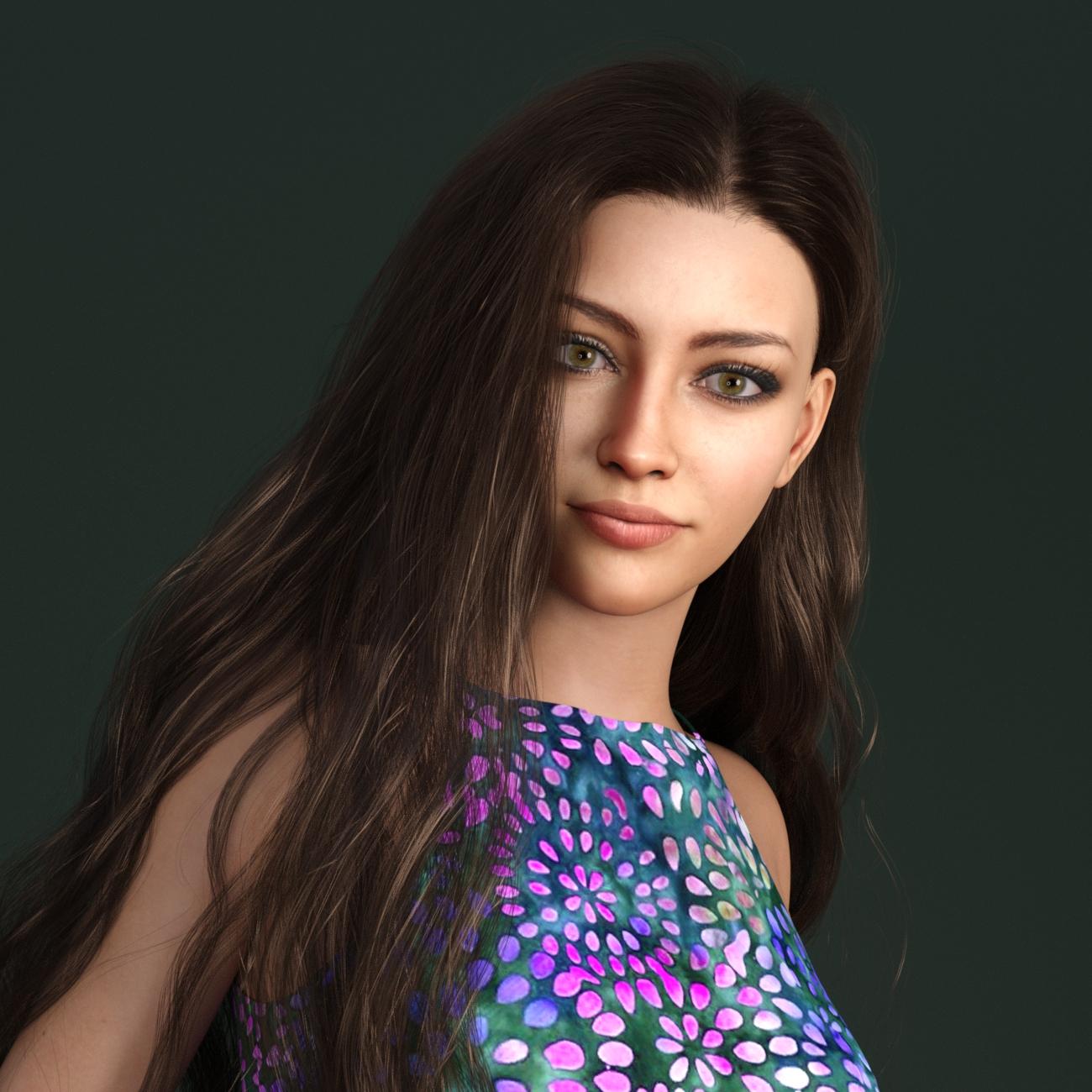
Wow, lovely characters (and renders) you're creating with FG! I'm on the fence about buying it, as I'm mainly looking to recreate people from old online photos which are usually not that good in quality and/or not in a full frontal pose. Would you happen to have any advice on this? I'm not interested in the textures (the old photos are usually black and white anyway), only the morphs. Would you think FG was a good starting point, combined with the PhilC add-on?
Hi there! Always glad to chat about creating characters, one of my favorite 3d art subjects and the literal reason why I started using Daz a couple of years ago.
I have tried all of the comparable products that I know of (including one available elsewhere) and for now, I find that I am using Face Transfer (with Face Transfer Shapes) to create shapes and of late, have been experimenting with the latest version of FaceGen to create textures from the same source images. I prefer FT shapes but FG definitely appears to be more forgiving of source image blemishes and problems, like shadows and highlights. (That wouldn't be relevant to you, if you're using old B/W photos, but just saying.)
Most of my recent characters have been complicated Franken-figures that are the result of FT -> G8.1, converted to G9, with FG textures. The latest FaceGen release creates textures for any of the Genesis versions through G9, and after some initial experimentation with manual conversion of G8 -> G9, I've moved to using the ManFriday product. That's totally a WIP; I'm still refining the process for all of that from one figure test to the next.
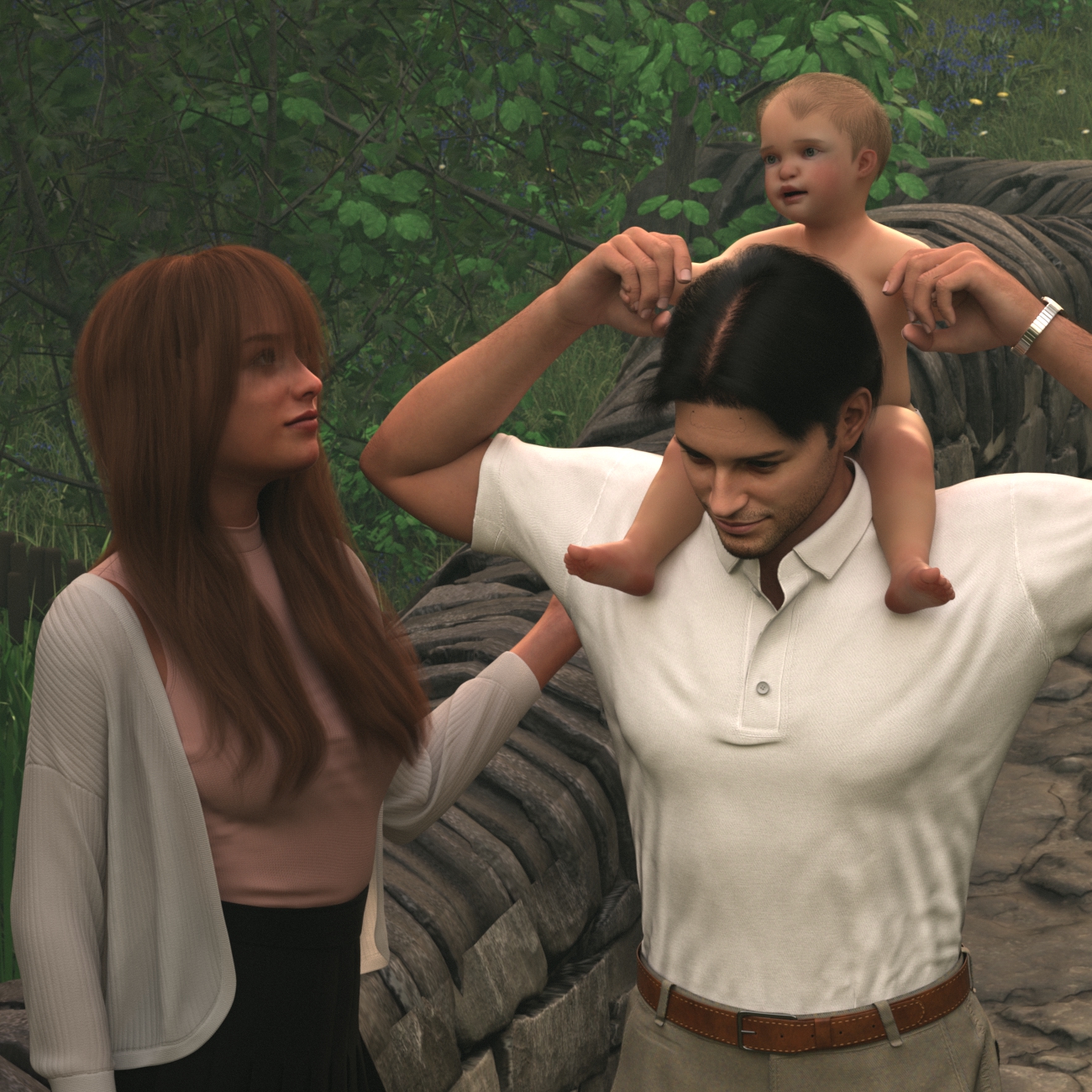
This is one I just posted in my gallery. Of course the baby is not FT - this is one of several I did to test out the new Mechasar Mega bundle stuff for Tobyn and Caryn - but the parents are G8.1 FT characters that I'm using for my current round of new product testing.
Check out my gallery, also linked in my signature:
https://www.daz3d.com/gallery/user/6088047653289984#gallery=newest&page=1
Also, there's lots of commentary on these other recent threads, worth checking out if you're interested in the subject:
https://www.daz3d.com/forums/discussion/597876/face-transfer-on-genesis-9#latest
https://www.daz3d.com/forums/discussion/621496/face-transfer-unlimited-g8-expressions-morphs#latest
Simple way of fixing snaggy teeth in G8 import results from HeadShop?Catherine3678ab said:
Federmann said:
... edited ... if only someone would have told me to forget about the expensive headshop hoaxes in this realm.Well, one person's cure can be to another pure poison so we do have to be somewhat careful how we word things. What you may notice over time is that what we can do, and do do, is remind people that if they bought [any product] within the past 30 days it [normally] can be returned. I'll say normally because one has to be careful as so many sales have trigger items. If by purchasing A, B is a very good price; and then one returns A, they'll find B is suddenly not such a good price. So yes, we do end up with a number of products gathering dust.
For use with Face Transfer is a set of morphs which were instant buys for most of us using Face Transfer. They address the most common issues that Face Transfer presents. https://www.daz3d.com/face-transfer-shapes-for-genesis-8
Years back there was one lady who was making some fantastic morphs for the legacy V4 and M4 figures. Basically she just used dFormers. Had a good eye ;-)
It can help [a lot] to use reference images in the scene [put squared picture on a square plane] - whether in D/S or in a modeler. PureRef is a popular utility for such projects. Many of the pros seem to use ZBrush. Now ZBrush plus some additional plugins [not free] seems to me to be the way to go if seriously trying to get very professional about making characters. Can do a marvellous job with matching resource skins to models as well. There are some videos over on YouTube.
[the super serious have way more money and wire people up to computers, etc. all of which is a bit overkill for one little game avatar or whatever]
You're absolutely right, some add-ons, plugins, proggies, figures and accessoiries might work wonderfully and without glitches for some, if not most, people and as you said there is always a rather generous, be it time limited, return policy at the DAZ shop. I recognize and respect the hard work that went in producing these resources and the enormouse skills curve that was travelled by these PA's.
As for (stable and reliable) "Face Transfer" (FT) within a week after purchase I stumbled upon the "Face Transfer Shapes for Genesis 8" addon that you mentioned which gets rid of the oddly flattened faces and faint jaw line. Only today I learned with FT comes a bunch of sliders for finetuning the transfer result. In my case, having bought a shocking amount of items at the DS shop over the last two years or so, I now have so many sliders with often the exact same function that it is difficult to navigate among them but I guess there are ways to organize them that I haven't learned yet. I do like FT for providing a quick way to get going on a character and dependent on luck and/or skills you could (supposedly) come close to your source model (I can't say I have yet accomplished any convincing level of verisimilitude with FT but that's on me not being a wizard with shapes, morphs and sliders).
As for ...shudder ... Head Shop I am tech savvy enough to at some point figure out which files, registry or config settings to restore so after a single succesful run, you could actually have another one; what the program misses sorely is a reset button. Re-installing Head Shop doesn't make any difference for the problems I encountered so it is on another level that I need to fix it.
Thx again for the other tips and suggestions you provided! ZBrush is far at the horizon for me but I'll take a crack at some other proggies soon.
Simple way of fixing snaggy teeth in G8 import results from HeadShop?Federmann said:
... edited ... if only someone would have told me to forget about the expensive headshop hoaxes in this realm.Well, one person's cure can be to another pure poison so we do have to be somewhat careful how we word things. What you may notice over time is that what we can do, and do do, is remind people that if they bought [any product] within the past 30 days it [normally] can be returned. I'll say normally because one has to be careful as so many sales have trigger items. If by purchasing A, B is a very good price; and then one returns A, they'll find B is suddenly not such a good price. So yes, we do end up with a number of products gathering dust.
For use with Face Transfer is a set of morphs which were instant buys for most of us using Face Transfer. They address the most common issues that Face Transfer presents. https://www.daz3d.com/face-transfer-shapes-for-genesis-8
Years back there was one lady who was making some fantastic morphs for the legacy V4 and M4 figures. Basically she just used dFormers. Had a good eye ;-)
It can help [a lot] to use reference images in the scene [put squared picture on a square plane] - whether in D/S or in a modeler. PureRef is a popular utility for such projects. Many of the pros seem to use ZBrush. Now ZBrush plus some additional plugins [not free] seems to me to be the way to go if seriously trying to get very professional about making characters. Can do a marvellous job with matching resource skins to models as well. There are some videos over on YouTube.
[the super serious have way more money and wire people up to computers, etc. all of which is a bit overkill for one little game avatar or whatever]
Simple way of fixing snaggy teeth in G8 import results from HeadShop?....Thx for your FB. My next attempt with HeadShop had ok teeth. My attempt after that ended in yet another garbled results pane (with an export that will near crash your scene or worse) which means the program has turned unusable again for a long time. One may find that after a year the plugin spontaneously works again and then you can go ahead with one or two head transfers before it dies again. One thing it cannot deal with at all is make a 8.1 transfer and after that try an 8 version (et v.v.). If HeadShop was an actual shop I would suspect people would throw bricks through their windows on probably a daily basis
LOL, that creased me up ! If so, I might be the 1st one... Anyway, forget about it, let's find a way out by ourselves
Simple way of fixing snaggy teeth in G8 import results from HeadShop?crosswind said:
I'm afraid this way won't work for OP's case, especially for the distorted teeth, gums, even mouth cavity on such 'stylized character' ... If you clear the selected delta, the position of the related vertices will totally change to the original shape, then it might be another mess with the current head morph.... It's not like the case that one head morph was ever ERC Freezed with a partial delta vertice change on a body part. I myselft have never succeeded in fixing such 'distorted teeth and mouth' case with this way.
But pls definitely try it as we'd like to know if it can help with fixing such an issue coming from Headshop.
Thx for your FB. My next attempt with HeadShop had ok teeth. My attempt after that ended in yet another garbled results pane (with an export that will near crash your scene or worse) which means the program has turned unusable again for a long time. One may find that after a year the plugin spontaneously works again and then you can go ahead with one or two head transfers before it dies again. One thing it cannot deal with at all is make a 8.1 transfer and after that try an 8 version (et v.v.). If HeadShop was an actual shop I would suspect people would throw bricks through their windows on probably a daily basis
Simple way of fixing snaggy teeth in G8 import results from HeadShop?crosswind said:
Hmm... snaggle-toothed like that, I don't think they could be fixed with Easy Teeth either though I'm pretty good at using ET... But there's a chance you may get them fixed with Blender or ZB if you know to use them, though that'll be pretty cumbersome. I ever did once with Blender to fix a similar case and it nearly took me 2 hours to just get a PoC 60%, then I gave it up...
I ever bought HeadShop OneClick2022 and that turned out to be my top 1 worst purchase. I did not request for refund but I never use it again, furthermore I've never got any update / fix from that vendor.... I dunno the mechanism in the latest version that you're using but if you're not happy with consulting the vendor, suggest you just request for refund other than wasting time on fixing such a thing that shoudn't have happenend from such an expensive 'product'.
Ps: On G8, there's no way to replace such teeth with the 'standard set of good teeth' as they're not a separated geometry / wearable, while it's only possible on G9. Technically, there's a possible way to use Faceform Wrap (used to be R3DS Wrap3D )...i.e. use G8 base figure as the floating geometry to wrap this figure with isolating the teeth. But that'll be another story....
Thx for your suggestions! "..bought HeadShop OneClick2022 and that turned out to be my top 1 worst purchase" LoL I didn't want to go there so I hinted at a top 5 of worst buys. Come to think of it, wish I hadn't bought about 45% of the stuff I now have, the horrible skins alone!
Simple way of fixing snaggy teeth in G8 import results from HeadShop?[removed links to pictures]
After this epic failure, my HeadShop managed to do one other face transfer that I would rate 2.3 out of 10, but definitely progress compared to snaggy girl (normal teeth for instance). Unfortunately on the next HeadShop run that program once again imploded, probably useless for the next 12 months after which something is spontaneously ok again and you can try one or two face transfers before it breaks down again.
Oh, boy. Excited I tried "FaceGen Artist demo" today. Now that looked promising! AI you say!? Wow! Gave it a go. Absolutely rubbish. It didn't crash, but the import result couldn't be further from the original; it turned a pretty girl into a butch female bouncer of a night club. Cool but pretty useless.
Guess FT and DAZ's own kazillion shaping sliders is what I am stuck with, which is ok I guess, cranking out new faces is pretty easy with these, in fact the result is sometimes stunning; if only someone would have told me to forget about the expensive headshop hoaxes in this realm.
Simple way of fixing snaggy teeth in G8 import results from HeadShop?Catherine3678ab said:
crosswind said:
I'm afraid this way won't work for OP's case, especially for the distorted teeth, gums, even mouth cavity on such 'stylized character' ... If you clear the selected delta, the position of the related vertices will totally change to the original shape, then it might be another mess with the current head morph.... It's not like the case that one head morph was ever ERC Freezed with a partial delta vertice change on a body part. I myselft have never succeeded in fixing such 'distorted teeth and mouth' case with this way.
But pls definitely try it as we'd like to know if it can help with fixing such an issue coming from Headshop.
Oh it would be somewhat challenging. Thankfully one can select by surfaces though to hopefully get all the teeth and whatever else needs to be reached inside the head. I would recommend working with the figure's mouth open.
For further morphing to fix the teeth back into the headshape, I would use the bridge to Hexagon etc. That's presupposin' I could even get HeadShop to work on my system. Facegen and Face Transfer, and a "kazillion" purchased and free morphs can also produce many a character.
Indeed ~ but I still pass over HeadShop. I'm building a workflow with Face Builder + Wrap...Reallusion Headshot might be an option as well, will see if they could be game changers or not...
Simple way of fixing snaggy teeth in G8 import results from HeadShop?crosswind said:
I'm afraid this way won't work for OP's case, especially for the distorted teeth, gums, even mouth cavity on such 'stylized character' ... If you clear the selected delta, the position of the related vertices will totally change to the original shape, then it might be another mess with the current head morph.... It's not like the case that one head morph was ever ERC Freezed with a partial delta vertice change on a body part. I myselft have never succeeded in fixing such 'distorted teeth and mouth' case with this way.
But pls definitely try it as we'd like to know if it can help with fixing such an issue coming from Headshop.
Oh it would be somewhat challenging. Thankfully one can select by surfaces though to hopefully get all the teeth and whatever else needs to be reached inside the head. I would recommend working with the figure's mouth open.
For further morphing to fix the teeth back into the headshape, I would use the bridge to Hexagon etc. That's presupposin' I could even get HeadShop to work on my system. Facegen and Face Transfer, and a "kazillion" purchased and free morphs can also produce many a character.
Simple way of fixing snaggy teeth in G8 import results from HeadShop?I'm afraid this way won't work for OP's case, especially for the distorted teeth, gums, even mouth cavity on such 'stylized character' ... If you clear the selected delta, the position of the related vertices will totally change to the original shape, then it might be another mess with the current head morph.... It's not like the case that one head morph was ever ERC Freezed with a partial delta vertice change on a body part. I myselft have never succeeded in fixing such 'distorted teeth and mouth' case with this way.
But pls definitely try it as we'd like to know if it can help with fixing such an issue coming from Headshop.
Simple way of fixing snaggy teeth in G8 import results from HeadShop?Hmm... snaggle-toothed like that, I don't think they could be fixed with Easy Teeth either though I'm pretty good at using ET... But there's a chance you may get them fixed with Blender or ZB if you know to use them, though that'll be pretty cumbersome. I ever did once with Blender to fix a similar case and it nearly took me 2 hours to just get a PoC 60%, then I gave it up...
I ever bought HeadShop OneClick2022 and that turned out to be my top 1 worst purchase. I did not request for refund but I never use it again, furthermore I've never got any update / fix from that vendor.... I dunno the mechanism in the latest version that you're using but if you're not happy with consulting the vendor, suggest you just request for refund other than wasting time on fixing such a thing that shoudn't have happenend from such an expensive 'product'.
Ps: On G8, there's no way to replace such teeth with the 'standard set of good teeth' as they're not a separated geometry / wearable, while it's only possible on G9. Technically, there's a possible way to use Faceform Wrap (used to be R3DS Wrap3D )...i.e. use G8 base figure as the floating geometry to wrap this figure with isolating the teeth. But that'll be another story....
Daz 3D is part of

Connect
DAZ Productions, Inc.
7533 S Center View Ct #4664
West Jordan, UT 84084Licensing Agreement | Terms of Service | Privacy Policy | EULA
© 2026 Daz Productions Inc. All Rights Reserved.