-
Buy Something That Doesn't Work in Carrara? Post your Questions and Workarounds here. (please)
WendyLuvsCatz said:
Diomede said:
The quick answer is 'No. I did not arrange or render the scene in Carrara.'
To be honest, I did not remember doing that. Then I noticed that I had put in the description 'Daz+ PC Club Anniversary Sale.' By itself, that didn't mean I did it in Daz Studio, but it gave me a hint of where I would find my old drafts. My project files are in Daz Studio DUF format.
thanks
I also since discovered there is an exterior prop version of it which you likely used
the creator does have a warning about loading the full figures after all
No problem. And now you got me curious so I am trying to load it in Carrara while I do other stuff around the house, and occasionally checking in.
Buy Something That Doesn't Work in Carrara? Post your Questions and Workarounds here. (please)So I tried. And my test to load it in Carrara did not go well. Load hung up at 56.8%.
Buy Something That Doesn't Work in Carrara? Post your Questions and Workarounds here. (please)Diomede said:
The quick answer is 'No. I did not arrange or render the scene in Carrara.'
To be honest, I did not remember doing that. Then I noticed that I had put in the description 'Daz+ PC Club Anniversary Sale.' By itself, that didn't mean I did it in Daz Studio, but it gave me a hint of where I would find my old drafts. My project files are in Daz Studio DUF format.
thanks
I also since discovered there is an exterior prop version of it which you likely used
the creator does have a warning about loading the full figures after all
Buy Something That Doesn't Work in Carrara? Post your Questions and Workarounds here. (please)The quick answer is 'No. I did not arrange or render the scene in Carrara.'
To be honest, I did not remember doing that. Then I noticed that I had put in the description 'Daz+ PC Club Anniversary Sale.' By itself, that didn't mean I did it in Daz Studio, but it gave me a hint of where I would find my old drafts. My project files are in Daz Studio DUF format.
Buy Something That Doesn't Work in Carrara? Post your Questions and Workarounds here. (please)https://www.daz3d.com/space-road-stop
I am trying to work with this monstrosity
in Twinmotion admittedly because sets this big usually don't play well in Carrara
well, this is impossible to use even in Twinmotion
so...
I followed the DAZ-DEALS links to the gallery and see this https://www.daz3d.com/gallery#image=1228861
our own Ted
(gallery image link expired in less than an hour)
so Diomede, did you render this in Carrara?
If so, was it a challenge?
and no, I cannot test it myself yet because it's frozen up my Twinmotion UI and is using all my VRAM and RAM
 ? Explain Render Options Alpha and Pre Multiplied Alpha ?
going full Carrara here:
Every pixel in a rendered image has:
-
R, G, B (color)
-
A (alpha, transparency)
1. Straight Alpha (un‑premultiplied)
RGB is stored as if the pixel were opaque, even if it’s actually transparent.
Example: A pixel that is 50% transparent red:
-
R = 1.0
-
G = 0
-
B = 0
-
A = 0.5
When compositing, the formula is:
Cout=Csrc⋅A+Cdst⋅(1−A)
This works perfectly if the compositor handles straight alpha correctly.
2. Premultiplied Alpha
RGB is already multiplied by alpha before saving:
R′=R⋅A
So the same pixel becomes:
-
R = 0.5
-
G = 0
-
B = 0
-
A = 0.5
Now the compositor uses:
Cout=Csrc+Cdst⋅(1−A)
This avoids a major problem…
With straight alpha, the RGB channels still contain the original background color.
If Carrara rendered your object over black, the transparent edges contain black RGB values.
When composited over a different background (e.g., sky blue), the black edge leaks through → dark halo.
With premultiplied alpha, the RGB values are already faded toward transparency.
There is no leftover background color to leak.
This is why premultiplied alpha is the standard in:
-
film pipelines
-
OpenEXR
-
linear compositing
-
VFX studios
Premultiplied alpha is bad for PNG billboards because the RGB gets darkened and you lose edge detail .
But it’s good when:
-
you’re compositing over the same HDRI you lit with
-
you want film‑style smooth edges
-
you’re rendering EXR sequences
-
you want mathematically correct blending
In summary:
Premultiplied alpha prevents color contamination at semi‑transparent edges by ensuring the RGB channels represent actual visible light instead of “imaginary opaque color,” which eliminates halos during compositing.
yes, I'm bored
 Adventures of Lorenzo & LoRez Figures in Carrara
the result was different in Carrara
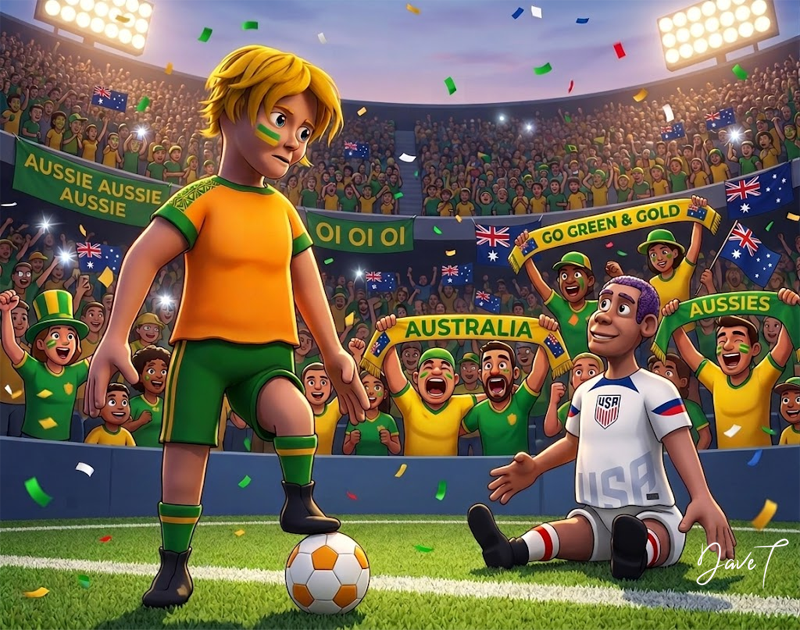 BJ Cycles - Cycles Renderer in Daz Studio
Dareshiranu said:
While the project is intriguing, I wouldn't depend upon the semiconductor industry to invest in capex to ease the shortage - the problems that are ongoing are due to we, the peon consumers being cut out of the loop as all of the sales are becoming BTB. Now, should there be an AI bubble burst, that might lead to a glut of memory silicon, but GPU pricing isn't going to be dropping to... let's say reasonable levels again for the forseeable future, and improvements in the consumer GPU space are likely to be minimal/incremental while the prices will probably stay high or even increase due to the lack of supply. The world of AI, NVidia in particular, envisions a user base of thin clients. No place in that vision for we PC users to maintain a hobby like this, unless it eventually morphs into a server/client/cloud model. Personally, I hate the cloud... and I don't hate much - it wastes time and energy that can be better spent on far more productive enterprises.
If they do that, I'm out. Not worth the risk of sudden [o]ligopolist price increases, or arbitrary service cutoffs. I'll drop computer graphics altogether, get a much cheaper machine, and go back to text. No doubt I'll still feel compelled to arrange colors in ways that resemble physical objects. I still have my paintbrushes.
What's a pity is that Daz created Daz Studio instead of improving Carrara. Blender, as an intro to 3D, is poor. A sanely put-together, moderately good modelling program that could also render all this stuff would've been better all around for practically everybody. Too late now.
My Cycles renders of Diffeomorphic-exported Daz & Poser items are generally pretty decent, but I'd really want to get at a texture node editor for the cases where I want to improve the automatic conversions.
... Gaming surpassed movie-making as a revenue-producing activity some years back. How are they proposing to run anything resembling modern 3D gaming on thin clients? They'd have to do all the fast complex rendering remotely and pass updates to each client at least 24 times per second. I realize I hang out in an online 3D setting with an old crowd that's considerably behind the times, but ... is there remote hardware and communication support in place for turning gaming topsy turvy in the near future? Because if it isn't built out before one starts making it impossible for the customers to buy the hardware to game on, what one produces probably does not greatly resemble a major surge in revenue.
The Torquinox Carrara Threadalso could depend on when you start Carrara what scene size you want.. I always select medium.
In the modelling room you can set sizes of models in the transform menu.
The Torquinox Carrara ThreadThanks to @Diomede & @Dartanbeck. I guess there's no array tool? It's probably unfair for me to poke at that. I know how long it's been since Carrara was updated.
The Torquinox Carrara ThreadTorquinox said:
Headwax said:
I seem to remember someone modelling a ruler once ... for size personally I'd eyeball it and use the grid
Thanks. That would work if I could get the measurements to work. I think I'm getting feet and I'm getting inches instead. No idea why. I'd kind of like meters or metric measures, and I forgot how to do that. I used to know that once. Carrara seems to prefer inches and feet, anyway. Maybe I should just go along with what's there and use scaling to make it all work together?
In the modeling room, you can set the sizes using any measurement you prefer - like type 12 inches into the field and it will give you one foot.
The same applies to the Motion tab. But that's the whole bouding box - which in many cases is just the same - but not always.The Torquinox Carrara ThreadHeadwax said:
I seem to remember someone modelling a ruler once ... for size personally I'd eyeball it and use the grid
Thanks. That would work if I could get the measurements to work. I think I'm getting feet and I'm getting inches instead. No idea why. I'd kind of like meters or metric measures, and I forgot how to do that. I used to know that once. Carrara seems to prefer inches and feet, anyway. Maybe I should just go along with what's there and use scaling to make it all work together?
The Torquinox Carrara ThreadWendyLuvsCatz said:
Torquinox said:
Thanks Wendy I'll try that. Mesh mixer looks interesting too. Thanks again. I'm guessing there's no grid fill in Carrara. No one has said.
no, Headwax had this issue 3D printing his surfboard, wanting to calculate volume and I suggested Meshmixer
I have 3D printer I bought years ago I cannot use anymore because it's DRM stopped recognising the costly proprietary filament cartridges I bought
its stashed in my laundry with stuff on top
should move it to my shed
I threw my old printer one out though they still sell it for 600 dollars , not enough room , I have too many shoes I guess . New 3D printers are very easy compared to the older ones . Like humans I guess .
I was looking fir a way to do area measurement btwThe Torquinox Carrara ThreadSo, I was hoping to do some modeling in Carrara and it hasn't been that easy! Not that it's awful. The tools for manipulating polys are pretty good and the program is quite stable. That last part is where hexagon and its bugs failed me. But there are things I struggle with, such as keeping track of the scale of my models, the units, dimensional size, etc. I want stuff from different sources to play together. Yes, I could just do stuff in Blender, but I have files that Blender won't open and Carrara will. Do other folks have these issues, or am I looking at it wrong?
The Torquinox Carrara ThreadTorquinox said:
Thanks Wendy I'll try that. Mesh mixer looks interesting too. Thanks again. I'm guessing there's no grid fill in Carrara. No one has said.
no, Headwax had this issue 3D printing his surfboard, wanting to calculate volume and I suggested Meshmixer
I have 3D printer I bought years ago I cannot use anymore because it's DRM stopped recognising the costly proprietary filament cartridges I bought
its stashed in my laundry with stuff on top
should move it to my shed
The Torquinox Carrara ThreadThanks Wendy I'll try that. Mesh mixer looks interesting too. Thanks again. I'm guessing there's no grid fill in Carrara. No one has said.
Buy Something That Doesn't Work in Carrara? Post your Questions and Workarounds here. (please)OK
import the FBX into the Carrara plugin called DAZ Studio
set rotation on the base and garment to 0
choose the Genesis9(2) that loads with it
apply G9 poses, animations or Aniblocks (you then bake to timeline)
as far as I have gotten
not figured out how to apply to the Carrara figure
good for extras in D|S scenes though
New Store and Features Discussion ThreadFWIW, I'm generally OK with the new store changes. Glad the devs are keeping things fresh/moving. I'm getting used to a few of the changes, but liking most of them.
FYI - If you happen to use the "DAZ Deals" extension, I recommend disabling it until both the new DAZ store web changes and the "DAZ Deals" plugin stabilize and get back in sync. When enabled, many (25%?) of my Product Library items disappear (*many* low SKU items for sure - e.g. Vicky 1/Micheal 1, and I can't tell for sure what others are missing...). Disable the extension and they all reappear.
First-pass recommendations, General:
- Filters: (re)add a enable/disable DAZ+ visibility button - both are useful when looking for DO coupon items.
- re-enable prices in the 'recommended for you' strips that appear on many pages
- why no "Vicky 1 and 2" figure option in the 'Compatible Figures' filters like the "Micheal 1 and 2"?
- I'd love an 'invert filter' button, so I can see everything but the checked items.
- (eta) - Filters: filter on file-type is good, but needs all filetypes including blender/vue/bryce/carrara/etc.) I see some being added over time, so this may already be a WIP. I'm not sure why this isn't configured with check-boxes like the other filter-sets, and the 'game ready' image is wasted real-estate to my eye.
- possible to add a general non-DAZ series figures option for non-DAZ rigged bots and toon figures (sadie, bots, toons, star, cookie/chip, etc.)?
Product Library:
- add a 'sort by' in the grid mode too, (maybe make it a separate button from the list/grid buttons)
- In Firefox, the initial Prod Lib 'goto page' option only let me enter 2 digits - I need 3.
- I wonder that the default click-on response on items in in the prod library could be a pop-up with details & DL links rather than a full-page refresh/change - at least on the Desktop browsers.
- I like the floating page count at the bottom of the normal store view, it would be great in the Prod Library and Wishlist too!
Hope this is useful...
--ms
New Store and Features Discussion ThreadI agree that the big Game Ready box is intrusive.
I miss the filter to see Daz+ items only and would like to see it added back.
I also miss the ability to filter by software - I still use and occasionally buy Bryce and Carrara content and it is now almost impossible to find it in the store.
Buy Something That Doesn't Work in Carrara? Post your Questions and Workarounds here. (please)Stezza said:
ok.. I thought that was a duf
is there an easy way to apply poses in Carrara with fBX?
I got this one as the freebie. .... just needs materials adjusted and had to shrink the hair cap down
if you make it an animation group, you can at least re-use poses
and they should work on any of the other ones if inclined to get
otherwise Unreal Engine is probably the only free pipeline for animation
and possibly Mixamo
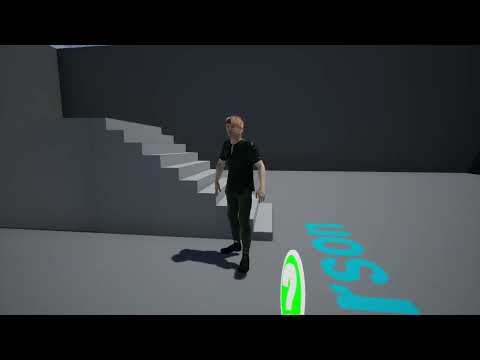
I found it fairly easy to retarget in UE4.27
Daz 3D is part of

Connect
DAZ Productions, Inc.
7533 S Center View Ct #4664
West Jordan, UT 84084Licensing Agreement | Terms of Service | Privacy Policy | EULA
© 2026 Daz Productions Inc. All Rights Reserved.









