-
[Released] ManFriday’s Figure Converter for Genesis 9 [Commercial]
necroscension said:
Artini said:
Yes, you are right. I think, I just abandon the idea of conversion Genesis 3 characters, for now.
I know it's frustrating when you see that the rest of the body morph transfers so well, but I'm sure ManFriday will get it fixed. It looks like the arms aren't lining up during the transfer process.
I hope so, especially since they have been rather silent in the thread lately
OK, fine, I guess I'll make some DAZ stuff after all.OK that makes more sense about the image.
My next question then is are you making custom JCMs for everything? Are you not using the Genesis auto generated JCMs? For clothing that is generally all that is needed - the only custom ERC I set up is for a morph when the left and right thighs bent together. My steps would be
- Pose Genesis and export JCM’s that need fixing with Resolution level set to base. For smoothing set the collision item to None. (that prevents double sided mesh like the straps pushing through itself when it gets pushed out by Genesis. I would rather fix it in a modeler for better results)
- Use the exact same name for the JCM as the one being used on Genesis, that will then overwrite the existing JCM when you import it back into DS
- Fix your morph in a modeler and import with Morph Loader Pro
- Reverse Deformations : Yes
- Overwrite Existing : Deltas only
- Set the negative dial to 0 instead of -100
Since you're using the exact same name as the genesis morph it will replace the auto generated morph with your fixed morph. Save your clothing item as an asset and that's pretty much it.
2nd video on this page shows how I do it : https://pixeldustvr.com/DazTutorials/2021/01/26/02-tight-top/
OK, fine, I guess I'll make some DAZ stuff after all.Mada said:
How are you creating the ERCs?
1: I am exporting the clothing item with the single posed joint I want to correct (like, lShldr bend up, or lShldr bend down, or lShldr bend front, etc.)
2: I have already exported the G8M for almost all of these, so I am just reusing those
3: I then import the relevant G8M posed figure into Zbrush
4: I then import the posed clothing figure into ZBrush in a separate subtool
5: repeat for any other clothing items meant to interact with the one in question that might affect it, like a shirt under a jacket, so that the fix takes the under-clothing into account as well
6: sculpt the fix and export it
7: Back in D|S with Morph Loader Pro, choose the fix morph file I just made. Set Reverse Deformations to yes. Set Create Control Property to yes. Select the relevant node (e.g. Left Shoulder Bend). Select the property (the rotation dial in question). Set Use Custom Value to Yes. Set the value to the relevant value (that is, 1 divided by the value of the rotation in question. I have a precalculated list of all the torso, leg, and arm limits (not fingers or toes, though). So, for instance, since the Left Shoulder Bend Front-Back Front-wise limit is -110, the custom value is -0.009091.
8: Once the morph is created (the ERC is already set set now so it will also go into effect), set the min to 0 (negative JCMs don't usually work well), hide it, and move it into Hidden/Correctives
And now...
Once all morphs are loaded and set up:
9: Right click any morph and select "Show in Property Hierarchy"
10: Open every single JCM I just added (this sort of marks them for "need fixing")
11: for each, drill down to the Controllers -> 1st Stage (Add/Subtract) -> ERC [DeltaAdd]: <controller rotation dial info here> -> Attributes -> Save With and set it to be this morph.
"Are you using the Genesis figure to link to instead of the clothing item?"
I don't know what that means. I don't understand the question.
"I never have to set anything when I create ERCs for clothing so I'm curious on why you have to do all this extra work."This is how it's been working the whole time for me.
Ryilee for Genesis 8.1 females breaks fingernails on base G8.1PerttiA said:
To fix any ill-behaving (non-zero default value) morphs, do as follows;
1. Open DS and load "Genesis 8.1 Basic Female" (to an empty scene)
2. Right Click at Parameters Tab->Preferences->Choose "Show Hidden Properties" (part 3 zeroes only 'visible' dials)
3. Right Click at Parameters Tab->Zero->Zero Figure (Zeroes the value of all the 'visible' dials)
4. Right Click at Parameters Tab->Memorize->Memorize Figure (Sets the current value of all the dials as their default value)
5. Edit->Save As->Support Asset->Save Modified Assets (Writes the changed default value to the morph files that were changed)When saving "Modified Assets" DS shows a dialog and asks for confirmation;
"The following file(s) will be permanently modified:" - "Accept/Cancel" - Choose "Accept"Thanks !!
Worked like a charm....
OK, fine, I guess I'll make some DAZ stuff after all.OK so there's a few reasons Richard, that I had no idea what you were saying and why that did not make any sense to me.
1: The fact that that is a drop-down menu is not apparent. It only looks like text. That UI component does not do ANYTHING when you mouse over it -- not even a cursor change -- AND, like I said, it looks exactly like the text preceding the dropdown. There's literally nothing to say at all "hey, click here and you can change me", so from what I can tell, it's just a readout. You asked what it said, and I showed you. I had no idea it was a thing I could change from there. I SET UP the ERC when I loaded the morph in Morph Loader Pro, so I never went in there until you asked. Hell, it took me ten minutes to even find the silly Property Hierarchy interface. I ended up finding that other link when I duckduckwent the problem.
2: In Poser, ERC is *always* stored in the target. It's a channel property, stored in 4-5 lines of weird (as in, it has strange syntax that doesn't fit most of the other format of Poser XX2 markup) markup. There's literally no way to say "control X" anywhere except X. So the idea that one even COULD "save the ERC code in another thing" is bewildering. And it's weird because it's really interally defining an object method associated with the thing it affects, so from a coder POV it doesn't make sense either
3: My bad, but I kinda thought you were just blowing the question off, since when I asked "what does Diffuse Overlay Weight do?" you answered "it controls the weight of the diffuse overlay" and I was all >.< so I figured it was another sort of non-answer.OK, fine, I guess I'll make some DAZ stuff after all.Oh, I'm afraid I disagree. That's a bug. Of Starship Troopers proportions.
If I make a change and save the thing out, I (and anyone) would expect that change to be included in the save. That's literally what "save changes" means. Save... changes (Shatner voice).
If I add a morph with ERC and I save the item, that's a change, and one that should be reflected in the saved-out item. If DAZ studio doesn't do this, DAZ studio is working wrong. There is literally not one program on Earth that doesn't include the expectation that saving something actually includes all of the changes in that thing. Don't let them snow you into thinking it shouldn't do this.
I have the 4060TI 16GB and it's OKkyoto kid said:
...I take it that's Kingston KC3000 PCIe 4.0 NVMe M.2 SSD with a data transfer rate of 7000MB/s. Yeah a bit out of my budget. I'll stay with SATA SSDs for now even though the MB I'm looking at does have two NVME M2 slots.
The Turbo Loader seems a much less expensive option for now.
Western Digital SN850X.
The 2TB is considerably cheaper, that's what I have now.
I asked WD customer service for a discount before I ordered, and they gave
me 10% off my entire order.
It was nice, since I was building my entire computer at the time.
Crucial will do that, too.
They're a lot more useful to me than Turbo Loader, as the drives speed up
everything on my computer, not just Studio load times.
Studio is pretty slow on everything, not just load times. But I use mostly
G1-G3, so it doesn't get too bad until I add a rare G8 character like Betty
Bunny.OK, fine, I guess I'll make some DAZ stuff after all.Dodger said:
Also, if so, should I be filing a bug report, because if that's the case, if changes to the content are not being saved out, then this is definitely a bug.
Its not a bug, just something to be aware of when working with the data folder. Changes are being saved, but if there's a morph removed from the item and you resave in the same folder then the morph will still be there and will load the next time.
I have the 4060TI 16GB and it's OK...I take it that's Kingston KC3000 PCIe 4.0 NVMe M.2 SSD with a data transfer rate of 7000MB/s. Yeah a bit out of my budget. I'll stay with SATA SSDs for now even though the MB I'm looking at does have two NVME M2 slots.
The Turbo Loader seems a much less expensive option for now.
Scroll that unfurls?Havos said:
There is a scroll with an open morph in this set.: https://www.daz3d.com/wizard-travelling-gear
I have that and it never came up in my search!
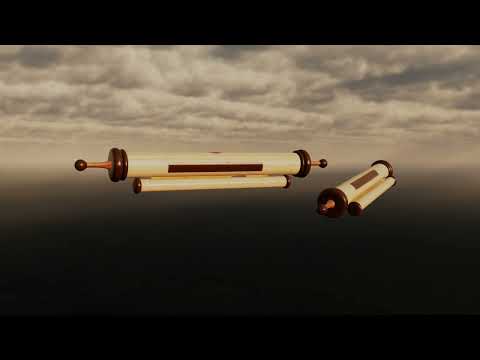
video of what it does
Scroll that unfurls?There is a scroll with an open morph in this set.: https://www.daz3d.com/wizard-travelling-gear
Scroll that unfurls?In order to unroll it would have to be a figure, a morph could handle rolled and unrolled but not the transition. I agree that it sounds familiar, but no idea where it was from - or whether it was a freebie or part of a product.
Scroll that unfurls?I could have sworn that I had a paper scroll prop with a morph to unroll it and make it long or roll it back up, but now I can't find it. Does anyone know what set something like that might be from? I thought it was from the Fantasy Clutter pack, but I just reinstalled that and all of the scrolls are static props. Thanks in advance.
[Released] ManFriday’s Figure Converter for Genesis 9 [Commercial]Artini said:
Yes, you are right. I think, I just abandon the idea of conversion Genesis 3 characters, for now.
I know it's frustrating when you see that the rest of the body morph transfers so well, but I'm sure ManFriday will get it fixed. It looks like the arms aren't lining up during the transfer process.
Daz Studio 5 preview release is delayed and that's good news.wsterdan said:
Ghosty12 said:
wsterdan said:
DAZ_Rawb said:
The title of this thread might be a little bit confusing, so let me start with the first half:
The Daz Studio 5 preview release is being delayed. The Studio dev team has worked really hard and gotten it to the point where we were getting ready to go through all the build and release procedures / ceremonies / interpretive dances necessary to get it distributed out to you but we are going to wait on that. This pre-release essentially would have been a version of Daz Studio 4.15 missing a bunch of features and running on a newer set of core libraries. The new big thing that it could do would be to run on the latest version of MacOS. So if we had a version of Daz Studio 4.15 that had all the features and compatibility and worked on the latest version of MacOS it wouldn't make sense to release this very early preview correct?
Well, the Studio team has also been working with some Apple engineers to see if there was a way to get Daz Studio 4.15 working on the latest MacOS and after a number of false-starts we finally had success. The latest DIM has those changes in it, so it should be able to run on the latest MacOS (and continue to work great on Windows). As for Daz Studio? Check out the new public beta (4.15.0.25) that just launched. This beta has some stability fixes in it as well, so it's not just a win for the MacOS folks. The beta cycle will likely be pretty fast so please give it a run through when you see it out in the wild.
Happy Anniversary!
It's been two years this month that we got the good news that they weren't going to rush the release of DAZ Studio 5.
Hopefully, on this anniversary, we'll get some good news about when we might actually be seeing DAZ Studio 5, or at the very least, what we should be expecting (besides Omnivision) that might make it worth waiting for.
Fingers crossed.
-- Walt Sterdan
What is interesting in all this time there have been 2 new versions of Poser that have been released in that time. With the latest, Poser 13 being released this year.
outrider42 said:
If we are all dead when Daz 5 releases, that kind of doesn't benefit us very much. I guess the children or grandchildren might have a reason to celebrate, but they will be probably too busy trying to survive the apocalypse.
The year is 2160 and Daz Studio 5 has just been released, but the alien invaders aren't sure what to make of it.

It's pretty useless to them; Genesis 47 base figures still only support 1 head, 2 eyes, 2 arms and zero basic tentacles. Alien invaders are notoriously against the need to spend extra for features they believe should be part of the basic package.
-- Walt Sterdan
OK, that was funny.
They would probably also be against buying the entire Pro Bundle just for one single Extremely Large Eyes morph.
[Released] ManFriday’s Figure Converter for Genesis 9 [Commercial]Artini said:
There was some update for the converter in DIM, so I have decided to test it with The Girl 7:
https://www.daz3d.com/the-girl-7
Have applied "adjust rigging to shape and have moved forward eyes.
With 100% of Body morph the distortion of the hands is still there,
but smaller than with the previous version of the converter.
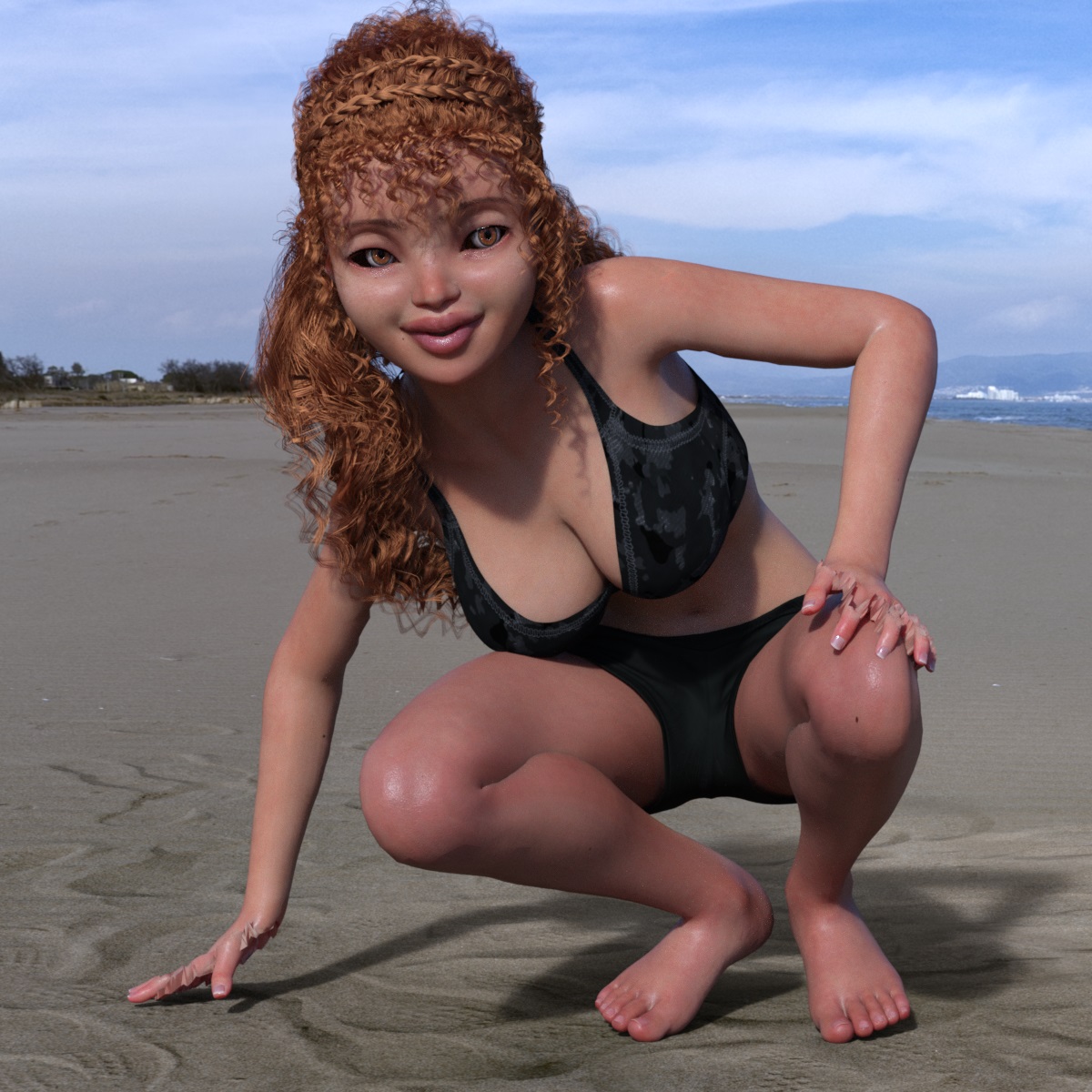
If you look closely, you'll see the distortion is all along the arms, not just the hands. It's just more prominent at the hands.
[Released] ManFriday’s Figure Converter for Genesis 9 [Commercial]With 10% of Body morph, the fingers are less distorted.
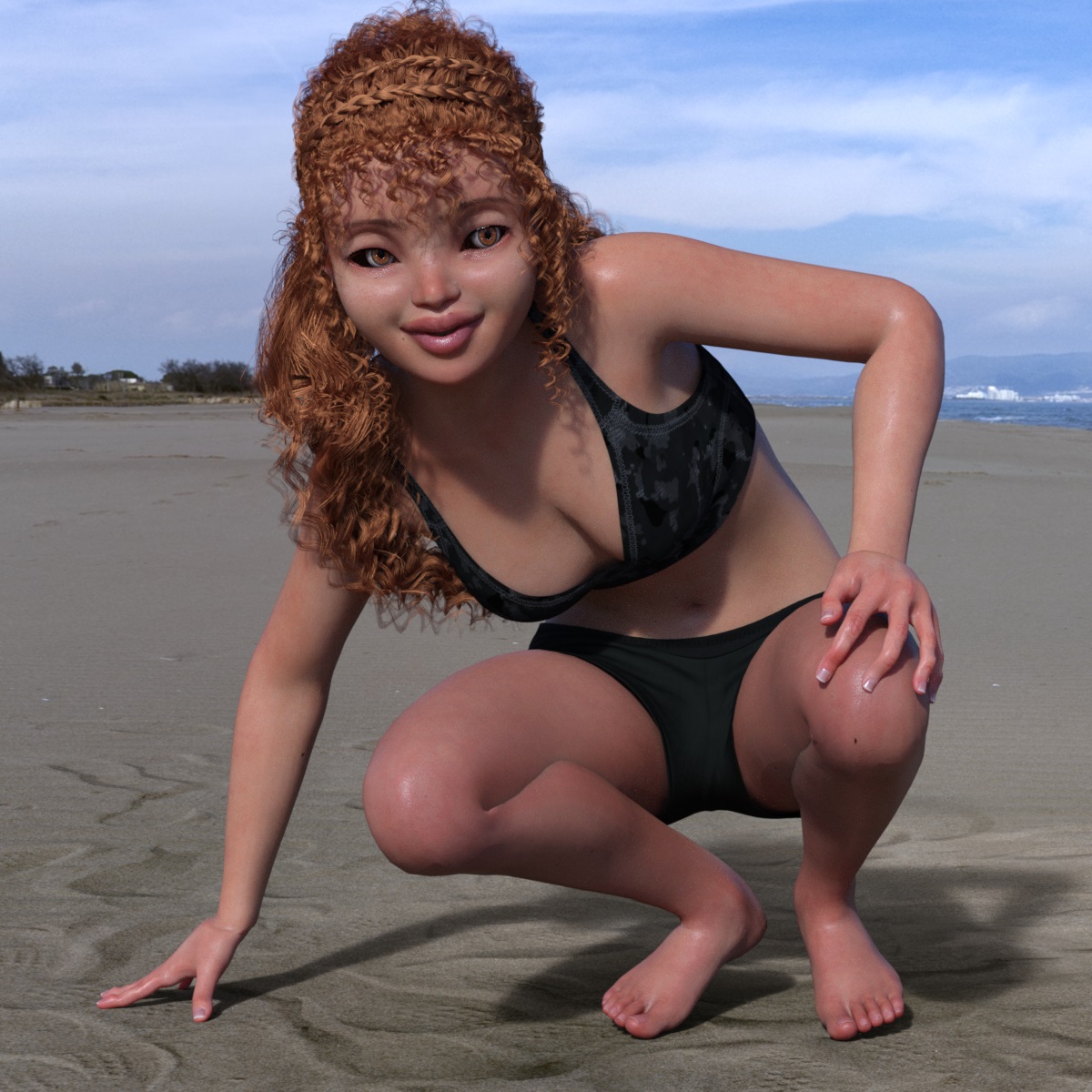 [Released] ManFriday’s Figure Converter for Genesis 9 [Commercial]
There was some update for the converter in DIM, so I have decided to test it with The Girl 7:
https://www.daz3d.com/the-girl-7
Have applied "adjust rigging to shape and have moved forward eyes.
With 100% of Body morph the distortion of the hands is still there,
but smaller than with the previous version of the converter.
Zbrush Morph?If someone used ZBrush, via GoZ, to create a morph it will, by default, have been added to the ZBrush Morphs group. It should not, generally, be left there so if it belongs to a product from the store please report it (via a support ticket) as a (minor) bug.
Is this common?Look for an active morph that came from some character set for them.
Daz 3D is part of

Connect
DAZ Productions, Inc.
7533 S Center View Ct #4664
West Jordan, UT 84084Licensing Agreement | Terms of Service | Privacy Policy | EULA
© 2026 Daz Productions Inc. All Rights Reserved.