-
ISO Victorian explorer outfit for kit bashing
Maybe Elverado Outfit (Victoria 4) for the gloves?
WHO IS THIS MODELIt could be FW Scarlett: https://www.daz3d.com/fw-scarlett-hd-for-victoria-7
WHO IS THIS MODELLooks like Fred Winkler style, there are several possible candidates among their characters:
https://www.daz3d.com/fred-winkler-art
ETA: possibly this one:
Why will genesis 8 female not load any more ?Look up your help log file and see what it says. There should be something getting flagged by the log. You can also uninstall just the G8F base and reinstall her. Some data may have become corrupted somehow. Did you install or save anything before this happened? If so, there could be conflicts.
If you have tons and tons of content it could take longer to load. This is because of how Genesis is designed. When you load any Genesis figure, it loads everything. All the different morphs you have from every character you ever installed gets loaded. So the more you have, the longer it can take. This is really something I believe Daz needs to work on, because if they expect users to buy all this content, they seriously need to streamline the loading process for Studio. Its a serious flaw. Victoria 4 may be old, but the way she could load with only base morphs meant she will almost always load quickly, and then you can inject only the shapes you want for that scene. Honestly at this point I think I would prefer going back to that kind of system! It would be so much faster than the mess Genesis becomes with a large library.I've been playing a lot with V4 lately, and even with all the tons of G8F stuff I have, G8F still loads faster than loading those silly morph injections. lol Plus being able to use the sliders to mix all the different morphs and create new and unique characters is fantastic. I've not been able to figure how to do that with V4 yet without the figure getting seriously distorted.
Don't get me wrong, I'm having fun playing with V4 content and rendering the cute V4 characters, but I definitely wouldn't prefer to go back to that kind of system.
What I have done with all the Gen 4, and earlier base figures, is load the figure and let powerloader do all the work of injecting all the morph packs etc. Once it is finished I save the whole thing as a CR2 file, and then if I need the figure later, I simply load the CR2 which already has all the morphs injected. It loads far faster. These are also the CR2 files I get generation X to load when I move a V4/M4 etc character to a Genesis 1-3.
Why will genesis 8 female not load any more ?I had such a problem happen long again, either with 4.9 or 4.10, only for the G3F instead, and I had to:
1) Check, double-check, and possible correct all installer and DAZ Content Library path names for DIM & DAZ Connect & Poser content! Must be correct! Exit DAZ when correct.
2) Uninstall all female model products dependant on G8F and then deinstall the Genesis 8 Essentials.
3) Then I reinstalled the Genesis 8 Essentials and all the female model products dependant on those Genesis 8 Essentials.
IMPORTANT NOTE: I uninstalled & installed via DIM so it was relatively fast and easy to do, if you've installed all product via DAZ Connent it will take much long to do.
I think the root cause of the failure was that I in someway reinstalled DAZ Studio and messed up the path names to the various DAZ Content Libraries and such in the DIM configuration in DIM, or the DAZ Connect / DAZ Content Library in Preferences in DAZ Studio, or a bit of both, that caused some needed files that 'explained' to DAZ Studio how 'Genesis 3 Female' was shaped, to be missing so when I loaded that model she wound up being these blocky squares like a robot. If you make same mistake for Genesis 8 then you'll get similar problems.
Yikes, that would be a massive undertaking. Not only do install manually, but I also have edited a good many textures for a lot of characters.What are all the Support files for? There are like 3 of them for most things. What happens if these get deleted and redownloaded?For me Victoria 4 loads lickedy split. The Morphs++ take the longest, but its only a few seconds. And since like 90% of all V4 only use M++, that's the only thing you need to worry about injecting most of the time. But the other injections are always super fast. Aiko 4, Elite Morphs, Stephanie 4, all of these inject as fast as I can click the button. Its pretty painless. You can place these injections in your shortcuts to make it faster if need be. The only time Genesis 8 loaded faster than V4 for me was when it was brand new and I had nothing for it. I use both 4.10 and the 4.11 beta, though I lean more towards the beta. Sometimes I still use 4.10 though because for me the Iray renderer is noticeably faster. Not sure why 4.11 is slower, but I'm not the only one to say that. The denoiser is fun, so I use the beta for that some. That's a different topic, though.I have no problems now but gave an example when a similar problem happened to me using G3F and DS 4.9/4.10. V4.2 loads fast for me too, considering I have a 7 year old laptop. They are saying though the G8F takes 10 minutes ot more to load but for me she loads as fast as G8M.
I only had about 6 G3F based females when I had to do that so it wasn't so massive an undertaking. It still took 2 or 3 hours though.
In DIM, if yoiu delete & redownload the support files without uninstalling those products nothing happens with them in their installed location if you're using DIM. However with DAZ Connect you've essentially reinstalled the products you deleted & redownloaded when you do something like that.
I also use DS 4.11 beta all the time as the have the viewport gizmo / mouse pointer slow to a crawl mostly fixed in 4.11 beta compared to 4.10.
Custom morph from morphed figureFor the first point, I usually use the George character as an example as he has a very different shape from default Genesis male figure so the problem is quite obvious: when you pose George you have special corrective morphs applied automatically so he bends correctly.
If you create a character using George morph as part of the mix, DS recognizes that George morph is used and applies the corresponding correction when needed. However if you export your character as obj and import is back as a new morph, then when it is used DS won’t see the George morph used, only yours. So when you pose him the corrective morphs won’t be used automatically, and you won’t get a result as good as with the “combination” version.
This will be less visible if your character is not too far from the default shape, but it can still be problematic.
PA is Published Artist, which is the name given to people who sell content in Daz store.
If you look in the store you’ll see quite a few characters called “some name HD”, and “HD add-ons” for the named figures like Victoria 8. Those use a special kind of morph which works on the subdivided mesh, giving you more details. You won’t be able do keep those details when converting the character to a custom morph.
[Relased] Cleo the Cheetah Girl for Genesis 8 Female !roger that. i will redo the tails to make them less of "belt tails"
I purchased Cleo a couple of weeks ago and can't find a tail. Are there any plans to add a tail to the product? Or is there one and I'm just not looking in the right place?
Ah, noting your concerns about a tail in the "catgirl" thread, I was going to point out this product discussion. If I correctly read and understood the earlier posts, a tail is planned, as well as digitigrade feet and other "add ons", but they have not yet been released.
Then again, this team made a similar character for Victoria 6 (or 7?) and no enhancements were ever offered. So, it's anybody's guess at this point. That's why i thought the creature morphs by DarioFish might offer a solution for the legs.
Sincerely,
Bill
2nd of nine lives Cat Girrrl render thread prrr@Redfern Thank you for the link to this thread! I finally got around to trying to make a cute Cat-Girl type character for G8F. I managed to get Cleo the Cheetah Girl for for G8F when it was on sale and did some dial spinning with some "Toon" morphs and ended up with a somewhat cute cat-girl, I think. lol
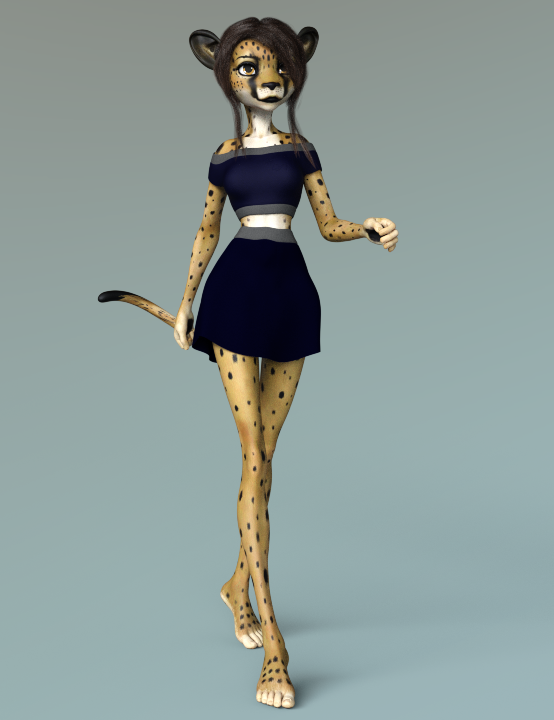
I'm a bit disappointed with Cleo though as she doesn't seem to come with a tail, despite there being a tail in several of the promos. I managed to get the above tail from another character and copy and pasted Cleo's torso maps onto the tail. The maps didn't line up perfectly and so I had to pose it so that half the tail is hidden. It was a pain in the bottom and I wish the Cleo character came with a tail. So I don't know how much use I'll get out of the character as I prefer having a tail.
I still think that Melody for A3 is my favorite so far:
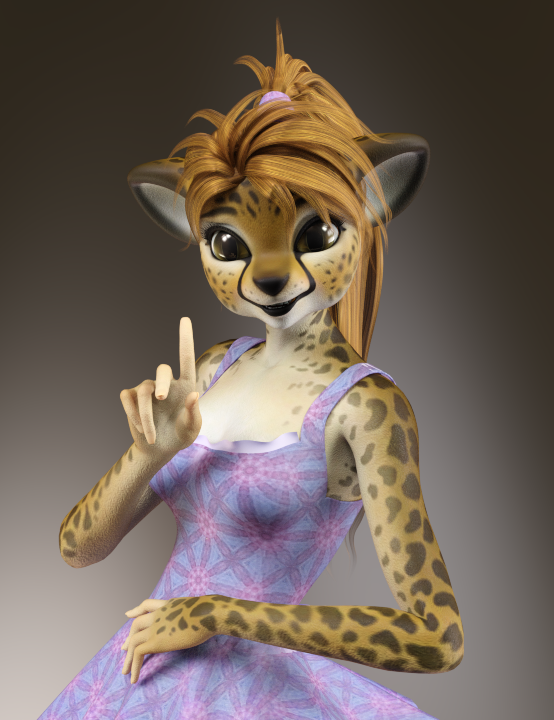
She's super cute! Sadly, though, I have next to no content for Aiko 3. I think I have like 4 outfits and maybe 2 or 3 hairs for her. So I wouldn't be able to do much with her.
I do, however, have a TON of stuff for Victoria 4, so I'm going to give Melody 2.0 for Victoria 4 a try. I was recently able to score Melody 2.0 and Two of her texture add-ons for $7.49 total.
I've been a bit busy and Daz Studio is a bit tied up with work-related stuff, but when I get more free time and Daz Studio gets freed up I'm looking forward to trying out Melody 2.0! :D
Why will genesis 8 female not load any more ?I had such a problem happen long again, either with 4.9 or 4.10, only for the G3F instead, and I had to:
1) Check, double-check, and possible correct all installer and DAZ Content Library path names for DIM & DAZ Connect & Poser content! Must be correct! Exit DAZ when correct.
2) Uninstall all female model products dependant on G8F and then deinstall the Genesis 8 Essentials.
3) Then I reinstalled the Genesis 8 Essentials and all the female model products dependant on those Genesis 8 Essentials.
IMPORTANT NOTE: I uninstalled & installed via DIM so it was relatively fast and easy to do, if you've installed all product via DAZ Connent it will take much long to do.
I think the root cause of the failure was that I in someway reinstalled DAZ Studio and messed up the path names to the various DAZ Content Libraries and such in the DIM configuration in DIM, or the DAZ Connect / DAZ Content Library in Preferences in DAZ Studio, or a bit of both, that caused some needed files that 'explained' to DAZ Studio how 'Genesis 3 Female' was shaped, to be missing so when I loaded that model she wound up being these blocky squares like a robot. If you make same mistake for Genesis 8 then you'll get similar problems.
Yikes, that would be a massive undertaking. Not only do install manually, but I also have edited a good many textures for a lot of characters.What are all the Support files for? There are like 3 of them for most things. What happens if these get deleted and redownloaded?If you mean /Runtime/Support those are the metadata files used to populate the database and the product thumbnail. Without them it will not be possible to reimport metadata if you ever need to do a database rteset.
For me Victoria 4 loads lickedy split. The Morphs++ take the longest, but its only a few seconds. And since like 90% of all V4 only use M++, that's the only thing you need to worry about injecting most of the time. But the other injections are always super fast. Aiko 4, Elite Morphs, Stephanie 4, all of these inject as fast as I can click the button. Its pretty painless. You can place these injections in your shortcuts to make it faster if need be. The only time Genesis 8 loaded faster than V4 for me was when it was brand new and I had nothing for it. I use both 4.10 and the 4.11 beta, though I lean more towards the beta. Sometimes I still use 4.10 though because for me the Iray renderer is noticeably faster. Not sure why 4.11 is slower, but I'm not the only one to say that. The denoiser is fun, so I use the beta for that some. That's a different topic, though.How to make 3rd party figures show up in People submenu?Hi all,
I really like loading the default Genesis 3/8 model and play around with several People morphs to create new actors. Unfortunately, there are some nice characters on third party sites, that doesn't show up in the Genesis 3/8/Actor/People submenu. What can I do to make them show up there?
I first recommend wating a video: Google "adding metadata to daz studio" and you should see many videos. Next, you should read an official set of instructions like: https://helpdaz.zendesk.com/hc/en-us/articles/207530533-Some-items-do-not-show-up-in-the-Smart-Content-pane Once, you learn how to add metadata (the info that tells Daz Studio that a figure is a Genesis 8 person rather than a prop for Victoria 4), you pretty much gain superpowers....
Is there an app/program that will transfer morphs/shape between Generations?GenX and its various addons can transfer morphs between Genesis 1, 2, and 3: https://www.daz3d.com/genesis-generation-x2 It can also transfer morphs from generations 3 and 4 (michael and victoria 3 and 4 for example) to Genesis. However, it does not work with Genesis 8.Why will genesis 8 female not load any more ?
Yikes, that would be a massive undertaking. Not only do install manually, but I also have edited a good many textures for a lot of characters. What are all the Support files for? There are like 3 of them for most things. What happens if these get deleted and redownloaded? For me Victoria 4 loads lickedy split. The Morphs++ take the longest, but its only a few seconds. And since like 90% of all V4 only use M++, that's the only thing you need to worry about injecting most of the time. But the other injections are always super fast. Aiko 4, Elite Morphs, Stephanie 4, all of these inject as fast as I can click the button. Its pretty painless. You can place these injections in your shortcuts to make it faster if need be. The only time Genesis 8 loaded faster than V4 for me was when it was brand new and I had nothing for it. I use both 4.10 and the 4.11 beta, though I lean more towards the beta. Sometimes I still use 4.10 though because for me the Iray renderer is noticeably faster. Not sure why 4.11 is slower, but I'm not the only one to say that. The denoiser is fun, so I use the beta for that some. That's a different topic, though.I had such a problem happen long again, either with 4.9 or 4.10, only for the G3F instead, and I had to:
1) Check, double-check, and possible correct all installer and DAZ Content Library path names for DIM & DAZ Connect & Poser content! Must be correct! Exit DAZ when correct.
2) Uninstall all female model products dependant on G8F and then deinstall the Genesis 8 Essentials.
3) Then I reinstalled the Genesis 8 Essentials and all the female model products dependant on those Genesis 8 Essentials.
IMPORTANT NOTE: I uninstalled & installed via DIM so it was relatively fast and easy to do, if you've installed all product via DAZ Connent it will take much long to do.
I think the root cause of the failure was that I in someway reinstalled DAZ Studio and messed up the path names to the various DAZ Content Libraries and such in the DIM configuration in DIM, or the DAZ Connect / DAZ Content Library in Preferences in DAZ Studio, or a bit of both, that caused some needed files that 'explained' to DAZ Studio how 'Genesis 3 Female' was shaped, to be missing so when I loaded that model she wound up being these blocky squares like a robot. If you make same mistake for Genesis 8 then you'll get similar problems.
Why will genesis 8 female not load any more ?Chances are that the Content Management System (CMS) is getting "bogged" down, either by p*ss poor Metadata or corrupt Metadata/database, and as it's a "Big Brother" system that means if it's struggling then so is DS4.
As for V4 taking ages to load, you're probably using PowerLoader, that system was garbage in DS3 and has gone downhill ever since. Best thing to do is delete the Victoria 4.2.DSB file that's in the same folder as the Victoria 4.2.CR2 file.@cherpenbeck, like you I'm still using 4.9 however I don't get any warning about not being able to use G8, mainly because I refuse to allow the CMS on to my system, so I don't have it or the crappy Metadata telling me what I can and can't do.
Slow loading of Genesis 8 and Victoria 8 FiguresIt takes up to 20 minutes to load a G8 or V8 Figure, no Matter if it is a new or a saved.
It startes after installing Studio 4.10 Pro
Any one know about it ????????
Genesis 2 Female Iray Based Characters.There are a couple of iray skins here: https://www.daz3d.com/ig-iray-essentials-victoria-6-michael-6
IG had a freebie pack for Aiko, Darius, Gia, Gianni, Girl, Lee, Lilith, Mei Lin, Monique, Olympia, and Stephanie a couple of years ago, but it's not available in the store. Only a few worked, most had missing texture file errors and CS was no help.
But the ones that worked were great! You could click on them in "figures" in smart content and they would load like any figure, but with iray materials already applied.Found the description:
"The 2015 Christmas Giveaway items are offered as free items from the DAZ PA (Premiere Artist) Community. Each item is offered for 2 days only. These items are not made by, or supported by Daz 3D. They're free, but you're on your own when working with them. Enjoy your freebies, and happy holidays!"
So yeah, some didn't work and no support.
Do you know which ones worked? And, can they be used without the actual characters? I don't have Gia or any of those other characters. Curious.
Dana
Okay, I just looked. The mats are available in the Content Library and can be used with any G2 figure. I also located them at DA here:
https://www.deviantart.com/inaneglory/gallery/
They're free, if you download them, consider buying one of IG's DAZ store items, it's the polite thing to do.
(And well worth the money!)Genesis 2 Female Iray Based Characters.There are a couple of iray skins here: https://www.daz3d.com/ig-iray-essentials-victoria-6-michael-6
IG had a freebie pack for Aiko, Darius, Gia, Gianni, Girl, Lee, Lilith, Mei Lin, Monique, Olympia, and Stephanie a couple of years ago, but it's not available in the store. Only a few worked, most had missing texture file errors and CS was no help.
But the ones that worked were great! You could click on them in "figures" in smart content and they would load like any figure, but with iray materials already applied.Found the description:
"The 2015 Christmas Giveaway items are offered as free items from the DAZ PA (Premiere Artist) Community. Each item is offered for 2 days only. These items are not made by, or supported by Daz 3D. They're free, but you're on your own when working with them. Enjoy your freebies, and happy holidays!"
So yeah, some didn't work and no support.
The former freebies are available from IG's Deviantart page now.
Do you have a link to the DA page? The DA search is as bad as DAZ forum's.
Never mind, found it!Genesis 2 Female Iray Based Characters.There are a couple of iray skins here: https://www.daz3d.com/ig-iray-essentials-victoria-6-michael-6
IG had a freebie pack for Aiko, Darius, Gia, Gianni, Girl, Lee, Lilith, Mei Lin, Monique, Olympia, and Stephanie a couple of years ago, but it's not available in the store. Only a few worked, most had missing texture file errors and CS was no help.
But the ones that worked were great! You could click on them in "figures" in smart content and they would load like any figure, but with iray materials already applied.Found the description:
"The 2015 Christmas Giveaway items are offered as free items from the DAZ PA (Premiere Artist) Community. Each item is offered for 2 days only. These items are not made by, or supported by Daz 3D. They're free, but you're on your own when working with them. Enjoy your freebies, and happy holidays!"
So yeah, some didn't work and no support.
Do you know which ones worked? And, can they be used without the actual characters? I don't have Gia or any of those other characters. Curious.
Dana
I don't know if they work without the originals, as I have all of them. They have their own thumbnails in Smart Content, clicking on them loads the character with iray skin.
If I recall, Giselle, Olympia, and Lilith textures are missing, as are all of the HD textures.
Why will genesis 8 female not load any more ?Look up your help log file and see what it says. There should be something getting flagged by the log. You can also uninstall just the G8F base and reinstall her. Some data may have become corrupted somehow. Did you install or save anything before this happened? If so, there could be conflicts.
If you have tons and tons of content it could take longer to load. This is because of how Genesis is designed. When you load any Genesis figure, it loads everything. All the different morphs you have from every character you ever installed gets loaded. So the more you have, the longer it can take. This is really something I believe Daz needs to work on, because if they expect users to buy all this content, they seriously need to streamline the loading process for Studio. Its a serious flaw. Victoria 4 may be old, but the way she could load with only base morphs meant she will almost always load quickly, and then you can inject only the shapes you want for that scene. Honestly at this point I think I would prefer going back to that kind of system! It would be so much faster than the mess Genesis becomes with a large library.I've been playing a lot with V4 lately, and even with all the tons of G8F stuff I have, G8F still loads faster than loading those silly morph injections. lol Plus being able to use the sliders to mix all the different morphs and create new and unique characters is fantastic. I've not been able to figure how to do that with V4 yet without the figure getting seriously distorted.
Don't get me wrong, I'm having fun playing with V4 content and rendering the cute V4 characters, but I definitely wouldn't prefer to go back to that kind of system.
Why will genesis 8 female not load any more ?Look up your help log file and see what it says. There should be something getting flagged by the log. You can also uninstall just the G8F base and reinstall her. Some data may have become corrupted somehow. Did you install or save anything before this happened? If so, there could be conflicts. If you have tons and tons of content it could take longer to load. This is because of how Genesis is designed. When you load any Genesis figure, it loads everything. All the different morphs you have from every character you ever installed gets loaded. So the more you have, the longer it can take. This is really something I believe Daz needs to work on, because if they expect users to buy all this content, they seriously need to streamline the loading process for Studio. Its a serious flaw. Victoria 4 may be old, but the way she could load with only base morphs meant she will almost always load quickly, and then you can inject only the shapes you want for that scene. Honestly at this point I think I would prefer going back to that kind of system! It would be so much faster than the mess Genesis becomes with a large library.Genesis 2 Female Iray Based Characters.There are a couple of iray skins here: https://www.daz3d.com/ig-iray-essentials-victoria-6-michael-6
IG had a freebie pack for Aiko, Darius, Gia, Gianni, Girl, Lee, Lilith, Mei Lin, Monique, Olympia, and Stephanie a couple of years ago, but it's not available in the store. Only a few worked, most had missing texture file errors and CS was no help.
But the ones that worked were great! You could click on them in "figures" in smart content and they would load like any figure, but with iray materials already applied.Found the description:
"The 2015 Christmas Giveaway items are offered as free items from the DAZ PA (Premiere Artist) Community. Each item is offered for 2 days only. These items are not made by, or supported by Daz 3D. They're free, but you're on your own when working with them. Enjoy your freebies, and happy holidays!"
So yeah, some didn't work and no support.
The former freebies are available from IG's Deviantart page now.
Daz 3D is part of

Connect
DAZ Productions, Inc.
7533 S Center View Ct #4664
West Jordan, UT 84084Licensing Agreement | Terms of Service | Privacy Policy | EULA
© 2026 Daz Productions Inc. All Rights Reserved.