-
VOTING THREAD - May the 4th Be With You Renders
Entry # 4
Title - Double Trouble
Artist - Bunyip02
4 items - Adriana Hair for Genesis 2 & 3 Females & Victoria 4
Adult Hatchling Dragon
Adventure Girl 2
African Elephant
Comments (if any) - NPR
 2nd of nine lives Cat Girrrl render thread prrr
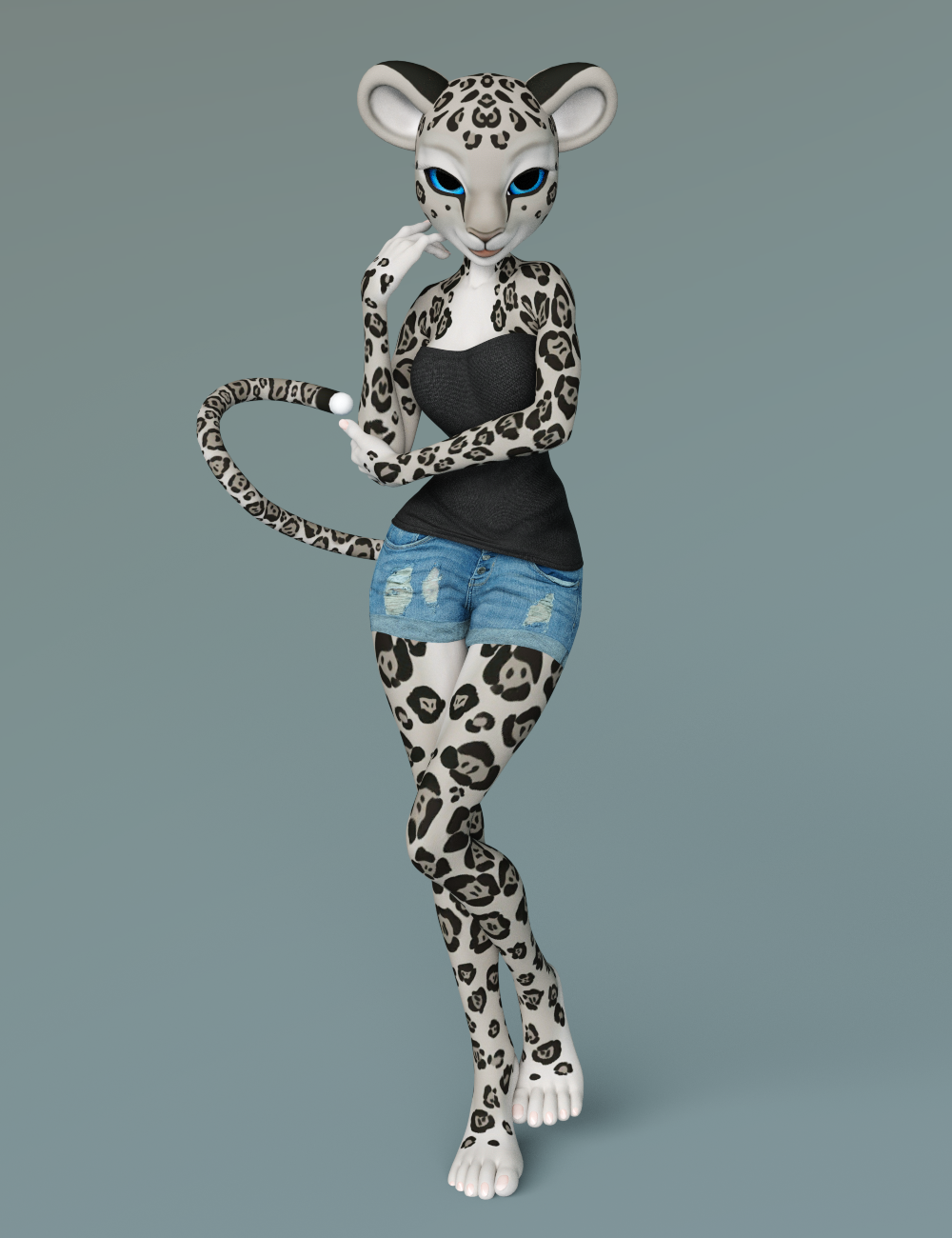
I got a chance to check out Melody 2.0 a little bit - not much but enough to get a first impression. So far so good. :) The cool thing about it is that the head, ears, and tail are attachable, which means you can parent them onto ANY figure and ANY body! AWESOME!
So I parented the Melody 2.0 head ears and tail to Genesis 8 Female. And then used Cayman Studios Victoria 4 Legacy UV for Genesis 8 Female to apply the Melody 2.0 textures to Genesis 8 Female.
I didn't have a whole lot of time to experiment with customizing it, but I think it has promise. Here's a couple of quicky renders with it the Melody 2.0 product + Legacy UV + Genesis 8 Female:
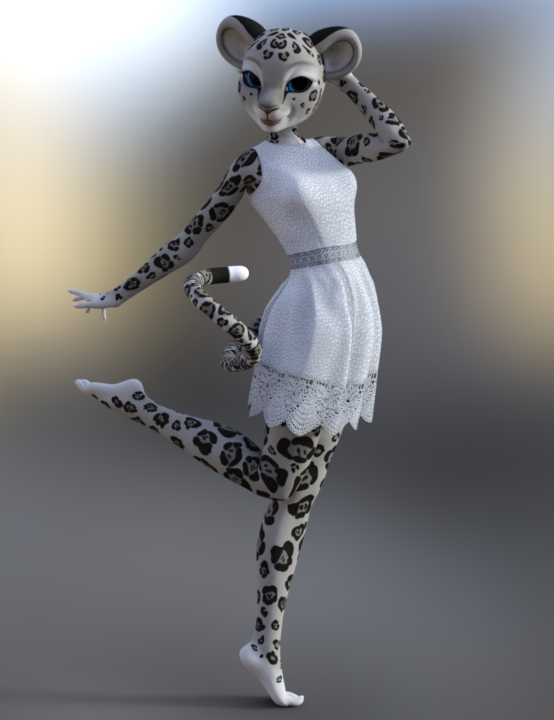
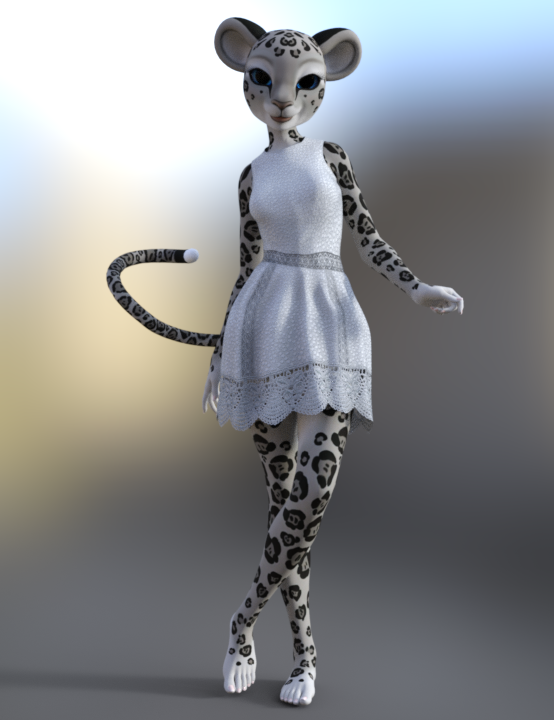
And here's one with some HFS Ultimate Shapes added:
 Legacy UVs -Victoria 4 is causing gaps when "preparing G3F"
What if Victoria 4 or Genesis 2 Female doesn't show up in the Surface tab under the UV Set? I get Victoria 7, 6 and 5, but 4 is missing altogether.
I'm having the same problem as Griffin, but NOTHING has worked. Still getting seams.There are several of the Legacy UV products out now for both Genesis 3 and Genesis 8. What figure are you using? And which product are you using?
more fantasy medieval armors for both male and female G8I second this, especially about the high heels. And as much as I love skimpy armors, we need more proper full armor for female characters.
yeah it's not like i hate skimpy many are really awesome and for some "fantasy roles they are fine like barbarians or magicians for others more like warriors, paladins or rogues they really look weird, specially the high heels, a rogue using a "high heel" as much it can look beatfull it really look weird, because the rogue wants be silence and have a good free move as it can and high heels are not for that lol.
I think my main issue is really the high heels more than skimpy cuz in some roles they are fine, like a savage role, like a shaman or barbarian or gladiator, but when comes to make a armor for paladins or other heavy armor class they being too skimpy and having high heels feels really weird
this for me is a very good exemple of well balanced armor between being skimpy and protective
https://www.daz3d.com/throne-defender-armor-for-genesis-8-female-s
but without any doubt my favorite armor for G8 whch the perfect ammount of protection and being skimpy is this one
https://www.daz3d.com/the-legend-for-genesis-3-and-8-female-s
my favorite armor here, it is really well designed when comes to protect and trying to be attractive, without count the customizations which you can make.
some others exemples which i do like:
https://www.daz3d.com/alirisia-outfit-for-genesis-8-female
https://www.daz3d.com/rebel-rogue-outfit-for-genesis-8-female-s
https://www.daz3d.com/tara-2-hd-for-victoria-7-victoria-8
https://www.daz3d.com/spartan-armor-for-genesis-3-and-8-female-s
they design do feel matching armors which i could see peoples wearing in fantasy based on they roles, specially not being high heels

again i'm not a high heels hater or something like that it's just which in some roles/games those cloths/outfites don't feel like "natural" as they where supposed to be lol, for exemple
a high heels outfit like that for a "fight game" or something like that or even a action game could be really cool and i don't have problem
https://www.daz3d.com/dforce-lilikh-outfit-and-weapons-for-genesis-8-females (this one is also one of my favorites here), to be fair that armor besides the high heel have a soo cool design which even could be used for a fantasy game.
anyway i would really love to see some more armors for fantasy/medieval and again not only female but also male cuz i feel the male to female rate is a lot umbalanced and i would love to see both genders getting more love.
Another cool things could be we get more "both genders armors like that ones:
https://www.daz3d.com/atlas-armored-suit-for-genesis-8
https://www.daz3d.com/tactical-assault-outfit-for-genesis-8-males-and-females
Legacy UVs -Victoria 4 is causing gaps when "preparing G3F"What if Victoria 4 or Genesis 2 Female doesn't show up in the Surface tab under the UV Set? I get Victoria 7, 6 and 5, but 4 is missing altogether.
I'm having the same problem as Griffin, but NOTHING has worked. Still getting seams.If you have the legacy UVs products installed and the corresponding UVs don't show up then they might not be installed properly. Where did you install them?
Legacy UVs -Victoria 4 is causing gaps when "preparing G3F"What if Victoria 4 or Genesis 2 Female doesn't show up in the Surface tab under the UV Set? I get Victoria 7, 6 and 5, but 4 is missing altogether.
I'm having the same problem as Griffin, but NOTHING has worked. Still getting seams.WHY Has Studio Started Crashing So Often?I haven't had DAZ Studio 4.11.x & Windows 10 latest crash on me, that wasn't related to an exceptionally huge scene, ever, actually.
What I do have trouble with is Genesis 8 characters having grossly distorted knees. I think that is an actual 4.11 bug and not a Genesis 8 mesh bug weirdly enough.
I don't have a knee issue. Could you have installed something that overrides the default? I've had one or two items do that, which were from other stores. It did not help to reinstall the base. Only uninstalling that character fixed the base back. I can't recall how I figured out what product did it, either. Because I remember there was no flag or hint as to what item caused it.I have to test to see if the problem exists in DAZ 4.10 but I recently, this month in fact, reinstalled all DS 4.10, DS 4.11, & all DIM Installed content and the problem still exists. It existed way back when I had only G8M / G8F & Michael 8 / Lucas 8 Pro Bundle / Victoria 8 as my only Genesis 8 purchases (if I remember correctly which is iffy even more so more than a year on). Oh, and I had all the DO base morphs for head & body too when I noticed that bug.
Genesis 9 delayed until at least 2020. Will you be buying it?I'm just getting caught up with Genesis 8 (after taking too long to migrate from Poser to DS). I'm not spending that much money for a new figure set unless it blows G8 so far out of the water it makes them look like Victoria 3 era products.
What product contains the Genesis 8 Gens?Any of the adult character Pro Bundles. (Ex. Victoria 8 Pro Bundle, Michael 8 Pro Bundle.)
Characters like Teen Josie 8, Karyssa 8, Sakura 8, etc. don't have any.
Optitex Clothing to D-Force?If this is the wrong part of the forum to ask this, I apologize.
I was wondering if it's possible to take a piece of optitex dynamic clothing for Victoria 4 and use it on G8F with D-Force?
Just remember that dforce clothing as in the store has rigging/bones, optitex clothing is purely dynamic with no rigging or bones. It is very possible to make optitex clothing dforce enabled, but all that does is enable it to be used with the dforce simulation, not give it bones or rigging.
Will future versions of Daz Studio have a "Comic Book Preview" like Poser 11?Uhm...I doubt so!
It doesn't seem like the current Daz version didn't have the technology to pull this off, so, if it's not here by now, I doubt it will be available in the future!
After all, it's already available in Poser, and I don't think many people would use this function in Daz.I can't really argue with either of those statements on their face... but I will! (he heh heh).
Honestly, we don't know that the technology isn't available to Daz Studio. From what I can tell, the outline feature MAY be some aspect of openGL technology. If that's the case then it would be a matter of implementing or accesing the code base that is already there. I could be way off here, but since the Poser feature requires that openGL be enabled and it is part of the preview option, that makes me think that I could be right here.
As for not many people wanting it... Well, I'm not so sure about that. If this feature were available to the artists who hang out in the Non-Photographc Renders and 3D Comics forum, I suspect it would be VERY welcome, indeed. Now, do I think geometric edges would become more popular than photorealism here at Daz? No. Not a chance. But I do think there is a substantial market of artists who would use it (even as a paid plug-in).
Then if there's a request, there's a market, and I hope you'll get what you're looking for! :D
I hope so. It would be nice to get to play with all of the great Genesis products out there. I do feel kind of stuck in the past with Michael 4 and Victoria 4. And yes, Dawn, Dusk and La Femme are more modern products, but they are woefully underrepresented when it comes to poses and clothing options. Using them almost always means starting a scene from scratch.
Optitex Clothing to D-Force?If this is the wrong part of the forum to ask this, I apologize.
I was wondering if it's possible to take a piece of optitex dynamic clothing for Victoria 4 and use it on G8F with D-Force?
[Relased] Cleo the Cheetah Girl for Genesis 8 Female !roger that. i will redo the tails to make them less of "belt tails"
I purchased Cleo a couple of weeks ago and can't find a tail. Are there any plans to add a tail to the product? Or is there one and I'm just not looking in the right place?
Ah, noting your concerns about a tail in the "catgirl" thread, I was going to point out this product discussion. If I correctly read and understood the earlier posts, a tail is planned, as well as digitigrade feet and other "add ons", but they have not yet been released.
Then again, this team made a similar character for Victoria 6 (or 7?) and no enhancements were ever offered. So, it's anybody's guess at this point. That's why i thought the creature morphs by DarioFish might offer a solution for the legs.
Sincerely,
Bill
Oh yeah. I see the tail was mentioned as being planned, but it looks like that was 6 months ago or so, so I'm not sure if that's been scrapped or not.
The DarioFish morphs would look good for the legs, I'll bet! I'll have to give that a try! :) Thanks, Bill!
Very Useful Daz Products IMHO (Converters, Lights, Utilities, Morphs, VRAM Optimizers, Shaders etc.)Here's some input for the beginner who's trying to keep their DAZ spending low:
(Needless to say, it's all just my subjective opinion.)Converters:
- I think auto-fit is good enough for starting out, especially when combined with Fit Control (which I absolutely do recommend).
- You can auto-fit M4/V4 items by first auto-fitting to Genesis, then from Genesis to G8.
- That being said, I would actually recommend M4/V4 clones for G8, because it generally achieves better results than the above method, and there's a ton of free M4/V4 items out there.
- Hair that's longer than shoulder length shouldn't be auto-fitted at all and just parented manually.
- Convert heeled G3 shoes to G8 with this free method.
- Convert M4/V4/Genesis/G2 poses to G3 with this freebie, and G3 poses to G8 with these two freebies.
Hair and Skin:
- It's worth playing around with the material settings and/or manipulate maps in your graphics editor (such as GIMP or Photoshop) to save on products like skin builder and color werks. See also here.
Morphs:
- Agree that DAZ Original Morphs are essential, and I like the 200+ Head and Face Morphs a lot. I personally don't find Shape Shift necessary.
- I do quite like SWOLE for G8. Obviously only if you're into that kind of thing.
Others:
- Since you single out glasses, you can get a lovely collection of free glasses here and here.
Might have more to add later, but I think i should go back to work now... *:)
Thank you for your tips! :D
These are nice ways to keep the cost really low while you're learning Daz, and I guess you're the first one to describe them, while others had just hinted at them.Yes, auto-fit is good for starting out! And Fit Control has a lot of features. Thank you for linking that SY guide!
The only problem with this method is that it requires a lot more time than just having everything ready to go in your "Smart Content". So, it's great if you don't do many renders or if you're learning Daz, but in my situation, for example, I'm glad I've organized my library in another way! ^^
Yes, there are a lot of freebies out there, and it's very important to use them at the start, although they don't usually have the quality of newer stuff, and you should at least change all the shaders. Again, that takes time. I've done that for some unique old outfits (like the Game of Thrones ones, that are not available for newer generation), but if I had to do that every time I used something, I'd probably get bored with Daz pretty soon xDI don't think I'd be able to replicate Skin Builder 8 stuff with Photoshop obtaining the same quality, and I've been using Photoshop since I was 13! I just do that for custom tattoos nowadays.
Nothing is necessary if you're just trying Daz out, but if you're creating many characters each month for your story you probably need some nice ways to differentiate one from the other.
Thanks for the eyeglasses freebie! I already have that G8 set, and I like its quality and simplicity of use! :D
Very Useful Daz Products IMHO (Converters, Lights, Utilities, Morphs, VRAM Optimizers, Shaders etc.)Here's some input for the beginner who's trying to keep their DAZ spending low:
(Needless to say, it's all just my subjective opinion.)Converters:
- I think auto-fit is good enough for starting out, especially when combined with Fit Control (which I absolutely do recommend).
- You can auto-fit M4/V4 items by first auto-fitting to Genesis, then from Genesis to G8.
- That being said, I would actually recommend M4/V4 clones for G8, because it generally achieves better results than the above method, and there's a ton of free M4/V4 items out there.
- Hair that's longer than shoulder length shouldn't be auto-fitted at all and just parented manually.
- Convert heeled G3 shoes to G8 with this free method.
- Convert M4/V4/Genesis/G2 poses to G3 with this freebie, and G3 poses to G8 with these two freebies.
Hair and Skin:
- It's worth playing around with the material settings and/or manipulate maps in your graphics editor (such as GIMP or Photoshop) to save on products like skin builder and color werks. See also here.
Morphs:
- Agree that DAZ Original Morphs are essential, and I like the 200+ Head and Face Morphs a lot. I personally don't find Shape Shift necessary.
- I do quite like SWOLE for G8. Obviously only if you're into that kind of thing.
Others:
- Since you single out glasses, you can get a lovely collection of free glasses here and here.
Might have more to add later, but I think i should go back to work now... *:)
Why will genesis 8 female not load any more ?I had such a problem happen long again, either with 4.9 or 4.10, only for the G3F instead, and I had to:
1) Check, double-check, and possible correct all installer and DAZ Content Library path names for DIM & DAZ Connect & Poser content! Must be correct! Exit DAZ when correct.
2) Uninstall all female model products dependant on G8F and then deinstall the Genesis 8 Essentials.
3) Then I reinstalled the Genesis 8 Essentials and all the female model products dependant on those Genesis 8 Essentials.
IMPORTANT NOTE: I uninstalled & installed via DIM so it was relatively fast and easy to do, if you've installed all product via DAZ Connent it will take much long to do.
I think the root cause of the failure was that I in someway reinstalled DAZ Studio and messed up the path names to the various DAZ Content Libraries and such in the DIM configuration in DIM, or the DAZ Connect / DAZ Content Library in Preferences in DAZ Studio, or a bit of both, that caused some needed files that 'explained' to DAZ Studio how 'Genesis 3 Female' was shaped, to be missing so when I loaded that model she wound up being these blocky squares like a robot. If you make same mistake for Genesis 8 then you'll get similar problems.
Yikes, that would be a massive undertaking. Not only do install manually, but I also have edited a good many textures for a lot of characters.What are all the Support files for? There are like 3 of them for most things. What happens if these get deleted and redownloaded?For me Victoria 4 loads lickedy split. The Morphs++ take the longest, but its only a few seconds. And since like 90% of all V4 only use M++, that's the only thing you need to worry about injecting most of the time. But the other injections are always super fast. Aiko 4, Elite Morphs, Stephanie 4, all of these inject as fast as I can click the button. Its pretty painless. You can place these injections in your shortcuts to make it faster if need be. The only time Genesis 8 loaded faster than V4 for me was when it was brand new and I had nothing for it. I use both 4.10 and the 4.11 beta, though I lean more towards the beta. Sometimes I still use 4.10 though because for me the Iray renderer is noticeably faster. Not sure why 4.11 is slower, but I'm not the only one to say that. The denoiser is fun, so I use the beta for that some. That's a different topic, though.I have no problems now but gave an example when a similar problem happened to me using G3F and DS 4.9/4.10. V4.2 loads fast for me too, considering I have a 7 year old laptop. They are saying though the G8F takes 10 minutes ot more to load but for me she loads as fast as G8M.
I only had about 6 G3F based females when I had to do that so it wasn't so massive an undertaking. It still took 2 or 3 hours though.
In DIM, if yoiu delete & redownload the support files without uninstalling those products nothing happens with them in their installed location if you're using DIM. However with DAZ Connect you've essentially reinstalled the products you deleted & redownloaded when you do something like that.
I also use DS 4.11 beta all the time as the have the viewport gizmo / mouse pointer slow to a crawl mostly fixed in 4.11 beta compared to 4.10.
I only manually install. I never use Connect or DIM. Since I edit a lot of textures and things I don't want Connect "fixing" my content. So I have no concern at all for this aspect. I don't care if it doesn't show up in smart content.
For me, Genesis 3 is the worst of the bunch to load. But it is not always that way, which is even more strange. Sometimes it loads faster than other times. It also effects all characters and scenes. It doesn't matter how I load the character, whether it be from a Daz character preset or a previous save, they often take a bit to load. Genesis 8 is getting worse over time. It used to load super fast, now it is approaching G3 loading times. Genesis 2 used to take a while to load, but recently it just got faster. That could be partly 4.11 maybe. It does seem to load faster in 4.11, and that is true for the other models as well.
But it is really annoying how content can mess around with loading times. There has got to be a better way. It would be nice if there was a way to have Daz skip content that you don't want to use, without deleting that content, so the program doesn't spend time looking for it.
When I look at the help log, I have dozens, maybe even hundreds of lines that say "Could not find target property for formula..." and "Could not find output property for formula..." These errors list a wide variety of morphs, expressions, and even animations. Here are a couple examples.
"2019-04-28 21:09:15.695 WARNING: ..\..\..\..\..\src\sdksource\fileinput\dzassetdaz.cpp(5804): Could not find target property for formula: Genesis3Female:/data/DAZ%203D/Genesis%203/Female/Morphs/DAZ%203D/Expressions/eCTRLConfused.dsf#eCTRLConfused?value in file : /data/DAZ%203D/Genesis%203/Female/Morphs/Littlefox/Star2/MCM-Star2-Express-Confused.dsf"
"2019-04-28 21:09:23.807 WARNING: ..\..\..\..\..\src\sdksource\fileinput\dzassetdaz.cpp(6129): Could not find property for animation: name://@selection#FHMVictoria7:?value/value"
Warnings like these completely dominate the log file. I cannot possible list them all. But these things DO load. Like the first one is for Star 2.0 expressions, I have access to them in my poses. I have no idea what the animation file is, or why I even have it.
I do have my content split between 2 drives. But I have not moved any characters across drives.
What is the best way to delete products manually? Is it better to do this from inside Daz or to browse the files?
Most of those warnings are for clothing products that trigger checks if you have the associated human morph product, eg Star 2.0, if you don't I think DS then doesn't bother keeping the Star 2 option of the clothing fits & morphs in memory for that particular clothing product.
I could be wrong though. O guess Richard Hasseltine would know for sure.
V4.2 & M4 do have a mechanism where the user picks & chooses the additional morph products to use when you load the character into a scene but it is slow & likewise was not popular with customers.
"Filter by Content" messed up?Hello,
I finally managed to edit the metadata of Generation 4 items with the help of some nice tutorial.
Now i assigned "compatibility" to my Gen. 4 Items to the certain core-Figures, as Victoria 4, Michael 4, Kids 4, and everything seemed to work fine, so now i'm able to select a Kids 4 figure, switch on "filter by context", and i can see all my kids 4 related stuff.
But somehow I've messed this up, and now, when i select a Kids 4 Figure with "filter by context" switched on, i see EVERYTHING BUT the kids 4 content.
Means, i see everything that is available with the current filter and categories settings, but without any of the Kids 4 content.
It only happened with the Kids 4. Selecting M4, V4 od A4 works as expected.
I don't have any clue what I've messed up?
Any suggestions anyone?
WHO IS THIS MODELReminds me alot of this one https://www.daz3d.com/fw-frankie-hd-for-victoria-7
Why will genesis 8 female not load any more ?I had such a problem happen long again, either with 4.9 or 4.10, only for the G3F instead, and I had to:
1) Check, double-check, and possible correct all installer and DAZ Content Library path names for DIM & DAZ Connect & Poser content! Must be correct! Exit DAZ when correct.
2) Uninstall all female model products dependant on G8F and then deinstall the Genesis 8 Essentials.
3) Then I reinstalled the Genesis 8 Essentials and all the female model products dependant on those Genesis 8 Essentials.
IMPORTANT NOTE: I uninstalled & installed via DIM so it was relatively fast and easy to do, if you've installed all product via DAZ Connent it will take much long to do.
I think the root cause of the failure was that I in someway reinstalled DAZ Studio and messed up the path names to the various DAZ Content Libraries and such in the DIM configuration in DIM, or the DAZ Connect / DAZ Content Library in Preferences in DAZ Studio, or a bit of both, that caused some needed files that 'explained' to DAZ Studio how 'Genesis 3 Female' was shaped, to be missing so when I loaded that model she wound up being these blocky squares like a robot. If you make same mistake for Genesis 8 then you'll get similar problems.
Yikes, that would be a massive undertaking. Not only do install manually, but I also have edited a good many textures for a lot of characters.What are all the Support files for? There are like 3 of them for most things. What happens if these get deleted and redownloaded?For me Victoria 4 loads lickedy split. The Morphs++ take the longest, but its only a few seconds. And since like 90% of all V4 only use M++, that's the only thing you need to worry about injecting most of the time. But the other injections are always super fast. Aiko 4, Elite Morphs, Stephanie 4, all of these inject as fast as I can click the button. Its pretty painless. You can place these injections in your shortcuts to make it faster if need be. The only time Genesis 8 loaded faster than V4 for me was when it was brand new and I had nothing for it. I use both 4.10 and the 4.11 beta, though I lean more towards the beta. Sometimes I still use 4.10 though because for me the Iray renderer is noticeably faster. Not sure why 4.11 is slower, but I'm not the only one to say that. The denoiser is fun, so I use the beta for that some. That's a different topic, though.I have no problems now but gave an example when a similar problem happened to me using G3F and DS 4.9/4.10. V4.2 loads fast for me too, considering I have a 7 year old laptop. They are saying though the G8F takes 10 minutes ot more to load but for me she loads as fast as G8M.
I only had about 6 G3F based females when I had to do that so it wasn't so massive an undertaking. It still took 2 or 3 hours though.
In DIM, if yoiu delete & redownload the support files without uninstalling those products nothing happens with them in their installed location if you're using DIM. However with DAZ Connect you've essentially reinstalled the products you deleted & redownloaded when you do something like that.
I also use DS 4.11 beta all the time as the have the viewport gizmo / mouse pointer slow to a crawl mostly fixed in 4.11 beta compared to 4.10.
I only manually install. I never use Connect or DIM. Since I edit a lot of textures and things I don't want Connect "fixing" my content. So I have no concern at all for this aspect. I don't care if it doesn't show up in smart content.
For me, Genesis 3 is the worst of the bunch to load. But it is not always that way, which is even more strange. Sometimes it loads faster than other times. It also effects all characters and scenes. It doesn't matter how I load the character, whether it be from a Daz character preset or a previous save, they often take a bit to load. Genesis 8 is getting worse over time. It used to load super fast, now it is approaching G3 loading times. Genesis 2 used to take a while to load, but recently it just got faster. That could be partly 4.11 maybe. It does seem to load faster in 4.11, and that is true for the other models as well.
But it is really annoying how content can mess around with loading times. There has got to be a better way. It would be nice if there was a way to have Daz skip content that you don't want to use, without deleting that content, so the program doesn't spend time looking for it.
When I look at the help log, I have dozens, maybe even hundreds of lines that say "Could not find target property for formula..." and "Could not find output property for formula..." These errors list a wide variety of morphs, expressions, and even animations. Here are a couple examples.
"2019-04-28 21:09:15.695 WARNING: ..\..\..\..\..\src\sdksource\fileinput\dzassetdaz.cpp(5804): Could not find target property for formula: Genesis3Female:/data/DAZ%203D/Genesis%203/Female/Morphs/DAZ%203D/Expressions/eCTRLConfused.dsf#eCTRLConfused?value in file : /data/DAZ%203D/Genesis%203/Female/Morphs/Littlefox/Star2/MCM-Star2-Express-Confused.dsf"
"2019-04-28 21:09:23.807 WARNING: ..\..\..\..\..\src\sdksource\fileinput\dzassetdaz.cpp(6129): Could not find property for animation: name://@selection#FHMVictoria7:?value/value"
Warnings like these completely dominate the log file. I cannot possible list them all. But these things DO load. Like the first one is for Star 2.0 expressions, I have access to them in my poses. I have no idea what the animation file is, or why I even have it.
I do have my content split between 2 drives. But I have not moved any characters across drives.
What is the best way to delete products manually? Is it better to do this from inside Daz or to browse the files?
ISO Victorian explorer outfit for kit bashingMaybe Elverado Outfit (Victoria 4) for the gloves?
Daz 3D is part of

Connect
DAZ Productions, Inc.
7533 S Center View Ct #4664
West Jordan, UT 84084Licensing Agreement | Terms of Service | Privacy Policy | EULA
© 2026 Daz Productions Inc. All Rights Reserved.