-
Why is my clothing getting horizontally flipped when I use transfer utility? Driving me insane!!!
Numerous modellers, including Modo and Lightwave, as well as sculpting applications like ZBrish use Z forward. As Kainjy says, adjust the settings - then save a preset, which will apply the correct adjustments in both the import and export dialogues with a single action.
Why is my clothing getting horizontally flipped when I use transfer utility? Driving me insane!!!When using Transfer Utility the base model (without morphs or other seettings) is adapted.. so the clothing is adapted with a positive X scale of 100.
You can:
- edit the impot settings for obj file
- import, correct the clothing, re-export from DAZ to OBJ and reimport it
When Importing you must set how axes are placed in Sketchup:
- Vertical Z
- Lateral X
- Depth Y
If the model looks inverted, under the Lateral X activate INVERT POSITIVE DIRECTION to flip the model
Why is my clothing getting horizontally flipped when I use transfer utility? Driving me insane!!!So I modeled a uniform in sketchup. Exported as an .obj. Imoorted it into Daz. This is where the problem starts. The Blue axis on the original sketchup model which is the vertical axis in literally every modeling and rendering program in the universe except Daz, in Daz becomes the front back axis and the model imports as if it was laying flat, face down on a floor instead of standing up. In the import dialog I tried every differnt combination of switiching, Z,Y and X axis but the closest I can get it to normal has the uniform aligned correctly with the Genesis 8 figure, but the Daz red axis is flipped. The only way I seem to be able to fix this is to select the uniform, then set the X Scale to -100 to then everything is aligned correctly.
However, once I use the transfer utility to morph the uniform to the Genesis 8 figure the fracking uniform flips back to an inverted red axis!!!! WHAT THE HECK!!!!!
Two questions...
How the heck do I import a model made in Sketchup, saved as an .obj to Daz starting off in the proper alignment?
Two how do I stop the uniform from flipping horizontally when using the transfer utility?
What does this mean? (Error log attached).Ryuu@AMcCF said:
PerttiA said:
I should be seeing files loaded into the "E:/Users/Public/Documents/My DAZ 3D Library/Content/runtime/"
No, the files should be in "E:/Users/Public/Documents/My DAZ 3D Library/runtime/"
That product is an old Poser product, meant to be used with Terradome2 (which doesn't work in DS)
If you download the installation zip manually and look at the file locations, is there anything in ...\Runtime\Support\? That is the place where the metadata is saved.
Well, in the WinZip file (IM00028004-01_TheRoadtoMadirac.zip), it has "Content" as the top level folder, alongside a copy of the Manifest.dsx & Supplement.dsx; in Content, there is "runtime", then drilling down further are folders for "animageminreadme's", "geometries", "libraries", "textures"; etc... which matches up with the text from the "IM00028004-01_TheRoadtoMadirac.dsx" file I had posted earlier.
But I AM seeing the folders and files in the "/My DAZ 3D Library/runtime/" path you're saying they should be in.
And in the "/runtime/support/", I have the DAZ_3D_28004_The_Road_to_Madirac.dsx" file. The text in this file seems to jive with what you said.
So, it would seem that DIM did the install after all--but why isn't it showing up as installed in DAZ?
And.... our comms might be about to die again--I'm seeing those 505 crashes starting up once more.

If you make a "DAZ_3D_28004_The_Road_to_Madirac.jpg" and put it to ...\Runtime\Support\, you shoud get the thumbnail in DS
The best place to look and use these old Poser products is in Content Library->Poser Formats
The "Content" folder in the installation file is an alias for whatever folder is defined in Content Directory Manager as the base directory for your content
What does this mean? (Error log attached).PerttiA said:
I should be seeing files loaded into the "E:/Users/Public/Documents/My DAZ 3D Library/Content/runtime/"
No, the files should be in "E:/Users/Public/Documents/My DAZ 3D Library/runtime/"
That product is an old Poser product, meant to be used with Terradome2 (which doesn't work in DS)
If you download the installation zip manually and look at the file locations, is there anything in ...\Runtime\Support\? That is the place where the metadata is saved.
Well, in the WinZip file (IM00028004-01_TheRoadtoMadirac.zip), it has "Content" as the top level folder, alongside a copy of the Manifest.dsx & Supplement.dsx; in Content, there is "runtime", then drilling down further are folders for "animageminreadme's", "geometries", "libraries", "textures"; etc... which matches up with the text from the "IM00028004-01_TheRoadtoMadirac.dsx" file I had posted earlier.
But I AM seeing the folders and files in the "/My DAZ 3D Library/runtime/" path you're saying they should be in.
And in the "/runtime/support/", I have the DAZ_3D_28004_The_Road_to_Madirac.dsx" file. The text in this file seems to jive with what you said.
So, it would seem that DIM did the install after all--but why isn't it showing up as installed in DAZ?
And.... our comms might be about to die again--I'm seeing those 505 crashes starting up once more.
What does this mean? (Error log attached).I should be seeing files loaded into the "E:/Users/Public/Documents/My DAZ 3D Library/Content/runtime/"
No, the files should be in "E:/Users/Public/Documents/My DAZ 3D Library/runtime/"
That product is an old Poser product, meant to be used with Terradome2 (which doesn't work in DS)
If you download the installation zip manually and look at the file locations, is there anything in ...\Runtime\Support\? That is the place where the metadata is saved.
What does this mean? (Error log attached).Okay, so I've completely loaded DAZ as a fresh install, loaded everything up using DIM (nearly 16000 products bought over the years), When it finished, I saw I only had about 9000 or so items loaded, but since I had dealt with this kind of reinstall before, I went ahead and forced DAZ Studio to update all the metadata. When that was done, the "Installed" collection now shows I've got 13811 products in the Smart Dontent, with 2508 still waiting in the "Available" collection.
Even so, DAZ fails to load all too many of the products or pictures of the products fail to load after going through the Updating Metadata process to its database
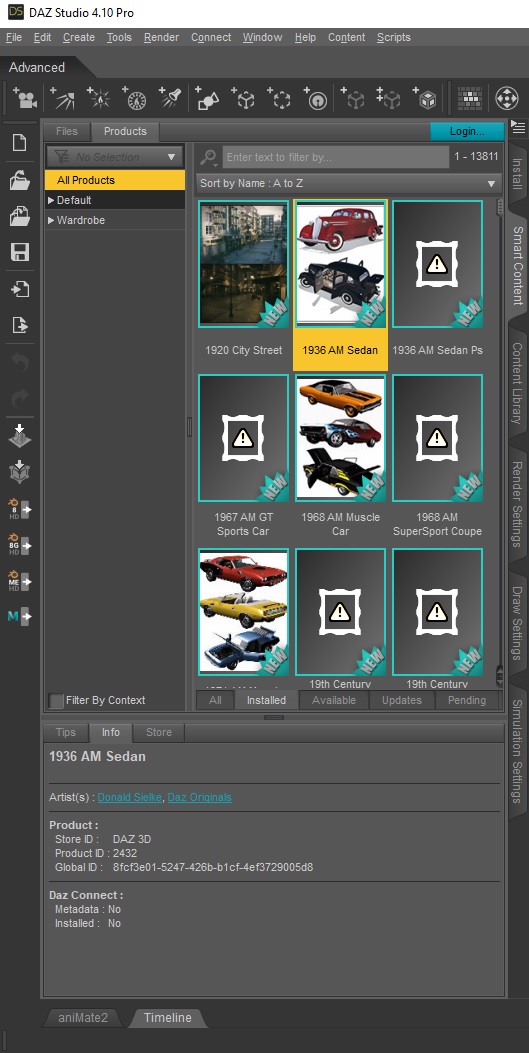
And so, here's where my problem with DIM lies:
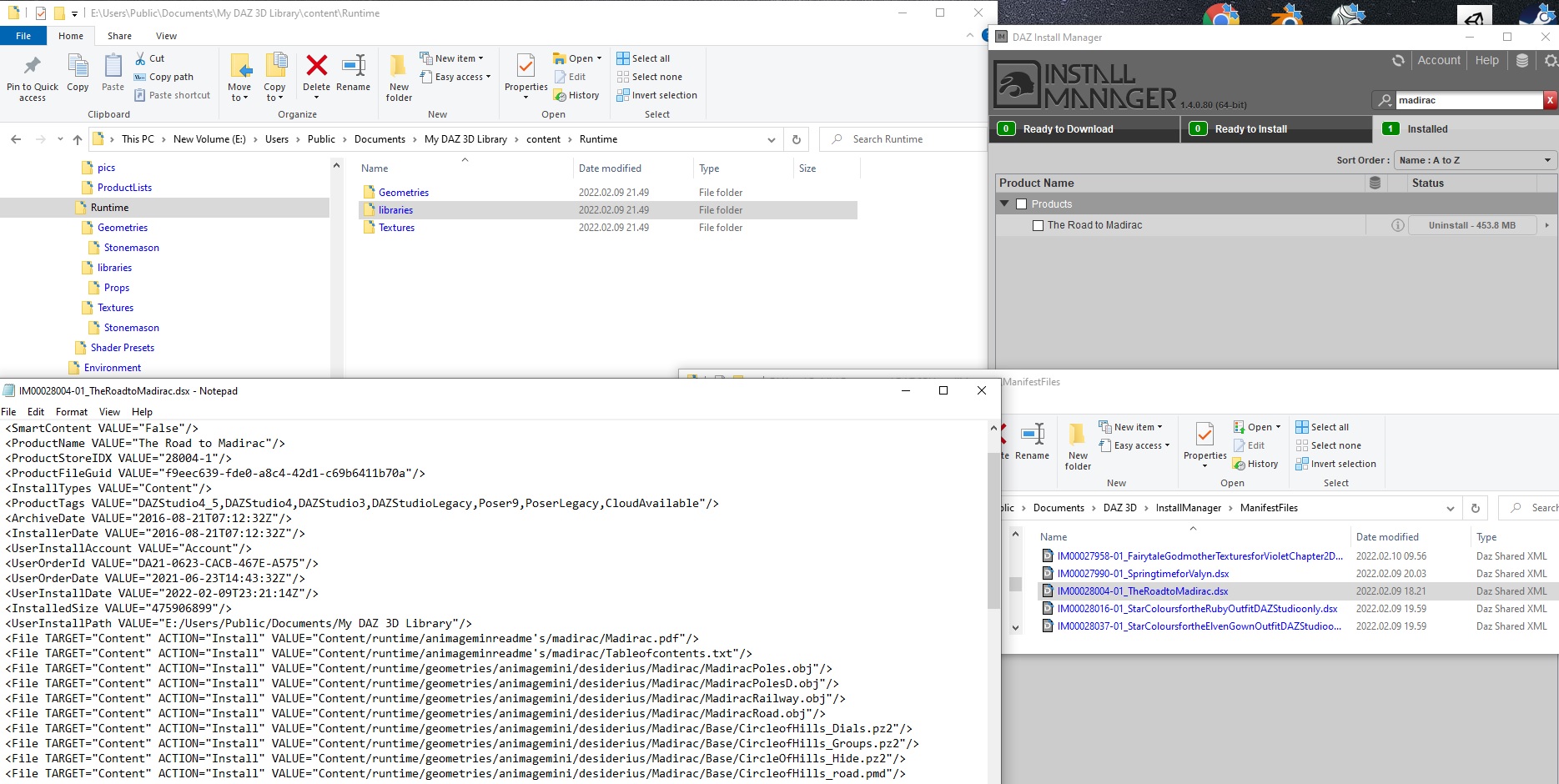
For example, this Second picture shows that, according to DIM, one of those products (The Road to Madirac) is supposed to be installed.
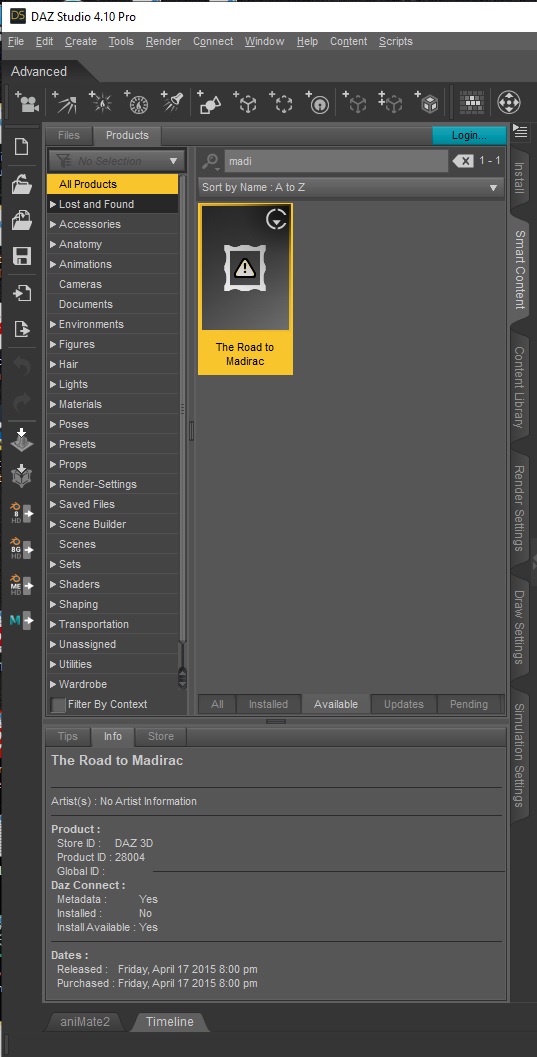
But, as this final picture shows, according to DAZ Studio, it is NOT "Installed", but rather is "Available". Any attempt to run it in DAZ, it wants me to log-in to my account and download it via the DAZ Connect--which is what we're trying to avoid!
Back to the First picture, I'm trying to trace down where the product is supposed to be.
I go to the product's Manifest file (it's Product ID # is 28004). In the Manifest file, I should be seeing files loaded into the "E:/Users/Public/Documents/My DAZ 3D Library/Content/runtime/" location with subsequent product-related subfolders, but none of those subfolders or files of this product, or anything of the 2508 products DAZ see's as "Available" are present.
So what can we do to recover those products if DIM won't work and yet we still avoid ever allowing DAZ to log directly into our accounts to avoid that encryption problem??

Oh, and in case you may have noticed and were about to point it out, yes--I did intentionally load up DAZ Studio 4.10 rather than 4.16--I'm concurrently T/S a problem with LAMH, too. Through conversations with AlessandroAM, I learned that LAMH won't work at all with versions after 4.13, even with his Catalyzer product. In fact, it was that issue which led me to this problem!
In addition, I'm unable to use dForce Hair either because a recent "upgrade" from Windows made my graphics card obsolete. Go figure.
Official Release of Carrara 8.5 **Update - 8.5.1.19**I was introduced to Carrara by a late friend back in 2013.
IMO Carrara is still relevant now as it was then.
I have tried may versions of Daz studio, IMO the UI sucks.
I'd love to see an update to this, every other platform has a 3D bridge.
If there was an update to Carrara, I'd love to see native import of all Bryce files :-)
(being a bit nostalgic there :-) )
For those using Huion tablets, consider trying a VEIKK A50, this tablet doesn't crash
Carrara.Blender to DazOK, what I did (if you have an object without moving parts, this solves everything):
1) Create the object in Blender2) Apply the textures, taking care to use the same material name to the parts with the same texture
3) Save your work
4) Join everything together in Blender (select all the objects and, in Object Mode, go to the menu Object and select Join - THIS WILL LITERALLY JOIN THE OBJECTS AS ONE, so SAVE A VERSION BEFORE DOING IT)
5) Export as Collada (DAE)
6) Go to Daz
7) Import the Collada object
Now you have a solid object (no movable parts) with all the textures in place and, if you go to the Surfaces tab, you can edit these textures separately (each material from Blender can be edited separately and will affect all the parts that have that material applied)
I'll attach my final DAZ render. Please note that this is an EXERCISE in Blender (I'm still learning) and that I didn't bother to light the scene properly in Daz@Gordig and @Zombietaggerung , Thanks again!
Is the bridge abandoned?Paintbox said:
butaixianran said:
Xanathon said:
But Blender fbx to C4D is a real pain when it comes to shaders/texture mapping into the correct shader ports. Aside from that I tested the Blender bridge and that also had loads of problems regarding texture plugging.
Blender is selling an addon called: "better fbx" in their market. So the free build-in fbx import/export will never be good. And "better fbx" is designed to work good with Daz characters.
Better FBX looks pretty sweet I must say.
If it can put out joint weighting and etc reliably I might take that up and see how well it works importing the resulting FBX'es into Cinema. The joint weighting being all weird every time is killing me xD
It kind of depends though, on how well the Blender Bridge imports them, since if they load broken as heck in that as well then there's no real point in going through the extra hoops.
Blender to DazThere isn't really a way around the texture issue, partly because Blender and DS use different render engines, but also because it's my experience that textures never survive conversion from one program to another fully intact. You'll generally get the diffuse/base color maps over, but you're lucky if you get anything else. If you say that you get the textures with DAE export, then that might be the way to go, with one additional step: once imported into DS, re-export them as OBJ, then import the new OBJ and use that. I've never used DAE myself, so I don't know what might be causing them to spurn attempts to manipulate grouped DAE imported objects.
Blender to Daz(EDIT) I PARTIALLY solved (for the most part) my problem, so I'm writing my partial solution in a reply at the end of the thread. I still have things to consider and I will thank all the suggestions (for the absolute noob here) to creating things (at this point only props)in Blender and importing into Daz.
ORIGINAL POST:
I imagine it's a common question, but after searching not only the forums but also "the Internet" (that epic episode of "The IT Crowd" always come to mind when I say this) I turn to you, that are here ages longer than me.
So, I'm learning Blender. I put together a very good copy of my living room TV rack with textures and all, grouping things together as I should and etc. Then, I started trying to export to "some format" and import into Daz. I had success, but I still have a problem:- If I export to an OBJ file, I lose all the textures AND my object is imported as a single "thing", no parts, no nothing (so I can't even apply different textures to different parts of the object)
- If I export to Collada (DAE), EVERYTHING works. I have my textures, all the parts are independent, etc. But... I have each piece of my object as a separate object and even if I parent or group them together in Daz they still are affected separately if I click in one of them and apply any transformation (moving, scaling, etc)
I've tried lots of things, followed dozens of suggestions "on the Internet" like changing options when exporting, but I always end up in one of the two situations above.
In my ideal, imaginary world, I would be able to export an object where I could CHOOSE parts to be movable (for example, I have two drawers on my rack that I would like to have the option to open or close in Daz), all the rest would be a monolyth (so, no dismantling my rack when trying to move it clicking in one of the pieces) AND I would have all the textures.
The Collada format nearly gave me it all, but I can't find a way to join the parts I would like to join (preferrably in Blender).
Any suggestions?
Import/Convert xnalara .mesh.ascii / .mesh / .xps models?cain-x said:
I just happened to see this post during my diving through the webs... yes, there is a way to bring XNALara into DAZ. You need the following:
- shinokawa's MMDImporter plugin for DAZ
- CATS Blender plugin (comes with mmd_tools)
- Blender
In short, you use CATS to import the XNALara model into Blender. Then using mmd_tools, you convert it to MMD. Then using same mmd_tools, export the model (it will create a .pmx file). Then in DAZ, with the MMDImported plugin installed, you drag and drop the .pmx file into the scene. This method works with any model w/ armature that you wish to bring into DAZ. There are some caveats but they are all solvable. This takes literally one minute to convert and it is ready to pose in DAZ.
Use responsibly.
AFAIK that particular MMD importer was removed from distribution in 2015. If you know of a legitimate source for it that would be interesting as it crops up in the forums occasionally. I managed to get a copy while it was available but others might like to know if you can still obtain it.
Alternative to Mysty's Presets for g3?Vyusur, thanks for the answers!
Vyusur said:
As for Genesis items for fitting, they require clones which I don't sell. But there is a whole bunch of recipes for making them on the forum. Usually it's enough to scale the figure to the source figure size, fit the fingertips and toes to the closest position, export to obj, import as a morph in D/S and save it as a clone.For me, that is a bit too much of a shamantic dance.
I provide normal maps only where it is required. I don't care about all these divisions on pbr or non-pbr. Usually it's enough for Carrara to use diffuse and bump maps, and anything procedural for specular. Personally, I use normals for veins or micro muscles, or some extreme reliefs like scars.
I use normals in both pbr and non pbr style renders. And I have found that IRAY materials in general are very useful in Carrara, even without Philemo's plugin.
The only question you missed was, are your characters compatible with one another? For example, can one share the other's clothing?
Volumetric Effects in Daz Studio.I hope someone makes a script to import a series for animation too,
I do know FLUIDOS can do it though so there is that option
Cataloging my downloaded contentThere is this one (Windows only) which has been unavailable for some time but is about to be re-relased (broken because of store changes), but it's for Renderosity products only. It creates an offline database of all your online product data and will automatically import downloaded product files (zips etc.) so you can manage them from within the program.
It has a simple, experimental installer where you can check the content of the files and select those you want to install. You can then see on the main product list what is installed and what isn't, and where (multiple library/runtime support). No uninstall feature yet but it's prepared for adding one. It needs to be redesigned a bit and some more features added, but the current version works basically OK as it is. It's free for up to 500 products but otherwise fully functional so anyone can test it for as long as they like.
Also working on a general content manager which can handle and import product data from all sources including the DAZ and Renderosity managers but it will take a while before it's released as it's a fairly complex project.
A Huge Regretfrank0314 said:
marble said:
PerttiA said:
frank0314 said:
The only downfall to manual installs is you will never get nor know when an update is available for any products. There are a lot of updates on a continuing basis to a lot of packs. I've never opened DIM and not had at least 2-3 updates to different things.
True, but then again what is being updated?
From what can be read here in the forums, it's mostly metadata for 'Smart' content, which I don't use or non-zero default values that I can fix myself.
Smart Content? No thanks - it is a hidden tab for me too.
Me three. Never used it never will. I'll stick with my good old reliable content library.
Bandwagon hopping time: Me four. Tried it, didn't like it! Burned the T-shirt.
I've used manual installation from the beginning of DAZ time. It's like all the decorative & kitschy stuff in my house. No roommates, no pets, no earthquakes, every item is exactly where I put it and it stays there. And if I can't find it, it's my own d**n fault.
 How can I use The Machine in Daz?
Since you have Bryce, load the asset, select it and then File > Export Object. Select Wavefront OBJ Files (very low down in the list). It will create a .obj and a .mtl file which you can import into Studio. Maybe the Studio Bridge works directly from Bryce. Just give it a try. (I assume that you mean Studio by "Daz", not Bryce, Carrara or Hexagon, those are also Daz.)
Alternative to Mysty's Presets for g3?UnifiedBrain said:
Vyusur, another great character!
Pardon me for sounding like I haven't been paying attention (except that it is true), but how hard is it to get your newer custom figures into Carrara? I succeeded with Leon. Are current figures about the same? Some seem to be for Poser only.
Can your custom figures wear Genesis clothing very easily?
Are the custom figures you make compatible with each other? Can they share poses, clothing, etc?
For current characters, I am relatively content using morph-less Genesis 3 and 8 characters at this point. Morphs would be nice, but the skin maps are the main draw for me. Do you provide normal maps (and IRAY maps) for all of your custom figure skin textures?
I know, a lot of questions. :)
All my figures, except the Poser ones, are beautifully convertible for Carrara using, as well as all related items that come with my figures (hair, clothing, etc.)
Poser figures are not compatible with anything else. Poser format is a regress for my figures due to the Poser rigging which is all legacy. But they are as good as ever possible for this kind of rigging and binding.
As for Genesis items for fitting, they require clones which I don't sell. But there is a whole bunch of recipes for making them on the forum. Usually it's enough to scale the figure to the source figure size, fit the fingertips and toes to the closest position, export to obj, import as a morph in D/S and save it as a clone.
I provide normal maps only where it is required. I don't care about all these divisions on pbr or non-pbr. Usually it's enough for Carrara to use diffuse and bump maps, and anything procedural for specular. Personally, I use normals for veins or micro muscles, or some extreme reliefs like scars.
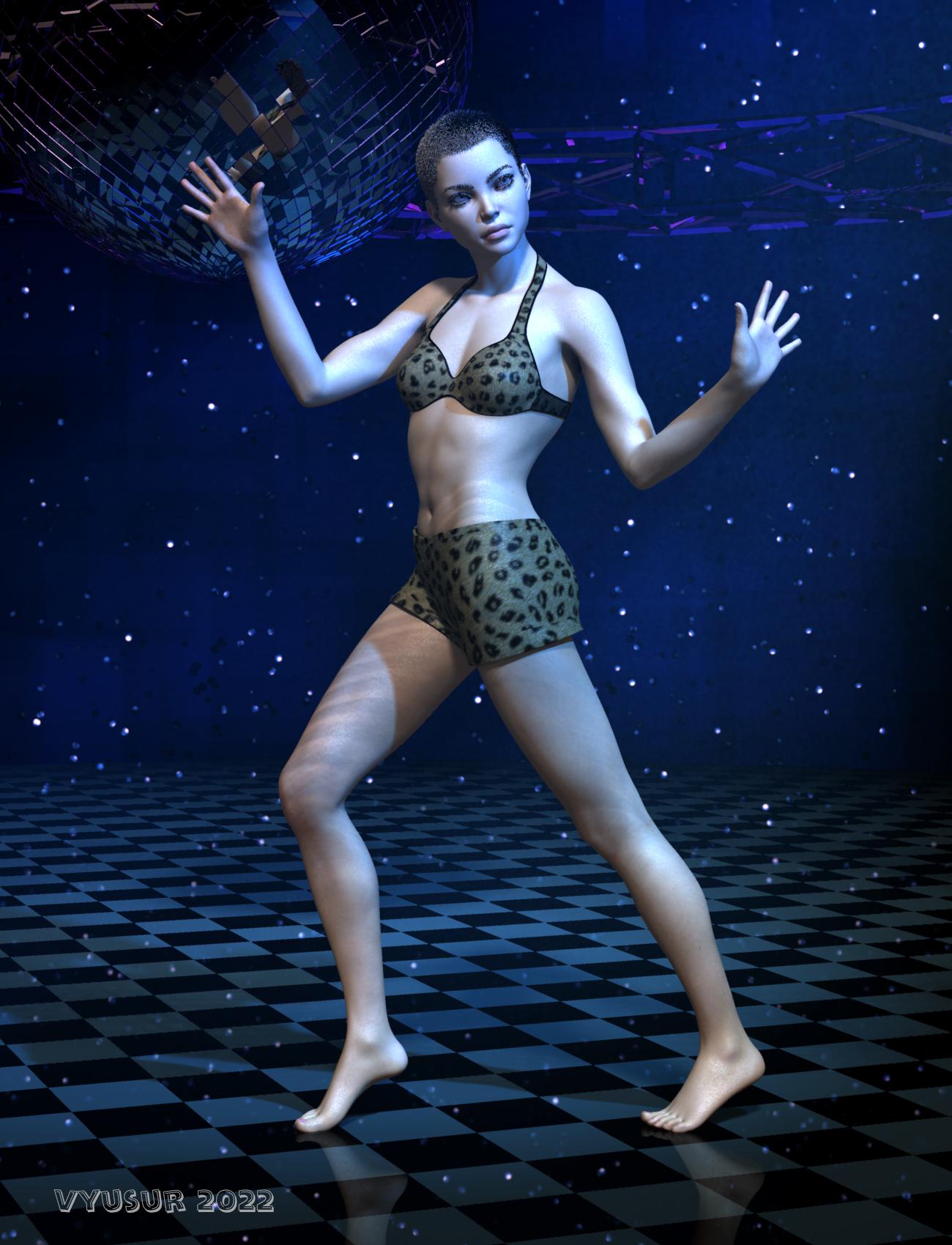
I pay the most attention to the joints bending. I try to avoid JCMs whenever possible so that my figures look mostly the same in different programs, at least those programs that have the same rigging and support dual quaternion binding.
The elbows and knees of my figure on the picture bellow don't contain a single JCM.
 Import/Convert xnalara .mesh.ascii / .mesh / .xps models?
I just happened to see this post during my diving through the webs... yes, there is a way to bring XNALara into DAZ. You need the following:
- shinokawa's MMDImporter plugin for DAZ
- CATS Blender plugin (comes with mmd_tools)
- Blender
In short, you use CATS to import the XNALara model into Blender. Then using mmd_tools, you convert it to MMD. Then using same mmd_tools, export the model (it will create a .pmx file). Then in DAZ, with the MMDImported plugin installed, you drag and drop the .pmx file into the scene. This method works with any model w/ armature that you wish to bring into DAZ. There are some caveats but they are all solvable. This takes literally one minute to convert and it is ready to pose in DAZ.
Use responsibly.
Daz 3D is part of

Connect
DAZ Productions, Inc.
7533 S Center View Ct #4664
West Jordan, UT 84084Licensing Agreement | Terms of Service | Privacy Policy | EULA
© 2026 Daz Productions Inc. All Rights Reserved.