-
pwToon
Quick question just to be sure - are you rendering in Iray or 3DL?
pwToon's in 3DL. If I have Iray elements, I use sickleyield's Iray to 3DL converter to help make things easier to apply the pwToon shader to them.
pwToonWait! Don't give up yet! pwToon is really an excellent program. If you check my signature, you can see a bunch of the work I've done with it. It's my preferred toon shader for DS.
I can offer some help is you're still interested.
Not bad. How much post work do you do? I've been thinking of getting this for a long time but never pulled the trigger.
For the past two years, I've been doing as little post as possible. Not because I'm against it, but because I still can't get super-comfortable with GIMP.
pwToon's nice to use. It gives me the comic and animation look I want. One trick I learned was to utilize the effects provided with the package, but stripping out any changes to colors or maps. It helps vary up the materials so that, say, skin renders differently from cloth and metal.
pwToonI received a response from the Help Desk. They offered to help with some tech support. I'm not ready for that right now. In the meantime, I've decided to keep pwToon.
A lot of us own it and have never used it. When you are ready start a thread and a lot of folks will join in. Just teh response and the number of views here show that.
pwToonI received a response from the Help Desk. They offered to help with some tech support. I'm not ready for that right now. In the meantime, I've decided to keep pwToon.
More Non-photorealisitic Renders (NPR II)Once again, I'm trying to decide whether or not to get pwToon. I can't decide if it will help or should I just stick with my regular workflow?
No matter what else I've tried since, I always end up going back to PWToon.
I experiemented with an image @nDelphi did with PwToon (with his permission). I think I'm going to get it. Just wondering if I should wait for a sale.
Original Image With some of my filters (my favorite of the 3).
 More Non-photorealisitic Renders (NPR II)
Once again, I'm trying to decide whether or not to get pwToon. I can't decide if it will help or should I just stick with my regular workflow?
No matter what else I've tried since, I always end up going back to PWToon.
pwToonIt looks impressive, Did you do any post work or is that a raw render?
I like Visual Style Shaders a lot, but the biggest problem I have with it, is you have to type the settings you want manually into every surface. No bit deal in a small scene. The more models you use, the bigger a pain it becomes. I think there is a way to have a preset but I never learned how. Also, I'm still not 100% satisfied with the setting I chose and that took a lot of experimenting.
Those are raw renders.
Toon rendering is a lot of work because we don't get out of the box materials ready to go. We have to tweak every single object we throw at the scene, even with toon presets.
It looks great for a raw render. If you don't mind, I would like to play with that image in photoshop and my other tools to see how well it would work with my standard procedures. It will help me decide whether or not to pick PwToon up.
pwToonIf anyone is interested here are the online docs with live scripts that I saved in .MHT format for offline viewing. You can use these to help you understand the pwToon settings, just use the sliders to see how they affect the shader. Each section also has tabs, so navigate to them to see additional settings. Don't click on any of the links to the left as they go directly to the website which is no longer online.
The PoseWorks' website seems to have disappeared so these come in handy to me and I am sure to anyone who has the pwToon shaders.
They only work with Internet Explorer as far as I can tell. Just drag and drop them into a tab.
They can be found at:
https://drive.google.com/file/d/1f79QtBC3kZVxuIiUMWaLmqQbqRicOrLF/view
pwToonThat Ghost AR soldier looks pretty damn good. Vicky looks good too but I'm not sure about the face. Man I don't know whether to stick with VSS or get PwToon. I wish I wasn't so indecisive. I hate to waist money on a product. Thanks for that tip BTW. I never thought of that. I'm going to try it with Visual Style Shaders.
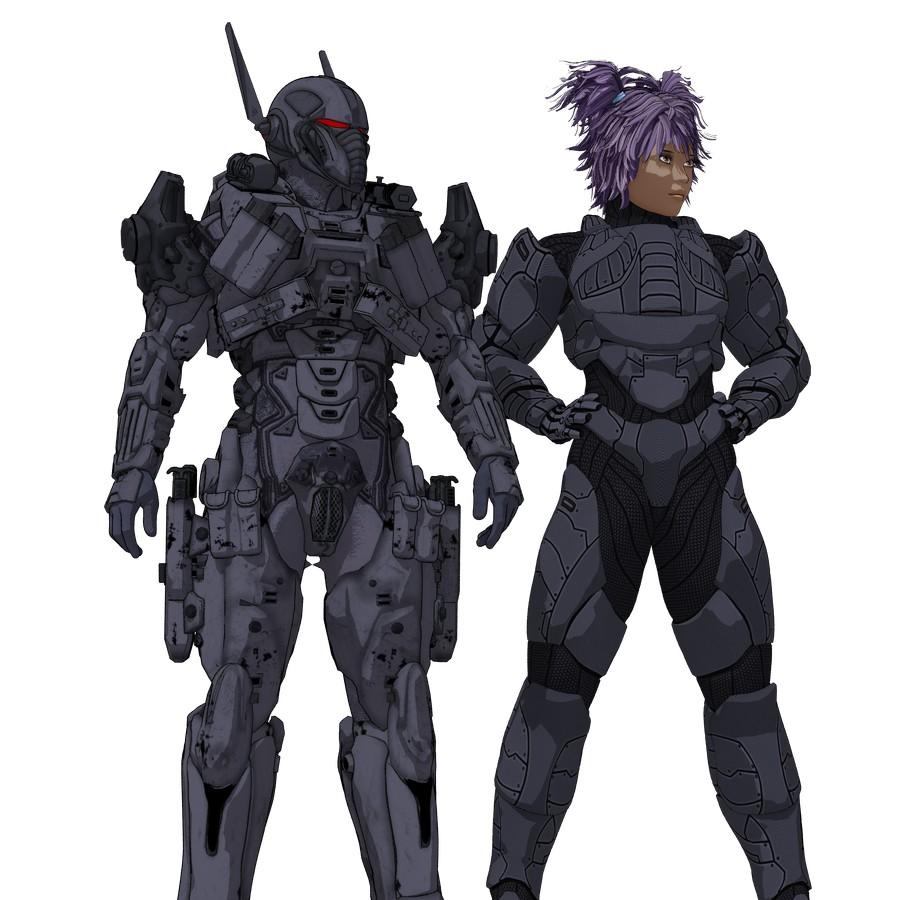
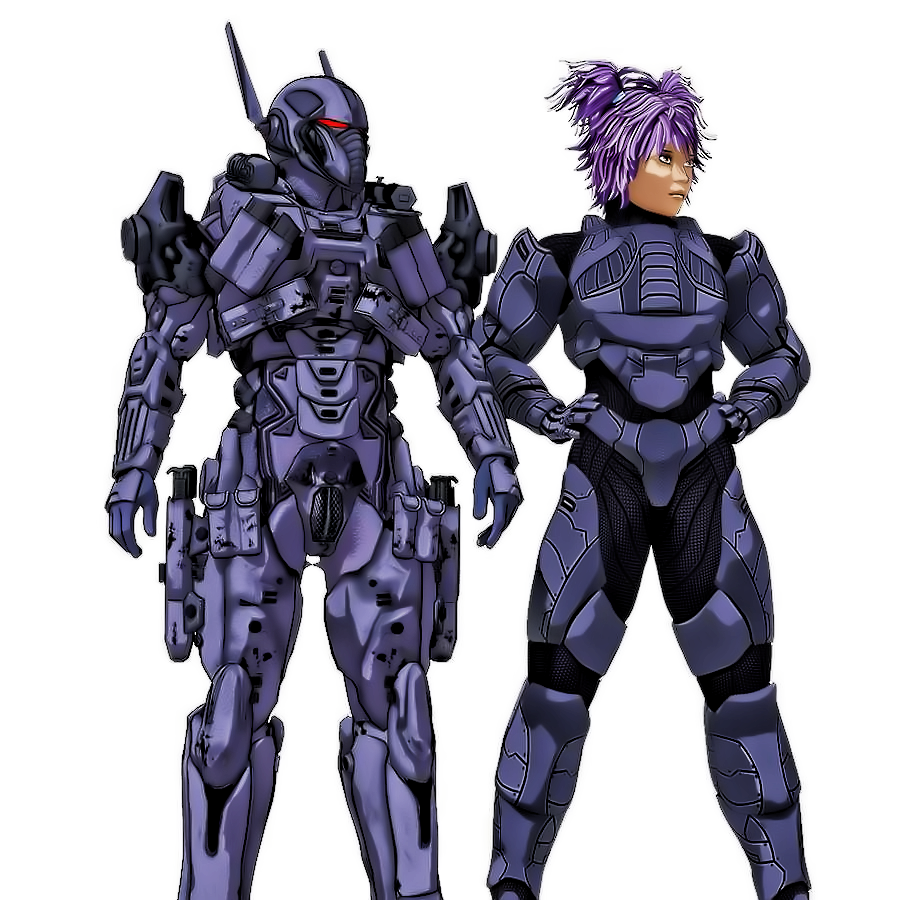
The face is just the shadow from the sun light source above. That too can be controlled with pwToon's upper bound and lower bound settings, part of the shader, or move the light source around to make shadows less prominent, like you would with any other render.
It looks impressive, Did you do any post work or is that a raw render?
I like Visual Style Shaders a lot, but the biggest problem I have with it, is you have to type the settings you want manually into every surface. No bit deal in a small scene. The more models you use, the bigger a pain it becomes. I think there is a way to have a preset but I never learned how. Also, I'm still not 100% satisfied with the setting I chose and that took a lot of experimenting.
pwToonThat Ghost AR soldier looks pretty damn good. Vicky looks good too but I'm not sure about the face. Man I don't know whether to stick with VSS or get PwToon. I wish I wasn't so indecisive. I hate to waist money on a product. Thanks for that tip BTW. I never thought of that. I'm going to try it with Visual Style Shaders.
The face is just the shadow from the sun light source above. That too can be controlled with pwToon's upper bound and lower bound settings, part of the shader, or move the light source around to make shadows less prominent, like you would with any other render.
pwToonThe tutorials are very much relevant still. Don't get so hung up on the textures.
You should get Crecent's Cel Shader Presets
https://www.daz3d.com/forums/discussion/195231/new-pwtoon-cel-shader-presetsJust make sure you are not using PBR (photoreal textures) textures with pwToon. Or do as I do and remove all the textures and just change colors in the diffuse channel after you apply Crecent's presets to get the toon colors you want.
If you must use a texture because of some detailing, it is best to transform them into a black and white image for use with pwToon, or any toon shaders for that matter. You can then change the colors in the parameters to whatever you like. I have even used Xurge 3D's bump maps in the diffuse channel to bring out some great toon details.
Here's sample of a Ghost AR (Sedition Soldier) where I converted the textures to black and white and Xurge 3D's Enforcer 01 Armor for Vicky 4 where I used the bump map in the diffuse channel.
I applied the same techniques to the hair which is why you see such detailed lines.
That Ghost AR soldier looks pretty damn good. Vicky looks good too but I'm not sure about the face. Man I don't know whether to stick with VSS or get PwToon. I wish I wasn't so indecisive. I hate to waist money on a product. Thanks for that tip BTW. I never thought of that. I'm going to try it with Visual Style Shaders.
pwToonThe tutorials are very much relevant still. Don't get so hung up on the textures.
You should get Crecent's Cel Shader Presets
https://www.daz3d.com/forums/discussion/195231/new-pwtoon-cel-shader-presetsJust make sure you are not using PBR (photoreal textures) textures with pwToon. Or do as I do and remove all the textures and just change colors in the diffuse channel after you apply Crecent's presets to get the toon colors you want.
If you must use a texture because of some detailing, it is best to transform them into a black and white image for use with pwToon, or any toon shaders for that matter. You can then change the colors in the parameters to whatever you like. I have even used Xurge 3D's bump maps in the diffuse channel to bring out some great toon details.
Here's sample of a Ghost AR (Sedition Soldier) where I converted the textures to black and white and Xurge 3D's Enforcer 01 Armor for Vicky 4 where I used the bump map in the diffuse channel.
I applied the same techniques to the hair which is why you see such detailed lines.
More Non-photorealisitic Renders (NPR II)Once again, I'm trying to decide whether or not to get pwToon. I can't decide if it will help or should I just stick with my regular workflow?
pwToonWait! Don't give up yet! pwToon is really an excellent program. If you check my signature, you can see a bunch of the work I've done with it. It's my preferred toon shader for DS.
I can offer some help is you're still interested.
Not bad. How much post work do you do? I've been thinking of getting this for a long time but never pulled the trigger.
pwToonActually it is pretty simple to use.
Like any shader you need to have the figure selected in the scene tab and the surface selected in the surfaces tab.
Then double click the PWtoon shader icon the you can choose one of the presets or change the surface parameters yourself, you don't see much of a result in viewport the lines etc only show when rendered.
PWToon does not work with Iray only 3dl
pwToonThanks for your responses. Unfortunately it appears pwToon is not as simple to use as the product description describes. I've moved on.
pwToonWait! Don't give up yet! pwToon is really an excellent program. If you check my signature, you can see a bunch of the work I've done with it. It's my preferred toon shader for DS.
I can offer some help is you're still interested.
pwToonThere isn't much about I'm afraid Ron. I really struggled to find anything which explained how to use them. I've just done another search because I was sure I'd found presets through the forum. Here is the link to the thread for the freebie set proved by Crescent. I select a surface, click on the pwToon shader to set the surface up and then apply these shaders to get the colours I want. I'm probably doing it all wrong though!
https://www.daz3d.com/forums/discussion/195231/new-pwtoon-cel-shader-presets#latest
I went back to my original link and the person who put up the tutorial also put up a later one (which is still a few years old)
https://www.deviantart.com/cyonixgfx/art/pwToon-Tutorial-1-The-Basics-257226861
Hopefully someone will be along soon who know how to use them much better than I do!
pwToonRon, I struggled with pwToon until I followed this tutorial I found at Deviantart. I'm still learning, but this was really helpful to get me started. I downloaded the suggested additional files from sharecg.
https://www.deviantart.com/cyonixgfx/art/Cel-Shading-in-DAZ-Studio-156161543
pwToonI've wanted this product for several years. I finally bought it. How do I get it to work. I loaded a character, and clicked on it, and clicked on the pw shader. Nothing happened. Am I missing something?
Daz 3D is part of

Connect
DAZ Productions, Inc.
7533 S Center View Ct #4664
West Jordan, UT 84084Licensing Agreement | Terms of Service | Privacy Policy | EULA
© 2026 Daz Productions Inc. All Rights Reserved.