-
Daz 4.22 insists I use 'Restore' when I want/need to use 'Zero'?!!
Why does a corrective morph have to be a different value than zero, if the figure is zero'ed. This is a very wrong design philosophy. Instead of doing it the right way, we get another unnecessary popup, great! But hey, we can use/make a script to help with that...
Is it so hard to just fix the issue, instead of having the user to find a workaround?
Dforce ghost sheet rigging transferHi,
I want to use this:
https://www.daz3d.com/dforce-sheet-ghost-for-genesis-8-female
on a boy, I could manage it one time to transfer the product to the boy, I loaded a G8F char, then the ghost on it, then I let it jump over to the boy, but no idea how I did that xD
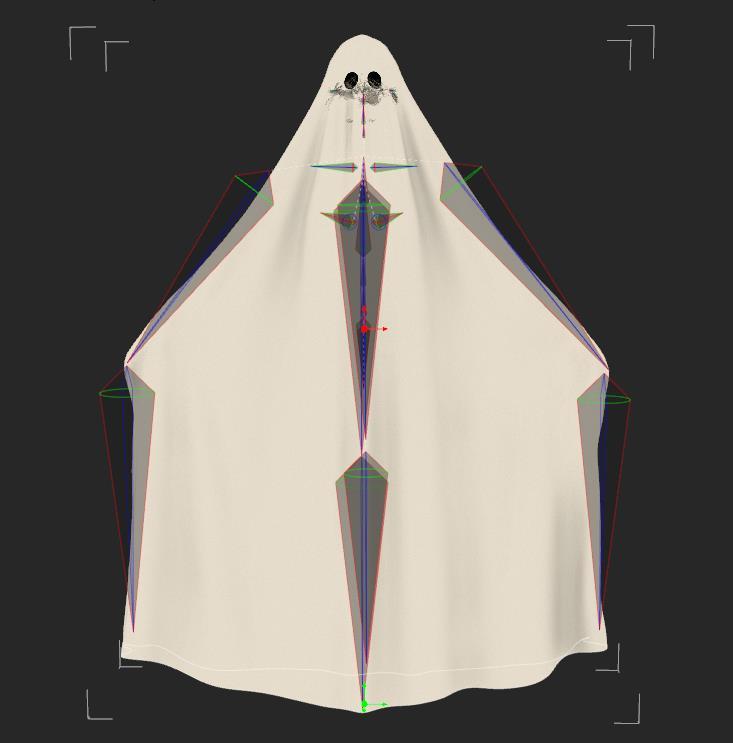
When I do it now, it does delete the ghost rigging and replace it with the G8M rigging.
This is how the rigging SHOULD look, then you can use the Active pose tool to move it.
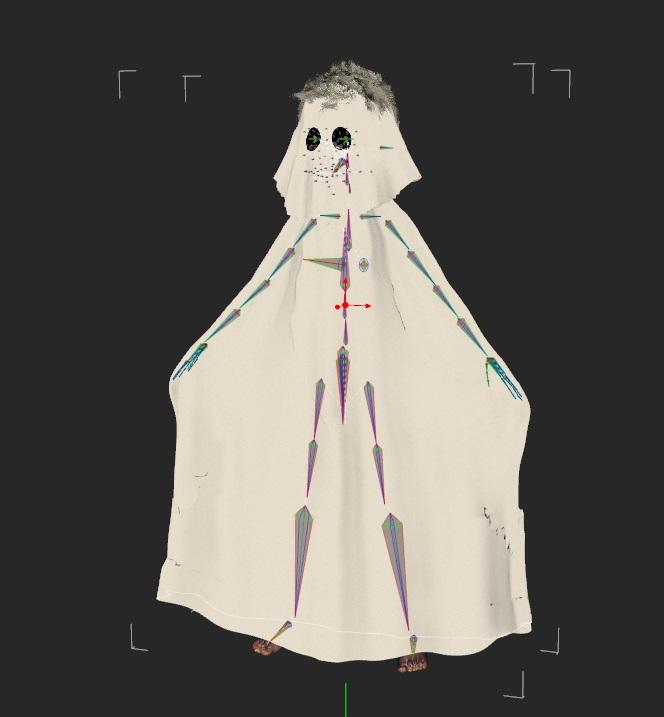
Okay... for some reason can I now also not move the ghost of the girl anymore xD...
maybe my software has just a hiccup who knows...
If anyone knows an alternate product to make a boy into a ghost, then throw it in :)
Clothing StretchingRichard Haseltine said:
That looks more like a post-conversion, or newly Transfer Utilityed, weight issue, needing the weight maps edited to make more sense - the edge of the sleeve may well be weighted for the torso bones, since it was closer to them in the zero pose..
I understood everything you said up until the weighted to the torso bones. Could you expand on that so I can look at a possible fix please. Thank you.
Werewolf morphs for g8 femaleA lot of the generic fantasy/alien morph packs include morphs that can morph the face into more of a snout, so you can manipulate details like that.
This is admittedly actually an 80% Werwulf, 20% Skinchangers (transferred from G3F as earlier suggested) mix with an additional morphs to extend the muzzle, but you don't have to only use one shape.
Tutorial: Making TriAx Figures from Old Parametric Characters@Eustace Scrubb. Thanks for the info. Never knew about the Gen3 kids being the same mesh and I had entirely forgotten about David 3. Only yesterday I found about the M3 to M2 morph character. I was also totally unaware that V3's shape was the same as V1/2. I knew V2 was an improved rigging version of V1, but I didn't know V1 to V3 all had the same general shape. Interesting how this comes out. Thanks. Regards, Richard.Morph conundrum for G9Morph conundrum for G9
So I'm having a pretty successful time getting my many many morphs for Genesis 8 moved over to Genesis 9. Issue is the chest. Esp where the nipples land. I thought it would be an easy fix but it's not since there's not allot of geometry to work with in that area, esp if I'm doing breast morphs. Pecs will be slightly easier to rangle into shape but breasts are quite daunting and I have 13 breast shapes and about 10 full females shapes. So wondering from a more pro persepctive, how one goes about working with this mesh to get breasts (and pecs) to line up with the default texture maps for Genesis 9? I THINK I opted for the male maps for the base I'm working with right now and I know the placement of the nipple and areola's are different for both male and female so that's probably contributing to what I'm seeing (and not liking) when morphing up the figure into one of my female shapes.
Thanks for tips, tricks and info.
Richard
Werewolf morphs for g8 femaleI'm looking for a more wolf-faced werewolf (similar in shape to the various Anubis character morphs available here). Werewulf just doesn't have enough of a snoot. I don't currently have what I need to transfer all my characters to G9 (and my laptop definitely can't hold that much), nor will I be jumping back towards G2F, so I'd be interested if anyone has more wolf-like (long snout) morphs for G8F out there.
Star Trek Builders Unite 8: THE REBOOTHi!
A while ago I promised something next to cardassian starships and now I can proudly say I can deliver :-)
I begun to recreate clothing and props from the Game "Star Trek: Infinite" to supplement the Cardassians, but I also took a break in the Delta Quadrant to catch you a Hirogen Armor and Species 8472 (the latter standalone and rigged). Everything free to use and made for G8.
Since downloads on DeviantArt cannot be linked directly, I will just link to my Freebie gallery: https://www.deviantart.com/ryselle-chan/gallery/67668353/ressources-and-tutorials
PS: The Cardassian morph and much more is provided by TheFigureGuy: https://www.deviantart.com/thefigureguy/gallery
Clothing StretchingThat looks more like a post-conversion, or newly Transfer Utilityed, weight issue, needing the weight maps edited to make more sense - the edge of the sleeve may well be weighted for the torso bones, since it was closer to them in the zero pose..
why isn't anybody talking about Daz 4.22?Muon Quark said:
Hylas said:
Any of you handsome fellas and capable ladies who have updated willing to check if GenX is still working? *seductive wink, roguish smile* Thx!
It appears to be working. I did have to reinstall the plug in and the add ons for it to show up though. Did a simple transfer of A5 to Genesis 3 and it transfered just fine. Will test it out more to see if there are any issues.
Many thanks!

 why isn't anybody talking about Daz 4.22?
Richard Haseltine said:
Muon Quark said:
Hylas said:
Any of you handsome fellas and capable ladies who have updated willing to check if GenX is still working? *seductive wink, roguish smile* Thx!
It appears to be working. I did have to reinstall the plug in and the add ons for it to show up though. Did a simple transfer of A5 to Genesis 3 and it transfered just fine. Will test it out more to see if there are any issues.
It shouldn't have needed that, the minimum SDK version remains at 4.5 so plug-in should all work in later versions than their release version (the reverse won't always be true if they use later additions to the SDK). Both DS 3 and DS 4 have, the odd glitcha side, maintained SDK compatibility across their lives - you'd have to go back to the early stages of DS2 to run itno a situation when all plug-ins needed updating for every release.
Thanks Richard. You reminded me I had copied the DIM files over to this new computer and then installed a new DS. So DIM thought the plug in was installed when it wasn't. I will double check my other plug ins as well. Thanks for the clarification.
Generation X2 - Anyone recall this?Leana said:
The eyes of the original character most likely were not moved through a morph but with translation / rotation / scaling, which would not have been transfered by Genx2. So you would need to adjust them yourself.
So position them and size them manually? I can do that, just wanted to make sure there wasn't something I was forgetting. Thanks Leana!
Generation X2 - Anyone recall this?The eyes of the original character most likely were not moved through a morph but with translation / rotation / scaling, which would not have been transfered by Genx2. So you would need to adjust them yourself.
why isn't anybody talking about Daz 4.22?Muon Quark said:
Hylas said:
Any of you handsome fellas and capable ladies who have updated willing to check if GenX is still working? *seductive wink, roguish smile* Thx!
It appears to be working. I did have to reinstall the plug in and the add ons for it to show up though. Did a simple transfer of A5 to Genesis 3 and it transfered just fine. Will test it out more to see if there are any issues.
It shouldn't have needed that, the minimum SDK version remains at 4.5 so plug-in should all work in later versions than their release version (the reverse won't always be true if they use later additions to the SDK). Both DS 3 and DS 4 have, the odd glitcha side, maintained SDK compatibility across their lives - you'd have to go back to the early stages of DS2 to run itno a situation when all plug-ins needed updating for every release.
Generation X2 - Anyone recall this?Was wondering if anyone recalled this issue with Generation X2 and if there was a fix? The attached is the Genesis 3 maile with the Genesis 2 dwarf base dial in. The eyes stay and don't move. I vaguely recall an issue with either the genesis 2 male eyes in Morphs maybe needing an edit or I need to transfer more than the basic dwarf shape? Sorry I can't remember more, just that I had an issue with this when Generation X2 first came out. Thought I would reach out and see if anyone remembered anything. Thanks.
Edited for typo
why isn't anybody talking about Daz 4.22?Hylas said:
Any of you handsome fellas and capable ladies who have updated willing to check if GenX is still working? *seductive wink, roguish smile* Thx!
It appears to be working. I did have to reinstall the plug in and the add ons for it to show up though. Did a simple transfer of A5 to Genesis 3 and it transfered just fine. Will test it out more to see if there are any issues.
Tutorial: Making TriAx Figures from Old Parametric CharactersSomething that will help tremendously with the Aiko morphs before converting to Triax: https://www.renderosity.com/freestuff/items/31148/group-morph-dials-2
It's nearly 20 years old, but it's still there and more importantly, it works in DS 4.22!, grouping the morphs. They work aftrwards, even after changing the rigging to Triax (just tested, as I wasn't sure).
Goblin Pack
Another great morph pack for Genesis, in this pack you will find 9 Character Preset for Genesis, plus 5 head presets for vary your goblin army, npw on Ext3nd Studio
For use this pack you need Genesis Creature Creator Heads and Genesis Creature Creator Bodies
For Goblin M5 you need also Michael 5
For Goblin D5 you need also David 5
For use Goblin Justin you need also Young Teen Justin 5
[Released] Character Converter from Genesis 3 Female to Genesis 8 Female(Now Conv JCMs) [Commercial]Xagrim said:
I have deleted all morphs from this folders in the past.
But i have found the problem. Now Sloane will be converted correct.
The problem was this folder:......data\DAZ 3D\Genesis 8\Female\Morphs\DAZ 3D\Genesis 3
After deleting all morphs in this folder it works good.
Yup. So that is where that V7 converted morph went!
 I am glad it is all working.Sorry. More Questions about Genesis versions
Genesis 3 skins can be used on Genesis 8. A few caveats:
- Eye materials won't work properly. Here's a free fix.
- Lash materials won't work.
- For Genesis 3 core character skins to work (Michael 7, Victoria 7, Olympia 7, etc... all the ones with "7" in their name, basically), you need these two items: Character UVs G8M, Character UVs G8FGenesis 3 morphs can be transferred pretty much flawlessly with XTransfer, with only the occasional minor inaccuracy.
Only caveat is that geografts won't transfer, so things like Star 2.0 or Centaur 7 won't work.To transfer skins and morphs from Genesis 2 and earlier to Genesis 8 you'll have to work a little harder, and the results won't always be very accurate.
For morphs you will need various "GenX" products by Dimension3D.
For skins you will need various Legacy UV products by Cayman Studios.Good luck!
Daz 3D is part of

Connect
DAZ Productions, Inc.
7533 S Center View Ct #4664
West Jordan, UT 84084Licensing Agreement | Terms of Service | Privacy Policy | EULA
© 2026 Daz Productions Inc. All Rights Reserved.