-
Headshop 11 Licence Key?
Does HeadShop 11 work with just Daz3d 4.10? Not working in 4.11.
If you right-click on Headshop's entry in the Installed tab of DIM (assuming that it can be and was installed that way) and select Show Installed Files the line at the top will show which version(s) of DS it installed to.
Not found in 4.11 version
HeadShop does not install via DIM, it has its own installer. With that said, you can install it to Daz3d 4.11.
Headshop 11 QuestionsHeadShop and OneClick are different products, so, the answer is no; you are supposed to have the previous version of HeadShop (HS10) installed to be able to upgrade.
Headshop 11 Licence Key?Does HeadShop 11 work with just Daz3d 4.10? Not working in 4.11.
If you right-click on Headshop's entry in the Installed tab of DIM (assuming that it can be and was installed that way) and select Show Installed Files the line at the top will show which version(s) of DS it installed to.
Not found in 4.11 version
Headshop 11 QuestionsAbalone, Could you please clear up the confusion over the upgrade prices. In particular, if you own Headshop One Click, are you entitled to the upgrade price?
Headshop 11 UpgradeI'm pleased to see this thread as I have FaceGen Artist Pro and I was thinking of buying Headshop as I assumed it would be better! I won't bother now as the consensus here is that the former is the better product. I've actually been disappointed with FaceGen as way too much fine-tuning is required to get the character to look close to the photo, plus as someone else above mentioned, the head always seems too large or fat on the body. But what surprises me about the various Headshop versions' promo images is that some of the faces don't look at all like the photos! I also don't understand why they show a frontal view photo and then a part-profile rendering, or why they use non-matching hair. I want to see a front view rendering of a front view face so the two can be properly compared. Ditto profiles. [Naughty aside: are their promo staff ex-Facadebook? I ask that as Facadebook aka Fastfoodbook aka Fakebook apparently have a brain-storming team whose objective is to come up with the best idea to make the interface that little bit worse than it was previously! The most illogical and/or impractical idea always wins!].

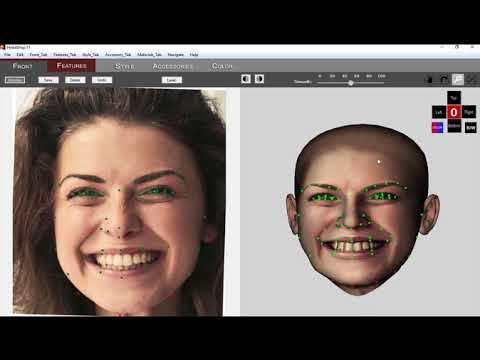
The reason for the promo to show part-profile (original photo) and frontal (3D head created by HeadShop) is to show how HeadShop can work with 3/4 profiles and rotated heads. Ditto for smiling (orginal photo) and unsmiling (3D head).
The promo pictures are helpful. That said, it seems at best an extra morph tool. The texturing still looks off (and it just copies the visible side; Obama has an extra mole in the result). When they said it could handle smiles, I thought we'd see the actual smiles--and that would be awesome, but the results still just show closed-mouth smiles.
Note that although FaceGen states that it needs a straight frontal shot, sometimes it can handle slightly tilted/rotated heads. Just depends.
"When they said it could handle smiles, I thought we'd see the actual smiles--and that would be awesome, but the results still just show closed-mouth smiles."
The reason we show transition from open-smile picture to closed smile is that we can do it (and FaceGen can not). If you attempt to do this in FaceGen, the teeth texture will end up on the lips and not on the teeth. This is why we show open-smile photo to closed smile 3D head conversion. Obviously the default is open-smile to open-smile.
OK, so that means the actual result will be an open smile? Would love to see some pictures showing the open smile conversions. Thank you for your responses!
 Headshop 11 Questions
Hi all!
Does Headshop 11export an OBJ that is Genesis 8 Female/Male base geometry? Or is it using a geograft?
What I'm getting at is... Once I've created a morph, can I save & redistribute it as a morph asset for Genesis 8?
Also is the resulting head texture compatible with the Genesis 8 Female/Male UVs respectively?
Thanks so much!
Yes, If you click on the Export button HeadShop 11 does export full head as an OBJ file, complete with textures.
Thanks for the response. I just want to be clear. The exported geometry matches Genesis 8 Female or Male's geometry at base resolution, right? And the textures are for the actual Genesis 8 Male/Female head, matching the UVs that come with Genesis 8 Female and Male? I just want to make sure this is doing what I want before I buy it. Thanks for the help!
Yes
PLEASE DELETE THIS POST: Headshop OneClick .. can I use my own texture on head?Headshop OC applies its own texture..from photo, I guess. Can I use my own ? Like from Skin Builder?
Headshop 11 UpgradeI'm pleased to see this thread as I have FaceGen Artist Pro and I was thinking of buying Headshop as I assumed it would be better! I won't bother now as the consensus here is that the former is the better product. I've actually been disappointed with FaceGen as way too much fine-tuning is required to get the character to look close to the photo, plus as someone else above mentioned, the head always seems too large or fat on the body. But what surprises me about the various Headshop versions' promo images is that some of the faces don't look at all like the photos! I also don't understand why they show a frontal view photo and then a part-profile rendering, or why they use non-matching hair. I want to see a front view rendering of a front view face so the two can be properly compared. Ditto profiles. [Naughty aside: are their promo staff ex-Facadebook? I ask that as Facadebook aka Fastfoodbook aka Fakebook apparently have a brain-storming team whose objective is to come up with the best idea to make the interface that little bit worse than it was previously! The most illogical and/or impractical idea always wins!].
The reason for the promo to show part-profile (original photo) and frontal (3D head created by HeadShop) is to show how HeadShop can work with 3/4 profiles and rotated heads. Ditto for smiling (orginal photo) and unsmiling (3D head).
The promo pictures are helpful. That said, it seems at best an extra morph tool. The texturing still looks off (and it just copies the visible side; Obama has an extra mole in the result). When they said it could handle smiles, I thought we'd see the actual smiles--and that would be awesome, but the results still just show closed-mouth smiles.
Note that although FaceGen states that it needs a straight frontal shot, sometimes it can handle slightly tilted/rotated heads. Just depends.
"When they said it could handle smiles, I thought we'd see the actual smiles--and that would be awesome, but the results still just show closed-mouth smiles."
The reason we show transition from open-smile picture to closed smile is that we can do it (and FaceGen can not). If you attempt to do this in FaceGen, the teeth texture will end up on the lips and not on the teeth. This is why we show open-smile photo to closed smile 3D head conversion. Obviously the default is open-smile to open-smile.
Yeah, that's pretty impressive. Of course there's still so much stuff ending up in the texture that we don't want, like those major smile lines, eyelids, hair or lighting in general. Not much you could do about that though, I imagine.
Headshop 11 UpgradeI'm pleased to see this thread as I have FaceGen Artist Pro and I was thinking of buying Headshop as I assumed it would be better! I won't bother now as the consensus here is that the former is the better product. I've actually been disappointed with FaceGen as way too much fine-tuning is required to get the character to look close to the photo, plus as someone else above mentioned, the head always seems too large or fat on the body. But what surprises me about the various Headshop versions' promo images is that some of the faces don't look at all like the photos! I also don't understand why they show a frontal view photo and then a part-profile rendering, or why they use non-matching hair. I want to see a front view rendering of a front view face so the two can be properly compared. Ditto profiles. [Naughty aside: are their promo staff ex-Facadebook? I ask that as Facadebook aka Fastfoodbook aka Fakebook apparently have a brain-storming team whose objective is to come up with the best idea to make the interface that little bit worse than it was previously! The most illogical and/or impractical idea always wins!].
The reason for the promo to show part-profile (original photo) and frontal (3D head created by HeadShop) is to show how HeadShop can work with 3/4 profiles and rotated heads. Ditto for smiling (orginal photo) and unsmiling (3D head).
The promo pictures are helpful. That said, it seems at best an extra morph tool. The texturing still looks off (and it just copies the visible side; Obama has an extra mole in the result). When they said it could handle smiles, I thought we'd see the actual smiles--and that would be awesome, but the results still just show closed-mouth smiles.
Note that although FaceGen states that it needs a straight frontal shot, sometimes it can handle slightly tilted/rotated heads. Just depends.
"When they said it could handle smiles, I thought we'd see the actual smiles--and that would be awesome, but the results still just show closed-mouth smiles."
The reason we show transition from open-smile picture to closed smile is that we can do it (and FaceGen can not). If you attempt to do this in FaceGen, the teeth texture will end up on the lips and not on the teeth. This is why we show open-smile photo to closed smile 3D head conversion. Obviously the default is open-smile to open-smile.
OK, so that means the actual result will be an open smile? Would love to see some pictures showing the open smile conversions. Thank you for your responses!
Headshop 11 QuestionsHi all!
Does Headshop 11export an OBJ that is Genesis 8 Female/Male base geometry? Or is it using a geograft?
What I'm getting at is... Once I've created a morph, can I save & redistribute it as a morph asset for Genesis 8?
Also is the resulting head texture compatible with the Genesis 8 Female/Male UVs respectively?
Thanks so much!
Yes, If you click on the Export button HeadShop 11 does export full head as an OBJ file, complete with textures.
Thanks for the response. I just want to be clear. The exported geometry matches Genesis 8 Female or Male's geometry at base resolution, right? And the textures are for the actual Genesis 8 Male/Female head, matching the UVs that come with Genesis 8 Female and Male? I just want to make sure this is doing what I want before I buy it. Thanks for the help!
Headshop 11 Licence Key?Does HeadShop 11 work with just Daz3d 4.10? Not working in 4.11.
If you right-click on Headshop's entry in the Installed tab of DIM (assuming that it can be and was installed that way) and select Show Installed Files the line at the top will show which version(s) of DS it installed to.
Headshop 11 Full will not installI purchased it but don't see it in DIM.
HeadShop is not a DIM installer. It has its own interactive installer.
Headshop 11 Full will not installIt doesn't show up in my download manager either...
..So I though I'd download and install it manually.
That installation process doesn't allow you to select your DAZ Studio install folder however, which becomes a huge problem if you (like me) doesn't have DAZ Studio installed in the default install-location...
So now I have Headshop installed in the wrong folders and it doesn't work with DS and last but not least it seems like there's no way to uninstall it either..
Sorry, but the installation DOES allow you to browse/select a destination folder (DAZ 3D) wherever it may be. Run installer again and correctly select designation folder.
Headshop 11 Full will not installIt doesn't show up in my download manager either...
..So I though I'd download and install it manually.
That installation process doesn't allow you to select your DAZ Studio install folder however, which becomes a huge problem if you (like me) doesn't have DAZ Studio installed in the default install-location...
So now I have Headshop installed in the wrong folders and it doesn't work with DS and last but not least it seems like there's no way to uninstall it either..
Headshop 11 QuestionsHi all!
Does Headshop 11export an OBJ that is Genesis 8 Female/Male base geometry? Or is it using a geograft?
What I'm getting at is... Once I've created a morph, can I save & redistribute it as a morph asset for Genesis 8?
Also is the resulting head texture compatible with the Genesis 8 Female/Male UVs respectively?
Thanks so much!
Yes, If you click on the Export button HeadShop 11 does export full head as an OBJ file, complete with textures.
Headshop 11 UpgradeI'm pleased to see this thread as I have FaceGen Artist Pro and I was thinking of buying Headshop as I assumed it would be better! I won't bother now as the consensus here is that the former is the better product. I've actually been disappointed with FaceGen as way too much fine-tuning is required to get the character to look close to the photo, plus as someone else above mentioned, the head always seems too large or fat on the body. But what surprises me about the various Headshop versions' promo images is that some of the faces don't look at all like the photos! I also don't understand why they show a frontal view photo and then a part-profile rendering, or why they use non-matching hair. I want to see a front view rendering of a front view face so the two can be properly compared. Ditto profiles. [Naughty aside: are their promo staff ex-Facadebook? I ask that as Facadebook aka Fastfoodbook aka Fakebook apparently have a brain-storming team whose objective is to come up with the best idea to make the interface that little bit worse than it was previously! The most illogical and/or impractical idea always wins!].
The reason for the promo to show part-profile (original photo) and frontal (3D head created by HeadShop) is to show how HeadShop can work with 3/4 profiles and rotated heads. Ditto for smiling (orginal photo) and unsmiling (3D head).
The promo pictures are helpful. That said, it seems at best an extra morph tool. The texturing still looks off (and it just copies the visible side; Obama has an extra mole in the result). When they said it could handle smiles, I thought we'd see the actual smiles--and that would be awesome, but the results still just show closed-mouth smiles.
Note that although FaceGen states that it needs a straight frontal shot, sometimes it can handle slightly tilted/rotated heads. Just depends.
"When they said it could handle smiles, I thought we'd see the actual smiles--and that would be awesome, but the results still just show closed-mouth smiles."
The reason we show transition from open-smile picture to closed smile is that we can do it (and FaceGen can not). If you attempt to do this in FaceGen, the teeth texture will end up on the lips and not on the teeth. This is why we show open-smile photo to closed smile 3D head conversion. Obviously the default is open-smile to open-smile.
Headshop 11 UpgradeI'm another with the HeadShop OneClick Plugin that wants to know if it qualifies for the Headshop 11 Upgrade.
sorry to throw this off a bit, but does oneclick work decent enough? problems? I was thinking of buying that as I do mostly G3 stuff anyway.
I abadoned using it after some initial errors which I now cannot fully remember. Plus, I did not like that it only generated head textures that did not blend well with the rest of the figure. I would have returned it, but I was over the 30-day mark.
Since then, I have been using FaceGen Artist Pro, which has some of its own issues, but was far superior, in my experience, than OneClick.
i was intending to use Skin Builder to do the textures. Will it allow that to be done..or to turn off the texturing? I just want the face morph
oh ..i cannot afford Facegen Pro right now, even at 50-60% off....Headshop 11 UpgradeI'm pleased to see this thread as I have FaceGen Artist Pro and I was thinking of buying Headshop as I assumed it would be better! I won't bother now as the consensus here is that the former is the better product. I've actually been disappointed with FaceGen as way too much fine-tuning is required to get the character to look close to the photo, plus as someone else above mentioned, the head always seems too large or fat on the body. But what surprises me about the various Headshop versions' promo images is that some of the faces don't look at all like the photos! I also don't understand why they show a frontal view photo and then a part-profile rendering, or why they use non-matching hair. I want to see a front view rendering of a front view face so the two can be properly compared. Ditto profiles. [Naughty aside: are their promo staff ex-Facadebook? I ask that as Facadebook aka Fastfoodbook aka Fakebook apparently have a brain-storming team whose objective is to come up with the best idea to make the interface that little bit worse than it was previously! The most illogical and/or impractical idea always wins!].
The reason for the promo to show part-profile (original photo) and frontal (3D head created by HeadShop) is to show how HeadShop can work with 3/4 profiles and rotated heads. Ditto for smiling (orginal photo) and unsmiling (3D head).
The promo pictures are helpful. That said, it seems at best an extra morph tool. The texturing still looks off (and it just copies the visible side; Obama has an extra mole in the result). When they said it could handle smiles, I thought we'd see the actual smiles--and that would be awesome, but the results still just show closed-mouth smiles.
Note that although FaceGen states that it needs a straight frontal shot, sometimes it can handle slightly tilted/rotated heads. Just depends.
Headshop 11 UpgradeI'm pleased to see this thread as I have FaceGen Artist Pro and I was thinking of buying Headshop as I assumed it would be better! I won't bother now as the consensus here is that the former is the better product. I've actually been disappointed with FaceGen as way too much fine-tuning is required to get the character to look close to the photo, plus as someone else above mentioned, the head always seems too large or fat on the body. But what surprises me about the various Headshop versions' promo images is that some of the faces don't look at all like the photos! I also don't understand why they show a frontal view photo and then a part-profile rendering, or why they use non-matching hair. I want to see a front view rendering of a front view face so the two can be properly compared. Ditto profiles. [Naughty aside: are their promo staff ex-Facadebook? I ask that as Facadebook aka Fastfoodbook aka Fakebook apparently have a brain-storming team whose objective is to come up with the best idea to make the interface that little bit worse than it was previously! The most illogical and/or impractical idea always wins!].
The reason for the promo to show part-profile (original photo) and frontal (3D head created by HeadShop) is to show how HeadShop can work with 3/4 profiles and rotated heads. Ditto for smiling (orginal photo) and unsmiling (3D head).
Headshop 11 Licence Key?Does HeadShop 11 work with just Daz3d 4.10? Not working in 4.11.
Can you submit a help ticket to CS, they will then have a look
Daz 3D is part of

Connect
DAZ Productions, Inc.
7533 S Center View Ct #4664
West Jordan, UT 84084Licensing Agreement | Terms of Service | Privacy Policy | EULA
© 2026 Daz Productions Inc. All Rights Reserved.