-
Remember, "There's Always Another Sale™" (Report sales errors here.)
Just noted a discrepancy in this week's Victoria coupon:
In the main text it says: any purchases you make during the week from June 22nd - June 29th.
Then at the bottom the text is: Coupon only valid thru 06/22/2019 - 06/30/2019
So it may or may not be valid on Sunday... Buyer, beware!
June 30th is the correct date. We will update the text. Thanks for pointing this out.
Remember, "There's Always Another Sale™" (Report sales errors here.)Just noted a discrepancy in this week's Victoria coupon:
In the main text it says: any purchases you make during the week from June 22nd - June 29th.
Then at the bottom the text is: Coupon only valid thru 06/22/2019 - 06/30/2019
So it may or may not be valid on Sunday... Buyer, beware!
3D Art Freebie Challenge-June 2019-"Summertime Pin-Ups" -Main Thread Only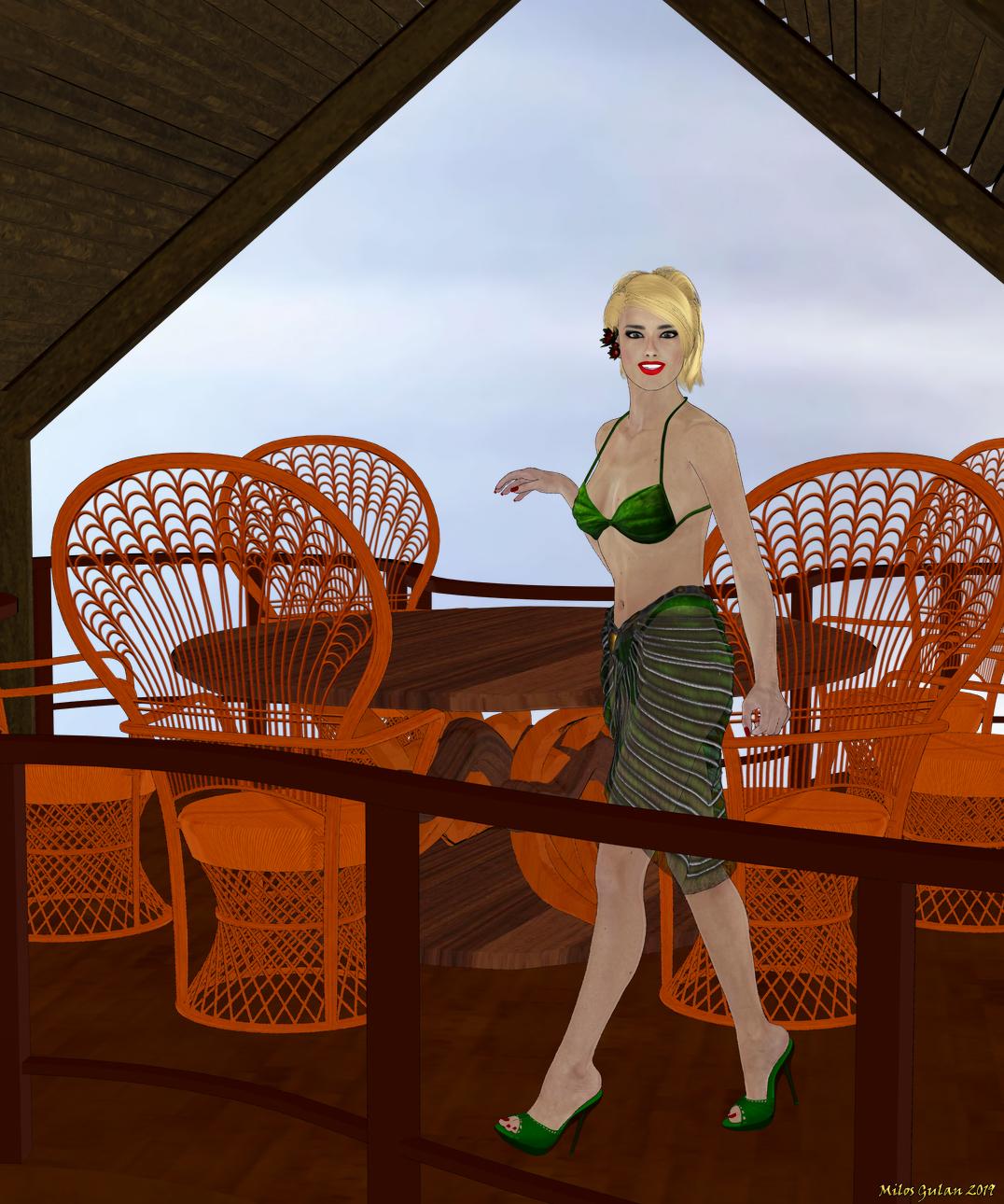
Preparing for Summer RPG Sessions
Vivid Skies (freebie from DS Creative Magazine) http://4eyes.code66.se/dsc/SkyBGFreebie.zip
Graca V4, she looks much better on thumbnail https://www.renderosity.com/mod/freestuff/graca-v4/79744
House (4th row, 2nd column) https://web.archive.org/web/20050204022611/http://www.sams3d.com/Freebies.htm
Rattan Chair https://elleque.net/?p=3626
Coffee Table http://freezone.thefantasiesattic.net/index.php?main_page=product_info&cPath=138_141&products_id=486
Paid:
Alana Hair (I thought this one was freebie) http://www.most-digital-creations.com/alana_hair.htm
Lilian Bikini https://www.daz3d.com/lilianbikini-for-victoria-4-and-aiko-4
pw Toon Shaders https://www.daz3d.com/pwtoon
I Forgot What My Complaint Was - Complaint Threada bit confused by titles
sp the British Empire never had an "emperor"?
Yes and no - the British ruler ws King/Queen, but Victoria was given the title "Empress of India" part way through her reign and I assume that was inherited by the Edwards and Georges up to independence.
Napoleon was an emperor at some point, but other than France dunno who he was emperor of , the seven seas?
Pretty much the whole of Europe, at one point or another, with various relatives as local rulers.
sp. if you a king or queen, every thing is royal, like royal navy, royal air force etc
if you an emperor, you have an imperial navy? etc
Probably, but that would be up to history, tradition, and convention - for example Royal Navy, Royal Air Force, but not Royal Army in the UK.
is a dictator the same as an emperor?
No, a dictator might take the title of emperor (Napoleon, Julius Caesar and Augustus) but most dictators don't (and don't call themselves dictators - though the Greek autocrats went in for calling themsleves Tyrants it didn't have the same meaning it does now)
Mostly they called themselves Leader Fuhrer means Leader as does Duce (Mussonlini) and Vozhd (Stalin). Franco apparently called himself El Caudillo de España (the Chieftain of Spain). Over in China you have the Chairman, as in Chairman Mao.
Russia had Tsars but some of the female Tsars were were called Empress. Especially Elizabeth and Catherine II (The Great).
But Russians had Tsars before the Dictators took over
I Forgot What My Complaint Was - Complaint Threada bit confused by titles
sp the British Empire never had an "emperor"?
Yes and no - the British ruler ws King/Queen, but Victoria was given the title "Empress of India" part way through her reign and I assume that was inherited by the Edwards and Georges up to independence.
Napoleon was an emperor at some point, but other than France dunno who he was emperor of , the seven seas?
Pretty much the whole of Europe, at one point or another, with various relatives as local rulers.
sp. if you a king or queen, every thing is royal, like royal navy, royal air force etc
if you an emperor, you have an imperial navy? etc
Probably, but that would be up to history, tradition, and convention - for example Royal Navy, Royal Air Force, but not Royal Army in the UK.
is a dictator the same as an emperor?
No, a dictator might take the title of emperor (Napoleon, Julius Caesar and Augustus) but most dictators don't (and don't call themselves dictators - though the Greek autocrats went in for calling themsleves Tyrants it didn't have the same meaning it does now)
Mostly they called themselves Leader Fuhrer means Leader as does Duce (Mussonlini) and Vozhd (Stalin). Franco apparently called himself El Caudillo de España (the Chieftain of Spain). Over in China you have the Chairman, as in Chairman Mao.
Russia had Tsars but some of the female Tsars were were called Empress. Especially Elizabeth and Catherine II (The Great).
I Forgot What My Complaint Was - Complaint Threada bit confused by titles
sp the British Empire never had an "emperor"?
Yes and no - the British ruler ws King/Queen, but Victoria was given the title "Empress of India" part way through her reign and I assume that was inherited by the Edwards and Georges up to independence.
Napoleon was an emperor at some point, but other than France dunno who he was emperor of , the seven seas?
Pretty much the whole of Europe, at one point or another, with various relatives as local rulers.
sp. if you a king or queen, every thing is royal, like royal navy, royal air force etc
if you an emperor, you have an imperial navy? etc
Probably, but that would be up to history, tradition, and convention - for example Royal Navy, Royal Air Force, but not Royal Army in the UK.
is a dictator the same as an emperor?
No, a dictator might take the title of emperor (Napoleon, Julius Caesar and Augustus) but most dictators don't (and don't call themselves dictators - though the Greek autocrats went in for calling themsleves Tyrants it didn't have the same meaning it does now)
Mostly they called themselves Leader Fuhrer means Leader as does Duce (Mussonlini) and Vozhd (Stalin). Franco apparently called himself El Caudillo de España (the Chieftain of Spain). Over in China you have the Chairman, as in Chairman Mao.
thank yoos
I Forgot What My Complaint Was - Complaint Threada bit confused by titles
sp the British Empire never had an "emperor"?
Yes and no - the British ruler ws King/Queen, but Victoria was given the title "Empress of India" part way through her reign and I assume that was inherited by the Edwards and Georges up to independence.
Napoleon was an emperor at some point, but other than France dunno who he was emperor of , the seven seas?
Pretty much the whole of Europe, at one point or another, with various relatives as local rulers.
sp. if you a king or queen, every thing is royal, like royal navy, royal air force etc
if you an emperor, you have an imperial navy? etc
Probably, but that would be up to history, tradition, and convention - for example Royal Navy, Royal Air Force, but not Royal Army in the UK.
is a dictator the same as an emperor?
No, a dictator might take the title of emperor (Napoleon, Julius Caesar and Augustus) but most dictators don't (and don't call themselves dictators - though the Greek autocrats went in for calling themsleves Tyrants it didn't have the same meaning it does now)
Mostly they called themselves Leader Fuhrer means Leader as does Duce (Mussonlini) and Vozhd (Stalin). Franco apparently called himself El Caudillo de España (the Chieftain of Spain). Over in China you have the Chairman, as in Chairman Mao.
I Forgot What My Complaint Was - Complaint Threada bit confused by titles
sp the British Empire never had an "emperor"?
Yes and no - the British ruler ws King/Queen, but Victoria was given the title "Empress of India" part way through her reign and I assume that was inherited by the Edwards and Georges up to independence.
Napoleon was an emperor at some point, but other than France dunno who he was emperor of , the seven seas?
Pretty much the whole of Europe, at one point or another, with various relatives as local rulers.
sp. if you a king or queen, every thing is royal, like royal navy, royal air force etc
if you an emperor, you have an imperial navy? etc
Probably, but that would be up to history, tradition, and convention - for example Royal Navy, Royal Air Force, but not Royal Army in the UK.
is a dictator the same as an emperor?
No, a dictator might take the title of emperor (Napoleon, Julius Caesar and Augustus) but most dictators don't (and don't call themselves dictators - though the Greek autocrats went in for calling themsleves Tyrants it didn't have the same meaning it does now)
Problem with eyes in G8M and G8F.Not G8 default, but did do Victoria 8, added RSL mats and rendered in 3DL engine . (Victoria was quickest to reinstall for me with 3DL mats - i delete all 3DL as soon as I install a product).
Actual render attached. (My 1st 3DL render and i did see in dialog box how it was optimizing mats for 3DL, so I know this was a 3DL render. Cut render short so bottom is a bit jaggy. No idea if this 3DL-render is normal.)
Well I figure that´s what it should look like with default settings and camera headlamp:)
Problem with eyes in G8M and G8F.Not G8 default, but did do Victoria 8, added RSL mats and rendered in 3DL engine . (Victoria was quickest to reinstall for me with 3DL mats - i delete all 3DL as soon as I install a product).
Actual render attached. (My 1st 3DL render and i did see in dialog box how it was optimizing mats for 3DL, so I know this was a 3DL render. Cut render short so bottom is a bit jaggy. No idea if this 3DL-render is normal.)
Breast movement...There is an Aniblock out there that looks Okay, does say in the description that it can be dialed up or down to fit your character's needs. It is just walking, but the chest modifications could be a good start to creating your own changes. (all and any aniblock can be converted back to timeline, and therefore be disected using GraphMate or KeyMate.)
https://www.daz3d.com/genesis-8-female-s-flat-foot-walk-aniblock
Comes in different character versions so G3F is available as well as Victoria.
Edit to add: There is also a Jogging version for same characters.
I have it in my wishlist, but the more I try to do with animation in Studio, the more I say to myself "there has GOT to be a better way!" Even gone so far as to load Poser back up... gee Soft Body Dynamics AND Gravity (sort of), can export as FBX, can pull FBX into DAZ... Hmmmm...
I can tell you from my exprience that anything you buy from SKAmotion store will be worth the money ou pay fr them, the aniblocks are very well done and i have purchase all their sets and can hightly recommend them and if you have graphmate you can make the walk cycle curve left or right to make them more useful . Mocap online is another good resource as well https://www.daz3d.com/mocap-online I know they seem pricey , but most preset animations that are done correctly are, so I don't mind the higher end cost for them.
Breast movement...There is an Aniblock out there that looks Okay, does say in the description that it can be dialed up or down to fit your character's needs. It is just walking, but the chest modifications could be a good start to creating your own changes. (all and any aniblock can be converted back to timeline, and therefore be disected using GraphMate or KeyMate.)
https://www.daz3d.com/genesis-8-female-s-flat-foot-walk-aniblock
Comes in different character versions so G3F is available as well as Victoria.
Edit to add: There is also a Jogging version for same characters.
I have it in my wishlist, but the more I try to do with animation in Studio, the more I say to myself "there has GOT to be a better way!" Even gone so far as to load Poser back up... gee Soft Body Dynamics AND Gravity (sort of), can export as FBX, can pull FBX into DAZ... Hmmmm...
More Non-photorealisitic Renders (NPR II)For the purpose of doing renders you can do whatever you like, in whichever aplication you like. The onyl thing that has some minor restrictions, which don't affect which application you can use, is the Anne Marie Goddard Digital Clone for Victoria 3.
Novica & Forum Members Tips & Product Reviews Pt 12Interesting. You folks who got the V5 and M5 PRO BUNDLES from buying Cararra- check and see if you still have the V5 Pro Bundle listed in your Product Library? Both Pro Bundles were offered with Cararra, and now apparently the individual products are there, without mentioning the Pro Bundle.
When I bought Carrara Pro, the page advertised it included the Victoria 5 Pro bundle and the Michael 5 Pro Bundle. All the products from those bundles went into my Product Library, but not the actual bundles. (There wasn't a listing for either Pro Bundle like there is when I buy a Pro Bundle in the store.)
Some of you may remember a special offer a year or so back, when people got a "Green/Blue/Orange/Purple" banner for a nice additional discount if they already owned all the bundles offered in a promotion. (I think it was one of the early, buy this pro bundle, choose one/two/three of these pro bundles free offer with one of the named 8 new releases.) A lot of people were upset because they didn't get the banner when they owned the V5 and M5 Pro Bundles from buying Carrara Pro. It didn't take long, and our Product Libraries had those Bundles added manually and the discount offer extended to us.
In fact, the Michael 5 Pro Bundle is still in my Product Library. Here's a cropped screenscapture. (the original is attached.)

But I no longer have a Victoria 5 Pro bundle listed…?
That's just weird.
Novica & Forum Members Tips & Product Reviews Pt 12It the same for me, no v5 or m5 pro bundles now, but I'm pretty sure at one time I had to have and saw with my own eyes the V5 & M5 Pro Bundles in my Product Library because buying Carrara Pro 8 added them to my Product Library & those products are still both listed as as being included with Cararra Pro 8. The individual products in the pro bundles are there in my product library still.
Maybe this means there will soon be a Carrara Pro 9 with Michael 8 Pro Bundle & Victoria 8 Pro Bundle?
You know you use Daz too much when.You have your paycheck directly deposited at DAZ.
When someone asks who your favorite authors are you, say Dreamlight, Drew Spence and Esha.
Your family vacation pictures are all photos of tree bark, rock surfaces and clouds.
You went to New Zealand just so you could be closer to Stonemason.
You've actually considered moving to Utah just to shorten your product download times by a few milliseconds.
You join a DAZ Users gang so you can go out and kick the butts of the Renderosity Poser Users gang.
Your kids are named Michael, Victoria, Stephanie, Michael 7 and Aiko.
You changed your name to Victoria... and you're a guy.
You got Cs in math but can do the long-form calcualtions required to figure out DAZ discounts in your head.
You commissioned a guy who normally does Velvet Elvis paintings to make you velvet painting of Jack Tomalin.
You only eat food if there's a model of it available at DAZ so you and your figures can share meals together.
You had a lifesize figure of Victoria 8 3d-printed in soft vinyl. And married her.
The C.E.O. of DAZ has your picture hanging on the wall of his office.
.
Alistair HD for Genesis 8 Maleit's a shame he's messed up and likely won't get fixed before the danged victoria coupon expires. I really like his skin, but I'm wary of buying a broken character.

you can buy him now with the coupon, move the skin mat to another folder and uninstall him. He will get fixed, it could be just a few days anyway.
Alistair HD for Genesis 8 Maleit's a shame he's messed up and likely won't get fixed before the danged victoria coupon expires. I really like his skin, but I'm wary of buying a broken character.
You have 30 days to return it, it they don't fix it by then.
Alistair HD for Genesis 8 Maleit's a shame he's messed up and likely won't get fixed before the danged victoria coupon expires. I really like his skin, but I'm wary of buying a broken character.
Celebrity Look-a-Likes for 3D figures Part 2Any Kim Kardashian look a likes please?
This is the only one I'm aware of -
https://www.most-digital-creations.com/g3_g8_celebrity_series_2.htm
There are also a few more for older models (Victoria 4 and Genesis 2) if that's any use.
http://www.beammeup.net/blog/3d-celebrities/poser-celebrities.php?keywords=Kim+Kardashian&active=1
Daz 3D is part of

Connect
DAZ Productions, Inc.
7533 S Center View Ct #4664
West Jordan, UT 84084Licensing Agreement | Terms of Service | Privacy Policy | EULA
© 2026 Daz Productions Inc. All Rights Reserved.