-
Shape Rigger Plus G9 Edition (Commercial)
If a morph has been previously saved and exists in your data you can only rerig/update save via the script. You cannot save it to a new path. That can only be done to newly imported morphs that require a first time save where your name and product name gets filled in.
Daz > Marvelous > Daz | HELP!!Saxa -- SD said:
tskprof said:
Saxa -- SD said:
How did your axis change?
When exporting from MD the coordinates were wrong. Should be x,y,z instead of y,x,z
And everything worked.
That is awesome you got.
But when check my MD settings for export to DAZ they are proper.
Just curious how your settings got "not Dazzy synced"?
I've done the morph similarly a hundred times. I don't know how, but I must have accidentally changed the coordinate.
Transfer Utility FreezesI think I found a stable workflow now, in case somebody else is doing this for Unity export of clothes only with morphs. This freezing happened to me when I was using Transfer Utility on them a second time, to get the morphs, too, but actually this is not needed.
This works for me:
- Have the weight painted and rigged clothes first saved as Figure/Prop Assets
- Have a Gen 8 character selected when adding the clothes prop oin the character. It will be parented to the character and the morphs get transferred at this stage.
- Right-click on the clothes and select "Unparent", unparenting it from the character (otherwise you get the character too in the export).
- Having the clothes selected, export it.
I am using Unofficial DTU bridge and doing this:
- In the export dialog, make sure to first check the Asset Name to match the clothing, because the exporter wants to save it under the character's name
- Select Show FBX Dialog
- In the FBX Dialog, select Include Morphs, and check the Export Rules that the desired morphs are included
Free: Gelatin dessert for Daz Studio IrayTo go along with the freebie challenge theme for this month (or in case you were planning on hosting a 3D Thanksgiving dinner), I modeled a gelatin dessert for you all. It has 10 different flavors, 2 plate colors, and a wobble morph in case you accidentally tip over your dessert or want to poke it.
Now at Deviant Art:
https://www.deviantart.com/perlk/art/Free-Gelatin-dessert-prop-for-Daz-Studio-Iray-994472030
And Renderosity:
https://www.renderosity.com/freestuff/items/96545/free-gelatin-dessert-for-daz-studio-iray
 Remixing your art with AI
Diomede said:
Stable Diffusion with ControlNet has a menu for loading rigged FBX, JSON, and similar models. But my custom toon Marx brothers do not appear to transfer correctly from Carrara FBX to Stable Diffusion.

Have you tried to transfer your Carrara FBX to Blender
and then export from Blender as FBX or any other format, that ControlNet accepts.
I am going via Blender when I need to export FBX models from Shape-E to Daz Studio, for example.
Awesome work and your thoughts about you experiments with Stable Diffusion.
I am also doing my experiments with AI for the same reasons.
Daz > Marvelous > Daz | HELP!!Hey, everybody. I decided to make a morph for a dress for a particular scene in Marvelous. I haven't done it for a long time, but I seem to do everything as usual. But when I use the morph, the dress flies away to other coordinates. Something I can not understand what's wrong. Screenshots of the settings below. Everything was fine before. Help, I'm already out of ideas.


P.S. Sorry about my English
The #1 thing I need far above all is mesh smoothing and contouring tools...RexRed said:
The whole point I am making is smoothing should be done directly within Daz.
Hi RexRed, when i read your OP and following posts, for sure understood your expressed hope that it can all be done in DS. Would be thrilled myself if that was possible. Listed those 2 ways to show that (1) Hex and DS were never merged - probably reasons? and (2) MarvellousDesigner way of colliding using GPU does exist, but that's a different 3d program with high levels of sophistication and differnt focus. So totally share your wish that DS could be further featurized to include that. By my estimation, that may happen, but not counting on it any time soon. Like decades. Would be delighted to be wrong.
Yes, I can export and smooth but it is very inconvenient.
I am working on an animation, I have 1400 frames. My figure is dancing in jeans and every time he does a twist or stretch his jeans are pulled in odd ways distorting the fabric texture.
To export this figure for each frame when the fabric goes out is impossible. So do I just decide to not animate in Daz and do it elsewhere? That would be terrible.
only tips i can give is (1) make bigger morphs allowing more range of movement and/or add ercs that trigger and work with various differnt morphs for that clothing item. Like jcms that figures have and clothes autfollow. Problem is the weights on figure vs clothing is still too large scale to accomodate all those deforms, especialy the tighter clothes are, like jeans.
the DS smoothing goes a long way. Have been thrilled with what it can overcome. Another big tip is turn off your clothing smoothing when poke-through is happening. Most often than not i find the failure is so big it is a wonder how much the native DS smoothing made that look better. Then make moprh to fix that etc. For now and long time forward, would say use the steps i listed plus ercs for that outfit if you really want. Still VERY frustrating when Viewport shows all smooth, but render is different even when both set to same level of subD. But seems it is what the current and future state of affairs.
Also very important, make sure your jeans are at subD similar to figure. Lots of clothes are at base res. Those extra polygons usually help alot..
Lots of peeps still just do 1 frame and not huge anims like you which is essentially 1400 different frames. Whole chapters are written with 1400 frames:)
In a way anims is sadly still a secondary and expensive activity, because ai and collision are not sufficiently advanced.
All of my figures textures are made to look right in Daz Iray, all of my props and environments are in Daz and Daz hair only looks right in Daz.
It is better to bring the mountian to Mohammad in this case.
A smoothing tool(s) could work on a per frame basis and correct all of my animation clothing stretches right in Daz.
Notice the fabric, the image I included is a frame in an animation, the moment he goes into another pose, the clothing will get taut in another location and again, need smoothing.
This smoothing needs to be done in Daz to be feasible.
How do you mean mesh grabber not animatable? Output is a static morph that you could reuse and keyframe?
Even dForce system 'as Is' cannot be paused and resumed. You probably know of the 2 main dF products dF2Morph by Riversoft and latest dF product by Silas and JoshDarling?
As for dancing, it would BE so next level if DS could incorporate a bullet physics real-time. But fear the demands of IRAY photoreal vs more toony 3d physics with no jcms is just too different and techno is not there to bridge gap.
Otherwise, i share your dreams and frustrations. Would love to be surprised.
AIUTO...CHI CONOSCE L’ITALIANO? PARTE QUATTORDICIPuoi aggirare il limite con l'ennesimo workaround, devi rimuovere il clamp dal file di settaggi del render come si fa con i morph.
Fai conto che è come se stessi parlando con un deficiente, un Dazmente: non ci capisco un beneamato bafanzio. Ti prego quindi, spiegami come si fa.
 [Fisio SB addOn released] Fisio: Physics Simulator
Saxa -- SD said:
Hi Alberto, hey finally made time to try this SoftBody toolset.
Bought way back when you released as support, but summer was busy so left this to now.Objective was a hand on a breast. And breast was a geograft.
Followed your Ollie-nose example to start.
Ended up shell did not work for hand. Deforms were just wrong for a hand. Used springs, and then instant worked! Yay!
Took a few hours to figure out.
Before that had to test quite a few different settings.This will save me TONS of time now.
Takes like less than 10 seconds to sim on timeline a 22 frame collision.
To sculpt that would take forever for hands. Even arms will be so much faster etc.Made a hand-arm with changed origin for quicker easier posing to act as rigid node, so quite a few polygons. Changed timeline to Linear for O and finish positions for posed hand-arm.
And to finish using your create Morph function worked flawless!
So anyway, wanted to THANK YOU for this product!

You're welcome! And thanks to your words, also.
Saxa -- SD said:
Ps. should also mention. When did a quick rough test this summer, FisioSB worked.
Just knew it was too involved without spending lots of hours and focus.
So, today when I started to reproduce your Ollie-Nose tut, it said no FisioEngine.dll (see screenshot)
Yet had worked this summer.
Looked and there was no such file.
Manual DL'd the files and copy and pasted that file and sorta worked.
The selected facets kept falling to figure origin.
So copied and pasted the content and plugin files too, and now it all worked!
That was a new one and have seen some wierd ones.
Anyway just to let you know.It seems that the installation is incomplete in the two folders ("DazStudio4" and "DazStudio4 Public Build"). But your method works anyway.
Mechasar's Characters Catalog: Who's next? (commercial)Mechasar said:
kirbawirba said:
I just bought the pack recently and am having trouble understanding this. So, if I try to use the new morph for Beverly without owning all of the products, does that mean the rest of the characters will be distorted?
Also, I'd like to encourage you to keep making stuff. Gladys is one of my favorite characters. If you ever do get around to it, do you think you can look at original Beverly's textures? It seems like she loses SSS properties in her hands. In some lighting situations they look bleached, or like she was washing dishes all day! Not something I'd ever let her do, btw! :D
You have some of the most unique and interesting characters on the market. Love them! Someday I will get enough money to buy them all!
EDIT: just read a post above this that mentions Smart Content. Can confirm that Smart Content does not show the vast majority of anything installed from the pack. It takes some hunting through SC to find anything, let alone everything.
EDIT 2: I CAN'T WAIT for your next release... They look fantastic!
Hi there! Thank you for your kind appreciation!
The Mega Add-Ons Pack, as the name suggests, consists of add-ons for my characters catalog only. Now, as you can see in your products library, the pack is split into 23 different zip folders, each one related to a different character (keep in mind that some add-on related to a single character can be further divided into 2 folders due to their size, something along the lines “folder 1of2”). This distinction is important because indicates that you should download and install ONLY the add-ons for those characters already installed in your Daz library, leaving aside the other add-ons. If you install an add-on for a character that you don’t yet own, the add-on won’t work and there is a chance that some hidden morphs could cause mesh distortions while you are using your Genesis 8/8.1 models. So, long story short, I strongly recommend to not install an add-on without first installing its related character.
That said, the “Bryana for Beverly” add-on needs the Beverly character, but you don’t need Brooke 8.1 in this case. In other words:
• Owned: Beverly + Brooke --> Obtainable characters: Beverly
• Owned: MMAP1 + Beverly + Brooke --> Obtainable characters: Beverly + Bryana
• Owned: MMAP1 + Beverly --> Obtainable characters: Bryana
• Owned: MMAP1 + Brooke --> Obtainable characters: none
• Owned: MMAP1 --> Obtainable characters: none
About her hands look, Iray makes the characters skin heavily influenced by the light color. I can suggest you to play with the environment lights, her translucency color, and you can also lower the values of her normal maps to make her skin smoother. These work pretty well. Or you can use the Bryana colors on Beverly, but keeping Beverly's normal maps, personally I love the result ;)Got it, thanks! I guess I'll try to uninstall the ones I don't have then! Also, the Bryanna mats are very nice! All in all, great stuff, and I hope to see a lot more!
Newbie Tip (Ctrl + L)Morph Loader Pro shortcut:
Right-click on the "Scene" tab > Assets > Morph Loader Pro
►►► aniMate 2 - Real aniMating Power for Daz Studio!Pose Splines
In my course, we'll be making wonderful Control Dials that allow us to manipulate the outcome of Any joint rotation, shape, or morph.
GoFigure has added Amazing functionality to aniMate 2+ that actaully allows us to manipulate the path of motion of the major joints of our figures - visually, directly in our viewport!
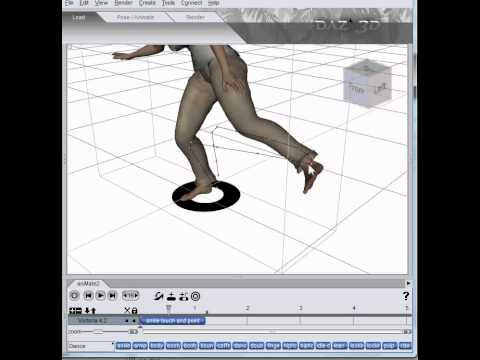
I agree with him: That IS Magic! :)
Remixing your art with AIStable Diffusion with ControlNet has a menu for loading rigged FBX, JSON, and similar models. But my custom toon Marx brothers do not appear to transfer correctly from Carrara FBX to Stable Diffusion.
Remixing your art with AIStezza said:
Diomede said:
WendyLuvsCatz said:
I got errors
Thanks -
awesome stuff ...
had me thinking if I could do something similar ( Santa on a roof ) in MS Paint... ended up with this after 5 minutes..
must incorporate this stuff with Carrara ,, hmmmm .


Beautiful Santa.
RE: Carrara. Oh, the missed opportunity for Daz3d (company) becomes all the more glaring. Carrara is the perfect tool for basic staging, editing, rigging, and posing as part of an AI workflow. Carrara would be perfect to block out concepts, arrange, rig, and pose on the fly, add an arch or a custom tree in the background, then recursively submit to the AI processor. Apparently, Blender is already being combined in this way. Daz Studio does not have a true vertex modeler or a tree editor or a landscape editor, etc. A combo of Studio/Bryce/Hexagon would be great, but they allowed Bryce and Hexagon to whither as well.
This guy has a tutorial on a plugin for Blender. Studio could do this particular example (pumpkins) because he only uses primitives. But Blender or Carrara could add an arch or edit a custon tree or a custom landscape. Studio can only load premade such things.
I would love to transfer some of my custom toon Carrara characters (the Marx brothers) to AI but Carrara's FBX exporter is old.
 Morphs for pantyhose, socks and shoes
I just took a pair of socks. I would think most socks should be able to use dForce without too much trouble.
So I applied dForce to it. Changed friction to the lowest.
Apllied static dForce objest to the character, so I also could set friction to lowest.
Added a dForce weightmap, so only one sock would simulate. Set expansioncontraction for the socks to 102.
And simulated. I always use timeline, as I then can follow what happens, and potentially make corrections.
After I was done, I realised, that if you want to use it as a morph, the character should remain in A-pose, so this can only be used as one-of.
question for the Wrap app usersyuyu.atem said:
Thank you very much! I saw he used Blender to fix the "last issues" that can happen after wrapping in Wrap, so if I understand well, when I obtain an issue about eyes and mouth postion, I shouln't try to fix it in Wrap and try to fix it in Blender, right? I obtained eyes that go out of the face after using the ApplySubset node, so I was a bit affraid...
I also have two other questions: I found another tutorial that recommands to use the lattice node instead the ApplySubset node:
https://www.youtube.com/watch?v=nR4_T0gTegI&list=PLPcx_LSSGfZd9iGlTTYWPhIL7chlJ2qPj&index=3&t=3sI tried to use it but I encountered another issue on the eyes:
We can see like a fissure on the eyeball... I changed the neighbors parameter to 20 but it didn't fix the problem.
So, I applied a Selectpolygons node to see better what happend by using the material display mode, and this is what I ontained:
I also compared to the original G8 basemesh, to be sure how it sould be:
So, after using the lattice node, we can see a pink part that sould be behind the eyeball and that seems to appear before. By hidding the eyeballs, I saw there is like a second eyeball inside the first one, so I gess it's a part of this second eyball that passed outside the first one.
So, my questions are:
- what would be the best way to fix this eye issue that appears after using the lattice node? I didn't find tutorial that mentions this issue...
- why is there a second eyeball inside the first one? Is it to improve the quality of the eye?
Thank you in advance for your help!
Lattice node is somewhat similar to how daz does autofollow morphs for fitted clothing etc. It takes the morph of the character and then applies a corresponding morph to the clothing (or whatever). I suppose in R3DS Wrap, their lattice node method is making some failed assumptions when applying the wrapping result deformation to the eyes of the original mesh. Perhaps that is because the eye is complex with internal geometry, not sure.
I guess if the lattice node are messing up your eyes, then dont use the lattice node on the eyes. If you want to use the output of the lattice node for the body then i guess you can take the part you want (the body) as another subset and apply it to the original mesh (and use the original unadulterated eyes, which you will then have to manually translate into place in Blender etc).
There isnt a "second eyeball inside the first one". The eyeball is multi-layered with different layers representing distinct anatomical features of the eyeball. Cornea + Eyemoisture is on top of iris + sclera. The gen 9 eyeball is more complicated still.
Grace Kelly head/face morph for V4?(Yes, I still use good old V4!) I seem to remember that there was at one time a face morph - either in a package available through the D3D store (Hollywood something?) or a freebie. Does anyone remember anything like that? I know about AOBB's "Princess" morph for G8.1F, but that's not what I'm looking for unless it can be adapted to V4. Failing a specific morph, is there another existing morph that looks enough like her that it can be dialed to a decent resemblance?
Mechasar's Characters Catalog: Who's next? (commercial)kirbawirba said:
I just bought the pack recently and am having trouble understanding this. So, if I try to use the new morph for Beverly without owning all of the products, does that mean the rest of the characters will be distorted?
Also, I'd like to encourage you to keep making stuff. Gladys is one of my favorite characters. If you ever do get around to it, do you think you can look at original Beverly's textures? It seems like she loses SSS properties in her hands. In some lighting situations they look bleached, or like she was washing dishes all day! Not something I'd ever let her do, btw! :D
You have some of the most unique and interesting characters on the market. Love them! Someday I will get enough money to buy them all!
EDIT: just read a post above this that mentions Smart Content. Can confirm that Smart Content does not show the vast majority of anything installed from the pack. It takes some hunting through SC to find anything, let alone everything.
EDIT 2: I CAN'T WAIT for your next release... They look fantastic!
Hi there! Thank you for your kind appreciation!
The Mega Add-Ons Pack, as the name suggests, consists of add-ons for my characters catalog only. Now, as you can see in your products library, the pack is split into 23 different zip folders, each one related to a different character (keep in mind that some add-on related to a single character can be further divided into 2 folders due to their size, something along the lines “folder 1of2”). This distinction is important because indicates that you should download and install ONLY the add-ons for those characters already installed in your Daz library, leaving aside the other add-ons. If you install an add-on for a character that you don’t yet own, the add-on won’t work and there is a chance that some hidden morphs could cause mesh distortions while you are using your Genesis 8/8.1 models. So, long story short, I strongly recommend to not install an add-on without first installing its related character.
That said, the “Bryana for Beverly” add-on needs the Beverly character, but you don’t need Brooke 8.1 in this case. In other words:
• Owned: Beverly + Brooke --> Obtainable characters: Beverly
• Owned: MMAP1 + Beverly + Brooke --> Obtainable characters: Beverly + Bryana
• Owned: MMAP1 + Beverly --> Obtainable characters: Bryana
• Owned: MMAP1 + Brooke --> Obtainable characters: none
• Owned: MMAP1 --> Obtainable characters: none
About her hands look, Iray makes the characters skin heavily influenced by the light color. I can suggest you to play with the environment lights, her translucency color, and you can also lower the values of her normal maps to make her skin smoother. These work pretty well. Or you can use the Bryana colors on Beverly, but keeping Beverly's normal maps, personally I love the result ;)AIUTO...CHI CONOSCE L’ITALIANO? PARTE QUATTORDICIAnfy said:
...senza considerare che hanno tolto, di proposito "se no i niubbi si inkasinavano", la possibilità di regolare i parametri rimuovendo i limiti nel tab Render, così non si può più settare un valore adeguato che sia > 100 ai Min Samples.
Sono senza parole.
Puoi aggirare il limite con l'ennesimo workaround, devi rimuovere il clamp dal file di settaggi del render come si fa con i morph.
Zbrush or Blender for creating DAZ morphs ?One guy who creates HD morphs for DAZ characters and is not a PA uses GoZ. He makes it look like a smooth transition back & forth once he does his initial workaround. I relax to Nikolay Naydenov Blender tuts like he's Bob Ross. Nikolay doesn't require super high poly figures for his work & says he does most projects in Blender now, but he doesn't use DAZ. Maxon's 14 day free trial is cringe but better than nothing. Hard to get used to the software in that time. I'm sure one could find a workaround if one was so inclined. I don't think Adobe has bought it yet so $360 USD yearly is fair. That's like 2 days a year of no DAZ shopping to offset the cost
. I've toyed around with Blender a bit & I still accidentally use the "industry standard" hotkeyes for navigating. Sculpting is easier because of the pen not the mouse. When I'm doing HS modeling using the mouse that old muscle memory kicks in from time to time. So annoying I set DAZ Studio navigation to be the same as Blender's to help train my brain. I brought G9 loading to a crawl a while back OBJ'ing between Blender & DAZ MLP. Dup morph accident. Working 45+ hours staight will do that so I understand your inquiry. If I'm inspired I just want software that doesn't get in the way of what I invision in my mind. If ZBrush does that then it's worth every penny. Nikolay says you can't smooth edges in ZBrush the way you can in Blender. Not sure if that's still true or applicable to your needs. If you give ZBrush a try I'd be interested in your opinion / review / comparison.Daz 3D is part of

Connect
DAZ Productions, Inc.
7533 S Center View Ct #4664
West Jordan, UT 84084Licensing Agreement | Terms of Service | Privacy Policy | EULA
© 2026 Daz Productions Inc. All Rights Reserved.