-
Adventures of Lorenzo & LoRez Figures in Carrara
you might need to resort to DAZ studio
if you convert to weightpainting you can use the transfer utility and save a support asset
the general weights best, just convert to blended weights afterwards
it should fit the legacy figure
works for V4 etc so should for Lorenzo
Any idea about creating corrective morph using Goz ? [Solved]I'm trying to use Zbrsh to make corrective morphs for some extreme pose. Everything works great but the problem is by using Goz, the corrective morph I've created also includes other morphs. Like if I'm making a corrective morphs for pose A, what I got through Goz is the corrective morphs plus pose A. What I really want is only the corrective morphs. In traditional work flow(export the obj and edit, then import it back ), these problem can be easily avoid by setting Reverse Deformations to YES, when import obj as morph. However, this could be messing when using Goz. Goz is definitely time saver for sculping figures and I wonder if there is any way to make the morph creating by Goz reverse deformations ?
Problem solved, it's nor Goz or Zbrush work flow has problem, just my stupid work, never put your hands on any figure dialed on multiple imported morph.
FaceGen Pulled From StoreAs a counter voice, I will note that Face Transfer (1.5.0.5) does do G8.1. It pops a gratuitous warning if you're doing a G8.1 male, but you can click through and it works fine. There are a few essential steps to making the figure that is initially created workable, including using the separate Face Transfer Shapes product. I then use ManFriday's Figure Converter for Genesis 9 to get the resulting FT shape to G9. Current FaceGen creates G9 characters directly but I simply do not like the squirrel face that FaceGen creates, and I gave up on using it after a few months when I could not make reasonable figures for some of my characters with it. Someone else's tastes and preferences may differ, so I'm just stating my opinion.
However ... Outrider42 makes the valid point in other threads on this subject that FaceGen offers an important feature that FT does not - you can select alternate base textures,so long as they are appropriate for the Genesis version. FaceGen also seems much more forgiving of relics like shadows and highlighting in the original source image than Face Transfer is. I have spent a lot of time experimenting with FaceGen-sourced textures in recent times and am currently using a workflow that uses Face Transfer-originated shape and FaceGen-originated textures on G9. For the moment, I find that both products are essential to my custom character creation process.
This is one I did yesterday as part of testing some new products. He's G9 with Face Transfer shape (including about 20% Dain 9) and FaceGen base textures.
I’d like to hire someone to create a modelunless it's a morph of a Genesis figure
Gnoll figure?Lycan looks a bit closer to what you're looking for. You might not want to dial it in all the way, because it's a very overpowering morph.
[Solved] Rigged Heels from Blender and parenting in DAZSince this topic comes up in google top results, I am adding my own solution that works for me adter trying many noy-so-great-working tutorials...
Studio 4.15
Blender 3.2
1. save g8 pose as preset
2. load blender obj
3. transfer utility: src g8, target obj
4. joint editor, select g8, then ctrl-select obj: r.click > transfer rigging (figure space)
5. delete g8, reload g8, apply g8 pose preset from step 1 <- not intuitive but necessary
6. fit obj to g8 <- will look weird
7. load obj as morph, apply to obj <- fixes the deformation from step 6FaceGen Pulled From StoreDartanbeck said:
...and there's this (never tried Facegen, so I don't really know what it does or doesn't do)

Face Transfer has never been updated since its launch in 2019. It can only do Genesis 8. It can't even do Genesis 8.1. Facegen has updated numeous times since, including support for Genesis 8.1 and 9, and already had support for Genesis 1, 2, 3 and of course 8.
Face Transfer is also useless without buying the Face Transfer Morph Pack, as that pack's main goal is to fix the flawed morph that Transfer produces (it creates a face that is comically flat)
Shape Rigger Plus G9 Edition (Commercial)Ok there is a big difference between a preset (.duf) and a native morph (.dsf). I suggest you learn how daz's structure works. Morphs will automatically be saved in data folder. Presets will be saved where ever you placed it on G9. You cannot save a preset in a data folder.
Shape Rigger Plus G9 Edition (Commercial)It doesn't matter. What you are choosing exists already, be it a morph, a character preset or anything, meaning path has already been defined. You cannot custom resave to another location via the script if it has been saved before. Only way to do that is manually through studio, then delete the source files afterwards.
PROBLEM WITH "Dial Fusion for Genesis 2 to 8.1" [RESOLVED]The newly saved dial or morph will not appear on a secondary character unless it is removed and reloaded from scene. Only then will the new morph populate.
Shape Rigger Plus G9 Edition (Commercial)Only way it is greyed out is if morph exists and has been saved before. In parameters you can click on the morphs cog and check file path..if there is one then it exists. You can use the 3 dots to jump to it in a browser.
Genesis 9 and Male ChestsMelissaGT said:
It's not so much the size of the pectoral that is an issue...it's the shape/angle itself. I bought some chest morphs specifically for male figures on the 'other' site and I'm hoping that will help.
Maybe post a picture of the morph so we can see how it looks and/or give feed back on how to correct it for you.
And, if DAZ Moderators delete the picture, you'll know if they look like boobs or pecs. Lol.
Genesis 9 and Male ChestsWrite Idea said:
MelissaGT said:
At least with G3 and G8 (and G2, but I've never used G2) there were separate base figures for males. I thought I'd like the unimesh for ease of converting stuff and having all my morphs available for both males and females...but the fact that the base G9 figure has boobs by default makes it very hard to get rid of those boobs entirely. Load up a G9 and then add in the base masculine slider...still has boobs. Load up any of the male core figures...still has boobs. 99.9% of male G9's I see in the store have boobs and not pecs. It seems the base figure should have been made without boobs because they're easier to add than remove.
I'm with you on this one. I thought having one base figure would double with textures, clothing, etc. More for your dollar, so to speak. Feminine textures tend to (not always) be flawless and porcelain perfection. While the masculine textures tend to (not always) have warts and all. Also, mens and womens clothing have buttons and zippers on opposite sides. It's small little things that throw off realism one tries to create.
As for the pecs/boobs debate, most of the core DAZ masculine figures, I'd say, have reasonably sized pectoral muscles for the swimmers/athletic build they've been given. Dain does verge into bodybuilder territory, however.
G8M does have a morph called Pectoral Undercurve (or something along those lines) that either enhances or decreases its size to give a flat chested look. That might help with G9 (if it has one). Though, all those faces might cause some distortions.
It's not so much the size of the pectoral that is an issue...it's the shape/angle itself. I bought some chest morphs specifically for male figures on the 'other' site and I'm hoping that will help.
Genesis 9 and Male ChestsMelissaGT said:
At least with G3 and G8 (and G2, but I've never used G2) there were separate base figures for males. I thought I'd like the unimesh for ease of converting stuff and having all my morphs available for both males and females...but the fact that the base G9 figure has boobs by default makes it very hard to get rid of those boobs entirely. Load up a G9 and then add in the base masculine slider...still has boobs. Load up any of the male core figures...still has boobs. 99.9% of male G9's I see in the store have boobs and not pecs. It seems the base figure should have been made without boobs because they're easier to add than remove.
I'm with you on this one. I thought having one base figure would double with textures, clothing, etc. More for your dollar, so to speak. Feminine textures tend to (not always) be flawless and porcelain perfection. While the masculine textures tend to (not always) have warts and all. Also, mens and womens clothing have buttons and zippers on opposite sides. It's small little things that throw off realism one tries to create.
As for the pecs/boobs debate, most of the core DAZ masculine figures, I'd say, have reasonably sized pectoral muscles for the swimmers/athletic build they've been given. Dain does verge into bodybuilder territory, however.
G8M does have a morph called Pectoral Undercurve (or something along those lines) that either enhances or decreases its size to give a flat chested look. That might help with G9 (if it has one). Though, all those faces might cause some distortions.
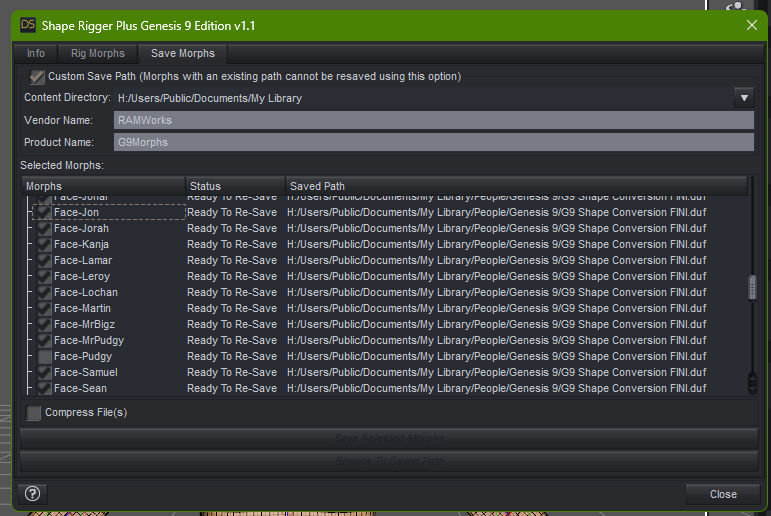
Shape Rigger Plus G9 Edition (Commercial)Hi again and Nope, unchecking the ONE morph I had saved out still doesn't give me any lit buttons to save to my desired path.
As you can see from the scroll area there are allot of morphs. I'd like to get this done in one go.
When I uncheck the Custom Save Path and let it do it's thing nothing seems to happen.
Saving out morphs is usually instantaneous from what I remember so not sure what your script is doing but my post above a little ways up I mentioned I let it grind away for about 10 minutes and not one morph was saved out any where that can see.
I go by RAMWorks now professionally. The older save directory was my name Richard McCormick.
The script also keeps defaulting to my E drive and while there are some Genesis 9 saves there NONE of my morph directories in the data folder are there, only on the H drive so not sure why your script keeps defaulting to the E drive?
The log file will not be helpful as for today there is nothing added to it since I couldn't move forward with your script saving out the morphs!
Thanks for help and clarification on what I may or may not be doing wrong.
 Ticket Request - Genesis 9 Feminine Nipples are wrongly placed and poorly detailed
I still think it is silly to argue something very subjective....but since i am a character maker and have thousands of resource pics, it only took a few seconds to show all is really fine with the shape.
The photo insert is from reference photos...one of many that would fit easily (G9 base female morph)
(hopefully covered enough for Richard)
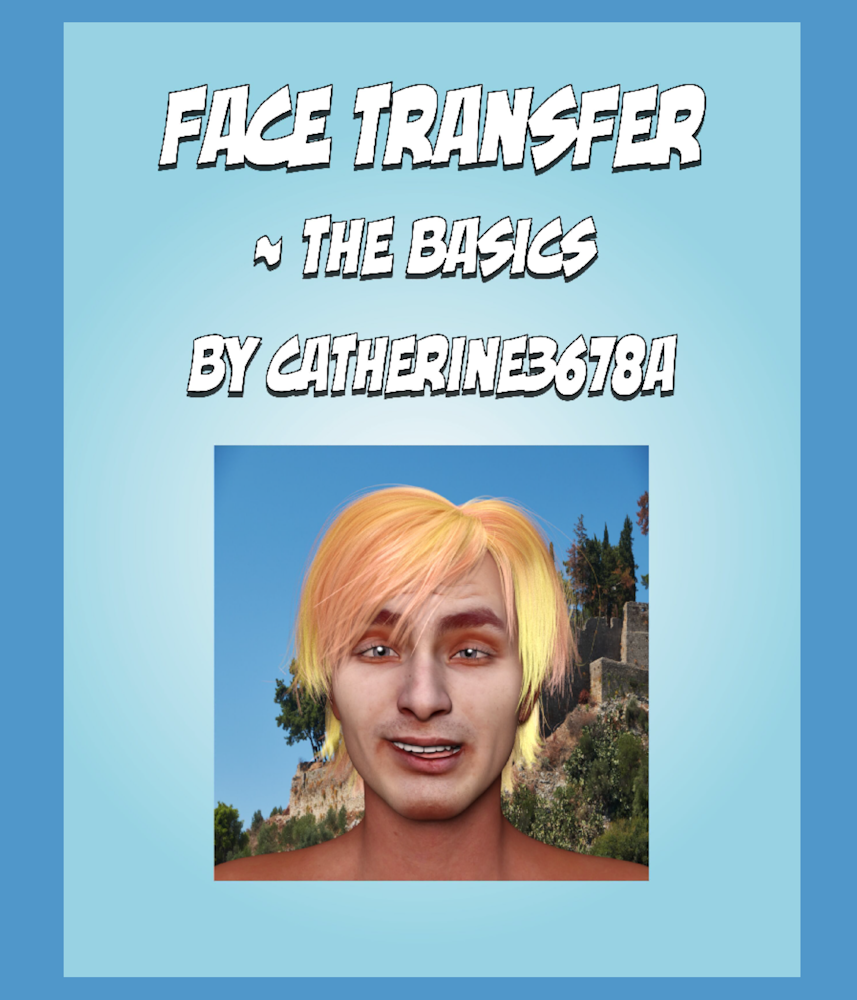
Face Transfer - The Basics {tutorial} ~ AND a Sequel ;-)The .pdf tutorial is in the proof-reading basket ;-) Hopefully will be uploaded later on today over at Renderosity.
Update: the tutorial has been uploaded to Renderosity and should be available within a day or so. is now available! [that was fast, thanks]
Face Transfer - The Basics
1. Face Transfer is a Windows only plugin that comes with Daz Studio. 3 free saves, and then for a nominal charge unlimited number of saves :-)
This tutorial covers making an image frame so many of those delightful head textures can be used to transfer the face image over to the Genesis 8's face :-)
Also shows where the generated images and morphs are put. And a very brief 'how-to" make the morphs useable by other G8 figures.
These 2 'frames' should be white with a transparent face section, .png files.
Genesis 9 and Male ChestsSo I've been building some custom characters on G9...specifically males. And while I have the faces down and I love making faces with G9...I'm having the hardest time with chests. I've noticed even with all the G9 core figures I've purchased, all the male chests just look...weird. I have to wonder if this is just me thinking they look weird or if others have noticed the same thing. Even the new one today, Wang 9, has a weird chest. I find myself scouring the marketplace specifically for more chest morph options to make them not look weird. I've also noticed that the back/shoulders is also very hunchy...if that's a word. The entire chest cavity area, from front to back, is just...off. And no matter what I do I can't seem to make the pectorals not look like boobs.
Render your buys! Use buys from the current month and the previous month of salessid said:
paulawp (marahzen) said:
I've been wanting to do something with the Tube stuff.
https://www.daz3d.com/the-tube-train
https://www.daz3d.com/the-tube-interior-extras-and-poses-for-genesis-8-and-81
https://www.daz3d.com/hs-rocking-edge-hair-for-genesis-9-81-and-8
https://www.daz3d.com/dforce-street-style-texture-add-on
https://www.daz3d.com/dain-9-hd - (he's not Dain, but I used some Dain morphs)
https://www.daz3d.com/long-nails-salon-for-genesis-9He's very handsome. The Dain 9 materials have come in really handy, I've borrowed his normals a few times now.
Also really like the Rock Edge hair, just wish there were more ways to pose it! I think I'm going to have to make a rule: no more static hairs.
Aw, thanks! I'm very pleased with how he came out. For the record, his normals and most skin settings are based on Jack, the base texture was created with FaceGen, and the shape is converted Face Transfer with about 20% Dain dialed in. Definitely a "Franken" G9.
I've noticed a bunch of otherwise nice hairs with no or minimal shaping/morphs lately. I'm OK with their limitations at the sale prices we've seen the last couple of months, but yeah, I would definitely prefer more options.
I am about to go Unreal on you all!RexRed said:
WendyLuvsCatz said:
geografts work for me in iClone 6 and subsquently FBX export from 3DX6 to Unreal but I do do it all manually no live links and use my own bone not morph based retargetting profiles
Thanks you very kindly for your help WendyLuvsCatz!

It is nice to hear that geographs work for you in Iclone 6! Hopeful! As for 3DX6 is that specifically for Genesis 2 characters or is it used to convert all Genesis characters? In other words, if I plan to bring in mostly Genesis 8 and 9 characters to Iclone 8 and Character Creator 4 do I need to buy this? And will I be able to apply Character creator skins and modifications to these imported characters?
..and, if I need to buy these to convert Gen8 and 9, do I need the full 3DXchange 6 Pipeline version or can I do the same with 3DXchange 6 PRO?
Now I am noticing a 3DX7 as well and something about it being discontinued and added directly into Iclone 8.
I am hoping if I wait on buying 3DX7(6) I will not regret it.
Also a question, Reallusion has a 50% off sale right now.
Anyone know if the sale may get any better than that on black Friday? (I am poor, and this endeavor is putting me into huge debt.)
completely different to CC4 which I don't have or iC7 or 8
they use their own mesh and convert stuff to it which is no doubt why geografts don't work
I do believe ther 3DX8? pipeline can still import FBX though and do manual retargetting but I really don't know
I cannot afford Reallusion stuff hence being 2 whole versions behind

Daz 3D is part of

Connect
DAZ Productions, Inc.
7533 S Center View Ct #4664
West Jordan, UT 84084Licensing Agreement | Terms of Service | Privacy Policy | EULA
© 2026 Daz Productions Inc. All Rights Reserved.