-
Saphirewild's Randomness Renders
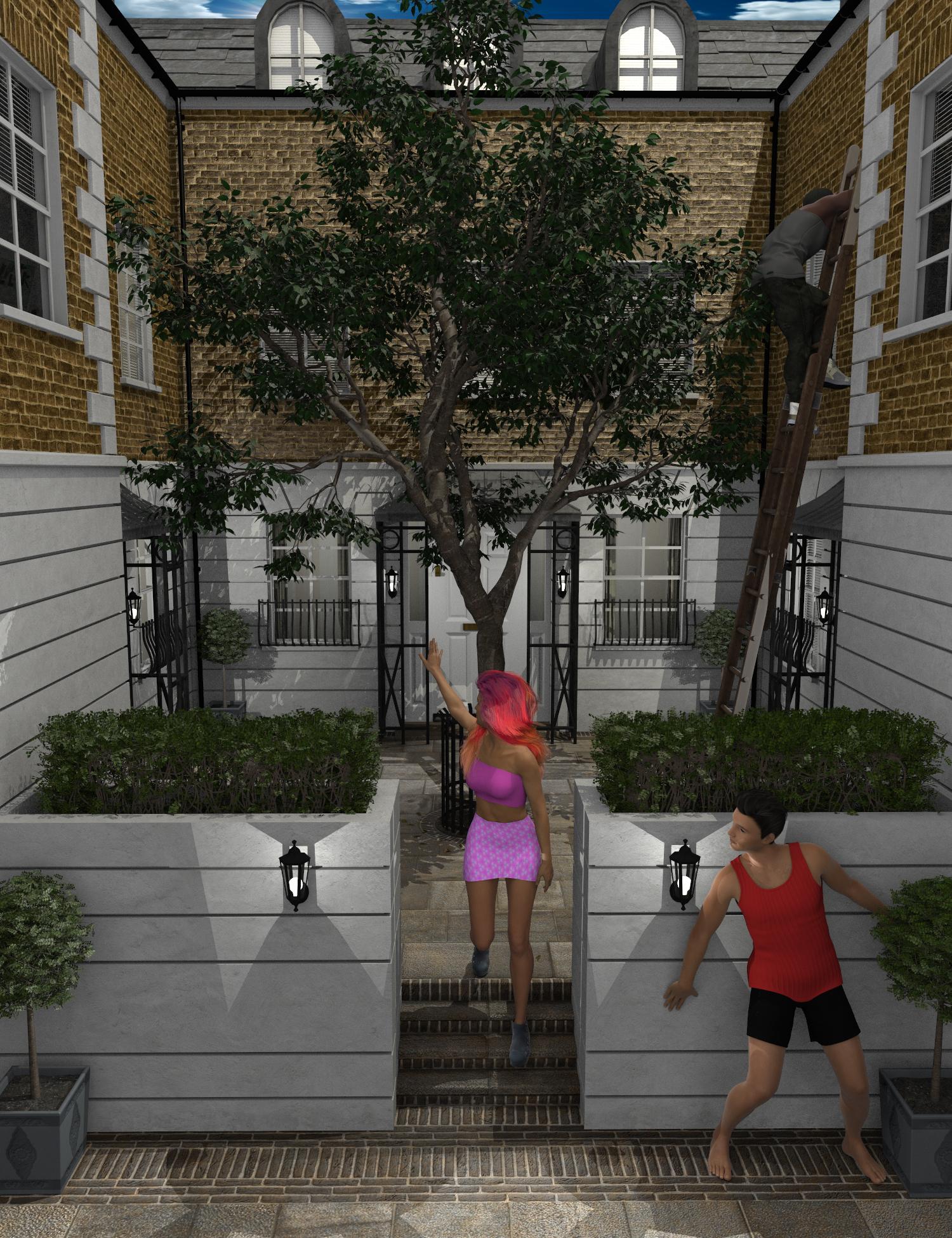
I made this render for the PC+ Insprational contest!
Used: London Courtyard , London Courtyard Poses and Props for Genesis 8 , Victoria 8 , Mace for Genesis 3 Male , Hip Hop Outfit for Genesis 3 Male(s)
 [Released] Character Converter from Genesis 3 Female to Genesis 8 Female(Now Conv JCMs) [Commercial]
Is this primarily for the Base Figures (Victoria 7, The Girl 7, etc) or also for the more generic G3 derivate characters (including those from third party sites)? I suspect primarily for the latter, since there are already products like Gia 7 for Gia 8 anyway, and because the generic G3 derivates use the standard UV layout, but I just want to be sure this is going to be what I hope it's going to be.
It is for any of them, except for more extreme characters.
[Released] Character Converter from Genesis 3 Female to Genesis 8 Female(Now Conv JCMs) [Commercial]Is this primarily for the Base Figures (Victoria 7, The Girl 7, etc) or also for the more generic G3 derivate characters (including those from third party sites)? I suspect primarily for the latter, since there are already products like Gia 7 for Gia 8 anyway, and because the generic G3 derivates use the standard UV layout, but I just want to be sure this is going to be what I hope it's going to be.
Searching for this FigureActually, follow-up. You said the Head morph for the Carley model is set to 55%. Is there any other model associated in the dials? For instance, if you load the Carley model Victoria 8 will have a default of 35%. Did you maintain that dial? The reason I am asking is so far I am unable to procure the desired result that you displayed. One of the leading indicators is the lips. The Carley character looks to have thin lips by default, and as such is displayed in your result. However, when I have it loaded from the Character pane it loads in with much fuller lips.
Let me know, but no worries if you moved on from this thread
 any news on the hd plugin?? :D
Has anyone done the HD to Victoria 8?
wondering if it does anything for her toe issues.
[Released] Character Converter from Genesis 3 Female to Genesis 8 Female(Now Conv JCMs) [Commercial]I think that there would be an audience, since GenX basically transfers morphs rather than characters.
Not to highjack this thread completely, but could you explain what this means?
With GenX, you check the morphs that you want to transfer between generations, so "nose size" or "Victoria 5 head," etc. Then those morph dials become available on the target generation figure.
Sounds like this, on the other hand, will transfer the entire character you have highlighted, so your character could have a bunch of morphs, and all those active morphs (including JCMs, if activated) would be transferred, plus a resulting dial for just that character. So this would be easier to transfer custom characters or characters in the store that are based on existing morph packs (see Saiyaness's characters). With GenX, you'd have to find out which morph dials were being used, transfer those morphs, and then apply the value of each morph dial to the new generation to get the same character. With this product, you can easily get the character transferred.
Nice summary. Thanks.

In your initial description you are stating that JCMs are not transferred, and yet in the summary above (which you agreed with) it is surmising that JCMs are transferred. Which is true?
"The Character converter script does not copy joint corrective morphs (JCMs) or morph corrective morphs (MCMs) properly". The "properly" is the key word here. If JCMs are being used, they are transferred. HOWEVER, they are not hooked up properly (the corrective part of JCMs), i.e., they will not be engaged when another morph get engaged or anything like that with extreme poses.
[Released] Character Converter from Genesis 3 Female to Genesis 8 Female(Now Conv JCMs) [Commercial]I think that there would be an audience, since GenX basically transfers morphs rather than characters.
Not to highjack this thread completely, but could you explain what this means?
With GenX, you check the morphs that you want to transfer between generations, so "nose size" or "Victoria 5 head," etc. Then those morph dials become available on the target generation figure.
Sounds like this, on the other hand, will transfer the entire character you have highlighted, so your character could have a bunch of morphs, and all those active morphs (including JCMs, if activated) would be transferred, plus a resulting dial for just that character. So this would be easier to transfer custom characters or characters in the store that are based on existing morph packs (see Saiyaness's characters). With GenX, you'd have to find out which morph dials were being used, transfer those morphs, and then apply the value of each morph dial to the new generation to get the same character. With this product, you can easily get the character transferred.
Nice summary. Thanks.
In your initial description you are stating that JCMs are not transferred, and yet in the summary above (which you agreed with) it is surmising that JCMs are transferred. Which is true?
[Released] Character Converter from Genesis 3 Female to Genesis 8 Female(Now Conv JCMs) [Commercial]I think that there would be an audience, since GenX basically transfers morphs rather than characters.
Not to highjack this thread completely, but could you explain what this means?
With GenX, you check the morphs that you want to transfer between generations, so "nose size" or "Victoria 5 head," etc. Then those morph dials become available on the target generation figure.
Sounds like this, on the other hand, will transfer the entire character you have highlighted, so your character could have a bunch of morphs, and all those active morphs (including JCMs, if activated) would be transferred, plus a resulting dial for just that character. So this would be easier to transfer custom characters or characters in the store that are based on existing morph packs (see Saiyaness's characters). With GenX, you'd have to find out which morph dials were being used, transfer those morphs, and then apply the value of each morph dial to the new generation to get the same character. With this product, you can easily get the character transferred.
Thanks for the explanation!
Sounds like products that transfer earlier generations would be redundant, strictly speaking. But as someone who doesn't already own GenX and works with G8 exclusively, a new product that transfers directly to G8 would still be more interesting than an old product that requires several steps.
Thank you for the information.
[Released] Bone Doctor Pose Control [Commercial]Above, you say (see below), so does this mean it will work with Michael 4 and convert to Genesis 3? If so, how about even a David 3?
- "Designed for any character or figure... from Victoria 4 to Genesis 3, from Horse to Dragon... anything with bones"
I do not have anything before V4/M4 to test, but if it has bones, it should work. You can always try it and return it if it doesn't work for you.
[Released] Character Converter from Genesis 3 Female to Genesis 8 Female(Now Conv JCMs) [Commercial]I think that there would be an audience, since GenX basically transfers morphs rather than characters.
Not to highjack this thread completely, but could you explain what this means?
With GenX, you check the morphs that you want to transfer between generations, so "nose size" or "Victoria 5 head," etc. Then those morph dials become available on the target generation figure.
Sounds like this, on the other hand, will transfer the entire character you have highlighted, so your character could have a bunch of morphs, and all those active morphs (including JCMs, if activated) would be transferred, plus a resulting dial for just that character. So this would be easier to transfer custom characters or characters in the store that are based on existing morph packs (see Saiyaness's characters). With GenX, you'd have to find out which morph dials were being used, transfer those morphs, and then apply the value of each morph dial to the new generation to get the same character. With this product, you can easily get the character transferred.
Thanks for the explanation!
Sounds like products that transfer earlier generations would be redundant, strictly speaking. But as someone who doesn't already own GenX and works with G8 exclusively, a new product that transfers directly to G8 would still be more interesting than an old product that requires several steps.
[Released] Bone Doctor Pose Control [Commercial]Above, you say (see below), so does this mean it will work with Michael 4 and convert to Genesis 3? If so, how about even a David 3?
- "Designed for any character or figure... from Victoria 4 to Genesis 3, from Horse to Dragon... anything with bones"
[Released] Character Converter from Genesis 3 Female to Genesis 8 Female(Now Conv JCMs) [Commercial]I think that there would be an audience, since GenX basically transfers morphs rather than characters.
Not to highjack this thread completely, but could you explain what this means?
With GenX, you check the morphs that you want to transfer between generations, so "nose size" or "Victoria 5 head," etc. Then those morph dials become available on the target generation figure.
Sounds like this, on the other hand, will transfer the entire character you have highlighted, so your character could have a bunch of morphs, and all those active morphs (including JCMs, if activated) would be transferred, plus a resulting dial for just that character. So this would be easier to transfer custom characters or characters in the store that are based on existing morph packs (see Saiyaness's characters). With GenX, you'd have to find out which morph dials were being used, transfer those morphs, and then apply the value of each morph dial to the new generation to get the same character. With this product, you can easily get the character transferred.
But of course you can create a single morph using GenX2, so you can convert a full character as far as Genesis 3 that way.
ETA: Mind you, I'm not saying I'd complain about having a fully supported RiverSoftArt alternative! This looks like a useful product for me too.
[Released] Character Converter from Genesis 3 Female to Genesis 8 Female(Now Conv JCMs) [Commercial]I think that there would be an audience, since GenX basically transfers morphs rather than characters.
Not to highjack this thread completely, but could you explain what this means?
With GenX, you check the morphs that you want to transfer between generations, so "nose size" or "Victoria 5 head," etc. Then those morph dials become available on the target generation figure.
Sounds like this, on the other hand, will transfer the entire character you have highlighted, so your character could have a bunch of morphs, and all those active morphs (including JCMs, if activated) would be transferred, plus a resulting dial for just that character. So this would be easier to transfer custom characters or characters in the store that are based on existing morph packs (see Saiyaness's characters). With GenX, you'd have to find out which morph dials were being used, transfer those morphs, and then apply the value of each morph dial to the new generation to get the same character. With this product, you can easily get the character transferred.
Nice summary. Thanks.
[Released] Character Converter from Genesis 3 Female to Genesis 8 Female(Now Conv JCMs) [Commercial]I think that there would be an audience, since GenX basically transfers morphs rather than characters.
Not to highjack this thread completely, but could you explain what this means?
With GenX, you check the morphs that you want to transfer between generations, so "nose size" or "Victoria 5 head," etc. Then those morph dials become available on the target generation figure.
Sounds like this, on the other hand, will transfer the entire character you have highlighted, so your character could have a bunch of morphs, and all those active morphs (including JCMs, if activated) would be transferred, plus a resulting dial for just that character. So this would be easier to transfer custom characters or characters in the store that are based on existing morph packs (see Saiyaness's characters). With GenX, you'd have to find out which morph dials were being used, transfer those morphs, and then apply the value of each morph dial to the new generation to get the same character. With this product, you can easily get the character transferred.
But of course you can create a single morph using GenX2, so you can convert a full character as far as Genesis 3 that way.
ETA: Mind you, I'm not saying I'd complain about having a fully supported RiverSoftArt alternative! This looks like a useful product for me too.
Remember, "There's Always Another Sale™" (Report sales errors here.)On this morning's sale, the area for the 90% off M4/V4 items is blank... does that mean I own them all, or is something not working? :-O
No. What it means is that the "50% OFF¥ Featured Artist Catalog Items" Headline is out of place. It should be just above the featured artists. Then the sliding banner (which is the one for the 90% off with purchase) that is now below it would be where it belongs above that headline and just below the "90% off Daz Original Victoria 4 & Michael 4 Items" headline.
Ah, I re-looked, and yes, I see how it's muddled, thank you. Still, only one page of items, and only one on my wishlist. Obviously a sign that I have enough of those bits, at least. :-)
Remember, "There's Always Another Sale™" (Report sales errors here.)On this morning's sale, the area for the 90% off M4/V4 items is blank... does that mean I own them all, or is something not working? :-O
No. What it means is that the "50% OFF¥ Featured Artist Catalog Items" Headline is out of place. It should be just above the featured artists. Then the sliding banner (which is the one for the 90% off with purchase) that is now below it would be where it belongs above that headline and just below the "90% off Daz Original Victoria 4 & Michael 4 Items" headline.
[Released] Character Converter from Genesis 3 Female to Genesis 8 Female(Now Conv JCMs) [Commercial]I think that there would be an audience, since GenX basically transfers morphs rather than characters.
Not to highjack this thread completely, but could you explain what this means?
With GenX, you check the morphs that you want to transfer between generations, so "nose size" or "Victoria 5 head," etc. Then those morph dials become available on the target generation figure.
Sounds like this, on the other hand, will transfer the entire character you have highlighted, so your character could have a bunch of morphs, and all those active morphs (including JCMs, if activated) would be transferred, plus a resulting dial for just that character. So this would be easier to transfer custom characters or characters in the store that are based on existing morph packs (see Saiyaness's characters). With GenX, you'd have to find out which morph dials were being used, transfer those morphs, and then apply the value of each morph dial to the new generation to get the same character. With this product, you can easily get the character transferred.
two peoples poseOkay. I have five screenshots for you. Each shows a different approach the PA took with the presets. These are the development figures from the G8 Starter Essentials, with the female tinted light red and the male tinted light blue. (You may also notice I've used G8M poses on G8F and vice-versa. I was just being efficient, as this computer takes forever to load figures.)
1. In this pose set, the dark red figure displays the pose. I used pose 29M on the female and 30M on the male. (M stands for "mirror" so poses 30 and 30M are mirrors of each other.) This number convention is different than most of my pose sets, in that it uses two numbers for each pose grouping, one for each pose. Other sets, including the other four examples here, use one number for all the poses in a set, and indicate who the pose is for in other ways.

2. This pose set tells you which pose is for the Fairy and which is for the Giant. It also tells uses the figure names, Mika8 and Ollie8, and includes the same pose for the base G8F and G8M figures. And if that isn't enough, there is the pink dot in the upper right corner of the female poses, and a blue dot in the upper right corner of the male poses. The base image of the pose for the preset, however, is the same for all four presets.
3.This pose set shows the pose figure in a solid color, much like the two figures I'm using. G8F is pink, G8M is blue, and the gray figure just shows how the two go together. This set also mentions which figure the pose is for, G8F or G8M, in the name of the preset. (You will also notice there are three presets that appear to be identical. I didn't try them all, but when I chose the G8M that is next to the G8F in the right column shown here, the male figure was posed correctly but centered where the female figure is currently standing. When I chose the third preset for both, the figures ended up as you see here.)
4. In this pose set, the presets use an L and R in the lower corners of image. (I like that the L in the lower Left corner and the R is in the lower Right corner!) It also states in the preset name that the pose is the left or right pose in the image. This set is intended for two males. If you look closely, you can see the hands do not meet correctly. While I could use it like this, or with two females, I would have to put some work into making those two hands grasp each other correctly.
5. This final example set does not use the preset image to indicate who the pose is for. The name of the intended figure is in the preset name, and includes Victoria 8 and Michael 8, as well as the base G8F and G8M figures.
I hope this helps.Virtual Reality, is there a future for Daz without it?Well chicken and egg situation here, DAZ might not need VR but as the technology advances and people can interact more with 3D objects VR will almost certainly need DAZ as they make the most realistic 3D people
Valid point. As I have been experimenting with VR, Unity and games in general the past month, the DAZ figures are the best assets I have used in Unity by far. the quality and realism really shows when you are standing next to lifesize victoria and can reach out and grab her and pose her unlike the game mesh figures I have tried (although it was cool standing next to lifesize superhero figures like Bats and Superman from Injustice)
With the new Oculus quest being wireless and being able to access the PC also, it makes being in VR even better. I am saving for some VR gloves and eventually the Valve index once they get the bugs worked out and the price drops a bit. Now we (VR users) just need more developers to get on the VR wagon.
Since i started using VR, I am having a very hard time opening up Daz Studio as creating scenes on my desktop and renders just don't cut it anymore. As such, my spending here has also dropped since the money has gone to tools to get 3D assets into Unity and also other game titles for VR
Hi, plz id this female from this make-up?Looks like it's Keri for Victoria 8
Daz 3D is part of

Connect
DAZ Productions, Inc.
7533 S Center View Ct #4664
West Jordan, UT 84084Licensing Agreement | Terms of Service | Privacy Policy | EULA
© 2026 Daz Productions Inc. All Rights Reserved.