-
Hi, plz id this female from this make-up?
https://www.daz3d.com/lie-make-up-set-for-genesis-8-female
It's an incredible model ... maybe is Olympia 7 ?
Thank you for help guys!!
Hi all,
She is completely Victoria with Tasha 8 textures ;)
it's the expression she has on that is making it look a little different

And yes, most probably expression made her different looking.
I've made a mixture with dials of "Magnetism" and "Psychopath" included at Big Expressive Pack
Trying to understand namespretty well
Genesis 8 F is base figure model for that generation of genesis female
She then has quite a few main characters,- Victoria 8
- Olympia 8
- Stephanie 8
- Monique 8
- Teen Josie 8
- Charlotte 8
- Sakura 8
- Karyssa 8
- Alexandra 8
- Aiko 8 to name just a few. these are all different purpose built shapes exploring different ethnicities, body shapes and variations etc which are released at roughhly monthly intervals. On release days you will find a base character, a starter bundle and a pro bundle, which include other products. If you want you character to be "Anatomically correct" then you need to buy the pro bundle for at least one of the adult characters (M&F) as genitalia are only released in the adult pro bundles.
there are also morph packs, these enable you to dial in differences to either the base figure or the characters, and desighn your own unique look
Then there are named extension packs such as https://www.daz3d.com/ry-tessa-for-victoria-8 ; which is optimised to be used with V8 but can actually be used on the base figure but won't look exactly the same.
Have I confused you?
Not at all! Thank you so much! :D I'm mostly insterested in working the models and not full 3D scenes so this is perfect advice.
One more quick question though... I found Victoria and Karysa but only because I had seen them before in tutorials. If I want to search for characters is here an easier way? I say this because Karyssa for example is not on the "figure" list in filters... :)
Trying to understand namesG8F would be the base, and everything else would be morphs& extra skins (a.k.a. "characters"). There are morph packs without skins, that usually add extra shapes to individualize your figure.
The Victoria ( etc that chohole mentioned above) are "official" characaters/owned by DAZ3D, while characters owned by the PAs might need specific morph packages or an official character to reach the look that you see in the promos. There are also characters that just need the base character, like G8F.
Thank you for your help! :)
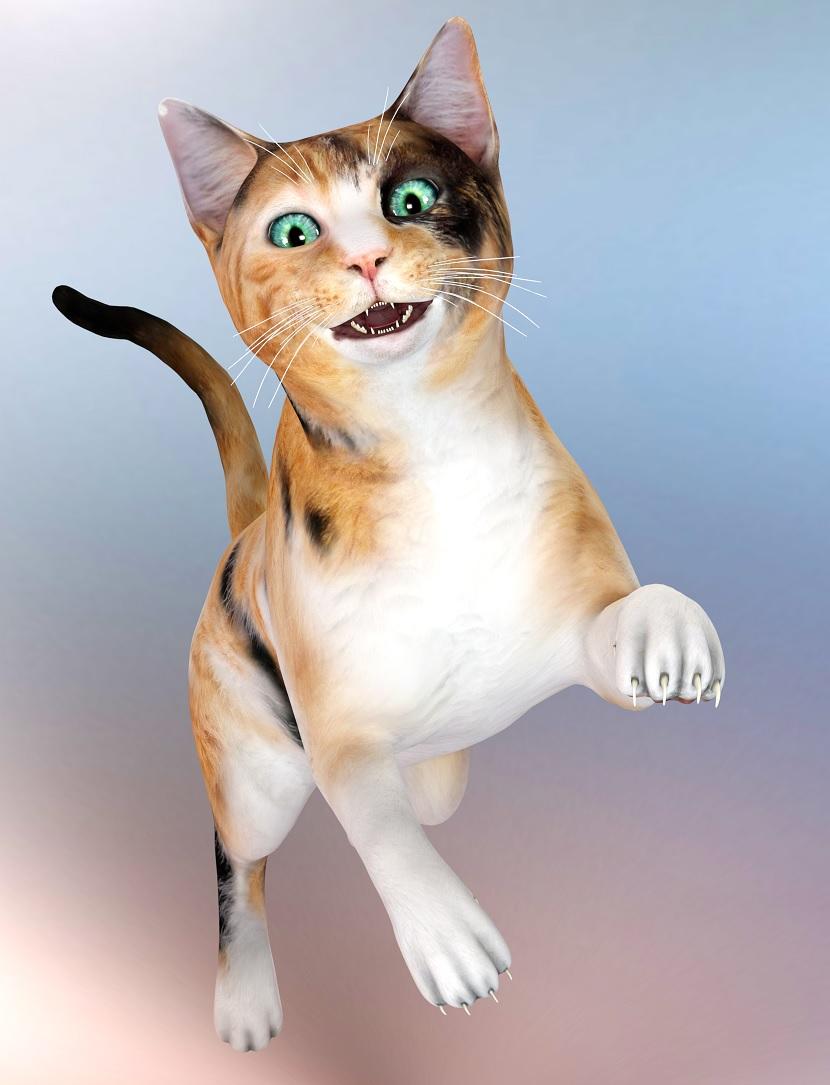
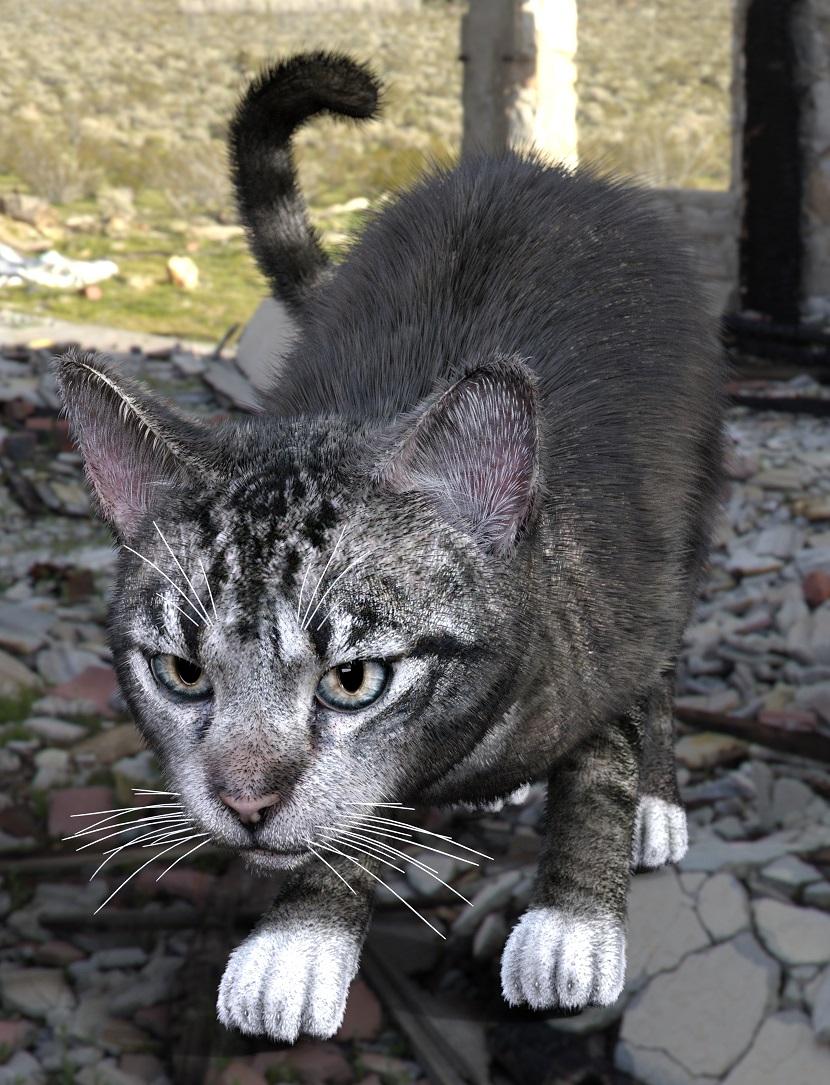
MimicMolly's Renders & WIPsI decided that a "quick fix" for Daz House Cat, is to parent an eyeball prop to each eye, and then hide the eyes. I used EYEdeas 3+ for V4 and M4. The Calico, which uses the same shaping preset I used to recreate my cat, had the eyes scaled up to 76% (because my cats have big eyes). Then the tabby, who is in the default shape, the yes were scaled to 74%. So if you have this product, it comes with pupil slit morphs that you can adjust to your liking. Just remember to make the iris and pupil really big.
The calico, no hair. (in the DAZ Gallery, because this render came out cute IMHO [x])
The tabby with hair. (Also in the DAZ Galleries because it looks believable at a glance. [x])
Now all the DAZ House Cat needs is paw geografts that give it flexible toes/better toe (and toe bean) shaping options, and better claws. I'd also buy wearable eyes, though it's kind of sad that we need add-ons like this to have a more realistic cat.
Apply Makeup Selectively?I'd like to use
Which character are you wanting to use the makeup from? Is it a character that has Diffuse Overlay Makeup, L.I.E. Makeup, or is it makeup that's baked into the character's face textures?
https://www.daz3d.com/amy-lee-for-victoria-8
I don't have her, so I don't know what type of makeup she uses. But what can you can try, if you have a character that uses Diffuse Overlay makeup that applies without changing the face texture (like Aiko 8), is apply that character's makeup to your figure then in the Surfaces Tab where it says Diffuse Overlay Color change that Diffuse Overlay Color map to the map that has the makeup that you want to use. Also, be sure and turn Diffuse Overlay Squared On:
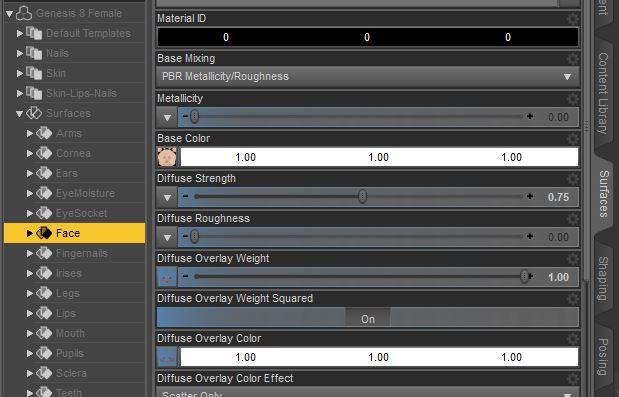
So if you have Aiko 8 (or another character that uses Diffuse Overlay Makeup that doesn't change the underlying face texture), apply one of her makeups (it won't show up in the preview screen unless you're using the Iray Preview Draw Setting), then go to the Surfaces Tab >> Face and click on the Map in the Diffuse Overlay Color slot, select "Browse" and navigate to the folder that has the makeup you want to use. Select the map that has the makeup you want to use and that should apply it to the Diffuse Overlay Color spot. Makes sure you also click "On" for Diffuse Overlay Weight Squared as that can help blend the map better with the face skin.
This technique doesn't work on all makeup but it does work quite a few times that I've tried it. :)
Trying to understand namesG8F would be the base, and everything else would be morphs& extra skins (a.k.a. "characters"). There are morph packs without skins, that usually add extra shapes to individualize your figure.
The Victoria ( etc that chohole mentioned above) are "official" characaters/owned by DAZ3D, while characters owned by the PAs might need specific morph packages or an official character to reach the look that you see in the promos. There are also characters that just need the base character, like G8F.
Trying to understand namespretty well
Genesis 8 F is base figure model for that generation of genesis female
She then has quite a few main characters,- Victoria 8
- Olympia 8
- Stephanie 8
- Monique 8
- Teen Josie 8
- Charlotte 8
- Sakura 8
- Karyssa 8
- Alexandra 8
- Aiko 8 to name just a few. these are all different purpose built shapes exploring different ethnicities, body shapes and variations etc which are released at roughhly monthly intervals. On release days you will find a base character, a starter bundle and a pro bundle, which include other products. If you want you character to be "Anatomically correct" then you need to buy the pro bundle for at least one of the adult characters (M&F) as genitalia are only released in the adult pro bundles.
there are also morph packs, these enable you to dial in differences to either the base figure or the characters, and desighn your own unique look
Then there are named extension packs such as https://www.daz3d.com/ry-tessa-for-victoria-8 ; which is optimised to be used with V8 but can actually be used on the base figure but won't look exactly the same.
Have I confused you?
Not at all! Thank you so much! :D I'm mostly insterested in working the models and not full 3D scenes so this is perfect advice.
One more quick question though... I found Victoria and Karysa but only because I had seen them before in tutorials. If I want to search for characters is here an easier way? I say this because Karyssa for example is not on the "figure" list in filters... :)
Apply Makeup Selectively?I'd like to use
Which character are you wanting to use the makeup from? Is it a character that has Diffuse Overlay Makeup, L.I.E. Makeup, or is it makeup that's baked into the character's face textures?
https://www.daz3d.com/amy-lee-for-victoria-8
problem with any 3rd pary anatomical elementsWhich Victoria? and Which Gens?
problem with any 3rd pary anatomical elementshi , i am having such a troublesome time here.
Ive uninstalled daz, DIM, APP roaming data, and others in APP data.
then reinstalled everything with only a few basic things that are in my DIM.
did i miss a setting when i deleted everything for the clean reinstall? this is just victoria with new gens on her. nothing more
also when i restarted after reinstalling, daz still remembered not to show the popup for tutorial page. so i missed something somewhere that is still remembering things that is screwing up my DAZ
Im sorry ahead of time if Im not supposed to ask this here.
I just didnt know where to go after googling forever and discord communities not knowing anything i can do.
Mod Edit :- Image removed due to nudity
Official Release of Carrara 8.5 **Update - 8.5.1.19**Rigging - I might be wrong, but...
Carrara's native skeleton/rigging tools relate each vertex to each joint once, and only once. So, if you have an armpit vertex, and a shoulder joint, the influence of the shoulder joint on the armpit vertex has a single value. No matter which direction you rotate the joint, that vertex will be inluenced by the same percentage, although direction changes with the direction of rotation. You can augment this limitation with a morph.
The legacy Poser rigging related the mesh around a joint to the joint in three ways, once for each of X, Y, Z direction of rotation. That was the stretched/spherical/capsules that could be edited with Poser's figure tools. This style of rigging is also Victoria 1-4. The joint bend results can be augmented with morphs. This works in Carrara.
I don't know enough about dual quarereon-whatever to give details, except to say that it is not the same as Carrara's native skeleton/rigging tools.
Thanks.
those armpits dohh
I luv Terai Yuki2, but her arm pits make me crazy lol
Trying to understand namespretty well
Genesis 8 F is base figure model for that generation of genesis female
She then has quite a few main characters,- Victoria 8
- Olympia 8
- Stephanie 8
- Monique 8
- Teen Josie 8
- Charlotte 8
- Sakura 8
- Karyssa 8
- Alexandra 8
- Aiko 8 to name just a few. these are all different purpose built shapes exploring different ethnicities, body shapes and variations etc which are released at roughhly monthly intervals. On release days you will find a base character, a starter bundle and a pro bundle, which include other products. If you want you character to be "Anatomically correct" then you need to buy the pro bundle for at least one of the adult characters (M&F) as genitalia are only released in the adult pro bundles.
there are also morph packs, these enable you to dial in differences to either the base figure or the characters, and desighn your own unique look
Then there are named extension packs such as https://www.daz3d.com/ry-tessa-for-victoria-8 ; which is optimised to be used with V8 but can actually be used on the base figure but won't look exactly the same.
Have I confused you?
Trying to understand namesHello everyone, I recently rediscovered DazStudio and as an artist I was hoping to try it. But I'm a little confused about some of the packs... I read sone of the other users questions and they helped so here we go... I'm also a simmer so forgive me if I use the game to try and understand what this all means There is a pack called Genesis 8, several packs with character names (we'll use Victoria 8) and other packs with head/body morphs. Applying this to the sims does this mean that Genesis 8=base game, Victoria = expansion packs and morphs = custom content/mods? Meaning that: Genesis is the base for everything. Victoria is an extra model you can add with better rig to improve your base/an update/upgrade. And morphs are extras you can add but they only work if you have a certain expansion (meaning model) - only morphs made for Victoria work on her and morphs made for Genesis work in general (like cc for base game). Is this right or have I just confused you?Official Release of Carrara 8.5 **Update - 8.5.1.19**Rigging - I might be wrong, but...
Carrara's native skeleton/rigging tools relate each vertex to each joint once, and only once. So, if you have an armpit vertex, and a shoulder joint, the influence of the shoulder joint on the armpit vertex has a single value. No matter which direction you rotate the joint, that vertex will be inluenced by the same percentage, although direction changes with the direction of rotation. You can augment this limitation with a morph.
The legacy Poser rigging related the mesh around a joint to the joint in three ways, once for each of X, Y, Z direction of rotation. That was the stretched/spherical/capsules that could be edited with Poser's figure tools. This style of rigging is also Victoria 1-4. The joint bend results can be augmented with morphs. This works in Carrara.
I don't know enough about dual quarereon-whatever to give details, except to say that it is not the same as Carrara's native skeleton/rigging tools.
Who's Next to Join the G8 Family?An updated list... 47. Kanade 8 2019-07-17 46. Teen Jane 8 2019-07-04 45. Ellithia 8 2019-06-20 44. Elios 8 2019-06-06 43. Kala 8 2019-05-23 42. Sanjay 8 2019-05-09 41. Tika 8 2019-04-25 40. Mr. Woo 8 2019-04-04 39. Mrs. Chow 8 2019-03-19 38. Bridget 8 2019-03-05 37. Landon 8 2019-02-19 36. Tasha 8 2019-02-05 35. Sydney 8 2019-01-15 34. Christian 8 2019-01-02 33. Nix 8 2018-12-18 32. Eva 8 2018-12-04 31. Lee 8 2018-11-22 30. Mei Lin 8 2018-11-06 29. Vladimir 8 2018-10-18 28. Gia 8 2018-10-01 27. The Brute 8 2018-09-18 26. Latonya 8 2018-09-04 25. Toon Dwayne 8 2018-08-21 24. Zelara 8 2018-08-10 23. Mabel 8 2018-07-17 22. Teen Kaylee 8 2018-07-03 --. Daz Dog 8 2018-06-18 21. The Girl 8 2018-06-05 20. Floyd 8 2018-05-23 19. Mika 8 2018-05-09 18. Edie 8 2018-04-24 17. Penny 8 2018-04-11 16. Ollie 8 2018-03-27 15. Aiko 8 2018-03-13 14. Edward 8 2018-02-22 13. Alexandra 8 2018-02-13 12. Karyssa 8 2018-01-23 11. Owen 8 2018-01-09 10. Sakura 8 2017-12-26 09. Charlotte 8 2017-12-12 08. Darius 8 2017-11-28 07. Monique 8 2017-11-14 06. Lucas 8 2017-10-17 05. Stephanie 8 2017-10-03 04. Teen Josie 8 2017-09-19 03. Michael 8 2017-08-22 02. Olympia 8 2017-07-25 01. Victoria 8 2017-06-15
[Released] Character Converter from Genesis 3 Female to Genesis 8 Female(Now Conv JCMs) [Commercial]I rather suspect that most of us are willing to address porting skins as a separate issue from porting morphs. I certainly wouldn't demand that the same product needs to handle both transfers. Getting the morphs properly transfered without overwhelmingly weird glitches is enough of an issue without having to deal with textures as well.
Absolutely. I brought up the UV issue as a warning to those who might expect to push a button and instantly duplicate any character, and the Genesis 2 figures are by far the most problematic due the sheer quantity of limited use UVs DAZ insisted on dumping into the market, even though the base UVs were clearly capable of handling even the most extreme designs by vendors like RawArt.
For that matter, base G1 uses V4's UV by default, and came out of the box with the ability to switch its UVs to M4 and K4. It was only the new series 5 DAZ base morphs which started us down the road to several years of propagating custom, and incompatible UVs.
And even with Genesis, the damage was limited to just 5 new UVs - Aiko 5, Hiro 5, David 5, Freak 5 and Stephanie 5, as there are already Michael 5 to G8M and Victoria 5 to G8F convertors available.
And, no, there is no consensus as to which older generations would be the best to support first. I can only speak for myself, and I've been pretty much sticking to G1 until G8 started bringing out the mature bases that I was in sore need of.Mainly because in the first fine flush of GenX, I ported a slew of gen4 character morphs to G1 and *really* didn't want to have to go through that again. Most of that library of close to 100 characters were built from the dial-spins from those ported over, along with the ones which were brought out for Genesis 1. With any luck I would like to be able to port up the resulting composite characters to something a bit more current. But I suspect that my experience is not necessarily typical.
I'm in roughly the same place. I have a LOT of V3 and V4 characters that I ported to Genesis, smaller numbers that I ported to G2 and G3 and only a handful of the newer generations that I ported up to G8... but that's primarily because my character library has become so stupidly large now that I have to do a lot less digging when I'm looking for a given type of base when I'm dialing up characters. At this point most of what I've moving up are creatures, anime/toon types and a lot of custom dialed characters that I want to replicate.
Anime/Toon types would be problematical with this tool as those are usually extreme shapes. The others should work.
[Released] Character Converter from Genesis 3 Female to Genesis 8 Female(Now Conv JCMs) [Commercial]If you going to do older-gen I would like to see gen 2 to gen 8 forget v4 that is old and busted plus poser format bleh.
Er... the whole point of a convertor is to move those older shapes to the newer figure so you don't have to deal with poser cr2. Just to be clear, as someone who owns over 300 commecially produced G2F characters I'm eagerly looking forward to a G2F to G8F convertor, BUT, and this is a Brute 8 sized butt, as anyone who's used GenX will tell you, converting the morphs is only half of the process of converting a character. You have to be able to transfer the textures accurately as well, and currently there is no easy way to transfer the textures for a large number of the G2F characters out there to G8F. This is because of a weird obsession that DAZ had at the time of creating new custom UVs for each new major figure release as they came out rather than simply reusing the base G2F UVs or the custom ones created for Victoria 6. To date, those two UV sets are the only ones for which a "plug and play" texture conversion option exists, so if you want to use any product texture that uses the UVs from any of the following base figures, you're going to have to create a conversion yourself:
Aiko 6
Ninive 6
Callie 6
Monique 6
Keiko 6
Belle 6
Mei Lin 6
Lilith 6
Giselle 6
Stephanie 6
Teen Josie 6
Olympia 6
Gia 6
edit - added The Girl 6Fortunately, about halfway through the G2 run a lot of the vendors realized how limiting the custom UVs were (as a charater made with a custom UV could only be used by someone who'd already bought the corresponding base figure, thereby automatically dooming it to lower sales) and by the end of the G2 run most PAs had stopped producing characters that used anything other than the base G2F UVs. What it does mean, unfortunately, is that a good chunk of the approximately 700 G2F characters that were commercially produced, including all of the iconic characters except V6, can't be replicated easily in G8... At least, not unless someone creates ready to go UV convertors for those UVs.
Baking textures to another uv isn't all that difficult, but it is time consuming, and doing it for multiple figures would be tedious and take a long time. I can see Cybersox' point for sure.
Laurie
If you going to do older-gen I would like to see gen 2 to gen 8 forget v4 that is old and busted plus poser format bleh.
Er... the whole point of a convertor is to move those older shapes to the newer figure so you don't have to deal with poser cr2. Just to be clear, as someone who owns over 300 commecially produced G2F characters I'm eagerly looking forward to a G2F to G8F convertor, BUT, and this is a Brute 8 sized butt, as anyone who's used GenX will tell you, converting the morphs is only half of the process of converting a character. You have to be able to transfer the textures accurately as well, and currently there is no easy way to transfer the textures for a large number of the G2F characters out there to G8F. This is because of a weird obsession that DAZ had at the time of creating new custom UVs for each new major figure release as they came out rather than simply reusing the base G2F UVs or the custom ones created for Victoria 6. To date, those two UV sets are the only ones for which a "plug and play" texture conversion option exists, so if you want to use any product texture that uses the UVs from any of the following base figures, you're going to have to create a conversion yourself:
Aiko 6
Ninive 6
Callie 6
Monique 6
Keiko 6
Belle 6
Mei Lin 6
Lilith 6
Giselle 6
Stephanie 6
Teen Josie 6
Olympia 6
Gia 6Fortunately, about halfway through the G2 run a lot of the vendors realized how limiting the custom UVs were (as a charater made with a custom UV could only be used by someone who'd already bought the corresonding base figure, thereby automatically dooming it to lower sales) and by the end of the G2 run most PAs had stopped producing characters that used anything other than the base G2F UVs. What it does mean, unfortunately, is that a good chunk of the approximately 700 G2F characters that were commercially produced, including all of the iconic characters except V6, can't be replicated easily in G8... At least, not unless someone creates ready to go UV convertors for those UVs.
Ding! The exact reason I didn't invest in GenX. I had been testing with SingularBlue and learned the hard reality of have the shape but no texture. Ribbet for Genesis and others stayed where they are.

Sounds like textures are the big challenge and may make older generations conversions difficult if not possible. I have no idea how to convert UV maps and whether it could be scripted. I would first have to find a good online tutorial.
I'm not sure if it could be scripted as there's a lot of eyeballing and artistic judgement involved and there was a radical change in the way the UVs were laid out between the G2 and G3 generations. Cayman Studio's brilliant idea of creating multiple geografts to facilitate the transfer is really the only thing I've seen that comes close to "plug and play" functionality within Studio, but he apparently hit a point where it wasn't commercially viable to keep making sets for all of varied UVs that DAZ churned out for Genesis and G2F. He did cover G8 for almost all of the Gen 4 generation though,since V4,A4 and S4 all use the same UVs, as do M4, H4 and F4.
Good to know. Thanks.
[Released] Character Converter from Genesis 3 Female to Genesis 8 Female(Now Conv JCMs) [Commercial]I rather suspect that most of us are willing to address porting skins as a separate issue from porting morphs. I certainly wouldn't demand that the same product needs to handle both transfers. Getting the morphs properly transfered without overwhelmingly weird glitches is enough of an issue without having to deal with textures as well.
Absolutely. I brought up the UV issue as a warning to those who might expect to push a button and instantly duplicate any character, and the Genesis 2 figures are by far the most problematic due the sheer quantity of limited use UVs DAZ insisted on dumping into the market, even though the base UVs were clearly capable of handling even the most extreme designs by vendors like RawArt.
For that matter, base G1 uses V4's UV by default, and came out of the box with the ability to switch its UVs to M4 and K4. It was only the new series 5 DAZ base morphs which started us down the road to several years of propagating custom, and incompatible UVs.
And even with Genesis, the damage was limited to just 5 new UVs - Aiko 5, Hiro 5, David 5, Freak 5 and Stephanie 5, as there are already Michael 5 to G8M and Victoria 5 to G8F convertors available.
And, no, there is no consensus as to which older generations would be the best to support first. I can only speak for myself, and I've been pretty much sticking to G1 until G8 started bringing out the mature bases that I was in sore need of.Mainly because in the first fine flush of GenX, I ported a slew of gen4 character morphs to G1 and *really* didn't want to have to go through that again. Most of that library of close to 100 characters were built from the dial-spins from those ported over, along with the ones which were brought out for Genesis 1. With any luck I would like to be able to port up the resulting composite characters to something a bit more current. But I suspect that my experience is not necessarily typical.
I'm in roughly the same place. I have a LOT of V3 and V4 characters that I ported to Genesis, smaller numbers that I ported to G2 and G3 and only a handful of the newer generations that I ported up to G8... but that's primarily because my character library has become so stupidly large now that I have to do a lot less digging when I'm looking for a given type of base when I'm dialing up characters. At this point most of what I've moving up are creatures, anime/toon types and a lot of custom dialed characters that I want to replicate.
[Released] Character Converter from Genesis 3 Female to Genesis 8 Female(Now Conv JCMs) [Commercial]If you going to do older-gen I would like to see gen 2 to gen 8 forget v4 that is old and busted plus poser format bleh.
Er... the whole point of a convertor is to move those older shapes to the newer figure so you don't have to deal with poser cr2. Just to be clear, as someone who owns over 300 commecially produced G2F characters I'm eagerly looking forward to a G2F to G8F convertor, BUT, and this is a Brute 8 sized butt, as anyone who's used GenX will tell you, converting the morphs is only half of the process of converting a character. You have to be able to transfer the textures accurately as well, and currently there is no easy way to transfer the textures for a large number of the G2F characters out there to G8F. This is because of a weird obsession that DAZ had at the time of creating new custom UVs for each new major figure release as they came out rather than simply reusing the base G2F UVs or the custom ones created for Victoria 6. To date, those two UV sets are the only ones for which a "plug and play" texture conversion option exists, so if you want to use any product texture that uses the UVs from any of the following base figures, you're going to have to create a conversion yourself:
Aiko 6
Ninive 6
Callie 6
Monique 6
Keiko 6
Belle 6
Mei Lin 6
Lilith 6
Giselle 6
Stephanie 6
Teen Josie 6
Olympia 6
Gia 6
edit - added The Girl 6Fortunately, about halfway through the G2 run a lot of the vendors realized how limiting the custom UVs were (as a charater made with a custom UV could only be used by someone who'd already bought the corresponding base figure, thereby automatically dooming it to lower sales) and by the end of the G2 run most PAs had stopped producing characters that used anything other than the base G2F UVs. What it does mean, unfortunately, is that a good chunk of the approximately 700 G2F characters that were commercially produced, including all of the iconic characters except V6, can't be replicated easily in G8... At least, not unless someone creates ready to go UV convertors for those UVs.
Baking textures to another uv isn't all that difficult, but it is time consuming, and doing it for multiple figures would be tedious and take a long time. I can see Cybersox' point for sure.
Laurie
If you going to do older-gen I would like to see gen 2 to gen 8 forget v4 that is old and busted plus poser format bleh.
Er... the whole point of a convertor is to move those older shapes to the newer figure so you don't have to deal with poser cr2. Just to be clear, as someone who owns over 300 commecially produced G2F characters I'm eagerly looking forward to a G2F to G8F convertor, BUT, and this is a Brute 8 sized butt, as anyone who's used GenX will tell you, converting the morphs is only half of the process of converting a character. You have to be able to transfer the textures accurately as well, and currently there is no easy way to transfer the textures for a large number of the G2F characters out there to G8F. This is because of a weird obsession that DAZ had at the time of creating new custom UVs for each new major figure release as they came out rather than simply reusing the base G2F UVs or the custom ones created for Victoria 6. To date, those two UV sets are the only ones for which a "plug and play" texture conversion option exists, so if you want to use any product texture that uses the UVs from any of the following base figures, you're going to have to create a conversion yourself:
Aiko 6
Ninive 6
Callie 6
Monique 6
Keiko 6
Belle 6
Mei Lin 6
Lilith 6
Giselle 6
Stephanie 6
Teen Josie 6
Olympia 6
Gia 6Fortunately, about halfway through the G2 run a lot of the vendors realized how limiting the custom UVs were (as a charater made with a custom UV could only be used by someone who'd already bought the corresonding base figure, thereby automatically dooming it to lower sales) and by the end of the G2 run most PAs had stopped producing characters that used anything other than the base G2F UVs. What it does mean, unfortunately, is that a good chunk of the approximately 700 G2F characters that were commercially produced, including all of the iconic characters except V6, can't be replicated easily in G8... At least, not unless someone creates ready to go UV convertors for those UVs.
Ding! The exact reason I didn't invest in GenX. I had been testing with SingularBlue and learned the hard reality of have the shape but no texture. Ribbet for Genesis and others stayed where they are.
Sounds like textures are the big challenge and may make older generations conversions difficult if not possible. I have no idea how to convert UV maps and whether it could be scripted. I would first have to find a good online tutorial.
I'm not sure if it could be scripted as there's a lot of eyeballing and artistic judgement involved and there was a radical change in the way the UVs were laid out between the G2 and G3 generations. Cayman Studio's brilliant idea of creating multiple geografts to facilitate the transfer is really the only thing I've seen that comes close to "plug and play" functionality within Studio, but he apparently hit a point where it wasn't commercially viable to keep making sets for all of varied UVs that DAZ churned out for Genesis and G2F. He did cover G8 for almost all of the Gen 4 generation though,since V4,A4 and S4 all use the same UVs, as do M4, H4 and F4.
[Released] Character Converter from Genesis 3 Female to Genesis 8 Female(Now Conv JCMs) [Commercial]If you going to do older-gen I would like to see gen 2 to gen 8 forget v4 that is old and busted plus poser format bleh.
Er... the whole point of a convertor is to move those older shapes to the newer figure so you don't have to deal with poser cr2. Just to be clear, as someone who owns over 300 commecially produced G2F characters I'm eagerly looking forward to a G2F to G8F convertor, BUT, and this is a Brute 8 sized butt, as anyone who's used GenX will tell you, converting the morphs is only half of the process of converting a character. You have to be able to transfer the textures accurately as well, and currently there is no easy way to transfer the textures for a large number of the G2F characters out there to G8F. This is because of a weird obsession that DAZ had at the time of creating new custom UVs for each new major figure release as they came out rather than simply reusing the base G2F UVs or the custom ones created for Victoria 6. To date, those two UV sets are the only ones for which a "plug and play" texture conversion option exists, so if you want to use any product texture that uses the UVs from any of the following base figures, you're going to have to create a conversion yourself:
Aiko 6
Ninive 6
Callie 6
Monique 6
Keiko 6
Belle 6
Mei Lin 6
Lilith 6
Giselle 6
Stephanie 6
Teen Josie 6
Olympia 6
Gia 6
edit - added The Girl 6Fortunately, about halfway through the G2 run a lot of the vendors realized how limiting the custom UVs were (as a charater made with a custom UV could only be used by someone who'd already bought the corresponding base figure, thereby automatically dooming it to lower sales) and by the end of the G2 run most PAs had stopped producing characters that used anything other than the base G2F UVs. What it does mean, unfortunately, is that a good chunk of the approximately 700 G2F characters that were commercially produced, including all of the iconic characters except V6, can't be replicated easily in G8... At least, not unless someone creates ready to go UV convertors for those UVs.
Baking textures to another uv isn't all that difficult, but it is time consuming, and doing it for multiple figures would be tedious and take a long time. I can see Cybersox' point for sure.
Laurie
If you going to do older-gen I would like to see gen 2 to gen 8 forget v4 that is old and busted plus poser format bleh.
Er... the whole point of a convertor is to move those older shapes to the newer figure so you don't have to deal with poser cr2. Just to be clear, as someone who owns over 300 commecially produced G2F characters I'm eagerly looking forward to a G2F to G8F convertor, BUT, and this is a Brute 8 sized butt, as anyone who's used GenX will tell you, converting the morphs is only half of the process of converting a character. You have to be able to transfer the textures accurately as well, and currently there is no easy way to transfer the textures for a large number of the G2F characters out there to G8F. This is because of a weird obsession that DAZ had at the time of creating new custom UVs for each new major figure release as they came out rather than simply reusing the base G2F UVs or the custom ones created for Victoria 6. To date, those two UV sets are the only ones for which a "plug and play" texture conversion option exists, so if you want to use any product texture that uses the UVs from any of the following base figures, you're going to have to create a conversion yourself:
Aiko 6
Ninive 6
Callie 6
Monique 6
Keiko 6
Belle 6
Mei Lin 6
Lilith 6
Giselle 6
Stephanie 6
Teen Josie 6
Olympia 6
Gia 6Fortunately, about halfway through the G2 run a lot of the vendors realized how limiting the custom UVs were (as a charater made with a custom UV could only be used by someone who'd already bought the corresonding base figure, thereby automatically dooming it to lower sales) and by the end of the G2 run most PAs had stopped producing characters that used anything other than the base G2F UVs. What it does mean, unfortunately, is that a good chunk of the approximately 700 G2F characters that were commercially produced, including all of the iconic characters except V6, can't be replicated easily in G8... At least, not unless someone creates ready to go UV convertors for those UVs.
Ding! The exact reason I didn't invest in GenX. I had been testing with SingularBlue and learned the hard reality of have the shape but no texture. Ribbet for Genesis and others stayed where they are.
Sounds like textures are the big challenge and may make older generations conversions difficult if not possible. I have no idea how to convert UV maps and whether it could be scripted. I would first have to find a good online tutorial.
Daz 3D is part of

Connect
DAZ Productions, Inc.
7533 S Center View Ct #4664
West Jordan, UT 84084Licensing Agreement | Terms of Service | Privacy Policy | EULA
© 2026 Daz Productions Inc. All Rights Reserved.