-
Jill Valentine Hair
here a some on Rendero
Hr-170 by ali
Samira Bob Hair for Victoria 4 and Genesis 3 Females by outoftouch
Lizanna Hair for Genesis 3 and 8 Females by outoftouch
ManFriday's Turbo Content [Commercial]What would it take to load Victoria 4 and the rest of her crew?
Metadata. :-) Same as with assets from 3rd parties such as Rendo, there is often no metadata for very old content. I haven't been using Daz for that long so I'm not sure how much metadata Daz created for old things, but I can see a Victoria 4.2 entry under Figures here.
ManFriday's Turbo Content [Commercial]What would it take to load Victoria 4 and the rest of her crew?
Upgrade from Daz Studio 4.9 Pro to the latest 4.X Version (Effect?)so i'm planning on updating my OS soon, and then my Daz software, after i have finished working on my current project.
i'm currently using Daz 4.9.2.70 Pro.
and i'm utilizing Iray for all my renders.
plus, i'm mostly just utilizing Victoria 4.2, Genesis 2, and Genesis 3 models because of their considerably lower file sizes.Goal:
- improved rendering speed
i have seen a post on DeviantArt before about how an artist rendered exactly the same scene, comparing the performance of an older version to that of 4.10 or 4.11, and it showed a great improvement in terms of rendering speed (previously more than 20 minutes down to about only 4 minutes)
Question #1: have other artists experienced such improvement on rendering speed?Concern:
Question #2: my primary concern is if there would be drastic change(s) on how Daz and/or Iray would be interpreting and assigning values to skin textures?
i have experienced this before when installing Daz in different computers, since the former (a laptop) cannot handle Daz's optimum potential.
i managed to install Daz 4.9, but with different versions i believe (4.9.x.x).
back then i noticed a drastic change on how the system interpreted the G2M's default skin setting for a certain saved scene file.
originally, the skin was interpreted to be of a light skin tone.
but when opening that exact file to the newly installed Daz 4.9, the skin is already interpreted by both Daz and Iray as a darker skin tone.
so i'm concerned if i should expect the same change(s) if i upgrade from 4.9 to whatever is the latest now, since that would mean that i have to adjust the texture settings for all my characters all over again.
i'm assuming that only the latest version will be offered in the download option.Question #3: what other drastic changes, especially the bad ones, have you observed after doing the upgrade?
Question #4: how do i upgrade manually, by the way?
i have the 'Download' option on my Product Library online.
but how would it initiate an upgrade?
i prefer downloading the files first, then manually installing them, coz i have experienced trouble before in letting the Install Manager install larger files (300 MB and above) because of issues regarding my internet connection.i hope to hear from you guys.
Gangster poses1) You closest you'd probably find are 'urban' dance moves or some such.
2) The gang signs are probably a no no as being an offensive hand gesture to non-gang-affiliates or opposing gang members.not to mention law enforcement.
3) As an idea, making gang signs is probably a bad idea since the gangs, themselves, take that stuff seriously and making it a fun piece of art is probably a bad way to go.
4) Most of the fly poses are b-boy in natute so maybe that's the product to ask for. Maybe there's a selfie pose set that would suffice with the big grins and clowning expressions.
https://www.daz3d.com/capsces-hip-hop-poses-and-expressions-for-genesis-3-female-s
replace the hand prop (lol)
https://www.daz3d.com/capture-me-poses-and-props-for-genesis-8
https://www.daz3d.com/expressive-dancer-poses-for-genesis-8-male
https://www.daz3d.com/igd-swagittude-poses-for-genesis-8-female
https://www.daz3d.com/igd-step
https://www.daz3d.com/60-ultimate-dance-poses-for-victoria-6
https://www.daz3d.com/30-ultimate-couple-dance-poses-for-v6-m6
I don't know what else you own, but there are utilities and scripts for converting poses. Some of these suggestions may need adjusting depending on what generation of figures you use.
I assume it's the current Gen 8 since you're asking for a new product to be made.
Let us know what happens.
Remember, "There's Always Another Sale™" (Report sales errors here.)About massive Victoria and Michael 4 sale:
if I put a new item in my cart and 3 RDNA (Daz Original) items, I can't use my monthly coupon of 6 $. I don't see why.... It looks like a bug.
When I saw "Report sales errors here", I thought it meant that someone from Daz would answer... I asked for support, but since it is a weekend sale, there's no chance my ticket will be answered before the end of the sale...
People from Daz don’t generally post in the forums (except for announcements). The thread is meant to make it easier for moderators to see problems and report them to Daz.
For the record I’m not sure it’s a bug, past few “1.99$” sales could not be combined with other discounts or coupons IIRC.
Remember, "There's Always Another Sale™" (Report sales errors here.)About massive Victoria and Michael 4 sale:
if I put a new item in my cart and 3 RDNA (Daz Original) items, I can't use my monthly coupon of 6 $. I don't see why.... It looks like a bug.
When I saw "Report sales errors here", I thought it meant that someone from Daz would answer... I asked for support, but since it is a weekend sale, there's no chance my ticket will be answered before the end of the sale...
Morphs from G3 to G8What the script really does, at a basic level, is transform properties between figures. In this it is similar to GenX. It doesn't simply move morphs, it can move the ERC data--like character controllers, JCMs, MCMs, and so on.
With Genesis(es), each property is simply a file. The file either lives in the figure Morphs folder, or in Projection Morphs (or something similar). Presently, my script is only concerned about the Morphs folder. The script is able to match the property on the figure to the file it comes from and transform the data across to a different figure such that the links between the figure and properties still work. For example, if you have Victoria 7 for Victoria 8, and you use my script to transfer Whoever for Victoria 7 from G3 to G8, when you dial Whoever, it will activate Victoria 7 for Victoria 8 because it has the same property identification data as V7 does on G3, right down to the file path in the Morphs folder.
In order to generate full bidirectional support for poser figures, I need to be able to rewrite ERC between two different formats, and I don't understand the format of the Poser figures. I also need to be able to save new morphs to the poser figures because they have to be put in the transfer shape before anything else happens. (The script contains no data of the differences between the figure shapes, per se. This would be a from of distrubtion of Daz intellectual property. I know because Daz lawyers said so. Also, it's pretty obvious if you read the EULA slowly. It has a common shape that all the figures share. WIth this, is can "reconstruct" the differences. to support Legacy poser figures, it needs to do the same thing, so it need to add the common shape and pose to those figures. To support modern poser figures, it may need to be able to do this without ever loading the figure.)
It's these two areas, preserving ERC and adding the correct morphs and pose controls, where I lack the knowledge to make the transfers happen. Even if we skip the former (effectively the suggestion you make here) the latter is not optional.I think for the older generations all that matters is the obj of the shape (which is all that GenX creates), not ERCs or other shaping helpers. They would be nice, but I wonder how well they would transfer from an older figure with no weight mapping and a completely different rigging system (ie all Gen 4 figures and earlier). I am sure most important to most people is the head shape (where there are no ERCs, I believe), transfering older body shapes is less useful, unless it is extreme, like a creature.
However if all this is completely different to how the existing script functions, I can see it is not going to work.
Remember, "There's Always Another Sale™" (Report sales errors here.)About massive Victoria and Michael 4 sale:
if I put a new item in my cart and 3 RDNA (Daz Original) items, I can't use my monthly coupon of 6 $. I don't see why.... It looks like a bug.
Morphs from G3 to G8What the script really does, at a basic level, is transform properties between figures. In this it is similar to GenX. It doesn't simply move morphs, it can move the ERC data--like character controllers, JCMs, MCMs, and so on.
With Genesis(es), each property is simply a file. The file either lives in the figure Morphs folder, or in Projection Morphs (or something similar). Presently, my script is only concerned about the Morphs folder. The script is able to match the property on the figure to the file it comes from and transform the data across to a different figure such that the links between the figure and properties still work. For example, if you have Victoria 7 for Victoria 8, and you use my script to transfer Whoever for Victoria 7 from G3 to G8, when you dial Whoever, it will activate Victoria 7 for Victoria 8 because it has the same property identification data as V7 does on G3, right down to the file path in the Morphs folder.
In order to generate full bidirectional support for poser figures, I need to be able to rewrite ERC between two different formats, and I don't understand the format of the Poser figures. I also need to be able to save new morphs to the poser figures because they have to be put in the transfer shape before anything else happens. (The script contains no data of the differences between the figure shapes, per se. This would be a from of distrubtion of Daz intellectual property. I know because Daz lawyers said so. Also, it's pretty obvious if you read the EULA slowly. It has a common shape that all the figures share. WIth this, is can "reconstruct" the differences. to support Legacy poser figures, it needs to do the same thing, so it need to add the common shape and pose to those figures. To support modern poser figures, it may need to be able to do this without ever loading the figure.)
It's these two areas, preserving ERC and adding the correct morphs and pose controls, where I lack the knowledge to make the transfers happen. Even if we skip the former (effectively the suggestion you make here) the latter is not optional.Morphs from G3 to G8Well, you load the base figure, whether it's David 3, Michael 4, Victoria 4 or whatever. Then, you go to the Morphs folder and inject the morphs you want. In Textures, you can inject textures. In Figures, you can inject particular characters made for Victoria 4, or whichever figure. Injecting a character may pull up the base figure, the accompanying morphs, the textures, etc. You would only add more morphs if you wanted to do so. In Hair, you could add hair; in Pose, you could add poses. Many of the DAZ characters (which these are) made for Poser, placed the textures for skin, hair, costumes, etc., all in the Pose folder.
So, in the Pose folder, I might create sub-folders as, e.g., Pose/Hair, Pose/Men, Pose/Women, Pose/Costumes, etc. It's really not very hard at all. Maybe you're just unfamiliar with it.
If I were calling up a Jepe David 3 character, for example, I could just double-click on it, and it would pull up the David 3 base, the morphs needed, the skin textures. Then, I could add hair, clothing, etc.
v4 clothes distortion on GEn8i had the worse luck with the RSA V4 to G8 clothing converter. i wasn't happy at all with the quality (too much warping and distortion) so i returned it.
i don't know if you have tried this one, but it was designed specifically for tunics and skirts https://www.daz3d.com/sy-victoria-4-and-michael-4-clones-for-genesis-8
How to make V4's Universal Arm Wings work on G3?I couldn't find that product. It sounds familiar though.
https://www.daz3d.com/v4-creature-wings, https://www.daz3d.com/ccwings-variety-pack, and https://www.daz3d.com/creatura-the-harpy-for-victoria-4 are the arm wings products I (used to) use, and they all have the issue described.
Daz3D's New 404 PageIt really should be Victoria wielding a big sword, with the 404 emblazoned on the sword itself.DEL!!!!!!!!!!!!!!!!!!!!!!!!!!!!!Yes you can
3D renders as images and videos, Sprites, tubes, clip art, gifs etc sell very well depending on the market and content
the only thing you cannot is an old V4 character called the Marie Goddard Clone you are very unlikely to ever buy.
Actually the Anne Marie Goddad Digital Clone was a Victoria 3 character
Upgraded to Daz 4.11 and now Headshop 11 doesn't show upAbalone, I am really impressed. I seldom get a direct response from a vendor on my posts.
Paranoid is a mild term for describing my feelings when I'm having a problem with some part of Daz. I normally use a sledge hammer to crack walnuts. This seemed like a tougher nut so I used a pile driver. Last week I gave my computer a radical Dazsectomy. I used DIM to uninstall the program and then blew out the content library. I then did a search on the C:/ drive for anything named Daz. There was a lot of stuff floating around. I restarted my computer and did a complete reinstall of Studio 4.11 and all the content. I loaded Faceshop 8 because the best faces that I get are when I use FaceShop 8 with Victoria 4.2, It did not show up in Daz for a day then on Thursday it was there. I have no idea what changed. I did shut the computer down after I loaded FaceShop (the standard fix for everything) so I don't think that restarting the computer had anything to do with it.
Several people have suggested that I might have multiple installations of Daz on my computer. How would I locate them? As I said, I did a complete search of the C:/ drive and didn't find either a second install or .exe file anywhere. I'm old (72) and bought my first computer in 1985 when the first "IBM clones" as they were called., showed up. I worked a lot with spreadsheets and photo editing programs and a little programing programing with Viisual Basic but 3D is a whole different mind set and a lot more fun. It just gets a little frustrating when something that should be straight forward gets really complicated.
I'd be dead without all of the tutorials on the web and this forum so thanks to everyone who gave suggestions.
Roger Cousineau
August 2019 – DAZ 3D New User Challenge – Free Month (With a Twist)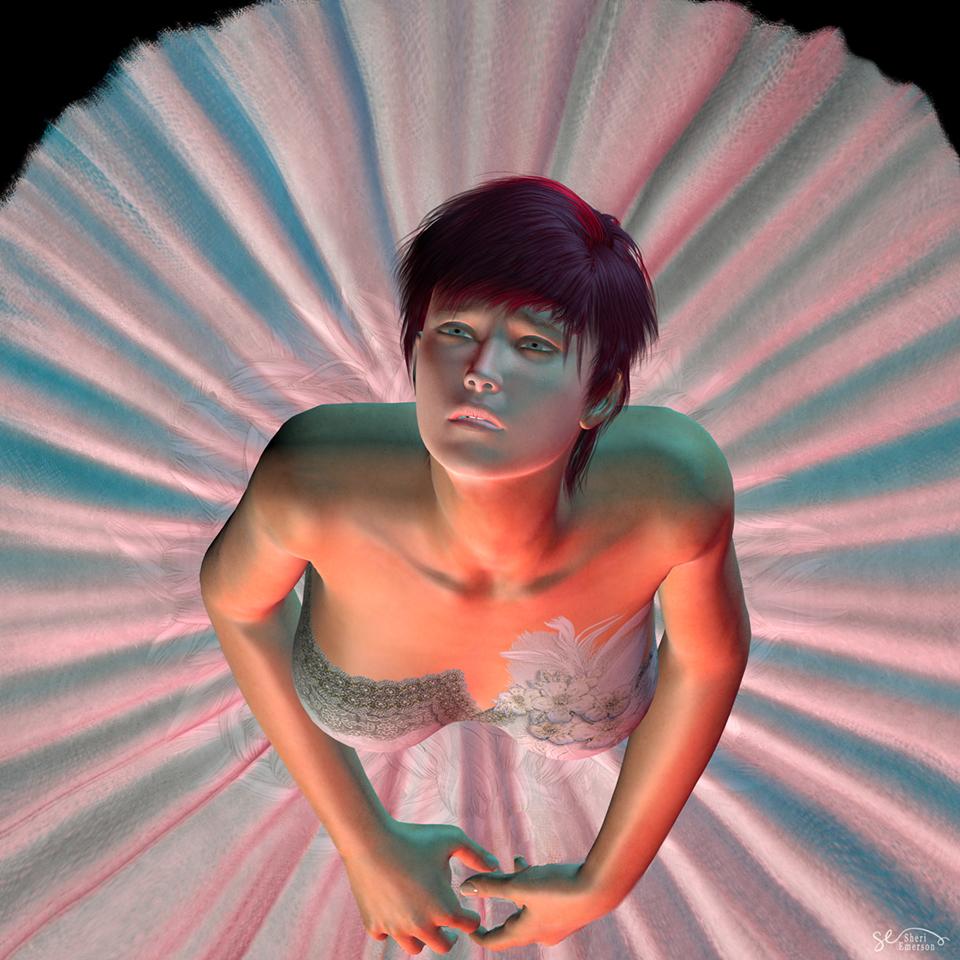
Okay, I chose the lovely Elliandra image of the wailing woman. I used Victoria 4.2, the Art of the Dance/Swan Lake ballerina tutu, and Pyrit hair. What I thought could be improved in the image was more of a sense of the drama to add to the scene and the feel of the image. By taking it overhead, I thought it would give a new perspective and focus right on her tortured face, and the addition of the colored lighting helps add to the mood. I wanted my model more sad than openly wailing. This is what I pictured when I thought about this challenge. Be kind; I literally started doing renders just a few weeks ago. Thanks!
Brilliant job on the render the expression and lighting they're really nice! I also like how the hair looks like it's flopping back as she's looking up!
The only things I might change really nit-picky but I'm OCD like that lol.
1. If you place a spotlight set to Specular Only in the light options pointing at her eyes then you'll get some more depth to them and make them really pop. I'd suggest sticking with a mid to darker grey for the light color so it doesn't blow them out on render.
2. The dress bodice could use a stronger bump or displacement addition to it, this can be done in the surface tab in Studio I would suggest using Bump as you don't have to worry about it poking into the figure. If the dress doesn't have a bump map you can always just plug the color map into the Bump Image location and fiddle with the strength!
Elli
Elli, I am overwhelmed at your kind words! Thank you for your suggestions as well. I will figure out what you are talking about, lol....I come from the Photoshop world, so I know what a bump map is, at least. I need to watch some of the videos. I kind of just jumped in, feet first. DAZ is is a huge change for me, but oh, so much fun!
Gabriela 8i personally really liked Gabriela's smaller, petite, and slightly curvy body. It was fun to work on her.
I love her petite frame. Her skin is great too, imo. She's very pretty! I'm really enjoying rendering her!
Thanks for that comparison. Didnt realize how small she wasShe's a bit on the small side, but also Victoria is super tall. According to her sales page Victoria 8 is: 6'0" (183 cm). That's quite a bit above average. The average hight of, say an American woman, is 5'4". According to Gabriela's sale's page she's: 5' 5" (165.2 cm) - so still a tad taller than average.
PoserDAZ Freebie Site - Image Creation Party 2019So one of the reasons I support the freebie link project is because I get to dig around and find things. Almost like an archeologist minus the dirt.
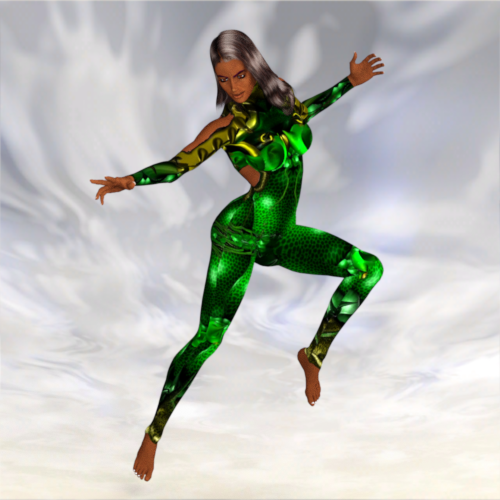
 So today I spent my time playing around with a couple of body textures by Cris Galvao for Victioria 2. I wasn't around then so it is like Christmas to me when I find these little treasures. All you get with these freebies are the files that go in the diffuse parameter and only for the body. What with there being skin exposed you are limited by what colors you can use on the head. So I thought why not see if a geo-shell would work. And sure enough it does. Now I don't have to worry about matching hand skin to face skin. And the best part I parent the geo-shell to victoria 2 and it follows anywhere she goes. Sweet! So to make this project work you will need to make a tranparency file that leaves the suit textures but removes everything else. This means I put white where I want to have something to show and black where I don't. I selected V2 and created a geometry shell. On the geo-shell I go to the surface tab and for the skinbody parameter I put the suit diffuse texture and for the opacity parameter I put the transparency file. If you want to try my example out here is the link to the body textures: http://crisgalvao.free.fr/downloadsB.html, The pose pack I used for the pose: https://poserdazfreebies.miraheze.org/wiki/7_poses_inspired_by_painting_of_Boris_Vallejo, the hair:https://poserdazfreebies.miraheze.org/wiki/Kyoko_Hair_MK-3 and the textures: https://poserdazfreebies.miraheze.org/wiki/Serenity_%26_Death. Below are two samples the first using the mat file and second using the geo-shell.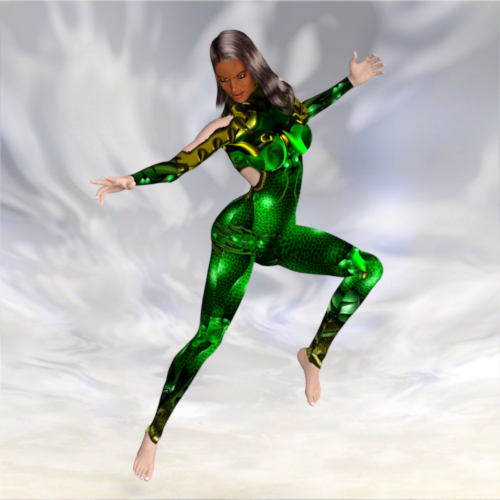
 Gabriela 8
A couple of "out of the box" renders of Gabriela 8, with different lighting and hair.
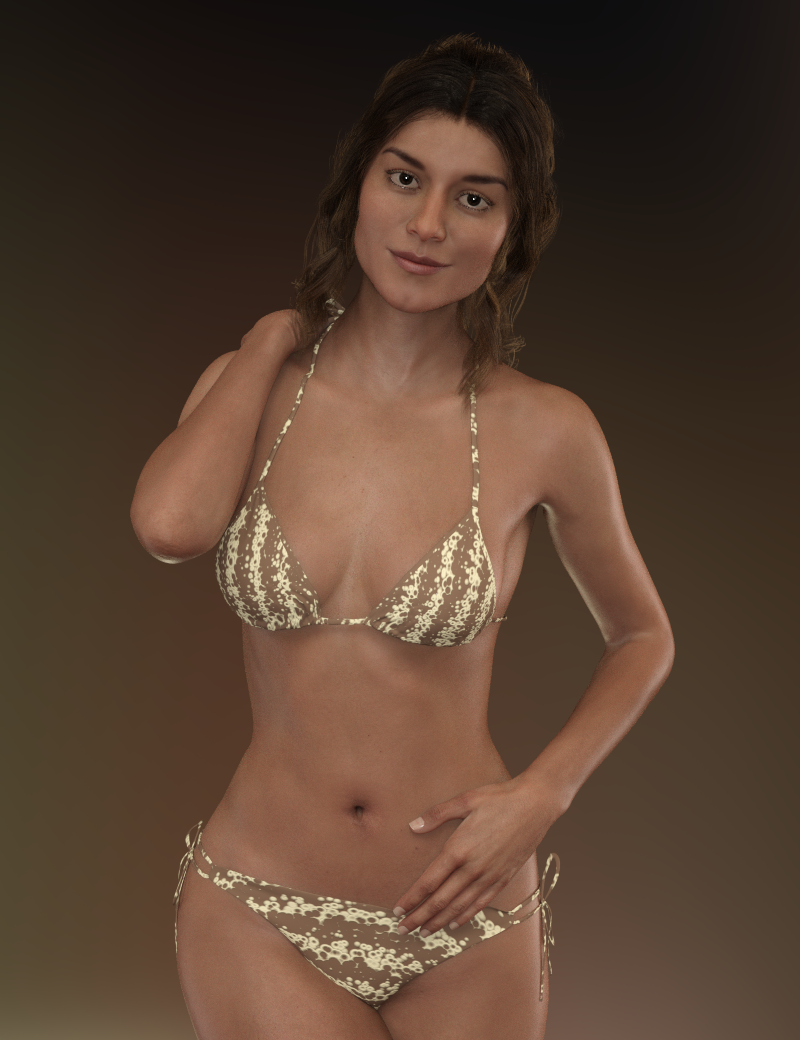
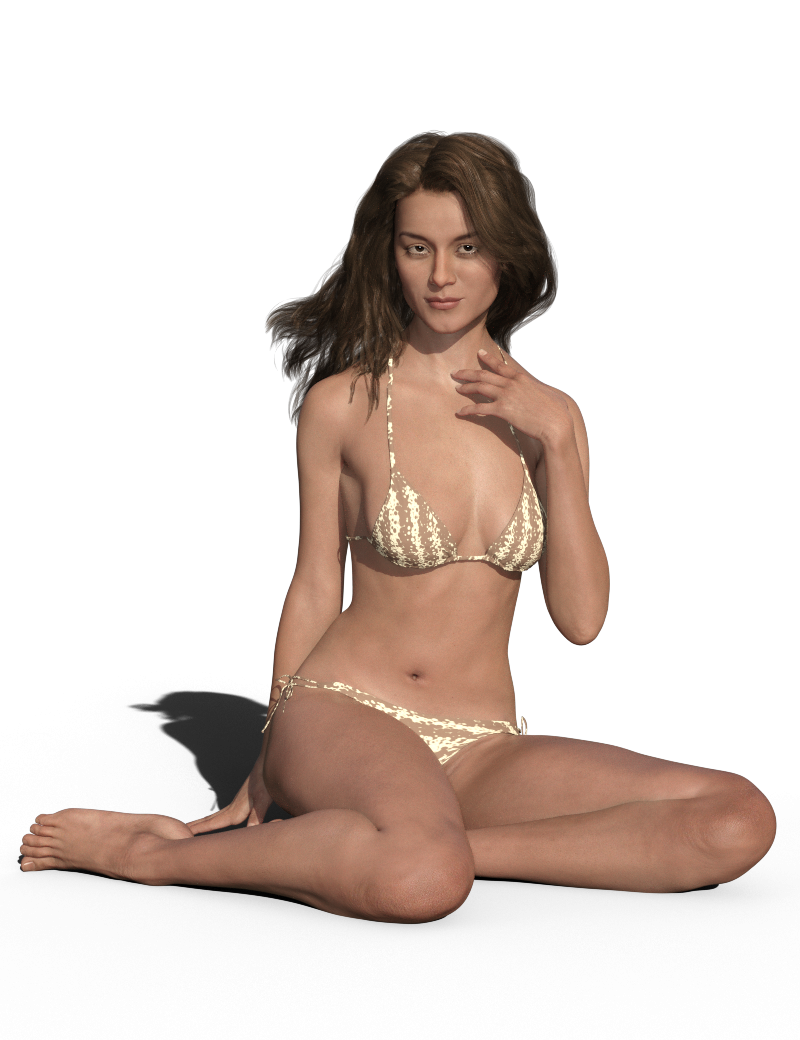
I messed up on the expression with the sitting render. I was aiming for "sultry" but with the lighting and angle it ended up looking a bit like RBF. lol
RBF looks good on her. Thank you for giving us a render where we can see what she actually looks like and for letting us see that pretty brown skin that Daz hid in the promos, or is that Altern8 magic? The promo renders (other than Grim-Red's) made me think of the line from "Come Together:" "
The above renders I posted are her "out of the box", so no Altern8. The skin tone greatly depends on the lighting, certain lighting will make her look paler and others will make her look darker - I guess that's the same for most/all figures. :) She is quite a bit darker than Victoria, and a lot more petite as well. Here's an "out of the box" render of Gabriela 8 and Victoria 8:
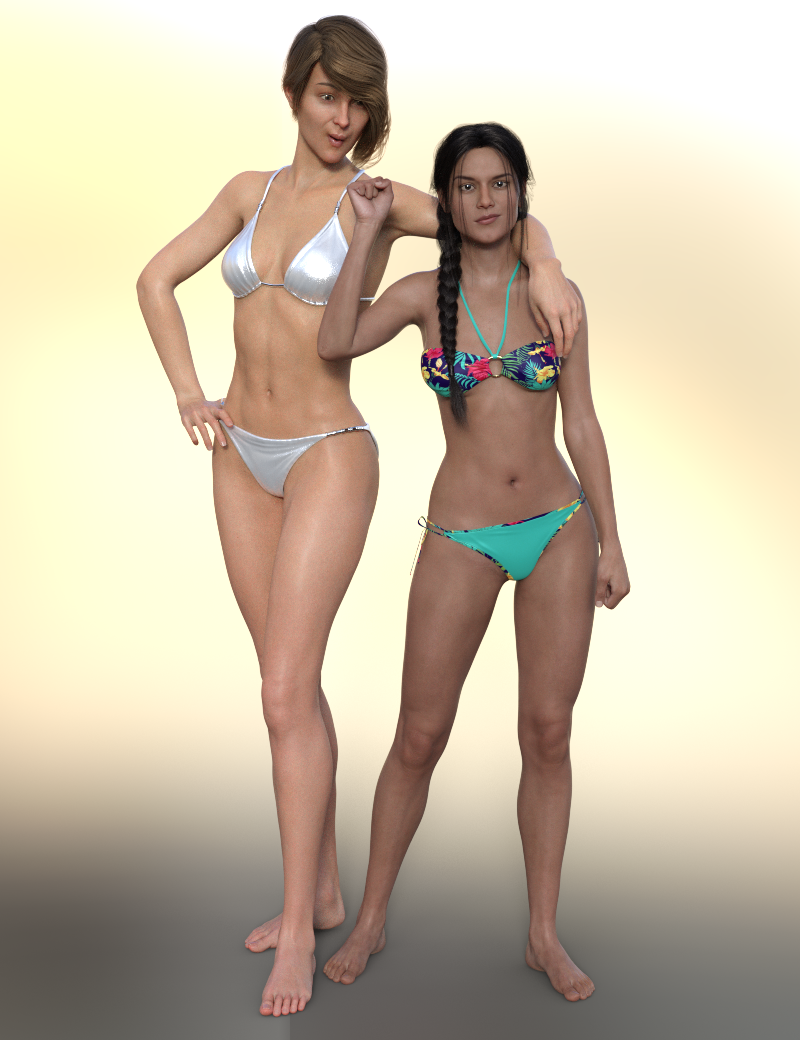
Victoria's so tall she's trying to use Gabriela as an armrest, but Gabriela is having none of it. lol
Daz 3D is part of

Connect
DAZ Productions, Inc.
7533 S Center View Ct #4664
West Jordan, UT 84084Licensing Agreement | Terms of Service | Privacy Policy | EULA
© 2026 Daz Productions Inc. All Rights Reserved.