-
Looking for Miku Miku Dance enthusiasts that like using DAZ as an MMD platform
For those that don't know, MMD users make up a massive community - it completely dwarfs DAZ and Poser user base combined probably by 100x. Many videos have tens of millons of views just on English youtube - that doesn't even count the Asian web equivalents like weibo, nicovideo. The majority of users originate from Asian countries such as Japan, S.Korea, China
Most of the MMD models are lower poly, have lower quality textures - not the same quality as typical DS assets . If you're a DS user you probably will not be interested in the models unless there is some specific reason (some specialized character designs and garments) . Or if you are willing to do some work to modify and retexture (you'd have to anyways if using DS IRAY or 3DL)
DS users would probably be more interested in motions . As mentioned above, most motions are dances, but chances are you can find anything if you look hard enough. But it can be quite difficult to find assets for English users - and Google translate doesn't always work perfectly . Some assets are buried deeply and have passwords, it's like some massive Easter egg hunt... not fun at all :(
However - It's quite difficult to transfer motions over to say, a G1/2/3/8 skeleton cleanly . Often there are problems. There are several different methods (some detailed on this forum) dealing with that. The PMX2FBX method mentioned above is probably the best one overall. But you absolutely need retargetting software such as iclone 3dx, motionbuilder, webanimate . And even with those, the motions require a lot of work to clean up. Most MMD models are anime stylized - skinny , with different bones and proportions - very different that the "muscular Michael" or "voluptuous Victoria". Beacuse of the large biomechanical differences, there are often extra problems that require attention
Blender has some MMD addons mentioned above, and you can import MMD models and VMD motions directly into blender. However, transferring them to a different model such as G1/2/3/8 cleanly within blender is still problematic . It doesn't have great retargetting tools yet (or maybe there is some 3rd party addon from the market I'm not aware of) . And getting from blender back into DS with rig and keys is problematic (and why would you want to do that? Proper HD, proper subd, JCM's - some methods cover one, but not all, you need to bring it back into DS to get everything)
There were some threads on breast jiggle. MMD has bullet physics since basically forever. PMX bases that have physics enabled, will calculate breast parameter. Because G3F/G8F have the same breast rigging (L/R Pectoral bone), you can just copy the curves over or adjust them for stronger/weaker effect . Same with any other physics enabled PMX rigged parts, such as clothing, hair etc....It's not as good as a true softbody rig - it does not calculate collisions or deformations, but it's decent, free and fast
Some of the motion tracers are quite talented (or so dedicated that they must spend months/years on a single song.) But some motions are just terrible, so YMMV. Motion tracing in MMD typically involves placing a dance choreography video on a plane and manually animating
You have to be careful with the usage and readme . Some of the authors place restrictions on certain assets and motions eg. that they cannot be used outside of MMD environment for example (ie. they don't want you using it in DS, or blender for whatever reason) , or for R18/adult purposes, or commercial usage
virtual nickel 4 yor carrara thoughts: the next levelCould there be something wrong with my installation of your Genesis 8 Female character? What are all the files and where do they go?
Here I dialed up some Victoria 8
there is only a duf file and a thumbnail, it should be under \Content\people\genesis 8 carrara beta\
and a plain black jpg for eye moisture opacity.did you transfer morphs from g8f to the clothes?
it could be a scaling issue. V8 embedded scaling in the body morph. as in there isn't a separate slider for her scaling.
PoserDAZ Freebie Site - Image Creation Party 2019Thank you!The redirect is for "She-Freak 4" with a hyphen - in case somebody searches the Wiki for that. But I edited it to redirect to "She Freak V4" instead of "Victoria 4".
Funnily enough, using the wiki search 'she-freak' finds 'she-hulk' and other entries and no 'she-freak' (adding 4 is no help) no sign of 'she-freak' or 'she freak' in the first 20 results at all*
I really don't think the '-' matters to the search, (at least as regards finding 'she freak') about the only reason to keep the 'she-freak 4' entry is to legitimise the non-uniform addressing on related items such as the 'She-Freak family poses'.
Preferentially these should probably be uniformised to the correct official product title (is it 'She-Freak' or 'She Freak'?)
* maybe it's treating the '-' as minus and applying Boolean logic as a NOT (So, 'She' but not also 'Freak'). Google and most search engines used to let you do that type of filtering until advertising took over totally.
"she-freak" finds her ... as I am used to boolean logic, I have the habit of using " " for searches with - and NOT and so on.
PoserDAZ Freebie Site - Image Creation Party 2019Thank you!The redirect is for "She-Freak 4" with a hyphen - in case somebody searches the Wiki for that. But I edited it to redirect to "She Freak V4" instead of "Victoria 4".
Funnily enough, using the wiki search 'she-freak' finds 'she-hulk' and other entries and no 'she-freak' (adding 4 is no help) no sign of 'she-freak' or 'she freak' in the first 20 results at all*
I really don't think the '-' matters to the search, (at least as regards finding 'she freak') about the only reason to keep the 'she-freak 4' entry is to legitimise the non-uniform addressing on related items such as the 'She-Freak family poses'.
Preferentially these should probably be uniformised to the correct official product title (is it 'She-Freak' or 'She Freak'?)
* maybe it's treating the '-' as minus and applying Boolean logic as a NOT (So, 'She' but not also 'Freak'). Google and most search engines used to let you do that type of filtering until advertising took over totally.
PoserDAZ Freebie Site - Image Creation Party 2019The image is visible to me too.

On the other hand: https://poserdazfreebies.miraheze.org/wiki/She_Freak_V4 is missing the image and there is no uploaded picture for She Freak ... @GafftheHorse - could you upload it?
Damn it!
I started that one, then had to reboot after an update refreshed critical s/w....
Upshot, coming in to look for she freak in order to finish, I came across
https://poserdazfreebies.miraheze.org/w/index.php?title=She-Freak_4&redirect=no
which is set to redirect to
https://poserdazfreebies.miraheze.org/wiki/Victoria_4
I thought someone had jumped in while I was recompiling my kernel, Video driver etc, not realising I had prepped a different page. So I moved onto the next without completing.
https://poserdazfreebies.miraheze.org/wiki/She_Freak_V4
Has now had it's image bestowed, but you may want to clear up this apparent duplication.
Thank you!
The redirect is for "She-Freak 4" with a hyphen - in case somebody searches the Wiki for that. But I edited it to redirect to "She Freak V4" instead of "Victoria 4".
virtual nickel 4 yor carrara thoughts: the next levelCould there be something wrong with my installation of your Genesis 8 Female character? What are all the files and where do they go?
Here I dialed up some Victoria 8
Will Michael 8's birthday be forgotten again?So, last year, Victoria 8 had a huge birthday sale. And, she's honored with another birthday sale this year!
Poor Michael 8, on the other hand, didn't even get a mention last year. Let alone a sale.
Michael 8 was released on 8/22/2017 btw, according to his Product Information page.
http://docs.daz3d.com/doku.php/public/read_me/index/45773/start
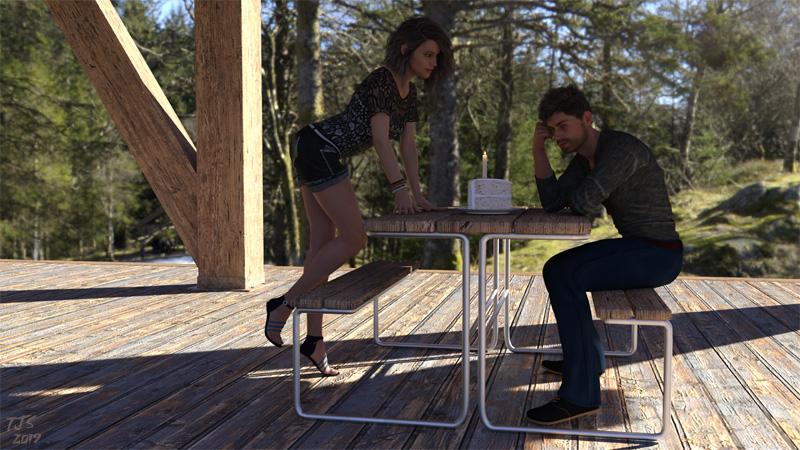
Belated BDay wishes to Mike from Vic
Anyways, even though Michael 8 sometimes is seemingly treated as the unwanted stepchild that some people may forget about at times, I still remember when his birthday is!
Looking forward to your second birthday Michael 8! And if you get overlooked again, well I won't forget you!
Well, we the fans of Michael 8 can certainly make a big hullaballoo about his birthday. He may not get the big flashy birthday Victoria gets from those in the Daz Ivory Tower, but there is no reason why we can't celebrate it ourselves.....with punch and pie? (OK, this is not going as well as I expected)
I was just going through a bunch of G8 starter bundles and marking them 'hide this product from listings' since I already have the associated Pro Bundles, and I noticed M8, which made me think of this thread.
1 more day until Michael 8's Birthday! I'm pretty sure I have a pie or two in my 3D Library... may need to track down a punch bowl though!
Edit: I DO have a punch bowl! One was included in this product:
https://www.daz3d.com/dance-party-room
A copule of other products have them too, such as the High School Prom props. Just google 'Punch Bowl Daz3D' for options if you want to double check real quick if you have one. A product search inside of Daz may do the trick too, if you have Daz up and running.
Another notable find, if you are looking for a freebie:
http://www.ageofarmour.com/3d/free/Christmas_2010.html
I wasn't aware that AoA had his/her own website...
Can someone do more renders of RY Adeline?If you own RY Adeline, can you do more renders of her with different hairstyles, preferably blonde hair with tan skin? Like a beach blonde. Then have her do various facial expressions. That would be a big help thanks!
https://www.daz3d.com/ry-adeline-for-victoria-8
 Anagenessis for Genesis 3
First time I double-clicked the shader which produced the above artifacts onto Victoria 7. However, the rendered image looked OK. Second time round I right-clicked the shader and chose merge to scene but the results were the same.I'm curious, how did you apply the Anagenesis shader to the character?
Face morphs from promo picsThe promo girl for the Sultry Bun Hair is a mix of Zoe and Charlotte explained by Hellboy here: https://www.daz3d.com/forums/discussion/comment/4499946/#Comment_4499946
I think promo girl for Nina Hair is probably Cathy: https://www.daz3d.com/cathy-hd-for-victoria-7 with Danny's textures: https://www.daz3d.com/p3d-danny-for-genesis-3-and-8-female (that Nina hair girl had been discussed on the forum before and I'm pretty sure that was the popular "consensus" was Cathy's morph with Danny's mats, if I remember correctly).
I think the promo girl for Giliel Hair might be Karyssa: https://www.daz3d.com/karyssa-8
And as Quixotry said, the Fallow Hair girl is probably the one discussed here: https://www.daz3d.com/forums/discussion/328541/who-is-the-beautiful-girl-used-by-goldtassel-in-promo-pics-that-looks-like-felicity-jones/p1
Male Anatomy Bundle ExperienceStart with reading this: http://docs.daz3d.com/doku.php/public/read_me/index/10286/start/, and in particular,
-
To conform M4 to Skeleton for DAZ Studio and Poser
-
Load the M4 Skeleton
-
With the Skeleton Selected apply the M4 Conform Pose
-
Load M4
-
In Poser Turn off IK for M4
-
-
With M4 selected apply the M4 Conform Pose
-
Conform M4 to the Skeleton:
-
“Fit To” in Studio
-
Conform To“ in Poser
-
-
In Poser Only, you will have to reapply the M4 Conform Pose to M4
and http://docs.daz3d.com/doku.php/public/read_me/index/10900/start/ and
-
Conforming:
-
When used with the M4 Skeleton, the Organs should be conformed to it.
-
When also using V4:
-
The Organs and Victoria 4 should be conformed to the V4 skeleton as normal.
The key thing is that everything is conformed to the skeleton and not the skeleton to M4 and then the Skeleton is posed.3D Art Freebie Challenge-August 2019-"Best Friends Forever" -Main Thread OnlyYour Move 2 -NAE
I did this image just before my hard drive crashed in 2016. Kind of fits the theme.

Freebies
InaneGlory's Simple Soft Lighting - http://inaneglory.deviantart.com/art/Simple-Soft-Lighting-Freebie-193115008
Andi3d Rocks - http://www.mortemvetus.com/freestuff_dl.php?file_id=50
V3RR Sci Classics Second Skins - http://www.sharecg.com/v/52117/gallery/21/DAZ-Studio/V3RR-Sci-Classics-Second-Skins
Cyber Boots for Victoria - http://www.renderosity.com/mod/freestuff/details.php?item_id=10222
Starry Night for SkyDome - http://www.sharecg.com/v/12914/browse/11/Poser/Starry-Night-for-SkyDome
25+ poses for Antares' & Virus' Alien Drone by en. - https://web.archive.org/web/20070127092424/http://www.planit3d.com/source/poser/aad_poses.zip (direct link)
Alien Drone - https://web.archive.org/web/20070121112025/http://www.planit3d.com/source/poser/aliendrone.zip (direct link)
Salashin Environments - https://web.archive.org/web/20120418133923/http://blackraven3d.com/ (Click on the Full set if you want all of it)
Sky Fern for DS - http://www.sharecg.com/v/61211/browse/21/DAZ-Studio/Sky-Fern-for-DS
Paid fors and no longer available:
This render used Victoria 3 and her morph packs, head and body.
I used Easy Environments Top of the World - http://www.daz3d.com/easy-environments-top-of-the-world for the ground.
Some of the freebies, jewelry, plants are from Dreampaint, who's site is now gone. V3's morph and texture are from Cin-Designs and I used their SciFi Princess for V3. Chess Set By Fisty - was a 2009 Christmas gift from the PA.
Anagenessis for Genesis 3Can anybody tell me what Ive done wrong?
It renders OK I think but why does this happen when I apply the material to Victoria 7
I will be extremely grateful for some help to resolve this issue
Thank you :)
Skin Builder 8 Merchant Resource for Genesis 8 Female (Commercial)I have a stupid question. I loaded the Victoria 8 base character, and put the Summer for Victoria 7 skin on it. With the exception of having to mess around with some of the surface color settings to get everything to match, and having to use different eye color textures from one of the G8 characters(for some reason, the iris & sclera showed a bright white outline on the border between them), everything matches up. Would Skinbuilder8 work on this skin, being that its a Victoria 7 skin base on a Victoria 8 base? I'm just looking to add some eyeshadow & liner with it.
Daz Studio Pro BETA - version 4.12.2.60! (*UPDATED*)Not sure if anyone brought it up yet, but, Victoria 8 is rendering with black sclera when loading her into a scene saved previously in 4.11. No amount of fiddling around fixes it except completely eliminating the cutout opacity. That could kinda work for distant shots, but for any camera 3 feet away, floating irises can look weird. I went through every setting in surfaces. Every. One... And applying different material after loading in even a basic genesis 8 with V8 material doesn't fix it. So far only tested with a 4.11 scene. I'll see if it does it after setting up lights and stuff in a fresh new 4.12 scene.Help Please - Eyes Rendering Black or Pixilated
Unfortunately, this doesn't work for me. Were you using Victoria 8 and daz 4.12 beta, by any chance? Using any of her material, and loading her in from a scene set up in 4.11 does this every time. Rendering her in 4.11 is fine, but I've been doing scenes in 4.11 and rendering them in 4.12 because of the iray build, but even loading a fresh Victoria 8 into a 4.11 scene has this effect. Oh, and for future reference, basically any setting with a number to it can have its parameters turned off. So for a parameter that has its limits between 1 and 2, click the little gear in its box and it brings up a dialog. Theres a checkbox for Use Limits. Uncheck that and you can set it for anything....I'm having this black eye issue from time to time. I have read countless forum threads and tried everything...
I managed to fix the eyes, not by figuring out what went wrong mind you. But I figured I'd leave this here in case it helps anyone. I saved the pose preset, shape preset, etc, loaded the figure in as a doppleganger so to speak, and applied the presets to it, and then deleted the original. The doppleganger's eyes are fine, so clearly I must have clicked something surface-wise on the original that screwed her eyes up. Either that or some kind of glitch.
Looking for this modelshe looks like Raiya's Elysa.
Gabriela 8A couple of "out of the box" renders of Gabriela 8, with different lighting and hair.
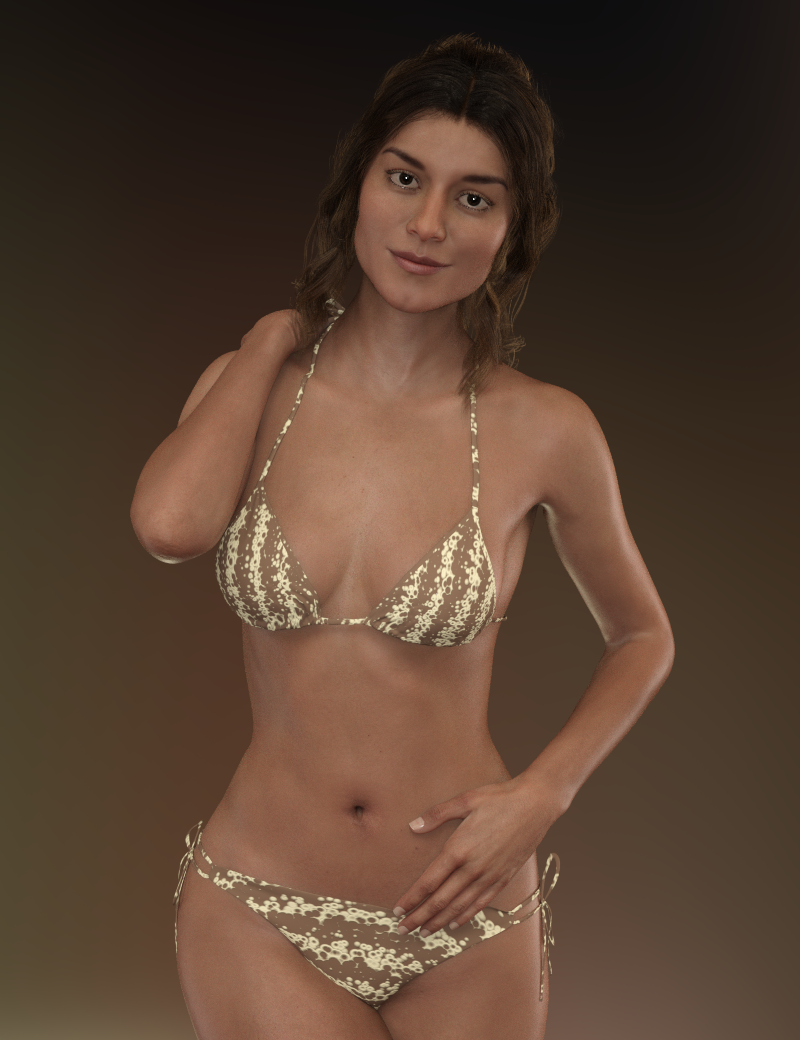
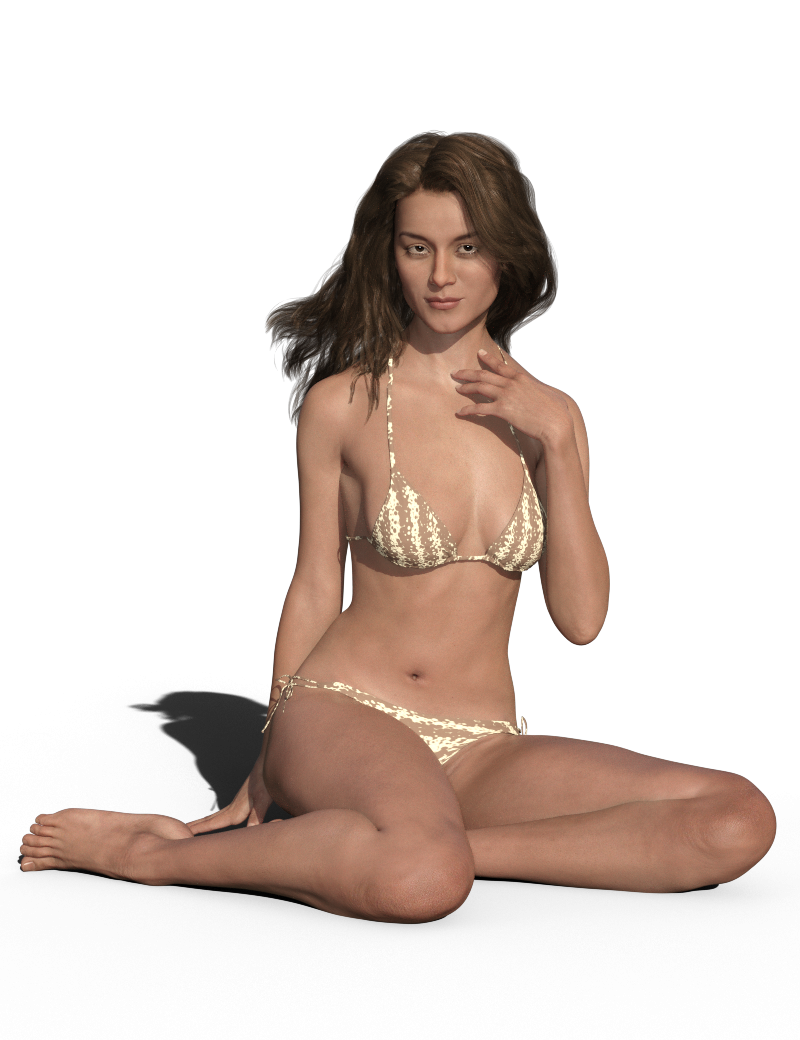
I messed up on the expression with the sitting render. I was aiming for "sultry" but with the lighting and angle it ended up looking a bit like RBF. lol
RBF looks good on her. Thank you for giving us a render where we can see what she actually looks like and for letting us see that pretty brown skin that Daz hid in the promos, or is that Altern8 magic? The promo renders (other than Grim-Red's) made me think of the line from "Come Together:" "
The above renders I posted are her "out of the box", so no Altern8. The skin tone greatly depends on the lighting, certain lighting will make her look paler and others will make her look darker - I guess that's the same for most/all figures. :) She is quite a bit darker than Victoria, and a lot more petite as well. Here's an "out of the box" render of Gabriela 8 and Victoria 8:
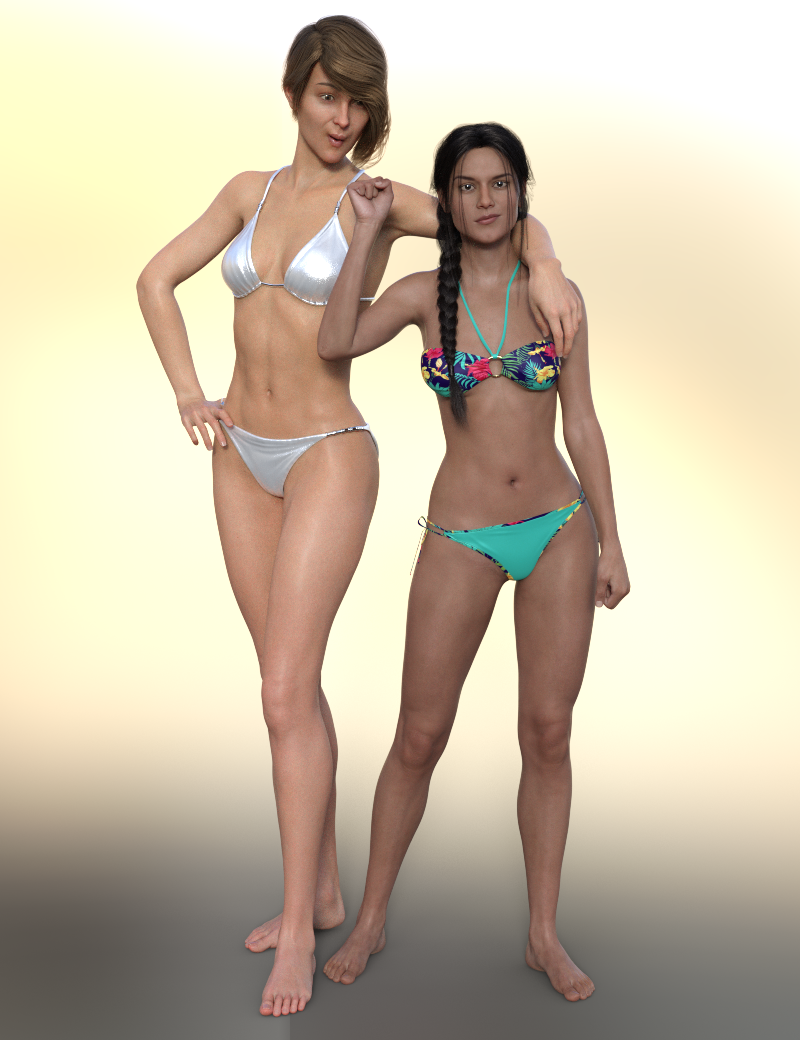
Victoria's so tall she's trying to use Gabriela as an armrest, but Gabriela is having none of it. lol
Would have loved to see this in the official Daz promo. Funny & Cute and clearly shows the contrast. This is kind of image that makes me see the potential and excited to buy a product. Nice one Diva.

That's how I feel about a lot of promo images: they're so focused on sheer aesthetics that they don't actually tell you very much about the actual product.
Gabriela 8A couple of "out of the box" renders of Gabriela 8, with different lighting and hair.
I messed up on the expression with the sitting render. I was aiming for "sultry" but with the lighting and angle it ended up looking a bit like RBF. lol
RBF looks good on her. Thank you for giving us a render where we can see what she actually looks like and for letting us see that pretty brown skin that Daz hid in the promos, or is that Altern8 magic? The promo renders (other than Grim-Red's) made me think of the line from "Come Together:" "
The above renders I posted are her "out of the box", so no Altern8. The skin tone greatly depends on the lighting, certain lighting will make her look paler and others will make her look darker - I guess that's the same for most/all figures. :) She is quite a bit darker than Victoria, and a lot more petite as well. Here's an "out of the box" render of Gabriela 8 and Victoria 8:
Victoria's so tall she's trying to use Gabriela as an armrest, but Gabriela is having none of it. lol
Would have loved to see this in the official Daz promo. Funny & Cute and clearly shows the contrast. This is kind of image that makes me see the potential and excited to buy a product. Nice one Diva.
Carrara Challenge 48 - transcendent or immanent WIP threadThanks Diomede!
Immanence in Pearls

"Beauty is not something imposed but something immanent." Anthony Burgess
Victoria 1 in Carrara, Fotosketcher, and PSE. The is a modification (mostly in the modeling room) of the V1 character from my Beaver Queen render.
Funny, this started out as a PR render, and ended up NPR. The Larson cartoon started NPR, but ended up PR.
I don't remember all the props, but there aren't many anyway. The flowers were Travelers Naturals Jungle pack 2 (I think). Other items are Crossover bikini and Xanadu hair.
Daz 3D is part of

Connect
DAZ Productions, Inc.
7533 S Center View Ct #4664
West Jordan, UT 84084Licensing Agreement | Terms of Service | Privacy Policy | EULA
© 2026 Daz Productions Inc. All Rights Reserved.