-
How to remove border lines between body parts In filament view?FilaToon / Cell shaded rendering with Filament
Anime G8F!

Just cause I wanted to see if it was hard to do, and it seems the anime figure is lacking in shapes...I made an Anime G8F (which is just the G9 Anime Toon character head on G8F's body). Since I got a TON of G8 and G3 stuff and investment, its always good to recycle, right?
A little tricky since Filament does not like visibility and transparency, but @Mada to the rescue! Conditional Grafts in Daz Studio You can make a conditional graft to hide the geometry of everything but the head of G9F, and then do the same for G8F, but hide her head, and a little Dr. Frankenstein aligning the head and body, and then parenting G9F toon to G8F head, and....BAM, you got Anime G8F.
Then the textures. I basically just changed all skin to Shader basic presets DzDefault/dzMatte and then picked a nice skin tone and added a plain white image to the base color, so the LIE still worked on the head, and hit it with the Filatoon skin shader. Of course the body is G8F and G9F textures dont align, so I lost the belly button, and other "redder" areas on the body...but not hard to paint some blurry red dots on PNG's if needed.Again, just a test, but now I can play with the character much more, since it is basically Anime G8F! It's a great anime head, well done Daz!
 Filatoon Shadow Casting & Render?
The post by theathanparable in this thread is very helpful
https://www.daz3d.com/forums/discussion/704931/filatoon-cell-shaded-rendering-with-filament/p21
Filatoon Shadow Casting & Render?Yes, certainly. The settings can be simple:
1) Shadow Caster: turn on Cast Shadows on its surface with Filatoon shader; Shadow Receiver: turn on Receive Shadows... Tweak shader settings related to shadow, like Shadow Smooth, MatCap...
2) Set Shadow Type on source of Lights: Distance Light, Spotlights, etc. Tweak Spread Angle of Spotlights to soften shadows.
3) Tweak settings related to shadow in Filament Draw Options, as well as Tone Mapping and Color Grading, etc.Then experiment more combos to get the results that satisfy you.
Filatoon Shadow Casting & Render?Is it possible to make filatoon objects & characters cast shadows & will they render? Is there a setting, technique or trick to achieve shadows with filament render engine? I love the look of & the possibilities the filatoon/PBR offers. But it would really suck if shadows go out the window with filament engine.MimicMolly's Renders & WIPsAnother surprisingly quick edit before I go into "hibernation." Probably not, because I relax with art. DAZ Galleries link [x].
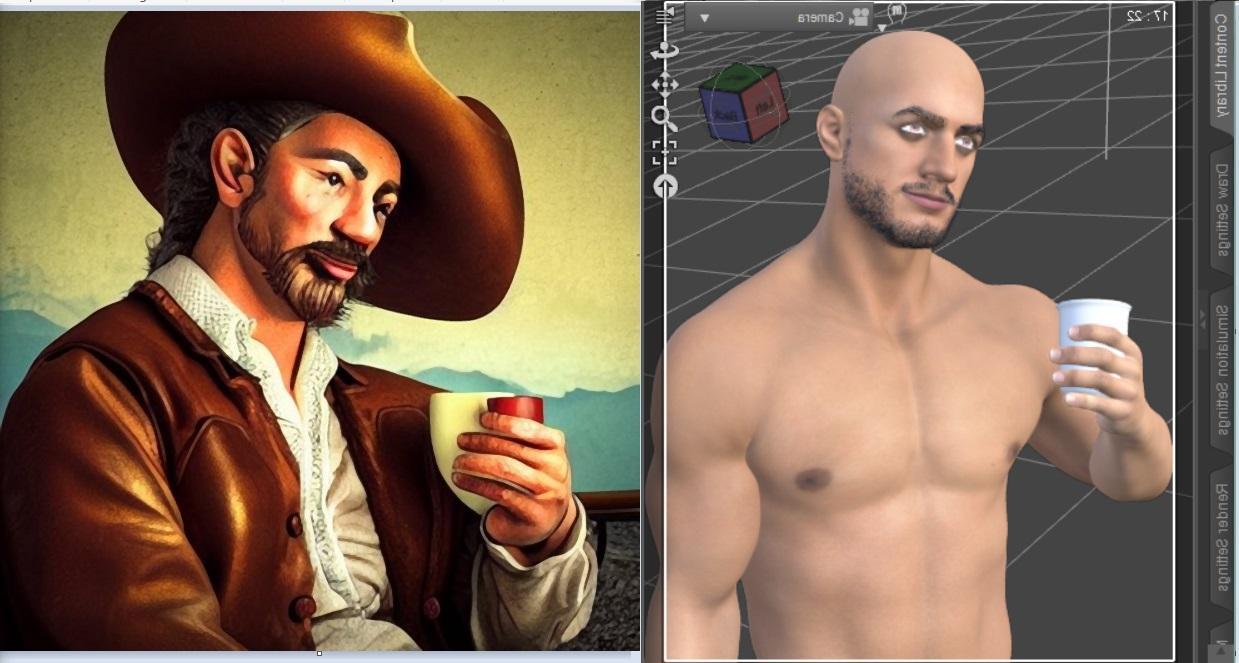
This is another old AI pic that I've been wanting to fix but never got a chance until now.

Since I believe I need to show off "presentable" work, here is the AI and the screenshot of the Filament render I used. As you can see in the screenshot, I had rendered it mirrored because it's easier to match shadows and highlights the default Filatoon enviroment lighting gives, this way. I did a bunch of "Curves" and Dodge/Burn to match the painterly coloring of the AI character.
 Visible in Renderer with Filament renders
Filament is a Viewport drawstyle rather than a full renderer, so that is why the settings is ignored.
Using the methods shown in these scripts http://docs.daz3d.com/doku.php/public/software/dazstudio/4/referenceguide/scripting/api_reference/samples/start#elements it may be possible to link the non-animating visible in Viewport property to an animatable property to make the visibility controllable.
Visible in Renderer with Filament rendersHi folks,
Any idea why the "Visible in Render" parameter is ignored when rendering an animation with Engine set to Viewport and the Viewport on Filament?
Not being able to animate the Visible in Viewport parameter as a workaround seems to make it impossible to render Filament animations with dynamic visibility which...isn't great.
Does DAZ3d has something like UE render engine?James said:
I guess, what I'm looking for is fake iray, like evvee.
--------------
What? render In filament? really? It looks bad.
I mean for viewport that's ok. But for end result?
You may just need good shaders when rendering with filament in Viewport. I only played with Filatoon shaders which was great. But I don't know other shaders with it.
For PR and NPR, I only render with Iray Engine.
However, if you like Eevee, you can send Daz assets to Blender to render, by using for instance, Diffeomorphic Daz Importer.... or if you play UE, send Daz assets there with DTU bridge.
Does DAZ3d has something like UE render engine?I guess, what I'm looking for is fake iray, like evvee.
--------------
What? render In filament? really? It looks bad.
I mean for viewport that's ok. But for end result?
Does DAZ3d has something like UE render engine?Sort of real-time engine ? Nope... there's no such engine in DS. What do you want to do ?
Some folks make animations with filament drawstyle becaust if has faster performance in both viewport and rendering.
FilaToon / Cell shaded rendering with Filamentbarbult said:
Ride Envy
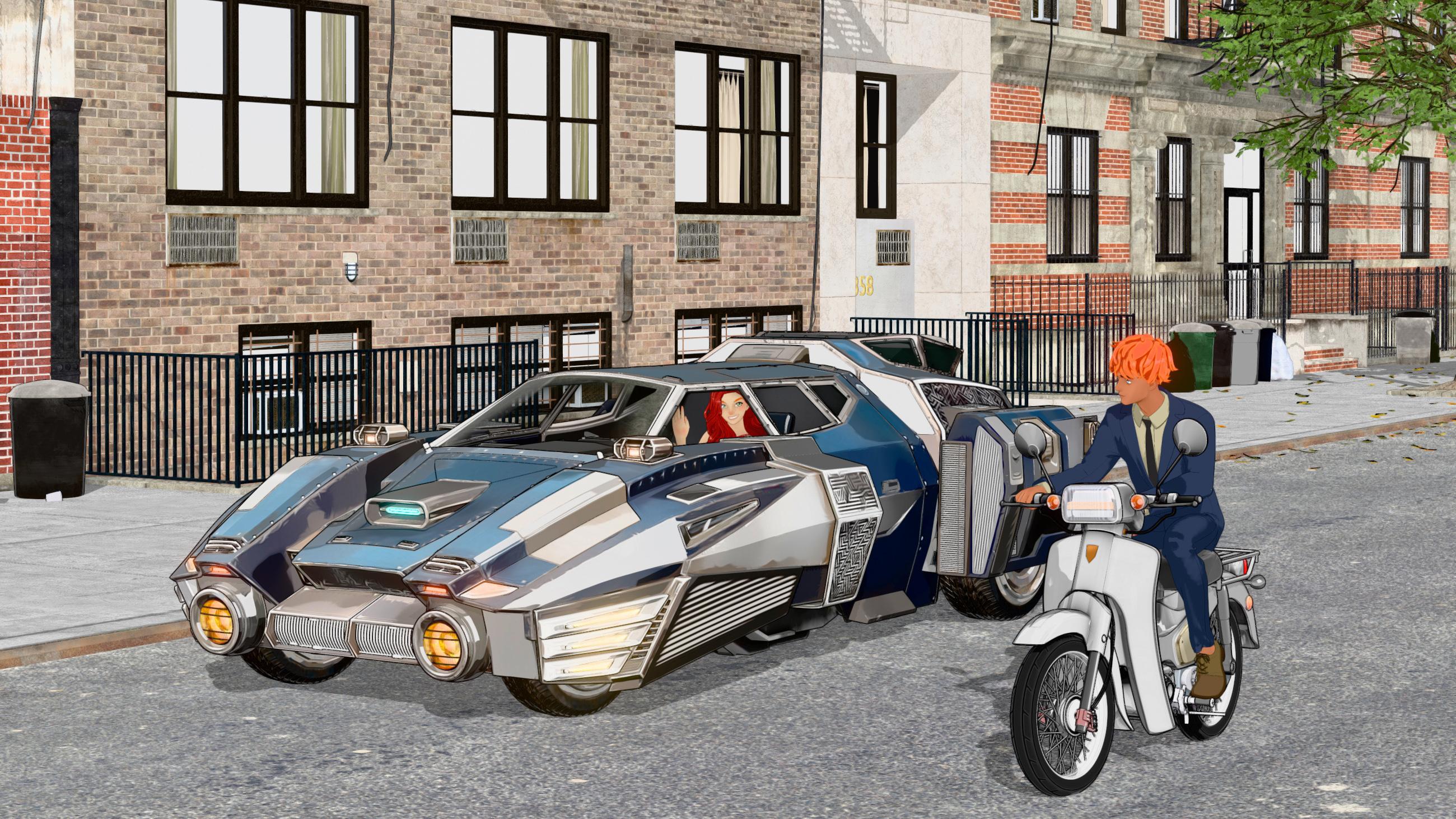
Lighting is tricky with Filament, imo, but you're nailing it! Nicely done!
FilaToon / Cell shaded rendering with FilamentGRFK DSGN Unlimited said:
3Diva said:
GRFK DSGN Unlimited said:
Can someone please point me in the right direction for tutorials about Bloom and Emissives related to FilaToon? I may have some uses for the effects but I'm unclear as to how they work or setting them up.
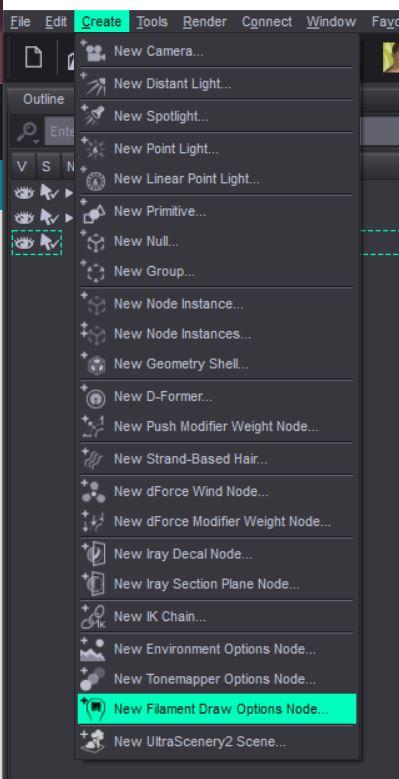
You'll need a Filament Draw Options Node in the scene (you can add it by going to "Create" >> "New Filamant Draw Options Node").
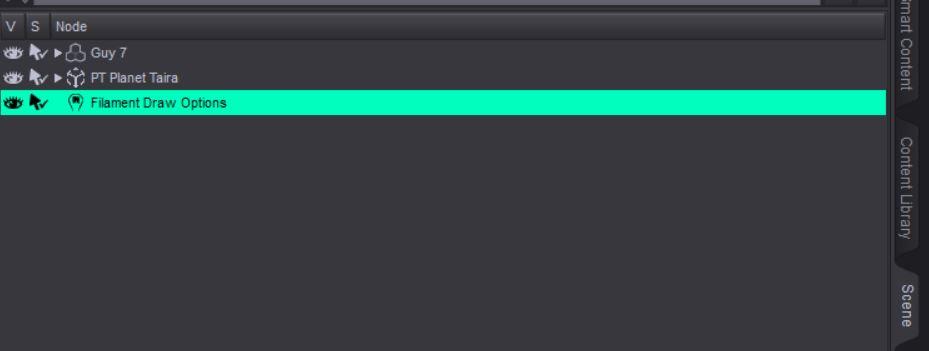
Then you'll need to select the Draw Options Node in the Scene Tab...
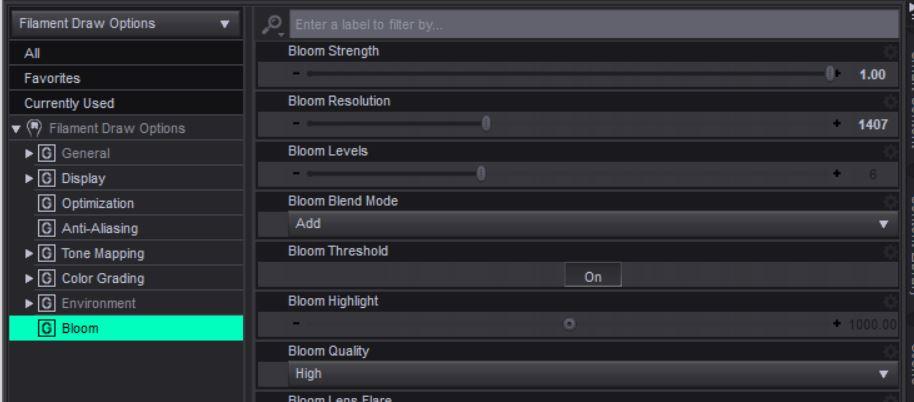
...then go to the Parameters Tab and select "Bloom" and turn the Bloom Strength up and adjust those settings to your liking.
You'll also need to make sure there is an emissive surface in the scene as well (though sometimes even just light/white surfaces will show up in blooms).
That's helpful, but I was looking for how to set up an emissive material so that it shows up in a bloom. I think I understand it but I feel like I may be missing key ingredients in order to get it to work properly. I have all of the things you mentioned above in my scene.
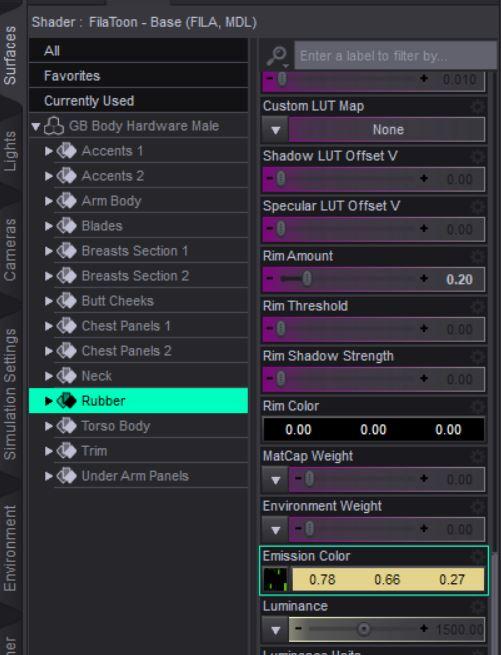
Select the item in the scene tab that you want to glow and then select it's surface in the surfaces tab. Find where it says "Emission Color" and make that anything other than black. Then increase the "Luminance" until it glows. Also make sure you're using the latest or second to the latest version of Daz Studio, as I think that blooms in Filament are a relatively new thing and older versions won't do it.
FilaToon / Cell shaded rendering with Filament3Diva said:
GRFK DSGN Unlimited said:
Can someone please point me in the right direction for tutorials about Bloom and Emissives related to FilaToon? I may have some uses for the effects but I'm unclear as to how they work or setting them up.
You'll need a Filament Draw Options Node in the scene (you can add it by going to "Create" >> "New Filamant Draw Options Node").
Then you'll need to select the Draw Options Node in the Scene Tab...
...then go to the Parameters Tab and select "Bloom" and turn the Bloom Strength up and adjust those settings to your liking.
You'll also need to make sure there is an emissive surface in the scene as well (though sometimes even just light/white surfaces will show up in blooms).
That's helpful, but I was looking for how to set up an emissive material so that it shows up in a bloom. I think I understand it but I feel like I may be missing key ingredients in order to get it to work properly. I have all of the things you mentioned above in my scene.
FilaToon / Cell shaded rendering with FilamentRichard Haseltine said:
barbult said:
3Diva said:
Oso3D said:
I'm working on some Iray/FilaToon products and man, when I have to do Iray promos I'm like... bleeeeeh.
Takes so looooooong. ;)
I know, right? I've been working with Filament and Filatoon for the majority of my renders lately and when I'm trying to render in Iray it's like 'oh man, I forgot how slow this was'. lol Do be fair, it's much faster than 3Delight (at least the few times I've tried to use 3Delight I noticed it was much slower than Iray). But you really can't beat one second renders. lol Filament and Filatoon is so awesome!
I'm glad Daz incorporated it before they started making new stuff like the Auto Save be Premier only.
It was about the same time as, or even a bit after. Auto-save may be Premier exclusive, but some of the other new stuff is Premier-preview - sugesting that it will be for all once released.
I don't want Daz Studio to become essentially subscription software, by making new features Premier only. So I am glad to hear that at least some features will be released to all (maybe).
FilaToon / Cell shaded rendering with Filamentbarbult said:
3Diva said:
Oso3D said:
I'm working on some Iray/FilaToon products and man, when I have to do Iray promos I'm like... bleeeeeh.
Takes so looooooong. ;)
I know, right? I've been working with Filament and Filatoon for the majority of my renders lately and when I'm trying to render in Iray it's like 'oh man, I forgot how slow this was'. lol Do be fair, it's much faster than 3Delight (at least the few times I've tried to use 3Delight I noticed it was much slower than Iray). But you really can't beat one second renders. lol Filament and Filatoon is so awesome!
I'm glad Daz incorporated it before they started making new stuff like the Auto Save be Premier only.
It was about the same time as, or even a bit after. Auto-save may be Premier exclusive, but some of the other new stuff is Premier-preview - sugesting that it will be for all once released.
FilaToon / Cell shaded rendering with FilamentGRFK DSGN Unlimited said:
Can someone please point me in the right direction for tutorials about Bloom and Emissives related to FilaToon? I may have some uses for the effects but I'm unclear as to how they work or setting them up.
You'll need a Filament Draw Options Node in the scene (you can add it by going to "Create" >> "New Filamant Draw Options Node").
Then you'll need to select the Draw Options Node in the Scene Tab...
...then go to the Parameters Tab and select "Bloom" and turn the Bloom Strength up and adjust those settings to your liking.
You'll also need to make sure there is an emissive surface in the scene as well (though sometimes even just light/white surfaces will show up in blooms).
FilaToon / Cell shaded rendering with Filament3Diva said:
Oso3D said:
I'm working on some Iray/FilaToon products and man, when I have to do Iray promos I'm like... bleeeeeh.
Takes so looooooong. ;)
I know, right? I've been working with Filament and Filatoon for the majority of my renders lately and when I'm trying to render in Iray it's like 'oh man, I forgot how slow this was'. lol Do be fair, it's much faster than 3Delight (at least the few times I've tried to use 3Delight I noticed it was much slower than Iray). But you really can't beat one second renders. lol Filament and Filatoon is so awesome!
I'm glad Daz incorporated it before they started making new stuff like the Auto Save be Premier only.
FilaToon / Cell shaded rendering with FilamentOso3D said:
I'm working on some Iray/FilaToon products and man, when I have to do Iray promos I'm like... bleeeeeh.
Takes so looooooong. ;)
I know, right? I've been working with Filament and Filatoon for the majority of my renders lately and when I'm trying to render in Iray it's like 'oh man, I forgot how slow this was'. lol Do be fair, it's much faster than 3Delight (at least the few times I've tried to use 3Delight I noticed it was much slower than Iray). But you really can't beat one second renders. lol Filament and Filatoon is so awesome!
super-sample option for filament in viewport(s)That is what super sampling is and it is a common technique in many games that allow you to render the game in 200% resolution (for example) and then it is scaled down to your monitor resolution. You can find details via google.
This is the best way to achieve perfect anti-aliasing compared to other methods, but it is the most gpu intensive also. In older games, or games with lightweight graphics it often is not issue if you have a modern card.
filament is also so lightweight i dont think it would be an issue.tldr, the tech itself is very common in many applications and games. Whether filament or daz could do it, is another question.
(also Nvidia supports this even on driver level, called Dynamic Super Resolution or DSR, but for desktop apps it often means ui's get scaled wrong, so its mostly for games)
https://en.wikipedia.org/wiki/Spatial_anti-aliasing#Super_sampling_/_full-scene_anti-aliasing
Full-scene anti-aliasing by super-sampling usually means that each full frame is rendered at double (2x) or quadruple (4x) the display resolution, and then down-sampled
Daz 3D is part of

Connect
DAZ Productions, Inc.
7533 S Center View Ct #4664
West Jordan, UT 84084Licensing Agreement | Terms of Service | Privacy Policy | EULA
© 2026 Daz Productions Inc. All Rights Reserved.