-
Is the new Iray Uber Shader backwards compatible?
Hello. Just a quick question. Is the new Iray Uber Shader something that comes with the named models only, or is it available for every DAZ user?
Also, is it limited to only Genesis 8 models, or can it be applied to older ones as well, such as VIctoria 7? If so, then how do we apply it?
Improved Iray Uber ShaderHi. Just a quick question. I'm a DAZ newbie. Is the new Iray Uber Shader compatible with Genesis 3 models, more specifically Victoria 7? Is it something you can apply to any model, or is it only possible with Genesis 8?
The following files could not be found........Everytime I load Genesis 3 Female and Victoria 7 or character related products I receive the following error:
Missing Files
The following files could not be found:
scenes/vivienne morphs.duf
I already have a character installed with the name of "Vivienne" by Cheribut so I'm assuming it must be some other character by the same name that's causing the problem?????
Please can someone help me to resolve this issue as it's fast becoming a reet pain in the bum

Thank you all in anticipation!
Karen
MMX and Sloshwerks SBH shaders[ EDIT: I have corrected some of my misunderstandings of Slosh's shader work below. ]
Based off a discussion in the Iray Shaders for Strand Based Hair from MMX thread, I started doing some testing with MMX Blended Dual Lobe Hair Shader Toolkit for Iray by @Mattymanx and ColorWerks Extreme: Hair Texture Blending for Iray and dForce Hair by @Slosh. I thought it was only fair to both vendors that I post this as a separate thread so they both get "credit" in the thread title. :) You can see the original thread for some other tests that L'Adair did as well.
Test Setup
For my testing, I chose PhilW's Femme Fatale Hair for G8F. I wanted to use a hair that had some curl and shape to it to better show how the highlights play within the hair. I'm not going to post all of the various options I tried, just 3 that kind of provide some side-by-side views. I put the hair on Victoria 8, but I removed a lot of detail from her skin shader because I didn't need a realistic figure, I just needed the hair to render well when placed on a human. I lit the scene with one of Colm Jackson's PRO-Studio HDR Lighting System HDRIs. I use these a lot for "character setup" scenes because they provide very nice even light with just enough contrast to be interesting.
Three Big Caveats
First, let's realize that "under the hood" the MMX shader uses the Dual Lobe Shader that comes with the latest versions of Daz Studio. For that reason, just like with a shader that is based off the Iray Uber Shader, the shader can't really do anything that the base shader isn't designed to do.
Second, Slosh did write a custom shader that allows the hair blending to be used for both transmapped and strand based hair products. So, in a full "apples to apples" comparison, the two products aren't really exactly the same which plays into some of my reviews of them below.
Third, as I stated in the original thread that motivated these tests, I have some experience in trying to make shader code designed for strand based hair work for transmapped hair. Even with the custom RSL code I was writing, trying to get the shader to treat a ribbon of geometry as if it were actually a cluster of hair strands was extremely difficult. So, while the MMX shader might work for transmapped hair and may even provide some good results, judging them based on their usefulness for that would be like using a wrench to drive nails. It might work, but the tools were made for different problems.
Too Long, Didn't Read Summary
I'm breaking the "rules" by giving my summary first. :) Both products bring something different to the table and will prove useful depending on exactly what you're trying to accomplish.
ColorWerks Extreme (CWX) is probably the easier package to use overall. Slosh has done a nice job providing a straightforward interface and a custom shader which makes blending hair colors easier. You select a base color, an optional color to blend with it, and a mask to use between them. There is some flexibilty as well because you can play with the blending modes, etc. Because this isn't based on the Dual Lobe shader, CWX is also going to work better for transmapped hair. When used on SBH, the implementation adds the shader code without destroying any settings for SBH/dForce hair which is why it focuses on color and less on the other aspects of those hair types. The tradeoff, of course, is that when you make something simple to use, you will often lose some of the flexibilty.
In contraxt the MMX BDLHS shader kit is VERY flexible. You're given a lot of control over all aspects of the hair shader including tools to modify things like the hair density and generation parameters. The use of maps is also unique and may take some getting used to in order to understand the power and usefulness of them. Unlike typical hair maps that look like photos of hair, what these maps basically tell the shader is "If a hair starts at this location on the surface, this is how you should modify the (root color, tip color, etc.)." This would make things like patterns on animal fur, etc. much easier to control. The tradeoff for the flexibility is that you may need to spend more time with it to get comfortable and be able to get the full benefits of the package.
ColorWerks Extreme: You'll like this if you mostly want realistic looking hair colors with maybe a few fantastic dyes, but you don't want to spend a lot of time "playing" with the hair color. Also of the two packages, this one is going to be more consistent in how it works for traditional transmapped hair products.
MMX BDLHS: You'll like this if you want more control over all the aspects of the hair color and maybe even want to tweak how the hair is being generated. You can still create wonderful realistic colors, but if you want to really get crazy (rainbow mohawk anyone?), this package will be more to your liking.
Test Renders
I actually did several test renders using various colors of hair, etc. But, to be honest, since I was trying to side by side comparison, what I found was that you couldn't really tell a huge difference from one to the other. I'll show the tests using a light brown / reddish tint to the hair to illustrate what I mean.
Important: Please note that I was only letting these run for about an hour. Because of the complexity of the Femme Fatale hair, they were achieving 35-50% convergence in that time. Look at the color more than the noise/detail levels. There is so much self-shadowing and light transmission with this complex hair product that it would have taken longer than I was willing to wait for my simple tests. I didn't do any postwork on any of the renders other than to add the label to them to show which shader was being used.
The time it was taking to render is due to the density of geometry in the Femme Fatale hair. With so many strands of polygons, casting shadows and transmitting light through them, Iray was working hard to converge the image. Even though the scene fit easily on my GPU. There didn't seem to be any appreciable difference in the time for rendering between the three options, again because the efficiency of the shader code was less significant than th density of the geometry.
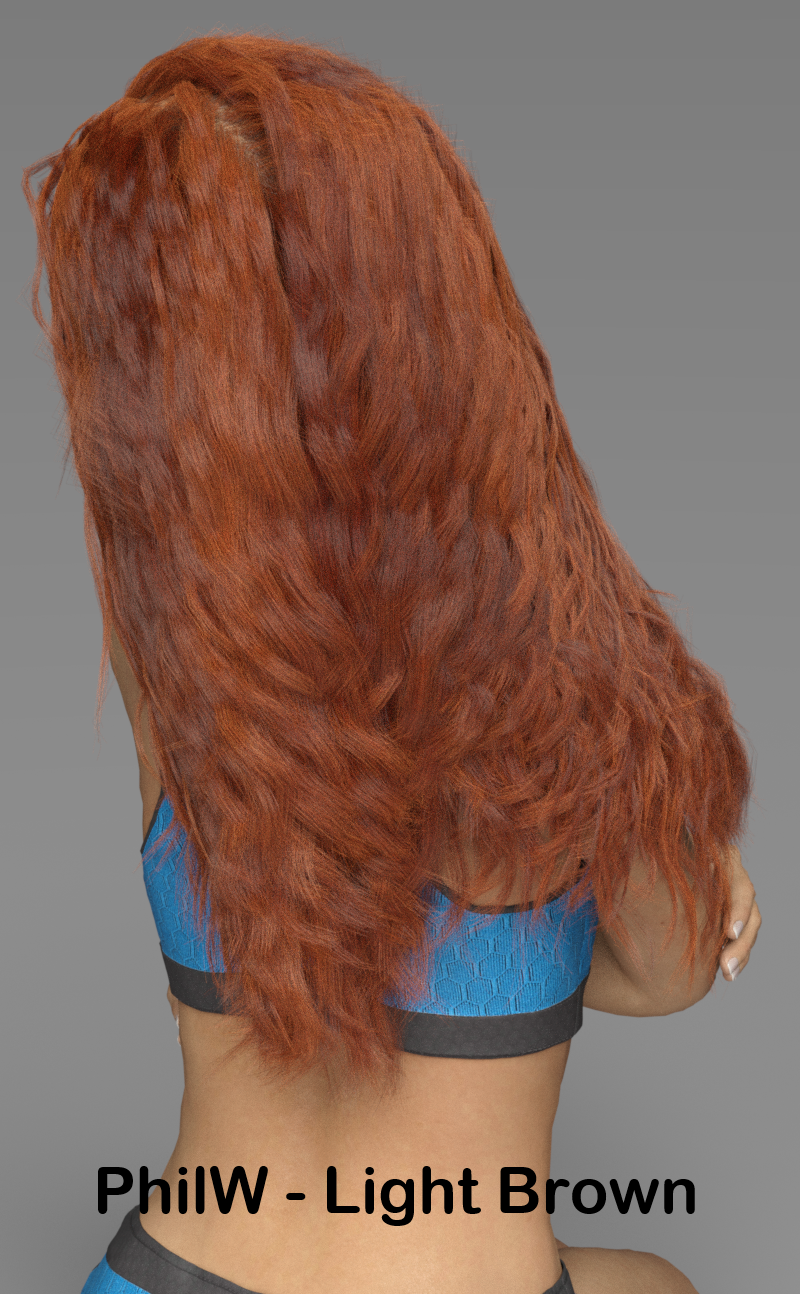
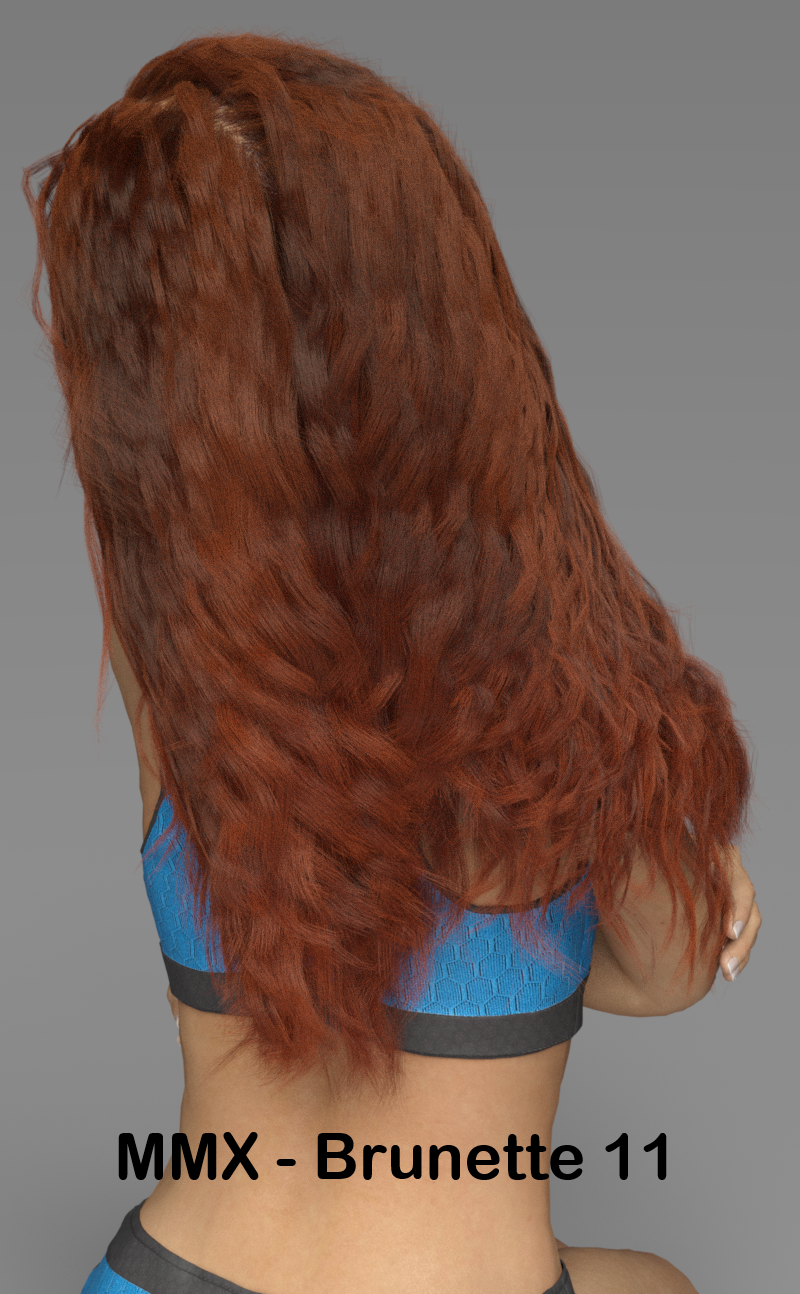
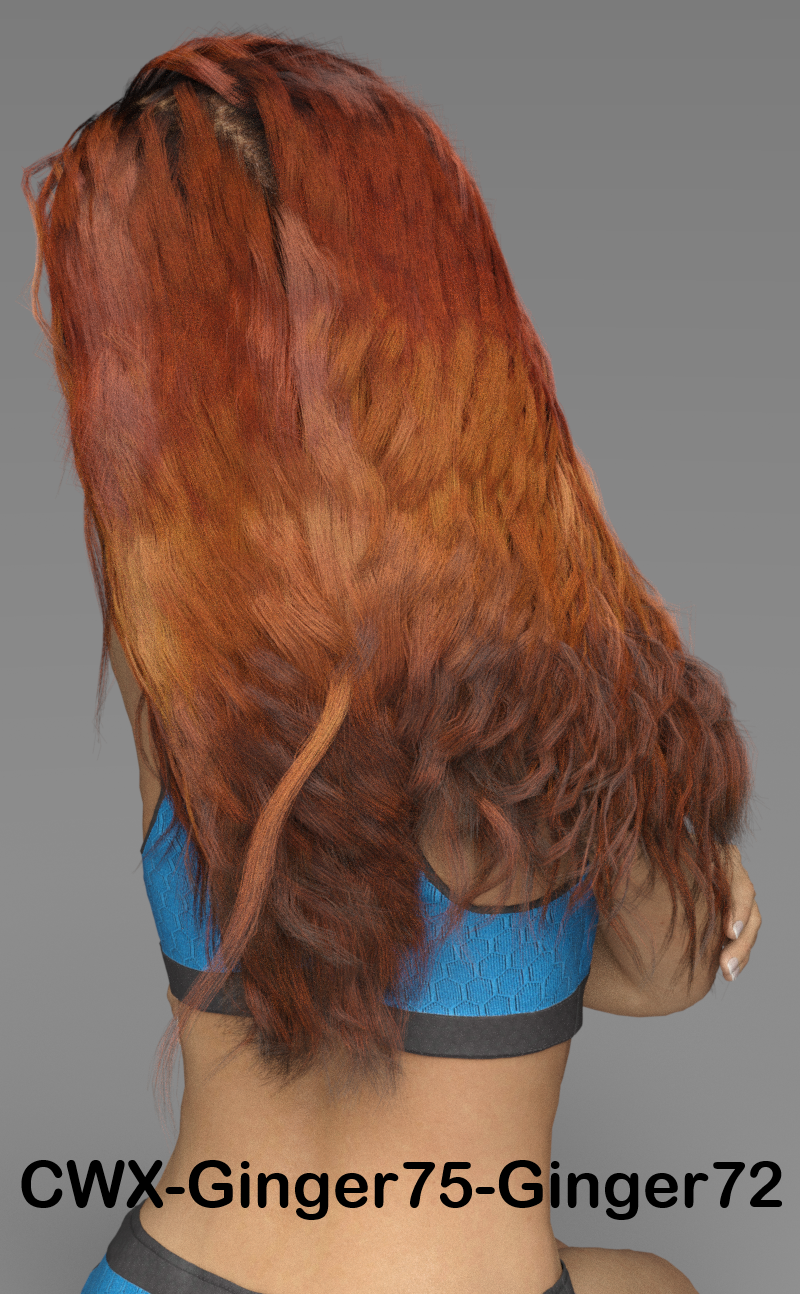
I think you can see that they are all 3 producing roughly equivalent reddish brunette colors. The choices I made for CWX provided some more variation in the color, but I could have achieved the same effect with MMX BDLHS with a bit more manipulation.
Also, I don't know what happened with that errant strand of hair in the CWX render. I noticed it after the render was done and would have re-draped and simulated the hair to fix it, but I got sleepy and decided it still served the purpose.
Does anyone know what Black/ Flowery Dress is used in the main promo pic for PC+ bus-stop-poses?Does anyone know what Black/ Flowery Dress is used in this promo for PC+ Bus Stop Poses for Genesis 8? (https://www.daz3d.com/bus-stop-poses-for-genesis-8)

As far I can tell it is not a part of any of the female outfits officially listed in the Additional Products used in Promo Images:
how to combine 2 layers on multiple textures (star trek trill)Because i asked but the person wasnt wanting to give out the info how it was doneWell there are several ways they could have done it, but none would be one-click solutions. For example:
- using an image editor to modify the V3 textures and manually position and layer the tattoo over the G8 skin
- using texture conversion programs to convert the overlay texture to G8F or G3F UVs: I don't know of any direct conversion program for V3 to G3/G8, but for example you could use Texture Converter 2 to convert it from V3 to V4 UVs, then use Blacksmith3D's Texture Transformer and add-ons to go from V4 to G3F UVs
- using some other program to "project" the texture on G8F: I know there was a tutorial on how to do this to convert G2F textures to G3F with blender, for example, a similar method might work.
It would be simpler to use it on G3F as you could use this: https://www.daz3d.com/legacy-uvs-for-genesis-3-special-edition-victoria-3 (there's no G8F version though)
To use the overlay above a G3F texture you'd need to load 2 copies of G3F: one "regular" G3F with the G3F texture, and one using the legacy UVs product with the overlay applied and transparent elsewhere. Give both figures the same pose, and add a slight push modifier or scale up the "overlay G3F" a bit so that the tattoo is above the base skin.
how to combine 2 layers on multiple textures (star trek trill)Hi all,
Huge star trek fan here.
want to make a G8 model with a trill (tattoo) and found this here: https://poserdazfreebies.miraheze.org/wiki/Trill_Overlay_Texture_for_DAZ_Studio_V3
Even though this is for V3 the textures itself are transparent, so technicly shout fit on any character texture Right?
Not in gneral, no - how a texture wraps around the mdoel is determined by the UVs, maps made for two different UV mappings will not line up. Fortuantely in this case the Genesis 8 and Genesis 3 UVs are more or less the same so you should be able to use the overlay.
It's for Victoria 3, not Genesis 3.
[SOLVED] Is GPU IRAY possible on iMac w. NVIDIA GTX 780M on macOS Mojave?If the renders are faster in bootcamp the GPU is definitely being used. You shouldn't need to download the CUDA driver..
After a test render, I looked at the log file under Help > Troubleshooting > View Log File... and it turns out it used only the CPU after all. This is very strange, as it rendered much faster on CPU in Win10 than on CPU in macOS Mojave. Is DAZ Studio really THAT badly optimized for Mac?
Here is a small snipped of what the log file says. I have 4GB of VRAM, and I've read that if you just have one figure and a simple backdrop, 4GB should be sufficient.
2019-09-09 02:42:27.205 Iray INFO - module:category(IRAY:RENDER): 1.2 IRAY rend info : CUDA device 0 (GeForce GTX 780M): Scene processed in 0.148s
2019-09-09 02:42:27.213 Iray INFO - module:category(IRAY:RENDER): 1.6 IRAY rend info : CUDA device 0 (GeForce GTX 780M): Allocated 37.2406 MiB for frame buffer
2019-09-09 02:42:27.293 Iray INFO - module:category(IRAY:RENDER): 1.2 IRAY rend info : CUDA device 0 (GeForce GTX 780M): Allocated 864 MiB of work space (1024k active samples in 0.079s)
2019-09-09 02:42:27.299 Iray INFO - module:category(IRAY:RENDER): 1.2 IRAY rend info : CUDA device 0 (GeForce GTX 780M): Used for display, optimizing for interactive usage (performance could be sacrificed)
2019-09-09 02:42:27.309 WARNING: ..\..\..\..\..\src\pluginsource\DzIrayRender\dzneuraymgr.cpp(302): Iray ERROR - module:category(IRAY:RENDER): 1.6 IRAY rend error: CUDA device 0 (GeForce GTX 780M): an illegal memory access was encountered (while launching CUDA ior stack renderer)
2019-09-09 02:42:27.310 WARNING: ..\..\..\..\..\src\pluginsource\DzIrayRender\dzneuraymgr.cpp(302): Iray ERROR - module:category(IRAY:RENDER): 1.2 IRAY rend error: CUDA device 0 (GeForce GTX 780M): Failed to update ior stack
2019-09-09 02:42:27.315 WARNING: ..\..\..\..\..\src\pluginsource\DzIrayRender\dzneuraymgr.cpp(302): Iray ERROR - module:category(IRAY:RENDER): 1.2 IRAY rend error: CUDA device 0 (GeForce GTX 780M): Device failed while rendering
2019-09-09 02:42:27.315 WARNING: ..\..\..\..\..\src\pluginsource\DzIrayRender\dzneuraymgr.cpp(302): Iray WARNING - module:category(IRAY:RENDER): 1.2 IRAY rend warn : All available GPUs failed.
2019-09-09 02:42:27.315 WARNING: ..\..\..\..\..\src\pluginsource\DzIrayRender\dzneuraymgr.cpp(302): Iray WARNING - module:category(IRAY:RENDER): 1.2 IRAY rend warn : No devices activated. Enabling CPU fallback.
2019-09-09 02:42:27.320 WARNING: ..\..\..\..\..\src\pluginsource\DzIrayRender\dzneuraymgr.cpp(302): Iray WARNING - module:category(IRAY:RENDER): 1.2 IRAY rend warn : Re-rendering iteration because of device failure
2019-09-09 02:42:27.320 WARNING: ..\..\..\..\..\src\pluginsource\DzIrayRender\dzneuraymgr.cpp(302): Iray ERROR - module:category(IRAY:RENDER): 1.2 IRAY rend error: All workers failed: aborting render
2019-09-09 02:42:27.321 WARNING: ..\..\..\..\..\src\pluginsource\DzIrayRender\dzneuraymgr.cpp(302): Iray ERROR - module:category(IRAY:RENDER): 1.2 IRAY rend error: CUDA device 0 (GeForce GTX 780M): an illegal memory access was encountered (while de-allocating memory)
2019-09-09 02:42:27.325 WARNING: ..\..\..\..\..\src\pluginsource\DzIrayRender\dzneuraymgr.cpp(302): Iray ERROR - module:category(IRAY:RENDER): 1.2 IRAY rend error: CUDA device 0 (GeForce GTX 780M): an illegal memory access was encountered (while de-allocating memory)
2019-09-09 02:42:27.326 WARNING: ..\..\..\..\..\src\pluginsource\DzIrayRender\dzneuraymgr.cpp(302): Iray ERROR - module:category(IRAY:RENDER): 1.2 IRAY rend error: CUDA device 0 (GeForce GTX 780M): an illegal memory access was encountered (while de-allocating memory)
2019-09-09 02:42:27.331 WARNING: ..\..\..\..\..\src\pluginsource\DzIrayRender\dzneuraymgr.cpp(302): Iray ERROR - module:category(IRAY:RENDER): 1.2 IRAY rend error: CUDA device 0 (GeForce GTX 780M): an illegal memory access was encountered (while de-allocating memory)
2019-09-09 02:42:27.332 WARNING: ..\..\..\..\..\src\pluginsource\DzIrayRender\dzneuraymgr.cpp(302): Iray ERROR - module:category(IRAY:RENDER): 1.2 IRAY rend error: CUDA device 0 (GeForce GTX 780M): an illegal memory access was encountered (while de-allocating memory)
2019-09-09 02:42:27.337 WARNING: ..\..\..\..\..\src\pluginsource\DzIrayRender\dzneuraymgr.cpp(302): Iray ERROR - module:category(IRAY:RENDER): 1.2 IRAY rend error: CUDA device 0 (GeForce GTX 780M): an illegal memory access was encountered (while de-allocating memory)
2019-09-09 02:42:27.337 WARNING: ..\..\..\..\..\src\pluginsource\DzIrayRender\dzneuraymgr.cpp(302): Iray ERROR - module:category(IRAY:RENDER): 1.2 IRAY rend error: CUDA device 0 (GeForce GTX 780M): an illegal memory access was encountered (while de-allocating memory)
2019-09-09 02:42:27.343 WARNING: ..\..\..\..\..\src\pluginsource\DzIrayRender\dzneuraymgr.cpp(302): Iray ERROR - module:category(IRAY:RENDER): 1.2 IRAY rend error: CUDA device 0 (GeForce GTX 780M): an illegal memory access was encountered (while de-allocating memory)
2019-09-09 02:42:27.343 WARNING: ..\..\..\..\..\src\pluginsource\DzIrayRender\dzneuraymgr.cpp(302): Iray ERROR - module:category(IRAY:RENDER): 1.2 IRAY rend error: CUDA device 0 (GeForce GTX 780M): an illegal memory access was encountered (while de-allocating memory)
2019-09-09 02:42:27.348 WARNING: ..\..\..\..\..\src\pluginsource\DzIrayRender\dzneuraymgr.cpp(302): Iray ERROR - module:category(IRAY:RENDER): 1.0 IRAY rend error: CUDA device 0 (GeForce GTX 780M): an illegal memory access was encountered (while de-allocating memory)
2019-09-09 02:42:27.348 WARNING: ..\..\..\..\..\src\pluginsource\DzIrayRender\dzneuraymgr.cpp(302): Iray ERROR - module:category(IRAY:RENDER): 1.0 IRAY rend error: CUDA device 0 (GeForce GTX 780M): an illegal memory access was encountered (while de-allocating memory)What does an "illegal memory access was encountered" mean?
Also I saw this in the log:
zneuraymgr.cpp(302): Iray WARNING - module:category(POST:RENDER): 1.0 POST rend warn : renderer iray has no more devices available. Postprocessing falling back to CPU.
Does this mean IRAY really ran out of VRAM after all? One model (Victoria 7 HD) and the IRAY Hi-Key Plugin from the DAZ Store, with a couple of lights, that's it. I also have OptiX Prime enabled. It shouldn't take up over 4GB of VRAM, I'm certain. This is confusing.
***
EDIT: This is weird. I tried a new render. Same scene, same model, same amount of lights, same everything, except a new pose and a diffrent camera angle. Just for fun, I tried a render with a much larger output of 5000 x 3750 pixels, and I even upped the SubDivison level from 1 to 2.
Now, for the first time ever, I see IRAY utilizing the GPU right off the bat in the Render History window. It seems to be very finnicky indeed. I'm gonna let it render for an hour or so, and go through the Log to see if it dropped to CPU rendering after a while.
Here's what it said in the Render status window under History, as it initialized the render. Usually I just see CPU right off the bat. Not this time, Here it's GPU straight off the bat:
Rendering in NVIDIA Iray
Compiling Shaders - 0/1
Rendering image
Rendering...
Iray VERBOSE - module:category(IRAY:RENDER): 1.9 IRAY rend progr: CUDA device 0 (GeForce GTX 780M): Processing scene...
Iray VERBOSE - module:category(IRAY:RENDER): 1.4 IRAY rend stat : Geometry memory consumption: 59.152 MiB (device 0), 0 B (host)
Iray VERBOSE - module:category(IRAY:RENDER): 1.4 IRAY rend stat : Texture memory consumption: 196.5 MiB for 24 bitmaps (device 0)
Iray VERBOSE - module:category(IRAY:RENDER): 1.4 IRAY rend stat : Lights memory consumption: 3.4027 MiB (device 0)
Iray VERBOSE - module:category(IRAY:RENDER): 1.4 IRAY rend stat : Material measurement memory consumption: 0 B (GPU)
Iray VERBOSE - module:category(IRAY:RENDER): 1.4 IRAY rend stat : Materials memory consumption: 84.3711 KiB (GPU)
Is There Any Difference Between Anatomical Elements from Figure to Figure?For example, would the Genesis 8 Male Anatomical Elements that come with a Diego Pro Bundle be a different model than say in the Michael Pro Bundle?
Same question for the female elements. Are Victoria's Genesis 8 Female Anatomical Elements different than those in the Mei Lin Pro Bundle?
Items "missing" from Install tab?Hello,
I'm sure this has happened to others, but I couldn't seem to find an answer/solution to it. Probably not using good search terms.
Anyway, I'm trying to install Victoria 4.2 content, but its entries in my Install tab show a "caution" symbol (triangle with !) and I can't install them. Tried updating Meta Data, but that didn't help. Everything else has been downloading and installing fine. I'll attach a screenshot of what I'm seeing.
How do I restore those so I can install them?
Thanks a bunch!
Victoria 4 in Carrara?
Was Genesis support sorta cobbled in to Carrara when DAZ bought it (IIRC it was originally made by a different company), and that explains why there's - seemingly - so many different factors and things to consider and account for when importing and using stuff? Like, why is Victoria 5 importing just fine as Content, and previous stuff imports fine as Content.. for Victoria 4 needs to be Runtime. Does DAZ like to just try random things from one figure to the next?
The "Runtime" folder structure is the previous standard as part of the posing/rendering program Poser. The original Daz3D figures (now called Victoria 1 and Michael 1) were created for use with Poser. Daz Studio and genesis content/duf did not exist. Victoria 1-4, Michael 1-4, etc. were created in the Runtme folder structure and their rigging systems were CR2 files (Poser's rigging). Daz3D releasing Daz Studio was an alternative to Poser.
Victoria 4 in Carrara?Nothing is fool proof because fools are so ingenious.
TCY - sorry for your frustration. I've been there. I've been there in Poser, in Daz Studio, in Carrara, in Bryce, and in Blender. Nothing just works. Thus my tag line in my forum signature. Aaaargh. Happy to try to help you diagnose and solve your problems.
Victoria 4 and Michael 4 work seamlessly for me in Carrara. What I mean is that Carrara reads their rigging correctly (uses CR2 fles) without any plugin. Carrara loads their mesh correctly, applies their morphs correctly, and applies their poses correctly. I don't like the blue tint multiplied to the diffuse maps by default, but I can't really call it an error. So, some shader tweaking is required. The conforming clothing/hair figures and smart props designed for V4 and M4 work seamlessly for me in Carrara.
Currently, I use the Genesis 2 figures (or my own custom rigged figures) for the vast majority my projects. However, I use V4, M4, or even earlier on occasion. I also use the Poser 4-7 figures regularly.
At the moment, I can't reproduce the bad results you are getting with generic references to V4. My V4 stuff works on my system with my installation. So, perhaps if you post the exact content you are using with V4 maybe I can try to use it on my system and see if there is a problem. Remember, V4/M4, the Poser figures, etc., do not have the auto-morph projections that the genesis figures have. The V4 conforming clothing figures have to have matching morphs (or be adjusted).
I know it sounds annoying. If you still have any patience left, tell us the specifics. Here is an example of why. Do the V4 pants found in the "V4 Morphing Clothing" runtime subfolder work with V4? Although the answer is yes, it is easy to demonstrate an example that appears like they don't work. Here we go.
- I started a new Carrara scene.
- I loaded V4 from my Runtime \ Library \ Figures \ Daz People subfolder. ( I also applied a Carrara skin shader and loaded some hair but ignore that for now).
- From the Runtime \ Library \ Poses \ Daz's Victoria 4 \ Morph Injections subfolder, I dragged and dropped the + injection files for Basic, Morph++, Elite, and Aiko 4 on to my V4 figure to load them.
- From my Figures \ V4 Morphing Clothing subfolder, I loaded the JYTop and the V4Pants. Please load those specific ones for his demonstration.
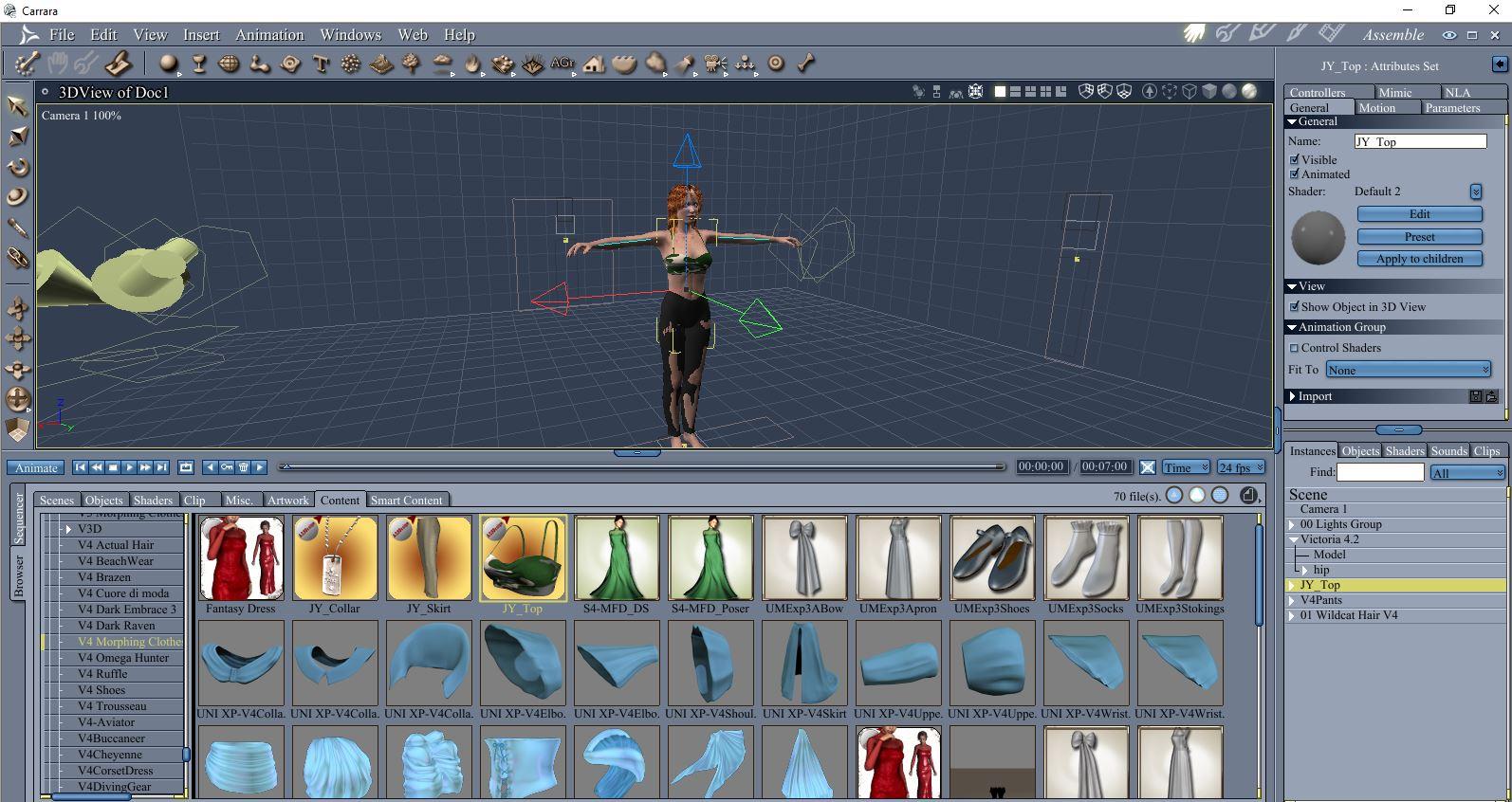
*** I loaded these two clothing items independently. For now, I did NOT drag and drop them on V4 or double click them with V4 selected. They are NOT fitted to V4 yet ***
- With V4 selected, I went to the parameters tab to see a list of morphs. I dialed Aiko 4 to 1. I also selected the V4 right thigh and rotated the thigh forward and up. You can see that neither the top nor the pants look correct.
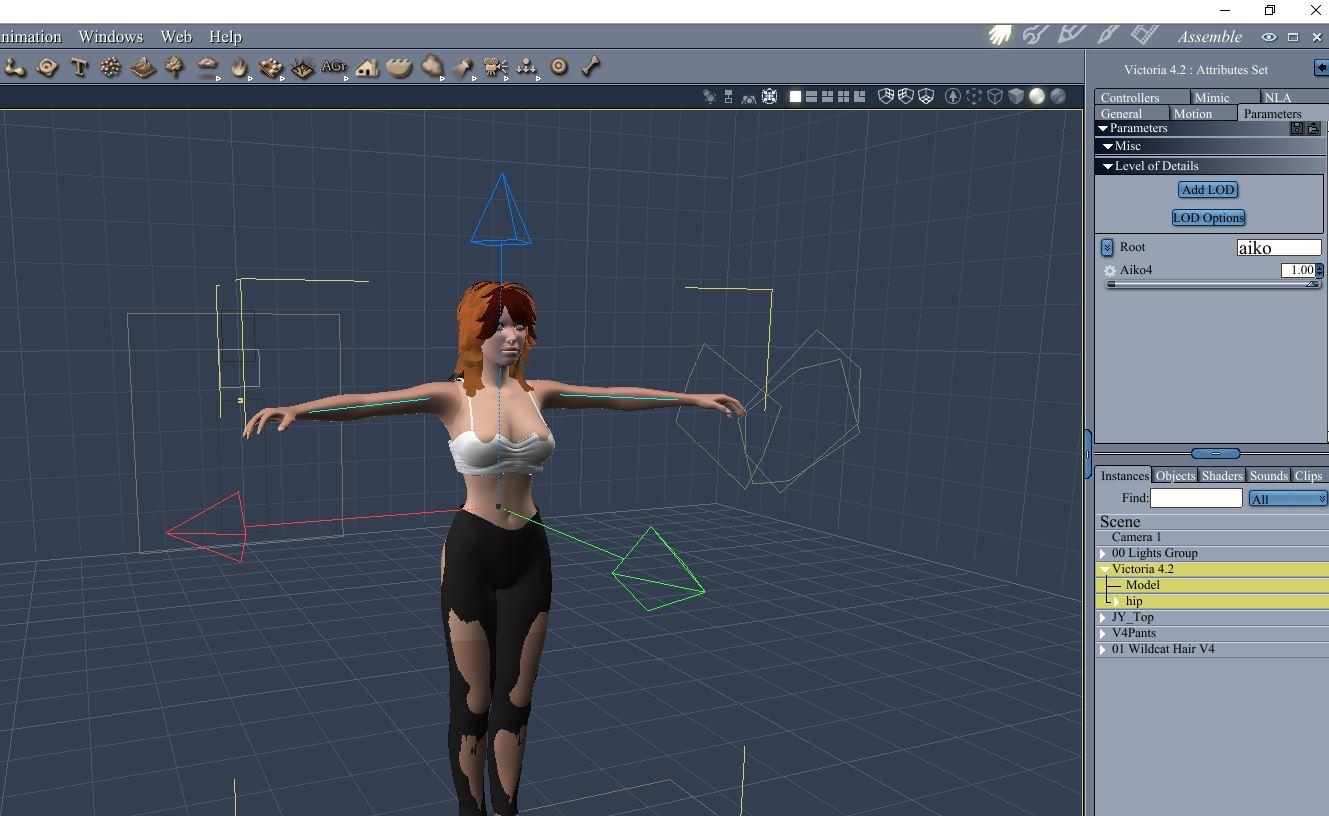
- I selected the top and used fit to V4, and selected the pants and used fit to V4. See that the top now fits fine. The pants conform to the pose but do not seem to fit the shape.
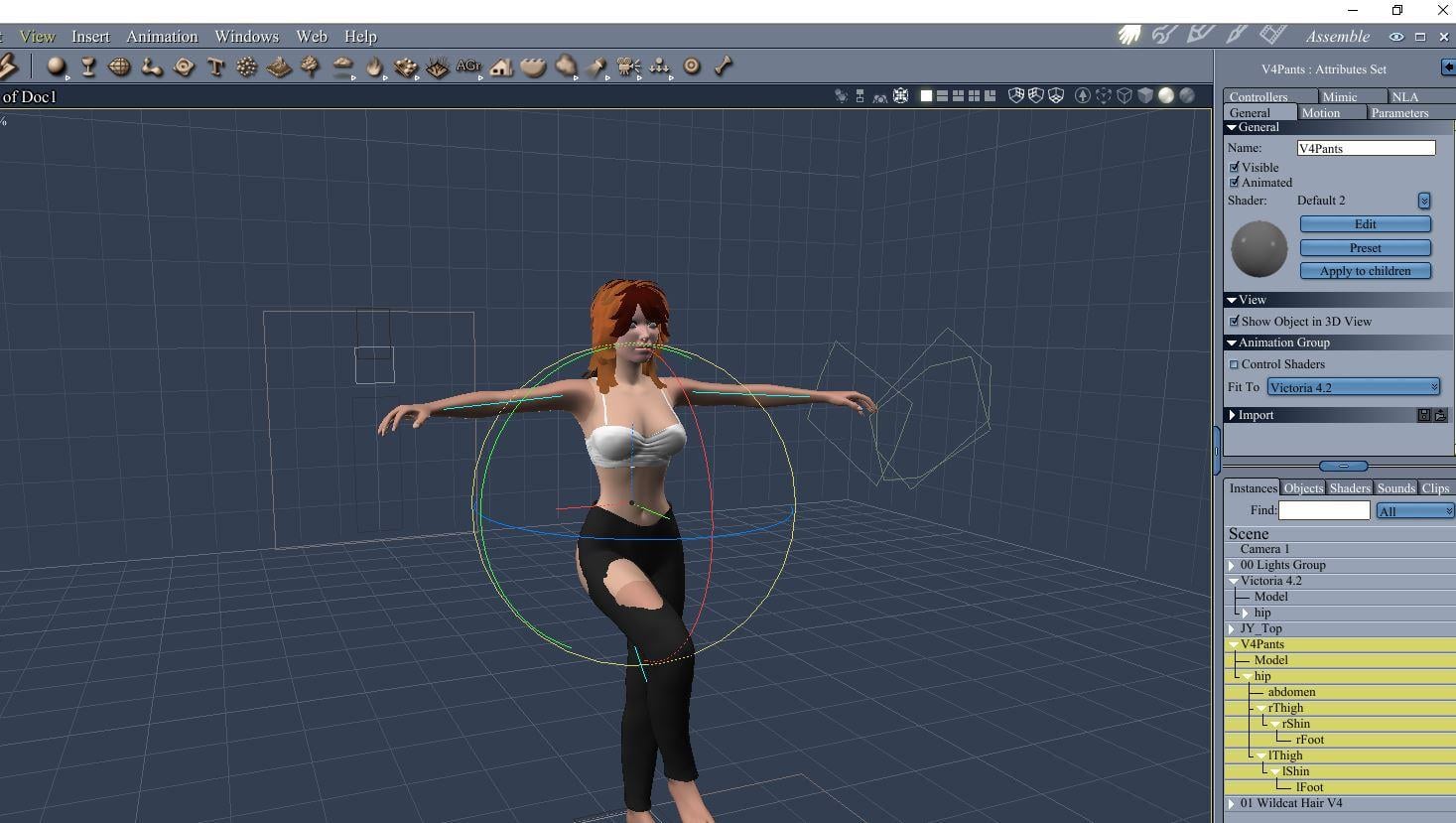
- Looking closely at the JYTTop figure parameters, notice it as an Aiko4 morph and it has automatically dialed to 1 to match the V4 figure morph.
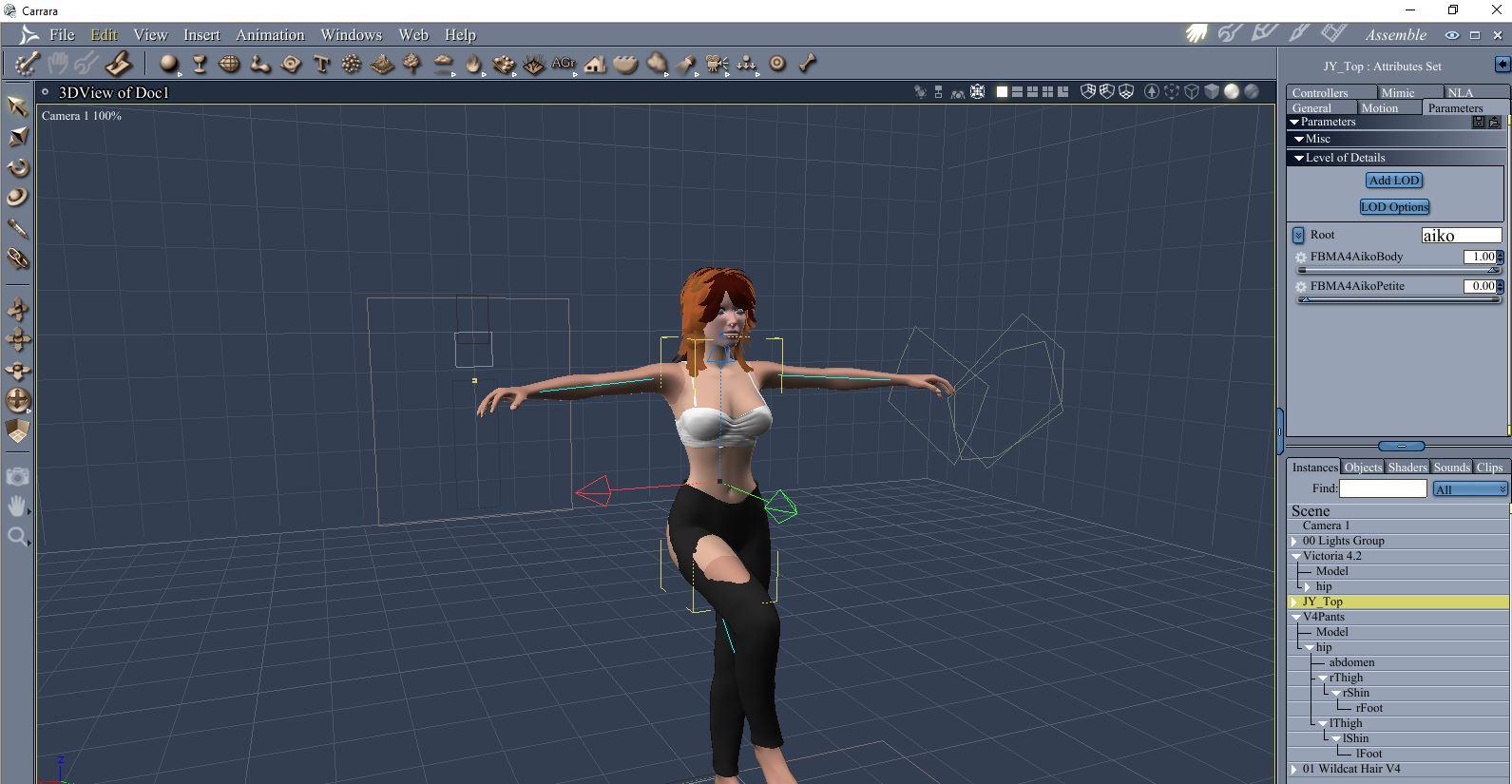
- In contrast to the top, choosing the pants parameters, there is no Aiko 4 morph present in the pants. That is why the shape looks wrong (and also a tweak for the thigh bend to a lesser degree).
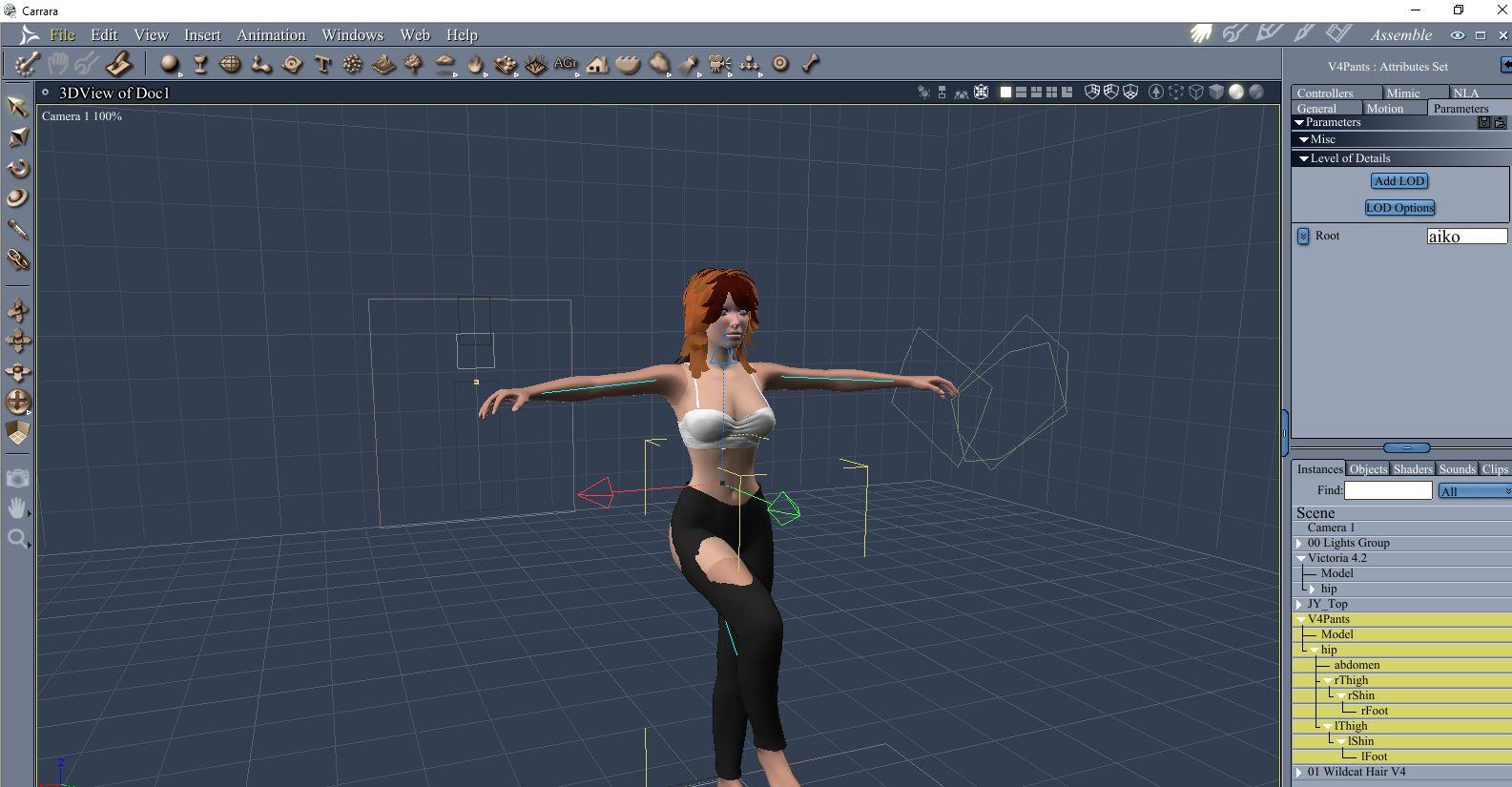
- Looking more closely at the pants parameters, there are a whole bunch of morphs present, jut not Aiko 4.
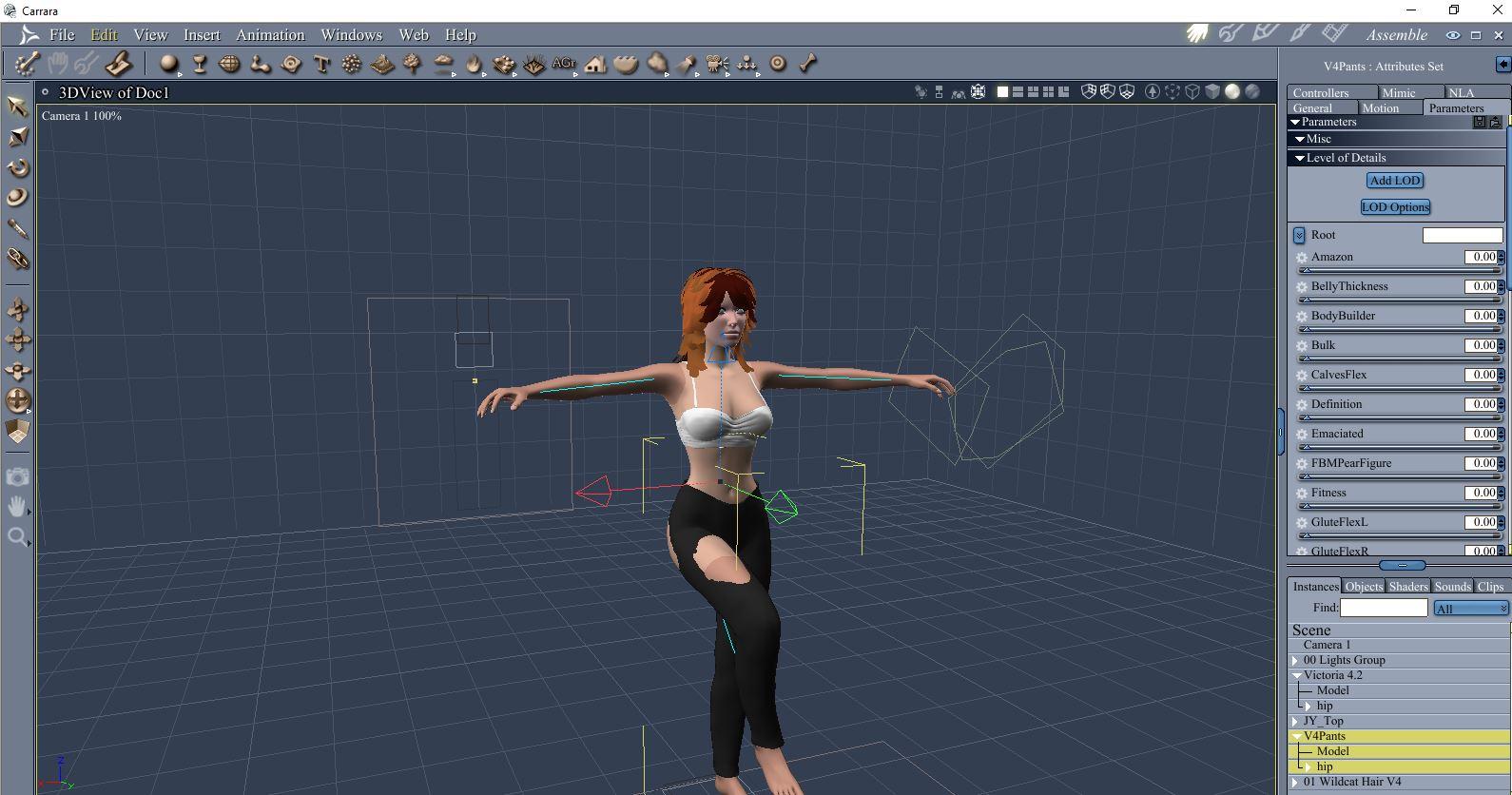
- To test, I selected V4 again, dialed Aiko 4 morph back to 0, but dialed bodybuilder up to 1.
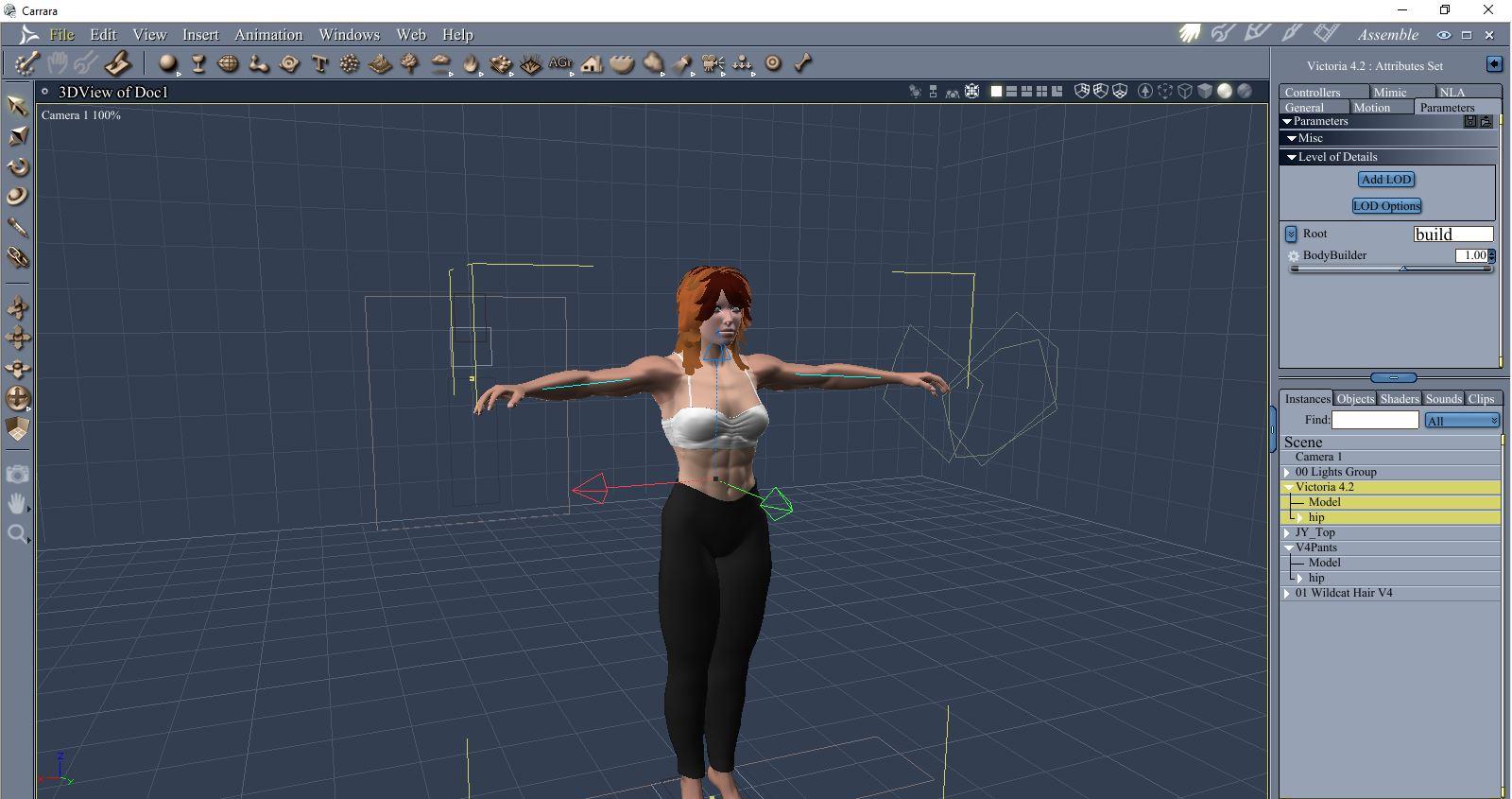
- The pants match the V4 morph because there IS a bodybuilder morph in the pants.
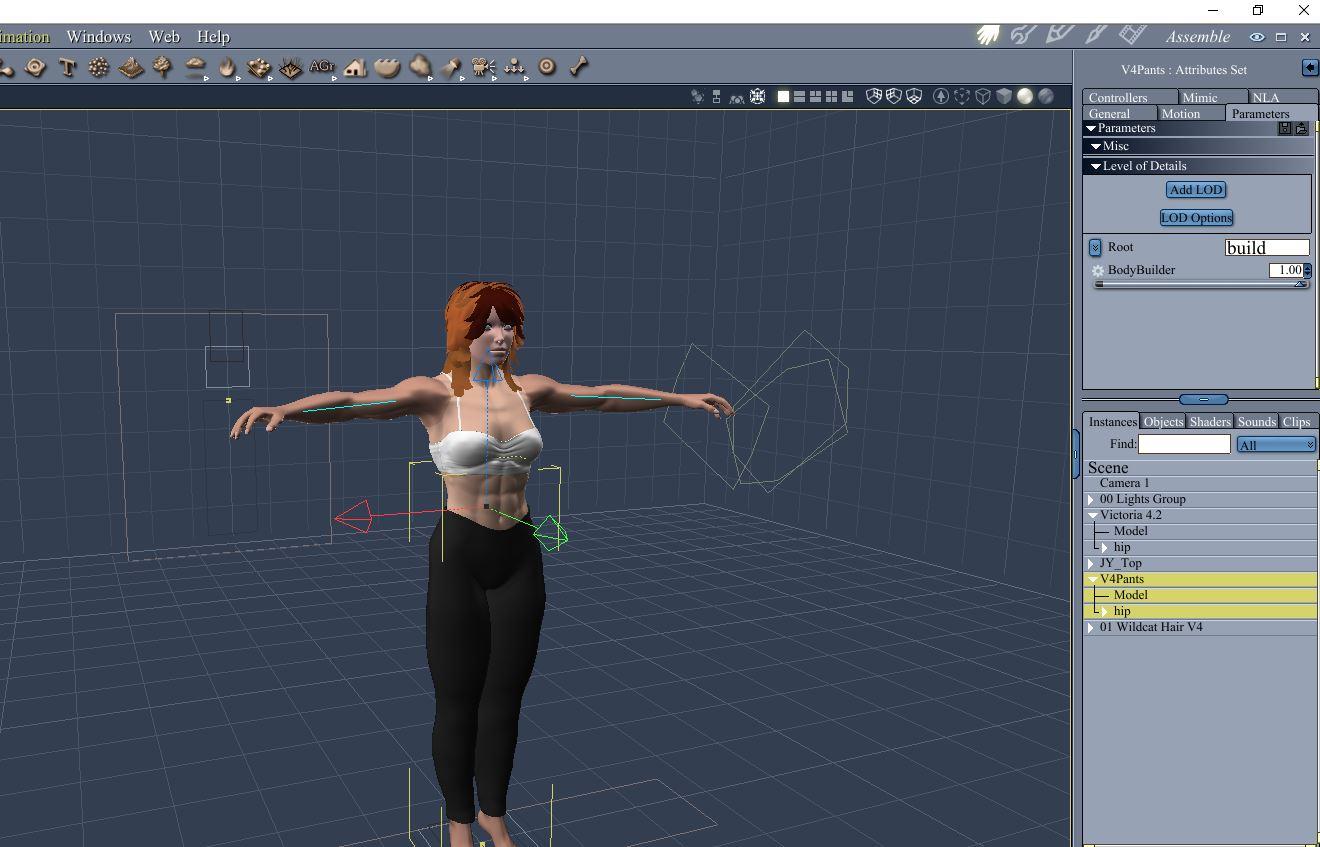
*** Although it appears that the V4 morphing pants didn't work with my first test of V4, that wasn't true. The pants don't happen to have Aiko4 morphs. The JYTop does.
Victoria 4 in Carrara?Yeah, someone in a previous comment mentioned that they have to be brought in as Runtime. I tried that, and it brought them in, but things still didn't work correctly. It's fine, though. I'm perfectly happy using 5 for the time being.
The part about using morphs and unimesh... -whoosh- lol. That's right over my head. I've just now found a way to reliably get figures into Carrara lol. Figuring out how to morph and such can wait for now. Just figuring out how to apply different hair color to Stalker Girl hair at the moment. Doesn't seem to want to update, so I'm looking for some kind of instructions.
Was Genesis support sorta cobbled in to Carrara when DAZ bought it (IIRC it was originally made by a different company), and that explains why there's - seemingly - so many different factors and things to consider and account for when importing and using stuff? Like, why is Victoria 5 importing just fine as Content, and previous stuff imports fine as Content.. for Victoria 4 needs to be Runtime. Does DAZ like to just try random things from one figure to the next?
Part of my frustration in learning this (importing/using Genesis characters) has been that there doesn't seem to be any kind of clear, clean and consistent workflow for it. Seems the process changes, becoming more or less complicated, depending on what you're trying to use. That's really unusual compared to pretty much any other program I've ever used. Most cases, using an installer/manager, you select the content, select "install", and the installer sets everything up for you and you're good to go. You don't even have to know how it's being set up. Manual installations are generally as straight-forward as just downloading and unzipping into a specific addons/plugins/etc folder. Then you restart the program, or click a "rescan addons" option, and the program does the rest. Other programs have the ability to install from zip file right from within the program, which places everything where it needs to be. And so on. In all cases, the user doesn't need to worry about the nuances or particulars of where/how/why. They just need to install and go. Carrara's the first program where it doesn't seem to (consistently) work like that. I'm rather curious why that's the case.Victoria 4 in Carrara?Hey there. Thanks, SadKitty.
I'm actually here to say that I seem to be going smoothly with the Victoria 5/Michael 5 figures. Everything's been "just working" so far. Doesn't look like there's as much stuff available on the store for them, but my understanding is that items can be "fit to" the given base figure (Genesis, Genesis 2, etc).
So, I'm happy lol. That's all I wanted to sort out; to reliably and smoothly get characters into Carrara.
Apologies again for the ranty stuff. I just really want to get into creating stuff and learning more about this workflow. Not having the characters working correctly was getting in the way and really bumming me out. I went with V4 because I happen to have the most stuff for that (in case anyone's wondering why I was insistant on using 4 instead of 5, etc)
Maybe I'll try V4 again in the future sometime... Maybe. lol
But I'm set for the time being.
Thanks againVictoria 4 in Carrara?Hello again,
So I completely removed and completely reinstalled everything, after doing a Registry clean, etc.
Victoria 4.2 loads okay,and all the outfits and such I have show in the Content browser, poses work just fine, but I'm still dealing with clothing/accessories not showing up on the character, or not fitting right even after I conform it to Victoria 4.2. I can drag and drop, I can double-click, doesn't matter. They're all items specifically made for Victoria 4.
One thing that's changed this time around is, when trying to load clothing items, it's randomly freezing and crashing the program.
It's understated to say this is at least the 12th attempt at making this work. Every time, some part of it works, but the rest doesn't. I'm convinced it's not that I'm just "doing it wrong", because others in this thread have noted having issues - though different ones - while others say it worked just fine for them. There's gotta be something in how it's all programmed that keeps it from being consistent on all systems.
I'm installing the content via DIM
I have all the Genesis 2 content in its own folder so that it's not conflicting with any other generations or related models, etc.
I'm adding the folder via Content Browser > Content > Add Folder
I'm selecting Runtime as the folder type.
The V4.2 Runtime stuff gets its own folder.
Victoria 4.2 loads fine.
Poses attach and work fine.
Clothing/Accessories show up, but won't fit right, if they show up on the character at all.
So, just to avoid all the headaches, what is the most recent generation/figure combo that "just works" with Carrara? No tweaking, no fussing, no having to add the folder in some special way or recite cryptic incantations over burning candles and incense to make it all magically work the way it's supposed to? I've wasted way too much time on this already and I'd like to actually get to *creating* stuff, instead of trying to divine what's going through DAZ's mind when they're deciding how to make all this stuff work.
I have Genesis, Genesis 2, Genesis 3 (which I know requires a special user-made mod), Genesis 8 (ditto). I have various figures for each.
Thanks again for everyone's help and time. Sorry for the ranty-ness.. It's my aggravation talking.
Babina 8
Thank you that's interesting! I have to admit the renders of her in this thread are all fantastic as well which led me to believe she has better shaders but indeed maybe it's just your'all so good with iray lighting! I'm fairly impressed.A superficial scan of the surfaces between Babina 8 and Victoria 8 doesn't pick up a lot of difference. Babina uses the Top Coat, and Victoria does not. There's slightly different weighting on Victoria, but those small shifts shouldn't be THAT dramatic.
The eyes? I didn't look at them. Sometimes, artists use Diffuse maps that are extremely jaundiced and bloodshot out of the box, IMO. Really unhealthy looking sclera to me, while others might prefer it as "realism". Eyes just vary so much.
Dunno, as a whole package. Maybe it's just a trick of the lighting. I prefer how Babina reacts to light, but she's not all that different than Victoria. Maybe we're all just better with Iray than we used to be. It's the subconscious corrections that we know how to do.
.........
One more Babina out of the box.
She has rib bone definition, which isn't a universal thing.
I like her face from some angles better than other angles. So maybe Penny still keeps her crown as the cutest in my book.
 Victoria 4 for Genesis 2 Female
"when i turned them up and apply a V4 Face or body nothing happens?"
If I understand you correctly, you are attempting to use this utility to apply Victoria 4 character morphs to Genesis 2 Female? If so, it is not designed nor will it work for that purpose. It is only designed to allow the use of V4 texture sets and to autofit V4 clothing to G2F. When the product description says "the Victoria 4 figure shape to see a familiar face", it is referring only to the base V4 shape, no other. To use V4 character morphs with G2F, you need Genesis Generation X2 and the GenX2 AddOn for Genesis 2.
Ok-Thanks for clearing that up!
Victoria 4 for Genesis 2 Female"when i turned them up and apply a V4 Face or body nothing happens?"
If I understand you correctly, you are attempting to use this utility to apply Victoria 4 character morphs to Genesis 2 Female? If so, it is not designed nor will it work for that purpose. It is only designed to allow the use of V4 texture sets and to autofit V4 clothing to G2F. When the product description says "the Victoria 4 figure shape to see a familiar face", it is referring only to the base V4 shape, no other. To use V4 character morphs with G2F, you need Genesis Generation X2 and the GenX2 AddOn for Genesis 2.
Victoria 4 for Genesis 2 FemaleOk. Now i found the Victoria 4 Head and body levers but when i turned them up and apply a V4 Face or body
nothing happens?I'm not sure what is happening then.
I also have G3F for G2F an its the same thing nothing happens when i try to load a shape
Isint it that wich gives the G2 a V4 shape so that i should be able to apply
V4 shapes to G2. But however i try to load a V4 shape nothing happens.
Is it possible to contact the artis that made the Product?Wacky Modelling ~ In Carrara ~thanks guys

I'll attach the mower when I've done with it for ya'll to have dibs with

if it's of any use to anyone of course

you never know who may want to cut Victoria's grass...

Daz 3D is part of

Connect
DAZ Productions, Inc.
7533 S Center View Ct #4664
West Jordan, UT 84084Licensing Agreement | Terms of Service | Privacy Policy | EULA
© 2026 Daz Productions Inc. All Rights Reserved.