-
odd prop import behaviour questions
daveymoses said:
Q1. Why would some colors not appear on one prop but all the colors appear on another prop with the exact same nodes?
I have two swords (one is black, red, and brass/gold, the other is white, blue, and stainless/silver) for some reason when I import the white and blue one into Daz the blue in one area does not appear but its material is listed, and the red on the other sword in the exact same spot does appear and the nodes used are the same except the color.You should always expect to do at least some retexturing when moving things from one program to another. As long as it imported with the right surfaces, you can jump straight into redoing your textures.
Q2. How do I make a material/surface emissive using the surfaces tab?
I have a set of weapons that have glowing parts, however, when imported to Daz, the color shows but it is not emissive and there are no options in surfaces for glow/emission.How are you rendering? You'll need an appropriate shader for your render engine applied. Open the surfaces pane and select one of the surfaces: at the top of the pane, it should say "Shader: _____". If it says "Daz default", then that is a 3Delight shader, in which case you'll need a 3Delight specific emissive shader. The Iray Uber shader, for Iray rendering, has an emissive slot buried at the bottom, you'll just need to change "emission color" to something other than black to enable emission.
Q3.How do I set the origin of a prop based on where the origin is in Blender at the time of Export, and why do I get 2 3D axis manipulation objects when I import the prop
When I import the props into Daz studio I end up with the model and two 3D axis manipulation objects (one red and one green) which I can move around freely but they don't align where the object origin is in Blender and I can't seem to bind them to the right area or simply set the origin/Rotation point to where it should be on the imported model, the best I can do is manually move each of the 3D axes to roughly the right area.That sounds to me like you've got the joint editor active. Switch to a different tool, for example by hitting Alt+Shift+U to select the universal tool.
odd prop import behaviour questionsI have a few questions about self-created and imported props from blender. I think this fits here. one topic but multiple questions to save space
Q1. Why would some colors not appear on one prop but all the colors appear on another prop with the exact same nodes?
I have two swords (one is black, red, and brass/gold, the other is white, blue, and stainless/silver) for some reason when I import the white and blue one into Daz the blue in one area does not appear but its material is listed, and the red on the other sword in the exact same spot does appear and the nodes used are the same except the color.
Q2. How do I make a material/surface emissive using the surfaces tab?
I have a set of weapons that have glowing parts, however, when imported to Daz, the color shows but it is not emissive and there are no options in surfaces for glow/emission.
Q3.How do I set the origin of a prop based on where the origin is in Blender at the time of Export, and why do I get 2 3D axis manipulation objects when I import the prop
When I import the props into Daz studio I end up with the model and two 3D axis manipulation objects (one red and one green) which I can move around freely but they don't align where the object origin is in Blender and I can't seem to bind them to the right area or simply set the origin/Rotation point to where it should be on the imported model, the best I can do is manually move each of the 3D axes to roughly the right area.Defect on the joints of the clothesOkay, took a look at the new files. It's okay to delete all of those now 'cause friend you're going to need to start over anyways.
Couple of tips: .duf files do not import. There's a folder arrangement required when sharing those which can be covered later. Esp. while learning, it would be an idea to NOT encrypt your files - makes finding where you put everything a little easier ;-) Also save the files to the appropriate locations.
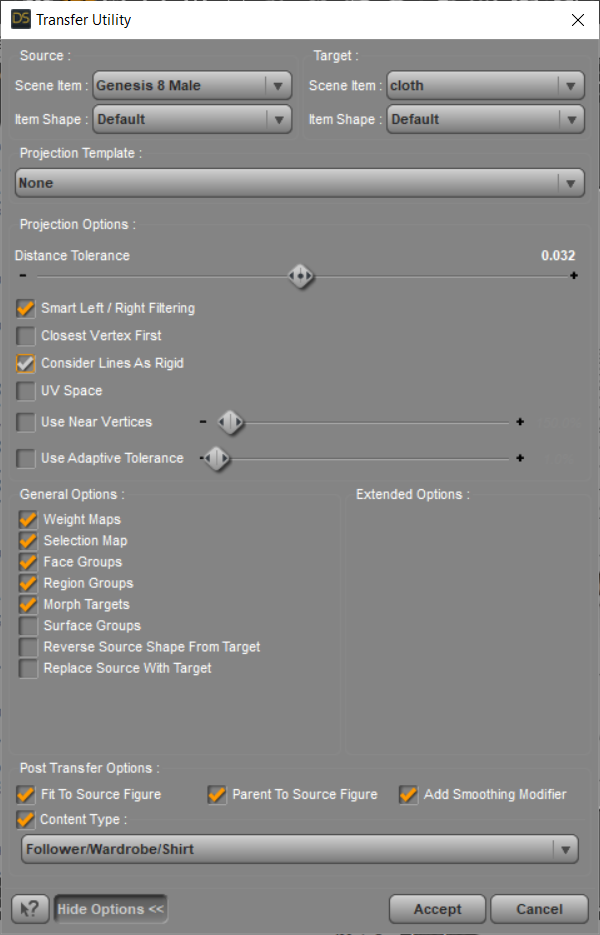
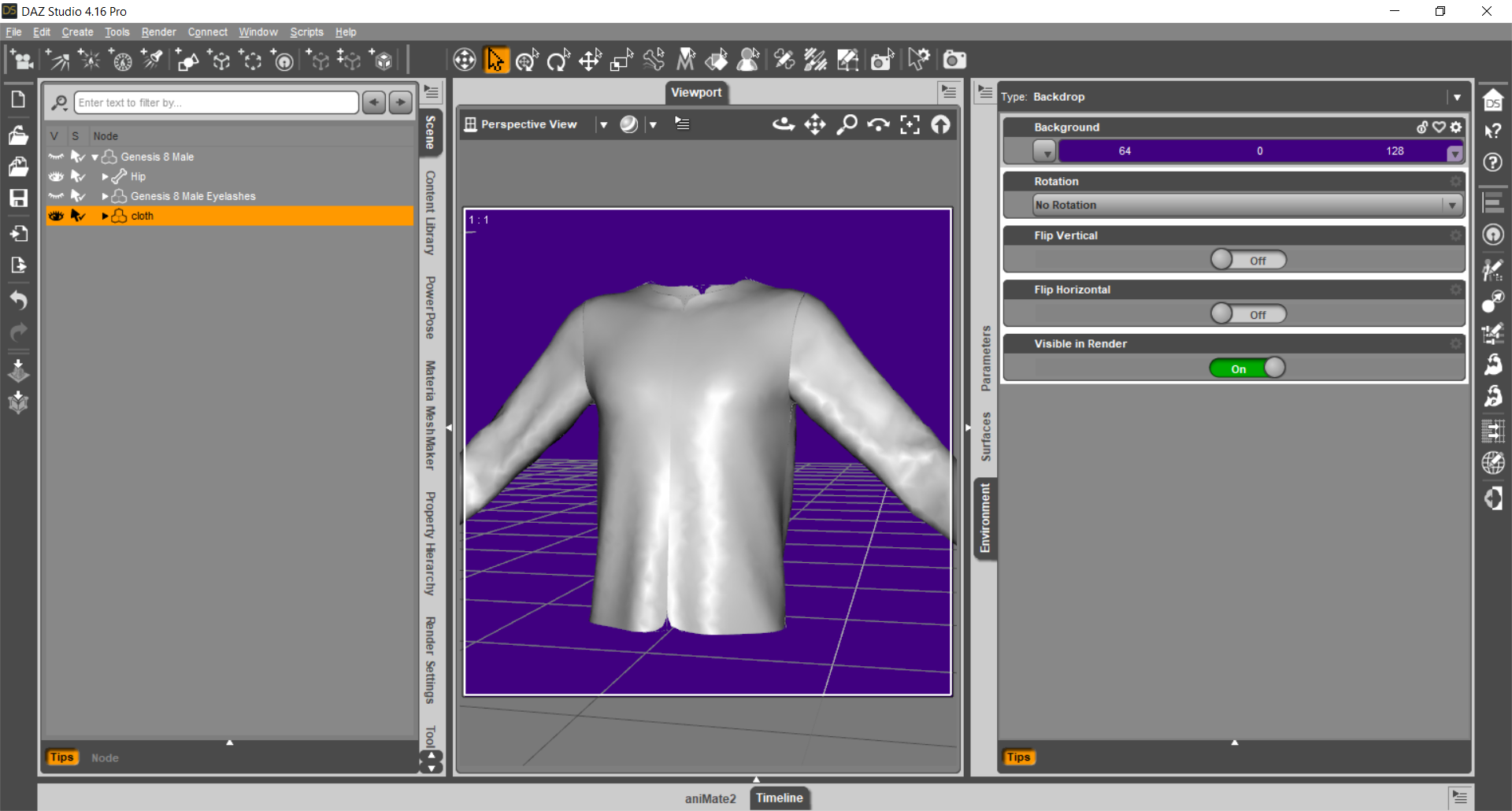
I imported the cloth which now is just the top. Okay. I ran the utility and made it into a clothing piece. Not so okay. BUT the good news is, that once you get all the necessary steps figured out, yes with M.D. you can make marvellous clothing "for" use in Daz Studio.
The curves on the seams illustrate that the seams are not welded together. You want these welded together.
Now while I do not own M.D., I have imported a number of clothing .obj files made in M.D. - and sadly most of them are not worth the time required to 'fix' them. So far, you have it right -- single mesh! Yes. It just needs to be welded.
Now, this I do not know, but if there's a way to make the clothing, single mesh, welded together and NO seam tubes ... paradise!!!
Otherwise it's a trip to the modeler to remove all the seam tubes and weld the sections together. Then the uvmap would need to be redone too of course.
Headus UVlayout is 'the' uvmap maker of many {industry standard somebody said}. Or of course in the modeler of your choice. {if the model can be made all in M.D. and it does the uvmap too, that's great.}
Once you get just the top finished, saved, THEN work on just 2 arm morphs. Let's get the workflow happening first.
To share product files: Collector folder > Content or My Library > data > your name > the relevant subfolders AND {Content or My Library} > People > Genesis 8 Male > Clothing > your name > the relevant subfolders.

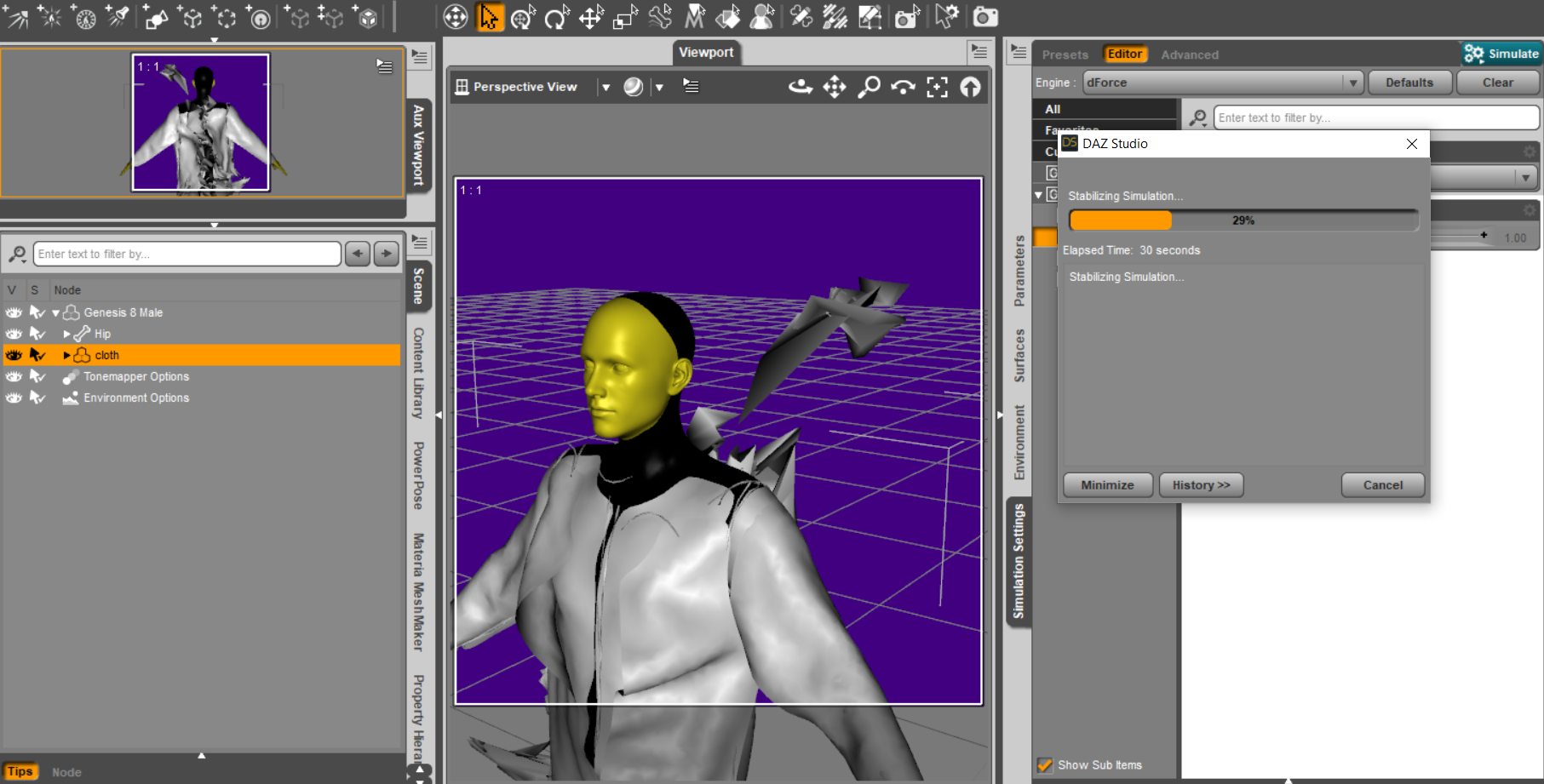 DAZ Studio is starting but UI doesn't appear
It sounds like maybe something got corrupted when Daz Studio closed down. I don't know. From looking at the log file, I see warnings related to loading some of the interface files.
2022-05-22 20:19:05.297 [INFO] :: Reading style definition C:/Daz 3D/Applications/64-bit/DAZ 3D/DAZStudio4/resources/style/Darkside.style
2022-05-22 20:19:05.297 [WARNING] :: ..\..\..\..\..\src\sdksource\interface\style\dzstyle.cpp(443): Failed to load style definition file "Darkside". Loading default style...
2022-05-22 20:19:05.297 [INFO] :: Reading style definition C:/Daz 3D/Applications/64-bit/DAZ 3D/DAZStudio4/resources/style/Darkside.style
2022-05-22 20:19:05.298 [WARNING] :: ..\..\..\..\..\src\sdksource\interface\style\dzstyle.cpp(446): Failed to load style definition file Darkside
2022-05-22 20:19:05.298 [INFO] :: Creating Import Manager...
2022-05-22 20:19:05.298 [INFO] :: Creating Export Manager...
2022-05-22 20:19:05.298 [INFO] :: Creating File IO Preset Manager...
2022-05-22 20:19:05.298 [WARNING] :: ..\..\..\..\..\src\sdksource\fileinput\dzfileiopresetmgr.cpp(411): Unable to open file fileiopresets.dsx
And later:
2022-05-22 20:19:08.545 [WARNING] :: QImage::scaleHeight: Image is a null image
2022-05-22 20:19:08.795 [WARNING] :: QCursor: Cannot create bitmap cursor; invalid bitmap(s)
2022-05-22 20:19:08.821 [WARNING] :: ..\..\..\..\..\src\sdksource\interface\panes\dzpanemgr.cpp(2477): Could not find file for image Default in DzPaneMgr::setActivityBarImage()
...
2022-05-22 20:19:09.220 [WARNING] :: QPainter::begin: A paint device can only be painted by one painter at a time.
2022-05-22 20:19:09.221 [WARNING] :: QPainter::font: Painter not active
2022-05-22 20:19:09.221 [WARNING] :: QPainter::setFont: Painter not active
2022-05-22 20:19:09.221 [WARNING] :: QPainter::fontMetrics: Painter not active
2022-05-22 20:19:09.221 [WARNING] :: QPainter::begin: A paint device can only be painted by one painter at a time.
2022-05-22 20:19:09.221 [WARNING] :: QPainter::font: Painter not active
2022-05-22 20:19:09.221 [WARNING] :: QPainter::setFont: Painter not active
2022-05-22 20:19:09.221 [WARNING] :: QPainter::fontMetrics: Painter not active
2022-05-22 20:19:09.221 [WARNING] :: QPainter::begin: A paint device can only be painted by one painter at a time.
2022-05-22 20:19:09.221 [WARNING] :: QPainter::font: Painter not active
2022-05-22 20:19:09.221 [WARNING] :: QPainter::setFont: Painter not active
2022-05-22 20:19:09.221 [WARNING] :: QPainter::fontMetrics: Painter not active
2022-05-22 20:19:09.221 [WARNING] :: QPainter::begin: A paint device can only be painted by one painter at a time.
2022-05-22 20:19:09.221 [WARNING] :: QPainter::font: Painter not active
2022-05-22 20:19:09.221 [WARNING] :: QPainter::setFont: Painter not active
2022-05-22 20:19:09.221 [WARNING] :: QPainter::fontMetrics: Painter not active
2022-05-22 20:19:09.221 [WARNING] :: QPainter::begin: A paint device can only be painted by one painter at a time.
2022-05-22 20:19:09.221 [WARNING] :: QPainter::font: Painter not active
2022-05-22 20:19:09.221 [WARNING] :: QPainter::setFont: Painter not active
2022-05-22 20:19:09.221 [WARNING] :: QPainter::fontMetrics: Painter not active
2022-05-22 20:19:09.221 [WARNING] :: QPainter::begin: A paint device can only be painted by one painter at a time.
2022-05-22 20:19:09.221 [WARNING] :: QPainter::font: Painter not active
2022-05-22 20:19:09.222 [WARNING] :: QPainter::setFont: Painter not active
2022-05-22 20:19:09.222 [WARNING] :: QPainter::fontMetrics: Painter not active
I don't know what any of these warnings mean. If you have already followed the advice to make sure Daz Studio is not running and then reinstall it with Daz Install Manager, and that didn't fix it, you should file a help request and attach the log file to see if customer service can assist you.
fbx issue cloHi, i have a problem when I import an Avatar on CLO. If I import a FBX file the feet has a really ugly distortion while If I import an OBJ the problem doesn't exist. How do i can solve? I Attached an image below.
Ps. for the heels i'm using I Love High Heels, Poses and Shoes for Genesis 8 Female(s) and the avatar is Victoria 8.1
Thanks
Loading normals with an OBJ's MTL?I am not certain that DS can import it properly.
But the materials in Obj-files are very limited. Why not just apply them after import?
Custom Morphsin Carrara you can use an existing morph channel, which one depends if the whole figure or a body part such as the head
obviously your morph import will overwrite the original one you are replacing in that Carrara scene
Custom MorphsJust to add this, i did a few testings and there are things that might could influence the result, if anybody knows more about this, i would appreciate it.
I did adjust the figure manually in Daz yesterday night and found out that the head morphs in Daz are all in percent but in Carrara there are not. Could that have some impact of the morph import?
On the other end, i modified a dress to fit on my figure, saved as obj and imported it as morph in morph loader pro in Daz to create a morph for the dress itself.
The lower part, hips region morphs as it should but the chest region did get distorted again as it creates a spike displacement.
About the distortion effect, i've heard that if the Geometry or Vertexes get out of order that the results could lead to distortion.
The question is, does shaping and changing the position of the vertexes are the reason for that? If yes, why did i got this kind of result for the full body morph if i haven't changed any of the vertexes there? Or is there an easier way to create the morph in Carrara itself without the need to import and export the file?Import Mocap into DAZ Studio for use on G2?So, I'm a little overwhelmed, and some of the articles I was able to find are several years old...
Is it possible, in 2022, to import Mocap animations into DAZ Studio and specifically to use them for G2 (my preferred character generation)?
I don't know how much it may or may not help but I own AniMate 2Some (posing?) morphs distortions in UEachesco said:
Hi everyone!
I'm getting the strange character distortions using posing morphs on imported character in UE. You can see the distored left leg on the attached image, in this case the 'Knees Up Left' with 0.55 value is applied. The second one is the 'Waist Bend' - makes upper body smaller... Is there any cure for this issue? Or maybe I'm doing something wrong it terms of export/import settings?
Software versions: UE 4.25, DazToUnreal Plugin 4.2.0, Daz Studio 4.20
you can't export a "pose" morph or it not gonna work as you want, when you try to export a "pose" it will only gona work when applied the 100%, any value between 0 and 1 will see as a "distortion not a moviment, when you use the morph in daz it's a mixing between "moviment with the internal pupet and some morphs to fix the body part while moving, something like when you are moving the character leg with the morph is like you are using a "pupet stuff to move the leg then during the process the morph try to apply some corrections to the leg, but when you export it to unrel it only go the "corrections the "moviment" is lost and only the "final pose" correction is saved this is why it's happening.
How do I send clothes to UE5 to use the cloth simulation?Ok, I think I got it.
First thing to note is that each material zone can set to act like cloth or not. This means that even if a model is all one piece, UE5 will treat each cloth section as differnt objects. Also, these objects are not attached to anything and will fall away unless you leave an edge unpainted.
Once material zones are reassigned (if wanted) convert the figure to prop
Send to UE5 or export FBX and select the skeletal mesh option (even though it has no bones)
import it to UE5
Open the asset and open the cloth window (Window -> Clothing
Left click on the surface you want to make cloth (it should highlight the entire material zone)
Right click and select the Create clothing section from selected -> create
Right click again and select Apply clothing data -> [the clothing surface that was created in the previous step] (Usually the object name_Clothing_incremental number starting at 0
Now you can click on the activate cloth paint above the viewport
In the cloth window, select the surface you applied the clothing data to (object_Clothing_0)
Now paint the areas of that surface you want to act like cloth, remembering to leave edges that should be attached to something unpainted so they don't move.
Next I need to see if there's some kind of settings for different cloth type
Some (posing?) morphs distortions in UEHi everyone!
I'm getting the strange character distortions using posing morphs on imported character in UE. You can see the distored left leg on the attached image, in this case the 'Knees Up Left' with 0.55 value is applied. The second one is the 'Waist Bend' - makes upper body smaller... Is there any cure for this issue? Or maybe I'm doing something wrong it terms of export/import settings?
Software versions: UE 4.25, DazToUnreal Plugin 4.2.0, Daz Studio 4.20
Carrara Challenge #62 "Clowns and Other Circus Stuff" -Steve K said:
ed3D said:
Yeah , Ouch! , indeed ~ and how to work with an sequence ?? - an video editor , then is it -
I think most video editors will import JPG and other standard image sequences. My Vegas Pro certainly does, you select the first image, then click a box "import sequence" and the program offers the number of the last image, which you can change if you don't want the whole sequence. After that, its like any video clip in the "Imported Elements" window, drop it on the timeline, move it around, etc.
~ yeah , then this is good _ for any who does'nt have an Editors , there are Free ones
_ Da Vinci Resolves perhapz
Daz Central breaks my databasesHere is why the situation is broken and why it should be taken more seriously.
I had no DEFAULT category under Smart Content for months. When I opened Smart Content there was nothing to expand. All the categories presented themselves.
After installing SY Starry, I now had a DEFAULT and LIGHT SETS at the top level of Smart Content. Clicking on DEFAULT didn't cause the drop down to appear. It just populated the right hand content window. Nothing implied that I should be hitting the drop down. I had to go out of my way to realize that I should expand the category that was never there before.
That started a whole week's worth of pain:
Process metadata queue, reimport metadata, stop CMS, start CMS, reset database, uninstall 2100 products, install 2100 products, ad naseum. I did that uninstall / install process 3x this week. Each cycle was five or six hours.Why did I go through all of this? Because there are so many products with bad metadata to begin with. I've become accustomed to unexpected errors. And the recent update breaking half my products.
I'm not an expert on DS, but I know enough to get around and trouble shoot things to try and figure out when things go sideways.
What hope does a new user have?
Daz Central breaks my databasesNorthof45 and Richard Haseltine have solved the mystery. I have an extra top level category "barbult" for my personal categories, as recommended by Daz. That is why I see Default in Smart Content. Default and barbult are siblings (same hierarchy level). So the real problem is that SY Starry Nights has bad metadata, and either nobody reported it, or it was reported, but Daz didn't fix it.
Daz Central breaks my databasesMystery solved. There is nothing wrong with your setup. Change the metadata to put "/Light Sets/SY Starry Sky HDRI Iray" under Default (i.e., "/Default/Light Sets/SY Starry Sky HDRI Iray").
Daz Central breaks my databasesNow that I think about it - I think the metadata for Starry Nights is bad as shipped by DAZ and I fixed my copy over a yearr ago while doing a complete re-install. I do remember that I had three products that installed outside default and one was a Sickleyield product. This is probably the one. I was up to my armpits in swamp and alligator at the time, so I never got around to reporting it.
Custom Morphsjust wondering, if i have a figure in Carrara, V4.2 for example morphed in the way i like it.
Than i want to create a single morph that makes the normal V4.2 to the morphed figure, so all face and body morphes are applied.
I have exported the figure to .objFor the options i have choosen Daz Studio Morph Target, Sureface Fidelity 100%, no Materials and Name Only.
Export Objects in Local Coordinates and Map Carrara Z axis to OBJ Y was greyed automaticly when i choosed Daz Studio Morph Target, so couldnt turn them off.
Than in Daz Studio, i just opened V4.2 (i've done without any morphs and than again with all morphs except Creature Morphs.
Than i selected V4.2, clicked on Edit > Figure > Morph Loader Pro.
Converted from Carrara, tried All Groups and another one with Vertex only, choosed the created obj file as morph file and than clicked accept.
The figure got a morph but when i use the morph it seems like it won't morph to the figure i wanted, i just get lots of spikes out of the figure and it looks very distorted like as it uses a displacement for that.
What am i doing wrong here? Is it because it have Octane Material? But that couldnt do anything as the exported obj was saved without any material.
I created the figure many years ago in Daz Studio, so i might have the original figure but i did a few adjustments to it over the years in Carrara and i wrote down any morph i have made within Carrara, so that i also could manually add the figure in Daz Studio but i would like to do the easiest way.
I think about that i could manually adjust the figure in Daz and create a morph target there, i did one years ago but not sure about it right now.
Edit: Just checked the Model Room in Carrara and it shows the standard V4.2 Figure, so meches should all be correct, so i guess it have something to do with the import/export settings but not sure about that.Carrara Challenge #62 "Clowns and Other Circus Stuff" -ed3D said:
Yeah , Ouch! , indeed ~ and how to work with an sequence ?? - an video editor , then is it -
I think most video editors will import JPG and other standard image sequences. My Vegas Pro certainly does, you select the first image, then click a box "import sequence" and the program offers the number of the last image, which you can change if you don't want the whole sequence. After that, its like any video clip in the "Imported Elements" window, drop it on the timeline, move it around, etc.
Daz Central breaks my databasesI have that set - no issues with the install. Everything installed with Install Manager.Two images, because I have so much installed.
ETA - Like barbult, I'm wondering where the top level 'default' went - all the metadata DAZ provides is set up to install these cataegories under default. Unless this is a function of Central I didn't notice the day I played with it and found it too limiting for my needs.
Daz 3D is part of

Connect
DAZ Productions, Inc.
7533 S Center View Ct #4664
West Jordan, UT 84084Licensing Agreement | Terms of Service | Privacy Policy | EULA
© 2026 Daz Productions Inc. All Rights Reserved.