-
The Brute 8
Thanks @wsterdan & @Lynara I was very happly to see Joe Quick's Mr Rubbleman as I has working that day on a render involing Submariner & the Human Torch. I was thinking how on earth am I going to ever model a working Thing let alone model flames for the Human Torch, invisible for the Invisible Girl & stretch Mr Fantastic. I'm trying out some shader materials to see if they'll do a good Human Torch right now. The scene only involves the Human Torch & the Submariner but there was recently a 'Ghostly Spectre' product in the DAZ store I can buy & look at the techniques for Invisible Girl. That leaves Mr Fantastic who will have to be faked on a case by case basis I guess according to the comic book panel I'm looking at as I don't think even with limits off the G8M model will stretch so much.
Yeah... that's like.... impossible, pretty much......
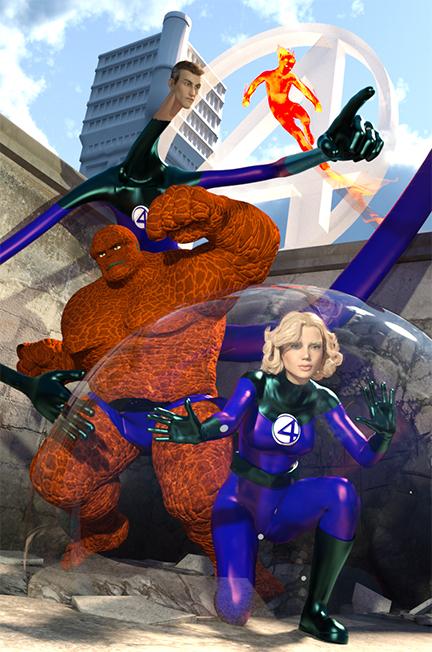
:) Okay, I cheated. I have a tentacle figure that I used the same blue shader as his outift on for Mr Fantastic Lower torso. His real body is hiding behind the Thing. All figures are G3 series. Rendo has product called Firebird for Genesis (I think). I used a fire shader and then another product from here called "Instan Flames" (Again, I think. I am sorry and I am at work so i cannot check at the moment.) The Thing was done with my morphs and the morphs and character work done by the incredible Joe Quick for a stone-type character that came out last series on G3. Invisb;le woman was done in photoshop with gradient knocjk out and two different renders of the same scene. One with her in it and one without. :)
I bought Brute right off when I saw MrRubble. Haven't played with him yet as time has not permitted but.... can't wait to dig in later when I have some more free time.... like in a decade or so. :)
Thanks that looks really good & Iyours looks like the comic book version not the movies version! That looks really good.
I forgot about that tentacle character in the DAZ Store for Mr Fantastic so that will work. What is it's name, the tentacle creature?
I'm afraid for the Torch DAZ has started crashing on me so I will have to delete some of the flame effects in my render I was trying to do.
 I'm trying to do without postwork or using 3DL and my 7 year old laptop with integrated GPU aren't cooperating, although if I could have more than 16GB RAM it would probably render or had a large that 222GB SSD system drive to optimize for memory. I may have to giveup & use 3DL/pwToon or Visual Style/Manga Style shader instead.More Non-photorealisitic Renders (NPR II)
QUESTION FOR THE EXPERTS: Do you think my 2nd image would be better if I lightened the black shadows a bit? If so, would it be best to tweak the opacity of the shadow layer or use one of the blending modes. Last night, I ran out of time and totally blanked out on what the different layer modes do (Multipy, Overlay, Lighten, etc).
I don't know if I'm an expert, but the first things I noticed was that the shadows seemed a bit strong for this image. I would suggest using the shadow render as a guide to add colored shadows to the image: Darker flesh tone and a relatively dark blue on the clothes (if you don't want to put in that much work, consider just lightening the layer to about 50% and see what happens).
Also, I would consider cutting out the fabric between his legs (the back of his shirt tail) so that space is open: it will look more dramatic that way. And, finally, I notice that we're missing outlines on his bent leg where the fabric touches.
You are more of an expert that I am, that's for sure.
When is it a good idea to use strong shadows? If this was a Western-style comic image, would it be more approprate? Or only if it was black and white (which looked very cool by the way)?
Good idea on the skirt tail. I don't think this jacket has very good morphs but I could do it in post-work.
I fixed that missing line, then I think I undid the fix by accident. I was in bad shape last night LOL! I'm just glad I got it to work at all.
Expert? Me? Just obsessive-cumplisive, I think! :-)
Although I think your question is great (about East/West comic styles), for me it comes down more to coloring choices and mood. Even in my color work, I use super-strong shadows because I'm usually going for a "noirish" look. This blends with my style because even my color zones have strong cuts to delineate the color zones (like in the jumping hero illustration, or those Conan pieces I did a while back, or the fairy drawing I did for the contents page):
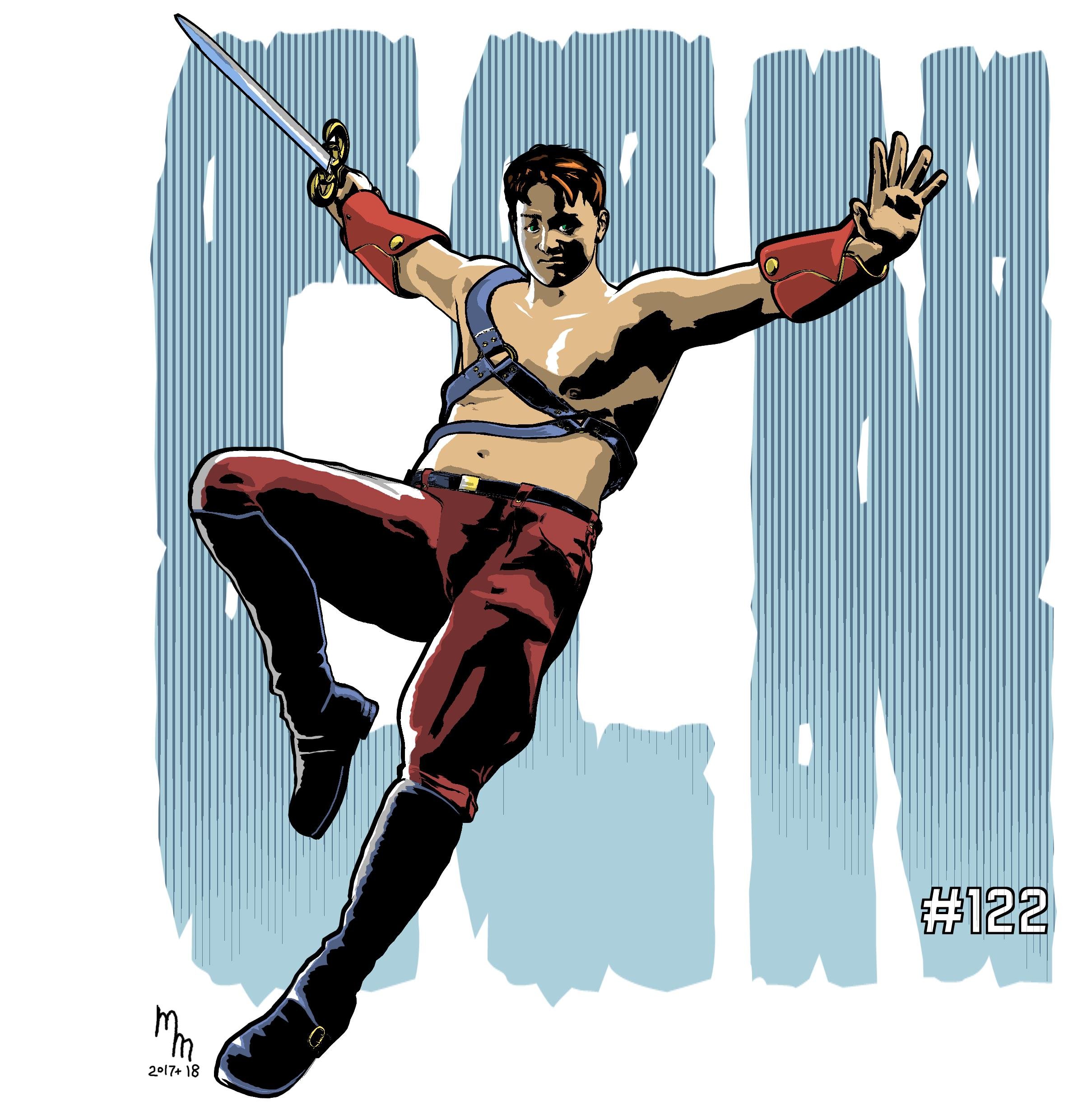
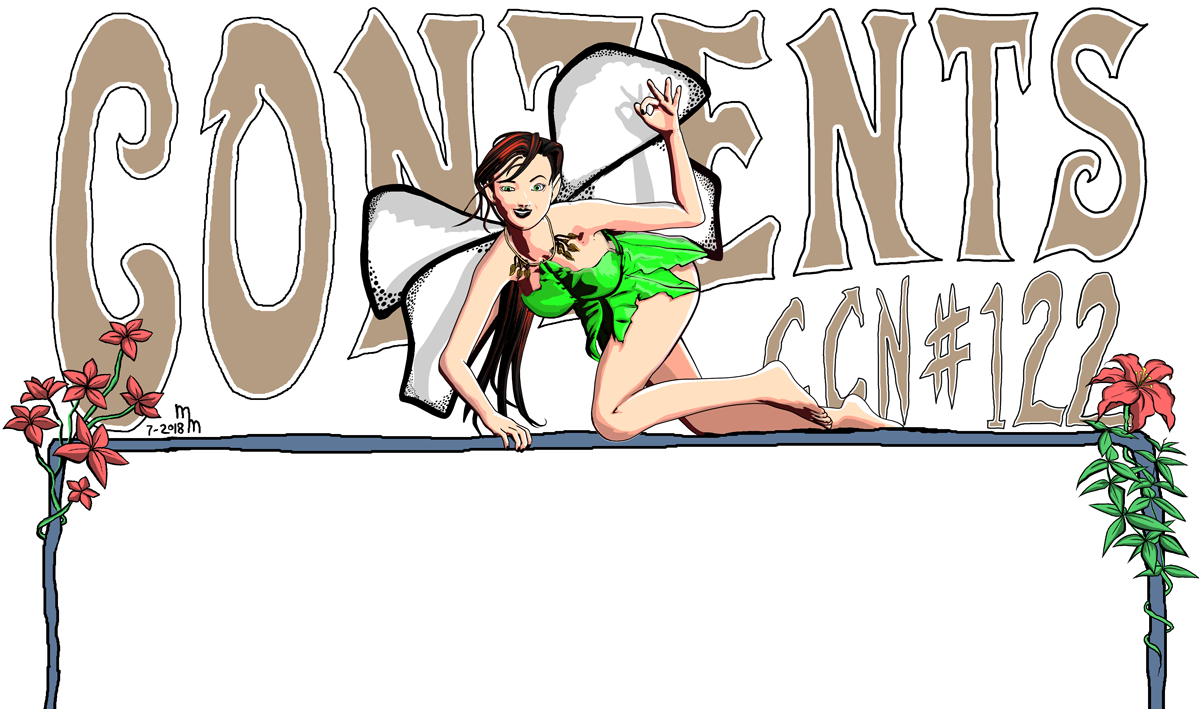
As you can see, I don't use many gradients for my colors: most of the time the colors have sharp lines to separate them. Your illustration has a lot of soft variations in color tones, which makes those sharp-edged, dark shadows seem a bit incongruous with the softer color edges, which is why I think softening them (or blurring their edges) on your work would be a better fit.
Of course (he said arguing the exact opposite point), sharp shadows are more dramatic, and if that's what you're going for then they do work. But I think in your case a lighter touch will look better.
Anyway, I'm happy to see you getting solid results from LineRender9000. Coupled with your other approaches, I think you may be getting close to something you can use to start your graphic novel.
In this illistration. I used different VSS setting that work better with Anime style . If I went back and used the VSS settings that I normally use for Western style comics (like most of my graphic novel concepts, superhero stuff, and my profile pic), then the darker shadows might work a lot better. I'll expiriment with that. I think you are right; with LineRender9000 and pwToon, I think I'm very close to getting the style I need/want to start my graphic novel in earnest.
Edit: The other thing to note is that I only used 1 light.
pwToonI like Visual Style shaders look too. I do have trouble though with the eye materials refusing to get switched from iRay to 3DL material properly when I apply the Visual Style material shader presets. That isn't the case when I switch from iRay to 3DL using the pwToon material shader presets.
I use a free toon shader for the eyes. I'd tell you where to get them if I could remember.
Oh, I'll get the Visual Style working on them next time I feel like dorking with them thanks though.
Found them but they only work for G1. https://sharecg.com/v/81595/gallery/7/Material-and-Shader/Cel-Toon-Eyes-For-Genesis
thanks
pwToonI like Visual Style shaders look too. I do have trouble though with the eye materials refusing to get switched from iRay to 3DL material properly when I apply the Visual Style material shader presets. That isn't the case when I switch from iRay to 3DL using the pwToon material shader presets.
I use a free toon shader for the eyes. I'd tell you where to get them if I could remember.
Oh, I'll get the Visual Style working on them next time I feel like dorking with them thanks though.
Found them but they only work for G1. https://sharecg.com/v/81595/gallery/7/Material-and-Shader/Cel-Toon-Eyes-For-Genesis
More Non-photorealisitic Renders (NPR II)Does it work if you set it to tiff? I know it recommends that, I don't think it should cause the issue you described, but I think I have always used tiff.
I like the idea of LineRender9000, and I have had some results that work look really good, but I also feel like I'm not comfortable enough with how this works and the different cameras and settings to know how to fix things when I get results that aren't what I want. I will have to experiment more based on the results here to get the outline results I like, because that is the one thing I consistently run into as an issue with pwToon, and I don't mind rendering twice to get lines separate from the rest.
I'll add that to my list of things to try. Hopefully, I can figure this out tonight.
Update: After reading the Google Doc again, I think, maybe, posiible I know what I did wrong. I won't know until tonight.
More Non-photorealisitic Renders (NPR II)Does it work if you set it to tiff? I know it recommends that, I don't think it should cause the issue you described, but I think I have always used tiff.
I like the idea of LineRender9000, and I have had some results that work look really good, but I also feel like I'm not comfortable enough with how this works and the different cameras and settings to know how to fix things when I get results that aren't what I want. I will have to experiment more based on the results here to get the outline results I like, because that is the one thing I consistently run into as an issue with pwToon, and I don't mind rendering twice to get lines separate from the rest.
LineRender9000 [FAQ]Hello, all. I finally got this product after having it in my wish list for some time, It comes highly reccomended by the NPR commuity. I tried it out last night, but I didn't have a lot of time. I couldn't get it to work. I do have experience using 3Delight scripted mode to create outlines but not with this product.
I tried using the Edge Blend camera, but I got no lines when I rendered. I tried playing with the line width and threashold, but nothing. During my 1st attempt, I had the wrong camera selected, but I tried several times with the Edge Blend camera selected. I even read the maunal's quick start guide and couldn't get it to work. Both the scenes I tried to render had already been created. I didn't have time to create a new sceane. In my 1st sceane. I was trying to render a mecha that is mostly white, but has textures, I used pwToon on that (Cresent's free cel-shaders). The background was transparent. I tried to change the color ID's, but that didn't seem to work.
Unfortunantly, I won't have time to play with this again until Wednesday and I won't have much time then. I hope have any serious time, until Saturday night or Sunday. Hopefully, I can figure out what I'm doing wrong. I'll try reading up on the Google page linked on the 1st post, but if anyone here can identify the problem, I'd greatly appreciate it.
Also, I've never rendered using more than 1 camera. How do you get them all to point that the same thing, the same way?
More Non-photorealisitic Renders (NPR II)P.S. I was trying to render a mecha that is mostly white, but has textures, I used pwToon on that. The background was transparent. I tried to change the color ID's, but that didn't seem to work.
Edit: My appologies, I ment to update my previous post, but created a new one. I got a lot of crap going on this week and I'm a little scatter brained.
pwToonI like Visual Style shaders look too. I do have trouble though with the eye materials refusing to get switched from iRay to 3DL material properly when I apply the Visual Style material shader presets. That isn't the case when I switch from iRay to 3DL using the pwToon material shader presets.
I use a free toon shader for the eyes. I'd tell you where to get them if I could remember.
Oh, I'll get the Visual Style working on them next time I feel like dorking with them thanks though.
pwToonI like Visual Style shaders look too. I do have trouble though with the eye materials refusing to get switched from iRay to 3DL material properly when I apply the Visual Style material shader presets. That isn't the case when I switch from iRay to 3DL using the pwToon material shader presets.
I use a free toon shader for the eyes. I'd tell you where to get them if I could remember.
More Non-photorealisitic Renders (NPR II)By "normal camera", what I mean is a camera that renders only the normals of a mesh. This is usually referred to as a "normal pass" in other software. If you do a google image search for "normal pass", you'll see what I mean.
I've never used "shader mixer" before, but I'm sure I can figure it out. Do you parent these cameras together so they are all pointing the same way?
And I for got to ask. What surface shaders did you use on your anime renders?
For the shirtless muscle dude, that's just pwToon and the LR9000 cameras.
For the two anime renders, those are using some custom toon shaders that i've been slowly developing for the past few years.
Ah ok. I'll try Visual Style Shaders with LineRender and see how that goes.
BTW, I can't find the model you used for the musle man in my wish list nor the DAZ store. The expressions and her poses are still there, but not the Anmimated man for GM2. Weird.
pwToonI like Visual Style shaders look too. I do have trouble though with the eye materials refusing to get switched from iRay to 3DL material properly when I apply the Visual Style material shader presets. That isn't the case when I switch from iRay to 3DL using the pwToon material shader presets.
More Non-photorealisitic Renders (NPR II)By "normal camera", what I mean is a camera that renders only the normals of a mesh. This is usually referred to as a "normal pass" in other software. If you do a google image search for "normal pass", you'll see what I mean.
I've never used "shader mixer" before, but I'm sure I can figure it out. Do you parent these cameras together so they are all pointing the same way?
And I for got to ask. What surface shaders did you use on your anime renders?
For the shirtless muscle dude, that's just pwToon and the LR9000 cameras.
For the two anime renders, those are using some custom toon shaders that i've been slowly developing for the past few years.
More Non-photorealisitic Renders (NPR II)A toon version of Batman Beyond. I used VSS on Batman and pwToon on background. I also used the free Manga Stle Shader outline geoshell script on Batman. Lots of postwork in PS and TS. I feel like I'm chasing the dragon trying to find a style I can stick with 100% of the time.

I like the overall look of the figure, especially the geoshell outline. That's the one thing I really miss from Daz Studio (as opposed to Poser): The ability to get a good outline on my geometry. The DS outlines are just okay, as far as I have seen. By that, I mean that they aren't really strong enough for production work because they don't seem to offer enough variation within the scene. Whereas in Poser, I can set different thicknesses based on material types.
Neverthless, you guys are ge amazing results from these shaders and effects. If you guys ever get it nailed down, I might coem back to DS for certain projects/effects.
More Non-photorealisitic Renders (NPR II)@tkdrobert here are the screen shots.
Visual Style Shaders
1. There are a number of skin settings to choose from. For the image above, I selected the skin surfaces (not the eyes, mouth and teeth - I did those individually and mostly with pwToon) and used Visual Shade Pink. I adjusted the lips tint to one a little darker.
2. On this image after I changed the skin using VSS, I changed the outline colour settings in the surface tab to something darker.
pwToon
3. I basically select the item I want to change e.g. the hair and apply the base shader which sets up the surface tab with the proper settings for pwToon shaders. I very rarely use a preset from the resources section and if I do, it's usually the architectual one or the cartoon classic. Usually I select each individual surface e.g. the iris or the pupil etc. and use one of Crescents shaders. I choose my shadows, line thickness etc. from what is in the set.
4. If things are not quite how I want them, I then go to the surfaces tab and play around with the numbers and colours. For instance I might turn off the internal line and not the outline. Or might change the colour / line colours to something closer to what I want. I don't really go for the one click option.
To be honest, I make a huge number of mistakes but I learn a lot from them

I'm very good with VSS. I've had it for a while. I just was curious if you actually changed the shading or outline numbers in the surface tab. I've been experimenting with these numbers for a long time now. I have settings that I think work very well for Western style comics, but I'm still trying to get a setting for anime that I'm 100% happy with.
I played around some more with pwToon last night and I think I'm getting a better handle on it. At a minumium, I think it will be a good tool to use on backgrounds. Right now, I still perfer VSS for figures. I'll keep expiremnting, but learning from others can save a lot of time.
I haven't even started on pwCatch yet.
I think I need to learn from you
, lol. I'm definatetly a starter with all this! I'm happy to anwser any question you have. For a newbie, you are doing very well.
More Non-photorealisitic Renders (NPR II)@tkdrobert here are the screen shots.
Visual Style Shaders
1. There are a number of skin settings to choose from. For the image above, I selected the skin surfaces (not the eyes, mouth and teeth - I did those individually and mostly with pwToon) and used Visual Shade Pink. I adjusted the lips tint to one a little darker.
2. On this image after I changed the skin using VSS, I changed the outline colour settings in the surface tab to something darker.
pwToon
3. I basically select the item I want to change e.g. the hair and apply the base shader which sets up the surface tab with the proper settings for pwToon shaders. I very rarely use a preset from the resources section and if I do, it's usually the architectual one or the cartoon classic. Usually I select each individual surface e.g. the iris or the pupil etc. and use one of Crescents shaders. I choose my shadows, line thickness etc. from what is in the set.
4. If things are not quite how I want them, I then go to the surfaces tab and play around with the numbers and colours. For instance I might turn off the internal line and not the outline. Or might change the colour / line colours to something closer to what I want. I don't really go for the one click option.
To be honest, I make a huge number of mistakes but I learn a lot from them
I'm very good with VSS. I've had it for a while. I just was curious if you actually changed the shading or outline numbers in the surface tab. I've been experimenting with these numbers for a long time now. I have settings that I think work very well for Western style comics, but I'm still trying to get a setting for anime that I'm 100% happy with.
I played around some more with pwToon last night and I think I'm getting a better handle on it. At a minumium, I think it will be a good tool to use on backgrounds. Right now, I still perfer VSS for figures. I'll keep expiremnting, but learning from others can save a lot of time.
I haven't even started on pwCatch yet.
I think I need to learn from you
, lol. I'm definatetly a starter with all this! pwToonWith pwToon, I like Cres
The problem with PWToon and most similar systems is that they rely on Normals to define an outline.
But if you have a very shallow or flat surface that’s angled almost perpendicular to the camera, this causes ‘bleed’ of the lines and the surface often fills in.
LineRender has the option to base drawing lines on an ID, which results in a much more reliable line.
I used the same idea in Oso Toon, though I used material ID and tricks to get around Iray’s normally realistic lighting system.
The other problem I sometimes run into is getting the line widths of pwtoon right can be finicky.
I think that the cel-shading in pwToon looks to harsh, unlike Visual Style Shaders that looks more smooth. Is that is something I can adjust in the setting?
More Non-photorealisitic Renders (NPR II)@tkdrobert here are the screen shots.
Visual Style Shaders
1. There are a number of skin settings to choose from. For the image above, I selected the skin surfaces (not the eyes, mouth and teeth - I did those individually and mostly with pwToon) and used Visual Shade Pink. I adjusted the lips tint to one a little darker.
2. On this image after I changed the skin using VSS, I changed the outline colour settings in the surface tab to something darker.
pwToon
3. I basically select the item I want to change e.g. the hair and apply the base shader which sets up the surface tab with the proper settings for pwToon shaders. I very rarely use a preset from the resources section and if I do, it's usually the architectual one or the cartoon classic. Usually I select each individual surface e.g. the iris or the pupil etc. and use one of Crescents shaders. I choose my shadows, line thickness etc. from what is in the set.
4. If things are not quite how I want them, I then go to the surfaces tab and play around with the numbers and colours. For instance I might turn off the internal line and not the outline. Or might change the colour / line colours to something closer to what I want. I don't really go for the one click option.
To be honest, I make a huge number of mistakes but I learn a lot from them
I'm very good with VSS. I've had it for a while. I just was curious if you actually changed the shading or outline numbers in the surface tab. I've been experimenting with these numbers for a long time now. I have settings that I think work very well for Western style comics, but I'm still trying to get a setting for anime that I'm 100% happy with.
I played around some more with pwToon last night and I think I'm getting a better handle on it. At a minumium, I think it will be a good tool to use on backgrounds. Right now, I still perfer VSS for figures. I'll keep expiremnting, but learning from others can save a lot of time.
I haven't even started on pwCatch yet.
More Non-photorealisitic Renders (NPR II)@tkdrobert here are the screen shots.
Visual Style Shaders
1. There are a number of skin settings to choose from. For the image above, I selected the skin surfaces (not the eyes, mouth and teeth - I did those individually and mostly with pwToon) and used Visual Shade Pink. I adjusted the lips tint to one a little darker.
2. On this image after I changed the skin using VSS, I changed the outline colour settings in the surface tab to something darker.
pwToon
3. I basically select the item I want to change e.g. the hair and apply the base shader which sets up the surface tab with the proper settings for pwToon shaders. I very rarely use a preset from the resources section and if I do, it's usually the architectual one or the cartoon classic. Usually I select each individual surface e.g. the iris or the pupil etc. and use one of Crescents shaders. I choose my shadows, line thickness etc. from what is in the set.
4. If things are not quite how I want them, I then go to the surfaces tab and play around with the numbers and colours. For instance I might turn off the internal line and not the outline. Or might change the colour / line colours to something closer to what I want. I don't really go for the one click option.
To be honest, I make a huge number of mistakes but I learn a lot from them
More Non-photorealisitic Renders (NPR II)A toon version of Batman Beyond. I used VSS on Batman and pwToon on background. I also used the free Manga Stle Shader outline geoshell script on Batman. Lots of postwork in PS and TS. I feel like I'm chasing the dragon trying to find a style I can stick with 100% of the time.
Daz 3D is part of

Connect
DAZ Productions, Inc.
7533 S Center View Ct #4664
West Jordan, UT 84084Licensing Agreement | Terms of Service | Privacy Policy | EULA
© 2026 Daz Productions Inc. All Rights Reserved.