-
Daz Studio 5 development update
scorpio said:
HamEinar said:
murgatroyd314 said:
OrangeFalcon said:
inquire said:
OrangeFalcon said:
Richard-I'm requesting when we load up Daz Studio 5, there's a 5 second laser show accompanied with a cat dancing to club music. An energetic orange cat.
There is no DS 5 yet, is there?
Nah, we are ways away from it still, probably years still. At this point we'd need something flashy to celebrate it!
The pressure for them to make it happen soon is increasing. For one thing, it looks like it won't be possible to make the newest generation of Nvidia cards compatible with iRay without making changes on a new-major-version level.
Sad state of affairs indeed - this thread started on July 7th, 2021 and there is still not even a hint at when we can expect to be able to use current tech in Daz Studio...
but all currant plugins may well not work
Forgive me if you're joking, but if you're not... how long will it take before all the current plug-ins are working? Tomorrow? Next week? Next month? Next year? I believe the correct answer is "never". All of the current plug-ins will never work. If I'm not mistaken, some older already don't work in *this* and never will.
It was stated that when the next big version of DAZ Studio (or whatever it or "they" might be called, assuming two versions with slightly different names) that we'd still be able to keep and use a version of DAZ Studio 4.
They had a bare-bones version of the next, big DAZ Studio working three-and-a-half years ago, and Filament worked on the Mac then. The original plan was to release a stable version with more functions roughly three years ago and that over the course of the first year of release to bring it up to speed to full functionality.They thought they could take it from the bare bones version to the full-featured version in a year-and-a-half, so really, they've had an extra two years to really polish it up and make it shine.
If they are truly not going to release it until all the plug-ins and scripts will work, well, that'll never happen.
With every minor tweak they make to DAZ Studio, something breaks for somebody. A week doesn't go by without someone having issues with crashing with the latest version, with scripts, with plug-ins, and Nvidia driver incompatibilities. Every. Week. That's not going away.
Moreover, it's crashing with *new* scripts and *new* plug-ins, so it's hard to tell if things are moving forward or backward.
Yes, some plug-ins and scripts will not work. but eventually, if they're really planning on releasing a Qt 6 version, I would think the best move would be to release it and let those of us willing to work through the kinks do so and those who want the "stability" of the current version stay with this version until they're comfortable with the newer version. We should be able to use both versions for until we're happy with the newer, bigger version.
Any major release is going to have launch problems, this major update will too. I originally applauded the DAZ team taking their time to "get it right", but in the meantime they continue to add features that we're told will work just as well in the new version and that as issues pop up in the current version and they're fixed, that they're also being fixed in the new version. I'm starting to worry that as both versions grow in complexity, there'll be more, not less issues when the new version is suddenly running on tens of thousands of different hardware and software system combinations they haven't tested it with.
On the plus side, I've saved thousands of dollars by not buying new content once the delay of the DAZ Studio 5 release was announced.
FilaToon / Cell shaded rendering with FilamentExperiment with https://www.daz3d.com/atmosphere-for-filament
Only Mist Plane looks ok, Atmo props takes away the shadows.
Also used https://www.daz3d.com/nutcracker-pro
 Toon Base T-Shirt textures not loading [SOLVED!!]
I reinstall the G9 starter essentials with the DIM and I keep having the same issue with the t-shirt only :(
Also, I noticed that the material is loaded correctly in NVIDIA Iray view. The problem is with the Filament view.
Daz Studio 5 development updateRichard Haseltine said:
wsterdan said:
Richard Haseltine said:
a_gus said:
Mac support would it mean also the support of Metal graphic engine? it would be very helpfull to increase speed interface and, maybe, acceleration of renderings.
With this update, I hope all the next versions will be synchonized (same features) between both Windows and Mac versions.Yes, Metal is used - to achieve parity between platforms is the desire, so don't expect a great deal of stuff that is possible only in Metal (so the acceleration of rendering may perhaps not be doable).
I'm just a tad confused; if they offered some Metal-only acceleration features, wouldn't that bring it closer to parity with the Nvidia users? The Mac users are already four years behind in Filament parity, and if we *got* Filament we'd still have hundreds of times slower rendering than an Nvidia machine (not to mention other PC-only features or plug-ins), wouldn't adding some Metal-only features just brings us a little closer to parity?
I am trying to avoid people getting their hopes up. There was some over-optimistic talk in relation to Metal in an earlier round, I do not know what represents reasonable expectations though.
That's fair. Yeah, I think the best we can hope for is that the UI and possibly previews are sped up. I would imagine that Filament will use Metal too, so Filament renders and animations should be great, though Nvidia renders most likely be no faster (though if it's also Apple Silicon-native I think we can rightly expect a 10-15% speed up there, too, just from by-passing Rosetta 2).
Still, it's probaby years away. so who knows what will be happening by then?
 Daz Studio 5 development update
wsterdan said:
Richard Haseltine said:
a_gus said:
Mac support would it mean also the support of Metal graphic engine? it would be very helpfull to increase speed interface and, maybe, acceleration of renderings.
With this update, I hope all the next versions will be synchonized (same features) between both Windows and Mac versions.Yes, Metal is used - to achieve parity between platforms is the desire, so don't expect a great deal of stuff that is possible only in Metal (so the acceleration of rendering may perhaps not be doable).
I'm just a tad confused; if they offered some Metal-only acceleration features, wouldn't that bring it closer to parity with the Nvidia users? The Mac users are already four years behind in Filament parity, and if we *got* Filament we'd still have hundreds of times slower rendering than an Nvidia machine (not to mention other PC-only features or plug-ins), wouldn't adding some Metal-only features just brings us a little closer to parity?
I am trying to avoid people getting their hopes up. There was some over-optimistic talk in relation to Metal in an earlier round, I do not know what represents reasonable expectations though.
Daz Studio 5 development updateConsidering all the bad blood between Apple and Nvidia, I don't see Nvidia allowing Iray to take advantage of Apple Silicon GPUs.
But just not having to deal with Rosetta should improve rendering speed a bit (I think the performance hit due to Rosetta is around 10 to 15 %). And Filament would be nice to have, especially now that Filatoon exists.
Daz Studio 5 development updateRichard Haseltine said:
a_gus said:
Mac support would it mean also the support of Metal graphic engine? it would be very helpfull to increase speed interface and, maybe, acceleration of renderings.
With this update, I hope all the next versions will be synchonized (same features) between both Windows and Mac versions.Yes, Metal is used - to achieve parity between platforms is the desire, so don't expect a great deal of stuff that is possible only in Metal (so the acceleration of rendering may perhaps not be doable).
I'm just a tad confused; if they offered some Metal-only acceleration features, wouldn't that bring it closer to parity with the Nvidia users? The Mac users are already four years behind in Filament parity, and if we *got* Filament we'd still have hundreds of times slower rendering than an Nvidia machine (not to mention other PC-only features or plug-ins), wouldn't adding some Metal-only features just brings us a little closer to parity?
Genesis 9 smooth expressions?GhostofMacbeth said:
Have you turned off the HD expressions?
Actually not using HD expressions. Using the anime expression distorts the forehead and cheeks quite a bit. I was uping if there was something that can relax the mesh so the distortion is not as obhious. I am rendering in Iray and not filament, so it's not as "flat." Since I'm going for a toon look, these distortions looks ugly.
Toon Base T-Shirt textures not loading [SOLVED!!]taiuri said:
3Diva said:
taiuri said:
I installed the new 4.23 Daz Studio because I wanted to use the new G9 Toon Figures, but when I loaded the Toon Base T-shirt on the Base Anime Masculine, the materials don't load, neither the defualt blue texture (it's only black).
Any idea how to solve this issue?
First, let's find out a couple of things to make sure of, to see if we can noodle out what the issue is:
1) Are you using the Filament draw option? https://www.daz3d.com/forums/discussion/comment/9041351/#Comment_9041351
2) Do you have a Filament Draw Options Node in the scene?
3) Do you have at least one distant light in the scene?
4) Are you using a PC (and not a Mac)? (I believe that Filatoon isn't usable on Mac at the moment but they're working on fixing that.)
If those four are a yes, make sure you have these installed and UPDATED: Default Resources for Daz Studio 4.23+ (or whatever the current version of that is), Genesis 9 Starter Essentials, Genesis 9 Starter Essentials Expansion.
1.- Yes
2.- I don't know what is that? Could you explain me, please?
3.- Yes
4.- PC
5.- Where can I get the Updated Default Resources? I have installed G9 starter essentials and its expansion.
I want to add that I don't have any problem with the rest of the clothes (males and females) or hairs. Only with the T-shirt.
To load a Filament Draw Options Node go to the top menu "Create" and select "Filament Draw Options Node" (it will be near the bottom of the dropdown list):
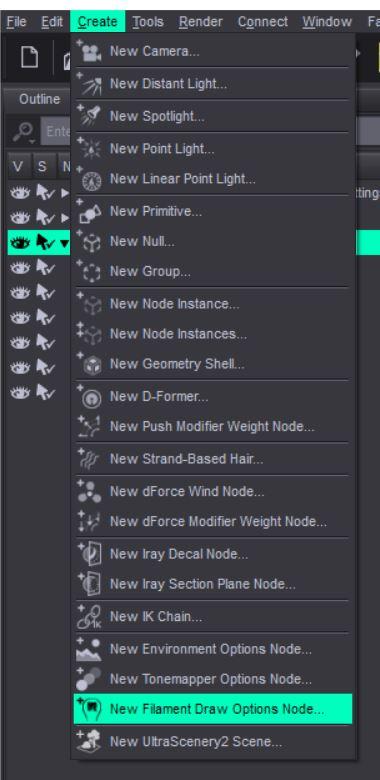
As for not having issues with the other clothing, are you sure? Could you post a render of it, because looking at the skin of the image you posted, the shaders do not look right. So I'm wondering if you just don't have all the resources installed that are needed.
Do you use DIM (Daz Install Manager)? If not I HIGHLY recommend it as it makes installing and managing products so much easier. Do a search in there for Default Resources for Daz Studio and make sure you have that updated.
Anime Toons and Filatoon Shader Q&AHas anyone been able to achieve a fog effect or fading depth effect in Filament without a fog prop? Right now I don't know if it's possible but wanted to check to see if anyone has discovered a way to do it without a prop?
Toon Base T-Shirt textures not loading [SOLVED!!]3Diva said:
taiuri said:
I installed the new 4.23 Daz Studio because I wanted to use the new G9 Toon Figures, but when I loaded the Toon Base T-shirt on the Base Anime Masculine, the materials don't load, neither the defualt blue texture (it's only black).
Any idea how to solve this issue?
First, let's find out a couple of things to make sure of, to see if we can noodle out what the issue is:
1) Are you using the Filament draw option? https://www.daz3d.com/forums/discussion/comment/9041351/#Comment_9041351
2) Do you have a Filament Draw Options Node in the scene?
3) Do you have at least one distant light in the scene?
4) Are you using a PC (and not a Mac)? (I believe that Filatoon isn't usable on Mac at the moment but they're working on fixing that.)
If those four are a yes, make sure you have these installed and UPDATED: Default Resources for Daz Studio 4.23+ (or whatever the current version of that is), Genesis 9 Starter Essentials, Genesis 9 Starter Essentials Expansion.
1.- Yes
2.- I don't know what is that? Could you explain me, please?
3.- Yes
4.- PC
5.- Where can I get the Updated Default Resources? I have installed G9 starter essentials and its expansion.
I want to add that I don't have any problem with the rest of the clothes (males and females) or hairs. Only with the T-shirt.
Toon Base T-Shirt textures not loading [SOLVED!!]taiuri said:
I installed the new 4.23 Daz Studio because I wanted to use the new G9 Toon Figures, but when I loaded the Toon Base T-shirt on the Base Anime Masculine, the materials don't load, neither the defualt blue texture (it's only black).
Any idea how to solve this issue?
First, let's find out a couple of things to make sure of, to see if we can noodle out what the issue is:
1) Are you using the Filament draw option? https://www.daz3d.com/forums/discussion/comment/9041351/#Comment_9041351
2) Do you have a Filament Draw Options Node in the scene?
3) Do you have at least one distant light in the scene?
4) Are you using a PC (and not a Mac)? (I believe that Filatoon isn't usable on Mac at the moment but they're working on fixing that.)
If those four are a yes, make sure you have these installed and UPDATED: Default Resources for Daz Studio 4.23+ (or whatever the current version of that is), Genesis 9 Starter Essentials, Genesis 9 Starter Essentials Expansion.
FilaToon / Cell shaded rendering with Filamentcain-x said:
Just wanted to verify all the testing and work done since Filatoon has been released and the new work put into Filament:
- Transparency/Opacity still has issues displaying correctly in filament (i.e. hair)
- Emissives does not cast light to any nearby objects
- Environment map only works with hdri images, unlike how Iray behaves
- Reflections only work with hdri and no 3d objectsIs there some limitation with the Google Filament engine or has it not yet been plumbed into DAZ? Some understanding of the road map will be very helpful as I do have some projects that may require these features or if I need to move this to a render engine that can support this.
The transparency/opacity issues have been solved if you use the Filatoon Shader on the hair (or anything else that has a transparency/cutout opacity map).
FilaToon / Cell shaded rendering with Filamentcain-x said:
Just wanted to verify all the testing and work done since Filatoon has been released and the new work put into Filament:
- Transparency/Opacity still has issues displaying correctly in filament (i.e. hair)
- Emissives does not cast light to any nearby objects
- Environment map only works with hdri images, unlike how Iray behaves
- Reflections only work with hdri and no 3d objectsIs there some limitation with the Google Filament engine or has it not yet been plumbed into DAZ? Some understanding of the road map will be very helpful as I do have some projects that may require these features or if I need to move this to a render engine that can support this.
While both Filament and Iray offfer a form of PBR rendering they are not the same. Filament and Iray do have documentation, and the DS chnage logs etc. tell you which versions DS is using, if you wish to compare features.
FilaToon / Cell shaded rendering with FilamentJust wanted to verify all the testing and work done since Filatoon has been released and the new work put into Filament:
- Transparency/Opacity still has issues displaying correctly in filament (i.e. hair)
- Emissives does not cast light to any nearby objects
- Environment map only works with hdri images, unlike how Iray behaves
- Reflections only work with hdri and no 3d objectsIs there some limitation with the Google Filament engine or has it not yet been plumbed into DAZ? Some understanding of the road map will be very helpful as I do have some projects that may require these features or if I need to move this to a render engine that can support this.
Artifacts with toon eyes on Iray?I am going for 3d toon style than a flat anime style as I am having trouble getting various geoshells effects to work in the filament. I did some test renders on Iray with the toon model and for the most part, it's okay but there is artifacts on the eyes. I tried changing from filatoon shader to base uber and still no different. Yes, I've fiddled around with environment weight on shaders too.I tried apply headlamp too incase low light was causing issues, still artifacts.The thing is, in one of my experiments, I did get it right without artifacts, but I forgot what I did. I am unable to reproduce it. Any advice?
Is AI killing the 3D star?@JoeQuick I agree with an earlier comment you made, that a plugin for Daz Studio that can be used to enhance Daz Studio renders would be so cool! It would only need an image to image functionality with low diffusion - just enough to enhance the image. If it could be used along side Iray (or even Filament for it's lightning fast rendering), that would be awesome!NVidia 5090Richard Haseltine said:
Which, as I wrote, is Iray, not Daz Studio itself - other GPU-enabled features (dForce, say, or Filament) do, as far as I know, work with 50x0 cards.
Fair enough, but since rendering scenes is (I assume) a big part of what folks do with Daz, I just wanted to point out that the 5090 does not yet work for that aspect of the program (until the Iray part of the software gets updated). Hopefully the NVidia update to Iray will have some goodies to help out legacy cards (like the 30xx and 40xx series) as well, since I notice that the latest driver adds new features to those cards that weren't previously available, such as frame generation.
NVidia 5090jbdiminnie said:
Richard Haseltine said:
Daz Studio works with the 50x0 series as far as I know, Iray requires an update (from nVidia, which will then need testing before release in DS).
Richard,
This was posted on February 1 in a thread asking if 5090 was supported by Daz, which indicates that 4.23 doesn't support 5090s at the moment, unless you know something different...
pocketnew said:
Unfortunately, RTX 5090 are not supported at this point, nothing renders (I'm using latest drivers).
2025-02-01 17:19:41.743 [WARNING] :: \src\pluginsource\DzIrayRender\dzneuraymgr.cpp(373): Iray [ERROR] - IRAY:RENDER :: 1.0 IRAY rend error: Cannot render: found no usable devices. Please update your NVIDIA driver (www.nvidia.com) to at least 537.13, or enable CPU rendering.
2025-02-01 17:19:41.743 [ERROR] Iray :: Invalid parameters (NULL pointer).Which, as I wrote, is Iray, not Daz Studio itself - other GPU-enabled features (dForce, say, or Filament) do, as far as I know, work with 50x0 cards.
[Released] Stylized Environment Shaders [Commercial]@scorpio I'm sorry to confuse you - they are Shader Presets (as defined by Daz Studio) and are based on the Iray Uber shader but can be used in Filament, either as is or converted to FilaToon if preferred as per the info above.
Given that Filament doesn't support displacement, if the presets are used as is but the drawstyle is switched to Filament, only the normal maps will provide simulated height information.
I've unlocked the max value of normal maps specifically for this purpose, as higher normal map values can simulate the geoshell outline effect of filatoon (obviously depending on lighting conditions, shadows etc).
I wanted to create a product that could be used in either Iray or Filament, because Mac users don't have Filament as option unfortunately.
Daz 3D is part of

Connect
DAZ Productions, Inc.
7533 S Center View Ct #4664
West Jordan, UT 84084Licensing Agreement | Terms of Service | Privacy Policy | EULA
© 2026 Daz Productions Inc. All Rights Reserved.