-
There's Always Another Sale Thread -- Discussions Only Pt 2
AllenArt said:
Hmmm...military nurse outfit with the top open to the navel? I think not. LOL I don't mind if they have a morph to open, but I don't want that to be the only way it comes. Am I alone in this?

Absolutely not. Any product that exhibits sexual erotica without being true to reality doesn't get purchased by me. There is no way a military nurse, or even a civilian nurse would wear weat low cut, bare midriff, butt hanging out or high heals. This goes for military uniforms in general.
Now, if you have a normal attire with the ability of opening the buttons, etc, that would be ideal.There's Always Another Sale Thread -- Discussions Only Pt 2paulawp (marahzen) said:
AllenArt said:
Hmmm...military nurse outfit with the top open to the navel? I think not. LOL I don't mind if they have a morph to open, but I don't want that to be the only way it comes. Am I alone in this?
Me, I thought that, too. I literally thought, "Just one or two more buttons, and this could have been a product for multiple audiences."
Ineed, and whats even more sexy is the transition from proper outfit to a sexy outfit.... always be on lookout for morphs on clothes.
Any way to split a morph, like eyeballsRAMWolff said:
PS. Sub Components >1st Stage has like a million and one entries when I expand it. So when I added in the mouth and eyes it didn't do anything, as in the eyes and mouth didn't follow along with Fuzzy's shape. SO I deleted those.
Have you ever did an ERC Freeze on Fuzzy's single control property ? It seems that you must've done at least once....
Pls DO NOT ERC Freeze on a control dial, freeze on "morph dial" as needed. Like this - there should be 3 basic dials for Fuzzy: Fuzzy, Fuzzy Head, Fuzzy Body on a Base Genesis figure. ERC Freeze on the last two, never on the 1st one.
Any way to split a morph, like eyeballsRAMWolff said:
OK, thanks so much.
Cloudfare took a dumb or I would have posted faster.
Watching Jay's tutorial on how to set up a controller for the eye morphs. Seems when the default blink morph is set to zero Fuzzy's eyes are SO wide they look like they are popping out of his cute little head. So I'll need to control the eye blink for him so this extreme fear look (LOL) doesn't happen! Just not sure where that controller is
I've almost watched each clip from Jay when I started to learn DS... but not recently. Which one ? I can refresh my memory...
There should be no problem as long as you make all steps correctly. Was the "blink corrective morphs" you made based the figure with Eye Blink property dial 100%... and you import them back to DS with "Reverse Deformatoion" + "Delta Only" in Morph Loader Pro ?
There's Always Another Sale Thread -- Discussions Only Pt 2AllenArt said:
Hmmm...military nurse outfit with the top open to the navel? I think not. LOL I don't mind if they have a morph to open, but I don't want that to be the only way it comes. Am I alone in this?
Me, I thought that, too. I literally thought, "Just one or two more buttons, and this could have been a product for multiple audiences."
Any way to split a morph, like eyeballsOK, thanks so much.
Cloudfare took a dumb or I would have posted faster.
Watching Jay's tutorial on how to set up a controller for the eye morphs. Seems when the default blink morph is set to zero Fuzzy's eyes are SO wide they look like they are popping out of his cute little head. So I'll need to control the eye blink for him so this extreme fear look (LOL) doesn't happen! Just not sure where that controller is
There's Always Another Sale Thread -- Discussions Only Pt 2AllenArt said:
Hmmm...military nurse outfit with the top open to the navel? I think not. LOL I don't mind if they have a morph to open, but I don't want that to be the only way it comes. Am I alone in this?
No, you are not! Then again, I also think armor with heels is stupid and yet that seems to be a popular thing to sell.
There's Always Another Sale Thread -- Discussions Only Pt 2AllenArt said:
Hmmm...military nurse outfit with the top open to the navel? I think not. LOL I don't mind if they have a morph to open, but I don't want that to be the only way it comes. Am I alone in this?
It is the much demanded Slutty Military bundle for connoisseurs of WWII erotica.
There's Always Another Sale Thread -- Discussions Only Pt 2Hmmm...military nurse outfit with the top open to the navel? I think not. LOL I don't mind if they have a morph to open, but I don't want that to be the only way it comes. Am I alone in this?
November 2023 - Daz 3D New User Challenge - Materials and next level KitbashingElliandra said:
Morning all!
Ok silly question @dreamcatcherphoto have you tried darkening the diffuse on her skin a tad? You mentioned you didn't like how much she was standing out from the background and that might help some.@aprilshowers2065
very nice render I love the moodiness you have going on!
The only things I would suggest right off the bat are:
1. The snake is poking through the Tyto shawl around knee height
2. The Helenic top is showing pokethrough into the gown below on the center figure and the one by the wolf. To correct this try either adding or increasing the smoothing, increase the Adjust Upper Torso morph. If the combination of those don't work (they should though) I'd suggest adding dForce to it via the simulation pane!Very good call...that might do the trick as well..never even though of that.
Any way to split a morph, like eyeballsRAMWolff said:
Thank you both. GOD I can be so dense at times! LOL
So another question. How do I make all the bits and pieces work as one? I have the inner mouth morph, the eyeball morph and the main character morph. How do I create a dial so that when I dial up Fuzzy these other elements activate as well?
Then I promise I'll leave you guys alone (maybe
 )
)No problem at all ~ At your service !
You use another way in Property Hierarchy: create a single control property for Fuzzy first, then assign those morphs to its Sub-Components - 1st Stage, like the attached shot~
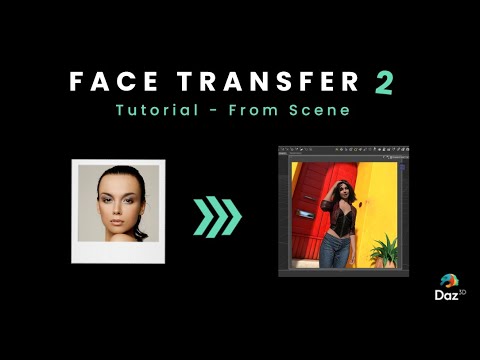
Please - Face Transfer 2A little disappointed with the promo pics in Face Transfer 2 | Daz 3D
While appreciating the creator's effort, I feel like the product still cannot capture the eyes shape correctly. I would say even FT1 is doing a better job for eyes. FT2 seems to be enlarging eyes unnecessarily. All three characters in the promo photos seems to have the same shape of eyes dispite in the original photos they are different...
Any way to split a morph, like eyeballsThank you both. GOD I can be so dense at times! LOL
So another question. How do I make all the bits and pieces work as one? I have the inner mouth morph, the eyeball morph and the main character morph. How do I create a dial so that when I dial up Fuzzy these other elements activate as well?
Then I promise I'll leave you guys alone (maybe
)Whenever I use the G8M males, the morph loader keeps failing, Any help?[morph loader keeps failing] It's does that everytime i use the morph loader [with the G8M males]. But it works fine on G8F
FaceGen Pulled From StoreMore information about Face Transfer 2 is included with YouTube video from Daz 3D
 November 2023 - Daz 3D New User Challenge - Materials and next level Kitbashing
Morning all!
Ok silly question @dreamcatcherphoto have you tried darkening the diffuse on her skin a tad? You mentioned you didn't like how much she was standing out from the background and that might help some.@aprilshowers2065
very nice render I love the moodiness you have going on!
The only things I would suggest right off the bat are:
1. The snake is poking through the Tyto shawl around knee height
2. The Helenic top is showing pokethrough into the gown below on the center figure and the one by the wolf. To correct this try either adding or increasing the smoothing, increase the Adjust Upper Torso morph. If the combination of those don't work (they should though) I'd suggest adding dForce to it via the simulation pane!Face Transfer 2frank0314 said:
Artini said:
It also explains, that Genesis 9 is currently handled by Face Transfer 2,
but Genesis 8 and 8.1 is handled by Face Transfer 1.
Where are you seeing this?
It's mentioned in one or both of the videos. The implication ( although it's not specifically stated ) is that, if you have Face Transfer 2 and there is no character selected, then a G9 character is created, and if you have a G9 character selected, then Face transfer 2 is used to create a face on it. If you have Face transfer 1, and a G8 or 8.1 character selected, then face transfer 1 is used to create a face on it.
Is AI killing the 3D star?Artini said:
This is the answer, about how to connect Daz Studio with AI:
I don't believe this is true. The AI for DS that Daz has discussed has to do with setting up scenes.
Face Transfer 2Artini said:
It also explains, that Genesis 9 is currently handled by Face Transfer 2,
but Genesis 8 and 8.1 is handled by Face Transfer 1.
Where are you seeing this?
Please help me understand the licenseHi, I am making a game and have some problem understanding the license, I bought genesis3 as well as 8, a morph for shape of the face, some clothes, I bought interactive license for every one of the objects and made a character adjusting size of the head, muscles etc, reduced to base resolution and exported a collada to blender to furter work in the rigging, my question is if there is some kind of legal problem to make my main character using those models, the interactive license suggest it can be used but then there is some new license extra and I dont really know if continue working with those models or require explicit permision, I have seen chinese games that aparently use characters made from genesis models can someone explain it in asimple way with examples please?
Daz 3D is part of

Connect
DAZ Productions, Inc.
7533 S Center View Ct #4664
West Jordan, UT 84084Licensing Agreement | Terms of Service | Privacy Policy | EULA
© 2026 Daz Productions Inc. All Rights Reserved.