-
Face Transfer 2 - Daz only displays FT 1
I purchased Face Transfer 2 and I am only seeing FT 1 displaying in my "About plugins folder". I have my serial number rearing to go but FT 1 is the only option currently. Is there a way to uninstall FT1 so I can activate my FT2?
[Released] RSSY Character And Material Conversion Bundle Genesis 8 to Genesis 9 [Commercial]So... I'm going to shuffle in and ask a dumb question. I did read through the whole thread, but am obviously being dense and not seeing where user error is kicking in in my situation.
Bought the character converter bundle and it looks awesome. This is the first chance in the months since the purchase that I've had time to sit and play with it. Since my results are so poor, I'm convinced that it's down to my own misunderstanding of something.
I begin with an empty scene.
1. Double-click on Character Converter - G8F to G9 script and the window opens.
2. Set output directory. In my case, because I want to keep the converted characters separate from the others, I've got it set as: E/:My Daz 3D Library/People/Genesis 9/Converted Characters.
3. Add Directory. In my case, I've got my Daz Originals installed to its own library: E/:My Daz 3D Daz Originals Library/People/Genesis 8 Female/Characters.
4. Select a single character, Babina 8.
5. Click Execute. The script begins to do its thing. Babina is loaded, then Genesis 9. As things work, a pop-up comes up asking if I want to zero the figure shape or restore it. I pick Restore.
6. A few seconds later, the script says it's finished. Everything seems to have worked smoothly.
However, nothing seems to have been saved. The character dials do appear on the G9 figure in the scene, though the values are not set as expected. If I delete the G9, those dials disappear so they haven been saved as part of the process. If I put in a value of 100% on the head and body and then dial up the G9 Feminine morph, the shape is fairly close to Babina 8's. Do they need to be saved manually? Also, no presets are appearing in the Converted Characters folder, and the materials don't seem to be getting converted either. The log is showing errors relating to the conversion, and it says it can't find the Genesis 8 Female Head property. Is it only looking for that in E/: ? So I'm definitely missing something along the way. Any idea where I've gone wrong?
Dentures?There are dentures in this set
https://www.daz3d.com/millennium-teeth
They're not actual dentures. It's a set of teeth with a denture morph.
Star Trek Builders Unite 8: THE REBOOTrschulte said:
Thanks for this update....
FYI....new freebies
Magnus1781 released a TOS Spock (Nemoy) and Kirk (Shatner) morph for G8:
https://www.deviantart.com/magnus1781/art/Various-VG-Characters-1001533311Ryselle-chan has released a Tholian for Daz:
https://www.deviantart.com/ryselle-chan/art/Free-Download-Tholian-for-DAZ-Studio-1001977976I hope it fixes the problems - and doesn't create more! I need to set up another machine to test these on that doesn't presume they're installed.
Thanks for the heads-up on the morphs. I tried them both - not real happy with either. Shatner looks more like Pine, and Nimoy, if looked at individually, isn't bad, but I decided to try using additional morphs. One thing I hate about a lot of these characters converted from VG characters is that they have scalps molded in the shape of hair. At the moment, I don't have any decent Spock hair, and I haven't purchased 3DUK's Spock, yet. This example uses the standard Genesis 8 Male texture, but I removed the brows and added a physical brow from "Aniyah' for G8F; I also changed the base and translucency colors. Next to the out-of-the-box morph, the original looks like Alex Baldwin Star Trek Builders Unite 8: THE REBOOT
Thanks for this update....
FYI....new freebies
Magnus1781 released a TOS Spock (Nemoy) and Kirk (Shatner) morph for G8:
https://www.deviantart.com/magnus1781/art/Various-VG-Characters-1001533311Ryselle-chan has released a Tholian for Daz:
https://www.deviantart.com/ryselle-chan/art/Free-Download-Tholian-for-DAZ-Studio-1001977976dforce hair importing as an empty scalp?aweswan said:
Try having the " node weight map brush" on in tools when you export. Not sure if it will help, it's fixed geograph issues for me before though.
https://davidvodhanel.com/2023/01/26/fix-for-geografts-breaking-morphs/
You can swap clothes, but it is complicated. I have Morphs + swappable clothes + lods working together, and I'd need a few pages in here to describe how I pulled it off. I'll try to make video tutorial series sometime soon.
If your new, I'd suggest sticking with gen 8 and below. Gen 9 have issues with their hands in animations and the avatar needs to be tweaked to get that working.
If you don't need body morphs, I suggest exporting to Character creator, and exporting from there - the skin sahders on daz models (in cc) looks better than unity bridge but maybe only ~10% better. It also has better eyes - though I'll have to get some time experimenting with other unity eyes. Cc fixes the skeletal issues in gen 9 as well.
Looking forward to your tutorial.
The other thing I am missing when transferring Daz 3D characters to Unity
is a possibility to transfer only visible parts but not the ones covered by clothes.
This is pretty common feature if you look at the characters with clothes
available in Unity Asset store.
dforce hair importing as an empty scalp?Thank you for the replies... Yeah, I'm realizing how complicated it all is unfortunately. I was able to get morphs working in Unity by doing SkinnedMeshRenderer.SetBlendShapeWeight() and making sure morph indexes all match up in Blender before exporting. It seems like this is the "simplest" way which is a bit unfortunate. A more functional Daz->Unity bridge would be nice but then I guess it wouldn't be a challenge to make a great looking game :P
I'll work on the hair a bit more and post if I have any success. Thanks!!Deepsea Eve for Genesis 9?FSMCDesigns said:
Gordig said:
riftwitch said:
You could just transfer the Eve shape to G9. This method is really easy.
I can't speak for the OP, but I'd guess that the UV and/or textures are what they're after.
Looking at both products, the G9 version looks to just be a normal character with the standard UV map, unlike the G8 Adam version. If so, then just transferring the G9 female version over to G9 would do the trick
OK. sounds good. I will try it.
And then hope a G9 Eve is released by the PA.
 Deepsea Eve for Genesis 9?
Gordig said:
riftwitch said:
You could just transfer the Eve shape to G9. This method is really easy.
I can't speak for the OP, but I'd guess that the UV and/or textures are what they're after.
Looking at both products, the G9 version looks to just be a normal character with the standard UV map, unlike the G8 Adam version. If so, then just transferring the G9 female version over to G9 would do the trick
Help with BruisesHey Gordig, I tried to map transfer materials from 8.1 to 8.0, but it did not work, i dont know if it will work that way round, so is it possible to transfer the LIE bruises to 8.1 using map transfer, or something like it?
Deepsea Eve for Genesis 9?Thank you. I will look into the transfer thing. But I would love to have the actual figure if/when it comes out. I know these things take time.
Deepsea Eve for Genesis 9?riftwitch said:
You could just transfer the Eve shape to G9. This method is really easy.
I can't speak for the OP, but I'd guess that the UV and/or textures are what they're after.
Help with BruisesYou can Map Transfer torso maps to G8.1 UV.
Deepsea Eve for Genesis 9?von Hobo said:
Will there be a Deepsea Eve for Genesis 9 to go with DS Adam for G9?
I own both the G8 figures with the same names and they are absolutely incredible.
How do I contact the PA to ask about Eve for G9?
DS Adam for Genesis 9 | Daz 3D
You could just transfer the Eve shape to G9. This method is really easy.
 Face Transfer 2
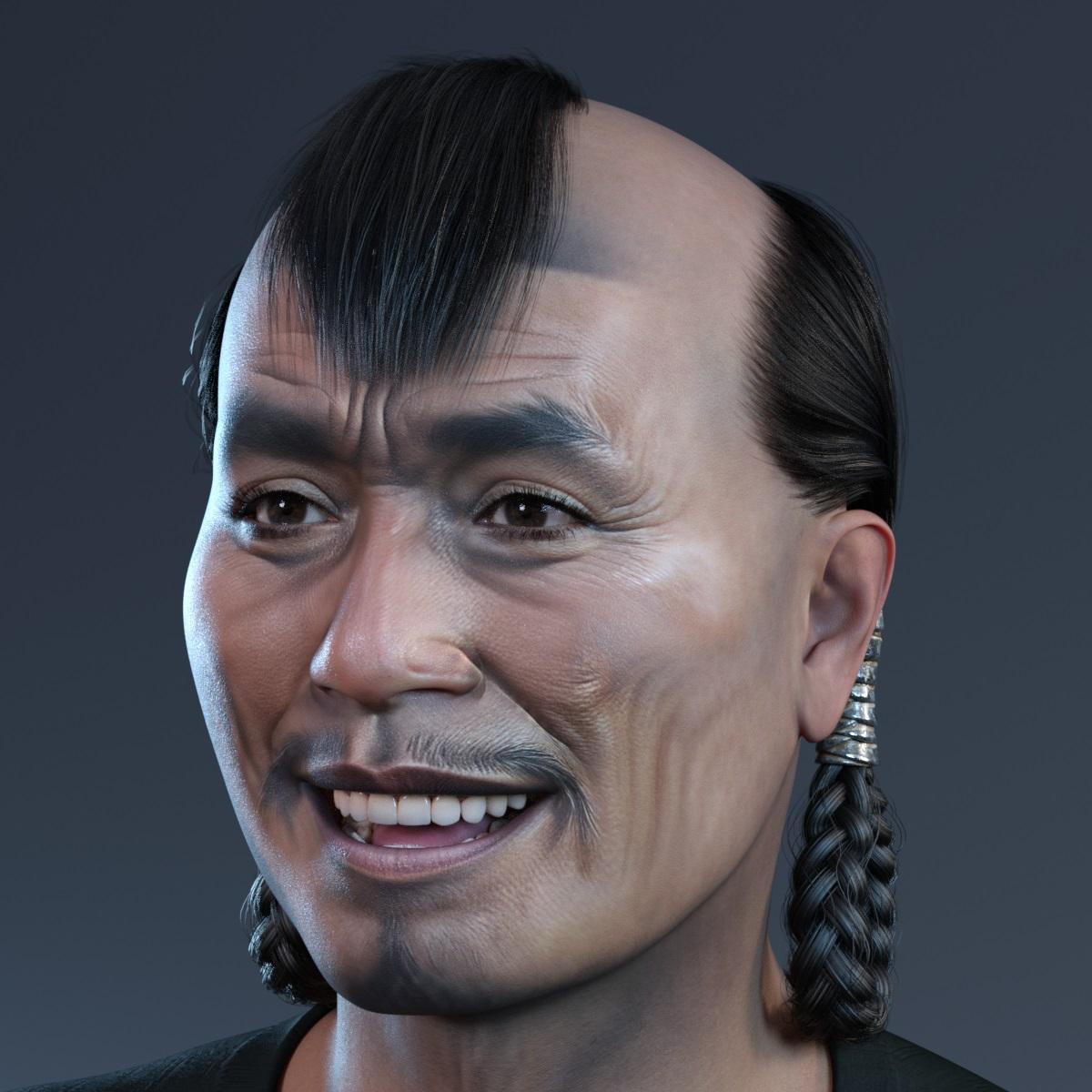
Could not resist, so one more Genesis 9 character created with Face Transfer 2
using hair from: https://www.daz3d.com/lee-roy-dforce-bowl-hair-for-genesis-9-and-8-male
 Daz Studio Pro BETA - version 4.22.0.15! (*UPDATED*)
I can confirm that the latest Daz Studio beta (4.22.0.12) has fixed the issue introduced in 4.22.0.10
when Daz Studio beta has crashed when trying to save characters created with Face Transfer 2.
Thanks a lot for fixing the issue.
Face Transfer 2Ok, I have installed the latest Daz Studio beta (4.22.0.12)
and can confirm that it works with saving characters made with Face Transfer 2.
Below is a happy Genesis 9 character created with it
and with the hair from: https://www.daz3d.com/genghis-hair-for-genesis-9
Thanks for fixing the issue.
 Daz Studio basic installation question
Yes and no, assuming that is in a folder selected as a Poser format content directory - they are Michael 4 files, but theya re not "user-facing" files (they are the system thata llows additional morph packs to be added to the figure). Character>Daz People wiould have the user-facing files for loading the figure, with Pose>Daz's Michael 4 having a lot of the others. They should be availble in Daz Studio, via the Content Library pane Poser Formats>folder you installed to>Figures>Daz People (confusingly, in Poser the Character folder appears as Figures - and faces appears as Expressions as I recall).
Face Transfer 2For today, I have tested how different material change the look of the render
of Genesis 9 created with Face Transfer 2.
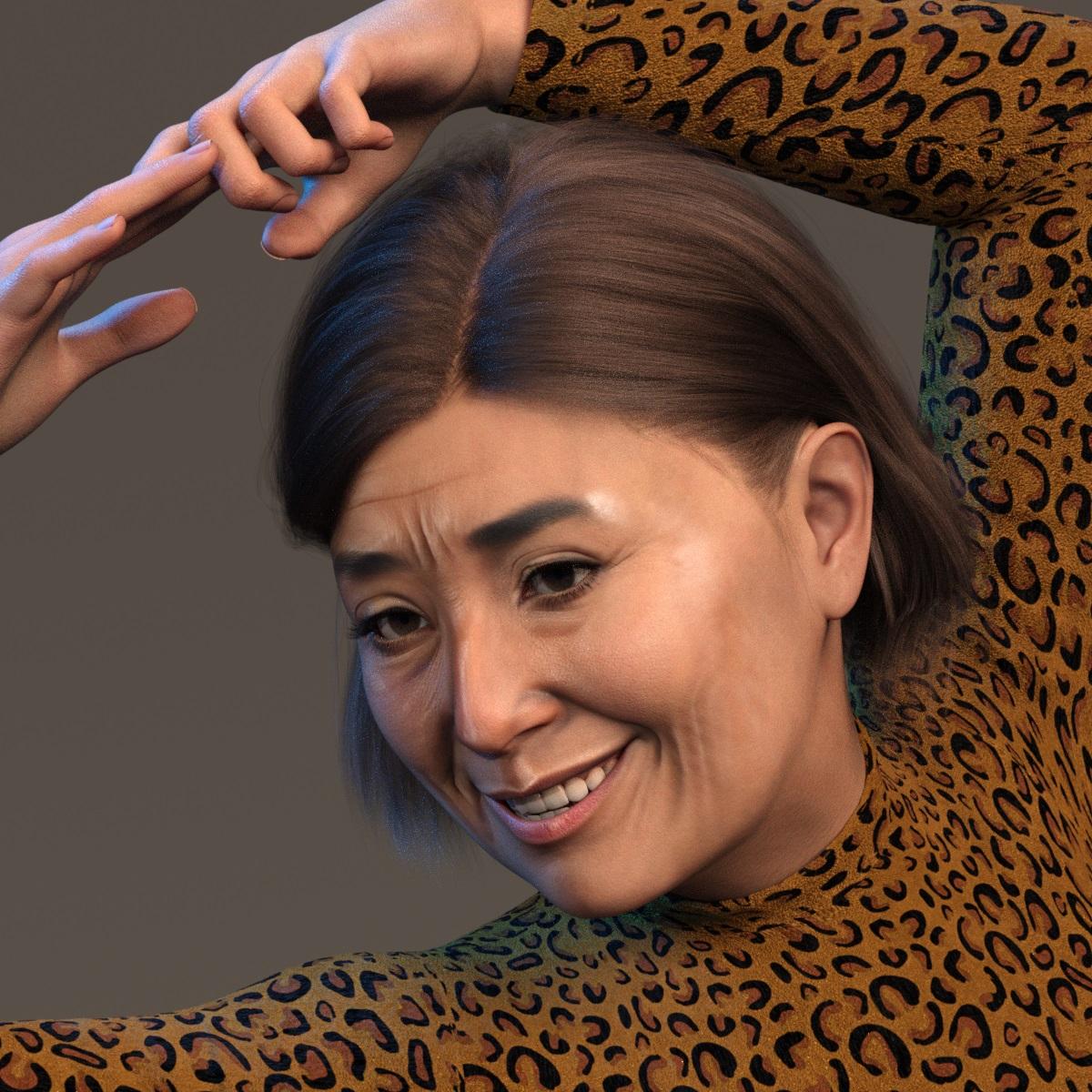
and the same character with materials from https://www.daz3d.com/dav-yasaki-for-genesis-9
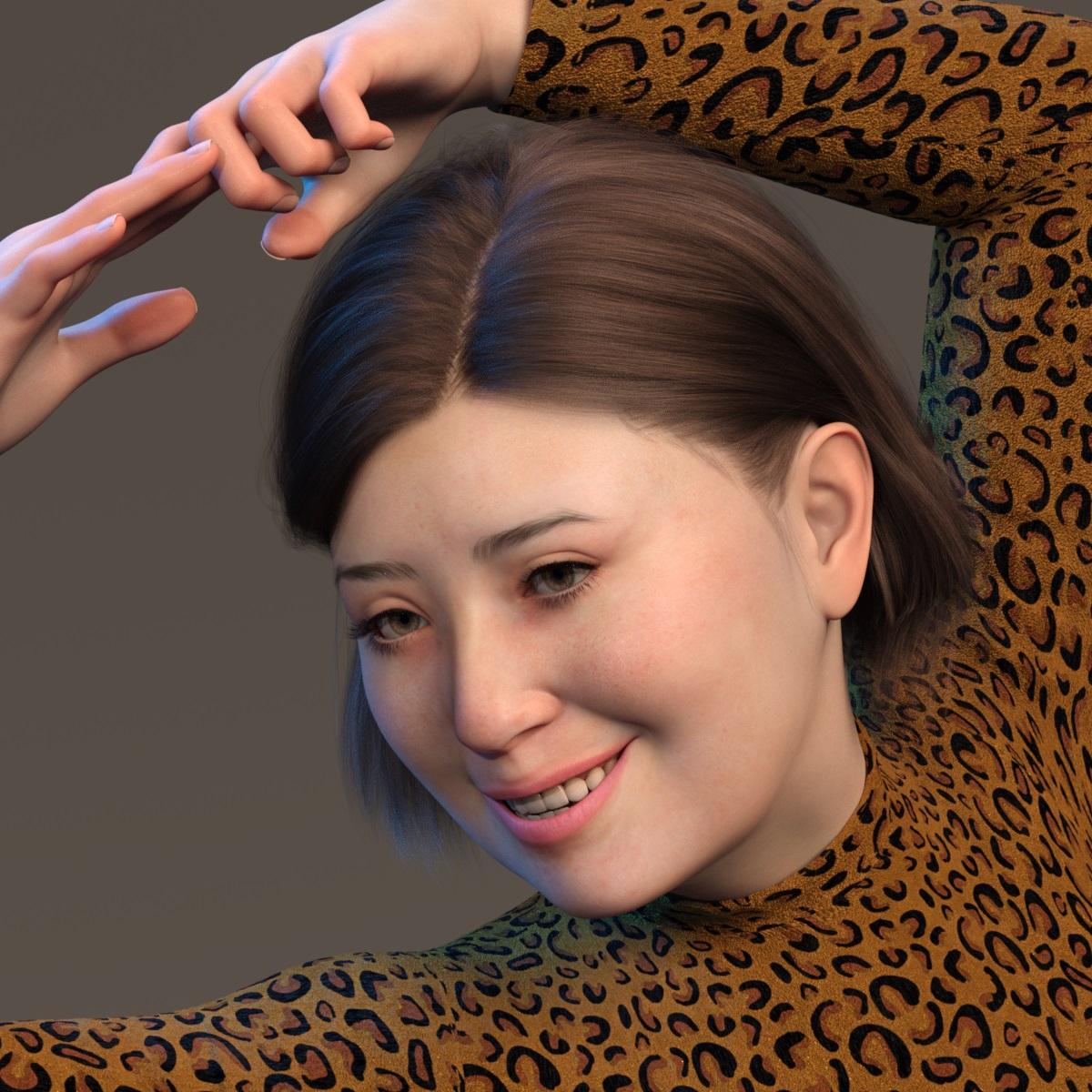 Face Transfer 2
Artini said:
There is a new version of Daz Studio beta in DIM.
Does anybody has tested it with Face Transfer 2?
Bad week at work here ... have had minimal art time.

Daz 3D is part of

Connect
DAZ Productions, Inc.
7533 S Center View Ct #4664
West Jordan, UT 84084Licensing Agreement | Terms of Service | Privacy Policy | EULA
© 2026 Daz Productions Inc. All Rights Reserved.