-
3D Art Freebie Challenge-October 2019-"Monster Mash" -Main Thread Only
Well, I finally have my entry ready.
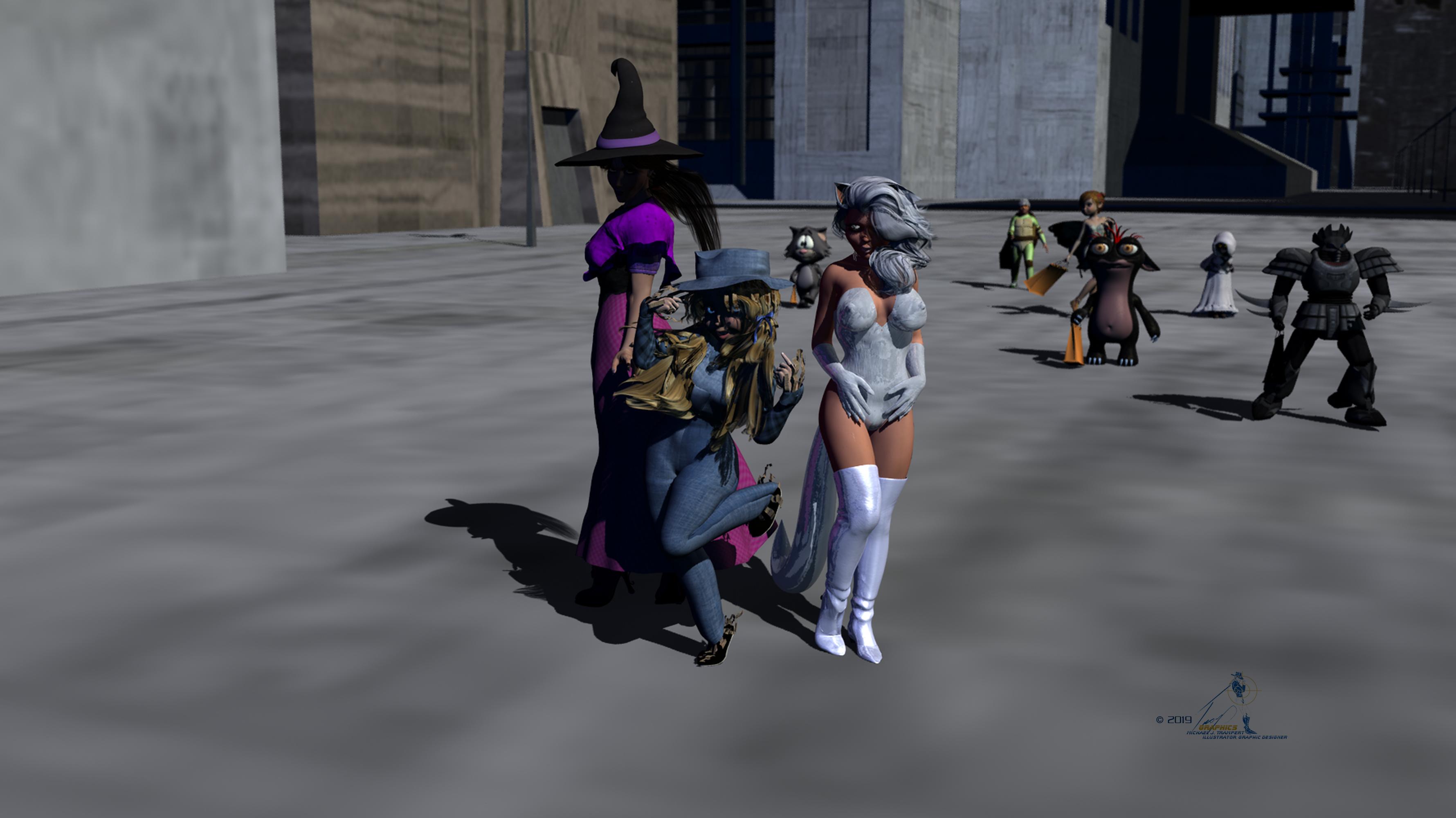
The girls are out on the town for Halloween surrounded by trick-or-treaters.
Bewitching Beauties
All characters Genesis Base
Freebies:
Die_trying's V4 morphs for Genesis (Tommie,, Ashley, Maria)*
Pin-up Girl Pack (Tommie)*
Ultimate Shader Pack (Chrome shaders—with reflection maps removed—for Ashley's eyes, and Maria's jewelry; Silver shaders Ashley's costume)*
Ella V4 (Tommie's eyes)*
Sandra for V4* (Tommie's skin)*HFS EVAN Expansion set (Ashley's eyes)*
Halloween bag: (trick-or-treaters)*
Dystopia City Blocks 11-20 (sky,road)
Faierie Dreams Freebies Page 1: (four items from same page) Deathrobe for M4 (top link), Tink Dress for V4 (First colum seventh row), Fairy wings for V4 Wings (First colum eigth row, and Leafy Boots Second colum second row. (Jawa trick-or-treater, Fairy trick-or-treater)
Ryuujin (robot trick-or-treater)
Gypsy Style Dress (Maria)*
Textures for Gypsy Dress (Maria)*
Witch Hat for Genesis 8 Female (Maria)
Hoop Earings for #Dream's Lusitana (Maria's Earrings)*
Cat Ears (Ashley)*
Foxy Sorceress (Ashley's tail)*
Catrina Jewelry for Genesis (Ashley)*
TrtlPWR (Turtle boy)*
Genesis bodysuit by Adam Thwaites (Turtle boy)
Zipper Ninja (Turtle boy)*
Grungle Monk (alien)
Halloween for Grungle Monk (alien)
Paid For Items
Willow for Genesis 2 Female (Tommie, Fairy trick-or-treater)Marja Hair for Genesis (Maria, Tommie)
End of Summer Hair for Genesis and Genesis 2 Female (Ashley)
Victoria 4 Hero Pack (Ashley)
Xandra for Genesis (Maria)
No Count ItemsRamwolf's Genesis Morphs (all figures)
Genesis Evolution Head and Body Morphs (all figures)
Sallie Mae Hair (Tommie)
Genesis Scarecrow outfit by Dragonbreath (Tommie)
Pikcet Pets Kitty by 3DUniverse [no longer available] (Cartoon Cat trick-or-treater)
All The Links Check Out Plz Move To Entries Thread
3D Art Freebie Challenge-October 2019-"Monster Mash" -Main Thread OnlyWell, I finally have my entry ready.
The girls are out on the town for Halloween surrounded by trick-or-treaters.
Bewitching Beauties
All characters Genesis Base
Freebies:
Die_trying's V4 morphs for Genesis (Tommie,, Ashley, Maria)*
Pin-up Girl Pack (Tommie)*
Ultimate Shader Pack (Chrome shaders—with reflection maps removed—for Ashley's eyes, and Maria's jewelry; Silver shaders Ashley's costume)*
Ella V4 (Tommie's eyes)*
Sandra for V4* (Tommie's skin)*HFS EVAN Expansion set (Ashley's eyes)*
Halloween bag: (trick-or-treaters)*
Dystopia City Blocks 11-20 (sky,road)
Faierie Dreams Freebies Page 1: (four items from same page) Deathrobe for M4 (top link), Tink Dress for V4 (First colum seventh row), Fairy wings for V4 Wings (First colum eigth row, and Leafy Boots Second colum second row. (Jawa trick-or-treater, Fairy trick-or-treater)
Ryuujin (robot trick-or-treater)
Gypsy Style Dress (Maria)*
Textures for Gypsy Dress (Maria)*
Witch Hat for Genesis 8 Female (Maria)
Hoop Earings for #Dream's Lusitana (Maria's Earrings)*
Cat Ears (Ashley)*
Foxy Sorceress (Ashley's tail)*
Catrina Jewelry for Genesis (Ashley)*
TrtlPWR (Turtle boy)*
Genesis bodysuit by Adam Thwaites (Turtle boy)
Zipper Ninja (Turtle boy)*
Grungle Monk (alien)
Halloween for Grungle Monk (alien)
Paid For Items
Willow for Genesis 2 Female (Tommie, Fairy trick-or-treater)Marja Hair for Genesis (Maria, Tommie)
End of Summer Hair for Genesis and Genesis 2 Female (Ashley)
Victoria 4 Hero Pack (Ashley)
Xandra for Genesis (Maria)
No Count ItemsRamwolf's Genesis Morphs (all figures)
Genesis Evolution Head and Body Morphs (all figures)
Sallie Mae Hair (Tommie)
Genesis Scarecrow outfit by Dragonbreath (Tommie)
Pikcet Pets Kitty by 3DUniverse [no longer available] (Cartoon Cat trick-or-treater)
V8 EyebrowsThe Victoria 8 brows have numerous morphs included. They can be found by selecting the brows in the Scene tab, then opening the Parameters tab, clicking on Actor, and scrolling until you see them. They make the brows quite versatile.
Also, SuperNatural Brows has tons of morphs, but the brows are so distinctive that I prefer not to use them on more than two characters per render.
I see no Actor portion of the tree in the Parameters tab. I'm looking at All, after loading the V8 Eyebrow then selecting in the scene tab. There are morphs for V8 regarding brows, but not for the brow object itself.
I purchased the LUXE lashes and brows product. Still no morphs, but more options to choose from.
V8 EyebrowsThe Victoria 8 brows have numerous morphs included. They can be found by selecting the brows in the Scene tab, then opening the Parameters tab, clicking on Actor, and scrolling until you see them. They make the brows quite versatile.
Also, SuperNatural Brows has tons of morphs, but the brows are so distinctive that I prefer not to use them on more than two characters per render.
Daz Studio and LinuxI'm still running EXT4 (external drives in EXT3)
Old. But not obsolete.
Perhaps I'll switchto ZFS
So, remember two things: firstly, write perfomance on usual filesystem greatly degrades at ~85÷90% of capacity used, zfs pools will suffer about 80÷85%. But for home use it does not matter at all. And another thing: never use deduplication unless you sure having a lot of RAM. Oh, a third one: if you need an advise, just ask )
Oh, it'll not be anytime soon - I've had my current drives for a fair few years - i just pulled the internal SDD and HDD out of the last sytem, put them in the new build and booted - had to reconfigure the boot Grub, and change the GPU driver, but beyond that, smooth switch.
I'm still not that confident about HDD drive sizes larger than 3TB
6÷12 TB tends to become mainline, and 6TB are best buy for a moment. Of course, you need GPT partitionning to use more then 2TB capacity, but all modern systems handle this well for years. But all of them are 3.5" form-factor.
Amazon have some 2.5" 4TB Samsung external drive.all my drives are Western Digital, I had several Seagate failures, but every WD has been rock solid
WD and Hitachi niciest to use. Toshiba fine too, but Seagate bad to the bones, since 7200.8 series. you can see it by use hddscan, mhdd or victoria under windows/dos, and whdd under linux.
lot are old USB2, a few are USB3, but I really don't have enough USB ports, so I don't think the USB3s are plugged into the best ports
USB2 less reliable, and much slower for hdd. And it may corrupt your data while transfering.
For a moment, you can find some 2TB all-flash NVME drives, like Samsung 970 Evo or ADATA XPG SX8200 Pro for reasonable price, especially A-Data. And external boxes to fit 2x nvme into 2.5" form factor (4TB superspeed and silence!) with USB3.1 interface... Too expensive for me, but maybe someone find them usefull.
My Daz64 wine prefix is 7.4G
I have Daz, hexagon and all free downloadable content, so mine mostly textures, meshes and lightmaps. But one and only criteria for truth is an experiment.
If you can try to archive one of yours content folders (or a part of single), so gzip-3 shows about 5÷10% more compression rate than LZ4 (mainline in ZFS for now), but LZ, at least, twenty times faster.
Out of interest, what Desktop do you normally use?
Is it always the same one, or do you vary occasionally?
The mouse... XFCE4. But I am looking in tilda dropdown terminal or firefox much more, than on desktop.
Once I tryed i3. It feels like… M'kay, it made for Aliens, by Predators. As ed/vi/vim. Now I am waiting for Wayland coming into mainstream, even with Utani, they both are humans, at all. (I suppose, that my english not so well to joking, but it so hard to not mentition
 )
)
But tiling wm's is good idea anyway.
KDE too crashlike for me. Seriously, I never seen a stable KDE installation. And only heard it, from people, that using just little part, like wm or decorator.
Gmone 3 and Unity are resource-eating junk.
Cinnamon written on JS, and leaks constantly.
Mate eats a little bit more resources, than xfce, with no advantages.
Cairo or any mac-like docks look nice, and, usually, fine to use, but have no tray, or it looks crappy.XFCE and Mate both fine, but cannot unite pinned app launcher and app button. And all docks able to integrate to their panes are abandoned or need compiling.
So, mice is my favorite.Well, if you've an Nvidia card, there's no Wayland yet - otherwise I'd be on Sway, not i3 - KDE Plasma is glitchy on Nvidia drivers and only marginally better with KDE Openbox, Gnome is just annoying after a while - I kind of like the screen setup for multimonitor, but too much else annoys after a bit.
"Aliens by Predators"? Heh!! Tilingwms usually have some sort of indpendant screen (Gnome kind of has it one independant screen), Enlightenment is somewhere close, and there's Openbox multihead - but the rest are a dead loss. i3 is reliable and highly configurable I can lock tags to particular monitors and move them i can lock applications to particular tags and move them - a manual tiler, you can't easily configure any exotic layouts like you can with Awesome or Xmonad - I think I've tried every Window Manager and every desktop from FVWM to CLFSWM (now that's a weird one). Which reminds me, there's a new tiling wm I only read about recently (there's not many new these days, not for Xorg, anyway) 'wtftw' written in Rust.
I used to like Unity - it's not half as heavy as Gnome, and much more elegant - I used to use Ubuntu - I was following and waiting for UnityNext, when they cancelled it, I lost interest in Ubuntu and switched not long after. I've not used XFCE since earlier this decade.
I basically have my own desktop built out of KDE Apps and other bits and bobs - being a Mainframer of old, I'm more comfortable on the CLI a lot of the time - but for file management I just like Dolphin over the alternatives - I'd prefer to still have Konqueror though - tabs and one split isn't enough sometimes - especially in Runtime Content Management.
I don't need a dock or launcher - Rofi or dMenu are good enough - I've sxhkd (a hotkey daemon) run from xsession, and other things setup in xprofile, one of which then calls my startup script wm_startup which sets up everything else, including running Freedesktop startup applications using Dex dependant on which Window Manager I've launched or not at all if a desktop. It's simple, uncluttered and elegant.
I often install Gnome or KDE when a major new release is out, but they don't last long. I've kind of given up on floating (compositing or parenting) desktops.
Daz Studio and LinuxI'm still running EXT4 (external drives in EXT3)
Old. But not obsolete.
Perhaps I'll switchto ZFS
So, remember two things: firstly, write perfomance on usual filesystem greatly degrades at ~85÷90% of capacity used, zfs pools will suffer about 80÷85%. But for home use it does not matter at all. And another thing: never use deduplication unless you sure having a lot of RAM. Oh, a third one: if you need an advise, just ask )
I'm still not that confident about HDD drive sizes larger than 3TB
6÷12 TB tends to become mainline, and 6TB are best buy for a moment. Of course, you need GPT partitionning to use more then 2TB capacity, but all modern systems handle this well for years. But all of them are 3.5" form-factor.
Amazon have some 2.5" 4TB Samsung external drive.all my drives are Western Digital, I had several Seagate failures, but every WD has been rock solid
WD and Hitachi niciest to use. Toshiba fine too, but Seagate bad to the bones, since 7200.8 series. you can see it by use hddscan, mhdd or victoria under windows/dos, and whdd under linux.
lot are old USB2, a few are USB3, but I really don't have enough USB ports, so I don't think the USB3s are plugged into the best ports
USB2 less reliable, and much slower for hdd. And it may corrupt your data while transfering.
For a moment, you can find some 2TB all-flash NVME drives, like Samsung 970 Evo or ADATA XPG SX8200 Pro for reasonable price, especially A-Data. And external boxes to fit 2x nvme into 2.5" form factor (4TB superspeed and silence!) with USB3.1 interface... Too expensive for me, but maybe someone find them usefull.
My Daz64 wine prefix is 7.4G
I have Daz, hexagon and all free downloadable content, so mine mostly textures, meshes and lightmaps. But one and only criteria for truth is an experiment.
If you can try to archive one of yours content folders (or a part of single), so gzip-3 shows about 5÷10% more compression rate than LZ4 (mainline in ZFS for now), but LZ, at least, twenty times faster.
Out of interest, what Desktop do you normally use?
Is it always the same one, or do you vary occasionally?
The mouse... XFCE4. But I am looking in tilda dropdown terminal or firefox much more, than on desktop.
Once I tryed i3. It feels like… M'kay, it made for Aliens, by Predators. As ed/vi/vim. Now I am waiting for Wayland coming into mainstream, even with Utani, they both are humans, at all. (I suppose, that my english not so well to joking, but it so hard to not mentition
)
But tiling wm's is good idea anyway.
KDE too crashlike for me. Seriously, I never seen a stable KDE installation. And only heard it, from people, that using just little part, like wm or decorator.
Gmone 3 and Unity are resource-eating junk.
Cinnamon written on JS, and leaks constantly.
Mate eats a little bit more resources, than xfce, with no advantages.
Cairo or any mac-like docks look nice, and, usually, fine to use, but have no tray, or it looks crappy.XFCE and Mate both fine, but cannot unite pinned app launcher and app button. And all docks able to integrate to their panes are abandoned or need compiling.
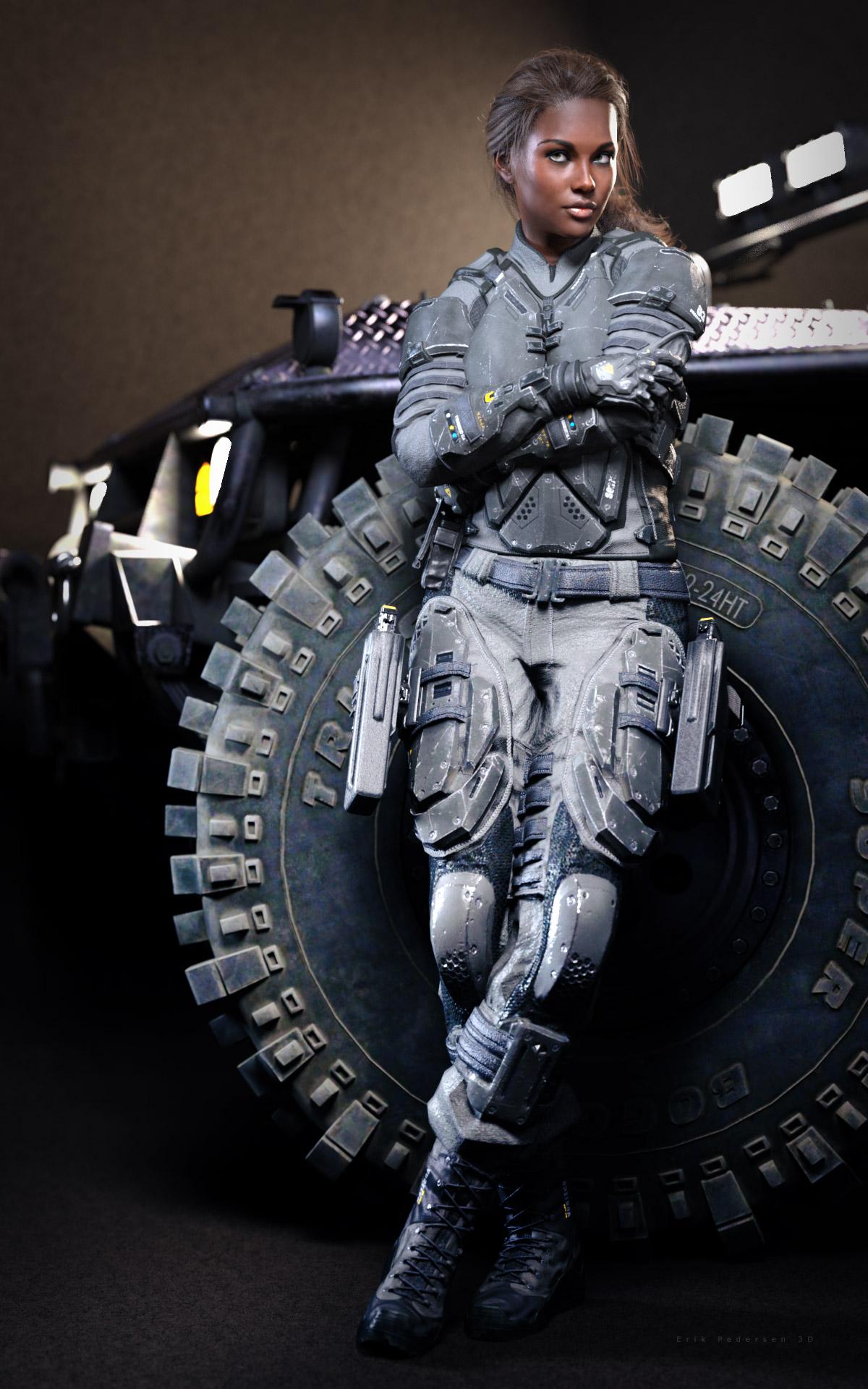
So, mice is my favorite.Black Is Beautiful IITessa at work in her ATLAS Armored Suit.(Sorry, can't recall which DZFire vehicle that is at the moment). Just playing around with this, not sure if it is done or not yet.
 why is genesis 8 considered better than genesis 3?I think the question should be "aside from content, why is G8 considered better". Because it isn't really fair to judge the content with G8 getting an extended run.
As unfair as it might seem, it is still a criterion to take into account. Volume of content is one of the main reasons that the Victoria/Genesis lines have been so successful compared to other 3D figures.
It might not be notable from an upgrading perspective, but if one had to recommend one generation over the other to a complete newbie, we're now at the point where we can confidently advise them that that G8 has more native content than G3.
And actually, I'm not digging the A pose as much.Well, it is significant from a content creation and technical point of view, even if by the time it reaches the end user those advantages are fairly invisible; if I were choosing to create a new figure, I'd pick A-pose over T-pose.
is the HD expressions an add on?
do you mean these?
https://www.daz3d.com/hd-visemes-for-genesis-8-female
thanks.
It's one of the basic Daz add-on packs: https://www.daz3d.com/genesis-8-female-expressions
(Interestingly, the blurb there only mentions that they're HD in the "What's included" section, although if you compare to the https://www.daz3d.com/genesis-3-female-expressions promo pictures, the difference is stark).
EDIT: Now correctly linking the G3 expression pack for the comparison...
why is genesis 8 considered better than genesis 3?Better expressions and all these morph kits (that is, PA support) make Genesis 8 a much better experience for me. I still use Genesis 3 as well, and the other day I noticed how flat the lip edges of a G3M looked, but there's no lip detail/crease morph for G3M. Of course, once Zev0 releases his morph converter (after my clothing/hair converter experiences, I decided to wait on his version), then G3M will be in better shape. But I'm thinking Daz will have to do something really gamechangingly spectacular with Genesis X before I adopt it.
Or maybe they could just release a feminine Victoria and a masculine Michael---instead of the reverse---and that might be my tipping point.
Choli? (link to example)I'm not really understanding what the difference is between that top and the ones in https://www.daz3d.com/saree-for-genesis-8-female-and-victoria-8 and https://www.daz3d.com/dforce-bollywood-bride-for-genesis-8-females -- is there one?
Also, anjeli93 at Renderosity has both a Traditional Indian outfit and a Ghagra Choli outfit.
I agree with you The choli is a basic piece of Indian clothing, and is worn with either a Sari, or a Lehenga or as you say a Ghagra. THere isn't much difference between a Lehenga and a Ghagra The Ghagra is an everyday item of clothing (a skirt to our western eyes) and the Lehenga is fancier for parties and weddings
I posted my images to show just how basic it can be.
Choli? (link to example)I'm not really understanding what the difference is between that top and the ones in https://www.daz3d.com/saree-for-genesis-8-female-and-victoria-8 and https://www.daz3d.com/dforce-bollywood-bride-for-genesis-8-females -- is there one?
Also, anjeli93 at Renderosity has both a Traditional Indian outfit and a Ghagra Choli outfit.
n/m good effort but uselessUsed Clothes Converter to update all of the Aiko 3/Girl/Stepanie3/Victoria 3 to Victoria 4, & David 3/Hiro 3/Freak/Michael 3 to Michael 4, as well as some cross pollinating - adds to the wardrobe !
Will check out Xurge again.
is there any way to see what verts or pollies are attached to a bone, exactly?yeah, i was suspicious of the 8 place decimal point too, but the right toe has em and doesnt cause it any problems.
and i removed every single morph and pose control from the folder, only thing left was the victoria 8 fbmand headm
i down to scrootnizing root regions. all it says is feet. don't see how to track down those toe verts in the geometry section
deleted the erc formulaes from the v8 fbm, is just the deltas now.dont know how to tell if is allll a single mesh, including those toe nail beds.
cuz i when the premise of genesis 1 was the single mesh thing.if it was poser, would run the obj thru uvmapperclassic and swap the obj for a new mesh.
ds is vertex, cant swap in a mesh? right?No we don't swap mesh ;-)
Yes the toenails appear to be one with the toes.
hexagon?

i did download it, and the bikinimodeling tutorial, need some mankinis for my males lol
g8m doesn't have toe problems!!scary!! that what it looks like in carrara when using the full body morphson g8f, only it affects only 3 of the toes. what is sooo different about those 3 toes??
even pretty Layla, messing up toes with her body morph
is there any way to see what verts or pollies are attached to a bone, exactly?yeah, i was suspicious of the 8 place decimal point too, but the right toe has em and doesnt cause it any problems.
and i removed every single morph and pose control from the folder, only thing left was the victoria 8 fbmand headm
i down to scrootnizing root regions. all it says is feet. don't see how to track down those toe verts in the geometry section
deleted the erc formulaes from the v8 fbm, is just the deltas now.dont know how to tell if is allll a single mesh, including those toe nail beds.
cuz i when the premise of genesis 1 was the single mesh thing.if it was poser, would run the obj thru uvmapperclassic and swap the obj for a new mesh.
ds is vertex, cant swap in a mesh? right?No we don't swap mesh ;-)
Yes the toenails appear to be one with the toes.
is there any way to see what verts or pollies are attached to a bone, exactly?yeah, i was suspicious of the 8 place decimal point too, but the right toe has em and doesnt cause it any problems.
and i removed every single morph and pose control from the folder, only thing left was the victoria 8 fbmand headm
i down to scrootnizing root regions. all it says is feet. don't see how to track down those toe verts in the geometry section
deleted the erc formulaes from the v8 fbm, is just the deltas now.dont know how to tell if is allll a single mesh, including those toe nail beds.
cuz i when the premise of genesis 1 was the single mesh thing.if it was poser, would run the obj thru uvmapperclassic and swap the obj for a new mesh.
ds is vertex, cant swap in a mesh? right?Arg! Impossible to find contentNot being able to find stuff has been an issue since day one for many many years. I know how hard it can be for someone new.
Daz install manager is fine of course for putting things where they need to go. But again, new people don't know where things are installed.
What I did and learned from many people doing the same thing is. Creating your own runtimes saves you the hassle of trying to find something.
I have a runtime for all my characters. Aiko's, Victoria's, Genesis's. By adding a base directory. Yes, you see all the folders and learn how the structure goes.
By adding a poser runtime. Everything is nice and organized except for one thing.
If you downloaded an item, let's say from Sharecg. And it only comes in Daz format. You won't see it in the Poser runtime.
So, by adding the base directory. You can easily go to the folder where the item is, and load it up. Or, when one has enough experience in Daz. Create the Poser Companion files.
When it comes to buying from Daz. Let the install manager do its thing.
When it comes to buying or obtaining from somewhere else, or creating your own content. Then make your own runtimes for those. Keeping everything organized.
... oh, I forgot I was writhing on here lol. I started playing around with La Femme in Daz to see how she looks. Eh, not bad. She has her own shape and look.
Doesn't move of course. JCM controls.
Sorry if my mythod seems akward. But, it works.
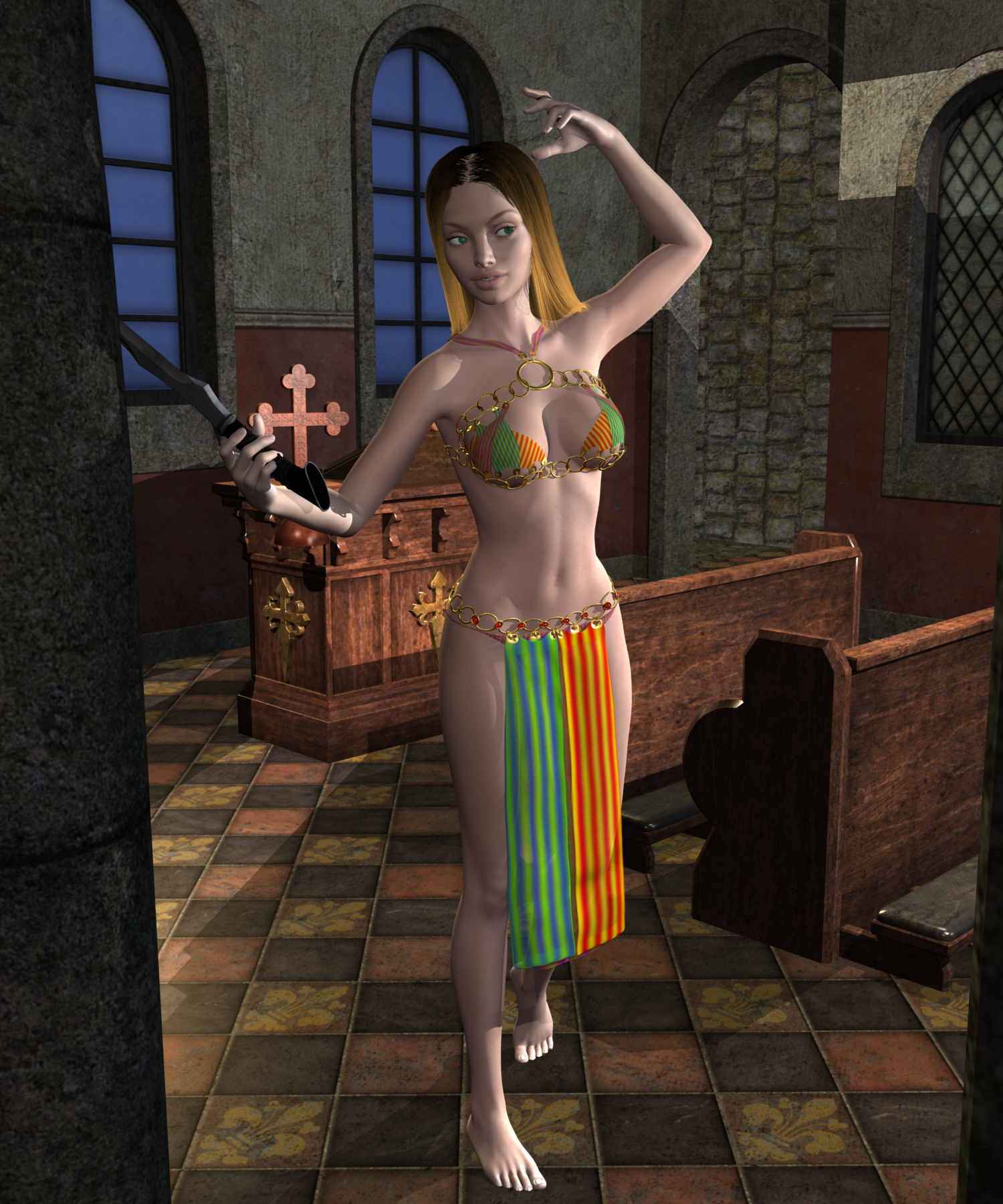
please, more support for g8 in carraraVictoria 7 in a Carrara Chapel with a Sword. (VIACCWAS) - LOL

- Not just exported as an obj or something. Misty's V7 character loaded in Carrara, outfit used the Daz Studio transfer utility to make conforming to G3F, then saved as blended. The blended outfit was then loaded in Carrara. In Carrara, the outfit was "fit to" the G3F. The G3F morph dial for V7 was dialed up (can't remember how far). The outfit automatically morphed with the change. Selecting the G3F group, a purchased pose as double clicked and the V7 adopted the pose. The outfit automatically followed.
- G3M and G3F can be loaded in Carrara after Misty's identified typos are fixed. Clothing can be converted to blended and automorph and autofollow.
- Offered merely as evidence that "working in Carrara" is on par with claims that G3F and G8F can be exported to other programs via FBX or what-have-you. Not 100% match, but G3F/G8F clothing, hair, pose sets, and other content sold in the Daz store can be used by Carrara users for the cost of fixing some typos, which Misty has identified on behalf of the development team.
 80's Mom hair (Stranger Things is popular = $$$$)
I have the SAV Dynasty hair, it's very pretty. It may be built for Victoria 4, but I can fit the Victoria 4 version on any Genesis figure without using the "Fit to" feature. I just simply parent it to the Genesis 1/2/3/8 figure's head.
Simulation AnimationI set the Sea plane (Plane2) at 0.9 Dynamic Strength and Density of 4500,I am using SKAmotion (Flat Foot Walk, no bounce). I just animated the sphere apart from G3 and the simulation worked (Sphere animated through out the timeline).
try baking the AniBlock to the Timeline, if you mean https://www.daz3d.com/genesis-3-female-s-victoria-7-flat-foot-walk-aniblock , or test using a Timeline animation instead of an AniBlock.
Why is it that daz never ...Why is it that DAZ never considers that you might like to use an older character design with newer functionality? Or when they do, they do it poorly or make it near impossible to do?
What if I am doing a comic or animation and have been using the same character for years? What if I created her as and A3, or an A4?
Why is it that after spending $100s I still can't succeed?
All I want to do is use an old A4 design with the advantages of Genesis, and the new outfits etc. and so far the tutorials have let me down. I follow the steps, and something won't be there, or something won't work as advertised, or I have to spend another fortune on another bit Daz left out, and it still won't do it....
This is after two days of beating my head against this problem, so you maybe you might understand that it isn't just a rant. I would really like it if Daz and other suppliers actually updated things. If I could buy a G8 version of the character I would.
And why the heck was dance poses for Victoria and Michael (i.e. V1) considered worthy of including in Build A Bundle? Stuff that is that useless should be hidden under a legacy checkbox or something.You can use the Face Transfer ability of Daz 4.12 to take the face off your old character and apply it to the latest generation. HeadShop was another way to do this. Simply load your old character, without hair, then take a screenshot, and import that into HeadShop. Apply that face to a G8, and then adjust the shape using sliders until you get the same figure.
If you made it once, you can make it again. I bleated about G2M for G8M, and it never happened with any kind of script, so I just painstakingly remade the character. It took almost a week of tweaking and changing to get it right, but now I have my favourite character as a G8. The materials were a bit harder, but I explainied it away in my story imagery with my character spending too much time in space; not enough sun! ;p
Daz 3D is part of

Connect
DAZ Productions, Inc.
7533 S Center View Ct #4664
West Jordan, UT 84084Licensing Agreement | Terms of Service | Privacy Policy | EULA
© 2026 Daz Productions Inc. All Rights Reserved.