-
Remember, "There's Always Another Sale™" (Report sales errors here.)
Okay, guess I've missed it. I don't know how to make a screen shot of the cart that goes off the page. And I don't feel like doing it seperated and stitching it together.
It's https://www.daz3d.com/victorian-iron-conservatory and her https://www.daz3d.com/victoria-8. I'm dropping her off, but someone else reported the same issue in another thread I started in nuts and bolts/tech support here: https://www.daz3d.com/forums/discussion/362096/do-i-need-to-open-a-support-ticket-for-problems-with-prices-in-cart#latest.
I'm not missing the other prices just to get her. She'll eventually be free again.
Remember, "There's Always Another Sale™" (Report sales errors here.)I've put a still new and a Victoria from the link and the Victoria shows free. It could be the item you've selected is having a problem or it could be you need to relog, clear cache, hard refresh and/or try another browser.
You know you've got too much stuff when...when you get a coupon because you own all the product in the sale category

Thanks Daz it help me get the Isla Bikini Bundle

Not in the sale category; just all the base figures (V4-V8). I own them all simply because they were all free on Victoria's birthday a while back.
I usually try to buy the pro bundles sets for victoria
Remember, "There's Always Another Sale™" (Report sales errors here.)Yes, the 20% off a GC with no strings attached was a very nice thank you for owning all Victoria's. Daz is trying to win my wallet back and is succeeding I think. Just when I thought I was free.
You know you've got too much stuff when...when you get a coupon because you own all the product in the sale category
Thanks Daz it help me get the Isla Bikini Bundle
Not in the sale category; just all the base figures (V4-V8). I own them all simply because they were all free on Victoria's birthday a while back.
Remember, "There's Always Another Sale™" (Report sales errors here.)Changing the subject to something happier, if you got this message from Daz: "Our records show that you already own all of the Victoria items we are offering for free with today's offer. We want to make sure you're not left out, and that you know how appreciative we are.Just use the coupon code below to get an EXTRA 20% OFF your entire order!" note that it works on gift cards, too.
Hmmm...interesting, I own those Victoria items, but did not get the message when I placed some orders today...oh well....maybe next time
Check the Exclusive Offers under Messages in your account page...
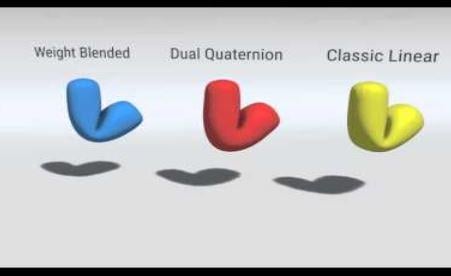
Genesis 8 in CarraraIt seems to me that the quality of the artist outweighs the quality of the weightmapping, especially when the weightmapping improvements are subtle.
True dat! With sincere admiration, I must say that you have proven many times over that you can make a more impactful image, with no postwork, using Victoria 3 than I can make with the most advanced figures and all the postwork I can muster. Still, for things like elbows, it is undeniable that each Daz figure has improved upon the previous. Look closely at the middle bend and see how the corner retains its shape better than the other two. Won't outweigh the skill of the artist, but it is there.
 Remember, "There's Always Another Sale™" (Report sales errors here.)
Changing the subject to something happier, if you got this message from Daz: "Our records show that you already own all of the Victoria items we are offering for free with today's offer. We want to make sure you're not left out, and that you know how appreciative we are.Just use the coupon code below to get an EXTRA 20% OFF your entire order!" note that it works on gift cards, too.
Hmmm...interesting, I own those Victoria items, but did not get the message when I placed some orders today...oh well....maybe next time
Remember, "There's Always Another Sale™" (Report sales errors here.)Changing the subject to something happier, if you got this message from Daz: "Our records show that you already own all of the Victoria items we are offering for free with today's offer. We want to make sure you're not left out, and that you know how appreciative we are.Just use the coupon code below to get an EXTRA 20% OFF your entire order!" note that it works on gift cards, too.
Great catch! I went from spending less than $3 USD today to getting a GC with a significant amount more lol.
Remember, "There's Always Another Sale™" (Report sales errors here.)Changing the subject to something happier, if you got this message from Daz: "Our records show that you already own all of the Victoria items we are offering for free with today's offer. We want to make sure you're not left out, and that you know how appreciative we are.Just use the coupon code below to get an EXTRA 20% OFF your entire order!" note that it works on gift cards, too.
Does it work more than once?
Kink in Marigold Hair by outoftouch!?I put the marigold hair on a few characters and the determining factor is, ahem, breast size. For the base Victoria 8 figure the hair hangs correctly. For the base Babina 8 character the kink is slightly visibile. If the Breast Size attribute is pushed to 100 then the kink becomes very visible. Parenting the hair versus autofitting seems to solve the problem. Unless there is a way to turn off a specific morph that is built into the product, I think this is the only solution. It is interesting that as the hair loads it hangs correctly and then when it completely loads it must apply morphs for the specific character it is autofitted to and the kink appears.
Thanks everyone for the help.
Remember, "There's Always Another Sale™" (Report sales errors here.)Changing the subject to something happier, if you got this message from Daz: "Our records show that you already own all of the Victoria items we are offering for free with today's offer. We want to make sure you're not left out, and that you know how appreciative we are.Just use the coupon code below to get an EXTRA 20% OFF your entire order!" note that it works on gift cards, too.
Novica & Forum Members Tips & Product Reviews Pt 12If you got this message from Daz: "Our records show that you already own all of the Victoria items we are offering for free with today's offer. We want to make sure you're not left out, and that you know how appreciative we are.Just use the coupon code below to get an EXTRA 20% OFF your entire order!" note that it works on gift cards, too.
Edit to add that the coupon can be used more than once, and on PC membership.
Genesis 8 in CarraraThis review of the difference between Genesis 3 and Geness 8 may help. Reminder, that items like differences in the mesh are still available to Carrara users, but that certain weightmapping differences are not.
http://www.digisprawl.com/blog/review/review-daz-3ds-victoria-8/
Genesis 8 in CarraraI am not an expert, so adjust your exectations of my answer accordingly.
Rigging and weight maps describe how each vertex of the mesh is affected by manipulation of the bones of a "skeleton." There are several alternative ways to rig a mesh. It is generally considered an improvement if the rigging (plus any related weightmapping and joint control morphs) provides the end user with (a) more discretion in the ways the mesh can be manipulated, and (b) more realistic simulation of human joint bends that occur without the user having to actually use the discretion.
An example. Carrara native rigging relates each vertex of the mesh to each bone as a single percentage of movement, no matter how the bone is manipulated or how far away the vertex is from the bone. A good thing is that any bone can in theory be made to affect any vertex. Wiggling the big toe can cause the ears to wiggle, if you want. A bad thing is that the relationship is a single value, so the degree of influence will be the same for rotating in the X direction and the Y direction and the Z direction. In comparison, the old Poser legacy rigging allowed for separate falloff zones for each direction of rotation (spheres) that users could adjust in a joint editor. Those spheres could be adjusted, but not really to allow a toe to manipulate an ear without manipulating stuff between. Carrara was able to interpret legacy Poser rigging, which includes up to the Victoria 4 and Michael 4 generation. If a Carrara user models a custom character in Carrara, the Carrara user has the choice of rigging with Carrara's native skeleton tools, or to rig in Poser using its setup tools and save as a Poser CR2, which Carrara can still interpret natively.
Complications - Some rigging changes occurred in Poser starting in Poser 8 or 9 or so. Carrara cannot completely interpret this more advanced Poser system, although Fenric had made a plugin that helped somewhat. To confuse matters, the advanced Poser system was called "weighmapped," and thus one can find figures such as Miki 4 referred to as "weightmapped" even though the term has a more general meaning. The introduction of the Daz3D Genesis figure introduced yet another variant of rigging. Carrara was updated from 8.1 to 8.5 so that Carrara could interpret Genesis rigging natively. Furthermore, if a Carrara user models a custom figure, the Carrara user can rig it Genesis-style in Daz Studio, save as a DUF, and then use the figure natively in Carrara.
Off the Rails, and Back On - The Genesis 3 line of Daz3D figures introduced yet another rigging system (dual quad-yadda-yadda-yadda). This system is supposed to be superior to the Genesis 1-2 system. For the moment, just accept that it is better in some way. Carrara could not load Genesis 3+ figures without crashing. Misty figured out what caused the crashes, but she has not figured out how to make (dual quad-yadda-yadda-yadda) work in Carrara. Instead, with her preset, Carrara users can convert the rigging of related items from (dual yadda yadda yadda) to a system more similar to the Genesis/Genesis2 system of rigging.
What Genesis 3/8 Offer Carrara Users - Even without (dual quad yadda yadda yadda), the Genesis 3/8 figures can be useful. The most obvious is the extra bones in the head/face to aid expressions. Less obvious is that the Genesis 3 base mesh is supposedly better optimized compared to genesis 2. For example, the mesh density in areas more likley to be bent (eg., knees, shoulders) is more appropriate for the bends, yielding more realistic results. Even without (dual yadda yadda yadda), this should yield better results.
What Carrara Users Miss Out On - Dual Quad yadda yadda yadda. Reportedly, this offers "(a) more discretion in the ways the mesh can be manipulated, and (b) more realistic simulation of human joint bends that occur without the user having to actually use the discretion."
In summation, Misty's presets are not some sort of morph to Genesis 2 allowing use of Genesis 3 content. Instead, they are a conversion of the genesis 3 rigging system to something more similar to genesis 1/2 rigging, but the other improvements of Genesis 3+ remain.
Happy to be corrected in the details.
Carrara Challenge #49 - THE FORBIDDEN ZONE WIP (sponsored by DAZ :) Entries closedSuper renders. Love the liquid top to the copy machine.
Here is a render of another forbidden zone, the classic "lover's lane." But what was forbidden? A young lady's desire? Her date's advances? Parking in the lane itself? This is the raw render. I also rendered out various passes. And, I can always drop this render back in Carrara's scene tab and apply some GMIC. I'm sure you think that this is Vicky in a Prom Dress with a Date. Well, this is Stephanie 6, not Victoria. Like to mix it up. In this case, mixing Stephanie 5 curvy with Stephanie 6.

i've re visited this one, is too funny. mebbe he is into a lil slap and tickles lol
Looks like more slap than tickle !
mebbe wa a tickle earned the slap
 Do I need to open a support ticket for problems with prices in cart?
Does it help at all to post in the forums that an item isn't receiving the discount it should in my cart, or do I need to open a ticket just for that? Victoria 8 and one of the still new releases are in my cart together, but she is not free as advertised.
Carrara Challenge #49 - THE FORBIDDEN ZONE WIP (sponsored by DAZ :) Entries closedSuper renders. Love the liquid top to the copy machine.
Here is a render of another forbidden zone, the classic "lover's lane." But what was forbidden? A young lady's desire? Her date's advances? Parking in the lane itself? This is the raw render. I also rendered out various passes. And, I can always drop this render back in Carrara's scene tab and apply some GMIC. I'm sure you think that this is Vicky in a Prom Dress with a Date. Well, this is Stephanie 6, not Victoria. Like to mix it up. In this case, mixing Stephanie 5 curvy with Stephanie 6.
i've re visited this one, is too funny. mebbe he is into a lil slap and tickles lol
Looks like more slap than tickle !
Genesis 8 in Carraraa couple of toes double feature, aiko 8 and victoria 8
Carrara Challenge #49 - THE FORBIDDEN ZONE WIP (sponsored by DAZ :) Entries closedSuper renders. Love the liquid top to the copy machine.
Here is a render of another forbidden zone, the classic "lover's lane." But what was forbidden? A young lady's desire? Her date's advances? Parking in the lane itself? This is the raw render. I also rendered out various passes. And, I can always drop this render back in Carrara's scene tab and apply some GMIC. I'm sure you think that this is Vicky in a Prom Dress with a Date. Well, this is Stephanie 6, not Victoria. Like to mix it up. In this case, mixing Stephanie 5 curvy with Stephanie 6.
i've re visited this one, is too funny. mebbe he is into a lil slap and tickles lol
Daz 3D is part of

Connect
DAZ Productions, Inc.
7533 S Center View Ct #4664
West Jordan, UT 84084Licensing Agreement | Terms of Service | Privacy Policy | EULA
© 2026 Daz Productions Inc. All Rights Reserved.