-
Released : V3D FilaToon Converter, Manager and Tools (Commercial)
RAMWolff said:
THank you for checking about the Persona save.

Hopefully, it'll work in your case (I don't have this converter, maybe one day when Daz has finally added support for Filament on MacOS).
But if you need help to use a post load addon script, I have yet to try using one with Personas, but I tested yesterday how to load AE using a character preset with the default post load addon script and I was able to get it to work, keeping track of the values to use to tell the post load addons script to load AE with the correct texture.
GRFK DSGN Unlimited said:
Persona save? What the heck is that?
In essence, it's a scene preset supercharged with functionnalities from character preset, or a character preset made as simple to save as a scene subset (post load addon settings are painful to set
 ). It's available for any one to test, using the current public beta build:
https://www.daz3d.com/blog/daz-studio-4-23-1-27-public-build
Issue with wrapping a plane primitive around a sphereHi! I am not sure if i comes from the object itself, but I have an issue when I add a bump map: on the render, there are kind of defects that don't appear in filament:
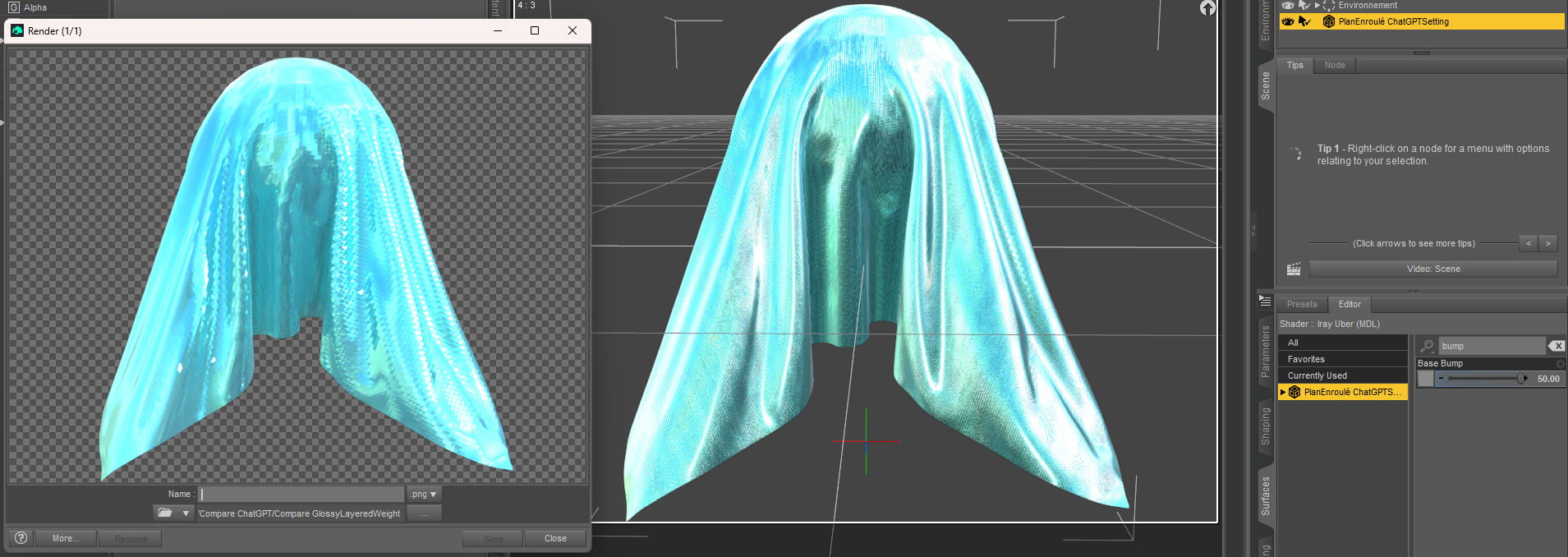
Do you know where the issue could come from, please?
Thank you in advance!
Flat/smooth hair shader compatable with filament?Hi, is there any hair shaders that'll make the hair flat/smooth without each strands/strips/cards/mesh visible? 90% of the hair looks terrible on filament and are resource hogs on iray. Using strand shader or filatoon shader gives an ugly choppy hair. Even if use good texture after applying strand hair shader via products like FSL texture for strand hair, it's still barely presentable. The issue is the mesh itself is ugly as they are just meant to be translucent guidelines for the hair shaders to render fiber like hair on iray and filament can't handle translucent hairs. Sorry if I sound a bit bitter, just frustrated why daz has not fixed filament hair issue despite its one of the most sought after improvement. I'm looking for something that'll crush appearance of individual strands or mesh, smoothing and blending it into one, but with a adjustable highlight of sorts that implies form. See attached example.
FilaToon / Cell shaded rendering with Filament3Diva said:
cain-x said:
3Diva said:
cain-x said:
Just wanted to verify all the testing and work done since Filatoon has been released and the new work put into Filament:
- Transparency/Opacity still has issues displaying correctly in filament (i.e. hair)
- Emissives does not cast light to any nearby objects
- Environment map only works with hdri images, unlike how Iray behaves
- Reflections only work with hdri and no 3d objectsIs there some limitation with the Google Filament engine or has it not yet been plumbed into DAZ? Some understanding of the road map will be very helpful as I do have some projects that may require these features or if I need to move this to a render engine that can support this.
The transparency/opacity issues have been solved if you use the Filatoon Shader on the hair (or anything else that has a transparency/cutout opacity map).
I've run numerous tests on this - it does not work in all situations. This is especially true if the surface can be see from the back side and the mesh with opacity maps overlaps - depending on the camera angle. This issue still persists.
When using Filatoon shader on trans-mapped hair you need to adjust the "PBR Masked Threshold" (it's under the Cutout Opacity channel in the Surfaces Tab):

Thanks - I have tested this before and it does get it about 80% of the way there - it works in certain situations but not for the projects I'll be working on. For some of the hair, it does leave parts of the strands disjointed if the OP maps has some thin faded lines - raising the threashold just makes the hair clumpy. Appreciate the tips.
How to hide shadow of specific objects in IrayNot like 3DL and Filament in DS with which you can fully control shadows... Iray is a pure PBR ( physically-based rendering ) engine, there's no way to 100% hide shadows from lights or to specifically control the shadow settings with Iray engine.
If you use spotlights, you can increase the value in Height property to soften shadows.
FilaToon / Cell shaded rendering with Filament3Diva said:
cain-x said:
3Diva said:
cain-x said:
Just wanted to verify all the testing and work done since Filatoon has been released and the new work put into Filament:
- Transparency/Opacity still has issues displaying correctly in filament (i.e. hair)
- Emissives does not cast light to any nearby objects
- Environment map only works with hdri images, unlike how Iray behaves
- Reflections only work with hdri and no 3d objectsIs there some limitation with the Google Filament engine or has it not yet been plumbed into DAZ? Some understanding of the road map will be very helpful as I do have some projects that may require these features or if I need to move this to a render engine that can support this.
The transparency/opacity issues have been solved if you use the Filatoon Shader on the hair (or anything else that has a transparency/cutout opacity map).
I've run numerous tests on this - it does not work in all situations. This is especially true if the surface can be see from the back side and the mesh with opacity maps overlaps - depending on the camera angle. This issue still persists.
When using Filatoon shader on trans-mapped hair you need to adjust the "PBR Masked Threshold" (it's under the Cutout Opacity channel in the Surfaces Tab):
This trick also works for foliage.
FilaToon / Cell shaded rendering with Filamentcain-x said:
3Diva said:
cain-x said:
Just wanted to verify all the testing and work done since Filatoon has been released and the new work put into Filament:
- Transparency/Opacity still has issues displaying correctly in filament (i.e. hair)
- Emissives does not cast light to any nearby objects
- Environment map only works with hdri images, unlike how Iray behaves
- Reflections only work with hdri and no 3d objectsIs there some limitation with the Google Filament engine or has it not yet been plumbed into DAZ? Some understanding of the road map will be very helpful as I do have some projects that may require these features or if I need to move this to a render engine that can support this.
The transparency/opacity issues have been solved if you use the Filatoon Shader on the hair (or anything else that has a transparency/cutout opacity map).
I've run numerous tests on this - it does not work in all situations. This is especially true if the surface can be see from the back side and the mesh with opacity maps overlaps - depending on the camera angle. This issue still persists.
When using Filatoon shader on trans-mapped hair you need to adjust the "PBR Masked Threshold" (it's under the Cutout Opacity channel in the Surfaces Tab):
FilaToon / Cell shaded rendering with Filament3Diva said:
cain-x said:
Just wanted to verify all the testing and work done since Filatoon has been released and the new work put into Filament:
- Transparency/Opacity still has issues displaying correctly in filament (i.e. hair)
- Emissives does not cast light to any nearby objects
- Environment map only works with hdri images, unlike how Iray behaves
- Reflections only work with hdri and no 3d objectsIs there some limitation with the Google Filament engine or has it not yet been plumbed into DAZ? Some understanding of the road map will be very helpful as I do have some projects that may require these features or if I need to move this to a render engine that can support this.
The transparency/opacity issues have been solved if you use the Filatoon Shader on the hair (or anything else that has a transparency/cutout opacity map).
I've run numerous tests on this - it does not work in all situations. This is especially true if the surface can be see from the back side and the mesh with opacity maps overlaps - depending on the camera angle. This issue still persists.
While I appreciate the tips, Richard - not knowing when things will be resolved or if they will be supported in the future is difficult in certain projects that have deadlines and goals to meet within a timeline. I can't take the risk in investing hundreds of dollars of assets and tools but come to realize it will not work because of a limitation. Thanks.
The Mac FAQRichard Haseltine said:
memcneil70 said:
Yacomo said:
memcneil70 said:
I have it on my MacMini M4. Sometimes it opens right away, mostly, I get the normal crash but then it reopens in a stable manner. I can use the CMD and C/V keys without thinking about it, where I before I had to crash once at least before it became stable. As for 'new' options, no clue. I am focused on still installing the over 20K products into my computer and assigning metadata, fixing missing or wrong thumbnails in small increments every day. I have done a couple of renders without issue and haven't ran into issue.
Only one problem I have had I noted above was with Content Wizard and that maybe due to how long it has been since I have used the script. And it is one of my favorite and most relied on ones that I have used on my MacBook Pro M1 and Win 10/Win 11 computers. I was hoping someone here might have an idea.
Content Wizard crashes for the same reason, most other scripts crash: A random crash in the QMetaType constructor (see my post above). That was actually my first experience with this type of crash after I came back to Studio a couple weeks ago.
The 'good' news is, that the crash is random and if you try often enough, you will eventually succeed. And once you are in that stable state, scripts seem to work just fine.
My suggestion is to try a problematic script immediately after starting Studio, retry if it crashes, until you reach the 'stable' state - then just leave it open in the background.
I have a Code 66 product named Santa's Normal Maker, which didn't crash but only gave me an error code that I do not have a bridge to two other programs. Which is correct, I don't have them. I did try all the other Code 66 scripts/utilities I have and not one crashed. I also tried a sampling of others and no reaction. I am thinking I did something wrong in Content Wizard but I did make sure my storage locations were correct as recommended. I may have to delete the files and try again. As it stands I have an empty folder with a thumbnail in Smart Content/Products and the files in My DAZ 3D Library.
But I will have to wait till tomorrow as today I have a vendor coming (I hope) to replace two windows in my home. Just ahead of a polar vortex/snow storm. We will below zero degrees for the next 70 hours this afternoon.
Thank you Yacomo for trying to guide me to a solution.
Mary
It could also be an issue in Content Wizard that required particular circumstances to trigger, and so was missed in the past.
It is possible Richard, except I have successfully installed this outfit on my Win 10s, Win 11 and MBPM1 D|S databases with Content Wizard. Since this was the first one I tried on the new Mac Mini and it has been months, I may have become lazy/forgetful of the process. When I get a quiet moment I will take the time to read up on the CW thread, the documentation, and try another product and watch my steps carefully. I never rule out my ability to mess up on my own. I excel at that.
But the newest D|S versions I have been working with have been remarkably stable compared to what I ran into when I first used the MacBookPro M1. I just wish Apple OS had Filament.
"V3D HDR Master Bundle" (Commercial)THANK YOU SO MUCH FOR THE HELP. I WAS WORKING WITH FILAMENT. I DID NOTICE THAT AND WAS FINALLY ABLE TO GET IT TO WORK. THANK YOU VERY MUCH.
Xivon --- so ProlificI tend to be somewhere else on the spectrum with Xi's environments. There are a lot of things they use that make it difficult to see in texture view. Environments like the Futuristic Home Office have transparencies that make it impossible to see where you're posing things, and do the same in filament. Try to take a look inside the structures of environments like Barren Land and it all looks like static, you can't see where one piece of structure ends and the other begins. There are more than one environment where not only do the internal doors from one room to another pivot in the middle rather than at the hinge, but they and external doors are instanced. I also like to use Dimension Theory's Sketchy shaders (and tweak textures here and there in general), which makes another thing very apparent with Xi's environments: Anything emissive is complately baked into the texture, meaning if you want to keep the lights, you have to create a geoshell and track down all the light and masking textures.
I can't help but to have bought a few, but I generally don't like using them.
Artifacts with toon eyes on Iray?Your screenshot is an Iray Preview. Shouldn't you be using Filament draw style to look at these FilaToon items?Genesis 9 smooth expressions?scuttlebuns said:
@crosswind Yes, that's the thing, I am not using filament, but iray because I want have a 3D toon effect similar to overwatch, marvel rivals, final fantasy etc. The biggest few reasons I decided to go for 3D style was... I had trouble getting skin wetness and other such detail effects working in filament, trouble getting decent lightin/shadows, and then hair - I'm unable to use catalog of hair I already have and applying filatoon shader only makes it look bad. There just isn't enough choice of decent toon hair that looks good in 2D style. The few made specifically for g9 anime toon style in shop is good, but that's too little a selection to make cast of characters. I'll have better OCs with going for modern final fantasy style 3D look where hair don't need to look too toony. So even if render takes long in my 6gb vram 3060 card and often requires restarting daz, I decided to go for 3D toon style with iray than 2D style with filament. I guess there is no way to "fix" this for Iray? I'm not that technically knowledgeable with Daz to know the implications of ERC freezed morphs, but I guess we can't tamper with it.
I'm sorry that after I further checked the ERC Links again, that HD FACS morph is not the true culprit because another property FACS Detail Strength is 0 as default. I don't think you've dialed this property. (screenshot 1) If so, you can easily "fix" it now:
1) Go to Head Bone in Scene pane, Ctrl + Select Left Brow Inner and Right Brow Inner (screenshot 2)
2) Reset Transforms value to 0, i.e. type in 0 for Translate / Rotate, 100% for Scale (screenshot 3) Also check Center Brow.You can get much better result. Or tweak them with PowerPose tool if you're familiar with it.
Genesis 9 smooth expressions?@crosswind Yes, that's the thing, I am not using filament, but iray because I want have a 3D toon effect similar to overwatch, marvel rivals, final fantasy etc. The biggest few reasons I decided to go for 3D style was... I had trouble getting skin wetness and other such detail effects working in filament, trouble getting decent lightin/shadows, and then hair - I'm unable to use catalog of hair I already have and applying filatoon shader only makes it look bad. There just isn't enough choice of decent toon hair that looks good in 2D style. The few made specifically for g9 anime toon style in shop is good, but that's too little a selection to make cast of characters. I'll have better OCs with going for modern final fantasy style 3D look where hair don't need to look too toony. So even if render takes long in my 6gb vram 3060 card and often requires restarting daz, I decided to go for 3D toon style with iray than 2D style with filament. I guess there is no way to "fix" this for Iray? I'm not that technically knowledgeable with Daz to know the implications of ERC freezed morphs, but I guess we can't tamper with it.
"V3D HDR Master Bundle" (Commercial)I think I might have solved your issue. I hope so anyway. Here is my global analysis process and the conclusion to solve it :
- Step 1 : Launched base tests on one of the latest 4.23 : no crash, does not seem to directly come from DS version on a basic use of the script (good news for me).
- Step 2 : Log file + script visual analysis (no tests) : The reason of the crash is that the script cannot find the “Post Denoiser Available” property of the Render Settings, in a function which is launched only when you check the "Set Denoiser to ON" box. It is confirmed by the fact that : oElement.name should be : NVIDIA Iray Render Options and NOT General as you have. Seems the render engine is not set to NVIDIA Iray.
- Step 3 : checking the existence of the “Post Denoiser Available” option in the current Daz Studio version : Yes, property still exists under “filtering”.
- Step 4 : Testing the script with the “Set Denoiser to ON” function. No error message if render engine is 3Delight, scripted 3Delight, or NvidiaIray. The Tonemapper and environment options are automatically created in those cases.
- Step 5 : Testing the script with “Viewport” render engine, “Multipass OPEN GL” render engine, and NO ToneMapper and NO environment options node in the scene : I have the exact same script crash and debug messages as you have.
The exr creator is an Iray product, and requires the "NVIDIA IRay (MDL)" render engine to be selected before you launch the script. It also requires to be able to read the environment and tonemapping options, and for this, the nodes must be added in your scene.
Conclusion : what you have to do :
- Set the render engine (at the “top top” of render settings, in the dropdown menu right to “Engine”) to “NVIDIA Iray (MDL)”
- Make sure that an “Environment Options” and a “ToneMapper Options” node are in your scene. You can load them from the “Create” Daz Studio Menu (they are near the bottom of the list), or if you are lazy, you just have to set the Viewport Style (near where you control your cameras to NVidia Iray).
- Test (launch the exr creator, with denoiser option on)
- In since the only conditions I managed to replicate your issue was when the render engine was “viewport” and that there was no ToneMapper and Environment node in your scene, your issue should be solved. If not, come back here, with screen captures of your scene tab and your render settings tab, and with the log file if different from what you already posted.
Remark : your render configuration (with issues : no environment, no tonemapper node, render engine probably on viewport) is typical from what you would have when you were working with a filament scene just before. Maybe it could explain when you have this issue now whereas everything was fine before (when people where always on Iray with the environment/tonemapper nodes here). So just choose Iray render engines and make sure environment and tone mapper nodes are in the scene.
Let me know if it solved your issue, and feel free to come back here if not. If your problem is solved, I'll add a note in the first thread so that people don't face the same issue.
Toon Base T-Shirt textures not loading [SOLVED!!]3Diva said:
taiuri said:
Finally I got to solve it! I had to load the FilaToon - General shader from the FilaToon shader presets. However, when I apply a new texture, it's neccesary to load the general shader again, because it keeps appearing black. So, I can say: issue solved!
I leave this solution in case someone else has the same issue in the future.
Thanks to the people who tried to help me, I appreciate so much your interest! :)
I'm really glad you found a workaround for the issue. It's unfortunate that the cause of the issue was never found, but I'm really glad you were able to fix it by applying a Filatoon shader to it. :)
Yeah, I'd have liked to know the cause too, because every time I load a new material I have to load the general shader too, but well, at least I could get they can be viewed in the Filament view. Thank you so much for all your suggestions. I appreciate so much your interest for helping me :)
Daz Studio 5 development updatewsterdan said:
Richard Haseltine said:
wsterdan said:
Totally understandable, but how do we deal with it? They've gone from a working, bare-bones application in three and a half years to what? It sounds like the difficulties of 2021 are still there. It doesn't sound like they have any solution to dealing with the broken plug-ins and scripts by third party developers any different than they did four years ago; if they keep doing what they're doing how much further along will we be in another three or four years? The plug-ins and scripts aren't going to fix themselves.
What could they do to deal with the plug-ins, other than what they are going to do - keep DS 4 available so that people can do whatever they need with the plug-in/script there and then ttransfer to DS 5 for rendering if they have a card unsupported in 4. But as I said above, it would seem likely to me that the non-Daz developers of scripts and plug-ins would not be willing to do many additional rewrite/recompile cycles for compatibility so I would not expect them to start working until at least close to a final version (and if they are already working they would not be alowed to discuss that).
Thanks, that does catch us up to where we are now. Based on some of the change logs over the last few years, I wonder if maybe there *should* be two versions of the program, a "DAZ Studio" and an "Nvidia Studio" where the latter deals with all of the many Nvidia-related updates and the former is a more limited, 3DL/Filament-oriented software with an Apple Silicon-native version with less reliance on 3rd party plug-ins. On the one hand, it would mean supporting two versions, but on the other, they're already -- theoretically -- supporting two versions anyway.
Two versions? Despite the Premier marketing there is only one DS version - the question is which features are activated and which additional plug-ins can be enabled.
I know, this solution is specifically Walt-oriented and wouldn't necessarily please even Mac users very much if there's a loss of features in a stripped-down version, so it's not a serious suggestion.
When DAZ Studio 5 was announced, I hoped that it would be released by the time I retired. Missed that date. Now? Without any excess drama, I'm hoping it wil be released before I die... I'm just not holding my breath.
Daz Studio 5 development updateRichard Haseltine said:
wsterdan said:
Totally understandable, but how do we deal with it? They've gone from a working, bare-bones application in three and a half years to what? It sounds like the difficulties of 2021 are still there. It doesn't sound like they have any solution to dealing with the broken plug-ins and scripts by third party developers any different than they did four years ago; if they keep doing what they're doing how much further along will we be in another three or four years? The plug-ins and scripts aren't going to fix themselves.
What could they do to deal with the plug-ins, other than what they are going to do - keep DS 4 available so that people can do whatever they need with the plug-in/script there and then ttransfer to DS 5 for rendering if they have a card unsupported in 4. But as I said above, it would seem likely to me that the non-Daz developers of scripts and plug-ins would not be willing to do many additional rewrite/recompile cycles for compatibility so I would not expect them to start working until at least close to a final version (and if they are already working they would not be alowed to discuss that).
Thanks, that does catch us up to where we are now. Based on some of the change logs over the last few years, I wonder if maybe there *should* be two versions of the program, a "DAZ Studio" and an "Nvidia Studio" where the latter deals with all of the many Nvidia-related updates and the former is a more limited, 3DL/Filament-oriented software with an Apple Silicon-native version with less reliance on 3rd party plug-ins. On the one hand, it would mean supporting two versions, but on the other, they're already -- theoretically -- supporting two versions anyway.
I know, this solution is specifically Walt-oriented and wouldn't necessarily please even Mac users very much if there's a loss of features in a stripped-down version, so it's not a serious suggestion.
When DAZ Studio 5 was announced, I hoped that it would be released by the time I retired. Missed that date. Now? Without any excess drama, I'm hoping it wil be released before I die... I'm just not holding my breath.
Daz Studio 5 development updateI can truly appreciate the benefits DS 4 has been receiving lately as a result of the next generation of DS development efforts. That likely means that DS 4 will be as modernized as it can get, while New DS carries on adding improvements not otherwise possible with the old Qt development software.
As a Mac owner, I am still quite upset that New DS hasn't made an appearance with things like Filament, Apple Silicon native support, UI fixes, GPU support (both Mac AND Windows) and performance/stability fixes. No New DS beta yet? Three and a half years down the road? A few months ago I pulled the plug on DAZ purchases and removed gallery and forum posts. This was immediately after a comment was directed at me for not being patient enough. It was a sit down and shut up response from someone who doesn't use a Mac. I suppose they weren't impacted and so were unable to understand why 3 years of waiting for basic compatibility was a long time (for us Mac users.)
That said...
It makes me wonder what project management tool/methodology is being used. If any at all. That would give DAZ management/developers an idea of when and what portions will be complete and ready for public release.
How far away are they from getting the core framework working with minimal useful capabilities for customers? Then what would be the timeline for getting the other plug-ins working? Those could roll out steadily over time. How many plug-ins are being written today that will not work with New DS? That's just compounding the existing problem.
Adoption of newer technology by the customers is moving faster than DAZ can keep up with. That's a shame.
Apple is currently on it's 4th generation of processors since the announcement of DS5 and is reported to be rolling out their 5th gen Apple Silicon Macs later this year. None of these Macs can natively run DS with performance and stability expected by consumers.
Just give up on Mac users, take the revenue hit, lay off a few employees, and focus on the customers you truly care about. It's not the Mac folks apparently.
Or prove me wrong. Show us something great. Soon.
Lee
Genesis 9 smooth expressions?OK, so I use Base Anime Surprised Angry as an example. You can see it pushes values to its Sub-component FACS properties: Brow Squeeze Left / Right. These properties are ERC Freezed with HD expression properties : FACSDetails_facs_bs_BrowSqueezeLeft_HD2 and FACSDetails_facs_bs_BrowSqueezeRight_HD2.
As they're HD morphs, so you see the bump and/or "distortions".(screenshot 1) However, you won't see them with Filament drawstyle (screenshot 2), only some heavily-dialed expressions may show you an outline from a certain angle.... (screenshot 3)
Daz 3D is part of

Connect
DAZ Productions, Inc.
7533 S Center View Ct #4664
West Jordan, UT 84084Licensing Agreement | Terms of Service | Privacy Policy | EULA
© 2026 Daz Productions Inc. All Rights Reserved.