-
Face Transfer 2
While I do like this, since tweaking is always a thing, there are some issues I see pretty consistently. Overall, I see it as a good place to start if I want a look alike.
Eyes-Very rounded. Has a hard time picking up slants or even Asian eyes.
-I feel I tweak around the eyes a lot
Mouth- seems pretty good on the shape/outline, but it lacks depth most times.
Nose-squished often like the original face transfer.Voldemort face!
Chin-Flat face overall on many of these.
-can easily go in and push chin depth or lip depth out/nose too. Nose shadows seem to affect the nose shape.
Texture- uses more than the original (base color and translucency) and may be harder to get a better overall body skin color depending on the lighting in the photo. I want to try this with one of the g9 skin generators to see if I can mix it like before with a new texture and blend in the generated ones from this. Granted, I will likely need to do post-work. Most of this does not feel out of the box slap it on and bam! But I never expected it to be as it was not that way before. I'm missing the shapes add-on like the original had.
Overall, you REALLY need a good picture and good lighting. I'd say even more than the G8 version (old version). I had some characters with a little tweak and some that don't look like the picture at all. The face seems round and beefy, but the eyes don't pick up as well. I felt like I had more control over the old model for g8 and could even use PBR with one click to make changes to the skin and blend the face texture and new skin together to match the body. One could also make changes to an image first, then run a transfer to reduce post-work.
This could benefit from another shape package like philw made for the original (Face transfer shapes). I've got most of the morph packs and feel like fixing flat face "depth" is not as bad. I've not tested the hair to see the hair bend issue yet, but I hope that can be fixed.
It seems like it does well, or not so well. On the G8 version, I would generate a face and pull the texture into an art program (Gimp/beFunky/photoshop if you use it) and clone the color around a blemish to fix hotspots or the darker side of the face. Naturally, you will have a light and a dark side. I've not personally had the easiest luck mirroring a good side and lining it up, but heard someone else mentioning it. I also used the PBR on click product or skin details (Zev0). I've used the new face gen for G9 and do not like the textures, but I love the morphs and can use both. So for me at least, it's a combination of which tool to use and when to use it.
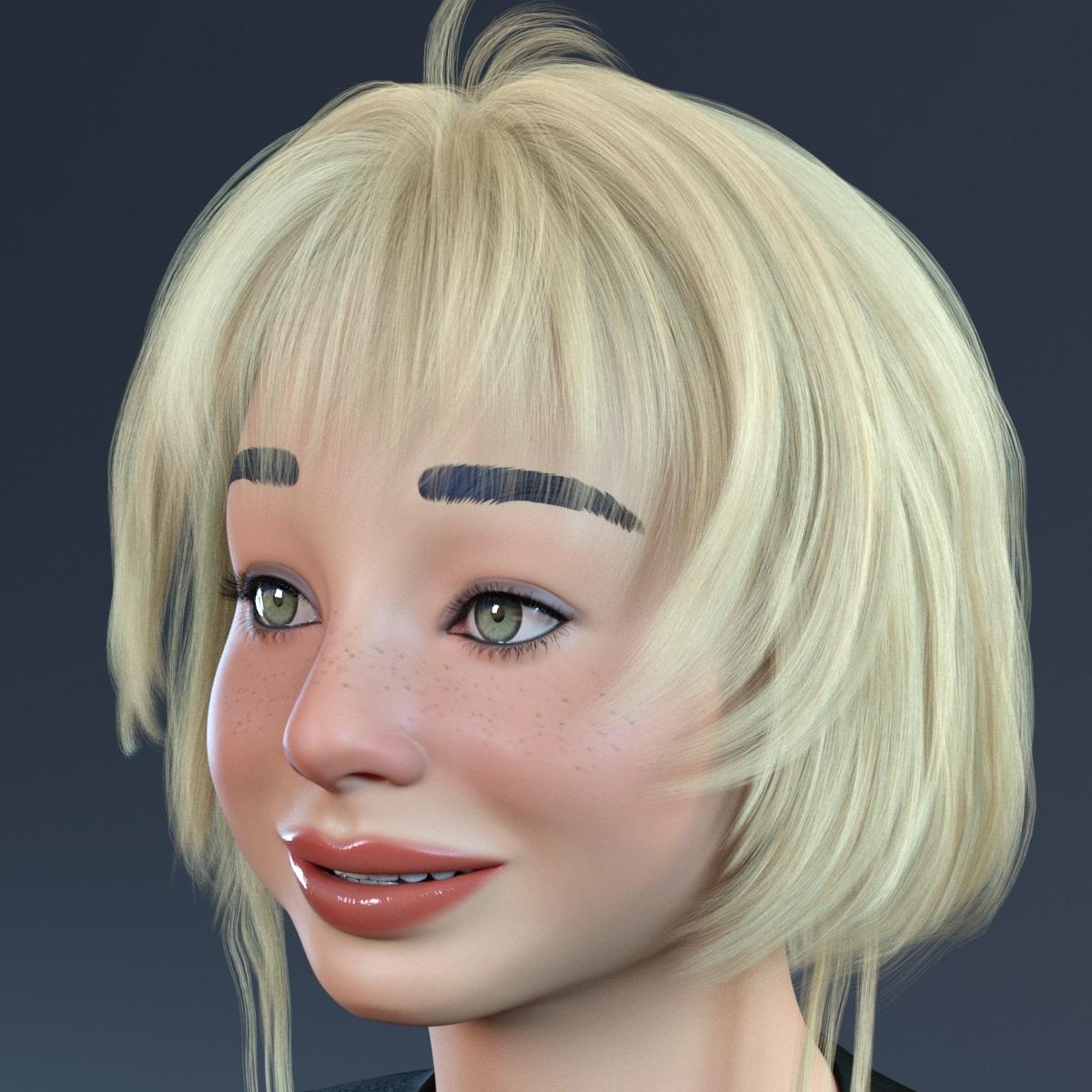
I also got hair bent when doing a quick render and adding a g9 hair. This is one of the best ones.Face Transfer 2Another attempt to create a toon character with Face Transfer 2...
 Have you seen this man? - Looking for Character + Hair
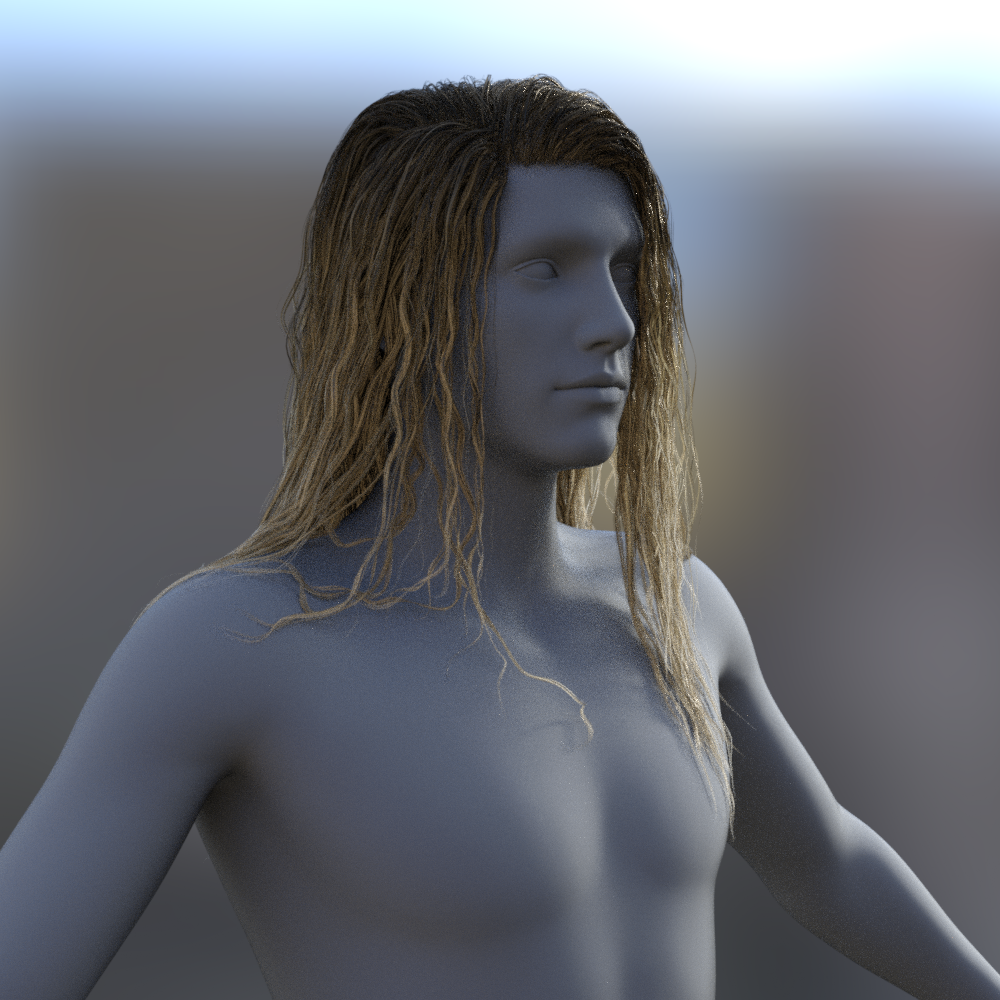
Well you can turn off limits on Victor hair's shorten morph and dial it into the negative. However, you very quickly run into clipping issues. Here it is at -200% and then -500%. And none of the movement morphs are sufficent to correct the clipping.


I suppose you might be able to use Mesh Grabber to pull it out of the figure's body, or try and make it dforce with a carefully painted weight map and then draping it on a timeline so the hair grows as the timeline progresses. But I cannot say for sure as i don't own mesh grabber and I'm not good enough with dforce weight maps to try that.
And just to check I tried mirroring Long Wet hair -100% on the X axis and it works just fine.
 Let's appreciate/discuss today's new releases - ongoing thread
ainm.sloinneadh said:
tsroemi said:
Llola Lane said:
tsroemi said:
"..., looks a bit like a trans woman. I just wish there were more promos of her as a 'normal' person, not fantasy-like."
I was thinking the same thing... Not sure about her yet... She's in my cart... waiting... for a decision to buy???... I think I'll wait until tonight to decide.
It's really really cool that we are getting a bit more unique and not just 'standard pretty' figures with G9 now I think. I like the trend. - Concerning the jewelry, found a second promo where one can clearly see that the earrings can be posed. Now only need to know about the side dangly things on the headpiece ...
Oh, and about the bundle: snow queen but no castle?!? Instead an 'Ice hotel' in the extras. Pity, although one can use the hotel for parts of a castle I reckon. Still, weird choice.
There are three earring styles and three headpiece styles. None of them have posing bones or morph sliders, but they can be posed. Each link in the jewellery is it's own node, which means you can rotate them into the pose you want. Works quite well and the necklace is built like this too. It also means you can hide individual links if you want to shorten any of the earrings or dangly bits on the headpiece. You'll be left with a dangling hook if you do that, but the hooks are decorative and look good on their own.
Ah, I see. Thank you so much, that was very helpful!
Let's appreciate/discuss today's new releases - ongoing threadtsroemi said:
Llola Lane said:
tsroemi said:
"..., looks a bit like a trans woman. I just wish there were more promos of her as a 'normal' person, not fantasy-like."
I was thinking the same thing... Not sure about her yet... She's in my cart... waiting... for a decision to buy???... I think I'll wait until tonight to decide.
It's really really cool that we are getting a bit more unique and not just 'standard pretty' figures with G9 now I think. I like the trend. - Concerning the jewelry, found a second promo where one can clearly see that the earrings can be posed. Now only need to know about the side dangly things on the headpiece ...
Oh, and about the bundle: snow queen but no castle?!? Instead an 'Ice hotel' in the extras. Pity, although one can use the hotel for parts of a castle I reckon. Still, weird choice.
There are three earring styles and three headpiece styles. None of them have posing bones or morph sliders, but they can be posed. Each link in the jewellery is it's own node, which means you can rotate them into the pose you want. Works quite well and the necklace is built like this too. It also means you can hide individual links if you want to shorten any of the earrings or dangly bits on the headpiece. You'll be left with a dangling hook if you do that, but the hooks are decorative and look good on their own.
Union Suit IssueI ran into this problem also but it was with a Face Transfer character and I wasn't sure if there was a weird hierarchy issue that I didn't know about yet. It was expedient just to update the surfaces manually. But I'm watching this thread for an answer.
Need help with Small Breasts Morphs (vol 1-4) for G8F by AnagordAnagords morph dials do not follow logic in their placement, in Parameters tab they can be found under "Actor->Full Body->People"
Can't find/install face transfer unlimitedjackiemcclements said:
I cant give my registration number as there is no 'face transfer plugin' listed for me to authenticate.
Did you install the latest general release of Daz studio (released yesterday), or a recent beta? Earlier versions of DS don't have Face Transfer 2 included.
Let's appreciate/discuss today's new releases - ongoing threadI'm in the weird position with the Snow Queen where I like her "older" face but her basic appearance doesn't really do anything for me (not that it's bad, it's just that I already have a lot of figures in that range, and these days I don't buy figures at all unless they're a face I don't already have), and I'm not buying the pro bundle just to get the older morph, so I guess I'm not going to get her.
A SPECIAL SHIN MORPHThat muscular part of the lower leg is called the Calf (plural Calves).
For G8F there is a morph in the Genesis 8 Female Body Morphs (which you may already have) called "Calves Size" which might do what you want but I'm not sure - there's a promo picture that shows larger calves on the product page.
For Gen9 there is a similar morph in Genesis 9 Body Shapes (again you may already have this).
Face Transfer 2StarLabz said:
So dissapointed in the new Face Transfer 2.... Here are the reasons why.
From the product it states:
Face Transfer 2 is an AI-powered system that from a photo transfers face shape, texture, and tone to create a look-a-like 3D version of family members, yourself, really whomever you want!
Answer: Really?? What AI? I have used the Face Transfer to the other FACE SHOP on here and there are barely any improvements. For example the faces still come out FLAT, OVER SIZED, and OUT OF PROPORTION.... Real AI recognizes these facial changes, so if AI was used then i dont see it at all. The cheeks/chin/forehead/ear locations do not represent the actual picture used. Even the size of the inner face to the outer does not line up correctly. JUST LIKE, FACE SHOP, i beleive it must line up points on the face like the lips and the like and just arrange it on the mesh, BUT does not respect the proportions AT ALL.
THE ONLY improvement, is the so called additions were you can load it on an a selected body morph, BUT BEWARE you have to make sure that body morph is in line with the original height (shoulders) with the BASE G9.... If not you get a stretched neck, and the head appears where the original G9 base head was.... WOW!
FROM AD: It is compatible with Genesis 9 figures, employs higher-resolution texture maps, refines the image projection process, and improves dynamic geometry adjustments.
ANSWER: LOL, right..... IT uses the base Genesis 9 Fem 2 base textures to overlay the LITTLE BIT of face it takes from the picture you provided. WOW... again i feel soooo dissapointed here and bit ticked off that i paid $35 for this product. AGAIN there is really no difference from the original and the other software Faceshop, besides the fact you can use it on G9 and it allows to place it on a body you decide to dail in, again with the caviat of being the same height as the origianl G9.
I feel ripped off to be honest. You are basically paying for just those two features alone: Being able to place it on G9, and used on a correct height figure.
WHY cant we use other High RES textures to be used with the generation??? Havent tried to go to where it pulls the ONLY texture it uses (G9 Fem 2 base textrues from the Essintials), and replace them (renaming them) with a seperate texture like from bluejaunte or HID, or the like.
It would have been an improvement if we could use any texture set we chose but instead we are stuck with ONE....
AGAIN, there is absolutely NO REAL (Especially AI) improvement here using/buying this product...
What do you mean here by "Correct height figure"?
Can't find/install face transfer unlimitedI cant give my registration number as there is no 'face transfer plugin' listed for me to authenticate.
Face Transfer 2Which figure are you using? The face Transfer 2 license covers Genesis 9, Genesis 8 is covered by the original version and will still have watermarks if only a Face Transfer 2 license is activated.
Face Transfer 2Lot of information floating around but being selfish and concerned posting my own.
Yesterday I updated Daz Studio to one that had Face Transfer 2.....great
Yesterday Purchased the item (not trial<)
Entered serial number into box provided...Great
Problem: all the images have watermarks, cannot save.
Remember this is product released last few day.
Thank you
Have you seen this man? - Looking for Character + Hairzombietaggerung said:
either the hair of the render is likely mirrored. you can mirror hairs by simply scaling them on the X axis -100%
That ... I didn't know!
So with a -100% on the X, the hair flips around keeping everything else in check? Morph and movements?
Face Transfer 2Just check the materials of created Face Transfer 2 characters.
Genesis 9 version uses multiple maps.
Genesis 8 version uses only one map, but it is a very well made.
Face Transfer 2darkestcubstudio said:
can someone help me? im having a terrible time with face transfer 2. i get great results with g8 but g9 looks nothing like the picture. i have tried different photos of different people and the result is the same. i attached an image so you can see what i mean. i used the same photo on both yet the results are drastically different, i made sure to update g9 but still not working
To my eyes the Genesis 8 version loks like a photo projected onto the emsh, the Genesis 9 looks like an actual 3D character. It is hard to judge how faithful either is in the absence of the source photo. So far I am feeling Genesis 9 produces better, though hardly perfect, matches.
Face Transfer 2can someone help me? im having a terrible time with face transfer 2. i get great results with g8 but g9 looks nothing like the picture. i have tried different photos of different people and the result is the same. i attached an image so you can see what i mean. i used the same photo on both yet the results are drastically different, i made sure to update g9 but still not working
A SPECIAL SHIN MORPHHi everybody !
A question :
Is there any morph I should be looking for to get some kind of backward curve on shins ( as on the sample in attached file, before and after ), wich I find much more dynamic and realistic that straight shins ( just me though^^) ?
As I'm french, it's not easy to find the right property, the right morph or its name...What is the name for that, what should I be looking for ?
...Or is there a pack of morphs including this that I could by for G8F / G9 ?
At the moment the only solution that I've found is to go through a body morph called "space elf" but it changes the whole body so it needs retweaking afterward...can be very annoying !
Any help would be greatly appreciated !
In advance, a big thank you !
Cheers !Face Transfer 2So dissapointed in the new Face Transfer 2.... Here are the reasons why.
From the product it states:
Face Transfer 2 is an AI-powered system that from a photo transfers face shape, texture, and tone to create a look-a-like 3D version of family members, yourself, really whomever you want!
Answer: Really?? What AI? I have used the Face Transfer to the other FACE SHOP on here and there are barely any improvements. For example the faces still come out FLAT, OVER SIZED, and OUT OF PROPORTION.... Real AI recognizes these facial changes, so if AI was used then i dont see it at all. The cheeks/chin/forehead/ear locations do not represent the actual picture used. Even the size of the inner face to the outer does not line up correctly. JUST LIKE, FACE SHOP, i beleive it must line up points on the face like the lips and the like and just arrange it on the mesh, BUT does not respect the proportions AT ALL.
THE ONLY improvement, is the so called additions were you can load it on an a selected body morph, BUT BEWARE you have to make sure that body morph is in line with the original height (shoulders) with the BASE G9.... If not you get a stretched neck, and the head appears where the original G9 base head was.... WOW!
FROM AD: It is compatible with Genesis 9 figures, employs higher-resolution texture maps, refines the image projection process, and improves dynamic geometry adjustments.
ANSWER: LOL, right..... IT uses the base Genesis 9 Fem 2 base textures to overlay the LITTLE BIT of face it takes from the picture you provided. WOW... again i feel soooo dissapointed here and bit ticked off that i paid $35 for this product. AGAIN there is really no difference from the original and the other software Faceshop, besides the fact you can use it on G9 and it allows to place it on a body you decide to dail in, again with the caviat of being the same height as the origianl G9.
I feel ripped off to be honest. You are basically paying for just those two features alone: Being able to place it on G9, and used on a correct height figure.
WHY cant we use other High RES textures to be used with the generation??? Havent tried to go to where it pulls the ONLY texture it uses (G9 Fem 2 base textrues from the Essintials), and replace them (renaming them) with a seperate texture like from bluejaunte or HID, or the like.
It would have been an improvement if we could use any texture set we chose but instead we are stuck with ONE....
AGAIN, there is absolutely NO REAL (Especially AI) improvement here using/buying this product...
Daz 3D is part of

Connect
DAZ Productions, Inc.
7533 S Center View Ct #4664
West Jordan, UT 84084Licensing Agreement | Terms of Service | Privacy Policy | EULA
© 2026 Daz Productions Inc. All Rights Reserved.