-
Converting Aiko/Genesis Figures to Gen 8
The Anime Starter Bundle is still free, so you can get A4. V4 is not free ATM, but they frequently give away V4 bundles.
The old Texture Convertor (TC2) product did a passable job of converting between V3 and V4 textures. If you had that, you could use A3 textures on any figure that can use V4 UVs. Alas, TC2 was pulled from the store. I have it. I use a few V3 textures on G2 via the V4 UVs for G2F.
A3 certainly had her fans. There were some terminally cute characters for A3. The rigging on the 3rd generation base characters was truly horrible, though.
Can one use https://www.daz3d.com/legacy-uvs-for-genesis-3-special-edition-victoria-3 instead of tc2?
No, as those products don't work in the same way at all.
- TC2 converted the textures maps between UVs, which means it creates new maps made for V4 UVs from maps using A3 UVs. After conversion you have actual V4 textures, which can be used on various figures which can "wear" V4 UVs
- The V3 Legacy UVs for G3F product modifies the G3F figure so that you can apply textures made for V3 to her, it doesn't convert the textures. So it only works with G3F, you can't use it to generate textures made for G3F you could then use on G8F.
Converting Aiko/Genesis Figures to Gen 8The Anime Starter Bundle is still free, so you can get A4. V4 is not free ATM, but they frequently give away V4 bundles.
The old Texture Convertor (TC2) product did a passable job of converting between V3 and V4 textures. If you had that, you could use A3 textures on any figure that can use V4 UVs. Alas, TC2 was pulled from the store. I have it. I use a few V3 textures on G2 via the V4 UVs for G2F.
A3 certainly had her fans. There were some terminally cute characters for A3. The rigging on the 3rd generation base characters was truly horrible, though.
Can one use https://www.daz3d.com/legacy-uvs-for-genesis-3-special-edition-victoria-3 instead of tc2?
[Released] Props & Poses Converter from Genesis 3 Female to Genesis 8 Female [Commercial]Ahhhhh! Got it!
I forgot to look at the date LOL!

Thank you! This is an awesome script!!!!
Is it possible to do it for earlier versions? I don't mean will you do one, but whether it's possible to do it or if it really only works well for G3 -> G8.
Great, thank you!
Does the saved file have a particular name? or is the same as the original character?
well, no, that won't work, it would overwrite the original, yeah? I've got three files in that folder for this particular character, but not sure which ones I created.
Gosh, you were quick! LOL Thank you!
I edited it to add a third question:
3. With the "hide eyes" option - which is mentioned in the manual as giving better results - does that mean the eyes of the G3F character do not transfer over at all? So eyes that are a different shape - not extreme, but say, eyes like Mei Lin 7 - won't transfer at all?
I couldn't find a thread for your "Character Converter from Genesis 3 Female to Genesis 8 Female" so I'll just ask here, and if there is a thread, then I'll delete and post it there....
just picked this one up tonight and have only had a very very quick play with it but I have two questions:
1. Is the "convert scene character" used for when you don't have a full character preset, and the character is a "apply Jane's body morph.duf" and "apply Jane's head morph.duf" deal, whereas the main converter is when you have the full character preset?
2. Will this do any expressions? (for instance, an expression pack such as "Victoria 7 Attitude Expressions") If so, is that "convert scene character"?
1. Yes, "Convert Scene Character" is for when you have created a character in the scene and applied all the morphs (weight, fitness, etc) to it
2. If the expressions are morph and they have been applied to the character, I *think* it will do it. I haven't tried it.
3. No, this refers to an option in the conversion process that Sickleyield had defined. The 2 processes the script uses are similar but can give different results, especially around the eyes.
Bonus answer: Yes, it is in data/Daz 3D/Genesis 8/Female/Morphs/VENDOR/PRODUCT where the root directory is defined as the first directory under Daz formats in the Content manager.
You created all of them with the script (check the creation dates). The original morphs live in My Daz 3D Library.
[Released] Props & Poses Converter from Genesis 3 Female to Genesis 8 Female [Commercial]Great, thank you!
Does the saved file have a particular name? or is the same as the original character?
well, no, that won't work, it would overwrite the original, yeah? I've got three files in that folder for this particular character, but not sure which ones I created.
Gosh, you were quick! LOL Thank you!
I edited it to add a third question:
3. With the "hide eyes" option - which is mentioned in the manual as giving better results - does that mean the eyes of the G3F character do not transfer over at all? So eyes that are a different shape - not extreme, but say, eyes like Mei Lin 7 - won't transfer at all?
I couldn't find a thread for your "Character Converter from Genesis 3 Female to Genesis 8 Female" so I'll just ask here, and if there is a thread, then I'll delete and post it there....
just picked this one up tonight and have only had a very very quick play with it but I have two questions:
1. Is the "convert scene character" used for when you don't have a full character preset, and the character is a "apply Jane's body morph.duf" and "apply Jane's head morph.duf" deal, whereas the main converter is when you have the full character preset?
2. Will this do any expressions? (for instance, an expression pack such as "Victoria 7 Attitude Expressions") If so, is that "convert scene character"?
1. Yes, "Convert Scene Character" is for when you have created a character in the scene and applied all the morphs (weight, fitness, etc) to it
2. If the expressions are morph and they have been applied to the character, I *think* it will do it. I haven't tried it.
3. No, this refers to an option in the conversion process that Sickleyield had defined. The 2 processes the script uses are similar but can give different results, especially around the eyes.
Bonus answer: Yes, it is in data/Daz 3D/Genesis 8/Female/Morphs/VENDOR/PRODUCT where the root directory is defined as the first directory under Daz formats in the Content manager.
You created all of them with the script (check the creation dates). The original morphs live in My Daz 3D Library.
[Released] Props & Poses Converter from Genesis 3 Female to Genesis 8 Female [Commercial]Great, thank you!
Does the saved file have a particular name? or is the same as the original character?
well, no, that won't work, it would overwrite the original, yeah? I've got three files in that folder for this particular character, but not sure which ones I created.
Gosh, you were quick! LOL Thank you!
I edited it to add a third question:
3. With the "hide eyes" option - which is mentioned in the manual as giving better results - does that mean the eyes of the G3F character do not transfer over at all? So eyes that are a different shape - not extreme, but say, eyes like Mei Lin 7 - won't transfer at all?
I couldn't find a thread for your "Character Converter from Genesis 3 Female to Genesis 8 Female" so I'll just ask here, and if there is a thread, then I'll delete and post it there....
just picked this one up tonight and have only had a very very quick play with it but I have two questions:
1. Is the "convert scene character" used for when you don't have a full character preset, and the character is a "apply Jane's body morph.duf" and "apply Jane's head morph.duf" deal, whereas the main converter is when you have the full character preset?
2. Will this do any expressions? (for instance, an expression pack such as "Victoria 7 Attitude Expressions") If so, is that "convert scene character"?
1. Yes, "Convert Scene Character" is for when you have created a character in the scene and applied all the morphs (weight, fitness, etc) to it
2. If the expressions are morph and they have been applied to the character, I *think* it will do it. I haven't tried it.
3. No, this refers to an option in the conversion process that Sickleyield had defined. The 2 processes the script uses are similar but can give different results, especially around the eyes.
Bonus answer: Yes, it is in data/Daz 3D/Genesis 8/Female/Morphs/VENDOR/PRODUCT where the root directory is defined as the first directory under Daz formats in the Content manager.
[Released] Props & Poses Converter from Genesis 3 Female to Genesis 8 Female [Commercial]Gosh, you were quick! LOL Thank you!
I edited it to add a third question:
3. With the "hide eyes" option - which is mentioned in the manual as giving better results - does that mean the eyes of the G3F character do not transfer over at all? So eyes that are a different shape - not extreme, but say, eyes like Mei Lin 7 - won't transfer at all?
I couldn't find a thread for your "Character Converter from Genesis 3 Female to Genesis 8 Female" so I'll just ask here, and if there is a thread, then I'll delete and post it there....
just picked this one up tonight and have only had a very very quick play with it but I have two questions:
1. Is the "convert scene character" used for when you don't have a full character preset, and the character is a "apply Jane's body morph.duf" and "apply Jane's head morph.duf" deal, whereas the main converter is when you have the full character preset?
2. Will this do any expressions? (for instance, an expression pack such as "Victoria 7 Attitude Expressions") If so, is that "convert scene character"?
1. Yes, "Convert Scene Character" is for when you have created a character in the scene and applied all the morphs (weight, fitness, etc) to it
2. If the expressions are morph and they have been applied to the character, I *think* it will do it. I haven't tried it.
3. No, this refers to an option in the conversion process that Sickleyield had defined. The 2 processes the script uses are similar but can give different results, especially around the eyes.
Bonus answer: Yes, it is in data/Daz 3D/Genesis 8/Female/Morphs/VENDOR/PRODUCT where the root directory is defined as the first directory under Daz formats in the Content manager.
[Released] Props & Poses Converter from Genesis 3 Female to Genesis 8 Female [Commercial]Gosh, you were quick! LOL Thank you!
I edited it to add a third question:
3. With the "hide eyes" option - which is mentioned in the manual as giving better results - does that mean the eyes of the G3F character do not transfer over at all? So eyes that are a different shape - not extreme, but say, eyes like Mei Lin 7 - won't transfer at all?
I couldn't find a thread for your "Character Converter from Genesis 3 Female to Genesis 8 Female" so I'll just ask here, and if there is a thread, then I'll delete and post it there....
just picked this one up tonight and have only had a very very quick play with it but I have two questions:
1. Is the "convert scene character" used for when you don't have a full character preset, and the character is a "apply Jane's body morph.duf" and "apply Jane's head morph.duf" deal, whereas the main converter is when you have the full character preset?
2. Will this do any expressions? (for instance, an expression pack such as "Victoria 7 Attitude Expressions") If so, is that "convert scene character"?
1. Yes, "Convert Scene Character" is for when you have created a character in the scene and applied all the morphs (weight, fitness, etc) to it
2. If the expressions are morph and they have been applied to the character, I *think* it will do it. I haven't tried it.
[Released] Props & Poses Converter from Genesis 3 Female to Genesis 8 Female [Commercial]I couldn't find a thread for your "Character Converter from Genesis 3 Female to Genesis 8 Female" so I'll just ask here, and if there is a thread, then I'll delete and post it there....
just picked this one up tonight and have only had a very very quick play with it but I have two questions:
1. Is the "convert scene character" used for when you don't have a full character preset, and the character is a "apply Jane's body morph.duf" and "apply Jane's head morph.duf" deal, whereas the main converter is when you have the full character preset?
2. Will this do any expressions? (for instance, an expression pack such as "Victoria 7 Attitude Expressions") If so, is that "convert scene character"?
1. Yes, "Convert Scene Character" is for when you have created a character in the scene and applied all the morphs (weight, fitness, etc) to it
2. If the expressions are morph and they have been applied to the character, I *think* it will do it. I haven't tried it.
[Released] Props & Poses Converter from Genesis 3 Female to Genesis 8 Female [Commercial]I couldn't find a thread for your "Character Converter from Genesis 3 Female to Genesis 8 Female" so I'll just ask here, and if there is a thread, then I'll delete and post it there....
just picked this one up tonight and have only had a very very quick play with it but I have two questions:
1. Is the "convert scene character" used for when you don't have a full character preset, and the character is a "apply Jane's body morph.duf" and "apply Jane's head morph.duf" deal, whereas the main converter is when you have the full character preset?
2. Will this do any expressions? (for instance, an expression pack such as "Victoria 7 Attitude Expressions") If so, is that "convert scene character"?
edit: oooh thought of a third question:
3. With the "hide eyes" option - which is mentioned in the manual as giving better results - does that mean the eyes of the G3F character do not transfer over at all? So eyes that are a different shape - not extreme, but say, eyes like Mei Lin 7 - won't transfer at all?
Z Expecting - Pregnancy Preset and Poses for Genesis 3 and 8It's not the Victoria 7 Pro Bundle you need for the morph, it's https://www.daz3d.com/genesis-7-female-body-morphs
Z Expecting - Pregnancy Preset and Poses for Genesis 3 and 8sorry to bother anyone but i purchased the victoria 7 pro bundle but can't find the pregnant morph ?
What was your first DAZ purchase, and how long ago?First overall Order Date: January 18, 2005 - DAZ|Studio Beta
First paid Order Date: January 20, 2005 - Victoria 3.0 Head & Body Morphs
Converting Aiko/Genesis Figures to Gen 8AikoToon 4 is indeed based on Victoria 4. Aiko 3 is a totally different figure, from the same generation as Victoria 3.
There's no product which will enable you to convert characters from V4, A3 or G1 directly to G8. You could convert the morphs to G3 then use your G3 to G8 converter to move them to G8 though.
To convert character morphs from V4, A3 or G1 to genesis figures up to G3 you would need GenX2 and its various add-ons:
- Base program: https://www.daz3d.com/genesis-generation-x2
- Aiko 3 add-on (required to convert A3 morphs): https://www.daz3d.com/genx-addon-gen3-for-a3-and-h3 or it's part of https://www.daz3d.com/genx-addon-gen3-bundle
- Genesis 2 and 3 add-ons (you need both to convert to G3): https://www.daz3d.com/genx2-addon-for-genesis-2 and https://www.daz3d.com/genx2-addon-for-genesis-3
Textures are more complicated.
For V4 textures the product otherunicorn linked will work.
There's no product to use Aiko 3 textures on G8F. There's one to use them on G3F (Aiko 3 uses the same textures as Victoria 3), but it won't help if you want to convert to G8F.
For Genesis 1, it depends which UVs the textures use.
Hmm this is the answer I was looking for. I think this is all I needed then. That's a pretty rough journey.
Have you done it before? Could you share images of the morphs working on Gen 8 or something please?
I want to especially see some of the genesis ones or Aiko figures.Thanks for the response!AikoToon 4 is indeed based on Victoria 4. Aiko 3 is a totally different figure, from the same generation as Victoria 3.
There's no product which will enable you to convert characters from V4, A3 or G1 directly to G8. You could convert the morphs to G3 then use your G3 to G8 converter to move them to G8 though.
To convert character morphs from V4, A3 or G1 to genesis figures up to G3 you would need GenX2 and its various add-ons:
- Base program: https://www.daz3d.com/genesis-generation-x2
- Aiko 3 add-on (required to convert A3 morphs): https://www.daz3d.com/genx-addon-gen3-for-a3-and-h3 or it's part of https://www.daz3d.com/genx-addon-gen3-bundle
- Genesis 2 and 3 add-ons (you need both to convert to G3): https://www.daz3d.com/genx2-addon-for-genesis-2 and https://www.daz3d.com/genx2-addon-for-genesis-3
Textures are more complicated.
For V4 textures the product otherunicorn linked will work.
There's no product to use Aiko 3 textures on G8F. There's one to use them on G3F (Aiko 3 uses the same textures as Victoria 3), but it won't help if you want to convert to G8F.
For Genesis 1, it depends which UVs the textures use.
Hmm this is the answer I was looking for. I think this is all I needed then. That's a pretty rough journey.
Have you done it before? Could you share images of the morphs working on Gen 8 or something please?
I want to especially see some of the genesis ones or Aiko figures.Thanks for the response!
Saving Character Preset: Eyelashes Problem...For the lashes you too would need to save them as a material preset that could be applied separately. If, indeed, you do have a character from the store that loads everything, I would be interested in which one since, as I said, all of those I have do not.
I just tried loading a few characters at random from their Actor presets, and most of them loaded the lashes texture, although a few didn't.
Characters that loaded with their custom lashes texture:
Victoria 8, RY Caprice, Mousso Albany, Syble HD.
Characters that loaded with the default G8 lashes texture:
BJ Amira, BJ Lyra
So it's certainly possible to save an Actor preset that'll load the correct lashes, but I've no idea how.
Converting Aiko/Genesis Figures to Gen 8AikoToon 4 is indeed based on Victoria 4. Aiko 3 is a totally different figure, from the same generation as Victoria 3.
There's no product which will enable you to convert characters from V4, A3 or G1 directly to G8. You could convert the morphs to G3 then use your G3 to G8 converter to move them to G8 though.
To convert character morphs from V4, A3 or G1 to genesis figures up to G3 you would need GenX2 and its various add-ons:
- Base program: https://www.daz3d.com/genesis-generation-x2
- Aiko 3 add-on (required to convert A3 morphs): https://www.daz3d.com/genx-addon-gen3-for-a3-and-h3 or it's part of https://www.daz3d.com/genx-addon-gen3-bundle
- Genesis 2 and 3 add-ons (you need both to convert to G3): https://www.daz3d.com/genx2-addon-for-genesis-2 and https://www.daz3d.com/genx2-addon-for-genesis-3
Textures are more complicated.
For V4 textures the product otherunicorn linked will work.
There's no product to use Aiko 3 textures on G8F. There's one to use them on G3F (Aiko 3 uses the same textures as Victoria 3), but it won't help if you want to convert to G8F.
For Genesis 1, it depends which UVs the textures use.
Barbie doll body maker!!(niples and gens remover)to be clear and some peoples are not missunderstand my request, i'm not talking about "true barbie doll body, i means plastic or rubber made bodie,. that is not the case i means which i want a way to remove niples, pub hair and gens from the already existing skins like for exemple victoria 8 material, i means make the bodies be like the genesis 1 and genesis 2 bodies, both of then don't have any niples or gens or pubic hairs on they bodies, they are "doll" style bodies but still "realistic style skin, this is what i want, not a cartoon or anime or plastic or rubber doll, body for exemple like sakura 8 body anime body, i want a way to get any of the existing bodies materials and "remove" they gens, niples or pub hairs, but still looking like a realistic body, it's just to help with censoship, i know which i can try that using the photoshop but it will be really a lot of work to have adjust for all that, then would be cool to have a tool which would do that.
"If you want to get rid of brows, nipples, gens, but keep skin details. Make copies of the Figure's Surface Maps (as to not destroy the default maps) rename, and in a photo editor llike Gimp, Affinity, or Photoshop use heal brush, blemish removal brush, or paint over the undesired areas. This needs to be done on the base, displacement, glossy, specular, or any of the avalible maps with that undesired marking. Replace the default maps with the edited ones in the figures surfaces tab. Save as a material preset. (nipples and gens are on torso maps)"
The Nips and Gens are on the torso maps. It's alot less work than you think or than it even sounds. Once you have the new maps on you can adjust colors to make multiple skin tones and save those skintones out if you wish.
However, if you load another characters materials surface maps to change color or markings (wrinkles, moles, etc) then you have to do it again for those torso maps as well.
Converting Aiko/Genesis Figures to Gen 8There are a few videos about that are meant to help converting, but to be honest, I was never able to get their processes to work.
Getting the mats across, however, is easy using https://www.daz3d.com/legacy-uvs-for-genesis-8-victoria-4 . Note that some distortion occurs so a little modifying of the mats may be needed.Converting Aiko/Genesis Figures to Gen 8Hello all,
My end goal is to get Aiko 3/4 and other genesis figures to Gen 8 Female.
I have the Gen 3 to Gen 8 conversion tool (and Gen 8 to Gen 3).
Could someone explain what process and models I need to get the figures to Genesis 8?
Here are the products that I want to convert:
https://www.daz3d.com/3d-universe-aikotoon-4
https://www.daz3d.com/aiko-3-0-base
(Anything Genesis 1)
Please let me know what products I need. For example, for Aiko, I'll need Victoria 4.2 base, right?
It would really help to get some advice. I'm going for the 'old videogame character' look for my art.Thanks!
Help Log warning error + DuplicateDuck lips and pointy nose are down to a character that has been saved with a non-zero default value, it has nothing to do with the log entries. I think there is a freebie known to do this - check the Currently Used list in the Parameters pane with the figure selected.
That's the issue I'm opening Victoria from product list not from a scene save or figure saved there shouldn't any save modifications and it only happens with genesis 8 females not the males or any other genesis figure
Yes, that's the way it works - if the morph is saved with a non-zero deault then it wil load non-zero in any file containing that base figure, unless the property has been explicitly set to zero in the file. You need to identify and either fix or remove the problem property.
More Non-photorealisitic Renders (NPR II)Just something quick - I've not been very active again for a while. Mostly real life stuff but then I turned to expanding my Poser Runtime with conversions of Genesis and Genesis 2 figures and accessories. This last couple of weeks have been spent getting Genesis 3 figures up and running.
I've been purchaseing Genesis items over the last few years when they've been at silly prices - even Genesis 3 is now hitting those super low price points giving me quite a selection to work with. Not all of the product line works in Poser but in case anyone else is interested in working with this generation, I've started a new thead on the Poser forum where I'll post my notes and successes which can serve to inform other folks' purchasing. There's a table of G3 Female clothes and now one of hair. I've quite a lot more female clothing to try and import but I'm going to turn my attention to the male figures fore a while first.
Anywho, here's a very simple pic of Victoria 7. While there have been some dissapointments (particularly regarding hair - a lot of which doesn't work), the figures themselves work very well (do create light versions to improve performance) and there are enough clothing items to make this a worth while addition to my toolset.
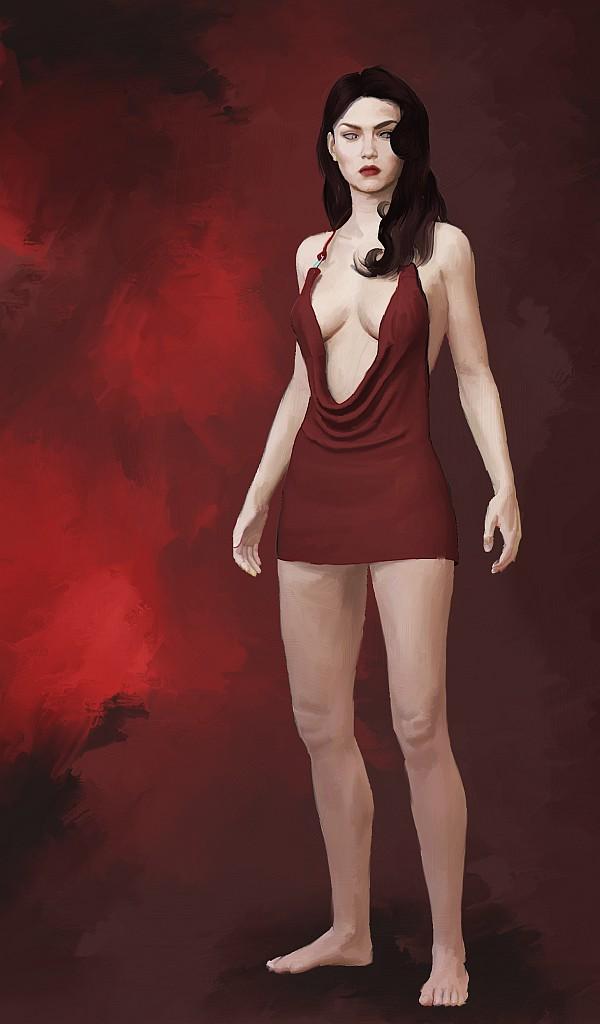
And here she is on a cover with a Michael 6 in the backgroud.
Glad to see you're making progress with Genesis 3 figures. When things slow down I'm going to revisit my efforts to work those figures into my art.
Ummmm. I don't see Michael in the background? Am I missing something?
Daz 3D is part of

Connect
DAZ Productions, Inc.
7533 S Center View Ct #4664
West Jordan, UT 84084Licensing Agreement | Terms of Service | Privacy Policy | EULA
© 2026 Daz Productions Inc. All Rights Reserved.