-
Sharing Prop Pose Presets with different Props?
I created a prop in Sketchup, exported it as an OBJ and importerd it into DAZ via the FIGURE SETUP (content Type = Prop and Rigging Type = Parametric), arranged the bone Hierarchy and then Created the new PROP1. I can now save various Poses for PROP1 and apply them to this PROP1 or copies as would be expected.
The problem I am having is that I want to create a 2nd prop, PROP2, virtually identical to the first prop just some material/surface changes, however, when applying the Poses saved for PROP1 to the newly created PROP2, I get either no pose change or only a very partial pose change.
The number and size of bones in each are identical. I changed both Prop bone names to be identical as well via the Scene Tab just to be sure the bone names were not the issue. I have also tried saving both as Pose Preset and Hierarchial Pose Preset.
Any thoughts on what I need to do to fix this would be greatly appreciated. Thanks!
Spline Objectsotodomus Unfortunately none of my friends have access to SketchUp and I can't afford the Pro version so I'll have to make due with the free version. I'm also not familiar with SketchUp so I'll need to take some time to learn how explode group components and fill lines.
Show Us Your Bryce Renders! Part 9@ David & Horo Ah well... one of three things may have gone wrong here: A) You are -secretly- one and the same person, B) Filling out tax forms is a repressed memory or C) I made a mista....nah, can't be, it must have been a combination of a hard days work and a stiff glass of whiskey.

@Tim82 I just love that real life art into Bryce.
@Jamahoney That is a great feel of depth in that render. Like it a lot.

Just a simple and fast render, this time. A few converted .skp into .obj files from Sketchup bunched together. I was a bit surprised by the reflection in the windows of the main building but I am not happy with the visibly flat surface of the lower building in front.
EDIT: Unfortunately, linking a picture from the gallery doesn't work. So it is back to parking my renders on my provider's server.
EDIT2: Once again I stand corrected, linking a picture from the gallery is quite possible. see the instructions from Chohole, 2 posts below this one.
Spline ObjectsHi insomnia, I really hope that you can solve your needings modelling your medals, I am currently working with a logo for some signs, the process is how I have said before I only want to show you how the components are saved in SU and how they are opened in Carrara:
The illustrator file:

The SketchUp model, I have made components for every part of the logo this way I can assign a shader domine to each part:

This is the window where you can see how Carrara recognises the components made in SketchUp, the highlighted parts are the logo ones:

And this is a quick render:

hope it helps
Regards
Otto
Spline ObjectsOK, first off you have a big step by using Ilustrator and Corel, I do usually do my vector art in Ilustrator, the next step is to get SketchUp, there are some versions that are free, SketchUp Make, and you can also run the free trial Pro version, maybe you can have a friend that can get you some Pro version the 2016 is the newest.
https://www.sketchup.com/products/sketchup-pro/new-in-2016
In Ai you can export your files as AutoCad Interchange File (dxf)

Depending on the complex of your vector art you will get basically a file with your vector art grouped in components, what you need is to explode those to get the lines that will be modelled.
Once you have exploded all the components you will need to fill out the lines of the vector art, you can have some like this:

And then you can extrude the parts you want to be solid:

Sometimes you have a dragged lines that aren't smooth at all, this is because you need to add some paths to the vector lines, but before that try the above steps adn tell me if you have some questions.
Regards
Otto
Spline Objectsotodomus A work-flow would be great. I've been struggling with this for a while and haven't found a solution. Thank you.
Hi! I work very often with vector images that needs to be modelled in 3D, my process is to model to SketchUp and then get the renders in Carrara, if you are interested in this process let me know and I can give you my work-flow in the process, as you I have seen some issues importing directly as spine objects, the way I do work with SketchUp is really nice and models are 100% compatible with Carrara at the point that any component created in SU is saved by name that you can see in the shader room of Carrara.
Regards
Otto
Spline ObjectsHi! I work very often with vector images that needs to be modelled in 3D, my process is to model to SketchUp and then get the renders in Carrara, if you are interested in this process let me know and I can give you my work-flow in the process, as you I have seen some issues importing directly as spine objects, the way I do work with SketchUp is really nice and models are 100% compatible with Carrara at the point that any component created in SU is saved by name that you can see in the shader room of Carrara.
Regards
Otto
Things With WheelsI actually found a good number of usable free wheelchairs at the SketchUp 3DWarehouse. Export them from SketchUp as an OBJ and import them into Daz and they work just fine!
How do I add texture to 1 area only if model can't be ungrouped?Creative use of Boolean modelling within Bryce is a great way to separate tricky single mesh objects... But for that Bryce experience is most handy tool.
Archive 3D is a fab resource but as you say, most of the models are low detail, single mesh and usually import into Bryce without their textures. Using Boolean modelling you can actually mask off parts and then make a reverse mask for those parts and then texture them up using different materials. But as each model is different, there is no easy way to explain the best way to do it. An example is this truck, which I totally tranformed in Bryce from a 1950 F100 to a 1951 F100 by altering the whole if the front grill in Bryce using Boolean functions. I then added wheel arch trims and an upright exhaust.
Your truck alterations look great! But I am not a modeller, have only built a wooden cabinet in Bryce and a building in Sketchup but this is how far my experience goes. As you mentioned above about Bryce experience, then I have still a long way to go. Thanks for your tips about boolean modelling.
How do I add texture to 1 area only if model can't be ungrouped?@fool - yes, it is a sketchup model of a town.
@Peter Fulford - yes, that is another option to do it in PSP or Photoshop.
Another question regards models that are ungroupable in Bryce. I have quite some models from Archive3D but many of those seems like one mesh. For instance, a car model. When I import the .obj (wavefront) to Bryce and want to retexture it to say red, the whole car including windows and wheels turns red. How can one add different textures to it, i.e. glass to windows, etc? Or do I need to try this in Hexagon first? If I know how the model was initially created and in which software it would be better but unfortunately there are not much info on the models.
How do I add texture to 1 area only if model can't be ungrouped?I am no Brycer but is this by some chance a sketchup model?
if so can it be edited in Sketchup?
Show Us Your Bryce Renders! Part 9@Vivien Welcome back, vivian. Great to see you back and with such a nice render.
@Horo Do you know if it possible to post an image in your gallery and use a link to that?
@Launok I like those town renders! Never heard of sketchup warehouse before but by the looks of it I'll definitely visit it a lot, thanks for the tip.
@Mermaid010 That sunless sky hdri works really well on that render, well done.
@David Brinnen you should fill out tax forms more often, they seem to work inspirational.
 Show Us Your Bryce Renders! Part 9
I am not making scenes very often but at times I love to work in Bryce.
Here are a few renders of a town called Amethyst Hill over at Sketchup Warehouse. There are 2 separate models to download but I have used the "Lower Depot Street" by Demilune, will later add the "Upper Depot Street" for a bigger town scene. The train model is from Sharecg. OK, there are quite some errors specially with terrain. The original model have 2D trees and I had to remove them as far as possible.
Laura
Show Us Your Bryce Renders! Part 9Rembrandt – beautiful surreal render, love it.
Horo – thanks. Both your renders are very inspiring.
Vivien – glad you are back. The render is awesome, love the clouds.
A Sketchup Formula One model lit by one of Horo’s Sunless Skies Hdri
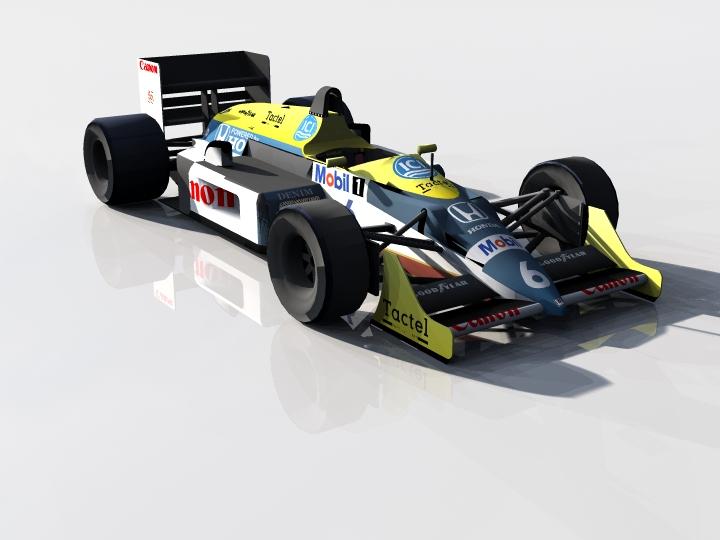 Does Stonemason ever sleep?
Just imagine what he could do if he could make Urban Sprawl in one day like that guy from the other discussion!

Well, I can imagine Stonemason using Sketchup for the main basic mesh, then refining with 3DS or Zbrush for the terrain and fibermesh for the greens, but is a theory.
Star Trek Builders Unite 7: The Continuing MissionJust a quick update - I'll have my Arboretum set up soon. I had some unexpected issues that turned out to be because I saved my .obj files in with my Sketchup files instead of with my Poser files.
I've also been working on uniforms from the upcoming film based on what I could see in the trailer. They've changed the neck and given the female uniform sleeves. Guess someone finally figured out that if you could tell a man who was a lieutnent from a man who was a commander by looking at his uniform, it just might be necessary to do that for women too...
Importing from SketchupThis may have been covered before, but I've dad some pecculiar issues importing things made in google sketchup. Sometimes parts of the item modelled are completely missing- for example I might import a table top with no legs, or legs without a tabletop. This tends not to happen if the Collada file (.dae) has been imported into blender and converted into a wavefront (.obj) file, before being imported into DAZ, but there are new problems arising in this case. Sometimes the colours and textures are lost, or partially lost. Sometimes they are only lost in the viewing screen, where a white ghost of the shape is all that can be seen. Sometimes the colours appear as they should if the image is rendered, but not in the main view. Sometimes only some of the colours and textures come through, in block across the surface, and the thing looks like urban camouflage.
Are there identifiablee causes and remedies to these things? Failing that is there an alternative to Sketchup that can be used to create 3d objects and sets that can be imported into DAZ without such problems?
Becoming a Published ArtistThere is no many men clothing, I know many users claim that, maybe this is an oportunity...
and asides bikinis, they're useless with my figures with well endowed frontals, I'm tired to use Z scale over and over.
for Poses, there is a slight market for them, specially hand poses for G3 and Sleeping/eating/ driving/common poses that nobody does, sexy poses is SATURATED,
other goal is common props, but well done props!, not low poly freebies, a coke bottle, a lighter, I'm also tired to import this items from Sketchup and from Keyshot.
for monsters and buildings, that classes are covered.
Indie work just doesn't fit with daz pricingbut If some of us are in urge of a building or a set of buildings and no money, use Sketchup, download some houses, even cars, export to Keyshot for obj cleaning and import to daztudio, money invested on assets...$ 0.00
Skin textures in external renderersIt is common to have converted materials for each rendering engine. None will read the "values" of DAZ materials, which is what is needed, beyond the images. They use a generic material, like "Plastic", or "Skin". If DAZ integrates them, then they WILL have the required material values to use. (Though, they may not have all the same results as each engine has thier own "values", which may not convert. Like Iray VS 3DeLight... No metalicity, no decals, no etc...)
EG, I use sketchup. If I export to a render-engine that is not setup for sketchup, it produces junk which I have to modify by hand. If I export to an engine with "converted materials", (which is usually only just sketchup's default junk), it renders exactly like sketchup, but better quality. If I use a built-in plug-in engine, then sketchup sends the required material info to the rendering engine, using sketchup's versions of the materials. (As opposed to ones made by another person, to "subsitute" the "suggested" materials from sketchup.)
Every program is like that. If the engine is designed for a specific program, or a program is designed for a specific rendering engine, then it will never work like you expect. The common thing to do is "don't export materials", unless you are setting-up new materials that you don't have pre-set. Once set, you guide the rendering engine to use your "DAZ materials", which have the same names as the materials labeled in the OBJ's MTL files. (Or whatever you export it as.)
You only have to setup each material once... (Not a big deal if you are rendering simple projects, but it is a big deal if you constantly render random "daz stuff" in engines that are not made for Daz.)
On that same respect... Some models can't be displayed correctly in DAZ, or other programs, if they contain multiple layered UV-maps, or other "custom shaders", that other programs might have. (That is why they "bake UV maps to one image", in programs like z-brush. Because few other programs can do what z-brush does. Like having mis-matched UVs for color and shaders and layers and alphas.)
Soon I hope...
Try looking for, or asking for a conversion tool. One that can create materials for your render-engine, from DAZ materials. Though, it is not difficult to do manually. Just look at the settings and the results, and set the same values, or similar values in the other program.
Daz 3D is part of

Connect
DAZ Productions, Inc.
7533 S Center View Ct #4664
West Jordan, UT 84084Licensing Agreement | Terms of Service | Privacy Policy | EULA
© 2026 Daz Productions Inc. All Rights Reserved.