-
Can't Find Morph Slider
MelissaGT said:
crosswind said:
MelissaGT said:
Richard Haseltine said:
Is this a morph applying when it shouldn't, or a moprh you want to apply but can't?
It is a G9 character that loads with its own morph applied. Normally I would be able to find the morph that is controlling the full body shape (body plus head) and then dial it out and back in...but the morph is a hidden property and it appears to be locked at 100%. The lock icon isn't indicating it is locked, but I can't move the slider...so something else is controlling it, but I can't find that something else.
Click that cog icon on the right of slider, see if there's a value of 100% in Min... if so, zero it.
That was it! That feels silly to have that set to a min of 100%. I only wish I could load a blank figure and then add that morph to it, but because it's hidden I suppose that's the reason? I do have show hidden selected so I can see clones and whatnot, but that morph isn't in the list on a blank figure.
Hidden by design... haha~ You may just uncheck Hidden in that cog icon.
Can't Find Morph Slidercrosswind said:
MelissaGT said:
crosswind said:
You may try to unlock the slider, and set its default value to 0 in Parameter Settings.
Or you may directly export this G9 figure (with this slider 100% dialed) to OBJ file with Base resolution. Then load a G9 Dev Load and use G9 HeadSplit dFormer (in the folder: your DAZ3D Library\People\Genesis 9\Developer Kit\) to split head & body morph with Morph Load Pro, by importing the saved OBJ file. (Jay's tut - https://youtu.be/PnPOD_d2GOs?si=u2JrYgnNqGL1EsBp )
Then save the head and body morph assets (Adjust Rigging to Shape and ERC Freeze need to be done first)...
I tried doing adjust rigging to shape but the skeleton is still wonky compared to the skeleton that loads when I load the custom character.
Weird... ARTS usually works well though it's not 100% accurate... But you may check it with a couple of poses... though the rigging looks wonky on some character, it may not necessarily mean it is wrong...
I'll have to give that a shot tomorrow. Would I be able to transfer the rigging from the custom figure over to the blank G9 with the imported morph?
Can't Find Morph Slidercrosswind said:
MelissaGT said:
Richard Haseltine said:
Is this a morph applying when it shouldn't, or a moprh you want to apply but can't?
It is a G9 character that loads with its own morph applied. Normally I would be able to find the morph that is controlling the full body shape (body plus head) and then dial it out and back in...but the morph is a hidden property and it appears to be locked at 100%. The lock icon isn't indicating it is locked, but I can't move the slider...so something else is controlling it, but I can't find that something else.
Click that cog icon on the right of slider, see if there's a value of 100% in Min... if so, zero it.
That was it! That feels silly to have that set to a min of 100%. I only wish I could load a blank figure and then add that morph to it, but because it's hidden I suppose that's the reason? I do have show hidden selected so I can see clones and whatnot, but that morph isn't in the list on a blank figure.
Can't Find Morph SliderMelissaGT said:
crosswind said:
You may try to unlock the slider, and set its default value to 0 in Parameter Settings.
Or you may directly export this G9 figure (with this slider 100% dialed) to OBJ file with Base resolution. Then load a G9 Dev Load and use G9 HeadSplit dFormer (in the folder: your DAZ3D Library\People\Genesis 9\Developer Kit\) to split head & body morph with Morph Load Pro, by importing the saved OBJ file. (Jay's tut - https://youtu.be/PnPOD_d2GOs?si=u2JrYgnNqGL1EsBp )
Then save the head and body morph assets (Adjust Rigging to Shape and ERC Freeze need to be done first)...
I tried doing adjust rigging to shape but the skeleton is still wonky compared to the skeleton that loads when I load the custom character.
Weird... ARTS usually works well though it's not 100% accurate... But you may check it with a couple of poses... though the rigging looks wonky on some character, it may not necessarily mean it is wrong...
Can't Find Morph SliderMelissaGT said:
Richard Haseltine said:
Is this a morph applying when it shouldn't, or a moprh you want to apply but can't?
It is a G9 character that loads with its own morph applied. Normally I would be able to find the morph that is controlling the full body shape (body plus head) and then dial it out and back in...but the morph is a hidden property and it appears to be locked at 100%. The lock icon isn't indicating it is locked, but I can't move the slider...so something else is controlling it, but I can't find that something else.
Click that cog icon on the right of slider, see if there's a value of 100% in Min... if so, zero it.
Can't Find Morph SliderRichard Haseltine said:
Is this a morph applying when it shouldn't, or a moprh you want to apply but can't?
It is a G9 character that loads with its own morph applied. Normally I would be able to find the morph that is controlling the full body shape (body plus head) and then dial it out and back in...but the morph is a hidden property and it appears to be locked at 100%. The lock icon isn't indicating it is locked, but I can't move the slider...so something else is controlling it, but I can't find that something else.
Can't Find Morph Slidercrosswind said:
You may try to unlock the slider, and set its default value to 0 in Parameter Settings.
Or you may directly export this G9 figure (with this slider 100% dialed) to OBJ file with Base resolution. Then load a G9 Dev Load and use G9 HeadSplit dFormer (in the folder: your DAZ3D Library\People\Genesis 9\Developer Kit\) to split head & body morph with Morph Load Pro, by importing the saved OBJ file. (Jay's tut - https://youtu.be/PnPOD_d2GOs?si=u2JrYgnNqGL1EsBp )
Then save the head and body morph assets (Adjust Rigging to Shape and ERC Freeze need to be done first)...
I tried doing adjust rigging to shape but the skeleton is still wonky compared to the skeleton that loads when I load the custom character.
Can't Find Morph SliderYou may try to unlock the slider, and set its default value to 0 in Parameter Settings.
Or you may directly export this G9 figure (with this slider 100% dialed) to OBJ file with Base resolution. Then load a G9 Dev Load and use G9 HeadSplit dFormer (in the folder: your DAZ3D Library\People\Genesis 9\Developer Kit\) to split head & body morph with Morph Load Pro, by importing the saved OBJ file. (Jay's tut - https://youtu.be/PnPOD_d2GOs?si=u2JrYgnNqGL1EsBp )
Then save the head and body morph assets (Adjust Rigging to Shape and ERC Freeze need to be done first)...
Face Transfer 2videoninja719 said:
Also guys any guide on installing face transfer 2? I purchased face transfer 2 but I am not sure how to install it. I have daz 4.22 installed via dim. Been using daz for very long. I searched in DIM for face transfer but nothing in there. When I use face transfer in daz using a picture, it uses genesis 8. I want to use it on genesis 9. Any help appreciated
It is included with the current Public Build (Beta) (4.22.0.9), not the General Release (4.22.0.1) - if you have purchased it all you need to do is enter the serial number in Help>About Installed Plugins and then restart Daz Studio to get the unlimited version.
Can't Find Morph SliderIs this a morph applying when it shouldn't, or a moprh you want to apply but can't?
Face Transfer 2Also guys any guide on installing face transfer 2? I purchased face transfer 2 but I am not sure how to install it. I have daz 4.22 installed via dim. Been using daz for very long. I searched in DIM for face transfer but nothing in there. When I use face transfer in daz using a picture, it uses genesis 8. I want to use it on genesis 9. Any help appreciated
Face Transfer 2Artini said:
After using Face Transfer 2 a couple of times,
I have noticed that characters usually lacks definition around mouth and chin area,
so using a correction morphs is a must for me.
I have converted Genesis 8 Face Transfer fixes to Genesis 9,
but because eyes in Genesis 9 are different than from Genesis 9 ones
applying such morphs giving a gap an eye and eye socket..
Below is an example of Male character made with Face Transfer 2.
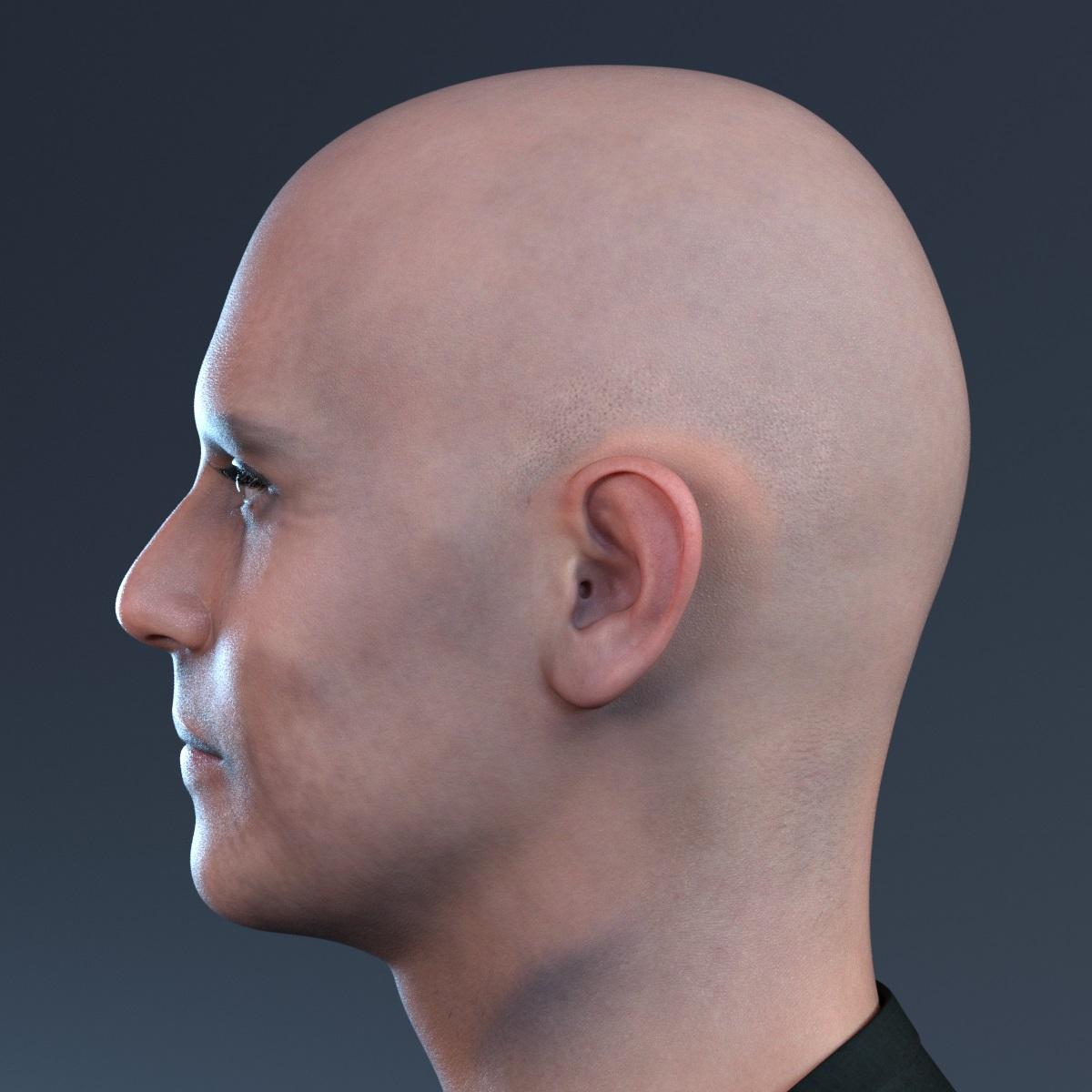
after applying the corrections morphs looks much better
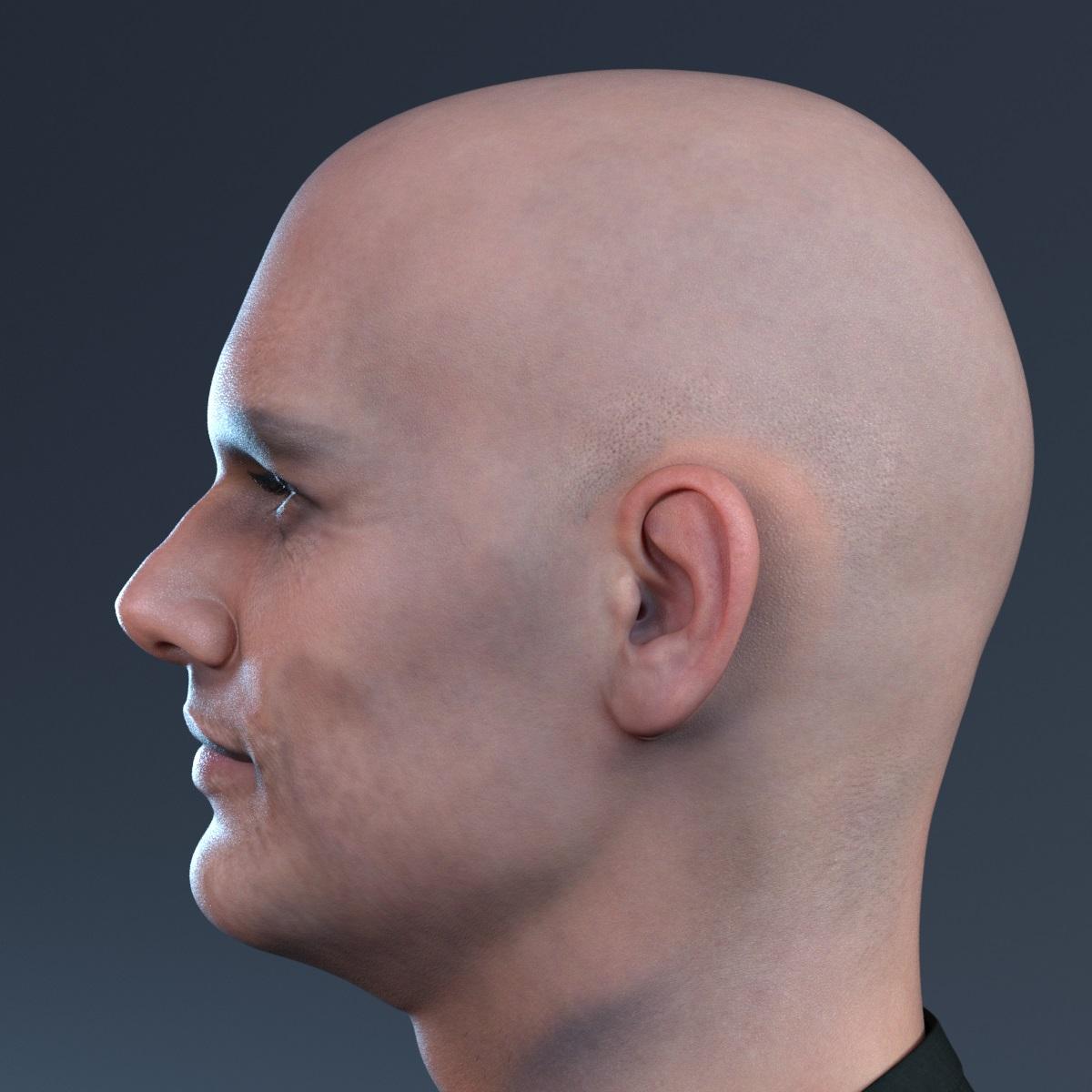
care to share what morph did you use and what product(morph product) to get a more realistic lips and chin as you said?
Can't Find Morph SliderI have a G9 figure that I can't find a morph slider for. I dug through the installation files as well and I can't seem to find a morph anywhere. It loads in as a full body (head and body), but when I go to currently used, there's no shaping sliders there. I'm totally at a loss as I was hoping to locate the body morph to separate it from the head. Any thoughts?
*edit* I was able to find it under hidden, but it seems to be locked and I can't slide it from 100%.
Face Transfer 2I really like when details on the face created with Face Transfer 2 just pop up.
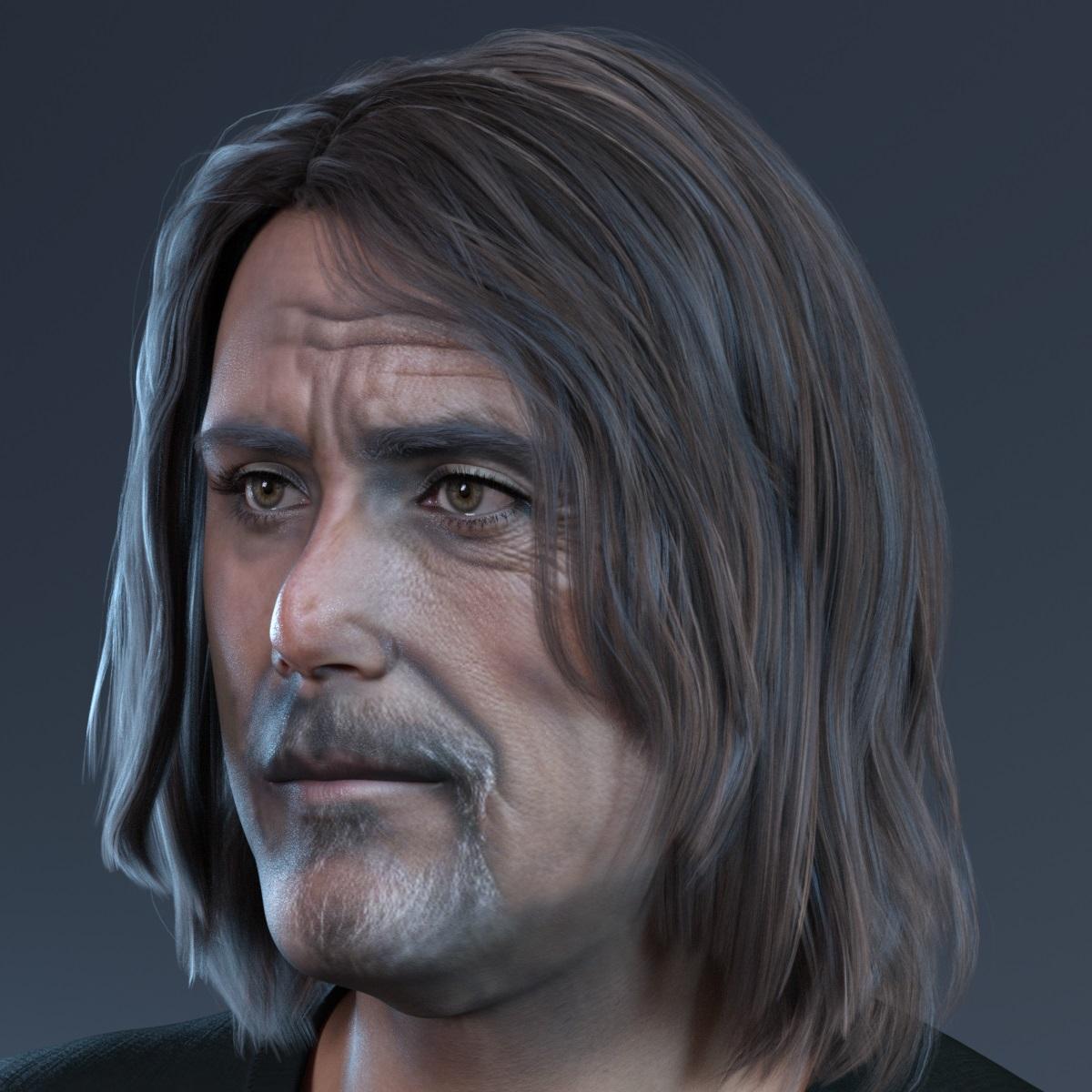 Transfer Utility
lilweep said:
It's a shame that Daz can't automatically make perfectly rigged clothing for users automatically. I guess if it could, then everyone would be a vendor on the daz marketplaces.
if you want more confidence in the content creation pipeline, there are tutorials about the sequence of steps you need to take to make clothing work. The good all-in-one tutorials you may have to pay for, though.
Another thing/hack to consider with Transfer Utility, is that usually people will use the base Genesis figure as the source (occasionally opting in to use a Projection Template for the Genesis Figure), but another thing you can do, which i guess youre technically not 'allowed' to do if you want to distirbute your clothing, is you could transfer weights from an existing face mask. I.e., if you own an existing face mask that is similar to the one you are masking, you could use that as the Source in Transfer Utility instead of using Genesis figure as the source.
That last paragraph is indeed not allowed under most license agreements, except for strictly personal use.
THE RIG DOES NOT DEFORM THE SAME WAY FOR SOME REASON!crosswind said:
As I said above, DO NOT use 4.22.01 General Release. There's a bug with FBX export in 4.22.01. Use 4.21.0.5 or the latest public build 4.22.0.9.
Like the the attached screenshot, I use 4.22.0.9 and C4D 2024, there's no issue by now. You have to manually dial the properties of pJCMs in C4D. C4D is not like Blender which use shape keys to automatically drive the corrective morphs. You have to manually dial them after posing.
Ok, it did work now. However, i do character animation, and to animate using only FK(Forward Kinematics) is a nightmare i wish to not live and endure. If i followed the method you suggested(to use DAZC4D BRIDGE to only export morphs, and then export as .FBX) i don't get IK(Inverse Kinematics) i only get FK. But if i used the DAZC4D BRIDGE i get IK, but the thigh morph and jaw, for some reason, are broken, like why the hell is the jaw broken WHATTATATATTAT THIS IS STUPID MAN. sorry, anyway, can you please help again.
Im verry sorry on behalf of these developers.
(and yeah, i switched to Daz 4.21.0.5 pro)Transfer UtilityPerilous7 said:
Not very happy about having to mess about correcting a mesh that daz has screwed up but have little choice - i have used the method crosswind supplied to correct the mask and can verify it works
Thankyou very much for that, at least i can progress with my project now - i was hoping that resetting the vertex weights would alter things but no amount of resetting weights, smoothing etc has made any sort of difference. which doesnt fill me with much hope if i ever do anything more complex in the future.
I well understand what you mean since I had the similar feeling when I started to learn and do these things... then it turned me into an "evil tinker", haha ~

Let me tell you why we have to fix these things all the time... because all these wearables we make or we use always have different mesh (polycounts, topo, wireframe) from Genesis figure. Then if we dial a head / body morph, we see the distortion / crease / intersection, etc. on the conformed wearables...
I show you a simple case below - I cut G9's head to make a "mask", rig it on G9 Base with Transfer Utility... Dial Death G9's head morph ! Then you can see no distortion at all, very smooth... just because of the above reason.
So pls just relax... When "fixing things" turns into a routine, you may get used to it... like me...
 How to get Genesis 8 expressions working on Genesis 8.1
Loony said:
Richard Haseltine said:
Yes, Genesis 8 expressions work on Genessi 8 figures - it's only 8.1 that uses a different system, and blocks the Daz Genesis 8 Expressions.
Okay thanks, then will I try to figure out how exactly I have to use the tutorial from the start page :D with all the edits and updates it's a bit confusing for my simple mind :)
The instructions on the first post are still wrong.
Making the G8 base expressions (and any expressions that are using them) work on G8.1 requires removing dummy/placeholder expressions that are installed to G8.1 morph folders - These dummy/placeholder expression files have no other function than to prevent the base G8 expressions from loading.
The dummy/placeholder files are located in;
...\Data\DAZ 3D\Genesis 8\Female 8_1\Morphs\Daz 3D\Base Pose Head\ (255 files, can be more if you have additional DAZ expression packs)
...\Data\DAZ 3D\Genesis 8\Female 8_1\Morphs\Daz 3D\Expressions\ (24 files, can be more if you have additional DAZ expression packs)
...\Data\DAZ 3D\Genesis 8\Male 8_1\Morphs\Daz 3D\Base Pose Head\ (255 files, can be more if you have additional DAZ expression packs)
...\Data\DAZ 3D\Genesis 8\Male 8_1\Morphs\Daz 3D\Expressions\ (24 files, can be more if you have additional DAZ expression packs)Please make sure you are removing the files from G8.1 morph folders and not G8 morph folders.
Note 1; If you are logging in to DS and letting DAZ Connect (within DS) to install/update your content, you may have these also in an other location that has "\Data\Cloud\" in it's path
Note 2; Do not remove any files from "FACS" or "FACSExpressions" foldersZack 9paulawp (marahzen) said:
Richard Haseltine said:
I see this too, which is off as AutoFollow is cetainly enabled for the body morph itself and that seems to be the shape (the sub-components are all joint centres or CBMs for adjusting bends). Please report this to Tech Support.
Done.
Thank you.
Zack 9Richard Haseltine said:
I see this too, which is off as AutoFollow is cetainly enabled for the body morph itself and that seems to be the shape (the sub-components are all joint centres or CBMs for adjusting bends). Please report this to Tech Support.
Done.
Daz 3D is part of

Connect
DAZ Productions, Inc.
7533 S Center View Ct #4664
West Jordan, UT 84084Licensing Agreement | Terms of Service | Privacy Policy | EULA
© 2026 Daz Productions Inc. All Rights Reserved.








