-
G8F - Looking for tiny female body hair. Arms, Face etc.
Benita includes vellus hair. See my reference image for here here
It should also work on other characters
Celebrity Look-a-Likes for 3D figures Part 2Aside from MRL Faryn, MRL Tiffany & CS12, other characters likened to Jennifer Lawrence include:
- LYFW Adrienne: https://www.daz3d.com/gallery/images/68400
- VH Foxy: http://www.beammeup.net/blog/3d-celebrities/poser-celebrities-6.php
- Jenn for V4.2 (no longer available): http://pixelsizzle.com/product/jennifer-lawrence-jenn-for-v4-2/
- Biljana HD for Genesis 8 Female: https://www.deviantart.com/isourcetexturespa/art/Biljana-HD-For-Genesis-8-Female-777741245
Personally I could add Tarian HD for Genesis 3 and 8 Female to the list. Any others I've missed, comment is free.
The main morph in this variety pack has a striking resemblence to Jennifer Lawrence.
https://www.daz3d.com/variety-hd-character-morphs-for-genesis-8-female
Carrara Challenge #50: A Special Carrara Anniversary Celebration - Results AnnouncedEntry: #25
Title: Fast Forward 50 (years)
Artist: Dartanbeck
Category: 50
WIP Links: Workflow of the whole thing - feel free to ask questions
Products Used: Urban Sprawl, Genesis, Genesis 2 Female, Victoria 4, EYEdeas 3+ for V4/M4, J-Suit for V4, Artemis X for Genesis, Litsure Hair (Cap and headband) for V4, Carrara Dynamic Hair, Coflek Gnorg's Steampunk Towers and Techno Town Construction Kit, Winnston1984's Elevated Subway, Cybertenko's Hunter Killer Drone, TheAntFarm's M11 Flea, Carrara 8.5 Pro, PD Howler 11
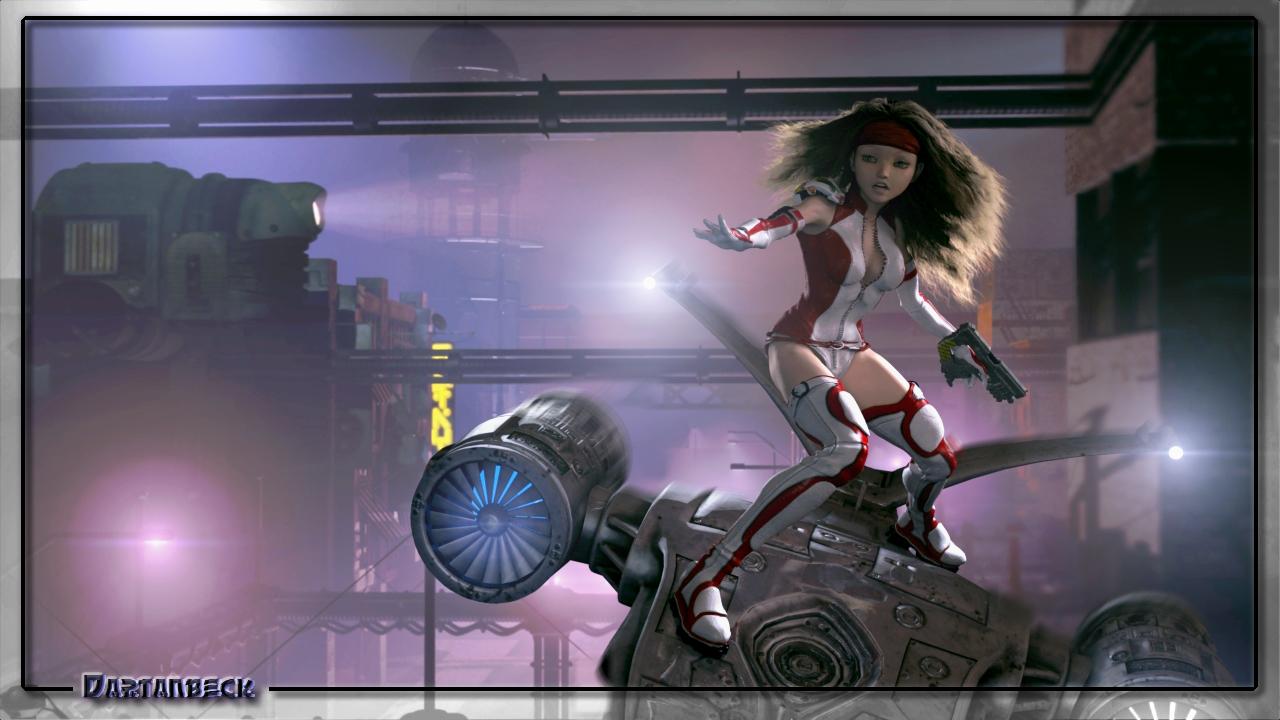
Carrara's physics is something I've kept myself from dabbling with for many years - now I can't seem to get enough of it! It was really fun working with forces to direct the Carrara Hair in this scene. I'm also still experimenting with Carrara's atmospherics combined with clouds and volumetric lighting, which becomes even more fun and challenging in motion. I must say that this image wouldn't have ended up the way it has without all of the individual elements in motion. I captured this nearly a second into the dynamic motion of it all - which was short, being a still conquest.
Celebrity Look-a-Likes for 3D figures Part 2Aside from MRL Faryn, MRL Tiffany & CS12, other characters likened to Jennifer Lawrence include:
- LYFW Adrienne: https://www.daz3d.com/gallery/images/68400
- VH Foxy: http://www.beammeup.net/blog/3d-celebrities/poser-celebrities-6.php
- Jenn for V4.2 (no longer available): http://pixelsizzle.com/product/jennifer-lawrence-jenn-for-v4-2/
- Biljana HD for Genesis 8 Female: https://www.deviantart.com/isourcetexturespa/art/Biljana-HD-For-Genesis-8-Female-777741245
Personally I could add Tarian HD for Genesis 3 and 8 Female to the list. Any others I've missed, comment is free.
Genesis 9 delayed until at least 2020. Will you be buying it?The first Victoria was the Millennium Woman.
Will Victoria 9 be the '20s Woman ?
Personas comprando irreconocibles - Unrecognizable people buyingI get what you are saying... It looks like the product was "pre-morphed", which, it could have been, but should not have been. However, your lips and eyes (how large they are) Seems to imply that you have some comic-character morph loading along with your base-model. As well as the heavily "triangulated" facial form. (Like an Anime-model morph.) Did you, or do you have a toon or anime morph which you recently loaded into your library?
Also check the "Hidden" correctives, in the models parameters. Something may be applied, with a base-value that should not be. (You will have to "Show hidden", to see some of them. Using the MENU-icon with three bars on the top of the window you have open for the parameters tab.)
Are you loading the model from the "Files" tab, or from the "Products" tab (Smart content), or from the "Content Library" view? The "Files" and "Content Library", may only be a partial loading, where as the "Products", may have a loading option that loads ALL settings needed to get that same exact "Look", as the whole product. Sometimes the "File", is just some of the base-forms or skins, not the whole setup, which may have a few other items needed to be loaded, to create the whole character. (Such as specific IRAY loading of textures, or skin-tones, Gloss, Diffuse, as there may be multiple variations for that single model.)
Also, it may have been "made" with a specific lighting that might honestly have to be recreated, exactly, to match the "product image". Especially if the lighting and shadows have been baked-on to the skin and bumps and normals.
Just adding... Simply using the raw morph-slider, may not work. It may depend on another base-morph to be loaded as well, like "Victoria 8", may have to be 50% or 100%, if it was a morph made off a morph, which was made as a morph for "Victoria 8", for instance. EG, It will not look the same with "Olympia 8" or the "Base Gen-8", alone...If it was, they may not have correctly zeroed-out the model. (Which the creator simply needs to be made aware of the issue. It happens... Usually fixed with a simple update which will show in your list, when you use the download manager or load it using the cloud.)
Free Hair and Hair related Items ListMore AprilYsh
Masque Prop & Hair
Aiko 3, P6 Jessi, Stephanie Petite 3, and Victoria 3
http://shop.aprilsvanity.com/classics/masque-prop-hair.htmlSharmane Hair
Aiko 3, Laura, P6 Jessi, Stephanie Petite 3, and Victoria 3
http://shop.aprilsvanity.com/classics/sharmane-hair.htmlDo you promote your work... and how?Mostly what I do is spam Twitter. It's free, and if you pick a few hashtags that either a lot of people follow religiously or ones that get picked up by bots with wide reaches, you're promotion gets in front of a lot of eyeballs. I had someone reach out to me after finding me through a hashtag they regularly follow, so it definitely works.
Another thing I've discovered, and I have no real idea what impact it actually has, is that many of the comic catgories on Amazon are sparsely populated. If you get people to buy your books or read them through KindleUnlimited - even just a couple people a month - you can stay on certain charts indefinitely. A couple of the lists don't even take that many sales or reads to hit #1 for an hour or two or three. Any book landing on any chart gets visibility - think of it like free advertising. But be careful taht your books are at least remotely relevant to the categories because Amazon does watch the comic categories and did try to pull some of my titles from a category even though they clearly belonged. Problem you as an indie has is that Amazon owns Comixolgy, and they tried flooding the comic categories with titles carried through Comixology - even if they have less than zero relevance to the category. If your comics stick in a best sellers list, they will target you. It's not just my experience, but I've seen a lot of my competition delisted from the comic categories if they weren't Comixology titles. Still, if your titles are relevant and you're willing to fight with Amazon, you can place on the best sellers lists in certain categories.
Last year, I set up a Patreon page, and eventually a DeviantArt page. I've been struggling with how to use DeviantArt as a tool. In the last 3 months of 2019, I decided to pull most of my titles from Amazon's KU program and try to sell them on DA, Initially I was disappointed to the point I was ready to give up and relist them in KU, but there have been a couple sales this month, so I'm hopeful, and I'm going to see if I can grow the market there. The thing that makes DA interesting as a platform is in how people can either favorite your work or add it to their own "collections." Because if you happen on someone who likes work similar to yours, your work will be displayed in their list of favorites, or in whatever folder they added you to. For example, if your specialty is rendering Victoria 4 in various skimpy outfits, and someone likes one of you pictures, they might add it to a collection called "Victoria 4 in skimpy outfits." If for whatever reason, another scantily-clad V4 fan comes across their page and looks into their folder, they'll see your picture along with other V4 artists. The more the pictures are liked, the more exposure they get. And no one will be able to get for free any content that you set to be sold, so it's not like people are wildly taking your work for free when you want to charge for it.
Ash ketchum creation
grrr.... even with the head fixer I can not fix this :(
Another good product is Deformers +: Hat Head.
Compatible Figures:
Victoria 4, Michael 4, The Kids 4
Not really the figures I would use ever...
It works just as well with Genesis. I know because that's the only figure I really use, for the most part. I don't use Gen 4 figures. Any Gen 4 characters I have, I use for skins or convert their morphs over to Genesis with Gen X. Hat Head does work on Genesis.
Ash ketchum creationgrrr.... even with the head fixer I can not fix this :(
Another good product is Deformers +: Hat Head.
Compatible Figures:
Victoria 4, Michael 4, The Kids 4
Not really the figures I would use ever...
Other place than DAZ and Rendo ?How about something like https://www.daz3d.com/dforce-mother-goose-outfit-for-genesis-8-females?
Or this https://www.daz3d.com/victoria-iven-for-genesis-3-females
Genesis 3 Female example and improvement discussionThis is Victoria 7 and Victoria 7 HD for Genesis 3
See the full resolutions on DA: http://fav.me/ddononq and http://fav.me/ddonopk
@Polish Metro Police carThere is a police car at Renderosity that is a Crown Victoria. It costs $30. It's mostly being dropped now though for Dodge Challengers (or is it the Dodge Chargers they are using now?).
Where I live down south it's mostly Chargers and Focuses (Foci?) with a few Camaros. I hear that police aren't doing as many high speed chases anymore (too much damage / liability) so musclecars are becoming less common. Mustang is another good choice.
[Released] Character Converter from Genesis 3 Female to Genesis 8 Female(Now Conv JCMs) [Commercial]Message to RiverSoftArt
For some reason I am unable to access my messages, I'm also unable to create a new message?!? Will file a support issie with Daz when this comment is sent.
The answer to the question "Did you convert things twice without deleting morphs? " is that I deleted all morphs in the data folder manually before I comverted the character agan.
The /data/ morph directory chreated when converting Victoria 7 was "DAZ 3D,Heysun Oh,Yannek", converting Victoria 7 HD created the /data/ folder "DAZ 3D,Heysun Oh".
Looking into the original Victoria 7 files, the "pJCMVictoria7ShoulderBndFwd_110_L.dsf" file formulas look like this;
"formulas" : [
{
"output" : "Genesis3Female:#pJCMVictoria7ShoulderBndFwdR?value",
"operations" : [
{ "op" : "push", "url" : "lShldr:/data/DAZ%203D/Genesis%203/Female/Genesis3Female.dsf#lShldr?rotation/y" },
{ "op" : "push", "val" : [ -110, 1, 0, 0, 0 ] },
{ "op" : "push", "val" : [ -85.5, 0, 0, 0, 0 ] },
{ "op" : "push", "val" : 2 },
{ "op" : "spline_tcb" }
]
},
{
"output" : "Genesis3Female:#pJCMVictoria7ShoulderBndFwdR?value",
"stage" : "mult",
"operations" : [
{ "op" : "push", "url" : "Genesis3Female:/data/DAZ%203D/Genesis%203/Female/Morphs/DAZ%203D/Victoria%207/FBMVictoria7.dsf#FBMVictoria7_v1?value" }
]
}
],And the formulas in "pJCMVictoria7ShoulderBndFwd85_L.dsf" look like this:
"formulas" : [
{
"output" : "Genesis3Female:#pJCMVictoria7ShoulderBndFwd85L?value",
"operations" : [
{ "op" : "push", "url" : "lShldr:/data/DAZ%203D/Genesis%203/Female/Genesis3Female.dsf#lShldr?rotation/y" },
{ "op" : "push", "val" : -0.01176471 },
{ "op" : "mult" }
]
},
{
"output" : "Genesis3Female:#pJCMVictoria7ShoulderBndFwd85L?value",
"stage" : "mult",
"operations" : [
{ "op" : "push", "url" : "Genesis3Female:/data/DAZ%203D/Genesis%203/Female/Morphs/DAZ%203D/Victoria%207/FBMVictoria7.dsf#FBMVictoria7_v1?value" }
]
}
],As stated earlier I don't know enought about dsa files to know whar the formula does but it is the only difference in the original files so that may indicate the reason for the:
WARNING: ..\..\..\..\..\src\sdksource\fileinput\dzassetdaz.cpp(5978): Unsupported formula: /data/DAZ%203D/Genesis%208/Female/Morphs/DAZ%203D%2CHeysun%20Oh%2CYannek/Victoria%207/pJCM_RS_Victoria7ShoulderBndFwd_110_R.dsf"Cheerio for now.
I apologize! Somehow I missed your post.
You can try a solution from the forums (https://www.daz3d.com/forums/discussion/22220/duplicate-formulas-error-solved-thank-you-bejaymac):
- load Genesis 8 into an empty scene, you'll get the error message, just click it to carry on.
- Find the offending morph(s) in the Parameters tab, in this case it Actor/Universal/Fantasy SciFi and it's the HFS_Shapes_Head01 morph.
- Dial the morph to make sure it works and then zero it again.
- At one end of the dial you'll see a little "cog", click on it and in the little menu that opens click on Parameter settings.
- In the new window that has just opened you will see a Color A & a Color B, click on Color B to open the color picker.
- Set the color to 254, 254, 254 and click OK.
- Click "Accept" at the bottom of the Parameter Settings window.
- After that window closes go "File > Save As > Support Asset > Save Modified Assets".
DS will do a quick scan of the figure and open a small window that should only have the one file listed, accept it and DS will replace the old file with a new updated one.
Legacy UVs for Genesis 8: Victoria 4 - Prepare doesn't work right?Workflow:
Open Daz 4.12 on Mac (Mojave)
Load G8F Developer load
Verify that I have selected G8F
Run the Legacy UVs Prepare script from the tool bar.
I get an incomplete character (see attached)
When I apply a texture the missing items don't get skinned.
Any thoughts on what I've done/not done?
Victoria 8 EyeBrowsV8 loads with diffuse overlay eyebrows but also has mesh eyebrows.
The latter can be found at people/Genesis 8 Female/Anatomy/Victoria 8 Eyebrows
Thanks guys, but when I try to apply these in the picture doesn't work.
Thanks.
Victoria 8 EyeBrowsV8 loads with diffuse overlay eyebrows but also has mesh eyebrows.
The latter can be found at people/Genesis 8 Female/Anatomy/Victoria 8 Eyebrows
Victoria 8 EyeBrowsVictoria 8 has mesh eyebrows (I thnk they are in the Anatomy category if you are using a non-file based content view), I thought there were materials options with and without painted brows.
Victoria 8 EyeBrowsIs Victoria 8 without eyebrows? How can I add it?
Thanks.
How to delete "helpers" on the V4 SkeletonAre you using the skeletons alone, or with Victoria 4, or have yu used AutoFit in Daz Studo to make them fit another figure?
Hi Richard, Indeed I am attempting to fit the V4 skeleton to a Genesis 8 Female (Victoria 8 to be precise) By using some of the few instructions I was able to find searching various forums on the subject. The method that I am following is to first fit teh skeleton to the regular Genesis 1 figure and then fit to Genesis 8 (in may case Victoris 8 which I am hoping woudl have the same results as Genesis 8 but am not sure) the results are so so but these does seem to be substantial distortion when reshaping the character's shape. I am quite good with Zbrush so I will be attempting to bring the skeleton into Zbrush to edit and fix distortion but my first attempt to do so was not successful. so I shall keep hammering away to get it right. (Wish there was an updated anatomical character or set of character's ala Zygote's offerings. This would substantially increase Daz's value as a valuable tool for medical simulation and studies.
Are you using the skeletons alone, or with Victoria 4, or have yu used AutoFit in Daz Studo to make them fit another figure?
Hi Richard, Indeed I am attempting to fit the V4 skeleton to a Genesis 8 Female (Victoria 8 to be precise) By using some of the few instructions I was able to find searching various forums on the subject. The method that I am following is to first fit teh skeleton to the regular Genesis 1 figure and then fit to Genesis 8 (in may case Victoris 8 which I am hoping woudl have the same results as Genesis 8 but am not sure) the results are so so but these does seem to be substantial distortion when reshaping the character's shape. I am quite good with Zbrush so I will be attempting to bring the skeleton into Zbrush to edit and fix distortion but my first attempt to do so was not successful. so I shall keep hammering away to get it right. (Wish there was an updated anatomical character or set of character's ala Zygote's offerings. This would substantially increase Daz's value as a valuable tool for medical simulation and studies.
When you AutoFit the original bones are ignored, DS just projects the bones from the base figure into the model - as a result the helpers can no longer be switched off, and the bones cannot be posed individually. If your ZBrush skills are up to the job I'd just take the exported skeleton (hide the helprs and export as OBJ - then they will be gone), adjust it in ZBrush to fit inside the Genesis 8 figure, export the result as OBJ from ZBrush, import that into DS (making sure that you use the same preset in the options dialogue, so everything is scaled correctly) and then use Edit>Figure>Transfer Utility to rig the model (set the Source to Genesis 8 female, the target to your imported OBJ). It won't be perfect, and you may want to use the rigging tools in DS to enhance it, but it should be better than the AutoFit.
Thank you once again Richard (your suggestions are the most helpful) I will give your latest suggestion a try. I'm wondering if the Midnight Skeleton for G8M might be an easier route for fitting within G8F (or Victoria 8) via autofit perhaps or one of the utilities for swapping around character UV, attripbutes, Shapes and poses? I shall experiment a bit but you seem to know right away what would work.
Thanks in advance :)
Cheers
(and happy New Year BTW)Daz 3D is part of

Connect
DAZ Productions, Inc.
7533 S Center View Ct #4664
West Jordan, UT 84084Licensing Agreement | Terms of Service | Privacy Policy | EULA
© 2026 Daz Productions Inc. All Rights Reserved.