-
Face Transfer 2
Artini said:
Relatively quick test to confirm that new Studio Beta 4.22.1.58

still works with Face Transfer 2 on my computer.

DId you get that new Typi3d toy? You have just have too much fun ...
Face Transfer 2Relatively quick test to confirm that new Studio Beta 4.22.1.58
still works with Face Transfer 2 on my computer.
blender 4.0.2. to Daz obj?barbult said:
Why do you export UV and normals to create a morph?
Because 1st, that's default options which has no impact to creating morph. 2nd, sometimes I do need them for other tasks, so I saved them as my Daz Preset. Then I don't have to check / uncheck them from time to time.
If one doesn't need them, just uncheck them from the preset.
blender 4.0.2. to Daz obj?Why do you export UV and normals to create a morph?
Erc freeze not freezing, no matter what the weather says outsidespearcarrier said:
I've never gotten a duplicate formula error ever, and didn't know you couuld get one until I was today years old.
As far as baking, I'd evern went as far as manually deleting all of the joint settings using the paremeter pane. Repeatedly I've tried various things to the point of insanity.
Links, which is what ERC Freeze creates, are managed through the Property Hierarchy pane.
I eventually got it to take by creating a new morph,naming it the skeleton, and baking the old morph to make it empty with the skeleton underneath. That was working great.
Until I loaded again a few minutes ago and the joints were whacked again.
With yet another new morph I think I have it working now. Maybe. It seems to be only this one morph being a problem. I'm nonplussed on what I did to create the issue. Sure would like to know so I can avoid in the future.
tutorial for fitting body armourWell, a Wearables preset would handle loading it all in one go. For the rest, if theya re rigid parts just parenting them to the relevant body parts would be fine - but then there would be no morph following, for good or ill.
Freebie Challenge December 2023 - January 2024 - "Driving home for ..." - Entries ThreadThe way home
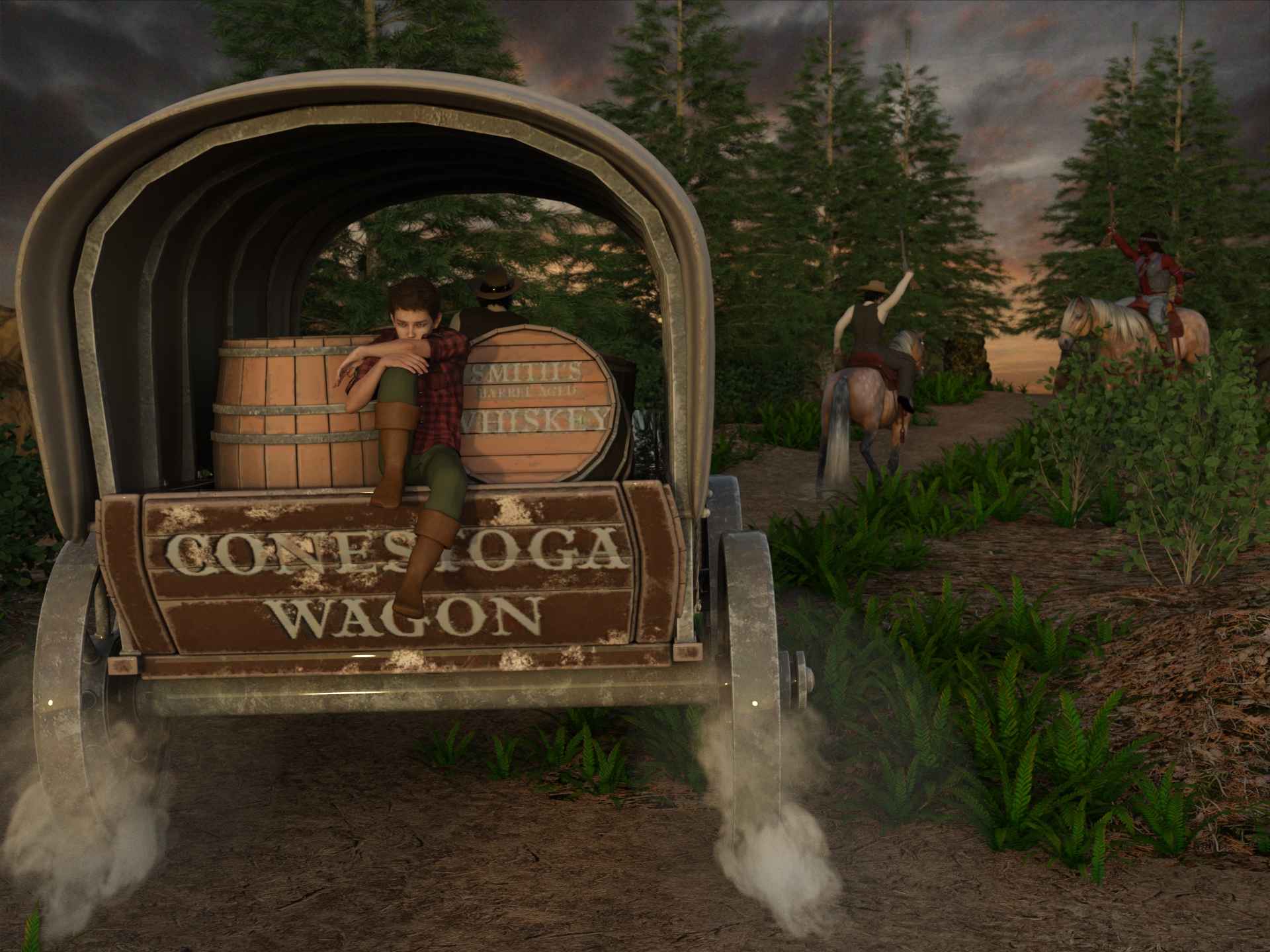
Freebies
"Conestoga Wagon" (https://skfb.ly/oBrPt) by Ursei is licensed under Creative Commons Attribution (http://creativecommons.org/licenses/by/4.0/).
https://sketchfab.com/3d-models/conestoga-wagon-2bfd8f4232054fd982b29e4df0f367d1Dropbox - FreebieMilHorseHalter.zip
https://community.hivewire3d.com/threads/free-milhorse-halter.1801/Horseseat V2 Modello 3D
https://free3d.com/3d-model/horseseat-v2--510500.htmlBush Walking Track
https://www.renderhub.com/shredder/bush-walking-track-for-dazNight Wolf for G8M
https://www.deviantart.com/shinteo/art/Night-Wolf-for-G8M-847515481
https://www.patreon.com/posts/night-wolf-for-38912644"STRONG" for G8M Character Morph & Pose by Mar3D
https://www.renderosity.com/freestuff/items/82833/strong-for-g8m-character-morph-amp-poseV Devil May Cry 5 Hair Prop for G8M
https://sharecg.com/v/93558/browse/21/DAZ-Studio/UPDATE-V-Devil-May-Cry-5-Hair-Prop-for-G8MG8M Walther 2.0
https://sharecg.com/v/97276/browse/21/DAZ-Studio/G8M-Walther-2.0Walther 2.0 simple hair for G8M
https://sharecg.com/v/97283/browse/21/DAZ-Studio/Walther-2.0-simple-hair-for-G8MEight Hats for Genesis 8 Male by Soulcatcher
https://www.renderosity.com/freestuff/items/94093/eight-hats-for-genesis-8-male1940's inspired suit for G8M - high res version by perlk
https://www.renderosity.com/freestuff/items/95281/1940s-inspired-suit-for-g8m-high-res-versionG8M Adventurer - dforce clothes by perlk
https://www.renderosity.com/freestuff/items/93843/updated-g8m-adventurer-dforce-clothesDforce Walther 2.0 shirt & shorts for G8M
https://sharecg.com/v/97280/browse/21/DAZ-Studio/Dforce-Walther-2.0-shirt-shorts-for-G8MFour Men on a Couch: G8M Poses by ruslan809
https://www.renderosity.com/freestuff/items/80168/four-men-on-a-couch-g8m-posesHorse Back Pose (sample) For G8F
https://www.renderhub.com/lstowe/horse-back-pose-sample-for-g8fNo count
Rifle: No longer available (temporary free Renderosity Christmas 2020 included in "NA Warrior Props")Paid items
DAZ Horse 2
https://www.daz3d.com/daz-horse-2Missing CTRLCheck if the paths of you Daz Libraries have been correctly configure in F2 - Content - Content Directory Manager. And make sure the Head Morph really exists (has been installed) in your Daz Libarary...
Help with SleevesI would recommend a good method without auto-fit for such a particular case of G9 - G2F clothing conversion. G2F has TriAx weight and this dress has long sleeves, so auto-fitting, rigging and weight projection are special. Tweaking them turns out to be pretty cumbersome.
Let's utilize G2F Clone on G9 to play the tricks, however, all default Clones on G9 have no ERC Freeze. Without ERC Freeze, we're not able to go for this way. Steps are shown as below:
1) Select G9, Show Hidden Properties, go to path: Hidden - Clones, dial Genesis 2 Female. Edit - Figure - Rigging - Adjust Rigging to Shape.Then ERC Freeze. (ss1)
2) File - Save As - Support Asset - Morph Asset(s). (ss2)
3) Load the Dress to G9, dial Left Upper Arm - Bend: 45, Left Forearm - Bend: -10; Right Upper Arm - Bend: -45, Right Forearm - Bend: 10, to make a T-Pose. (ss3)
4) Select the Dress, set Resolution Level to Base, export to OBJ file. (ss4)
5) Load a G2F, import OBJ file, rig it to G2F with Transfer Utility. Then addd a Smoothing Modifier to it: Edit - Figure - Geometry - Add Smoothing Modifier, and Convert to SubD: Edit - Figure - Geometry - Convert to SubD. (ss5)
6) Transfer Morph Targets from G9's Dress to G2F's. (ss6)
7a) Enable dForce: select the Dress on G2F, Edit - Figure - Geometry - Add dForce Modifier: Dynamic Surface. Select the Dress on G9, Surface pane, slect all surfaces, Copy Select Surface(s), then paste them to the Dress on G2F. (ss7)
7b) Transfer dForce Weight: DS menu : Create - New dForce Modifier Weight Node to both Dresses. Alt + Shift + W, select Weight Node on G9's Dress, in Tool Settings pane, Copy Selected. Select Weight Node on G2F's Dress, Add Map and Paste Selected. (ss8 - 9).Now everything on G9's Dress has been transferred to G2F's Dress. Test everything as needed, then save it as a Wearable Presets... or Figure Asset with your Vendor Name. (PS: The dForce properties on dynamic surfaces were not really well set on the original dress, better tweak it.)
Be noted that step 1) - 2) can permanently enable perfect conversion for any G9 - G2 case in the future. You can transfer everything from a G9's Wearable to the re-rigged one on G2F.
Erc freeze not freezing, no matter what the weather says outsideI'm somehow particularly curious..
- have you by chance changed the morph's name in Parameter settings during the operation of rigging, baking, freezing and saving asset?
- have you by chance saved the morph assets to other Daz Library path?
- have you tried romoving or deleting the "not working" morphs from all relevant paths before creating the new one... then clear DSON cache file and reload G9 for a test?And what's your DS version by the way?
blender 4.0.2. to Daz obj?I tried to make a simple morph for the basic tank top in the G8 package, and it works fine here. For a morph you only need to export faces, the other data is not necessary and may be what it is giving troubles. I'm attaching the daz and blender options I used.
In some rare cases the daz geometry is not good for blender and it needs to be validated, this means blender may change the vertex order on import to fit the internal data structures. This may depend on the application the PA uses to model the asset.
Diffeomorphic DAZ Importer version 1.6.0 released@rugeyohe Usually actor morphs are baked in the dbz so they don't need to be transferred. If you load them later as custom morphs then you can use "transfer shapekeys" in the morphs panel, but you may also need morphing armatures. Of course a baked dbz is much more efficient and blender friendly than a morphing figure, if you don't necessarily need a morphing animation.
https://bitbucket.org/Diffeomorphic/import_daz/wiki/Setup/Morphs
https://diffeomorphic.blogspot.com/2023/12/new-way-to-do-morphing-armatures.html
Erc freeze not freezing, no matter what the weather says outsideI've never gotten a duplicate formula error ever, and didn't know you couuld get one until I was today years old.
As far as baking, I'd evern went as far as manually deleting all of the joint settings using the paremeter pane. Repeatedly I've tried various things to the point of insanity.
I eventually got it to take by creating a new morph,naming it the skeleton, and baking the old morph to make it empty with the skeleton underneath. That was working great.
Until I loaded again a few minutes ago and the joints were whacked again.
With yet another new morph I think I have it working now. Maybe. It seems to be only this one morph being a problem. I'm nonplussed on what I did to create the issue. Sure would like to know so I can avoid in the future.
Export to FBX not working on Studio 4.22, how do i fix this?GBDubstep said:
Has this issue been fixed? I can't use Unreal or IClone at the moment. :/
Fixed in DS 4.22.0.4:
-
Changes merged from 4.22.1.22
-
Source maintenance
-
Improved quality of eye materials in Face Transfer 2 on macOS
-
Fixed an issue with the FBX Exporter with setting up visible polygons where a Geo-Graft is involved
-
Fixed an issue with the FBX Exporter with setting up subdivision edge weights where a Geo-Graft is involved
-
Fixed a crash in FBX Import of skinning when more than a skinning modifier exists
-
Fixed a crash in Geometry Editor when invoking the context menu while selecting between a skeleton with bones and a skeleton without bones
-
Fixed an issue with the FBX Exporter where separate geometry for each actively grafted follower was being included in addition to the merged geometry
-
DAZ Studio : Incremented build number to 4.22.0.4
Erc freeze not freezing, no matter what the weather says outsideI have no idea why this is happening but I'm going bonkers. I'm in an area where I have only ahotspot for internet and precious few data bytes, but I wasted some to try tio find an answer and only found this thread: https://www.daz3d.com/forums/discussion/459291/adjust-rigging-erc-freeze-and-save-morph-not-working-solved ; Not helpful at all. Alas.
So I'm creating a character system on DAZ. I've been making characters a while now (who knew I'd get this far) so am pretty sure I'm doing things correctly. This is my second full item on Genesis 9 - not counting personal ones - and so far everything has been behaving. Until this character.
I have a full body morph. No matter how many times I:
- Adjust rigging, then
- Erc that rigging, then
- save as morph asset
The rigging will NOT save. It'll save a little off or not at all. NO matter what I do. I even tried creating a submorph that would be it's skeleton, and no dice.
I can't find a solution, especially on my limited data, and would greatly appreciate some help. I'm hoping it's not another library problem. i did recently import some things in and other problems cropped up (not many and all but one have been removed), but I'm not in a place where I can start a whole new fresh library again at the moment.
How to bring v4 character inj into Daz StudioIn Windows, there's a file named DzCreateExPFiles-V4.bat located in [content library name]\Runtime\Libraries\!DAZ, double-click to run it and it will create the appropriate morph channels.
Can someone figure this out for me?Look what I did, took me 5 hours, lots of trail and error, and a bunch of swearing and dancing with TRANSFER UTILITY, but it now fits and works with a GENESIS 8 FEMALE (only thing I did not fit was the gloves, they were really tricky sand I had others I could use so). Thanks to everyone for you help, and big thanks to GORDIG for the idea to manually fit and then dance with transfer utility :) me very happy now :)
AIUTO...CHI CONOSCE L’ITALIANO? PARTE QUATTORDICICrios said:
Imago said:
Crios said:
Io al massimo la 3
Sbagliate entrambi: Usate Genesis 1.
Ci sono più poligoni, più morph, più abiti e più accessori. E meno pezzi sparsi in giro.
Sì.

Ma io uso molto anche quello.
Io sono passato direttamente dalle generazioni 3 e 4 (pre-Genesis) a Genesis 8. Ho un po' di roba anche per G3 ma ricordo che quando uscì la prima generazione di Genesis avevo tanta di quella roba per V4 che la continuai a usare, poi mi schiattò il PC e per quando lo rimisi a posto eravamo già arrivati a G8
Freebie Challenge December 2023 - January 2024 - "Driving home for ..." - Main Threademanuela1 said:
The way home
Freebies
"Conestoga Wagon" (https://skfb.ly/oBrPt) by Ursei is licensed under Creative Commons Attribution (http://creativecommons.org/licenses/by/4.0/).
https://sketchfab.com/3d-models/conestoga-wagon-2bfd8f4232054fd982b29e4df0f367d1Dropbox - FreebieMilHorseHalter.zip
https://community.hivewire3d.com/threads/free-milhorse-halter.1801/Horseseat V2 Modello 3D
https://free3d.com/3d-model/horseseat-v2--510500.htmlBush Walking Track
https://www.renderhub.com/shredder/bush-walking-track-for-dazNight Wolf for G8M
https://www.deviantart.com/shinteo/art/Night-Wolf-for-G8M-847515481
https://www.patreon.com/posts/night-wolf-for-38912644"STRONG" for G8M Character Morph & Pose by Mar3D
https://www.renderosity.com/freestuff/items/82833/strong-for-g8m-character-morph-amp-poseV Devil May Cry 5 Hair Prop for G8M
https://sharecg.com/v/93558/browse/21/DAZ-Studio/UPDATE-V-Devil-May-Cry-5-Hair-Prop-for-G8MG8M Walther 2.0
https://sharecg.com/v/97276/browse/21/DAZ-Studio/G8M-Walther-2.0Walther 2.0 simple hair for G8M
https://sharecg.com/v/97283/browse/21/DAZ-Studio/Walther-2.0-simple-hair-for-G8MEight Hats for Genesis 8 Male by Soulcatcher
https://www.renderosity.com/freestuff/items/94093/eight-hats-for-genesis-8-male1940's inspired suit for G8M - high res version by perlk
https://www.renderosity.com/freestuff/items/95281/1940s-inspired-suit-for-g8m-high-res-versionG8M Adventurer - dforce clothes by perlk
https://www.renderosity.com/freestuff/items/93843/updated-g8m-adventurer-dforce-clothesDforce Walther 2.0 shirt & shorts for G8M
https://sharecg.com/v/97280/browse/21/DAZ-Studio/Dforce-Walther-2.0-shirt-shorts-for-G8MFour Men on a Couch: G8M Poses by ruslan809
https://www.renderosity.com/freestuff/items/80168/four-men-on-a-couch-g8m-posesHorse Back Pose (sample) For G8F
https://www.renderhub.com/lstowe/horse-back-pose-sample-for-g8fNo count
Rifle: No longer available (temporary free Renderosity Christmas 2020 included in "NA Warrior Props")Paid items
DAZ Horse 2
https://www.daz3d.com/daz-horse-2all Freebies approved, please move to entries
Diffeomorphic DAZ Importer version 1.6.0 released@Padone Thanks. I was gone ask something else. I saw you can transfer dynamic body morphs(for example heavy thin muscular etc) to cloths when you use slider in blender. How can I transfer them to clothes? I couldn't see where it shows it...
Daz 3D is part of

Connect
DAZ Productions, Inc.
7533 S Center View Ct #4664
West Jordan, UT 84084Licensing Agreement | Terms of Service | Privacy Policy | EULA
© 2026 Daz Productions Inc. All Rights Reserved.