-
Getting on the 9 train, or not
nonesuch00 said:
Serene Night said:
Genesis 9 male is a disappointment for me. The figure shape is pretty undefined, and traces of female presenting breasts, as well as oddly long necks, and the absence of details in most purchased figures in the chest region makes it tough to get a comparative figure to G8M.
I do think the heads are really good, but really hard to get really cut, and detailed male figures that I prefer and the normals and HD seem very undetailed in most characters I buy for the guys. I'm used to better HD on Genesis 8.
Have you bought & tried the Victor for Victoria 9 and the Michelle for Michael 9? Maybe those help?
I bought the Victor to Victoria morph and it was....not a great. I like the idea of Victor, but to use the morph you must dial in Victoria 9 fully, then the Victor morph. I found that these two morphs don't play well with other male morphs, making Victor essentially useless if you want to mix him with other males. The Victor body was largely rather basic to begin with anyway.
Also the lack of hd comparative to genesis 8 is a real visual stumbling block to me. There is just a rather strongg lack of detail to the male genesis 9 line's bodies that seeems wasted opportunity even with characters like Mike 9, Lawrence erc.
The older generation: Victoria 2/3, Michael 2/3 and their children rendersSomeone is in a bit of a grump. If you're lucky, you might only be maimed..
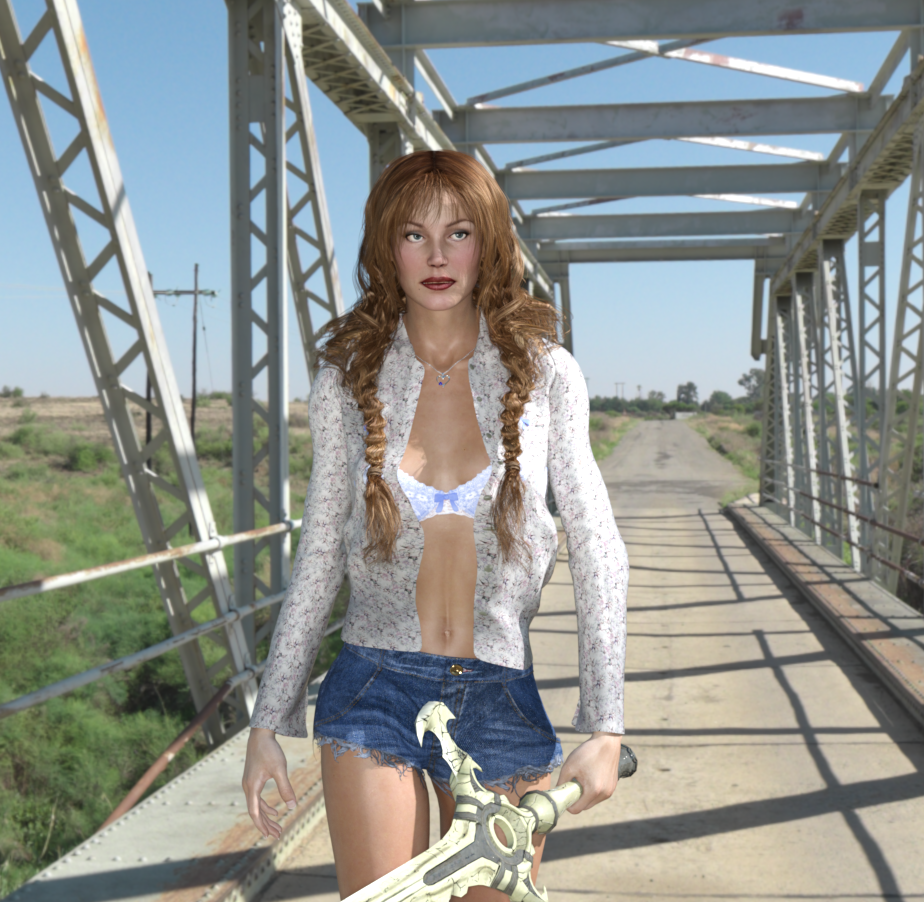
TriAx GV3 with G3F hair & top. G8F shorts, bra and necklace. Wearing GV3 boots (not that they can be seen) and carrying the 'Sword of the Creator' in her left hand. HDRI from Polyhaven. Pose by me (Walking 25M), converted to GV3 from G8F by my G8FtoGV3 Transfer script.
Felt the need to play with an image after a lot of time clearing my dad's house.
Regards,
Richard
The Mac FAQI'm looking at buying a Mac Studio, which has Thunderbolt 4. My Mac Pro has Thunderbolt 2. I can get a cable to connect the two so I can run Migration Assistant.
Externally, I have 5 drives, two of which are Time Machine, two are home movies and pics, and one is a SuperDuper backup of the internal HD. (The home movies and pics are the same on each drive. I just wanted to be sure to preserve them.) The drives are LaCie drives.
There is one Thundrbolt 2 cable going from the Mac Pro to one of the external drives. All of the external drives are linked to each other with Thunderbolt 2 cables. They all show up on the desktop.
Now, should I be able to plug the Thunderbolt 4 to Thunderbolt 2 cable from the Mac Studio into one of the external drives, and have all of the external drives show up on the Mac Studio's desktop?
I did call Apple Support about this, but the tech person was hesitant to give me a "Yes" answer as the LaCie drives are from a third party vendor. Does anyone know for sure? Has anyone tried this already?
If this is not possible, who might I contact to transfer the contents of one of the home movies and pics drives from a Thunderbolt 2 drive to a Thundrbolt 4 drive?
I'm hesitant to purchase until I know more.
macos how install Face Transfer 2There isn't an installer, since it comes with a three-save trial in DS (and it usesthe same pane as Face Transfer - which you use depends on the target figure). Just enter the serial number into the space in Help>About Installed Plugins.
macos how install Face Transfer 2Mechasar's Characters Catalog: Who's next? (commercial)Mechasar said:
hookflash said:
Has anyone else noticed some strange deformation in Norbert's uppert arm / shoulder area with "Arms Up-Down" is dialed in to 100%? It's not a deal breaker or anything, and it could just be my lack of anatomy knowledge. I'm just trying to figure out whether I might have some JCM conflicts happening under the hood. Here's a couple pics:
...
Hi! Yea, when you bend up Norbert’s arm, his armpit morph kicks in. If on one hand a morph can add realistic appearance to a character, on the other it is not possible to prevent distortions when you push to the limit its limbs rotations, especially when arms or legs are completely bended and twisted at the same time. Norbert was designed as a non-athletic character, so his corrective morphs was designed for undemanding movements :) My first advice is not to bend to the limit shoulders and arms at the same time whatever the character. Anyway, you can still correct that result as you wish by following these simple steps
- Right click on Parameters pane and flag the “Preference/Show Hidden Properties”
- Then go to “Parameters/Hidden/People/Norbert/JCMs” folder
- Just play with the “JCM_Norbert_Collar_Up” and “JCM_Norbert_Shoulder_Up” morphs until you get the result you needCool, good to know I'm not having any JCM conflicts (this is an issue I've had a couple times in the past with other vendors). Great characters, by the way!
Mechasar's Characters Catalog: Who's next? (commercial)hookflash said:
Has anyone else noticed some strange deformation in Norbert's uppert arm / shoulder area with "Arms Up-Down" is dialed in to 100%? It's not a deal breaker or anything, and it could just be my lack of anatomy knowledge. I'm just trying to figure out whether I might have some JCM conflicts happening under the hood. Here's a couple pics:


Hi! Yea, when you bend up Norbert’s arm, his armpit morph kicks in. If on one hand a morph can add realistic appearance to a character, on the other it is not possible to prevent distortions when you push to the limit its limbs rotations, especially when arms or legs are completely bended and twisted at the same time. Norbert was designed as a non-athletic character, so his corrective morphs was designed for undemanding movements :) My first advice is not to bend to the limit shoulders and arms at the same time whatever the character. Anyway, you can still correct that result as you wish by following these simple steps
- Right click on Parameters pane and flag the “Preference/Show Hidden Properties”
- Then go to “Parameters/Hidden/People/Norbert/JCMs” folder
- Just play with the “JCM_Norbert_Collar_Up” and “JCM_Norbert_Shoulder_Up” morphs until you get the result you needDiffeomorphic: do i need to have HD meshes active in daz studio when importing them?I want to import both a base resolution and a high resolution character to do the whole baking of detail process in blender (i want to add vascularity HD veins without needing to add like a subdivision modifier at like 6 that would kill my computer)
My question is if i need to have the resolution level active at "high resolution" file in the morph section in the parameter tab when exporting for the process to work or if i can have the resolution level at "base" and the HD exporting process would work the same, I have been searching for a while for the answer and i cant seem to find any reference if you need to have something active in the daz side for the process to work
Daz Studio 5 development updateSaxa -- SD said:
WendyLuvsCatz said:
Carrara also has a lot in common with Hexagon
Nice to hear Hex & Carrara have alot in common.
Hex is just an awesome program for quick morph-making.
So have hopes for Carrara for some things.Hopefully DS5 will include an option to select what to send to Hex (or Zbrush).
Right now if send base g8f, it auto-sends all children.
Would be so nice for DS5 to have option to toggle this and not that.
Right now, Little bit more work for spontaneous morphs.See you wrote in another thread (2021) that Carrara needs blended weights?
Saw in Carrara 8.5 pro features that General Weights are seamless fit?
Just trying to figure out what can do and not.
Tried an ultra simple 3ds import from Carrara (not .obj) and looked good.btw. the displacement painting, 3d paiting and bullet physics looked intriguing too.
Carrara actually uses quaternions just not ones compatible with the DAZ studio flavour
there are typos in the hidden naming of bones in Genesis 3 and 8/8.5 that crash Carrara that were fixed in Genesis 9 (or rather not misnamed in the matching hidden node) https://www.renderosity.com/forums/comments/4312857/permalink
Mistylara fixed them in DSON editor but (notepad should work too) on the base character files but sadly she pulled her genesis 3 characters from the Renderosity marketplace
and has been MIA for a couple years (am very concerned)
she has a freebie for Genesis 8.1 up still
https://www.renderosity.com/freestuff/items/88523/carrara-presets-for-genesis-81?AID=4737
Daz Studio 5 development updateWendyLuvsCatz said:
Carrara also has a lot in common with Hexagon
Nice to hear Hex & Carrara have alot in common.
Hex is just an awesome program for quick morph-making.
So have hopes for Carrara for some things.Hopefully DS5 will include an option to select what to send to Hex (or Zbrush).
Right now if send base g8f, it auto-sends all children.
Would be so nice for DS5 to have option to toggle this and not that.
Right now, Little bit more work for spontaneous morphs.See you wrote in another thread (2021) that Carrara needs blended weights?
Saw in Carrara 8.5 pro features that General Weights are seamless fit?
Just trying to figure out what can do and not.
Tried an ultra simple 3ds import from Carrara (not .obj) and looked good.btw. the displacement painting, 3d paiting and bullet physics looked intriguing too.
It's tough to justify making purchasesDisparateDreamer said:
Ron Knights said:
I hadn't bought much at DAZ for a few years. I got mildly excited by the arrival of Genesis 9. I rejoined the PC Club. I cancelled the subscription soon after.
One thing about DAZ's products turns me off. Too many products use "vanity names" for their content. If I buy a "pirate" shirt, I want to find it listed as a "pirate" shirt. I don't want to guess what PA made the product, and look under a PA's folder. And now it appears there is a shortage of male clothing.
Re: vanity and 'generic' names like "Pirate" shirt- the trouble is when files are all named the same for different products- for example if two PAs make a pirate shirt and both are are in the same runtime and Category and location, and if they just name it Pirate shirt, it'll conflict with the other. If two characters for the same figure have the same name, it might overwrite, or call on the wrong fix morphs/jcms and cause other issues. I've had to go back and rename a character because it was the exact same name, spelling, and morphs as another PA's and they'd have conflicted with each other, so things are required to have the vendor's initials in front and separate the folder locations to limit that kind of issue. I thought it was kind of hilarious at the time because I'd looked very carefully for a name that wasn't already used in Daz and another primary market, and yet STILL managed to submit at the same time as another PA who had a character of the same exact name. Glad I caught it in time though, because when that happens people always get upset and blame the PA "why is this morph messing up???? This PA does garbage work!" or Daz "why didn't Daz catch this?" and then we all hustle to fix stuff but the thread is still there complaining about a bad character morph when its really a conflict of two instead. So there's reason for the "vanity" and it's to help keep every data name unique and working without problems. :) That said, isn't smart content supposed to help you find things by category? I don't use it myself ... I'm too set in my ways and install everything manually. ;)
and there's a lot of clothes for G9 if you like lingerie times 1000 :PI joke but I do get the general frustration with not being able to buy a lot. All I can say is, there's a lot of sales at daz and a lot of very very high discounts. The odds are in your favor
Here's what I've been doing. Maybe it could help you. I hate thse vanity folders, too. But sometimes it is useful to know the PA that created a thing (like if you need to find the texture folder something has). So I remove all the nested folders down to just one and name it the name of the item with the PA's name AFTER it. So that pirate outfit is called "Pirate Whatever Jasmineskunk" or "Pirate Whatever JS" (pretending I'm the PA here) That lets me sort it and have the PA's moniker without that ID getting in the way of my search.
Getting on the 9 train, or not..." JasmineSkunk
...I noticed the "starter" freebies on the freebie page. and it's actually nice they did that. Sort of like an updated version of the "starter bundle" I mentioned. though without all the "Mil.Critters" Included. I do agree that when they released the G9 base they offered more options with an expanded Starter Essentials as well as offering the Essentials Expansion i nthe store. both of which ass far options than previous generations had.
However for what I do I would still need to purchase all the various merchant shaping, morph, and skin resource content as well as plugins and those characters with certain desirable features for my "gene pool " (as I call it) that I use for designing unique "one of a kind" characters, along with the plugins and other rsoruces I use that assist with ransferring older genration shapes and moorphs (which unfortunately are not available, and may ever be).
Modelling, UV mapping , rigging, and sculpting are definitely not my "strong suits". Hence I have to rely on existing resource content. and plugins (some of which allow me to cross-mix different generations). That is aht makes up the major part of the investment I have in this, and with which I developed my workflow over the years. I really don't feel like starting all over from square one any more as I've already done so with each new generation that came along. I also had to deal with recovering from a fatal drive crash that not only took years of wokr with it but also sapped my creative "muse" for a while.
This is why I made the decision to get off a while back . Not calling it quits by any means but need to stop and settle down for a bit. Besides that leaves an empty seat for for someone else.who wants to see where hte train goes next.
Gen 9 - Lines Under Eyes - Questioncrosswind said:
Fabler said:
crosswind said:
Some characters have deeper inner lower eye sockets that result in disctinct creases... I would not suggest you further buy a couple of shaping products let alone there might be no dedicated morph for this.
If you have Mesh Grabber or know Blender, it'll be pretty easy if you give it a couple of drags or smoothing that area in Blender and import the fix morph...
Thanks for the suggestions. I'll give Mesh Grabber a try. I've only used it to fix clothing. Do you have any tips on using it to make changes to the face?
Yep ~
- First, Alt + Shift + G (Geometry Editor), Ctrl +[, turn on Use Symmetry in Tools Settings, then drag select on one-side of the face... (ss1)
- Alt+Shift+E, in Tools Settings, set Gizmo Orientation : Normal, set a proper value in Falloff Radius, then carefully drag the Gizmo. Then click Save button to save a delta morph. (ss2).Suggest you have more experiments first, then you'll be good at this way. Good luck!
Super helpful, thanks a bunch! :-)
Hot New (Northern) Season, New Sales Thread: Report Issues Here "Reporting Only"The store search isn't so good, either. Type in Rita, you get one...a morph. Type in Rita Hollywood, you get two, the same as the first, plus some other thing that isn't Rita Hollywood anything!
How To Transfer A Morph From One Clothing Item To AnotherThanks for the help, crosswind! I found the Transfer Utility and I've been experimenting with it- it's pretty cool!
Getting on the 9 train, or notI wasn't around to falll in love or invest much in Genesis 8, so my experience of all the Generaions of Genesis from 2 onward were simultaneous. My favorites have been Genesis 9...and Genesis 2, actually. (Genesis 2 is more awesome than people talk about). And honestly, I feel like the morphs and shapes I have for Genesis 9 "do more" than what exists for most of the other figures. I have about 3 or 4 complete shape and morph collections for Genesis 8, male and female - and STILL struggle to get details or the "look" I want to see. And it takes what seems like forever.
What I like abut Genesis 9 is the way the face has more nuance and idk how to explain it... It seems less cartoony and "smooth". (Though that's the exact reason I love Genesis 2) Genesis 9 characters just look more like real people to me. I have seen some Genesis 9 art that I have had to *really really* scrutinize to tell it from a photo of a real person. That's impressive to me. And while I do have a few issues with 9 "out fo the box" (like short shins) all of them are easily addressed once I got a few character morphs and shapes and begin creating my own characters...which feels REALLY easy by comparison to Genesis 8 (even with all the morph packs).
I've heard people say stuff about the eyes, but from my playing around, I think it might just be a need for "better" ( I know that word is subjective) textures.
Here is an example of a character I've been developing with Genesis 9. It's a fantasy "non real" character, and even though it is incomplete and kinda "rough" there's STILL something about it that looks more "real" to me than the other figures I have in my collection to work with... even though it's not a "real life" character. Idk... (btw, she's made mostly from Thornworks "Nala" , for anyone curious)
No... Your experience of Genesis 9 without any characters or shapes, is going to seem as robust as however many years collection you have invested in your Generation 8 figure feels... But, I really think that it is WAY better than previous figures were without those things and actually with only a minimal few added, is actually much much better...
And you know, I get why people are attatched to their current favorite figures, but I will never understand why some feel the need to discourage others from liking sometihng else. Why throw "yuck" on someone else's "yum'? It's also interesting to me that the people most adamant about NOT liking it are the one's saying they're not interested to try it at all. (shrug) I'm liking it very much.
Shape Rigger Plus(Commercial)Hi Zev0
Trying to save an existing morph and I get 'unable to save morph' for any existing morph I try.
I can create new morphs fine
Pretty sure my path is ok.
How To Transfer A Morph From One Clothing Item To Anothergfdamron1 said:
It looks like I have the Pro version, and I registered it. So far I don't see any difference with what I had earlier, but I might not be looking in the right place.
Just check if you have Transfer Utility under menu : Edit - Figure - Tansfer Utility...
Gen 9 - Lines Under Eyes - QuestionFabler said:
crosswind said:
Some characters have deeper inner lower eye sockets that result in disctinct creases... I would not suggest you further buy a couple of shaping products let alone there might be no dedicated morph for this.
If you have Mesh Grabber or know Blender, it'll be pretty easy if you give it a couple of drags or smoothing that area in Blender and import the fix morph...
Thanks for the suggestions. I'll give Mesh Grabber a try. I've only used it to fix clothing. Do you have any tips on using it to make changes to the face?
Yep ~
- First, Alt + Shift + G (Geometry Editor), Ctrl +[, turn on Use Symmetry in Tools Settings, then drag select on one-side of the face... (ss1)
- Alt+Shift+E, in Tools Settings, set Gizmo Orientation : Normal, set a proper value in Falloff Radius, then carefully drag the Gizmo. Then click Save button to save a delta morph. (ss2).Suggest you have more experiments first, then you'll be good at this way. Good luck!
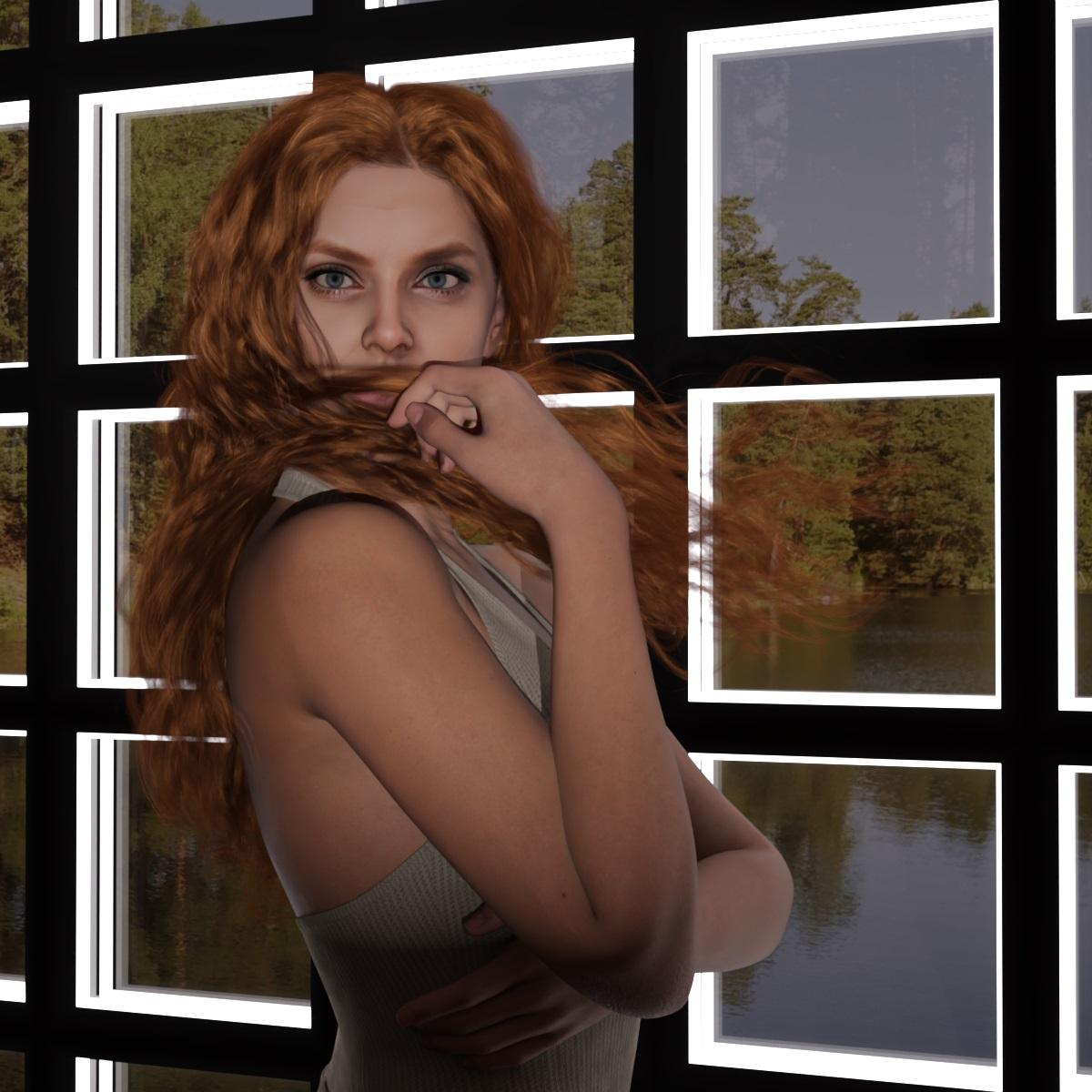
Face Transfer 2Yet another creation with Face Transfer 2. PhilW shapes to it provides nice touch to the face.
Daz 3D is part of

Connect
DAZ Productions, Inc.
7533 S Center View Ct #4664
West Jordan, UT 84084Licensing Agreement | Terms of Service | Privacy Policy | EULA
© 2026 Daz Productions Inc. All Rights Reserved.