-
Searching for a specific female Gen 8 hairstyle - help
https://www.daz3d.com/victoria-5-elite-ponytail
Edit - or the Genesis 2 version
Skip version of genesis 8I wonder whether they will move on from Genesis. There were 4 generations (e.g. Victoria 1-4) before Genesis and now there have been four Genesis versions (0,2,3 and 8) so perhaps it is time for another major change, especially considering they held G8 for an extra year.
Genesis 8 Female example and improvement discussionThank you all again for these new examples. Yes, I hope people will share any specific settings that they think work well for multiple textures or light setups, but it can really vary and I'm not sure if there are any real secrets to be learned. Maybe top coat settings for wet skin would be useful though.
The only particularly good teeth examples I've found so far are Victoria 8 (left) and Ellithia 8. Most others are alright, but these two are quite a bit more realistic in my opinion. 3000 iterations, same lighting as usual, no adjustments.
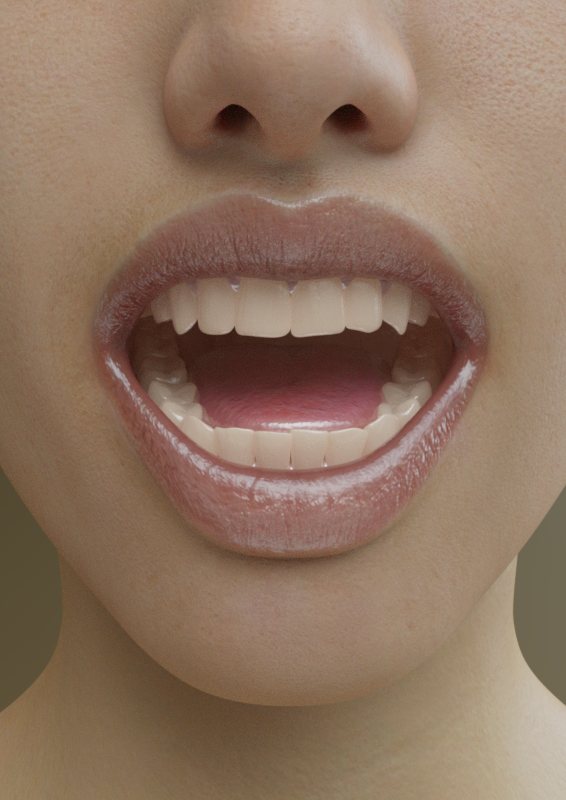
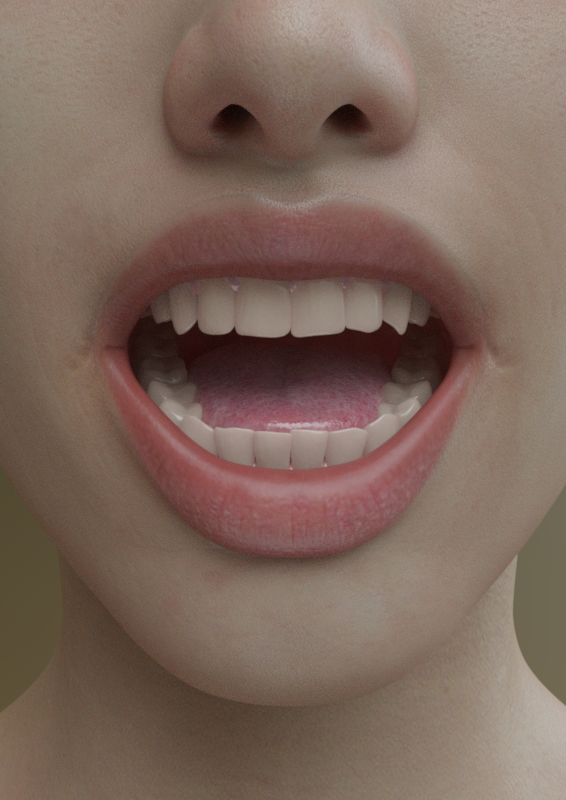
Yes, those teeth do look good.
We can certainly share suggestions for improving textures too, but like Markus said, this thread also works well as a repository for comparable examples of textures to help people make more informed purchases. You can clearly see that some textures have more detail than others in many of these examples, and there's a least a few that I have added to my wishlist because I was able to see how their level of detail compares to that of others.
Nicstt, I did start a G3F example thread but I can't find a link to it right now. I'll track it down in a bit.
For those who want to discuss improvements, how about your recommendations for best mouth and teeth texture elements? From my experience, official DAZ textures seem to have the best teeth when they use a slight bit of translucency, but many still need a little darkening or yellowing to look realistic. The mouth and gums have never really looked all that realistic to me, but you so rarely see them that it's never been a priority to improve them.
There are some characters for G8F that use def G3F as a base; I suspect because G3F default is also a merchant resource if you own the particular item that contains those textures. If that isn't the case, the textures share navel for example. :)
Whilst I use G3 and G8 textures all the time on G8, most of the time I don't notice as they are interchangable, I was merely pointing out that appearing more than once is possible.
I'm saying it not because I object to it happening, but as an indication that it's what is done with the textures, and how the shader brings out the particular details present - in addition to what the PA adds.
Install Types: Daz Connect or Install Manager Why one and Not the other?I am assuming you need. to install Victoria and Michael4 and morphs plus wth the DIM right. I am a new Daz user and my content was installed by. Daz connect since that is where all the files are, there are none in the DIM folder I triied to use the DIM at the begiining but it said download faiiled. I cant say for sure how things turned the way they did. I will say the organization of the smart content is impressive.I did notice the 4th generation was missing. Reading these posts I understand the difference between the two I have used Poser for 15 years and always install content manualy it takes a long time so this was quite a expierence
Genesis 8 Female example and improvement discussionThank you all again for these new examples. Yes, I hope people will share any specific settings that they think work well for multiple textures or light setups, but it can really vary and I'm not sure if there are any real secrets to be learned. Maybe top coat settings for wet skin would be useful though.
The only particularly good teeth examples I've found so far are Victoria 8 (left) and Ellithia 8. Most others are alright, but these two are quite a bit more realistic in my opinion. 3000 iterations, same lighting as usual, no adjustments.
How to load a character faster? [solved with a workaround]It could be a complete coincidence, but I didn't notice much of a slowdown until the new G3 to G8 character transfer scripts came out. Once I started using those, and transferred a few characters, my G8F's have been laggy. Loading a blank G8F in a blank scene isn't so bad, but once I apply a character to it and then start posing it gets slow. And if I ever need to zero the character pose or clear the scene I might as well go get a coffee. I can't imagine it's any fault of the character transfer tools themselves, it's just right around that same time everything started to get slow. Maybe it's because I now have all those extra transferred G3 to G8 morphs in the background.
One thing I don't understand is why does loading one character require the loading of -all- the morphs in the library? Say if one character uses 15 morphs and you have 200 installed, why is not just loading the 15 morphs it needs? I won't pretend to know the mechanics behind the scenes of how things work but it feels like that's how it should be and it would save with load times to boot. I'm entirely too lazy to start shuffling my morphs around and then moving them back if I need them. I have a hard enough time remembering things I've bougt in the past as it is. I'd likely just move them and forget them completely.
I noticed this too with Zev0's xtransfer. I deleted the xtransfer folder with all the transferred morphs and the lag has gone. I made a backup of the xtransfer folder and will move the xtransfer folder back when I need those morphs.In my case it's definitely not a case of too many characters and morph packs. I own only a handful characters for either G8F and G8M and work with many custom morphs that I import separately for each figure.
In that case, maybe it really does have something to do with those G3 morphs being transferrred to G8. I'm not trying to blame those specific mod authors because they are providing a service many people want, myself included, but there might be something Daz itself doesn't like about those morphs. I've only transferred a handful of characters (Victoria, Ophelia, and Olympia as well as a custom dial-spun character) and that was absolutely the jumping point for when Daz slowed to a crawl for me.
Wacky Modelling ~ In Carrara ~wow!
what a ride this is!
thanks for all your thoughts and concerns..
we are back home and thankfully have been spared ( someone is looking after us and our community )
fires are raging around us and we evacuated last Friday uncertain as to the outcome of this horrendous situation.
we are still enveloped with smoke and fires are still burning ... we had a bit of heavy rain today but not enough to douse anything.
unfortunately my cousin has lost her house and all belongings to this raging fire but all family is safe.. our newest grandson visited us just after xmas but then they evacuated to get back to Victoria ( 600 miles away ) just before it all went pear shaped.
to say this is very scary is an understatement and I'm sure all of you have caught glimpses of what is happening downunder... it is relentless.
but, we are safe for the moment but still in a very dangerouse predicament which is determined by the wind and what has already gone up in smoke.
I try to keep everyone up to date on Facebook as using the phone or iPad on this Daz3D site has been near impossible to log in, even today I couldn't do it.. finally back on the PC whilst internet is up and running.
this clip was the situation at my area last Saturday

keep safe everyone and if you can please donate to the bushfires in Australia appeal
 Wacky Modelling ~ In Carrara ~
wow!
what a ride this is!
thanks for all your thoughts and concerns..
we are back home and thankfully have been spared ( someone is looking after us and our community )
fires are raging around us and we evacuated last Friday uncertain as to the outcome of this horrendous situation.
we are still enveloped with smoke and fires are still burning ... we had a bit of heavy rain today but not enough to douse anything.
unfortunately my cousin has lost her house and all belongings to this raging fire but all family is safe.. our newest grandson visited us just after xmas but then they evacuated to get back to Victoria ( 600 miles away ) just before it all went pear shaped.
to say this is very scary is an understatement and I'm sure all of you have caught glimpses of what is happening downunder... it is relentless.
but, we are safe for the moment but still in a very dangerouse predicament which is determined by the wind and what has already gone up in smoke.
I try to keep everyone up to date on Facebook as using the phone or iPad on this Daz3D site has been near impossible to log in, even today I couldn't do it.. finally back on the PC whilst internet is up and running.
this clip was the situation at my area last Saturday
keep safe everyone and if you can please donate to the bushfires in Australia appeal
Celebrity Look-a-Likes for 3D figures Part 2Hi guys, I'm pretty new to Daz but Im slowly learnin' my way through it and having a lot of fun. I recently found this great Jenna Coleman lookalike and made some cool stuff with her, but I'm looking to recreate a particular outfit of hers from her time on Doctor Who.
Think anyone can help me out? And sorry if I posted this in the wrong forum...
This should get you close. It is for Genesis 2 Female but can be autofitted to G8F (you don't say who you are trying to dress but given the character you are referencing I'm guessing G8F). Then add a couple of dForce Scarves maybe.
https://www.daz3d.com/the-victorian-gown-for-genesis-2-female-s
https://www.daz3d.com/idg-dforce-dynamics-scarves-and-shawls
Or if you have a Victoria 4 clone maybe this one with one of the texture packs available
https://www.daz3d.com/victorian-innocence-base-outfit
Bootswise specifically for G8F the closest I can find are these. You would maybe want to hide the ribbons and straps in the surfaces tab and change everything to a plain leather shader.
https://www.daz3d.com/hair-salon-boots-for-genesis-8-female-s
or these
https://www.daz3d.com/pendi-boots-leggings-for-genesis-8-female-s
It's fair to say that I think you're going to have to do a fair bit of kitbashing.
Maybe setting up a specific request thread in The Commons might yield more results. Good luck.
Novica & Forum Members Tips & Product Reviews Pt 12Ok, I decided to give in (sigh :( ) and buy 2 bundles 7 Pro. Since I started with Gen8 already available, I have only Victoria 7 bundle. At first I didn't want to get them since they are "old" but with all the new converters from G3 to G8 I figure it would be worth it.
I am thinking I will get the Centaur 7 Female (more for the Girls and the Hairstyles than the Centaur part) but I am not sure about the second one.
I am in between Ophelia, Genevieve, Mei Lin and Olympia. Any advice and/or opinions?
Edit:
Also, for anyone interested, I think I was right about the Featured Artist price, I am now getting 59% off.
This means Item price * 0.8 (Original discount) * 0.8 (20% for 1 new item) * 0.64 (36% for 2 new items).
New User! Have located files and body but can't get them to transfer on...Hi all! Brand new out of the box user here! Okay, so I've navigated getting all downloaded and set-up. I started shopping and found an outfit I wanted to buy. It required that I also buy Victoria 4.2 base, which I have done. I've located the files within the program, have loaded the Victoria base, but no matter what I do, I can't seem to get the clothes to go onto the woman. (Sorry if I sound like I don't have a clue - I pretty much don't!) Here's a screenshot of what I'm seeing. Am I missing something really obvious?
V8 (and others) texture improvement discussionThank you Melissa for the detailed settings and explanation. :) So you combined the blood vessel maps (the AJ ones for V4-G2?) with the SSS map in Photoshop? There's an Asian artist on dA that also combined them with Skin Builder maps and other odd textures that no one else can track down to make a very realistic skin. I do know that adding Skin Builder's detail maps on top of an existing texture can make quite a difference.
They're actually the ones from here. (The person notes that they did not create them, and sadly I have no idea who did...but I don't sell any textures I use so I only use them in my own artwork.) To create my own SSS maps, I take the Color map and Vicky 7 for Vicky 8's SSS map along with the blood vessel map and set each to varying transparencies over the Color map in Photoshop. Transparencies vary by character, but I use this same technique for all characters I've worked on, even the boys. (Some blending is needed to make the maps fit with the male UV map, especially when you get to the torso and arms.)
I've played around with some of Skin Builder's stuff but haven't gotten too heavily into it. So far I've mainly just played with the freckles. I do blend a lot of Daz skins into other skins to build them out and add in more detail. G3 skins for the most part, in particular Vicky 7, Olympia 7, and Monique 7 are all wonderful resource bases. I have a couple custom characters who use complete and total "frankenskins" as I call them, lol.I've attached an example of a "frankenskin" that is a combination of Monique 7 and Monique 8 with custom blended SSS maps (she's using the Monique 7 UV map on a custom G8 figure). Unlike Victoria 8 above, she's using the old glossy reflectivity rather than dual-lobe. I tried both, but couldn't manage to get the details to pop as much with the latter...that and the skin had hotter highlights. I also opened up the original scene file to play with spectral rendering and I got it close, but I couldn't get it to look quite as good. Lastly, I tried out the same technique I used for Victoria 8 to create displacement maps (as above) and it didn't work out. Just goes to show how different skins need to be treated differently and sometimes even the same skin needs to be treated differently in different lighting/scene situations.
Are seperatly bought characters always fully customizable? (with shape shift etc. installed)Given I've installed things like "Shape Shift" and "Head and Face Morphs" for Gen8, will I be able to fully customize/morph Gen8 core figures like Victoria 8 or even more individual characters like Alabama HD? Or will at least these individual characters be locked (by the artist) for changing their body/face?
Speaking of Alabama HD for Sydney 8, is Sydney 8 really mandatory for the figure to load at all (even naked), or is it only because Alabama used some assets from Sydney 8 for clothing etc. ?
So if I am only interested in Alabama's body/face, would I still need Sydney 8 ?
https://www.daz3d.com/alabama-hd-for-sydney-8Thanx!
Genesis 8 Female example and improvement discussionThis is Shawna HD for Victoria 8
See the full resolution on DA: https://fav.me/ddnnl32V8 (and others) texture improvement discussionI figured I'd add my contribution for Victoria 8. It's the first time I've worked with her skin and I think it's a good first attempt. I've been playing around with skin for a while trying to get more photoreal results and what I've learned is that there really isn't one setting that works across the board for all skin types and lighting situations. I'll find some settings that work wonderful for one scene that oftentimes need to be tweaked after a lighting change. However, there are a couple consistencies I've noticed pretty much across the board. G8 skins contain virtually no subsurface data. Yes, there are SSS maps, but they are often enough just lightened copies of the color map. Sometimes there are added veins but there is so much more to looking -through- skin than veins. That...fleshiness...I guess that is the word...is missing. Here are the changes I've worked up for Victoria 8 -
Color Map - unmodified
SSS Map - blended in Photoshop with Victoria 7 for Victoria 8 SSS map as well as blood vessel maps found on DeviantArt (obviously this is for my own use)(Victoria 7 for Victoria 8 maps are just Vicky 7's translated to the base G8 UV map so they match up perfectly)(I didn't touch any SSS colors as that's largely personal preference and will vary depending on end-user needs)
Specular Map - unmodified
Bump Map - unmodified (overall bump turned down)
Normal Map - all but removed (dropped down to .25)
Displacement Map - this was created in Photoshop by blending the bump map with the normal map and creating a height map (this would largely take the place of the use of normal mapping and is much more realistic as it reacts to light rather than using fake baked shading)(note that displacement will add to render times)
Top Coat - used specular map here
HD Add-On - set to 200% (SubD 4)
Eyes - I swapped in one of Muosso's eyes (I believe it was from Sylvian) and then I just manually added back V8's iris textures (in shaping I also added Corneal Bulge to 100% and Natural Eyes HD Iris to 100%)In my example render, I used the same HDRI as the OP with the same dome settings. Tone Mapping was default. I don't use spectral rendering as I've never grown to appreciate the look (everything looks dulled down to me, but that's just my own artistic choice). Render time was approximately 25min on my 1080TI @ 2000px which felt long, but that displacement and HD Add-On are heavy...they really wouldn't be needed for something other than a closeup. The biggest takeaway is SSS. That's the key. And that's what 90% of the skins out there on the marketplace are missing. Individual desired results will of course vary depending on what look the end-user is going for.
*Note that I did not modify anything but her head, so for the neck area you can see the contrast to the out-of-the-box skin*
*Edit* I went ahead and tried a spectral render with some tweaked SSS values (.4 Transmitted Measurement Distance and .08 Scattering Measurement Distance) and changed the Base Color Effect to Scatter and Transmit Intensity. Really digging it.
Daz Studio crash when running script - fit controlI can verify this on multiple scripts, not just Fit Control, as well as it being a bug in 4.12 vs 4.11. Scene Optimizer will CTD as well.
No crash logs are generated.
The full log of when Fit Control was running:
2020-01-03 14:32:37.005 DEBUG: -----------------------------------
2020-01-03 14:32:37.005 DEBUG: Processing Morphs On Follower Items...
2020-01-03 14:32:37.394 DEBUG: Fit Control Morphs Processed On Super Natural Brows G8F
2020-01-03 14:32:37.443 DEBUG: Fit Control Morphs Processed On Short Crop hair cap
2020-01-03 14:32:37.562 DEBUG: Fit Control Morphs Processed On Lashes Utilities Genesis 8 Female Base
2020-01-03 14:32:37.639 DEBUG: Fit Control Morphs Processed On Cayley Necklace (Genesis 8 Female) (2)
2020-01-03 14:32:37.677 DEBUG: Fit Control Morphs Processed On Peach Fuzz Cheeks (2)
2020-01-03 14:32:37.696 DEBUG: Fit Control Morphs Processed On Peach Fuzz Nose (2)
2020-01-03 14:32:37.809 DEBUG: Fit Control Morphs Processed On New Genitalia For Victoria 8 (2)
2020-01-03 14:32:37.909 DEBUG: Fit Control Morphs Processed On Boho Ruffle Skirt
2020-01-03 14:32:38.003 DEBUG: Fit Control Morphs Processed On Boho Ruffle Top
2020-01-03 14:32:38.052 DEBUG: Fit Control Morphs Processed On Boho Ruffle Sandals
2020-01-03 14:32:57.935 DEBUG: Unchecked Items = 8
2020-01-03 14:32:57.935 DEBUG: Follower Items = 10
2020-01-03 14:32:57.940 DEBUG: Boho Ruffle Sandals selected
2020-01-03 14:32:57.940 DEBUG: Cleaning Up Unwanted Morphs
2020-01-03 14:32:57.963 DEBUG: -----------------------------------
2020-01-03 14:32:57.963 DEBUG: Running D:/Runtimes/DAZ Runtime/People/Genesis 8 Female/Clothing/Fit Control/Fit Control - 03 Delete Unused Morphs On Selected Item.dse
2020-01-03 14:32:57.963 DEBUG: -----------------------------------
2020-01-03 14:32:57.963 DEBUG: Selected Item = Boho Ruffle Sandals
2020-01-03 14:32:57.984 DEBUG: -----------------------------------
2020-01-03 14:32:57.984 DEBUG: Deleting Morphs On Boho Ruffle Sandals
2020-01-03 14:33:00.077 DEBUG: -----------------------------------
2020-01-03 14:33:00.399 DEBUG: Cayley Necklace (Genesis 8 Female) (2) selected
2020-01-03 14:33:00.399 DEBUG: Cleaning Up Unwanted Morphs
2020-01-03 14:33:00.403 DEBUG: -----------------------------------
2020-01-03 14:33:00.403 DEBUG: Running D:/Runtimes/DAZ Runtime/People/Genesis 8 Female/Clothing/Fit Control/Fit Control - 03 Delete Unused Morphs On Selected Item.dse
2020-01-03 14:33:00.403 DEBUG: -----------------------------------
2020-01-03 14:33:00.403 DEBUG: Selected Item = Cayley Necklace (Genesis 8 Female) (2)
2020-01-03 14:33:00.429 DEBUG: -----------------------------------
2020-01-03 14:33:00.429 DEBUG: Deleting Morphs On Cayley Necklace (Genesis 8 Female) (2)
2020-01-03 14:33:01.657 DEBUG: -----------------------------------
2020-01-03 14:33:01.672 DEBUG: Lashes Utilities Genesis 8 Female Base selected
2020-01-03 14:33:01.672 DEBUG: Cleaning Up Unwanted Morphs
2020-01-03 14:33:01.676 DEBUG: -----------------------------------
2020-01-03 14:33:01.676 DEBUG: Running D:/Runtimes/DAZ Runtime/People/Genesis 8 Female/Clothing/Fit Control/Fit Control - 03 Delete Unused Morphs On Selected Item.dse
2020-01-03 14:33:01.682 DEBUG: -----------------------------------
2020-01-03 14:33:01.682 DEBUG: Selected Item = Lashes Utilities Genesis 8 Female Base
2020-01-03 14:33:01.691 DEBUG: -----------------------------------
2020-01-03 14:33:01.692 DEBUG: Deleting Morphs On Lashes Utilities Genesis 8 Female Base
2020-01-03 14:33:03.173 DEBUG: -----------------------------------
2020-01-03 14:33:03.188 DEBUG: New Genitalia For Victoria 8 (2) selected
2020-01-03 14:33:03.188 DEBUG: Cleaning Up Unwanted Morphs
2020-01-03 14:33:03.191 DEBUG: -----------------------------------
2020-01-03 14:33:03.199 DEBUG: Running D:/Runtimes/DAZ Runtime/People/Genesis 8 Female/Clothing/Fit Control/Fit Control - 03 Delete Unused Morphs On Selected Item.dse
2020-01-03 14:33:03.199 DEBUG: -----------------------------------
2020-01-03 14:33:03.200 DEBUG: Selected Item = New Genitalia For Victoria 8 (2)
2020-01-03 14:33:03.255 DEBUG: -----------------------------------
2020-01-03 14:33:03.255 DEBUG: Deleting Morphs On New Genitalia For Victoria 8 (2)
2020-01-03 14:33:04.037 DEBUG: -----------------------------------
2020-01-03 14:33:04.057 DEBUG: Peach Fuzz Cheeks (2) selected
2020-01-03 14:33:04.057 DEBUG: Cleaning Up Unwanted Morphs
2020-01-03 14:33:04.061 DEBUG: -----------------------------------
2020-01-03 14:33:04.061 DEBUG: Running D:/Runtimes/DAZ Runtime/People/Genesis 8 Female/Clothing/Fit Control/Fit Control - 03 Delete Unused Morphs On Selected Item.dse
2020-01-03 14:33:04.061 DEBUG: -----------------------------------
2020-01-03 14:33:04.061 DEBUG: Selected Item = Peach Fuzz Cheeks (2)
2020-01-03 14:33:04.075 DEBUG: -----------------------------------
2020-01-03 14:33:04.080 DEBUG: Deleting Morphs On Peach Fuzz Cheeks (2)
2020-01-03 14:33:06.905 DEBUG: -----------------------------------
2020-01-03 14:33:06.919 DEBUG: Peach Fuzz Nose (2) selected
2020-01-03 14:33:06.919 DEBUG: Cleaning Up Unwanted Morphs
2020-01-03 14:33:06.923 DEBUG: -----------------------------------
2020-01-03 14:33:06.923 DEBUG: Running D:/Runtimes/DAZ Runtime/People/Genesis 8 Female/Clothing/Fit Control/Fit Control - 03 Delete Unused Morphs On Selected Item.dse
2020-01-03 14:33:06.923 DEBUG: -----------------------------------
2020-01-03 14:33:06.929 DEBUG: Selected Item = Peach Fuzz Nose (2)
2020-01-03 14:33:06.940 DEBUG: -----------------------------------
2020-01-03 14:33:06.940 DEBUG: Deleting Morphs On Peach Fuzz Nose (2)
2020-01-03 14:33:08.716 DEBUG: -----------------------------------
2020-01-03 14:33:08.731 DEBUG: Short Crop hair cap selected
2020-01-03 14:33:08.731 DEBUG: Cleaning Up Unwanted Morphs
2020-01-03 14:33:08.734 DEBUG: -----------------------------------
2020-01-03 14:33:08.734 DEBUG: Running D:/Runtimes/DAZ Runtime/People/Genesis 8 Female/Clothing/Fit Control/Fit Control - 03 Delete Unused Morphs On Selected Item.dse
2020-01-03 14:33:08.739 DEBUG: -----------------------------------
2020-01-03 14:33:08.739 DEBUG: Selected Item = Short Crop hair cap
2020-01-03 14:33:08.762 DEBUG: -----------------------------------
2020-01-03 14:33:08.762 DEBUG: Deleting Morphs On Short Crop hair cap
2020-01-03 14:33:10.958 DEBUG: -----------------------------------
2020-01-03 14:33:10.972 DEBUG: Super Natural Brows G8F selected
2020-01-03 14:33:10.972 DEBUG: Cleaning Up Unwanted Morphs
2020-01-03 14:33:10.976 DEBUG: -----------------------------------
2020-01-03 14:33:10.981 DEBUG: Running D:/Runtimes/DAZ Runtime/People/Genesis 8 Female/Clothing/Fit Control/Fit Control - 03 Delete Unused Morphs On Selected Item.dse
2020-01-03 14:33:10.981 DEBUG: -----------------------------------
2020-01-03 14:33:10.981 DEBUG: Selected Item = Super Natural Brows G8F
2020-01-03 14:33:10.996 DEBUG: -----------------------------------
2020-01-03 14:33:10.996 DEBUG: Deleting Morphs On Super Natural Brows G8F
2020-01-03 14:33:13.227 DEBUG: -----------------------------------
2020-01-03 14:33:22.385 DEBUG: Fit Control morphs have been transferred to the selected items.
2020-01-03 14:33:22.385 DEBUG: -----------------------------------
2020-01-03 14:33:22.386 DEBUG: Cleaning Up Unwanted Morphs
2020-01-03 14:33:22.390 DEBUG: -----------------------------------
2020-01-03 14:33:22.390 DEBUG: Running D:/Runtimes/DAZ Runtime/People/Genesis 8 Female/Clothing/Fit Control/Fit Control - 03 Delete Unused Morphs On Selected Item.dse
2020-01-03 14:33:22.390 DEBUG: -----------------------------------
2020-01-03 14:33:22.400 DEBUG: Selected Item = Genesis 8 Female Eyelashes
2020-01-03 14:33:22.508 DEBUG: -----------------------------------
2020-01-03 14:33:22.508 DEBUG: Deleting Morphs On Genesis 8 Female Eyelashes
2020-01-03 14:33:23.227 Loaded Morph Deltas in 0 min 0.0 sec.
2020-01-03 14:33:23.227 Loaded file: eJCMStephanie8BrowSqueezeR_HDLv1_proj.dsf
2020-01-03 14:33:23.261 Loaded Morph Deltas in 0 min 0.0 sec.
2020-01-03 14:33:23.261 Loaded file: eJCMStephanie8BrowSqueezeL_HDLv1_proj.dsf
2020-01-03 14:33:23.492 Loaded Morph Deltas in 0 min 0.0 sec.When the script ended and I clicked "close" DazStudio CTD's. I can repeat this on Scene Optimizer as well.
Genesis 8 Female example and improvement discussionThis is Sabrina HD for Victoria 8
See the full resolution on DA: http://fav.me/ddnl35t
Genesis 8 Female example and improvement discussionThis is Neiva HD for Victoria 8
See the full resolution on DA: http://fav.me/ddnl36r
[Released] Character Converter from Genesis 3 Female to Genesis 8 Female(Now Conv JCMs) [Commercial]Message to RiverSoftArt
For some reason I am unable to access my messages, I'm also unable to create a new message?!? Will file a support issie with Daz when this comment is sent.
The answer to the question "Did you convert things twice without deleting morphs? " is that I deleted all morphs in the data folder manually before I comverted the character agan.
The /data/ morph directory chreated when converting Victoria 7 was "DAZ 3D,Heysun Oh,Yannek", converting Victoria 7 HD created the /data/ folder "DAZ 3D,Heysun Oh".
Looking into the original Victoria 7 files, the "pJCMVictoria7ShoulderBndFwd_110_L.dsf" file formulas look like this;
"formulas" : [
{
"output" : "Genesis3Female:#pJCMVictoria7ShoulderBndFwdR?value",
"operations" : [
{ "op" : "push", "url" : "lShldr:/data/DAZ%203D/Genesis%203/Female/Genesis3Female.dsf#lShldr?rotation/y" },
{ "op" : "push", "val" : [ -110, 1, 0, 0, 0 ] },
{ "op" : "push", "val" : [ -85.5, 0, 0, 0, 0 ] },
{ "op" : "push", "val" : 2 },
{ "op" : "spline_tcb" }
]
},
{
"output" : "Genesis3Female:#pJCMVictoria7ShoulderBndFwdR?value",
"stage" : "mult",
"operations" : [
{ "op" : "push", "url" : "Genesis3Female:/data/DAZ%203D/Genesis%203/Female/Morphs/DAZ%203D/Victoria%207/FBMVictoria7.dsf#FBMVictoria7_v1?value" }
]
}
],And the formulas in "pJCMVictoria7ShoulderBndFwd85_L.dsf" look like this:
"formulas" : [
{
"output" : "Genesis3Female:#pJCMVictoria7ShoulderBndFwd85L?value",
"operations" : [
{ "op" : "push", "url" : "lShldr:/data/DAZ%203D/Genesis%203/Female/Genesis3Female.dsf#lShldr?rotation/y" },
{ "op" : "push", "val" : -0.01176471 },
{ "op" : "mult" }
]
},
{
"output" : "Genesis3Female:#pJCMVictoria7ShoulderBndFwd85L?value",
"stage" : "mult",
"operations" : [
{ "op" : "push", "url" : "Genesis3Female:/data/DAZ%203D/Genesis%203/Female/Morphs/DAZ%203D/Victoria%207/FBMVictoria7.dsf#FBMVictoria7_v1?value" }
]
}
],As stated earlier I don't know enought about dsa files to know whar the formula does but it is the only difference in the original files so that may indicate the reason for the:
WARNING: ..\..\..\..\..\src\sdksource\fileinput\dzassetdaz.cpp(5978): Unsupported formula: /data/DAZ%203D/Genesis%208/Female/Morphs/DAZ%203D%2CHeysun%20Oh%2CYannek/Victoria%207/pJCM_RS_Victoria7ShoulderBndFwd_110_R.dsf"Cheerio for now.
Congratulations DAZ3D!Think I discovered DAZ 18 years ago.
The first entry in my product library here is the Victoria 1 Reduced Resolution figure, that was a freebie for a few days, in May 2002.
Added a few entries, since.
Congratulations from me, too!!!!!!
Daz 3D is part of

Connect
DAZ Productions, Inc.
7533 S Center View Ct #4664
West Jordan, UT 84084Licensing Agreement | Terms of Service | Privacy Policy | EULA
© 2026 Daz Productions Inc. All Rights Reserved.