-
I have eliminated all PA folders!
Torquinox said:
takezo_3001 said:
Richard Haseltine said:
The name and location of the content directories are not functionally significant, it's the relative paths within that matter. Zips which include My Library/My Daz 3D Library as a root folder are very annoying.
Indeed, it is, as I have to open the folder within to be able to copy the "people/props/scripts/etc" over to my own content directory, so it's a bit of a pain…
I'm not going to sugar coat the hassle factor - It's a hassle! I use PeaZip to open all the zips from other sites into their own folders and then I combine and reconfigure the content as needed for installation and storage. Then I copy/paste into my content library. Then, I actually load the product to make sure it works and to see what it does. That last part... There are products in my library I have never loaded! Anyway, I've been doing that for so long that it doesn't bother me at all - It's just what I have do to install the product. As for Daz items installed with DIM, I use Everything (a search program @WendyLuvsCatz recommended) to find the items in my library and then I find them in DS, browse to folder and move/modify whatever needs moving to make me happy with the arrangement.
I generally unzip, discarding excess folders, into a testing content directory to make sure it is working and to set up metadata, then I move into the real content directory (or not, as the case may be)
There's no free lunch. Even if one is using Smart Content, the metadata may need modification to suit people, as well - People do rearrange their stuff! Items from other sites may not even have any metadata! Is it quicker and easier to go through Smart Content? I don't know. Maybe? I think it's all in what one gets used to doing. I'm used to rearranging files, so I do that. I might reach a point in the future where I need or want to get Smart Content to work for me, and then I'll see.
Don't forget options like links (.djl files), and of course the Smart Content pane is not the only metadata-using content view (Categories/Products in the Content Library pane, Presets tabs in most property panes) so it isn't an either/or.
I have eliminated all PA folders!takezo_3001 said:
Richard Haseltine said:
The name and location of the content directories are not functionally significant, it's the relative paths within that matter. Zips which include My Library/My Daz 3D Library as a root folder are very annoying.
Indeed, it is, as I have to open the folder within to be able to copy the "people/props/scripts/etc" over to my own content directory, so it's a bit of a pain…
I'm not going to sugar coat the hassle factor - It's a hassle! I use PeaZip to open all the zips from other sites into their own folders and then I combine and reconfigure the content as needed for installation and storage. Then I copy/paste into my content library. Then, I actually load the product to make sure it works and to see what it does. That last part... There are products in my library I have never loaded! Anyway, I've been doing that for so long that it doesn't bother me at all - It's just what I have do to install the product. As for Daz items installed with DIM, I use Everything (a search program @WendyLuvsCatz recommended) to find the items in my library and then I find them in DS, browse to folder and move/modify whatever needs moving to make me happy with the arrangement.
There's no free lunch. Even if one is using Smart Content, the metadata may need modification to suit people, as well - People do rearrange their stuff! Items from other sites may not even have any metadata! Is it quicker and easier to go through Smart Content? I don't know. Maybe? I think it's all in what one gets used to doing. I'm used to rearranging files, so I do that. I might reach a point in the future where I need or want to get Smart Content to work for me, and then I'll see.
Show Us Your Bryce Renders Part 14We have not forgotten you Yellow Pen. I am happy that your life challenges have been resolved and glad that you are able to visit the Bryce forum again. I stepped away too, but mermaid convinced me to come back.
The 'Eat Your Food and Like It' Complaint ThreadLeatherGryphon said:
This message replaces a double post of the previous message.

I tried a new cheese today. I found it while at the grocery two days ago, looking for some Gruyere or a decent Blue cheese wedge. Sadly, nothing but cheap blue crumbles(*yawn*) in a tub, or some "Cheddar/Gouda" mix(*blech*) wedges. HOWEVER, I did see something odd that I'd never seen before, called "Ube Gouda". It's purple/blue/green and has a mild taste & texture sort of like Gouda but with an interestingly likable vanilla sub-taste, if you can get over eating such oddly colored cheese.

https://www.yoderscountrymarket.com/shop/yancey_s_fancy_ube_gouda_cheese_7_6_oz/p/5607317
Some of the comments around the web are not flattering.
I just found it "interesting" and edible, not terrible. For me it's easy snacking by itself. Haven't yet tried it on crackers or saltines. It's definitely not as "interesting" as a good, soft, tangy, Danish Blue cheese, but it's OK.
Oh cool! Gouda has been my favorite ever since I was a little kid. My grandparents lived in Wisconsin, and right next to a cheese factory with its attached store, so whenever we'd go to watch the cheese being made (a highlight for my brother and me!) we'd always come home with all sorts of bits-and-bops. Grandma loved feeding us weird stuff because we'd always try it. Anyway, it meant while most of my friends thought pocket cheese was the height of awesome, I was in love with waxed wheels of gouda. I'll have to give this type a try! Thank you for the bucket list item!
Daz Studio 2026 Beta - version 6.25.2026.9715! (Updated April 09, 2026)Thanks for the reply, Richard: yep, the 4.24 previews were via the I9 Ultra CPU -- and were quicker to render than I would have guessed. It's a workaround, albeit a clumsy one. But still nothing so quick as the viewport I had when the 5090 card was doing it in DAZ 2025!
I suppose an incorrect drriver can work fine for a while, and then just suddenly stop working? ('Cause that's what I observed today -- was working fine this morning) NVIDIA seems to offer two drivers for their cards: a game-ready driver, and a studio driver. I've always assumed the Studio driver was the correct one to use for Daz -- advertised for creating content, more testing and stability. (Most current release in October, 581.57) Just to test your theory, I tried installing their most-current game-ready driver -- 581.94, released in April 25, and it makes no difference: no Iray preview image in the viewport. Sorta tough to assess scene lighting (and other things) without it! There sure seem to be a lot of reports on this forum of View Port problems . . . (I get it, ALPHA version, but the dropping of support for Windows 10 is forcing us to update our machines and move us to the 50-series!)
Anything else I can try?
The 'Eat Your Food and Like It' Complaint ThreadThis message replaces a double post of the previous message.
I tried a new cheese today. I found it while at the grocery two days ago, looking for some Gruyere or a decent Blue cheese wedge. Sadly, nothing but cheap blue crumbles(*yawn*) in a tub, or some "Cheddar/Gouda" mix(*blech*) wedges. HOWEVER, I did see something odd that I'd never seen before, called "Ube Gouda". It's purple/blue/green and has a mild taste & texture sort of like Gouda but with an interestingly likable vanilla sub-taste, if you can get over eating such oddly colored cheese.
https://www.yoderscountrymarket.com/shop/yancey_s_fancy_ube_gouda_cheese_7_6_oz/p/5607317
Some of the comments around the web are not flattering.
I just found it "interesting" and edible, not terrible. For me it's easy snacking by itself. Haven't yet tried it on crackers or saltines. It's definitely not as "interesting" as a good, soft, tangy, Danish Blue cheese, but it's OK.It was the Monty Python Cheese Shop skit that turned me on to all the varieties of cheese, sixty years ago. Still haven't tried even a half of them mentioned. But I did find a few that I won't try again.
 Remixing your art with AI
I don't copy the embed just the URL under share and change the forum box to source and paste it
Is the default Iray environment "DTHDR-RuinsB-500.hdr" a Dimension Theory HDR originally?Blank_Canvas said:
avmorgan said:
I kept digging through my runtime and managed to track it down myself! It comes with Studio, as I expected. I just did not recognize it among my render presets. For anyone else wanting to know, the product you can find the full HDRE is:
Iray HDR Outdoor Environments
It should be noted that the file in that product is named "DTHDR-RuinsB.hdr" and not "DTHDR-RuinsB-500.hdr" that the OT was looking for. While you can surmise they are the same, it is not with certainty.
Thanks! I should have copied in my "search stack":
DAZ Studio Iray HDR Outdoor Environments
Content :
/Light Presets/Iray HDR Outdoor Environments/Backgrounds/DTHDR-RuinsB-Background.duf
/Light Presets/Iray HDR Outdoor Environments/Backgrounds/DTHDR-RuinsB-Background.png
/Light Presets/Iray HDR Outdoor Environments/Backgrounds/DTHDR-RuinsB-Background.tip.pngFor the HDR: "/Runtime/Textures/DimensionTheory/IrayHDRs/DTHDR-RuinsB.hdr"
I have eliminated all PA folders!Matt_Castle said:
takezo_3001 said:
it is hard to find what you're looking for if the name is unpronounceable, like schuntrozinar as they're much harder to remember which and what product are they using…
We occasionally get some of the PAs on our (unofficial) Discord server asking for suggestions for the name of a WIP product of theirs, and my advice has always been not to get fancy with their naming.
The search function in both Studio and the store are very limited, as I've often found simply on the basis of being British rather than American - often I've been unable to find certain props in a search because the US calls whatever that thing is by a different name to the UK.
So I've told these PAs that that if they're making a robot, call it a robot. It's unimaginative, but there's a much better chance of a possible buyer finding it with a store search a year down the line.
This is a wise solution, as simplicity will always win out over the complicated, it's why I can always find what I'm looking for when the PA uses a simple image along with their name as we're highly visual, being artists after all, so you can easily associate a product with an image!
I have eliminated all PA folders!Matt_Castle said:
takezo_3001 said:
it is hard to find what you're looking for if the name is unpronounceable, like schuntrozinar as they're much harder to remember which and what product are they using…
We occasionally get some of the PAs on our (unofficial) Discord server asking for suggestions for the name of a WIP product of theirs, and my advice has always been not to get fancy with their naming.
The search function in both Studio and the store are very limited, as I've often found simply on the basis of being British rather than American - often I've been unable to find certain props in a search because the US calls whatever that thing is by a different name to the UK.
So I've told these PAs that that if they're making a robot, call it a robot. It's unimaginative, but there's a much better chance of a possible buyer finding it with a store search a year down the line.
Filtering does support a lot of options:
http://docs.daz3d.com/doku.php/public/software/dazstudio/4/referenceguide/interface/panes/content_library/advanced_filtering/start
http://docs.daz3d.com/doku.php/public/software/dazstudio/4/referenceguide/interface/panes/smart_content/advanced_filtering/startbut those do depend on how the PA and Daz have tagged etc. the files.
I have eliminated all PA folders!takezo_3001 said:
it is hard to find what you're looking for if the name is unpronounceable, like schuntrozinar as they're much harder to remember which and what product are they using…
We occasionally get some of the PAs on our (unofficial) Discord server asking for suggestions for the name of a WIP product of theirs, and my advice has always been not to get fancy with their naming.
The search function in both Studio and the store are very limited, as I've often found simply on the basis of being British rather than American - often I've been unable to find certain props in a search because the US calls whatever that thing is by a different name to the UK.
So I've told these PAs that that if they're making a robot, call it a robot. It's unimaginative, but there's a much better chance of a possible buyer finding it with a store search a year down the line.
Is your wishlist ready for Christmas?SilverGirl said:
I think last year a GC purchase of $1 would trigger the "bought something" qualification, yes?
In the years prior to the last year, yes. Last year, I think, Daz did away with that rule. I remember someone in the sales discussion thread purchasing the $1 GC to test, and it didn't count. I think I purchased one too, for the same reason. So I would assume it probably won't count this year either and look at $1.99 QG/OS items as the cheapest options instead.
And also, I seem to remember that the day the calendar went into effect, it was already calculating from the previous couple days. So people who want to plan/participate might want to make some sort of presumably qualifying purchase on Sunday of next weekend.
Ah, yes! Forgot to mention about it. Not sure if it was the calendar, but definitely for the punch tickets!
richardandtracy said:
I confess I'm not ready for Christmas in any way, whether it's a DAZ wishlist or off-line. This year has gone so fast it's ridiculous, and I feel as if I'm just about ready for June to arrive. Regards, Richard
I know what you mean by the year going by quickly. There was March, then May and June, the September. I'm not sure if I even noticed October, and November's almost gone.
Thankfully for me, I don't have any real Christmas preparations. It's just my husband and I, and we don't care for decorations, pick gift for each other together, and we make fun experiments in the kitchen food for Christmas meals. When we feel like it. His family is half the States away, and my family is half the world away, so no family obligations either. Even his company's Christmas Party probably won't be a thing, because we'd have to drive 5h one day to get there.
cosmosm said:
joanna said:
you don't have to inform anyone how this thread is unhIelpful
Is the opposite response okay? I may or may not wind up with this changing my options, but even if not, it's an interesting and potentally useful look into things and if not now that knowelge will probably be useful later. Thank you!
You're welcome! The disclaimer was mostly to keep the discussion fun and limit any "I don't do things this way, so tailor the advice to work for me!" comments that sometimes seep into this otherwise wonderful forum.
I definitely need to go through my WL and both make sure I have enough stuff and make sure I won't have a Charlie Brown "...I got a rock..." moment if that's what I'm offered.
For fluffing out a sparse WL, of course everyone's definition of usefulness varies, but I like to go for shaders. Even if I only use them one time three years from now, it'd still be more useful than a skimpwear texture.
Shaders, in my book, are an excellent choice. And there's never enough of them. Just a few days ago, I was going through 4 or 5 different leather sets I own to find one shader that would work perfectly for what I had already, making the piece of a kitbashed outfit look like it was a part of it. Same for stone or wood shaders. There's no "already have wood/stone shaders" for me.
I can't search the forum anymoreBetter use your regular browser and add "Daz3D.com" in your search terms. The "Search Forums" function is inefficient.
[Released] Turbo Loader for Genesis 9 [Commercial]fullerdb said:
RiverSoft Art said:
fullerdb said:
I've been having trouble with Turbo Loader for G9. It used to work and I have many disabled morphs. When I search for new morphs, though, it stops working. The morph list updates, but, if I try to uncheck any item, Daz Studio crashes. When I try to click any button, like Save Config, nothing happens. I tried to click Execute and I saw this message in the log:
2025-11-17 23:14:20.101 [DEBUG] :: Delete Products: Genesis 2 Male Body Morphs,Genesis 2 Starter Essentials,Genesis 3 Developer Kit,Genesis 3 Female Body Morphs,Genesis 3 Female Expressions,Genesis 3 Female Head Morphs,Genesis 3 Male Body Morphs,Genesis 3 Male Expressions,Genesis 3 Male Head Morphs,Genesis 3 Starter Essentials,Genesis 8 Male Body Morphs,Genesis 8 Male Body Morphs Pre-Release PA Build,Genesis 8 Male Expressions,Genesis 8 Male Expressions Pre-Release PA Build,Genesis 8 Male Head Morphs,Genesis 8 Male Head Morphs Pre-Release PA Build,Genesis 8 Male Pre-Release PA Build,Genesis 8 Starter Essentials,Genesis 9 Body Shapes,Genesis 9 Expressions (DO NOT ENABLE),Genesis 9 Head Shapes (DO NOT ENABLE),Genesis 9 Starter Essentials,Genesis Starter Essentials,Mouth Realism
2025-11-17 23:14:20.272 [WARNING] :: \src\sdksource\general\dzscript.cpp(1192): Unhandled error while executing script.
2025-11-17 23:14:20.272 [WARNING] :: QScriptEngine::popContext() doesn't match with pushContext()When I reopen Turbo Loader, the list has not been updated.
I also saw, in the log, this message repeated a few times among the AddRelPathToListView entries:
2025-11-17 23:14:19.771 [INFO] :: Loaded image: TurboLoader Missing Product.jpg
I have tried to uninstall some products listed around the Missing Product warnings, but that made no difference.
Any suggestions about what the issue could be?
First, it has nothing to do with the TurboLoader Missing Product, so we can ignore that. What version of DS are you using? What version of TL? What are the directories in your Content Directory Manager?
DS version: 4.24.0.3
Turbo Loader version: 1.60. The problems manifest only in Manager for Genesis 9 Base, but I also have 8 & 8.1 Male and Female installed, as well as the Booster Utilities, in case that is relevant.
Do you mean the library directories? I have a few: E:\daz\lib, D:\daz-libs\lib2, D:\daz-libs\lib3, D:\daz-libs\lib4, D:\daz-libs\lib-r.
I appreciate the help.
I mean what the Content Directory Manager lists for each of its types:
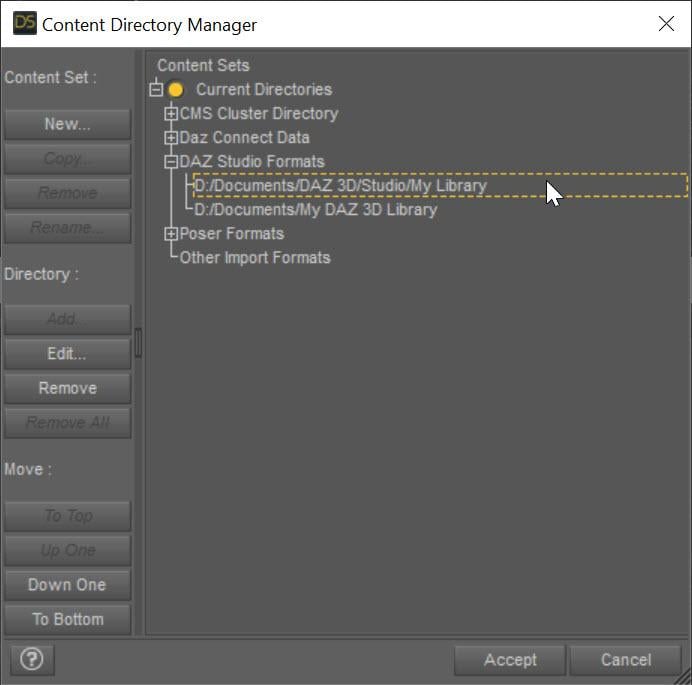 I can't search the forum anymore
I click on the magnefying glass on the top of the page and it gives me a box that says "Search Forums". I'll type something in the box then click "go" or press the enter key. Instead of giving me a list of forum entries with the keywords highlighted like it used to, it now sends me to the store's main page.
[Released] Turbo Loader for Genesis 9 [Commercial]RiverSoft Art said:
fullerdb said:
I've been having trouble with Turbo Loader for G9. It used to work and I have many disabled morphs. When I search for new morphs, though, it stops working. The morph list updates, but, if I try to uncheck any item, Daz Studio crashes. When I try to click any button, like Save Config, nothing happens. I tried to click Execute and I saw this message in the log:
2025-11-17 23:14:20.101 [DEBUG] :: Delete Products: Genesis 2 Male Body Morphs,Genesis 2 Starter Essentials,Genesis 3 Developer Kit,Genesis 3 Female Body Morphs,Genesis 3 Female Expressions,Genesis 3 Female Head Morphs,Genesis 3 Male Body Morphs,Genesis 3 Male Expressions,Genesis 3 Male Head Morphs,Genesis 3 Starter Essentials,Genesis 8 Male Body Morphs,Genesis 8 Male Body Morphs Pre-Release PA Build,Genesis 8 Male Expressions,Genesis 8 Male Expressions Pre-Release PA Build,Genesis 8 Male Head Morphs,Genesis 8 Male Head Morphs Pre-Release PA Build,Genesis 8 Male Pre-Release PA Build,Genesis 8 Starter Essentials,Genesis 9 Body Shapes,Genesis 9 Expressions (DO NOT ENABLE),Genesis 9 Head Shapes (DO NOT ENABLE),Genesis 9 Starter Essentials,Genesis Starter Essentials,Mouth Realism
2025-11-17 23:14:20.272 [WARNING] :: \src\sdksource\general\dzscript.cpp(1192): Unhandled error while executing script.
2025-11-17 23:14:20.272 [WARNING] :: QScriptEngine::popContext() doesn't match with pushContext()When I reopen Turbo Loader, the list has not been updated.
I also saw, in the log, this message repeated a few times among the AddRelPathToListView entries:
2025-11-17 23:14:19.771 [INFO] :: Loaded image: TurboLoader Missing Product.jpg
I have tried to uninstall some products listed around the Missing Product warnings, but that made no difference.
Any suggestions about what the issue could be?
First, it has nothing to do with the TurboLoader Missing Product, so we can ignore that. What version of DS are you using? What version of TL? What are the directories in your Content Directory Manager?
DS version: 4.24.0.3
Turbo Loader version: 1.60. The problems manifest only in Manager for Genesis 9 Base, but I also have 8 & 8.1 Male and Female installed, as well as the Booster Utilities, in case that is relevant.
Do you mean the library directories? I have a few: E:\daz\lib, D:\daz-libs\lib2, D:\daz-libs\lib3, D:\daz-libs\lib4, D:\daz-libs\lib-r.
I appreciate the help.
I have eliminated all PA folders!Ron Knights said:
There are no conflicts. None whatsoever.
You are repeating this emphatically, but I'm not understanding your actual underlying point.
Are you asserting that you do not believe conflicts are possible, that you do not believe conflicts have happened, or do you just believe that the conflicts are rare?
Is your point that Daz should abandon this as their standard, or are you just pointing out that this is an option for other users?As has been pointed out, it is exceedingly common for characters to be published with the same name. Here's a list that barely starts to scratch the surface...
Two G9 Jennys:
https://www.daz3d.com/js-jenny-hd-for-genesis-9
https://www.daz3d.com/enn-jenny-for-genesis-9-feminineTwo G9 Ursulas:
https://www.daz3d.com/pn-ursula-for-genesis-9
https://www.daz3d.com/p3d-ursula-hd-for-genesis-9Two G9 Beatrices:
https://www.daz3d.com/fn-beatrice-hd-for-genesis-9
https://www.daz3d.com/beatrice-and-bartholemew-for-genesis-9Two G9 Nicoles:
https://www.daz3d.com/v3d-nicole-hd-for-genesis-9
https://www.daz3d.com/e3d-nicole-hd-for-genesis-9and five G8 Nicoles:
https://www.daz3d.com/nicole-for-genesis-3-and-8-female-s
https://www.daz3d.com/v3d-nicole-g8f
https://www.daz3d.com/feng-nicole-hd-for-genesis-81-female
https://www.daz3d.com/gdn-nicole
https://www.daz3d.com/sc-nicole-for-genesis-8-femaleThree G9 Zoes:
https://www.daz3d.com/lala-zoe-hd-for-genesis-9-feminine
https://www.daz3d.com/p3d-zoe-hd-for-genesis-9
https://www.daz3d.com/vo-zoe-hd-for-genesis-9Who also have three G8 Zoes to go with them:
https://www.daz3d.com/v3d-zoe-g8f-g8-1f
https://www.daz3d.com/meshgames-zoe-g8f-morph
https://www.daz3d.com/mbm-zoe-for-genesis-8-femaleTwo G9 Lins:
https://www.daz3d.com/pa-lin-for-genesis-9-feminine
https://www.daz3d.com/lala-lin-for-genesis-9-feminineThree G8 (and G8.1) Eves:
https://www.daz3d.com/hid-eve-for-genesis-81-female
https://www.daz3d.com/deepsea-eve-hd-for-genesis-through-genesis-8
https://www.daz3d.com/eve-enhanced-virtual-entity-hd-for-genesis-8-female
(I'm not counting https://www.daz3d.com/eve-3022-hd-morph-for-genesis-8-females as she has her presets called EVE 3022)Two G8 Celestes:
https://www.daz3d.com/celeste-for-teen-raven-8
https://www.daz3d.com/celeste-for-genesis-8-and-8-1-femaleTwo G8 Stephanies, despite one being a preexisting core character, and a name Daz has used for several generations of core character:
https://www.daz3d.com/mbm-stephanie-for-genesis-8-female
https://www.daz3d.com/stephanie-8Two G8 Taras (in this case, the PA character preceded the DO core character):
https://www.daz3d.com/tara-2-hd-for-victoria-7-victoria-8
https://www.daz3d.com/tara-8Two G8 Zaras:
https://www.daz3d.com/zara-g8f
https://www.daz3d.com/ly-zara-hd-for-genesis-8-femaleTwo G8 Jamies:
https://www.daz3d.com/krashwerks-jamie-for-genesis-8-female
https://www.daz3d.com/jasa-jamie-for-genesis-8-and-8-1-female... I think it's a fair assertion that there's a significant chance that any character with a common name has a significant chance of a duplicate, and even a few slightly more fanciful ones do too.
Without being differentiated by vendor specific initials or folders, these products would clash.
It is a major task formally resaving every file in a product under a new name (as I explained before, it is strictly incorrect to simply rename the files; while it normally works, they will have incorrect internal paths and that can on rare occasions cause a problem, so while it's mostly okay for end users to do, it is not legitimate for a vendor as a way to rename their product). Moreover, renaming the user accessible library files is only part of the situation. If a character's name is changed in the library, then the underlying data files probably need renaming as well. And renaming files like this can actually break user's scenes.
It would not be good practice for a vendor to rely on being able to rename products after release. This is something that should be reserved for emergency cases.As such, I could only see that a wild west system would result in a load of neo-spellings such that characters were called Daeyvide or Rhiebeckah.
Now, as far as real-life, I have a pet peeve about neo-spellings like this, because parents making their little snowflake have a unique name is going to cause the kid a metric butt-tonne of problems down the line. No-one is instinctively going to know how to spell their name, and then that's going to cause things like paperwork not matching exactly. Seriously, don't try to be clever with your kids' names.
In the Daz store, it just means no-one would be able to find any of them half the time. The store search has a long history of being very poor at fuzzy matching, and if you don't get a spelling exactly right (and sometimes even if you do), it won't find the product.In the end, if you're just pointing out that this is an option for other users, then fine... but I don't think you're going to convince Daz to conform to the standards you want, because they know that file clashes have been a problem in the past, and I don't think it's worth you trying to press the point to them.
There's Always Another Sale Thread -- Discussions Only Pt 5
Oh, that's right... I did buy that thing for a,b,c reason... until I saw that other thing for d, e, f reason and forgot about the first thing... Happens all the time. Sometimes, I just pick one of my fav artists and unchecked the hide the stuff I own, so I can verify what I have from them. I wish searching your library was at least as good as the store search. The store search by artist or genre is often more helpful to verify what you have for different ideas you come up with. At least for me it is. I actually wish I could filter by ONLY items I own in the store. Scrap the library and just use the store search instead with a favorite check mark like the wishlist one.3DSaga said:I'm kind of glad for a bit of a lull in the mega sales (yeah, sure- if one were to pop up now, I'd be all in!); it gives me a chance to play with what I've accumulated during the last two sales. Even so, I still stumble on surprises in my Content Library.
I have eliminated all PA folders!Barubary said:
But...DAZ CAN obviously enforce some standard structures. So I am a little miffed they enforce largely (to me) superflous folders named after PA's instead of preventing folder structures like "Environments/Architecture/DAZ Originals/Artist Name/DAZ Originals". Or having the 'Materials' folder randomly named 'Materials', 'Material', 'Mats', 'MATS' oder 'Iray Mats'. Sometimes there is a sub-folder named 'Iray'. Somethimes there isn't. I haven't seen other kinds of materials in years so why do we need it? Do I really require a link to the PA store I just bought the product from?
'Vanity' folders are the textbook example of a simple solution preventing a problem (name conflicts due to two products by different artists having the same name) leading to people thinking that solution is useless because, well, they don't have any problem.
As an example, they are two Genesis 9 character named Ursula on Daz3D.com and a search on common first name will likely lead to multiple results either on one store alone or accross all the store, none which are conflicting with each other because by using a folder named after themselves, each artist has access to all first names in existence, will only have to pay attention to what they have already released and not to what every other artists have released / are releasing.
And while characters' names are likely the most prone to conflict (after all, many real people are sharing a first AND a last name), it can happen on other kind of products too.
Shorthands like MSO for Mousso, SU for Sue Yee, etc, are also used to prevent name conflicts, at the Smart Content level though (it's also useful at the store level considering the way the URL are built), because AFAIK, product's names have to been unique too.
Regarding your folder structure example, if the artist used that structure to create the product, it's not raising any error while loading that product, so while it's something that will likely be fixed if you opened a ticket, it may not have been seen by Daz QA when they checked it (they should have caught it, but with close to 400 monthly products released monthly on Daz3D.com, errors are prone to happen).
3D Printed Action FiguresMoved to Art Studio since it is showing off your work - Product Suggestions is for in search of/would like to see type threads.
Daz 3D is part of

Connect
DAZ Productions, Inc.
7533 S Center View Ct #4664
West Jordan, UT 84084Licensing Agreement | Terms of Service | Privacy Policy | EULA
© 2026 Daz Productions Inc. All Rights Reserved.